
Seo Website Audit Free
You've probably done this already. You typed your web address into a free checker late one evening, watched a progress bar crawl across the screen, and got a score, a traffic light, and a long list of warnings you didn't fully understand. Some sounded urgent. Some sounded like sales patter.
A useful SEO website audit free of charge shouldn't leave you more confused than you started. It should tell you what's stopping local customers from finding you, contacting you, or buying from you, and what to fix first.
Table of Contents
- Why a Free SEO Audit Matters for UK Small Businesses
- The Four Pillars of a Free Website Audit
- Running the Technical Crawl and Index Checks
- Reviewing On-Page, Content and Backlink Signals
- Reading the Results and Prioritising the Fixes
- What Most Free Audits Miss for UK Businesses
- When to DIY, Pay for a Deep-Dive, or Bring in an Agency
Why a Free SEO Audit Matters for UK Small Businesses
A Dorset tradesperson, retailer, or professional services firm rarely opens an audit report for fun. Usually something's prompted it. Enquiries have dipped, a competitor keeps appearing above you on Google, or you've paid for a website that looks fine on your laptop but brings in very little work.
That first report can feel brutal. Missing meta descriptions, broken links, slow mobile pages, and pages Google hasn't indexed at all tend to arrive in one long, undifferentiated list. Without context, owners either panic and try to fix everything, or close the tab and fix nothing.
Most UK Sites Exist, Fewer Get Proper Attention
Website ownership itself isn't the barrier for most firms. The UK Government's 2024 Business Data Survey on business website ownership found that 68% of UK businesses had a website, but ownership dropped sharply with size, falling from 99% of large businesses to 74% of micro-businesses and 65% of sole traders.
That gap matters because smaller firms rarely have a dedicated SEO person watching crawl errors or page titles. The site was launched, perhaps updated when prices changed, and then left to run. A free audit gives you a structured snapshot before you commit money to a redesign, a retainer, or tools you may not need.
A free audit is a diagnostic, not a verdict. Treat the score as a starting point for questions, not as proof your site is good or bad.
What a Good Free Audit Actually Delivers
At minimum, you should come away knowing five things:
- Crawlability: Can search engines reach your important pages, or are settings blocking them?
- Indexation: Are those pages eligible to appear in results?
- On-page basics: Do titles, headings, and internal links explain what each page offers and where?
- Usability: Does the site work quickly and clearly on a phone?
- Local signals: Can a customer in Weymouth, Dorchester, or Poole tell instantly that you serve their area?
If you haven't run anything yet, you can run a free SEO scan to get that first snapshot, then work through the checks below to sense-check what it flags. Don't act on the headline score alone. Export or screenshot the findings, group repeated issues together, and note which money pages are affected. A warning on your main service page deserves more attention than the same warning on an old news post nobody visits.
The Four Pillars of a Free Website Audit
Chasing one composite score is the fastest way to waste an afternoon. Different tools weight issues differently, so your score can rise while your enquiries stay flat. A staged framework works better, because you can see where the blockage sits.
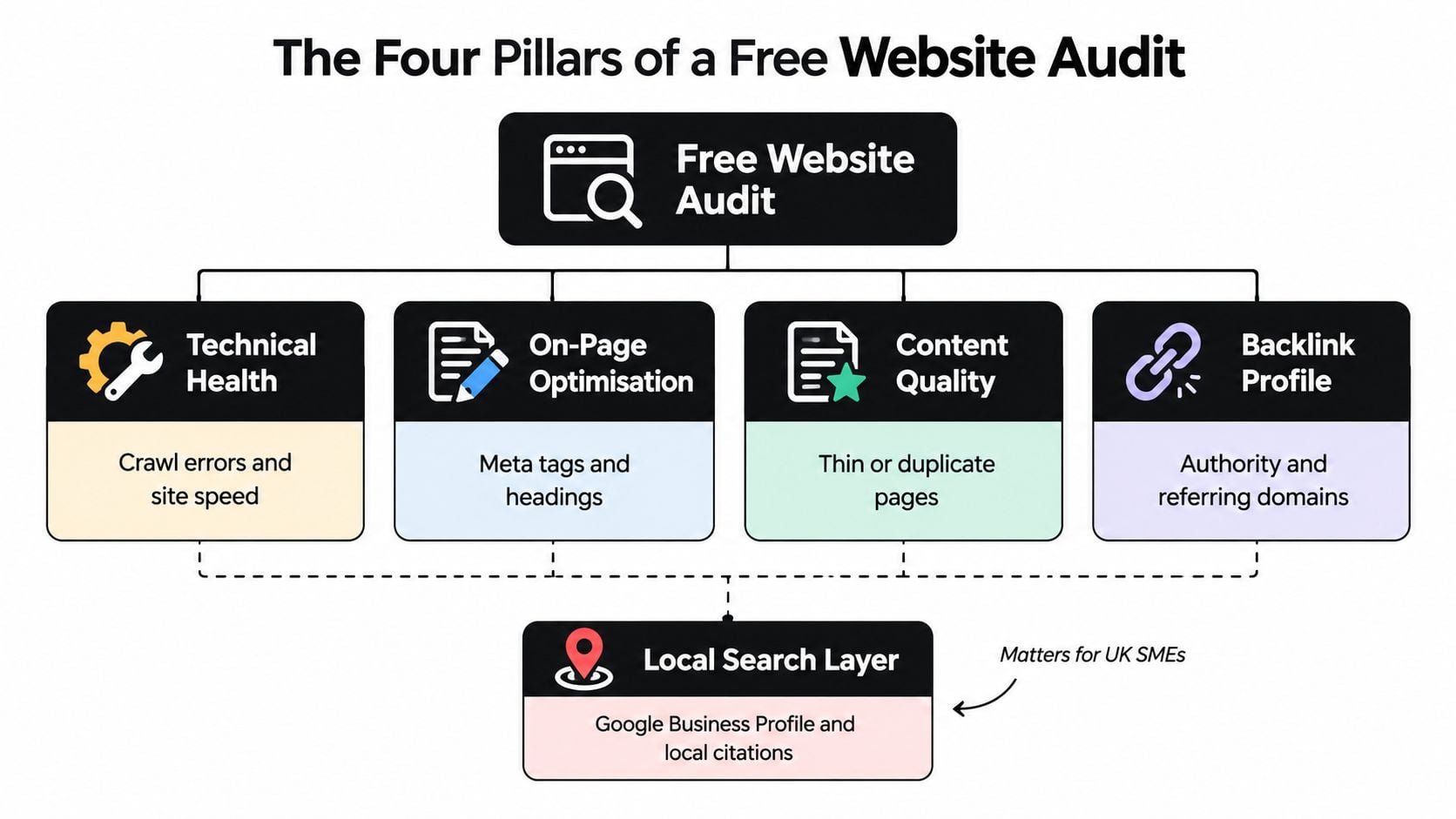
The Four Pillars Plus a Local Layer
Technical health comes first. If Google can't crawl or index a page, nothing else on that page matters. This pillar covers status codes, redirects, sitemaps, canonical tags, and mobile performance.
On-page optimisation is about clarity. Titles, headings, image descriptions, and internal links should tell both visitors and search engines what a page is for, without stuffing in repeated phrases.
Content quality is where many small sites lose ground. Thin service pages, duplicated location pages with only the town name changed, and outdated offers don't give Google much reason to rank you. They don't give customers much reason to stay, either.
Backlink profile looks outward. Links from relevant local organisations, suppliers, directories, and press coverage help establish that your business is real and trusted. A handful of relevant links usually matters more than a long list of unrelated ones.
Underneath all four sits a local search layer that's especially important for UK SMEs. Your Google Business Profile, consistent name, address and phone details, reviews, and location-specific service pages often decide whether you appear for nearby searches at all.
The audience at stake is large. Independent reporting citing Ofcom's Online Nation evidence on UK Google Search use states that 82% of UK adults used Google Search in 2025, which means even modest technical or on-page issues can affect visibility across a very large potential audience.
You don't need paid software for most of this. Google Search Console, PageSpeed Insights, and a free crawler cover the foundations. For Shopify stores, platform-specific help can fill gaps the default setup leaves, which is why roundups of the best Shopify SEO apps are worth checking before you assume a theme problem needs custom development.
Running the Technical Crawl and Index Checks
Start with a crawl, not with your homepage in a browser. Your homepage is usually the most polished page on the site and the least representative.
The screenshot below shows the kind of focused desk work this stage involves. It's methodical rather than glamorous.
Crawl First, Then Verify Indexability
Use the free version of Screaming Frog SEO Spider to crawl your site with both mobile and desktop settings where possible. Export the list of URLs and look for error status codes, redirect chains that hop through several addresses, and pages returning soft errors that look like content to you but not to a crawler.
Then open Google Search Console. Check which pages are indexed, which are excluded, and why. Cross-reference that against your robots.txt file, your XML sitemap, canonical tags, and any noindex directives. A surprising number of small-business sites still carry a leftover noindex setting from development, or a sitemap listing old URLs that now redirect.
If you want the background on why these settings interact the way they do, our guide to technical SEO fundamentals for business websites walks through the mechanics in plain language.
Test Templates, Not Just the Homepage
Pick one example of each important template and test it properly:
- Service or category page: Headings, internal links, structured data, and load speed under mobile conditions.
- Product or booking page: Image weight, consent and analytics scripts, and anything that delays the main content.
- Contact page: Clickable phone number, form usability on a small screen, and clear location details.
- Checkout or enquiry flow: Layout shift, slow third-party widgets, and steps where visitors are likely to abandon.
Record LCP, INP, and CLS for each template in PageSpeed Insights. Those are your Core Web Vitals measures for loading, responsiveness, and visual stability. Trace failures back to likely causes, such as oversized images, render-blocking code, font loading, caching problems, or slow hosting, rather than copying generic tool advice.
Mobile speed isn't an abstract metric. Google research on UK mobile site speed and user behaviour reported that 50% of UK users would leave a mobile site when loading exceeded three seconds, while 75% said page-load speed had the greatest impact on their experience, and UK smartphone browsing time reached 66 hours per month versus 29 on desktop.
The walkthrough below shows a crawl being set up and reviewed, which is helpful if spreadsheet exports feel unfamiliar.
Practical rule: If a template-level fault affects every service or product page, fix the template once. Don't edit pages one by one and call it progress.
Retest after each meaningful change, such as image compression, lazy loading, or removing an unused plugin. That way you know which change helped.
Reviewing On-Page, Content and Backlink Signals
Technical checks tell you whether Google can reach a page. This stage tells you whether the page deserves to rank and whether a visitor will trust it once they arrive.
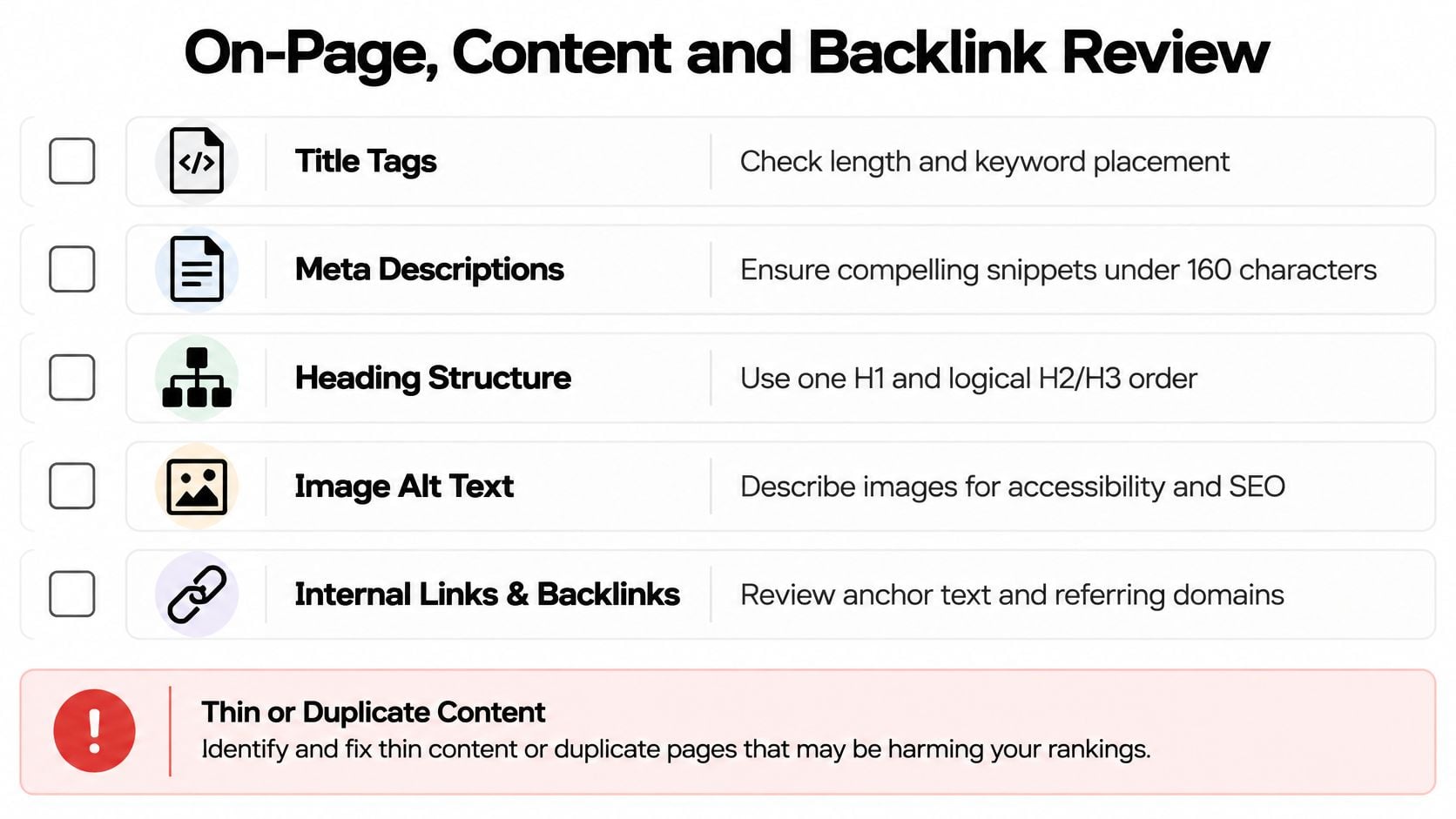
Titles, Headings, and Internal Links
Export your page titles and meta descriptions from your crawl. You're looking for duplicates, blanks, and titles that say nothing useful. "Home", "Services", and "Welcome to our website" waste your most visible search snippet. Compare that with a title that names the service and place plainly, written for a person first.
Good title tag best practices for small business pages come down to accuracy and distinctiveness. Each important page needs its own title that matches what the page delivers. If two pages share a title, they're probably competing with each other or one of them shouldn't exist.
Headings should follow a logical order, with one clear main heading and subheadings that break the page into scannable sections. For guidance on where search terms belong without forcing them, this explanation of keyword placement for SEO is a useful companion while you review headings, openings, and image text.
Check internal links next. Your highest-value service pages should be linked from relevant blog posts, location pages, and navigation, using descriptive anchor text. Orphaned pages with no internal links pointing to them rarely perform, however well they're written.
Images, Thin Content, and Trust Signals
Missing image alt text is both an accessibility failure and a missed clarity signal. A 2026 analysis of UK small-business website health covering 4,324 sites found 61.6% had at least one image without alternative text, 45.8% lacked a click-to-call phone number, 15.5% were not mobile-friendly and 13.7% contained broken images.
Write alt text that describes the image for someone who can't see it. Don't stuff it with keywords, and don't leave file names like IMG_2048 doing the job.
For content, flag pages that are thin, duplicated, or outdated:
- Thin service pages: A short paragraph and a contact button rarely answer cost, process, or coverage questions.
- Duplicate location pages: Identical copy with swapped town names reads as filler to visitors and search engines alike.
- Stale offers and opening hours: These damage trust faster than a missing meta description ever will.
A Sensible Backlink Review
Use Ahrefs Webmaster Tools, Moz Link Explorer, and the links report in Search Console to see who's linking to you. Look for relevant local and industry sites, check that important pages receive links, and note any obviously spammy referring domains with unrelated anchor text.
Don't panic about a low authority score. For a local firm, links from a chamber of commerce, a supplier, a charity you sponsor, or local press coverage carry real relevance. Note gaps where competitors earn local links and you don't, and treat that as relationship work, not a buying exercise.
Reading the Results and Prioritising the Fixes
By now you'll have more findings than time. That's normal. The audit only becomes useful when you stop collecting warnings and start sequencing work by business value.
Score by Impact and Effort, Not by Tool Severity
Tools label issues as errors, warnings, or notices based on their own rules. Those labels don't know which pages make you money. A critical error on an archived page matters less than a moderate warning on the service page that generates most of your enquiries.
Group findings by template and root cause first. Twenty pages with duplicate titles might be one content decision, not twenty separate jobs. Then judge each group on three things: how many important URLs it affects, what it likely costs you in visits or enquiries, and how hard it is to fix properly.
Fix blockers before polish. Indexation and broken conversion journeys come before rewriting a meta description that already works reasonably well.
Copy This Scorecard Into a Spreadsheet
Free Audit Scorecard Template
| Issue Category | Affected URLs | Business Impact (H/M/L) | Effort (H/M/L) | Priority Score | Owner | Deadline |
|---|---|---|---|---|---|---|
| Indexation blocker | List key pages | H | L | Do first | Owner or developer | This week |
| Slow mobile template | Service template | H | M | Do first | Developer | Agreed date |
| Duplicate titles | Location pages | M | L | Schedule | Owner | Agreed date |
| Missing alt text | Image library | M | M | Schedule | Owner | Agreed date |
| Weak internal links | Main services | M | L | Schedule | Owner | Agreed date |
| Minor notices | Low-value pages | L | L | Backlog | Owner | Review later |
Worked through systematically, a long warning list usually collapses into a short sequence. First, remove anything preventing indexing or contact. Second, fix template-level speed and layout problems. Third, improve titles, headings, and internal links on money pages. Everything else joins a backlog with a review date, rather than haunting you as an undone error count.
Assign an owner to every row, even if that owner is you. Add a retest step, because a fix that hasn't been verified in Search Console or a fresh crawl is only a hope. If the list still feels unmanageable, our page on SEO help for small business owners explains how that triage conversation normally works in practice.
One warning from experience. Don't chase a perfect tool score. Some notices are irrelevant to your platform, your audience, or your goals, and fixing them consumes the time you needed for the two changes that would bring enquiries.
What Most Free Audits Miss for UK Businesses
A conventional audit can give you a healthy score while your website still loses customers. That's because most free tools measure search-engine hygiene, not whether a real person can use, trust, and act on your site.
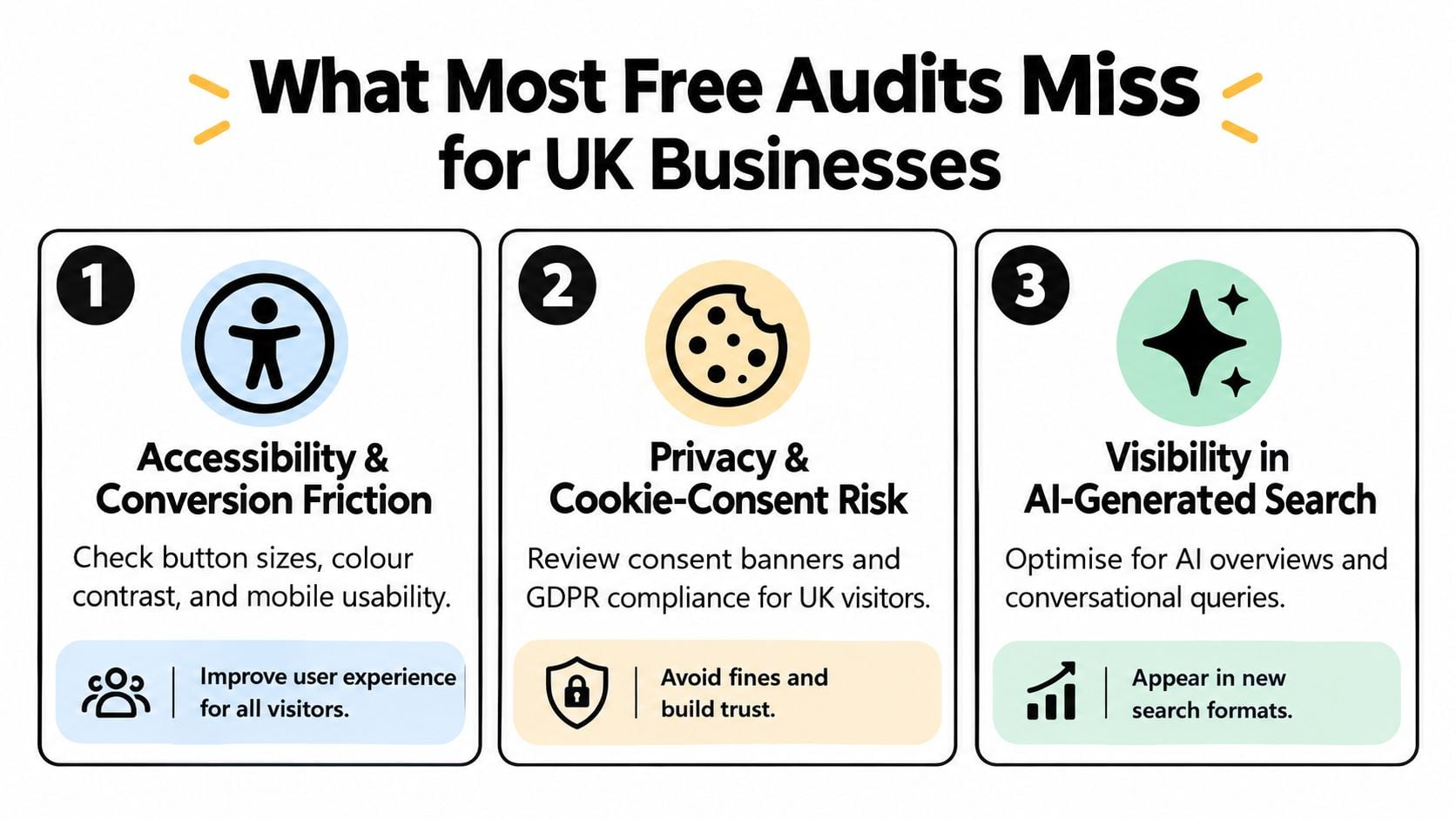
Accessibility and Conversion Friction
Check colour contrast, visible keyboard focus, button and tap target size, and whether content reflows properly when zoomed on a phone. Automated scanners only catch part of this, so test your contact form and checkout manually using only a keyboard, then again on a small screen.
Ask a blunter question too. Can a visitor call you in one tap, find your opening hours, and understand your service area without hunting? If not, that's a conversion defect, whatever your SEO score says.
Privacy Signals and AI Visibility
Look for a clear privacy policy and a cookie-consent mechanism that works before non-essential scripts fire. An audit can flag absence, but it can't confirm legal compliance. If you're unsure, get proper advice rather than treating a green tool result as reassurance.
The newest blind spot is answer visibility. UK reporting on AI Overviews and SME readiness for AI-driven search says roughly one-third of Google searches showed an AI Overview in mid-2026, compared with roughly one-fifth at the start of 2025, while fewer than 5% of UK SMEs had optimised for AI-driven search.
Free audits rarely test whether your services and location are stated unambiguously, whether pages answer customer questions directly, or whether your business details are consistent everywhere. Add concise question-and-answer sections on key service pages, use structured data where it's appropriate, and keep citations consistent. Our guidance on local citation building for UK businesses covers that consistency work. Measure branded searches and qualified enquiries alongside rankings, because visibility now extends beyond the traditional blue links.
When to DIY, Pay for a Deep-Dive, or Bring in an Agency
A free audit is enough when your site is small, your findings are mostly content-level, and you're confident editing titles, alt text, internal links, and images yourself. It's also the right scope for a routine health check when traffic and enquiries are stable.
A Simple Decision Checklist
- DIY it: The fixes sit inside WordPress or Shopify settings you already understand, and you can retest them.
- Pay for a one-off deep-dive: Search Console shows indexation problems you can't explain, traffic has dropped after a redesign or migration, or Core Web Vitals failures point to theme, hosting, or script conflicts.
- Bring in ongoing help: You need content, local visibility, and technical fixes delivered together over time, and nobody in-house owns that work.
Be wary of any audit that arrives unsolicited, leads with a frightening score, and moves straight to a monthly package without explaining which pages earn you money. A credible follow-up proposal names priorities, effort, and expected outcomes in plain terms. It also tells you what not to bother fixing.
Before signing anything, ask who'll do the work, how success will be measured beyond rankings, and what access you'll retain to your own Search Console and analytics. Comparing SEO companies in Bournemouth and across Dorset against those questions will tell you more than any sales presentation.
If your free audit has produced a long list and no clear starting point, DesignStack can review the findings with you, separate genuine blockers from tool noise, and turn them into a prioritised plan for your website. Visit DesignStack to talk through your audit results and decide, without obligation, which fixes are worth doing first.