Title Tag Best Practices for UK Small Businesses
Most title tag advice still repeats the same rule set, put the keyword first, keep it short, add the brand at the end. That formula works in some cases, but it is not a universal rule for UK small businesses, especially when trust, local recognition, and Google's title rewrites matter more than forcing a phrase into the first few words.
In Dorset and across the UK, a title tag is rarely just an SEO label. It is the line people see in Google, the text that frames your page in a browser tab, and often the first signal of whether your business looks relevant, credible, and worth clicking. In UK search, Google dominates the results page, so the title tag has to do more than name the page. It has to earn the click.
That is why generic advice breaks down. A Weymouth plumber with local reputation does not need the same title strategy as a national ecommerce brand, and a homepage often deserves a different treatment from a service page. A brand-first title can outperform a keyword-first title when the business already has local recognition, because it reinforces trust before the searcher even opens the page.
Google's AI-driven rewrites add another layer. If the title tag looks stiff, padded, or written only for a crawler, Google is more likely to replace it with something else from the page. A cleaner, human title gives Google less reason to rewrite and gives real users a better reason to click. The Ahrefs title tag study is a useful reminder that title tags influence real search behaviour, but the practical lesson for UK businesses is simpler, write for the result page first, then tune for the keyword.
For smaller sites, that usually means choosing the title that supports the page's real job. A service page may still need the main keyword near the front. A homepage, local brand page, or well-known trades business can often benefit from the brand first, followed by a clear service or location cue. If you are reviewing the wider site structure at the same time, the approach in DesignStack's small business SEO guide pairs well with the title decisions below.
Table of Contents
- Why Generic Title Tag Advice Fails UK Businesses
- The Technical Fundamentals of Effective Title Tags
- Keyword-First Versus Brand-First Title Strategy
- Handling Google's AI-Driven Title Rewrites
- Implementing Title Tags in WordPress
- Real-World Title Tag Examples That Work
- Testing and Measuring Title Tag Performance
- Your Title Tag Optimisation Checklist
Why Generic Title Tag Advice Fails UK Businesses
Most title tag advice is written as if every page is chasing the same click. That breaks down fast in the UK market. A broad keyword-first title can help when the searcher is still comparing options, but it can also make a local business look interchangeable if the brand already has recognition in town. I see that with Dorset firms all the time. Their edge comes from reputation, repeat work, and local familiarity, not from stuffing the front of the title with the service phrase.
Google's UK dominance changes the stakes. If about 93% of UK search traffic passes through one results page style, the title is not just naming a page, it is shaping the first impression in a crowded result set. In practice, the title has to work for the click, not just for the crawler.
Practical rule: if a title reads well to a human, matches the page topic, and still fits the query intent, it usually performs better than a rigid keyword-first formula.
Where the universal rule falls apart
A keyword-first title can still be the right choice for a service page that needs immediate relevance, especially in competitive searches. On a homepage, an about page, or a local service brand with decent recognition, putting the brand first can reinforce trust and make the result feel more credible. Generic SEO advice often misses that commercial context.
For local businesses, the title should reflect what wins the click. A well-known Dorset studio does not need to lead with the service category if the name already carries weight. A newer business often does better by leading with the service, because the searcher has no brand memory to fall back on.
The true function of title tags
A title tag is a relevance signal, but it is also a sales line. Google's advice, reflected in UK guidance, is to keep titles descriptive and concise, make them unique, and put the most important phrase near the beginning when that helps clarity. That is a solid baseline, but it still leaves room for judgement.
For example, if your business is established locally, a brand-first title can be the smarter trust move. If you are targeting a new service category, keyword-first may still be the cleaner choice. The skill is knowing which outcome matters more on that page. For smaller sites, the title should sit alongside the wider site structure, and DesignStack's small business SEO guide is a useful companion when you are making those calls.
The Technical Fundamentals of Effective Title Tags
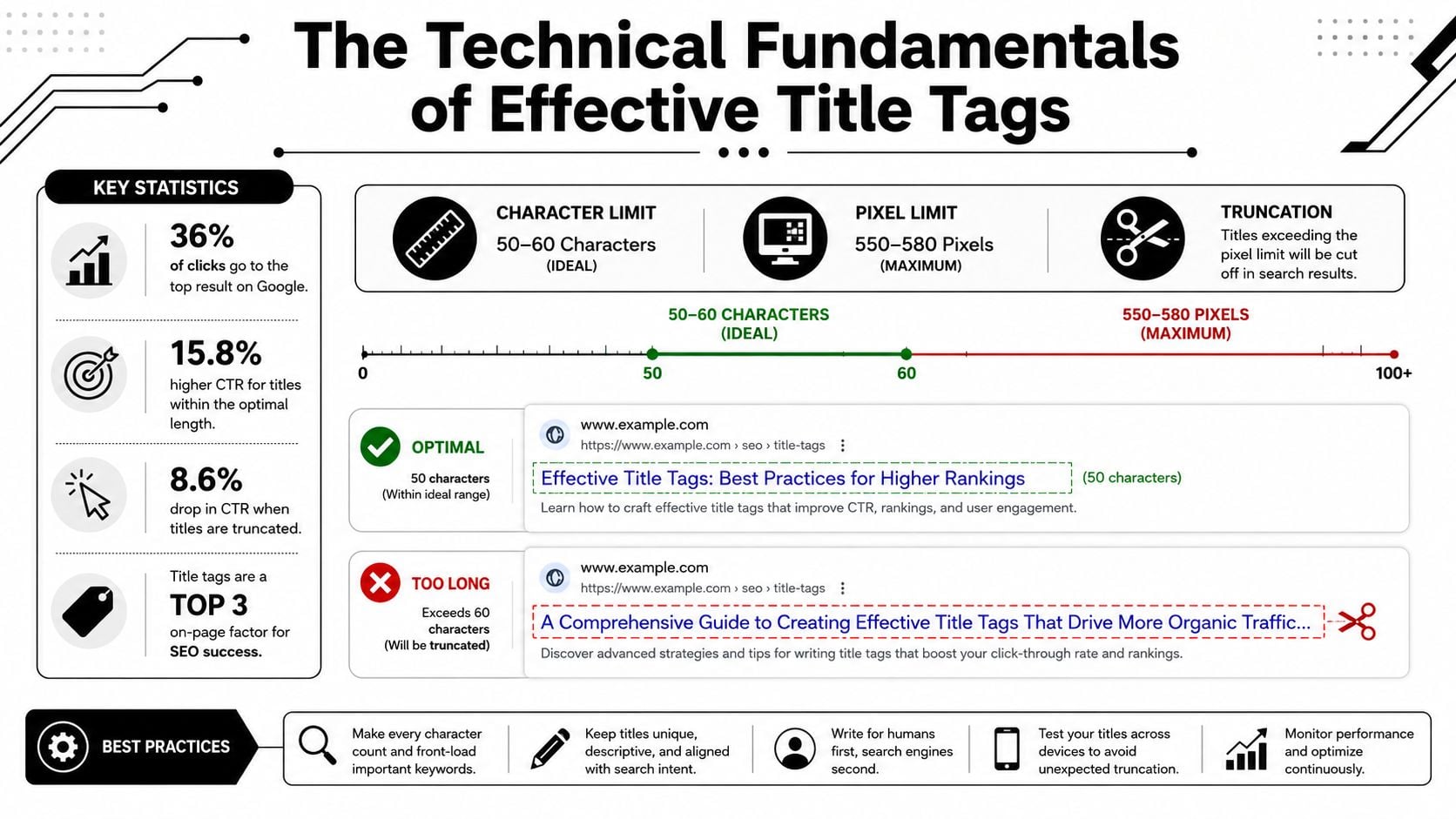
The technical side matters because search results do not display every character equally. Search snippets can vary by device and query, so title writing has to account for how Google renders the result, not just how the page code reads. In practice, that means planning for a title that stays clear when space gets tight, rather than assuming every word will survive intact.
What the Searcher Sees
The HTML title tag sits in the page code, but the title shown in Google can be different. Google may trim it, rewrite it, or re-order it to fit the search context. That means the line you write in the backend is only the starting point, not a guarantee of what users will see.
A title that runs too long can lose the part that matters most, usually the service, location, or point of difference. A title that is too short can feel thin and fail to signal relevance. The aim is a title that tells the user what the page covers without wasting space on words that do not help the click.
How to think about width, not just length
Pixel width matters because characters do not all take the same space. A title full of wide letters, uppercase text, or long brand names can truncate sooner than a cleaner title with compact wording. That is why the best titles usually rely on plain language, selective punctuation, and an order that keeps the important phrase near the front.
For the wider technical setup, DesignStack's technical SEO overview is a useful companion because title performance depends on the page being understood properly before it is surfaced in search.
If you also need to fix crawling for AI search, title tags are part of that same basic housekeeping. They do not work in isolation. If crawling, indexing, or page rendering is shaky, a well-written title can still underperform because the page itself is not being read cleanly.
The simplest way to check your title
You do not need to guess. Use a SERP preview tool or your SEO plugin's snippet preview, then check the title on both desktop and mobile. If the key message disappears when you shrink the preview, rewrite it until the first half still works on its own.
A quick manual check also helps. Read the title as a person would in search results, and ask whether it still makes sense if the end gets cut off. If it depends on the last few words to carry the meaning, it is too fragile for real-world search display.
Keyword-First Versus Brand-First Title Strategy
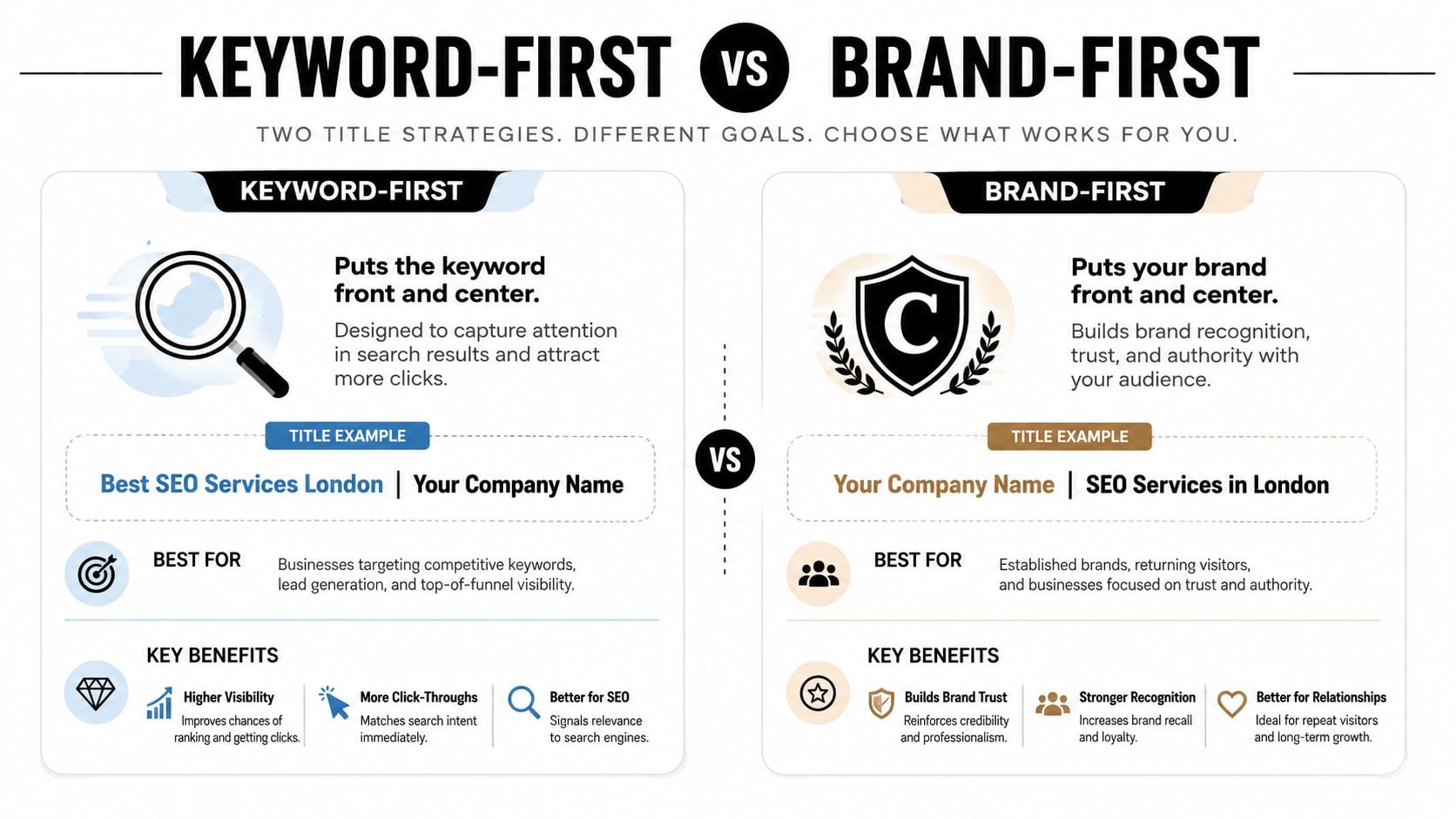
The keyword-first habit exists for a reason. It tells search engines and searchers what the page is about immediately, which is useful when the query is broad, competitive, or unfamiliar. But brand-first can be stronger when the business already has local awareness, because it shifts the result from “another service listing” to “the company I know”.
When keyword-first wins
Keyword-first is usually the safer choice for unfamiliar brands, new pages, and service pages competing against bigger players. If the user is scanning for “SEO services London” or “web design Weymouth”, front-loading the service gives an immediate relevance cue. It's efficient, especially when the brand name doesn't carry weight yet.
That said, keyword-first isn't automatically the best option for every page. If the title feels robotic, it can look like a template rather than a business. Users do notice that.
When brand-first wins
Brand-first works best when recognition and trust are already part of the click decision. A local Dorset firm with repeat customers, referrals, or strong offline presence can sometimes do better by leading with the company name, then stating the service. That ordering makes the result feel established rather than generic.
The usual advice often gets too rigid. Google's own guidance is to be descriptive and concise, not to obey a fixed word order, so the best title is the one that serves the page and the business goal rather than a rulebook. If you're refining your positioning as well as your titles, DesignStack's unique value proposition guide is useful context.
A simple decision test
Use keyword-first when the page needs immediate topical clarity. Use brand-first when reputation, local trust, or repeat recognition is the stronger conversion lever. For many service pages, a hybrid format works best, with the service first and the brand at the end, or the brand first on the homepage and the service first on key landing pages.
If the visitor already knows you, lead with recognition. If they don't, lead with relevance.
Handling Google's AI-Driven Title Rewrites
Google doesn't always show the title you wrote. Its documentation says it may generate titles from visible page content, links, or other sources when the HTML title is too long, repetitive, or unhelpful, and that matters even more now that richer SERPs and AI-enhanced results are part of the (Moz title tag guidance). For UK sites, that means a rewrite can affect a very large share of local traffic because Google dominates the market.
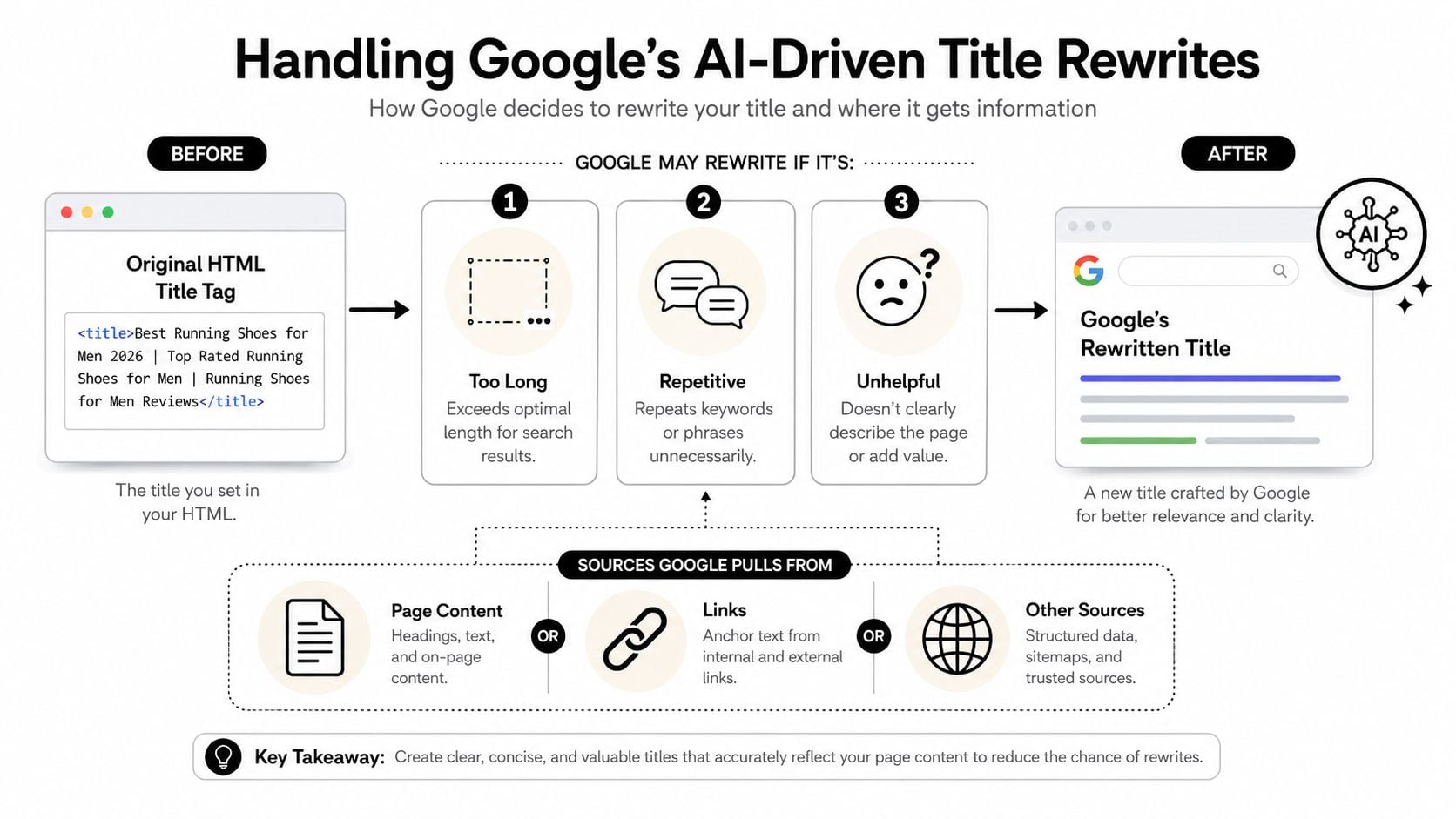
What tends to trigger rewrites
Long titles are an obvious risk, but length isn't the only issue. Repetition, vague phrasing, and titles that don't match the visible page content can all make Google look elsewhere for a better label. If the HTML title feels stuffed with keywords or reads like it was written for a machine, the displayed title is more likely to drift.
That's especially annoying when the rewritten version drops your local signal or brand name. A page can rank well and still look less convincing if the displayed title gets flattened into something generic. The page may still perform, but the click can weaken.
How to reduce the chance of rewrites
Keep the title aligned with the H1 and the page copy. Make it unique. Avoid repeating the same phrase twice. Use the actual service, location, or product wording people expect to see on the page.
A practical rule is to write for the visible title first, not the raw HTML. If the displayed title makes sense on its own, you're in better shape if Google trims it. If the title depends on the last few words to make sense, it's too brittle.
What to do when Google changes it anyway
Check the displayed title in Google Search Console, then compare it with the HTML title on the page. If the rewrite happens repeatedly, simplify the title and tighten the on-page heading. Sometimes the fix is to remove excess wording, not to add more keywords.
If your titles keep getting rewritten, the issue may be broader than copy. Weak page structure, poor internal linking, and thin content can all make Google less confident about the title you chose. That's where the page, not just the tag, needs attention.
Implementing Title Tags in WordPress
WordPress makes title editing straightforward, but the plugin settings can undo good work if you let them auto-generate everything. In Yoast, Rank Math, and All in One SEO, the title field is usually easy to find, but the default template often needs editing for different page types. A clean setup saves time later and stops every page from sounding like the same template.
For a practical WordPress workflow and broader site build support, DesignStack's WordPress SEO services are relevant if you're managing a site that needs both design and search structure.
Where to change the title
Open the page or post in the WordPress editor, then find the SEO settings panel from your plugin of choice. In Yoast and Rank Math, look for the snippet or SEO title field and preview how it appears in search. In All in One SEO, the title field works in a similar way, with a search preview that helps you spot truncation before publishing.
What to stop doing
Don't let every page inherit the same auto-generated format. That's how you end up with duplicated or awkward titles that read fine in a spreadsheet but weakly in Google. If a plugin template inserts the brand on every line and pushes the useful phrase too far right, adjust the global template and then override important pages manually.
How to set page-specific logic
Service pages usually need a direct title that matches intent, with the service and location clear. Blog posts can take a more descriptive, topic-led approach. Ecommerce pages should keep product or category clarity high, while location pages need a local signal that doesn't sound copied and pasted.
A small habit helps a lot here, preview every title before publishing and again after the page goes live. The preview catches the majority of bad formatting decisions before Google does.
Real-World Title Tag Examples That Work
The strongest titles are clear from the results page and honest about what the page offers. For local UK businesses, that often means choosing between a keyword-led title and a brand-led one based on the searcher's intent, not a fixed rule that applies everywhere.
A title can do more than describe a page. It can carry local recognition, product intent, or service clarity, and the right balance changes by business type. A venue people already know can benefit from the brand first, while a service page often needs the service phrase at the front so Google and the user both understand it quickly.
A useful split-title resource worth reading alongside this is Next Point Digital's guide to split titles, especially if you are deciding where the brand should sit in relation to the main service phrase and how much space to give each part.
Examples by business type
| Business Type | Original Title | Optimised Title | Characters | Strategy |
|---|---|---|---|---|
| Local Restaurant | Home | The Lobster Pot | The Lobster Pot | Weymouth Seafood Restaurant | 15 | Brand-first, then location and cuisine for local trust |
| Fitness Studio | Dorset Fitness | Dorset Fitness Classes | 15 | Service-led title with a local cue |
| Professional Services Firm | Accountants | Dorset Accountants | 11 | Clarifies the service and the geography |
| Ecommerce Brand | Shop | Shop Online | 4 | Adds commercial intent without clutter |
| Community Organisation | About Us | Weymouth Community Group | 9 | Name-led for identity and trust |
Why these shifts work
The restaurant example shows where brand-first titles can beat keyword-first ones. If the business already has local recognition, “The Lobster Pot | Weymouth Seafood Restaurant” gives the searcher a familiar name and enough context to confirm it is the right result. A bare “Home” title wastes that chance, because it tells Google and the user almost nothing.
A fitness studio usually needs the offer upfront because the user is comparing classes, prices, or training style. “Dorset Fitness Classes” is clearer than a vague brand-only title, and it helps the page qualify for people searching for a service rather than a specific name.
Professional services need plain language. “Dorset Accountants” is stronger than just “Accountants” because it answers the two questions that matter most for local search, what the business does and where it serves. Ecommerce titles should stay direct as well, with enough commercial intent to make the page feel active, not just indexed.
What good examples have in common
They fit the page purpose. They avoid filler. They give Google enough context to rewrite less often, which matters because AI-driven title rewrites usually happen when the original title is thin, repetitive, or badly matched to the page content.
They also respect the brand's role. Some local businesses need the keyword first because the page has to rank on service intent. Others do better with the brand first because the name already carries trust, and forcing the keyword to the front makes the title read like every other result in the SERP. That trade-off is exactly why split titles work so well on local sites.
A title should feel like a clean doorway, not a brochure headline. If the user can understand the page from the result alone, the title is doing its job.
Testing and Measuring Title Tag Performance
A title tag change should be treated like a live test, not a guess. The most useful place to check the effect is Google Search Console, where you can compare clicks, impressions, average position, and CTR before and after a change. If you also track landing-page behaviour in DesignStack's analytics guidance, you get a clearer picture of whether the click improved real engagement too.
What to measure first
CTR matters because it tells you whether the title is earning attention. Impressions matter because they show how often the page is appearing. Average position matters because a CTR change means more when rankings stay steady than when the page moves around.
Keep the test window long enough for Google to recrawl the page and stabilise. Don't judge the title by a handful of days unless the page gets very high traffic. If rankings changed at the same time, separate that effect from the title change before drawing conclusions.
How to test without a formal experiment
Change one title at a time. Record the old version, the new version, the publish date, and the reason for the change. Then compare the page's performance in Search Console over a consistent period after the update.
If the CTR rises and the average position is roughly stable, the new title is probably doing its job. If impressions rise but clicks don't, the title may be widening relevance without improving appeal. If clicks fall while rankings improve, the wording may not match what the searcher wants.
Practical rule: don't keep changing titles every few days. A messy test tells you less than a patient one.
What to do with the results
Keep titles that improve click quality without damaging relevance. Rework titles that get impressions but not clicks. Replace titles that Google keeps rewriting, because that usually means the page still isn't giving the search engine a strong enough cue.
For a broader visibility view that goes beyond classic organic reporting, beyond traditional SEO reporting is a useful mindset, especially if you're also checking how pages surface in AI-assisted environments.
Your Title Tag Optimisation Checklist
A title tag only earns its place if it works on three levels at once. It needs to be technically sound, commercially useful, and clear enough that a person scanning Google can understand it fast. If it misses one of those, it is probably losing clicks or sending the wrong signal.
Quick audit list
- Keep it concise: Use a title that fits comfortably in search results and avoids awkward truncation.
- Make it unique: Every page needs its own title, so users and search engines can tell pages apart quickly.
- Match the page purpose: A homepage, service page, blog post, and product page should not all follow the same pattern.
- Put the key phrase first when relevance is the main job: Lead with the service or topic on pages that need search visibility more than brand pull.
- Lead with the brand when trust is the main job: Brand-first titles work better on pages where recognition, local reputation, and familiarity affect the click.
- Check the SERP preview: Review the snippet in your plugin or a simulator before publishing.
- Match the H1: Keep the on-page heading close enough to the title that the click feels honest.
- Watch for rewrites: If Google keeps changing the title, the wording is probably too broad, too repetitive, or too weak a cue for the page.
- Update templates: Do not let auto-generated defaults write every title for you.
- Review the quick result: Check CTR, impressions, and average position in Search Console after the change, then keep, adjust, or replace the title based on what moved.
For a fast audit, ask one question first. Would this title help a local UK business get the right click from the right searcher, or does it just repeat a keyword formula that looks tidy on paper? In real SERPs, brand-first titles often beat keyword-first titles on pages where trust matters more than raw relevance, especially for established local firms. On newer or more competitive service pages, the keyword may still need to lead.
Google's AI-driven title rewrites need a separate check. If the search engine keeps replacing your title, treat that as a warning that the page copy, H1, and title are not aligned closely enough. Tighten the wording, remove filler, and make sure the page gives Google a clear version of the phrase you want shown. If the rewrite still happens, the title may be too clever for the page content and needs to be simpler.
A good final review is short and practical. Read the title out loud, view it in a SERP preview, and decide whether it helps a user choose your result over the one above it. If it does not, rewrite it.