
Website Project Planning: A Practical Guide for UK SMEs
A website project for a UK SME is rarely a grand transformation programme. It's usually a working tool for a small team, and that's exactly why the planning has to be sharper, faster, and more disciplined than people expect. With 5.46 million private-sector businesses in the UK at the start of 2024, and 99.8% classed as SMEs, most website builds need lean scope control and firm milestones, not open-ended ambition (UK business demography data summary).
That reality shapes everything that follows. The businesses commissioning these sites are usually operating with short decision chains, limited internal time, and very little tolerance for rework. UK project delivery data also shows why weak planning hurts, only 49% of organisations mostly or always deliver projects on time, and only 36% mostly or always deliver on budget, while 50% lack real-time centralised project KPIs and 72% spend half a day or more each month manually compiling reports (UK project control reporting).
Table of Contents
- Why Website Project Planning Matters for UK SMEs
- Defining Goals and Locking Scope Before Design Begins
- Building Sitemaps and Wireframes with Content in Mind
- Estimating Timelines and Budgets with Real Data
- Planning for Post-Launch Iteration and Measurable Outcomes
- Your Launch Checklist and Risk Mitigation Playbook
Why Website Project Planning Matters for UK SMEs
The UK business base makes the case for disciplined website project planning on its own. When nearly every private-sector business is an SME, and around 97% are microbusinesses with fewer than 10 employees, the default delivery model isn't a sprawling transformation programme. It's a practical, resource-constrained build that has to land quickly, work properly, and support sales, enquiries, recruitment, or service delivery without dragging the team into months of distraction (UK business demography data summary).
For that kind of project, planning isn't bureaucracy. It's the difference between a site that gets launched cleanly and a site that limps over the line after three rounds of “just one more change”. In smaller organisations, one owner, one manager, or one external supplier often carries several decisions at once, so a missing approval can stop everything. A good plan creates order before pressure builds.
Operational tool, not decoration
A common mistake is treating the website like a design asset first and a business tool second. That's how teams end up approving layouts before they've agreed what the site needs to do, who owns the content, or what success looks like after launch. The result is usually a nice-looking site that still needs more work once real users start interacting with it.
A better approach is to set the project up like a delivery process. Define the business purpose, agree the outputs, assign responsibility for each dependency, and keep the decision path short. That lines up with UK delivery expectations that prioritise user needs, iteration, and measurable performance rather than one-off presentation.
Practical rule: if a decision can block the build later, get it made before design begins.
That's the core reason planning matters for SMEs in Dorset and across the UK. It protects time, protects budget, and makes the project measurable enough to manage. Once the team accepts that, the rest of the work gets easier to control.

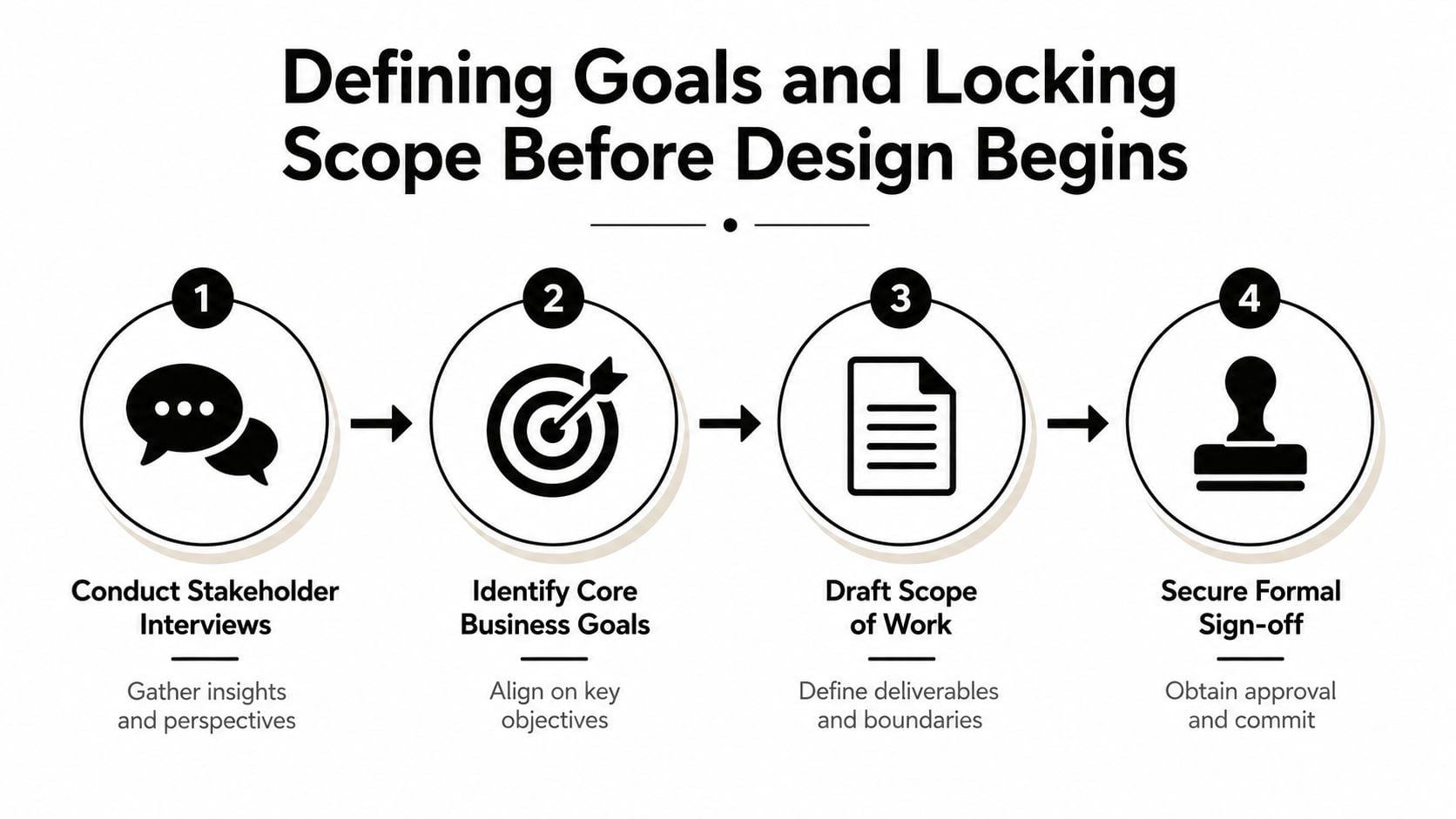
Defining Goals and Locking Scope Before Design Begins
The cleanest website projects start with a discovery phase that forces real decisions. I've seen enough SME builds to know that vague goals like “modernise the brand” or “make it look premium” don't help a team choose features, content, or page structure. Good planning turns that vagueness into a scope the whole team can live with.
Start with stakeholder interviews
The first task is to talk to everyone who can affect the outcome, not just the loudest person in the room. That usually means the owner, the person who knows the customers, whoever will maintain the site, and anyone who signs off content or budget. If those people aren't identified early, they'll appear later as blockers.
Ask what the site must do in practice. Is it meant to generate leads, support online sales, reduce admin, explain services, or replace an outdated brochure site? Those answers should become the basis for the brief, not the visual mood board. For a useful structure, I'd point teams to a solid design brief framework before they touch wireframes.
Lock scope before the first mockup
Scope needs to be written down in plain language. List the pages, the main features, the content responsibilities, the integrations, and the things the project will not include. That last part matters more than people think, because scope creep usually starts with a feature that sounded harmless in a meeting.
A scope document works best when it includes:
- Core business goal: what the site is supposed to achieve.
- Page list: the exact pages being built.
- Decision owners: who approves design, copy, and final sign-off.
- Exclusions: anything deferred to a later phase.
- Approval gates: where the project pauses for review.
When that's in place, the team can move through discovery with much less churn. That matters because project-management research shows the highest-performing projects were, on average, 18% lower in cost and 8% faster in cycle time than the worst projects, while the worst projects were 42% higher in cost and 49% slower in cycle time when definition was weak before authorisation (PMI project definition research). Better definition before build is not a nice-to-have, it's a control mechanism.
If you only do one thing well at this stage, do formal sign-off. An agreed scope, a named stakeholder map, and a list of open questions are worth more than a dozen promising sketches.
Building Sitemaps and Wireframes with Content in Mind
Most website delays I've seen have little to do with the CMS or the code. They happen because content wasn't treated as a dependency from day one. A sitemap and wireframe only work when they're built around real copy, real approval paths, and the amount of material the client can produce.
Treat content as a project input
The quickest way to derail a build is to design pages around placeholder text and hope the copy will fit later. It rarely does. A homepage that looks balanced in a wireframe can collapse once the client tries to fit product details, service explanations, testimonials, or compliance text into it.
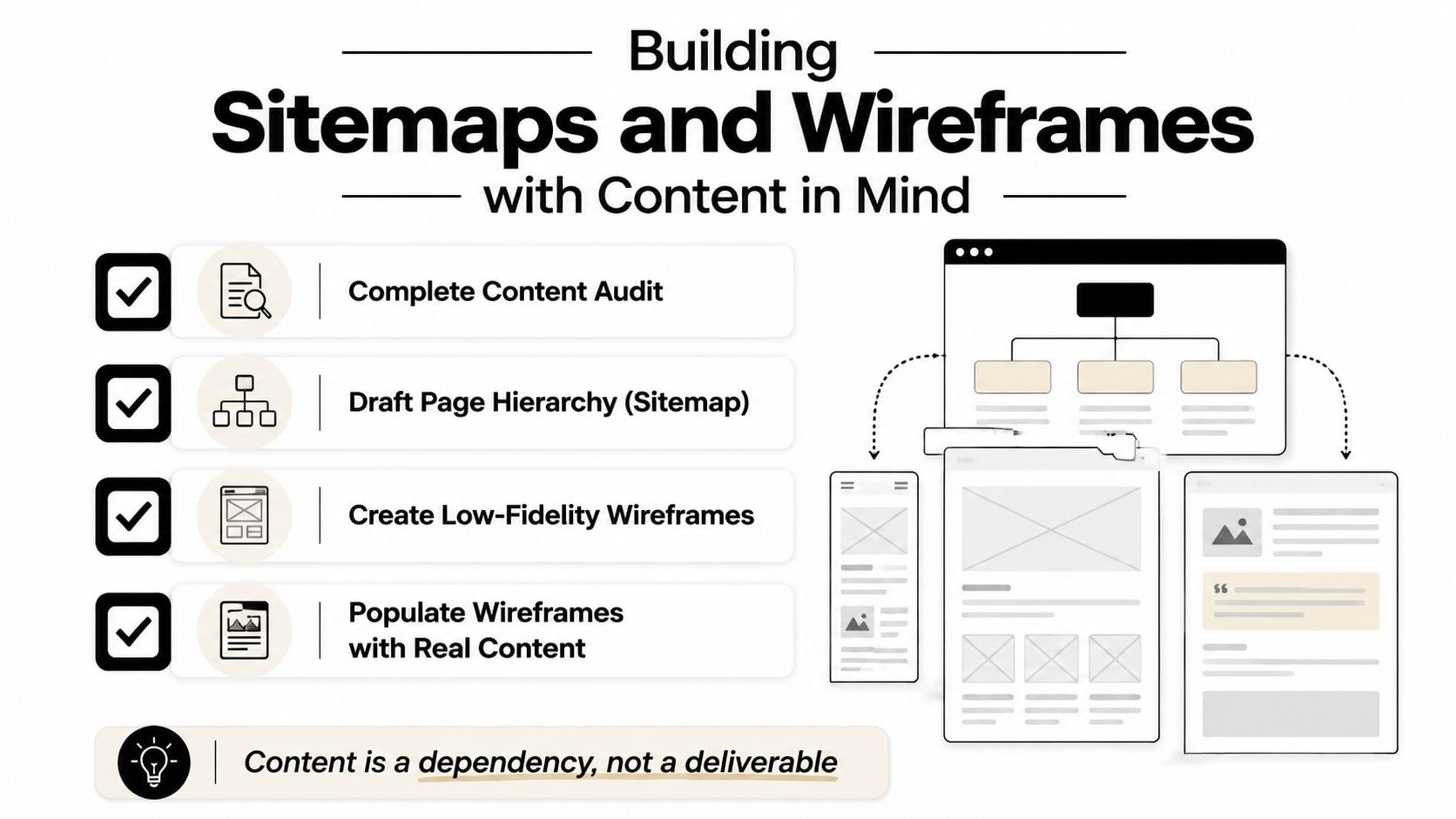
Start with a content audit. Gather what already exists, identify what can be reused, and mark what needs rewriting. Then assign clear ownership for drafting, review, and approval, because “someone in the team will sort the copy” is how pages sit unfinished for weeks. Content governance matters too, especially for SMEs that need a simple process for future updates after launch.
A useful resource for seeing how page structure can be mapped is Transactional LLC's website sitemaps. It's helpful because it makes the page hierarchy problem visible before anyone starts polishing visuals.
Wireframes should fit the real story
Wireframes are not just boxes and lines. They're a way to check whether the page structure supports the content volume, the calls to action, and the user journey. If a service page needs three proof points, a testimonial, and a contact prompt, the wireframe should make room for that from the start.
For a practical definition of the format, this wireframe guide is a clean reference point. In delivery terms, the wireframe should tell you whether the layout supports the message, not whether it looks polished enough for stakeholders to fall in love with it too early.
The best sitemap is the one that still makes sense when the real content lands.
A lean content workflow helps here. Draft the sitemap, build low-fidelity wireframes, then populate them with real copy as soon as possible. That keeps design, content, and development moving in parallel instead of waiting on each other.
A short demo can also help teams see how structure affects the content workload.
Estimating Timelines and Budgets with Real Data
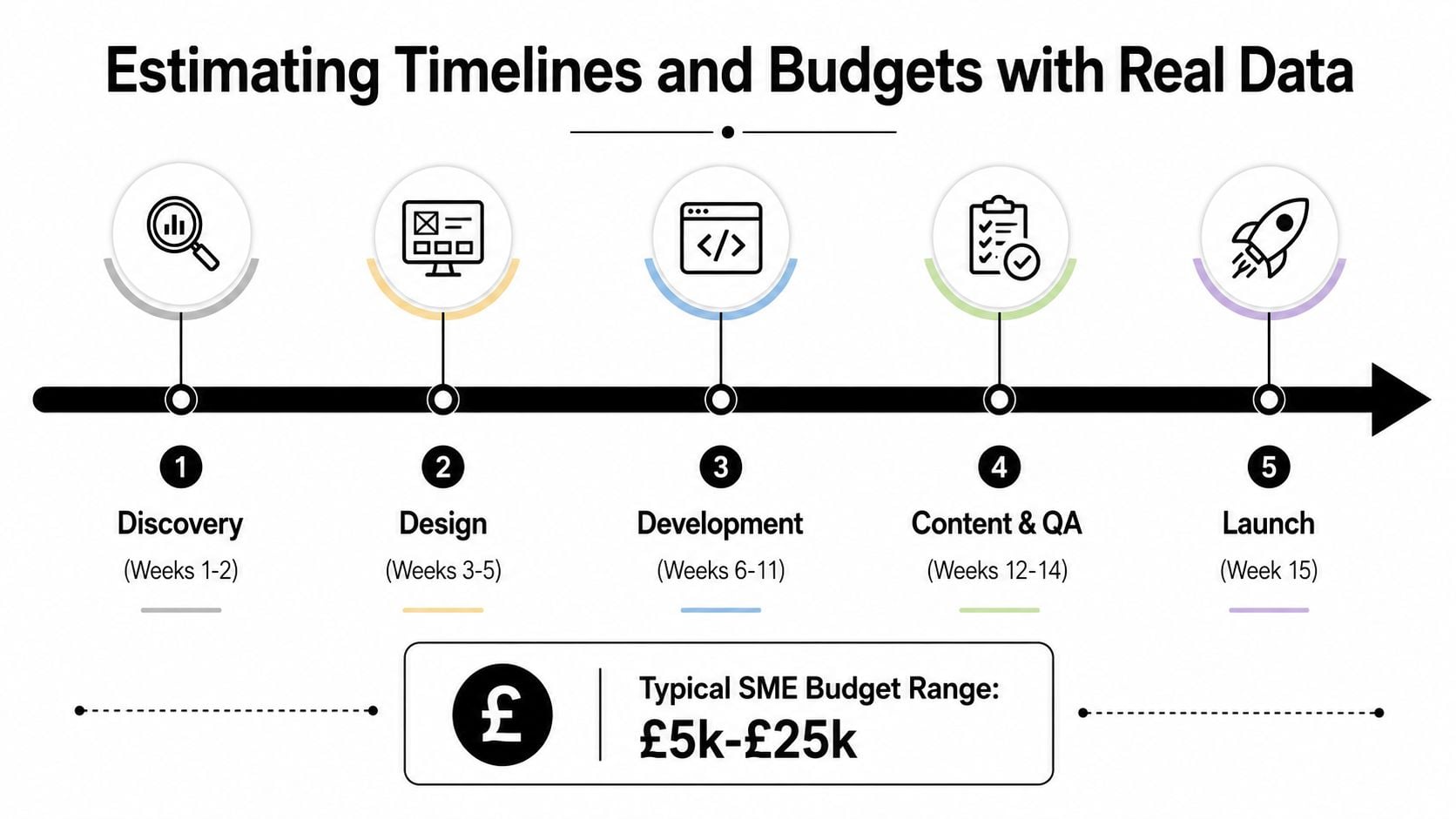
Timelines slip when teams build from hope instead of phase duration. For a realistic SME website plan, discovery usually needs 2 to 4 weeks, design 2 to 4 weeks, development 8 to 12 weeks, testing 1 to 2 weeks, and launch plus stabilisation 1 to 2 weeks. That means roughly 11% to 22% of the schedule sits in planning and 44% to 67% sits in build work, which is where most of the effort lands (website project methodology data).
Build the schedule from dependencies
The common mistake is assuming design and development can move ahead before scope, content, and approvals have settled. They can start in rough form, but not in a way that protects the schedule. Every unclear page, unconfirmed feature, or missing asset turns into a delay later, and those delays usually stack rather than stay isolated.
Analysts at the same source note that insufficient planning is cited as a direct cause of 47% of project failures, and rushed website projects are reported to fail at rates exceeding 65% (website project methodology data). The point is not to over-engineer the plan. It is to give discovery enough room to expose the issues that would otherwise interrupt build work.
Budget for change, not just delivery
Budget pressure usually comes from late scope changes, unclear requirements, and rushed discovery. That means the budget needs a visible contingency, even if the client never uses all of it. It is better to plan for controlled change than pretend change will not happen and absorb it informally through extra meetings, rework, or unpaid revisions.
For agencies and SMEs trying to sanity-check budgets, this UK website cost guide is a useful reference point. The discipline, though, is live visibility. A project should have milestone tracking, budget tracking, and a clear owner for reporting from day one, because UK project control reporting still shows too many teams without centralised real-time KPIs, and too much time spent compiling reports manually (UK project control reporting).
I would rather see a slightly longer plan with clear checkpoints than a compressed schedule that hides risk. Once the team can see the work properly, they can manage it properly.
Wireframes should fit the actual story
Wireframes are not just boxes and lines. They are a way to check whether the page structure supports the content volume, the calls to action, and the user journey. If a service page needs three proof points, a testimonial, and a contact prompt, the wireframe should make room for that from the start.
For a practical definition of the format, this wireframe guide is a clean reference point. In delivery terms, the wireframe should show whether the layout supports the message, not whether it looks polished enough for stakeholders to fall in love with it too early.
A lean content workflow helps here. Draft the sitemap, build low-fidelity wireframes, then populate them with copy as soon as possible.
That keeps design, content, and development moving in parallel instead of waiting on each other.
A short demo can also help teams see how structure affects the content workload.
Planning for Post-Launch Iteration and Measurable Outcomes
A website launch isn't the finish line. It's the first moment the site meets real users, real devices, and real behaviour, which is why post-launch iteration needs a budget and a plan of its own. That matters even more for SMEs working in a mobile-led buying environment, where speed, clarity, and conversion tracking shape whether the site does useful work.
Leave room for the first 90 days
The smart move is to reserve time for beta testing, analytics setup, and phased fixes after launch. That doesn't mean delaying the launch for perfection. It means making the launch usable, measurable, and open to improvement. If the site is live but no one can see what users are doing, the team is flying blind.
A lean post-launch plan should identify the first fixes, the first metrics, and the first review point. That usually includes form testing, mobile checks, tracking validation, and a quick sweep of broken links or confusing journeys. If you want a practical analytics reference, this website analytics guide is a sensible starting point for the setup side.
Use a simple workflow for improvements
The first month after launch is where small issues become obvious. Contact forms misfire, headings need rewording, and users click in places nobody expected. That's normal, and it's why the team should have a lightweight way to capture and prioritise fixes instead of relying on scattered emails.
A simple board in a tool like Kanban for Google Tasks can be enough for a small team if everyone understands the labels and the owner of each issue. For SMEs, the goal isn't elaborate tooling, it's visibility.
A website that gets improved quickly after launch usually beats a “perfect” site that sits frozen for months.
That approach is often more useful than trying to predict every problem in advance. The project is still controlled, but it's controlled through feedback and iteration, not by pretending the first live version will be the final version.
Your Launch Checklist and Risk Mitigation Playbook
A site can be almost ready and still fail on launch day because no one checked the handover details. The safer approach is a launch checklist that covers technical readiness, content approval, stakeholder sign-off, and support ownership before the site goes live. For a tidy checklist structure, this launch resource is a practical reference.
Pre-launch checks that matter
Start with the basics. Check forms, redirects, page titles, metadata, mobile layout, analytics tags, and backup access. Then verify that every agreed page has been signed off by the right person, because launch-day problems usually come from content, not code. If the client's team hasn't approved a page, it is not ready.
A useful handoff pack should include:
- Ownership map: who manages content, updates, and support.
- Issue path: where bugs and urgent changes get logged.
- Training notes: how to use the CMS and how to request help.
- Live date plan: who does what on launch day.
Reduce the common failure points
Scope creep is easier to control when the scope was locked early and the change process is visible. Content delays are easier to avoid when copy is written alongside design instead of after development. Stakeholder bottlenecks are easier to manage when one person has final sign-off authority, not a committee with shifting opinions.
Post-launch budgets often get overlooked, and that creates a false finish line. A new site usually needs a small reserve for fixes, content tweaks, and the first round of changes once real users start moving through it. If that money is not set aside, minor issues sit unresolved and the team starts arguing about whether a fix is a launch defect or a new request.
Technical debt is the last trap. If a shortcut was taken to meet launch timing, document it clearly and make sure it is scheduled for follow-up. That is better than leaving the next person to guess why something was built a certain way.
The first week after launch should be treated as an active support window, not a passive handover. Track issues, confirm fixes, and check whether the site is doing what the discovery phase said it should do. Clean project close-out comes from this discipline, not from assuming the job is done because the site is public.
If you are planning a new site or untangling a project that has already stalled, DesignStack can help you shape the scope, content flow, and launch process into something your team can manage. Visit DesignStack to discuss a website project that needs clear planning, fixed deliverables, and proper post-launch support.