Web Application Hosting: Options, Costs and How to Choose
Your booking page works fine on a Tuesday morning. Then Friday lunchtime arrives, customers pile in, pages stall, and someone phones to ask if you're still taking orders. That moment is when web application hosting stops being a technical detail and becomes a business risk. The right plan isn't the one with the longest feature list. It's the one that matches your traffic, your team's skills, and what an hour offline costs you.
Table of Contents
- Hosting Types Compared and Explained
- Performance and Scaling Under Real Traffic
- Uptime, Backups and Security You Must Verify
- Cost Trade-offs Beyond the Monthly Price
- How to Move an Application from Staging to Live
- Choose Your Hosting and Confirm Your Next Step
Hosting Types Compared and Explained
Say a bakery runs a small booking app for celebration cakes. It's quiet most of the week, then slows every Friday lunchtime when office workers place orders for the weekend. The owner asks the obvious question: do we just buy a bigger plan? Sometimes yes. Often the problem is the wrong type of hosting, not too little of it. A cheap shared plan can choke under a short burst, while an oversized server sits idle for six days a week and still needs someone to patch it. Match the hosting type to your traffic pattern, the control you need, and who'll look after it, and the Friday problem usually gets much cheaper to solve.
Costs below are indicative ranges that vary by provider, region and support level, so check current pricing before you commit. Read the table across, not down. You're looking for the row where the best-for column sounds like your application and the control column matches the skills you have in-house.
Web Application Hosting Types Compared
| Hosting type | Best for | Control | Approximate monthly cost | How it scales |
|---|---|---|---|---|
| Shared hosting | Brochure sites and light WordPress | Low | £3 to £15 | Limited, by upgrading the plan |
| VPS (virtual private server) | Growing apps that need root access | High | £10 to £60 | Resize the server or add resources manually |
| Dedicated server | High-traffic or tightly controlled workloads | Full | £80 to £300 | Hardware upgrades, usually slower |
| Public cloud (IaaS) | Variable traffic and custom stacks | High | Pay-as-you-go, often £20 or more | Automatic or scripted scaling |
| PaaS (managed app platform) | Teams focused on code rather than servers | Medium | £15 to £100 | Largely automatic |
| Containers (Docker, Kubernetes-style) | Microservices and repeatable deployments | High | £25 or more per service | Orchestrated, rule-based scaling |
Shared Hosting and VPS
Shared hosting is a flat share. You get your own room, but the kitchen, bathroom and hallway are shared, and the whole flat runs only as fast as its busiest tenant allows. You can't change the plumbing, so you can't tune PHP workers, install unusual extensions or adjust server-level caching. It suits a brochure site or a light WordPress install with steady, modest traffic, and if you're weighing that option it's worth comparing it with managed WordPress website hosting before you buy. It doesn't suit a booking system, membership portal or shop where a neighbour's traffic spike can slow your checkout. If customers transact through it, shared hosting is usually the wrong starting point.
A VPS is leasing your own floor in an office block. The building is shared, but your floor has its own locked door, its own allocated resources and room to rearrange the furniture. You get root access, so you can choose your runtime, set worker limits and install the tools your application needs. It suits a growing custom app or a busy WordPress site that's outgrown shared hosting and needs predictable performance. It doesn't suit a team with nobody able to apply security updates, manage firewalls and respond when a service stops at midnight. An unmanaged VPS is cheap to rent and expensive to neglect.
Dedicated Servers and Public Cloud
A dedicated server is owning the whole building. Every CPU core, drive and network port is yours, and so is every maintenance job, from failed disks to firmware updates. Performance is predictable because nobody else competes for resources, which suits high-traffic applications, large databases and workloads with strict data or compliance requirements. It doesn't suit an application with sharp, short traffic peaks, because you pay for peak capacity all month and hardware upgrades take time. For most small UK businesses, a dedicated server is more machine and more responsibility than the application justifies.
Public cloud (IaaS) is a hotel suite you enlarge or shrink by the hour. You rent computing, storage and networking from providers such as Amazon Web Services, Google Cloud Platform or Microsoft Azure, and you build the server environment yourself. It suits variable traffic and custom stacks, because you can add capacity for a campaign and release it afterwards. It doesn't suit anyone who wants a fixed, predictable bill with no monitoring, since usage-based pricing punishes forgotten test servers and unmonitored traffic spikes. Cloud gives you flexibility, but you still own the architecture decisions.
If nobody on your team can explain who patches the server, you don't have a hosting plan yet. You have a hope.
PaaS and Containers
PaaS is a serviced apartment. The provider handles the plumbing, updates and security, and you bring your code and live in it. You deploy the application, set environment variables and let the platform manage the runtime, scaling and much of the patching. It suits teams who'd rather spend their hours on features than on server administration, including small product teams without a dedicated systems person. It doesn't suit an application that needs an unusual operating system configuration, a custom network setup or software the platform doesn't support. You trade control for time, and for many small teams that's the right trade.
Containers are standard shipping containers. Each one carries everything an application needs to run, so it behaves the same on a developer's laptop, in staging and in production. Tools in the Docker and Kubernetes style let you run several services, restart failed ones automatically and scale individual parts of an application independently. Containers suit microservices and teams that deploy often and need repeatable releases. They don't suit a simple single-site WordPress install, where the orchestration layer adds complexity and cost without solving a real problem. Don't adopt containers because they sound modern. Adopt them when you have several services that need to scale separately.
The central trade-off runs through every row of that table. The more the provider manages, the less your team controls. Shared hosting and PaaS remove work but limit your choices. A VPS, dedicated server or raw cloud account gives you freedom and hands you the pager. For our bakery, the honest answer is usually a modest VPS or a managed platform that can absorb the Friday burst, not the biggest plan on the page.
Performance and Scaling Under Real Traffic
A slow application does not become fast because you buy a bigger plan. Find the bottleneck first, then pay to remove it. Start with time to first byte (TTFB), the time a server takes to begin responding. For most business applications, a cold-cache TTFB under 0.5 seconds for a typical UK visitor is a sound target. If it misses that target, inspect database queries: a single unindexed query on a busy page can make requests queue behind it.
Next, check PHP or application worker limits. Workers process requests; when they are all occupied, new visitors wait, even if the server has spare memory. Then review caching, which reduces how often requests reach your application code, and image delivery, since oversized images slow mobile visitors after the server has responded. Data-centre efficiency has improved over the past decade, as discussed in UK parliamentary evidence on data-centre efficiency. That can reduce facility overhead, but it will not make an individual page load faster.
Scaling Up Versus Scaling Out
Vertical scaling means moving to a larger server. It is straightforward and usually requires no code changes, but has a ceiling: the largest available server, or a database that remains the bottleneck. Horizontal scaling adds servers behind a load balancer to spread traffic across machines. It can handle larger peaks, but the application must manage shared sessions, shared file storage and the extra database connections created by each server.
For a small application, scale vertically first, then fix queries and caching. Scale out only when a well-tuned server cannot handle the demand. The business test is simple: compare the cost of that upgrade with the revenue at risk during an hour of downtime. A modest server may be the right choice for a low-impact site; an application taking orders needs enough capacity for real demand, not just a low monthly bill.
Test Before Your Customers Do
Run a load test on a staging copy with k6 or Apache JMeter. Record TTFB and error rates at twice and five times normal traffic, and monitor database connections: they can run out before CPU does. Follow this guide to stress testing websites to set up a test safely. Use the results to ask a provider four direct questions before signing:
- Burst capacity: What happens when traffic reaches five times normal for one hour?
- Hard limits: What are the limits for workers, database connections and concurrent processes?
- Scaling speed: Can resources increase automatically, or must you raise a ticket and wait?
- Throttling policy: At what point will the provider slow your account to protect other customers?
If the provider cannot give clear answers, you cannot judge whether the plan will cope when traffic rises. Choose capacity based on the application's likely load and the cost of an outage, not server specifications or monthly price in isolation.
Uptime, Backups and Security You Must Verify
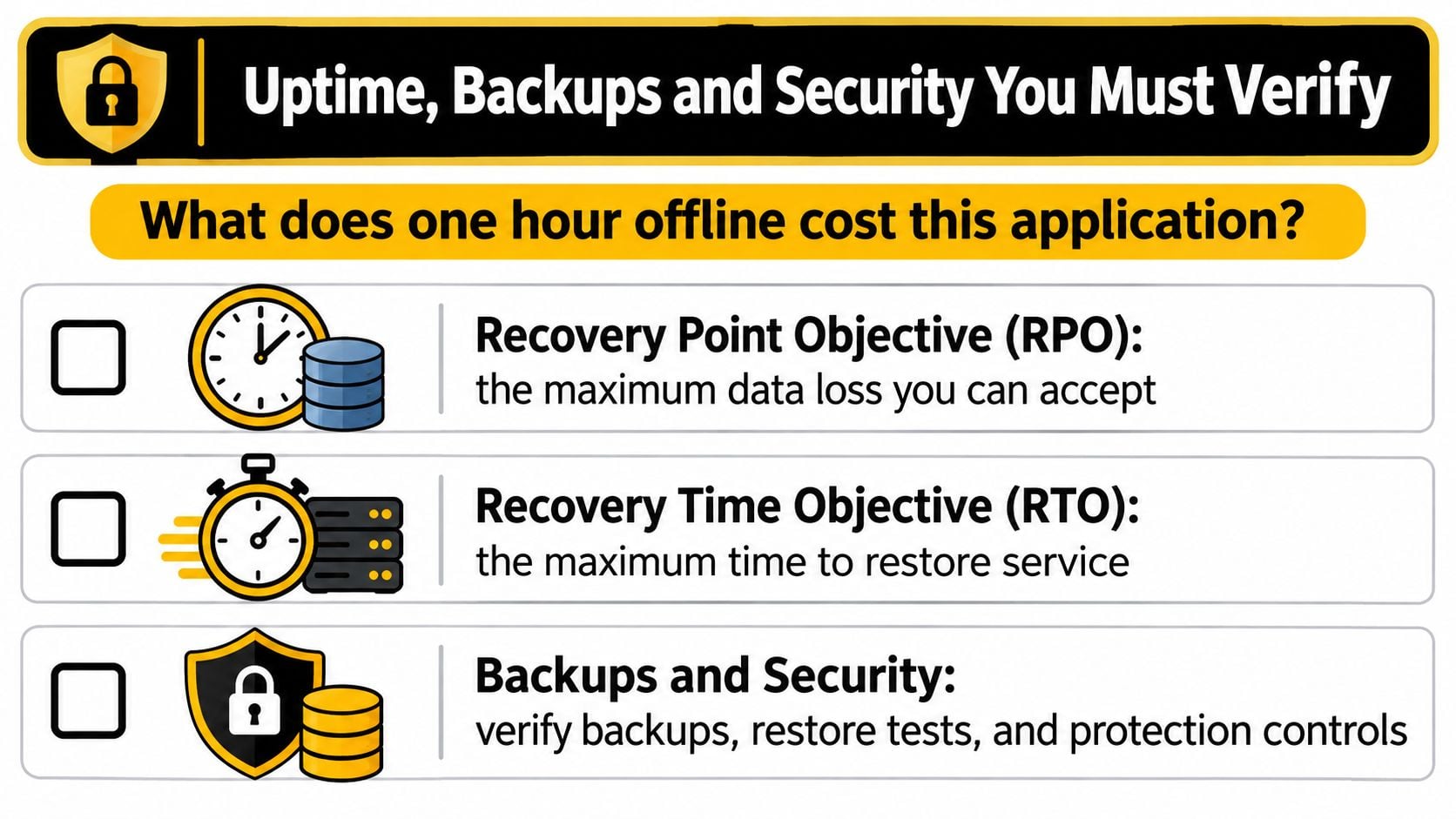
Start with one question. What does one hour offline cost this application? For a portfolio site, the answer might be mild embarrassment. For a shop taking orders or a booking system holding Friday's appointments, it's lost revenue plus the staff time spent apologising and rebooking. That figure, not a marketing uptime percentage, should set how much resilience you pay for. Two terms turn it into something you can put in a contract. Recovery Point Objective (RPO) is the maximum data loss you can accept, measured backwards from the failure. Recovery Time Objective (RTO) is the maximum time you can tolerate being offline while service is restored. Both must be agreed in writing, because a provider's idea of a reasonable restore and yours will differ at the worst possible moment.
The diagram below sets out those recovery measures alongside the security checks that support them.
Indicative Recovery Targets by Application Type
| Application type | Acceptable downtime | Backup frequency | Restore goal |
|---|---|---|---|
| Brochure or portfolio site | Several hours | Weekly full backup | Restore within a working day |
| Booking or membership app | Under one hour | Daily backup plus database snapshots | Restore within a few hours |
| eCommerce store | Minutes | Hourly database backups plus daily full backup | Restore within one hour |
These targets are indicative, so agree your own with the provider and the business. Notice how quickly the requirement hardens once money or appointments depend on the system. Institutional spending shows how seriously this is taken at scale. The UK Government's cyber security sectoral analysis 2025 recorded 942 public-sector cyber-security contracts worth £931 million during 2024. You don't need that budget. You do need the same discipline in miniature.
Controls to Verify Before You Sign
Ask for evidence of layered controls, not a reassuring paragraph. Confirm a web application firewall or network firewall, multi-factor authentication for administrator access, least-privilege accounts so nobody has more access than their job needs, and a clear patch management routine. Check malware monitoring, immutable or isolated backups that an attacker who breaches the server can't delete, automated TLS certificates, and a documented incident escalation route with a real phone number or priority queue. Our breakdown of recent PHP security flaws and what they mean for your website shows why patching speed matters in practice. A UK server location doesn't by itself establish compliance or security, so ask for the actual region, any subcontractors, logging retention and the breach-notification process.
Practical rule: A backup only counts once you've restored it and timed how long it took.
WordPress and eCommerce systems get compromised through predictable routes. Vulnerable plugins are the most common, followed by stolen administrator passwords, then weaknesses around payment integrations. A professionally maintained server doesn't protect you from a plugin you forgot to update or an admin account with a reused password and no second factor. So restore a backup to staging every quarter, time it against your RTO, and write down what broke. That single habit tells you more about your real resilience than any uptime badge on a sales page.
Cost Trade-offs Beyond the Monthly Price
The monthly price is often the smallest part of the bill. Run the maths on a common setup. A £15 shared plan runs a site that keeps slowing down, so a developer spends four hours a month investigating, clearing caches and working around limits. At £50 an hour, that's £200 of time, making the total cost £215 a month. A £60 managed VPS running the same site needs one hour a month of attention. That's £60 plus £50, or £110 a month. The plan that looked four times more expensive costs roughly half as much to own. This is why we tell Dorset businesses to price hosting the way they'd price a van, including fuel, servicing and breakdowns, not just the sticker. If you want the wider picture first, our guide to how much website hosting costs breaks down typical line items.
Where the Hidden Costs Sit
Check these before you compare headline prices:
- Backups and staging: Frequently paid extras, yet both are essential for any application that takes money or bookings.
- SSL and security add-ons: Certificates, malware scanning and firewall upgrades are sometimes bundled, sometimes itemised.
- Data transfer fees: Cloud platforms may charge for egress, so serving large files or heavy traffic can cost more than the compute.
- Migration costs: Moving later takes developer time, testing and often a period of running two systems side by side.
- Downtime: One lost Saturday of orders can exceed a year of savings from choosing the cheaper plan.
Pay-as-you-go platforms add one more risk. A traffic spike, a runaway script or a misconfigured autoscaling rule can raise a cloud bill sharply overnight. Set spending alerts and hard limits on day one, not after the first surprise invoice. Then run one simple annual calculation for each option you're considering: plan price times twelve, plus add-ons, plus realistic support time, plus the expected cost of one outage a year. A brochure site and a checkout system should never be judged by the same number, because the outage line is trivial for one and decisive for the other.
How to Move an Application from Staging to Live
Most launch problems aren't caused by bad code. They're caused by a rushed handover between environments. The process below keeps that handover boring, which is exactly what you want. The flow diagram summarises the shape of the move before we get into the detail.
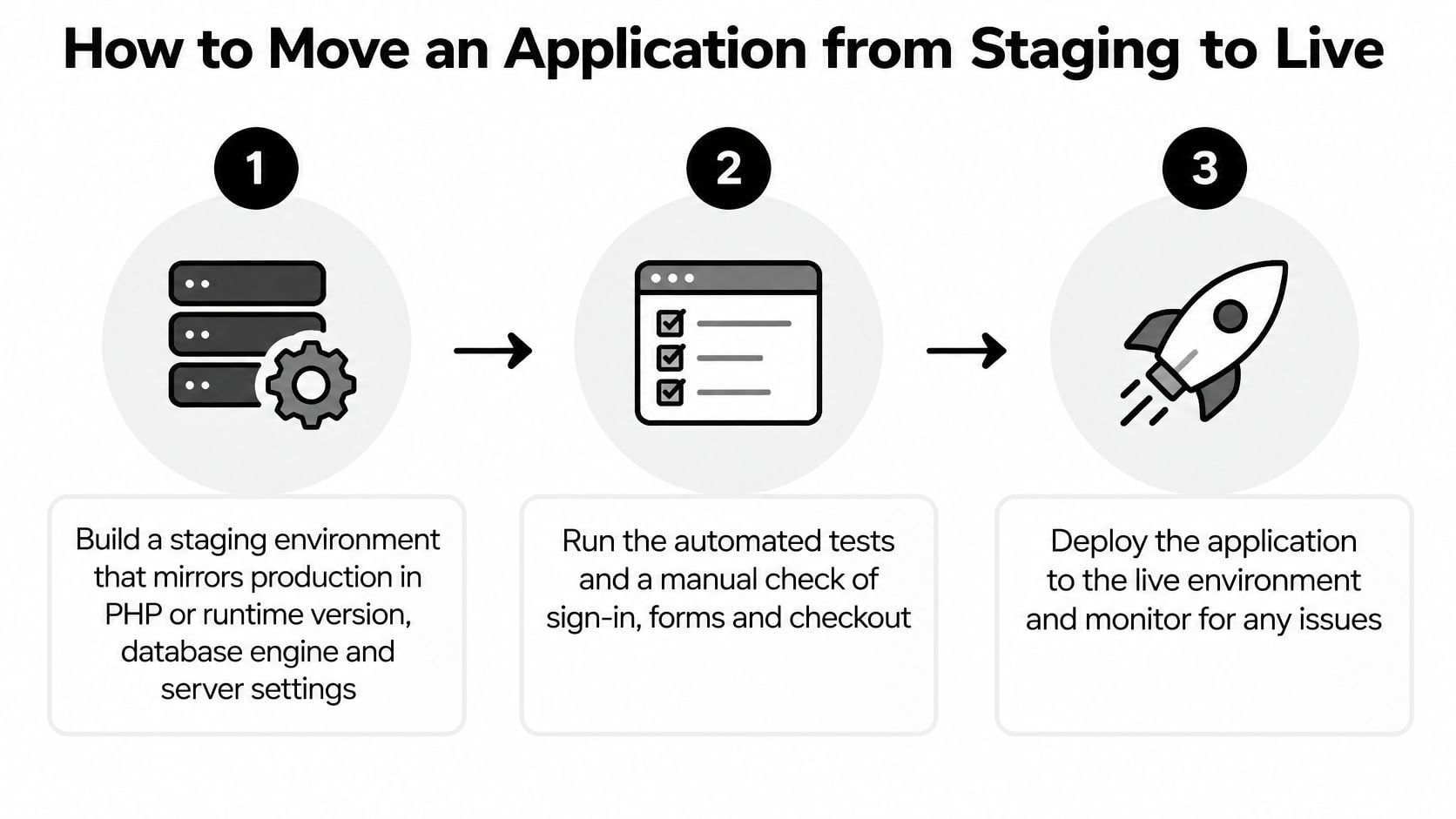
- Build a staging environment that mirrors production in PHP or runtime version, database engine and server settings. If staging differs, you're testing a different application. The common slip is a newer PHP version in staging that hides a fatal error waiting on live.
- Run automated tests, then check manually. Sign in, submit every form and complete the checkout yourself. Automated tests miss broken button labels and confusing error messages that stop real customers cold.
- Store secrets as environment variables. API keys and database passwords never belong in code files or version control. The common slip is copying a config file from staging and pointing live traffic at the test database.
- Take a full backup and test that it restores before any database migration. An untested backup taken five minutes before launch is a gamble, not a safety net.
- Deploy during a quiet period with the previous release ready to roll back. The frequent mistake is migrating the database before deploying the code that expects the new structure, which breaks both versions at once.
- Smoke test on live. Sign in, submit a form and complete a test purchase. Then clear the cache, because forgetting to is the classic reason a fixed bug appears to survive the launch.
If you're moving an existing site between hosts at the same time, our WordPress website migration guide covers the transfer side of the job. The short video below shows a deployment sequence in action, which helps if you've only ever read about staging rather than watched a release happen.
- Check accessibility and the failed-transaction log. Hosting configuration affects image delivery and page speed, and an inaccessible checkout costs sales directly. UK shopper research reported by eCommerce News UK found 76% of shoppers with disabilities said accessibility problems prevented them from completing purchases during major online sales periods, and 57% of all UK consumers said accessibility problems would discourage online shopping. Confirm the checkout works with a keyboard and a screen reader, and that image and script delivery doesn't block it.
- Monitor for 24 hours. Watch error rates and response times, and keep the rollback plan open until a full day of real traffic has passed. A successful launch looks unremarkable in the logs: steady response times, no spike in errors, and completed transactions matching your normal pattern.
Choose Your Hosting and Confirm Your Next Step
Here's our verdict by situation. A brochure or small WordPress site fits shared or managed WordPress hosting, and paying more buys you little. A custom application with a team that can maintain it fits a VPS or managed PaaS, depending on whether you want control or convenience. An app with variable traffic or a revenue-critical checkout justifies managed cloud or PaaS with monitoring and tested backups, because the cost of failure dwarfs the hosting bill. If your application sits between categories, choose based on the downtime question. The category your revenue belongs to matters more than the category your traffic belongs to.
Put these questions to any provider you're shortlisting:
- Region: Where exactly will my application and its backups be hosted, and is that in the UK?
- Backups: How often are they taken, and when did you last test a restore?
- Support hours: Who answers at 9pm on a Saturday, and how fast?
- Scaling: What happens automatically when traffic spikes, and what's my ceiling?
- Patching: Who applies security updates, you or me, and within what timeframe?
We're one option for that shortlist. Our hosting is LiteSpeed-powered cPanel hosting, runs on 100% renewable energy on UK-based servers, and includes weekly or monthly backups of web, database and email, which answers several of those questions directly. Judge us by the same list as everyone else.
Your next step is a single page of notes. Write down your expected monthly traffic, your recovery targets from the table earlier, and your monthly budget including support time. Send those three figures to a hosting provider and ask for a written recommendation that addresses each one. If the reply ignores your recovery targets and talks only about disk space, you've learned something important about that provider. Pick the one that answers the risk question, and you'll have chosen well.
If your application has outgrown its current plan, or you're launching something that needs to stay online when it matters, we can help you match the hosting to the risk. DesignStack provides hosting solutions for websites and web applications alongside the design and build, so one team owns the whole picture. Visit DesignStack and send us your traffic, recovery targets and budget, and we'll give you a straight written recommendation.