WordPress Website Migration: A Practical UK Guide
You usually realise a WordPress site needs to move at the worst possible time. The renewal email lands, the hosting bill jumps, WooCommerce starts dragging its feet, or a rebrand means the old domain no longer fits the business. For a Dorset retailer or service firm, that moment is never really about “moving files”. It's about protecting enquiries, orders, customer logins, and the search visibility you've already paid for.
That's the right way to think about WordPress website migration. The file transfer is the easy bit. The main challenge is keeping the business live while the platform changes underneath it.
The old GOV.UK transition guidance treated migration as a controlled operational process, not a cosmetic refresh, with redirects, launch planning, testing, and post-launch monitoring built in from the start, which is exactly how sensible migration still works today (GOV.UK transition guidance). If you want a hosting decision to sit alongside that thinking, the practical comparison in in-depth managed hosting reviews is worth a look, and if you're weighing whether a move is even necessary, DesignStack's notes on managed WordPress hosting are a useful benchmark.
Table of Contents
- When and Why a WordPress Site Actually Needs to Move
- The Pre-Migration Checklist Every Business Owner Should Build
- Backups, Staging, and Moving the Files and Database
- DNS, SSL, Redirects, and the Search Console Handover
- Troubleshooting the Issues That Hit Most Migrations
- Testing, Monitoring, and Rolling Back If Something Goes Wrong
When and Why a WordPress Site Actually Needs to Move
A Dorset shop owner rarely starts the day planning a migration. The trigger is usually practical: a hosting renewal becomes too expensive, checkout slows during busy periods, or an agency wants to rebuild the site on its own stack. A rebrand can also make the existing domain unsuitable. Identify that trigger before approving any work. It tells you whether the business needs a full move, improved hosting, plugin changes, or performance work.
The point is continuity, not novelty
A site move becomes a business risk as soon as it carries enquiries, orders, customer accounts, payments, email sending, or organic traffic. Changing the host or platform can affect all of those at once. A poor handover leaves visitors facing broken links, failed forms, missing trust signals, or landing pages that no longer match active adverts.
Treat WordPress website migration as a governance and continuity exercise. The UK's transition guidance for agencies includes redirects, launch planning, testing, and post-publication monitoring, showing why a migration needs named owners and controlled decisions rather than a simple file transfer (GOV.UK transition guidance). Redirects protect established search equity and user journeys. Analytics handover confirms that enquiries and sales remain visible. A rollback plan gives the team a safe route back if the new environment fails.
Those deliverables belong in the migration plan from day one. Decide who can change DNS, who checks payment flows, who owns analytics access, and who approves the final launch. If your hosting choice is still open, compare the technical trade-offs in in-depth managed hosting reviews and use DesignStack's guidance on managed WordPress hosting as a practical benchmark.
Practical rule: if the current site works and the problem is cost, speed, or reliability, improve the existing stack first. If the domain, content structure, or platform is holding the business back, plan a migration with redirects, tracking, and rollback treated as deliverables.
When a move makes sense, and when it doesn't
A migration makes sense after a brand change that requires a new domain, when patchwork hosting and plugins create ongoing operational risk, or when the current setup cannot support eCommerce, membership, or a cleaner content model. A new agency may also require a different hosting and deployment arrangement. That can be a sound commercial decision if the agency accepts responsibility for the handover and continuity plan.
Keep the site where it is when a narrower fix solves the problem. Slow admin screens or image delivery usually call for hosting and optimisation work. One unreliable plugin can be replaced without moving the whole site. An early-stage business with a suitable domain should not create migration risk merely because a redesign is being considered.
A good wordpress website migration is a managed business decision, not a reflex. If you are still deciding between a full transition and a narrower overhaul, DesignStack's content migration services provide a useful reference for defining the work.
The Pre-Migration Checklist Every Business Owner Should Build
A migration can fail before anyone copies a file. The usual cause is an unrecorded dependency, an expired licence, or an account nobody can access on launch day. Write the checklist before touching the site, keep it in one shared document, and assign an owner to every item. The host, developer, and account manager should all be able to see the same version.
Start with the dependency map
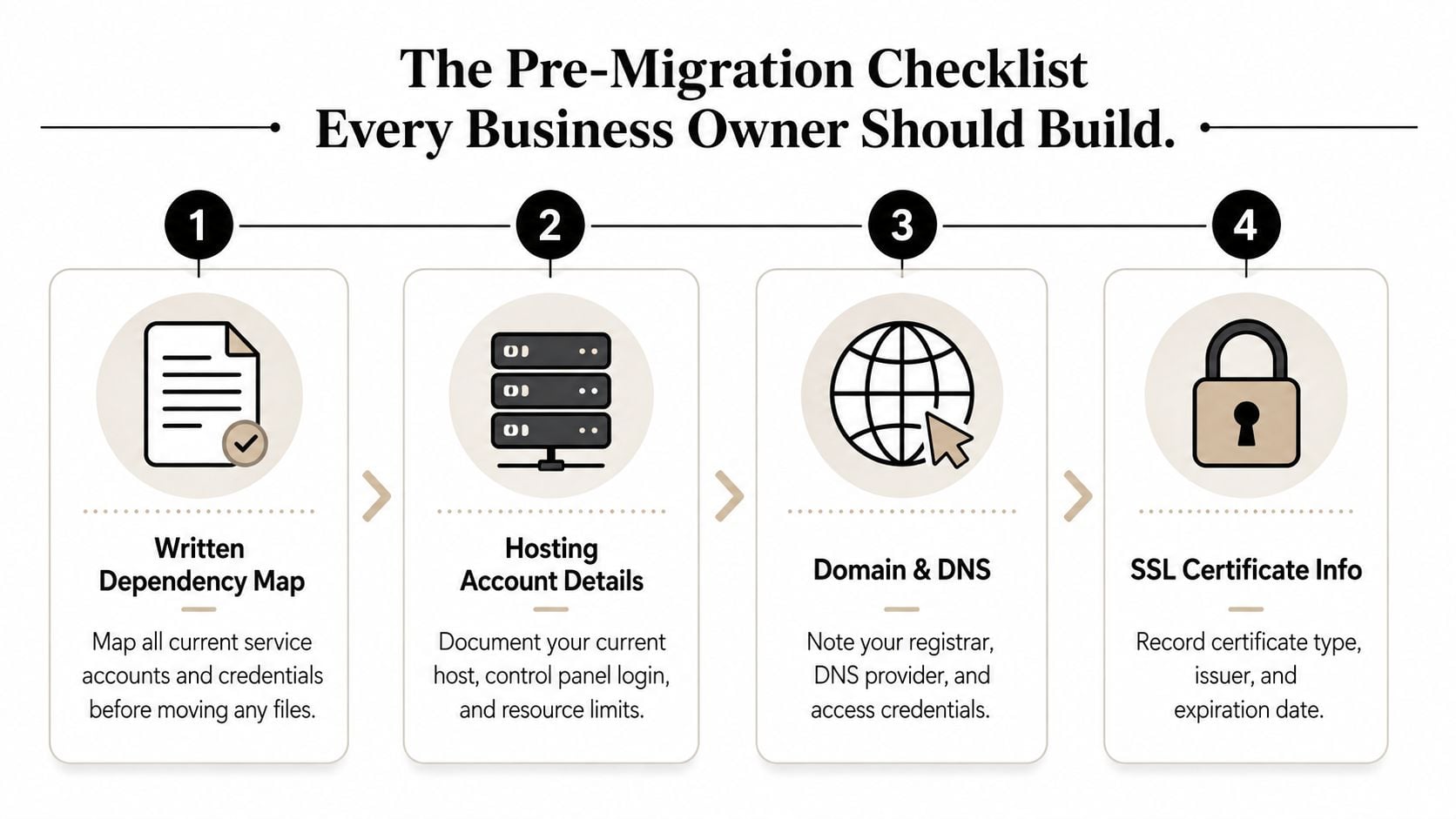
Record every service connected to the site. Include the hosting account, domain registrar, DNS access, SSL certificate details, administrator and SFTP credentials, plugins, the active theme, and third-party connections. Payments, email marketing, CRM links, analytics, reCAPTCHA, CDN rules, and membership software belong on the same list.
The overlooked details often cause the longest outages. Password resets may depend on an admin email nobody monitors. Paid plugin licences can disappear during a rebuild. Staging URLs may still reference the old environment. Custom post types and multilingual content can vanish if they are treated like standard pages instead of being checked and mapped before the move.
Build the list around business access, not just technical access
Add scheduled posts, cron-driven tasks, and hard-coded URLs stored in the database. If the site sends order confirmations or membership reminders, document whether those messages use the old domain. If a booking form sends leads to a CRM, test that connection before launch. Do not leave it to discovery after the DNS change.
Record account ownership as carefully as technical settings. Identify the domain registrar login, DNS provider, hosting panel, and SSL controls in writing. If a former freelancer or agency controls any of them, recover access before cutover. A missing login can stop a migration even when the files and database are ready.
The checklist must also cover continuity. Note the analytics property, conversion tracking, key landing pages, redirect requirements, and the person authorised to approve a rollback. These are governance tasks, not paperwork. They protect enquiry paths, revenue tracking, and search equity from the first hour on the new setup.
If a setting, login, or service would be painful to rediscover at 8 a.m. on launch day, document it now.
For a structured comparison of supplier requirements, DesignStack's guide on how to choose a web hosting provider fits alongside this checklist. Circulate the final version to every administrator. The morning DNS changes is the wrong time to find a missing login, an unassigned owner, or an untested business integration.
Backups, Staging, and Moving the Files and Database
If you skip backup verification, you're gambling with the whole site. A backup that exists but can't restore is just a comforting file. The job here is to move the site in a way that proves recovery before you ever touch live traffic.
Choose the tool that matches the job
For simple brochure sites, a plugin-based backup can be enough if it includes both the wp-content directory and the database export, and if you test the restore. UpdraftPlus is common for that kind of work because it bundles backups and restores into something a non-developer can follow. BlogVault earns its place when you want more of a managed backup workflow and site cloning. ManageWP helps when you're handling several sites and need centralised oversight rather than a one-off export. Manual SFTP plus phpMyAdmin still has a place when you need full control or the site is too awkward for a plugin-only approach.
The important thing is not the brand name, it's the discipline. Technovation LLC's planning your data migration sits in the same camp, because the planning matters more than the transfer button. That's also where a service like DesignStack's website migration SEO checklist can be useful, because the technical move and the search handover need to be planned together.
Practical rule: test the restore on a local or staging copy before you trust the backup. If you haven't restored it, you haven't backed it up.
Move the content in the right order
Start by cloning the site to staging. Restore the files, import the database, then check that the site renders properly before changing anything else. Use search-replace carefully to swap the old domain for the new one in the database, and use a tool that respects serialised data, such as WP-CLI or Better Search Replace. That matters because WordPress stores some settings in a format that breaks if you do a crude text swap.
Then update wp-config.php with the new database credentials and any environment-specific values. If the site has a large media library, upload it over SSH rather than old-fashioned FTP, because timeouts waste hours on bigger builds. After that, walk through checkout, forms, logins, and any automated notifications in the staged copy. If those don't work on staging, they won't magically start working when DNS changes.
| Tool | Best For | Key Limitation |
|---|---|---|
| UpdraftPlus | Straightforward backups and restores for smaller sites | You still need to test the restore properly |
| BlogVault | Managed backup workflows and cloning | Can be more than you need for a basic brochure site |
| ManageWP | Central oversight across multiple WordPress sites | Not a full substitute for hands-on migration checks |
| Manual SFTP plus phpMyAdmin | Full control and awkward edge cases | Slower and easier to get wrong |
A clean staging pass is the checkpoint that stops avoidable damage. If you can log in, submit a form, and complete a checkout on the clone, you're finally ready to think about launch.
DNS, SSL, Redirects, and the Search Console Handover
This part gets broken most often because people treat it as four separate jobs. It isn't. DNS, SSL, redirects, and Search Console are one transition. If one of them is late, the whole move feels unstable to users and search engines.
Cut the timing properly
Lower the DNS TTL before launch, ideally 24 to 48 hours beforehand, so the change spreads faster when you switch. Then get the new host ready with the SSL certificate already installed, so the moment the domain resolves, the browser sees a secure site instead of a half-built one. DesignStack's SSL certificate installation page is a sensible reference if you want that part handled professionally rather than guessed at.
The redirect map comes next. Every old URL needs a clean destination on the new site, and the mapping should stay flat. Don't chain one 301 into another. Keep old to new, one hop, no detours. Chained redirects waste crawl budget, complicate troubleshooting, and create avoidable friction for users who just wanted the page they already knew.
Match the search handover to the domain change
If the domain itself changes, the Search Console move tool comes into play. If the domain stays the same and only the hosting changes, you still need property checks and post-launch monitoring, but not a full move-of-address workflow. The old and new properties should both be verified before launch, then watched closely once traffic starts landing on the new stack.
A useful way to organise the redirect work is a simple worksheet.
| Old URL Pattern | New URL Pattern | Redirect Type | Notes |
|---|---|---|---|
| Old page URL | New page URL | 301 | Keep it one-to-one where possible |
| Old product URL | New product URL | 301 | Preserve commercial landing pages first |
| Old category URL | New category URL | 301 | Watch for trailing slash differences |
| Old campaign URL | New campaign URL | 301 | Protect active ads and email links |
Once the certificates and redirects are in place, confirm the stack is really live. Check the HTTP headers, then run an SSL Labs scan so you know the certificate chain is behaving correctly before you steer traffic. That's not paranoia, it's basic launch hygiene. The search side only settles once the crawl path is clean, the new property is verified, and the redirect map holds without surprises.
Troubleshooting the Issues That Hit Most Migrations
The first few days expose weak handover work. A page may load while forms fail, analytics disappear, or old URLs return 404s. Diagnose each symptom against its likely cause, then fix the underlying configuration rather than patching one browser session.
The common failures and what they usually mean
- Mixed-content warnings mean the page uses HTTPS while images, scripts, or stylesheets still request HTTP assets. Hard-coded URLs in the theme, page builder, or database are common causes. Replace the source URLs, clear caches, and test again in a fresh browser session.
- Broken permalinks appear when the homepage works but inner pages return 404. The new host may not be reading the rewrite rules correctly, or
.htaccessmay be missing or wrong. Save the permalink settings again and confirm the server applies the expected rules. - 404 spikes on specific variants show that the redirect map missed a URL pattern already used by visitors. Check uppercase paths, trailing slashes, campaign parameters, and older links. Add the missing rules, keeping each redirect direct and consistent.
- Lost analytics means the site can look healthy while reporting has stopped. Re-verify the Search Console property, check the Google Tag Manager container, and confirm the analytics snippet is present in the new template. Test key events, not just page views, so enquiry and purchase paths remain measurable.
- Stuck caches keep the old site visible after launch. Purge the CDN and the WordPress cache plugin, then test from a clean browser and another network. If only some users see stale content, compare cache headers before changing DNS again.
Keep a written incident log during this work. Record the affected URL, the test performed, the change made, and the person responsible. That turns a frantic launch into an auditable continuity process and makes rollback decisions far clearer.
Don't blame DNS for everything
DNS propagation can make the handover look inconsistent. Some visitors may reach the new host while others still see the old one for a period. If nobody can reach the site, or the certificate does not match the domain, treat that as a configuration fault rather than propagation.
Use phpMyAdmin to check whether siteurl and home still contain the old address. Correct them if necessary, then inspect wp-config.php for overrides. A stale constant can make the database appear fixed while WordPress continues using the wrong domain.
Analytics, redirects, and rollback instructions belong in the launch record alongside the files and database. If the fix risks customer journeys or data capture, stop experimenting on the live site and ask a developer to inspect the server configuration. DesignStack's website migration SEO checklist was referenced earlier, so use that earlier checklist rather than duplicating the link here.
Testing, Monitoring, and Rolling Back If Something Goes Wrong
A migration remains unfinished until the business can operate normally on the new site. Treat launch testing, monitoring, redirects, analytics handover, and rollback instructions as governance work, not housekeeping. The first month should produce a clear record of what was checked, what changed, and who can reverse it.
The first hour and the first week matter most
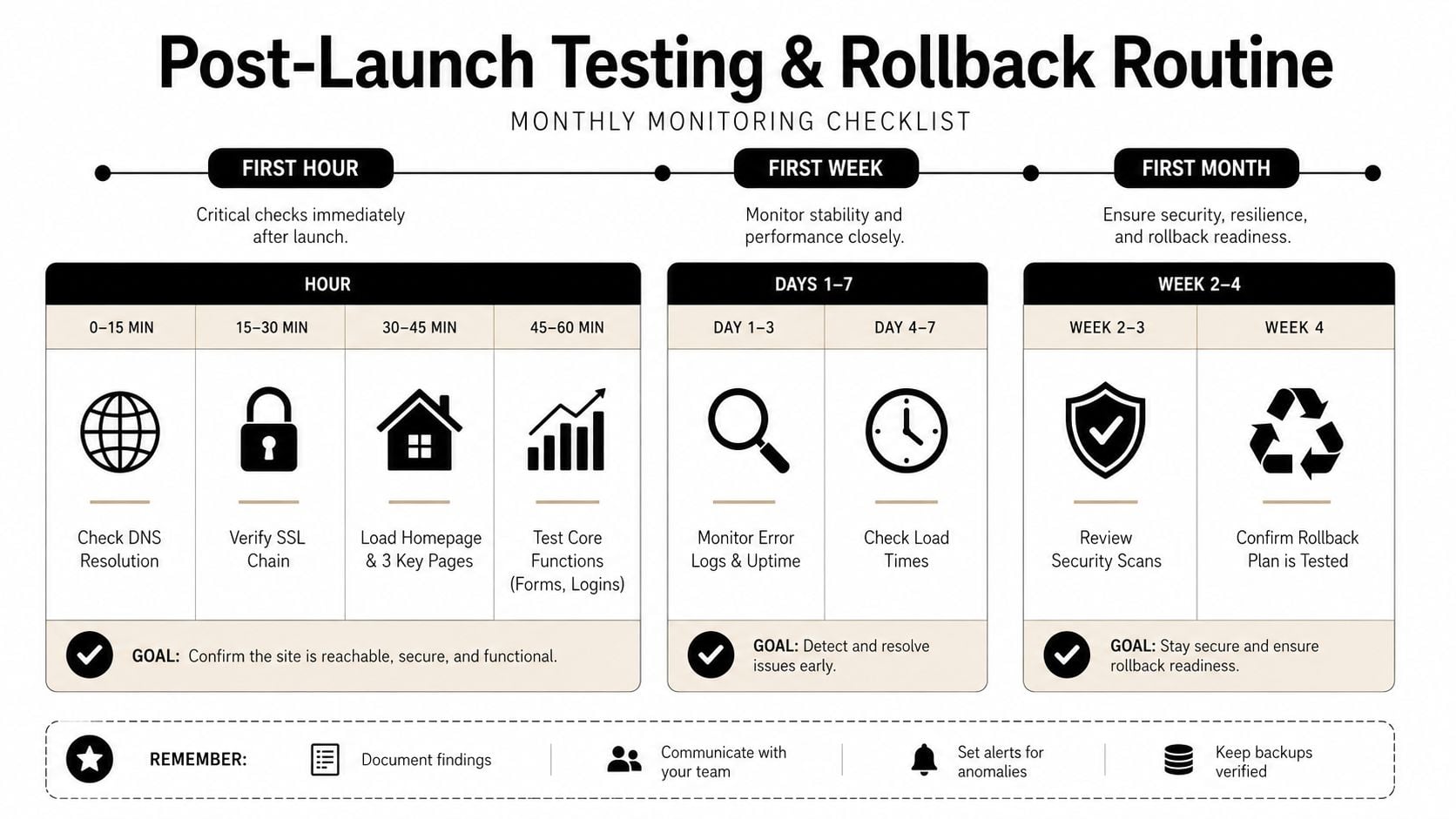
During the first hour, check DNS resolution, verify the SSL chain, and load the homepage plus three important landing pages. Test the journeys that generate revenue or enquiries, including forms, logins, and checkout. Confirm analytics records visits and conversions on the new site, and test redirects from old, high-value URLs rather than assuming the mapping works.
The first week needs active monitoring. Review crawl errors, index coverage, uptime, page speed, broken links, form delivery, and key conversion paths. Compare search and analytics data with the previous environment, then record any change that could affect revenue or search equity. Use the earlier SEO checklist for WordPress website migration as a written reference for redirects, tracking, and Search Console checks.
The monthly routine is quieter. Confirm the Search Console handover remains correct, check that important backlinks reach the intended pages, and review whether organic traffic is settling into a sensible recovery pattern. That is when you stop acting like a mover and start acting like the site owner.
Keep the old host alive long enough to act as a safety net, but not so long that nobody remembers which site is live.
Roll back the right way
If DNS points visitors to the wrong stack, revert DNS first. If the new host is corrupt, incomplete, or missing data, restore the backup. These failures need different responses. A bad content import will not be fixed by changing records, while a DNS error does not require re-uploading media.
Before launch, write the rollback trigger, owner, steps, and customer message. Keep the message factual: the site is returning to the previous environment while the fault is corrected, service remains available, and an update will follow when the position is known. Do not promise a recovery time you cannot support.
Keep an incident log with the affected URL, test performed, change made, result, and person responsible. If a live fix could disrupt customer journeys or data capture, stop experimenting and ask a developer to inspect the server configuration. DesignStack plans and delivers WordPress website migration projects with URL mapping, launch testing, and post-launch checks, useful support when the move needs coordinated ownership.