Structured Data for Small Business SEO
You've checked your Dorset business on Google, but the result looks strangely bare. Your name and blue link are there, yet a nearby competitor displays opening hours, review details, contact information, and a more useful search appearance. That difference isn't necessarily down to Google favouring them. Often, it comes from the extra information their website gives search engines through structured data.
Structured data helps search engines interpret what a page represents, from a local shop or service provider to a product, event, article, or organisation. It won't replace useful content, accurate business details, strong reviews, or a well-built website. It can, however, make those details clearer to machines and create eligibility for enhanced search features. Google recommends JSON-LD as the preferred format for structured data, alongside Microdata and RDFa as alternatives.
Table of Contents
- Why Your Competitors Look Better on Google
- What Structured Data Actually Is
- Schema Types That Matter for Small Businesses
- Adding Structured Data to a WordPress Site
- A UK-Friendly LocalBusiness JSON-LD Example
- Testing and Monitoring Your Markup
- Common Pitfalls and How to Avoid Them
- Beyond the Snippet and Your Next Steps
Why Your Competitors Look Better on Google
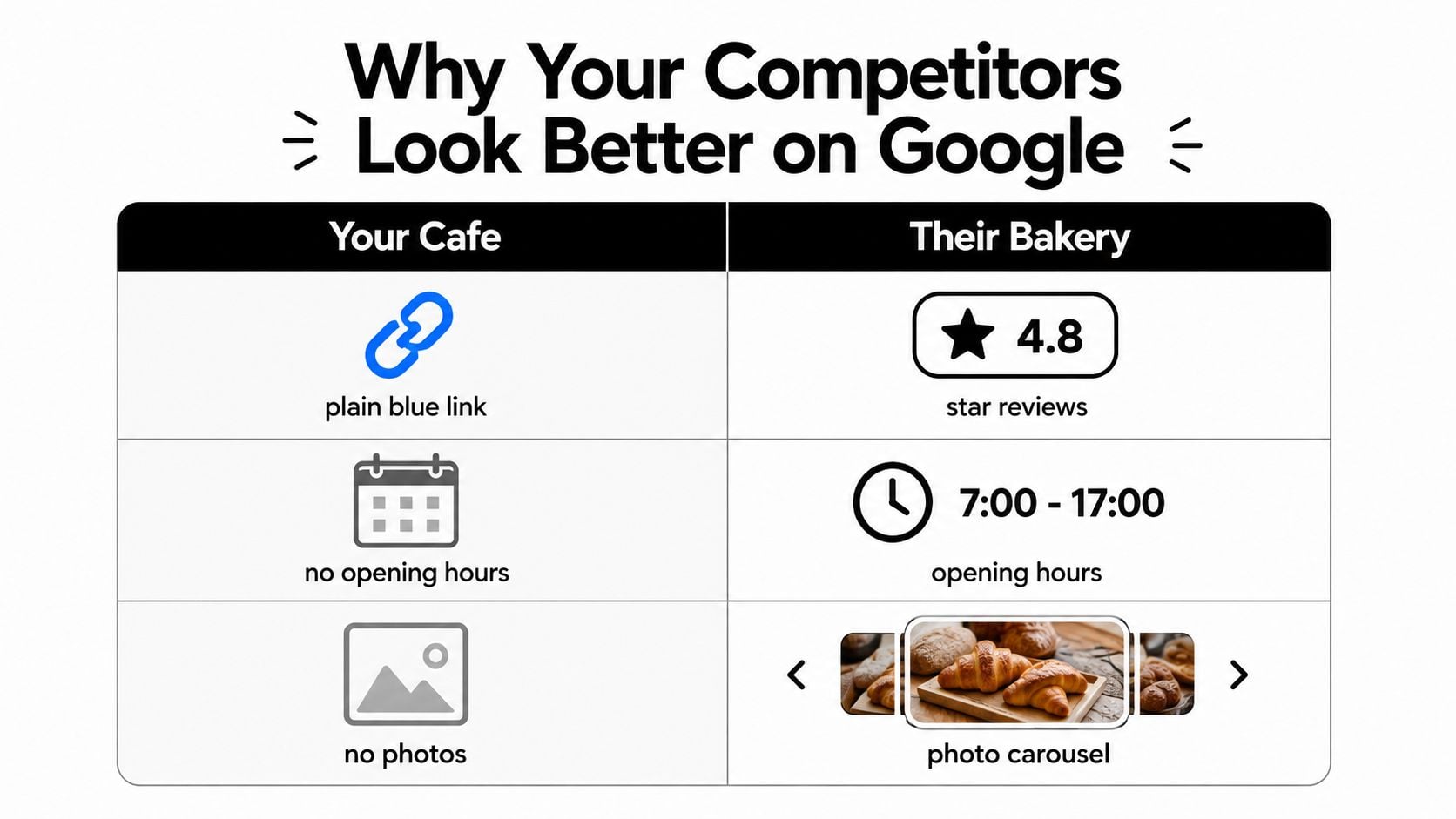
A Dorset café owner searches for their own business and sees a plain blue result. The bakery across the street appears with review information, opening hours, and richer visual elements. It's natural to assume Google has picked a winner, but the difference may be that the bakery has labelled its business information in a format search engines can process more easily.
That extra layer can describe the business name, location, telephone number, services, products, reviews, and relationships between pages. Google still decides whether to show enhanced features, and structured data doesn't guarantee a particular appearance. It gives Google clearer information to evaluate.
What it can and can't do
Structured data is often described as an SEO ranking tactic. That description creates the wrong expectation. Markup rarely moves a page to the top of the organic results by itself. It can support search appearance and click-through behaviour by helping Google understand which details might qualify for enhanced presentation.
A strong local foundation usually includes:
- A clear business identity: Use accurate organisation or local business details that match the visible page.
- Useful page relationships: Breadcrumbs can clarify where a page sits within the website.
- Relevant commercial information: Products, events, and services should only be marked up where the page contains those details.
- Consistent public information: Your website, Google Business Profile, and local listings should not contradict one another.
For a broader introduction to improving discoverability as a smaller operator, the guide on how to improve search visibility as an indie maker offers useful context. Dorset firms can also review this practical guide to local SEO for businesses before adding schema.
Practical rule: Treat structured data as a clear label for information you already publish, not as a way to hide extra claims from visitors.
What Structured Data Actually Is
Think of your website as a book in a large library. The page itself contains the useful material, but Google's crawler must work out what the title means, who produced the content, what the page is about, and which facts matter. Structured data is like a catalogue card inside the book, using recognised labels to make those relationships explicit.
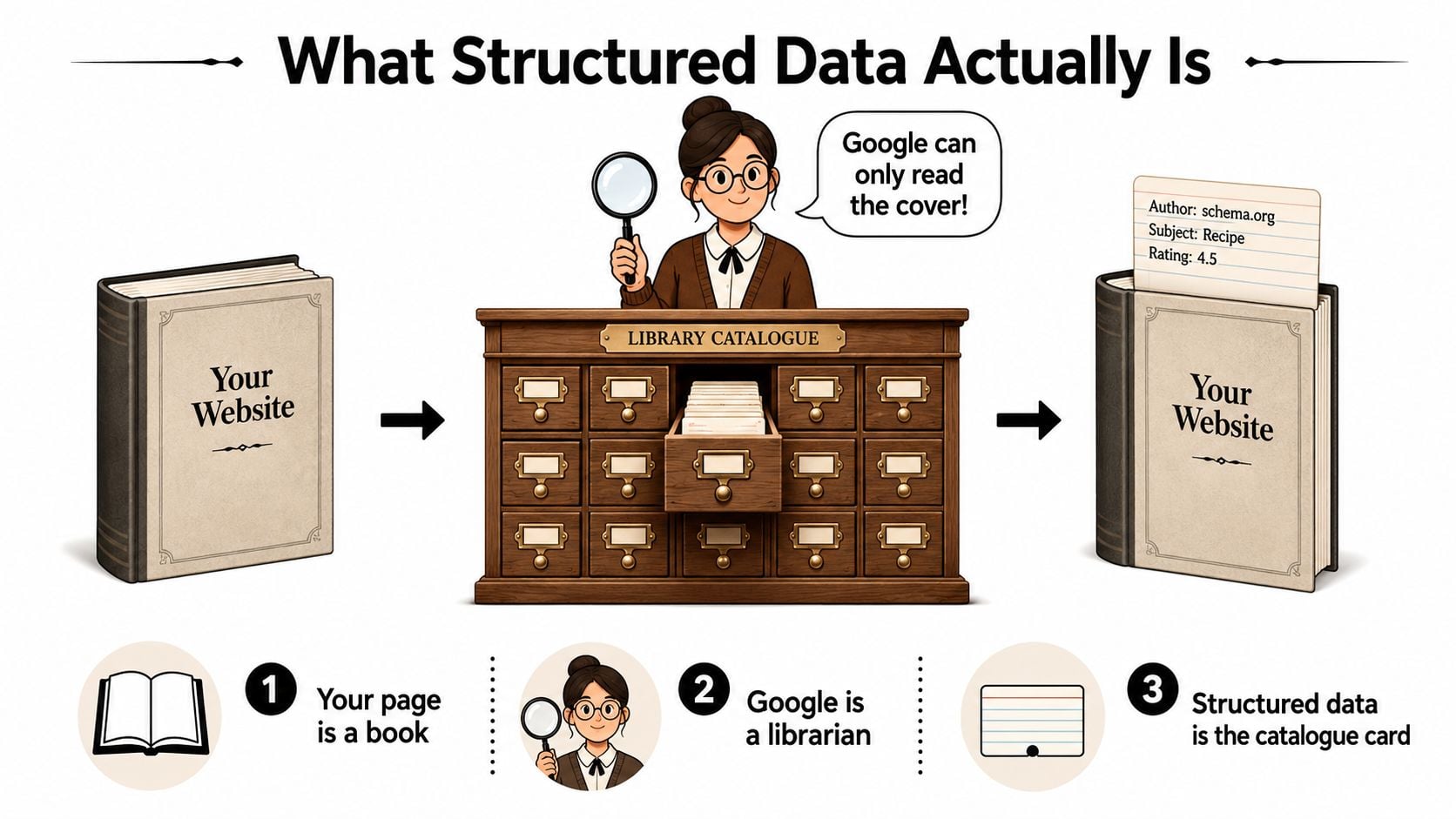
The vocabulary most websites use comes from Schema.org. A business might label its name as a business name, an address as a postal address, and a product as a product with an offer. These labels don't change what visitors see on the page. They add machine-readable context behind the scenes.
Three ways to publish the labels
JSON-LD places the information in a separate JavaScript notation block, usually within the page head or generated by a content management system. It stays independent from the visual HTML, so a developer can update the business information without weaving attributes through every visible element. Google's documentation recommends JSON-LD where it's available.
Microdata adds attributes directly to HTML elements. A visible business name, for example, might carry an attribute identifying it as the name of a business. This can work, but it ties the data closely to the page layout. A redesign can accidentally remove or damage the markup.
RDFa also uses attributes within HTML and offers a flexible way to describe relationships. It's less common in everyday WordPress implementations, so small businesses will usually encounter JSON-LD through an SEO plugin or developer-built template.
For a shop or service company, JSON-LD is normally the sensible starting point. It's easier to inspect, easier to validate, and less dependent on how the page is styled. Those building an online shop may also find this Shopify structured data guide helpful for understanding product-focused implementation. For the wider technical context, see what technical SEO means.
Schema Types That Matter for Small Businesses
Not every Schema.org type deserves a place on your website. The useful question is simple: what does this page represent, and which facts would a search engine need to identify it accurately?
A Dorset café with a physical location might start with LocalBusiness, while an online furniture shop may prioritise Product. An organisation with several services may use Organization at site level and add specific markup to relevant pages. Google's eligibility rules vary by feature, so always verify the type and properties against its current developer guidance.
| Schema Type | Search Feature | Required Properties | Best For |
|---|---|---|---|
LocalBusiness |
Business details, location, hours, and contact information | Business name and appropriate location details | Shops, cafés, salons, offices, and local services |
Product |
Product price, availability, and related shopping information | Product identity and valid offer details where applicable | Ecommerce product pages |
FAQPage |
Expandable question-and-answer presentation where eligible | Visible questions and answers that genuinely appear on the page | Service pages answering common customer concerns |
Event |
Date, venue, event details, and ticket information | Event name, timing, and location or online setting | Workshops, classes, launches, and community events |
Organization |
Organisation identity, logo, and related brand information | Name and core organisation details | Companies, charities, groups, and larger businesses |
BreadcrumbList |
Clickable page paths in search results | Ordered list items with names and page URLs | Websites with categories, services, or content sections |
Start with the foundation
For many small businesses, LocalBusiness plus BreadcrumbList gives the cleanest initial project. The first helps machines understand the organisation and its location. The second describes the website's hierarchy, which can make a result's path more meaningful than a long URL.
Layer on other types only when the page supports them. A product page needs real product information. An FAQ section needs visible questions and answers. An event page needs a genuine event. Adding unrelated types creates maintenance work and can make the site's signals less trustworthy.
Technical SEO guides such as SubmitMySaas on technical optimisation can help teams think about markup as part of a wider technical system rather than an isolated code task.
Adding Structured Data to a WordPress Site
WordPress gives you several workable routes, but the right choice depends on your skills, theme, hosting setup, and existing plugins. The biggest practical risk isn't choosing the wrong syntax. It's allowing several tools to describe the same page independently.
| Method | Skill Required | Best For | Watch Out For |
|---|---|---|---|
| Theme or child-theme JSON-LD | Developer or technically confident administrator | A controlled sitewide system | Theme changes, syntax errors, and poor deployment discipline |
| Reputable SEO or schema plugin | Low to moderate | Owners who want an interface and automated templates | Overlapping plugins and settings that output duplicate markup |
| Manual JSON-LD block | Moderate | A small number of carefully managed pages | Editing errors and accidental removal during content updates |
Choose one source of truth
A developer can add a JSON-LD block through a child theme or a small theme hook. That approach works well when the business has stable details and wants consistent output across relevant pages. Keep the data centralised so a telephone or address change doesn't require hunting through scattered code.
A plugin such as Rank Math, Schema Pro, or a suitable Yoast implementation may suit a non-developer. These tools can generate common types from fields you complete in WordPress. Review their output rather than assuming every setting is appropriate.
Manual JSON-LD can be placed through a Custom HTML block or a reusable content component, although access and sanitisation rules vary between WordPress setups. It's useful for one-off event or product pages, but less suitable for a business with frequent changes.
Before publishing, decide which system owns each type. If an SEO plugin outputs Organization and another plugin adds it again, remove one source. After every change, run the page through Google's Rich Results Test. A WordPress SEO service can help when the site has a complex plugin stack or a custom theme.
A UK-Friendly LocalBusiness JSON-LD Example
Below is a fictional example for a Dorset café. It shows the UK conventions that matter in practice, including GB for the country, an international +44 telephone number, and GBP for currency. Replace every value with information that appears accurately on your own page.
<script type="application/ld+json">
{
  "@context": "https://schema.org",
  "@type": "CafeOrCoffeeShop",
  "@id": "https://www.example.co.uk/#cafe",
  "name": "Harbour View Café",
  "url": "https://www.example.co.uk/",
  "telephone": "+44 1305 555 123",
  "address": {
    "@type": "PostalAddress",
    "streetAddress": "10 Harbour Road",
    "addressLocality": "Weymouth",
    "addressRegion": "Dorset",
    "postalCode": "DT4 8AB",
    "addressCountry": "GB"
  },
  "openingHoursSpecification": [
    {
      "@type": "OpeningHoursSpecification",
      "dayOfWeek": [
        "Monday",
        "Tuesday",
        "Wednesday",
        "Thursday",
        "Friday"
      ],
      "opens": "07:00",
      "closes": "17:00"
    },
    {
      "@type": "OpeningHoursSpecification",
      "dayOfWeek": [
        "Saturday",
        "Sunday"
      ],
      "opens": "08:00",
      "closes": "16:00"
    }
  ],
  "priceRange": "££",
  "currenciesAccepted": "GBP"
}
</script>
Reading the important fields
@context tells the parser which vocabulary you're using. @type identifies the business category. @id gives the entity a stable identifier, while name, url, and telephone connect the markup to the visible business.
The address should match the page, including the spelling of the locality and the postcode. openingHoursSpecification describes days and times in a structured way. If your hours change for bank holidays, update the visible content and markup together rather than leaving stale times behind.
You can add the block through a Custom HTML block, a header-injection tool, or a small child-theme hook. Don't mark up a price range, payment detail, review, or service that the page doesn't support. For local implementation guidance, see local SEO for small businesses.
Testing and Monitoring Your Markup
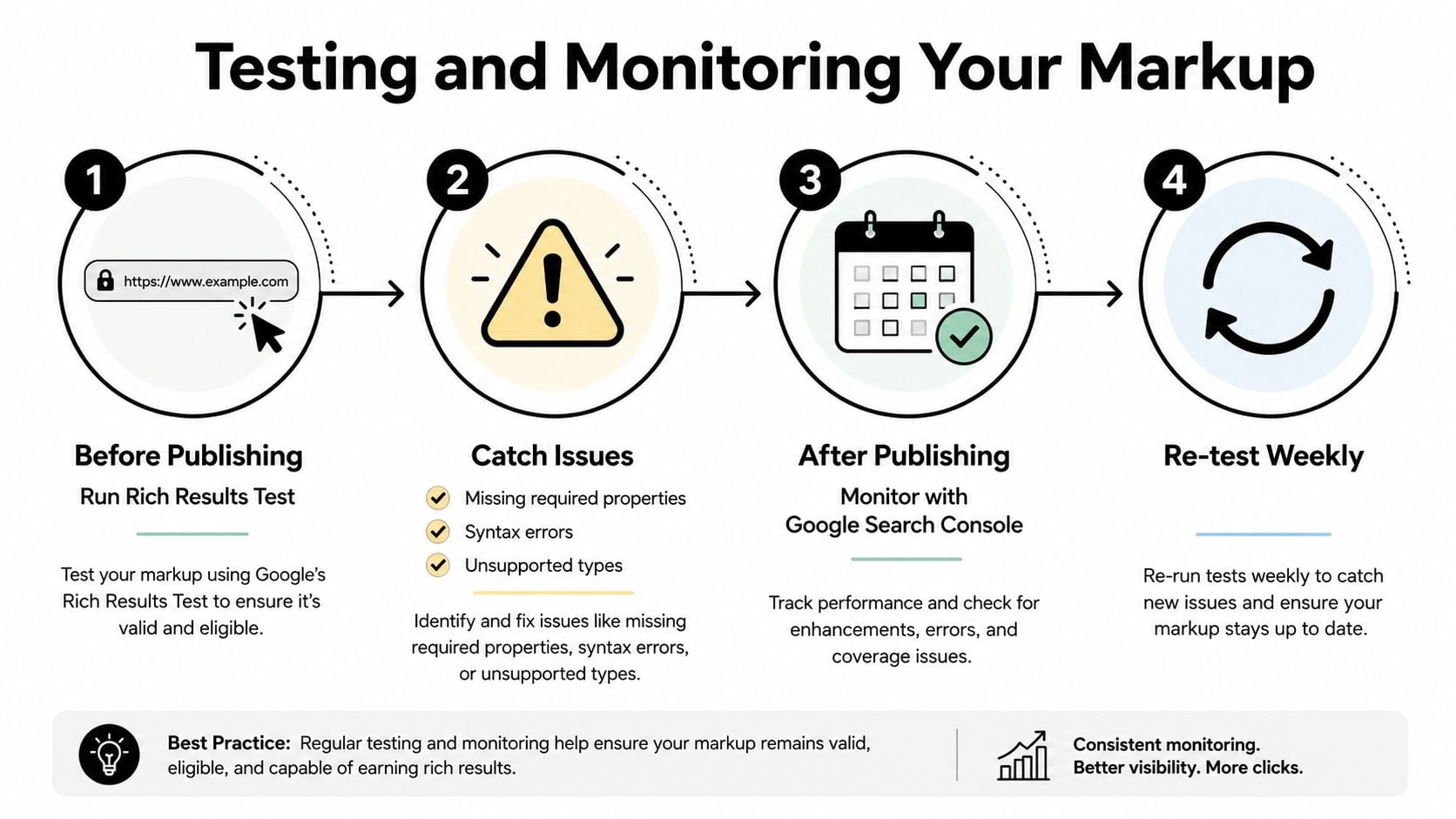
Adding code is only the middle of the job. A valid-looking script can still contain missing properties, an unsuitable type, incorrect values, or information that doesn't match the page. Use a repeatable checking process rather than publishing and hoping Google interprets it correctly.
A practical validation routine
Test the page in Google's Rich Results Test. Check whether Google can read the markup and whether the type is eligible for a supported rich result. Resolve errors before launch, then review warnings to decide which optional properties are worth completing.
Use the Schema Markup Validator for broader conformance. Google's test focuses on Google search features. The Schema.org validator can provide a wider check of the vocabulary and relationships, including types that don't currently produce a Google enhancement.
Inspect Search Console after publication. Google recommends using Search Console performance data over multiple months to compare pages before and after implementation, rather than treating an immediate change as proof of success. Watch eligible items, errors, warnings, impressions, clicks, and click-through rate for the pages you changed.
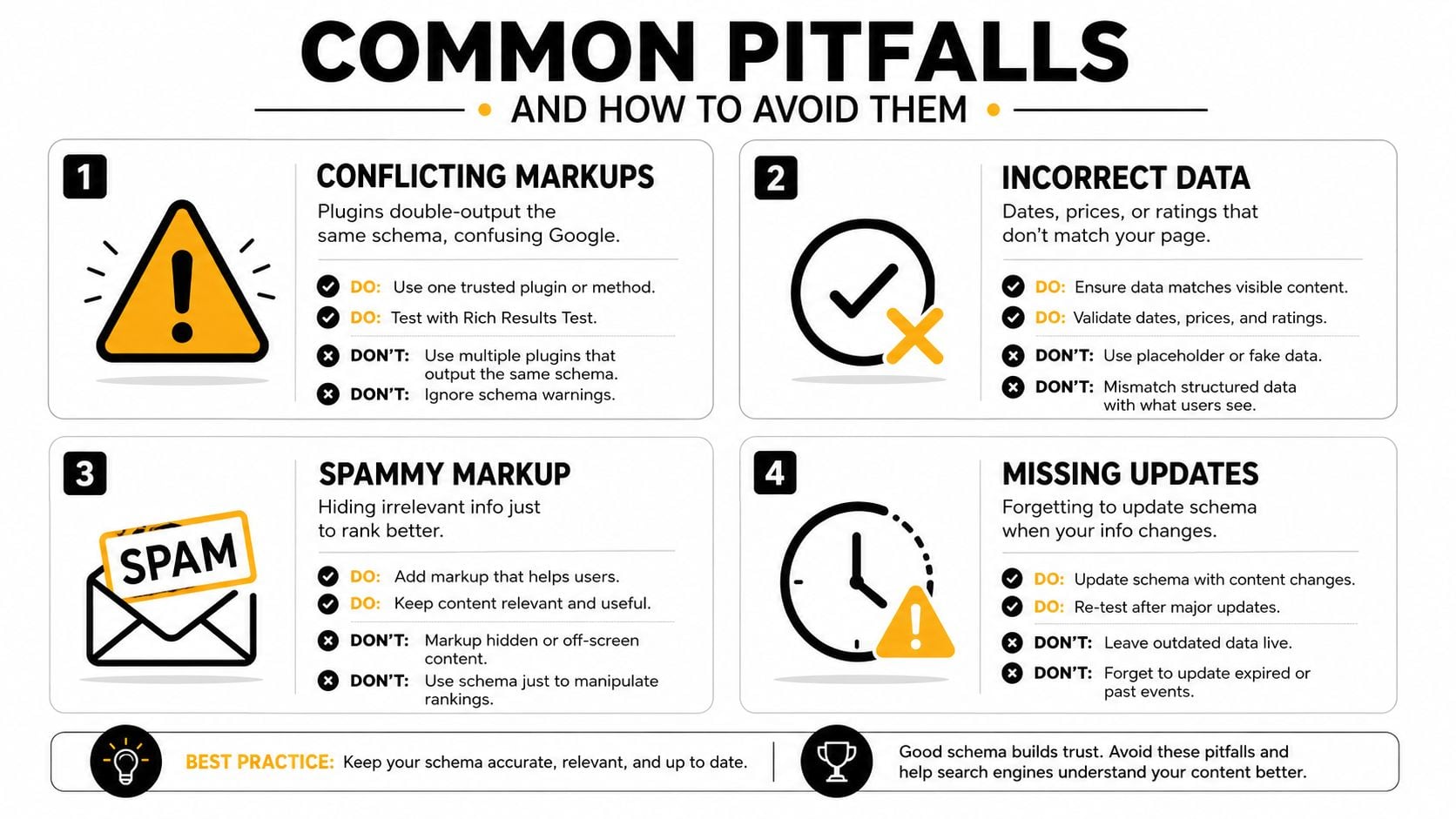
Keep the business information current. If your café changes its opening hours, your product goes out of stock, or an event ends, update the visible page and the markup promptly.
The useful pass condition isn't “Google displayed every feature I wanted”. It's no critical errors, accurate properties, and stable recognition over time. Search appearance can vary by query, device, location, and eligibility.
Here's a concise video walkthrough to use alongside the tests:
Common Pitfalls and How to Avoid Them
Many structured data problems start with a reasonable intention. The owner installs an SEO plugin, a developer adds a custom block, and a theme includes its own organisation markup. Each part may work alone, but together they can produce conflicting descriptions of the same business.
The mistakes to look for
Conflicting markups: Two plugins may output the same
OrganizationorLocalBusinessentity with different names, addresses, or telephone numbers. Inspect the rendered page and keep one authoritative output for each entity.Incorrect information: A price, opening time, rating, date, or availability status must reflect what visitors can see. Don't leave yesterday's event date or an old price in the script after updating the page.
Missing properties: A product description without a usable offer is incomplete for product-focused eligibility. An FAQ page without visible questions and answers doesn't support the meaning implied by
FAQPage.Invisible content: Don't add details solely to attract search features if visitors can't find them on the page. Marking up hidden or irrelevant information can undermine trust and create policy problems.
Canonicalised pages: If a page points search engines to another canonical URL, adding elaborate markup to the non-canonical version may not produce the outcome you expect. Put the main signals on the page you want indexed.
A quick repair sequence
Start by identifying every tool that can generate schema. Temporarily document which plugin, theme component, or custom code outputs each type. Remove duplicates, correct values against the visible page, validate the canonical URL, and then resubmit the sitemap through your normal Search Console workflow if the site has undergone substantial corrections.
The cleanest implementation is usually smaller than the first implementation.
Beyond the Snippet and Your Next Steps
Structured data makes more sense when you stop viewing it as a trick for a decorative search result. The UK has used machine-readable information as part of public publishing infrastructure for years. GOV.UK schema documentation describes the Content API as the primary interface for looking up content needed to render GOV.UK pages, and notes that some official pages expose the Dataset schema so attachments can be discovered in Google Dataset Search.
The wider data ecosystem follows the same direction. The Integrated Data Service catalog includes long-running structured datasets covering business structures, labour-market information, and mobile network travel and location data. Eurostat's UK metadata describes structural business statistics across several hundred sectors and fields such as enterprises, turnover, value added, employment, hours worked, purchases, and investment, showing why consistent fields matter for comparison and planning.
Company reporting is part of this shift too. The Financial Reporting Council's CODEx project describes UK company and organisational data collected in iXBRL format, while its digital reporting Viewer public beta improves access to structured company reporting data. The National Data Library transition announcement also describes data.gov.uk's move towards a single trusted gateway for curated public-sector data, building on its role helping people find and use open government data since 2010.
A focused 30-day plan
Week one: Check what your WordPress theme and plugins already output. Confirm your business name, address, telephone number, opening hours, and website URL, then review your Google Business Profile.
Week two: Add or correct LocalBusiness and BreadcrumbList markup. Use a child-theme implementation or one reputable plugin, not several overlapping systems.
Week three: Add Product, FAQPage, or Event markup only to pages that contain those details. Prioritise pages tied to customer decisions, such as core services, important products, and upcoming workshops.
Week four: Run the Rich Results Test and Schema Markup Validator, fix errors, and begin monitoring Search Console. For wider guidance on improving your site, use this practical resource on how to improve website SEO, then review the data over multiple months before judging performance.
Your business doesn't need to describe every possible entity on day one. It needs accurate, useful, consistently maintained information that people can see and machines can interpret.
DesignStack can audit your existing WordPress markup, remove conflicting schema, and implement a clear LocalBusiness, organisation, product, or breadcrumb structure where it fits. Visit DesignStack to discuss a structured SEO and website plan for your Dorset business.