What Is Technical SEO? a Guide for UK Businesses
Technical SEO is the process of optimising your website's infrastructure so search engines like Google can easily find, understand, and rank your content. In practice, that means making sure your pages can be crawled and indexed properly, and that your site meets key performance thresholds like Largest Contentful Paint of 2.5 seconds or less and Interaction to Next Paint of 200 milliseconds or less.
If you're reading this, there's a good chance you already have a website. It may even look good. The branding feels right, the photos are polished, and the copy says the right things. But the phone isn't ringing as often as you expected, your service pages aren't showing up in Google, and you're left wondering whether SEO means writing more blog posts or paying for ads.
A lot of small business owners hit this point. The site exists, but it's not pulling its weight.
That's usually where technical SEO comes in. It's the aspect of SEO often not observed, because it sits under the surface. But it affects whether Google can access your pages at all, whether visitors stay long enough to enquire, and whether your website supports the business instead of holding it back.
Table of Contents
- Your Website's Blueprint for Google
- Why Technical SEO Is Non-Negotiable for Growth
- The Core Components of a Healthy Website
- A Practical Technical SEO Audit Checklist for SMEs
- Essential Tools to Check Your Technical Health
- How an Agency Can Elevate Your Technical SEO
- Building a Future-Proof Digital Presence
Your Website's Blueprint for Google
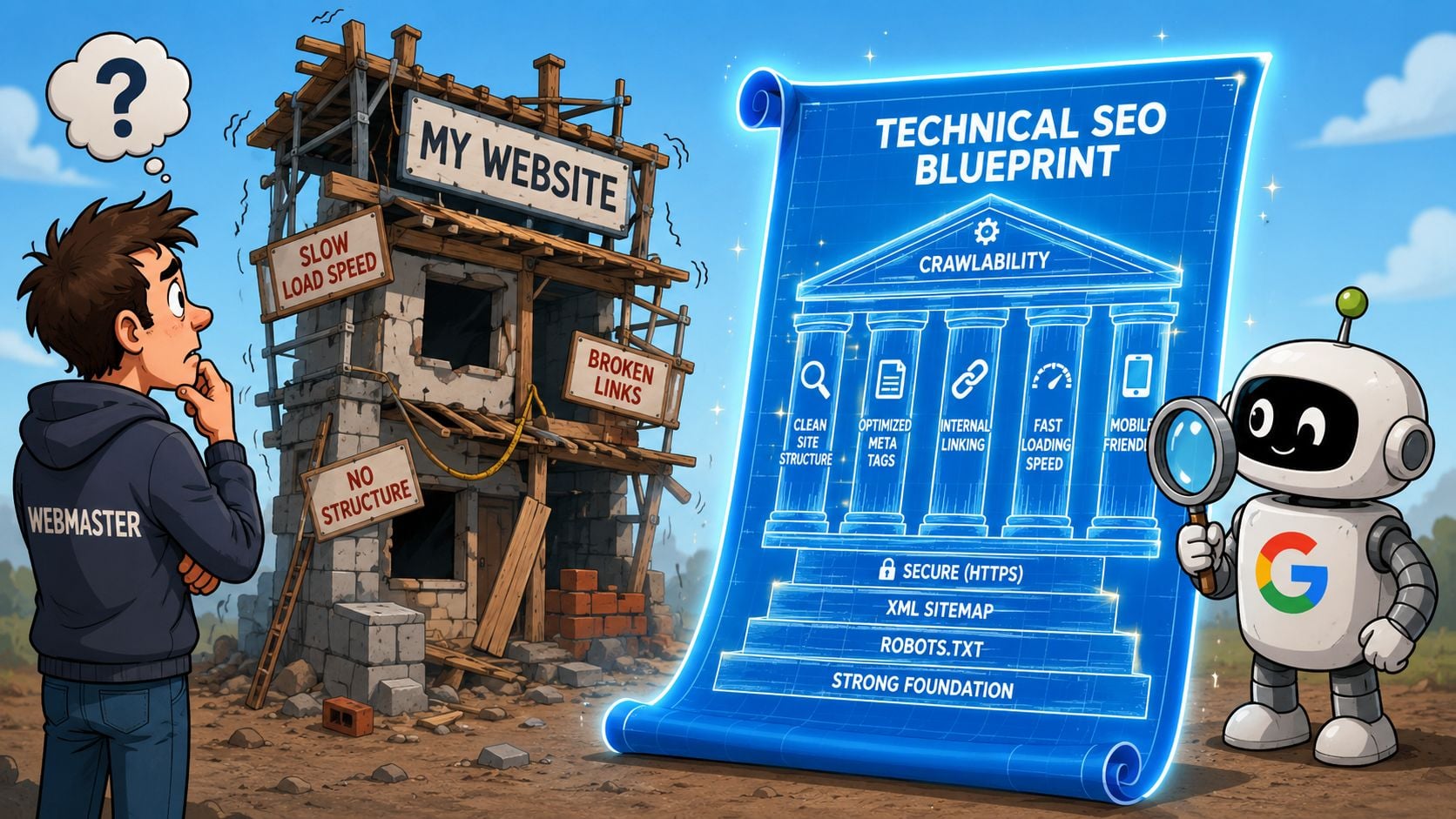
A simple way to understand technical SEO is to think of your website like a house.
Your branding, photography, and page copy are the paint, furniture, and décor. They matter. They help people feel confident in your business. But technical SEO is the foundation, wiring, plumbing, and front door. If those parts are faulty, the house might look lovely from the street, but people struggle to get in, move around, or trust it.
That's what happens with a lot of business websites. A Dorset café, local trades firm, or online retailer pays for a smart-looking site, then wonders why Google hardly shows it and why visitors drop off quickly. The problem often isn't the wording on the homepage. It's that the site structure is messy, important pages are hard to crawl, or the technical setup is sending weak signals.
What technical SEO actually means
In plain English, technical SEO is the behind-the-scenes work that helps search engines access your site properly.
That includes things like:
- Crawl access: Can Google reach your important pages?
- Clear structure: Are pages connected in a sensible way?
- Index readiness: Can search engines store the right pages in their results?
- Usability: Does the site work smoothly on mobile and load without friction?
- Trust signals: Is the site secure and well maintained?
If you've launched a fresh website, it helps to see how these basics fit into the build itself. This guide to technical SEO for new sites is useful because it connects launch decisions with later visibility.
A sitemap is a good example. Business owners often hear the word and assume it's something highly technical. Usually, it's just a file that points search engines towards the pages you want discovered. If that sounds abstract, this explanation of how to create a website sitemap makes it much easier to picture.
Practical rule: If Google can't reliably find and understand your pages, every other SEO effort becomes harder.
Why small businesses get caught out
Small firms rarely ignore technical SEO on purpose. It's usually because nobody explained it in business terms.
If your wedding venue page isn't indexed, you miss enquiries. If your product pages load poorly on mobile, you lose sales. If your location pages aren't easy to crawl, nearby customers may never see you. Technical SEO matters because it decides whether the website you paid for can do its job.
Why Technical SEO Is Non-Negotiable for Growth
A lot of people treat technical SEO like an optional clean-up job for developers. For a business owner, that's the wrong frame.
It's really about visibility first. If your site isn't technically sound, Google may struggle to crawl, render, and index pages properly. Google's own guidance says to make links crawlable, use robots.txt to control crawling, and use sitemaps to encourage crawling. For UK businesses, that matters because technical SEO is not just about rankings. It's about being discoverable at all, as outlined in Google Search Central's guidance on crawling and indexing.
That point lands hardest when you've already invested in the site. You've paid for design, copy, maybe even some SEO content. Yet the service pages you care about most still don't show. From the outside, it looks like marketing isn't working. In reality, the website may be giving Google mixed signals.
Visibility affects real business outcomes
If your core pages can't be found, they can't generate leads.
If they can be found but load awkwardly or break on mobile, people leave before they enquire.
If the site feels clunky or insecure, that trust gap can damage conversion even when the visitor likes what you offer.
Here's the business version of the problem:
| Technical issue | What the customer experiences | Likely business impact |
|---|---|---|
| Key pages not indexed | They can't find you in search | Fewer enquiries |
| Slow loading pages | They lose patience | Lost sales or leads |
| Broken internal links | They hit dead ends | Lower trust |
| Poor mobile layout | The site is frustrating to use | Drop in conversions |
Why this matters more than many owners realise
For many SMEs, the website is carrying several jobs at once. It has to act as brochure, salesperson, booking assistant, trust signal, and lead generator.
That means technical problems don't stay technical for long. They turn into commercial problems.
A page that doesn't appear in Google can't support sales. A site that feels unreliable can undermine a strong brand. A confusing structure can bury your most profitable services. If you've ever asked, “Why does my website not bring in leads?”, it's worth checking whether the underlying issue is discoverability. This guide on why a website may not show up on Google is a useful place to start.
The first SEO win isn't ranking higher. It's making sure the right pages are eligible to appear in the first place.
The Core Components of a Healthy Website
Technical SEO sounds broad because it is. But for most small businesses, you don't need to memorise every technical term. You just need to understand the main moving parts and what each one affects.
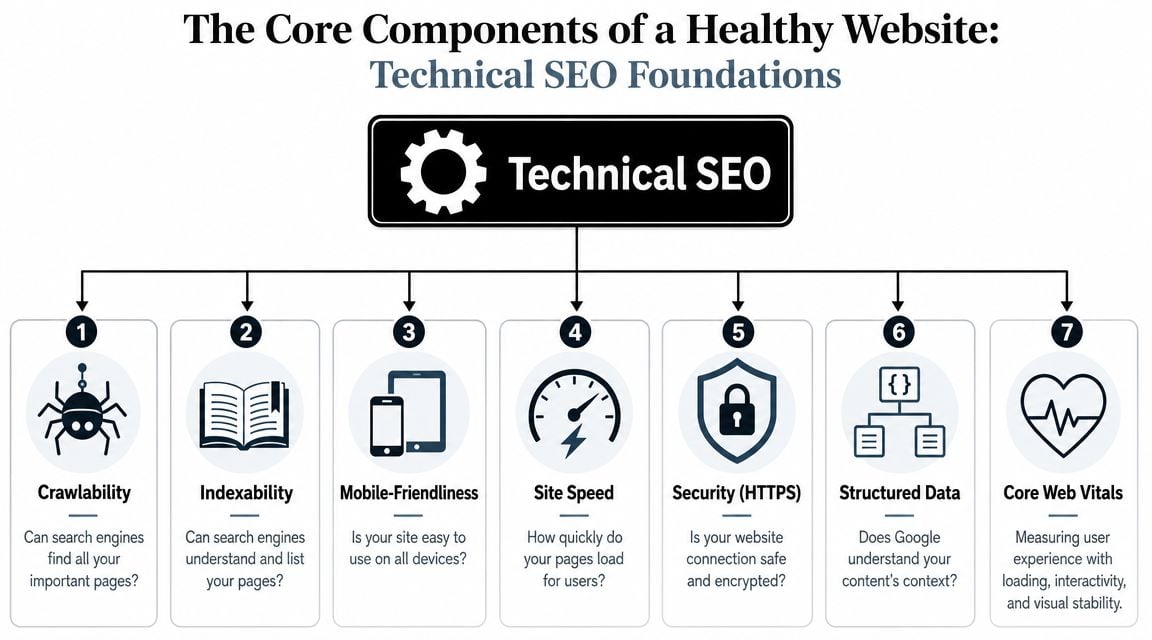
Crawlability and indexability
Think of Google like a librarian.
First, it needs to find the book. That's crawlability. Then it needs to catalogue the book so people can discover it later. That's indexability.
If an important service page has no internal links pointing to it, Google may struggle to find it. If a page is blocked or set up incorrectly, Google may find it but not keep it in the index. To a business owner, both problems feel the same. The page doesn't show up when it should.
A healthy site makes it easy for search engines to move from page to page and understand which pages matter most.
Site structure and internal links
Your site structure is like the layout of a well-organised shop.
If every aisle is clearly labelled and related items sit together, people find what they need quickly. If the layout is chaotic, visitors wander, miss important products, and give up. Search engines behave in a similar way.
Good structure usually means your main services sit near the top of the site, related pages are grouped together, and internal links guide both users and search engines logically. It also means you don't leave valuable pages isolated.
A few signs of a healthier structure are:
- Clear navigation: Important pages are easy to reach
- Relevant internal links: Pages support each other naturally
- No orphan pages: Key pages aren't left disconnected
- Simple hierarchy: The site makes sense at a glance
Speed and Core Web Vitals
Performance is one of the clearest places where technical SEO connects to revenue.
Core Web Vitals became a major technical SEO milestone because Google tied user experience to page performance. Semrush summarises the current thresholds as Largest Contentful Paint of 2.5 seconds or less, Interaction to Next Paint of 200 milliseconds or less, and Cumulative Layout Shift of 0.1 or less in its overview of technical SEO and Core Web Vitals. The same source notes that only 51.8% of websites meet recommended standards, and that a one-second mobile delay can reduce conversions by 20%.
That last point matters because business owners often see speed as a nicety. It isn't. A slow website can cost you enquiries even when the design is strong and the offer is right.
If you want a practical next step, this guide on how to improve website loading speed is a sensible place to start.
A fast page doesn't just please Google. It removes friction at the exact moment someone is deciding whether to trust you.
Mobile use and security
Most business owners already know their site should work on a phone. What they sometimes miss is that mobile performance isn't just about shrinking the layout to fit a smaller screen.
Buttons need to be tappable. Text needs to be readable. Menus need to make sense. Forms need to be easy to complete. If someone has to pinch, zoom, or fight their way through your page, they're less likely to convert.
Security works in a similar way. HTTPS tells users their connection is secure. That reassurance may seem subtle, but people notice when a site feels off. If you run an eCommerce shop, collect enquiries, or ask people to submit details, security supports both trust and usability.
Structured data
Structured data is one of those terms that sounds far more technical than it needs to.
It's extra information added to a page so search engines can understand the context more clearly. For example, it can help identify that a page is about a local business, a product, a service, or an organisation.
You don't need to become a schema expert to grasp the business value. Clearer context can help Google interpret your content more accurately. That's useful when you want your key pages to appear for the right searches, with the right meaning attached to them.
A Practical Technical SEO Audit Checklist for SMEs
You don't need to run a full developer-grade audit to spot the obvious issues. A short business-owner check can tell you whether your website is healthy, neglected, or blocking growth unnoticed.
This infographic gives a simple overview before you work through the checklist.
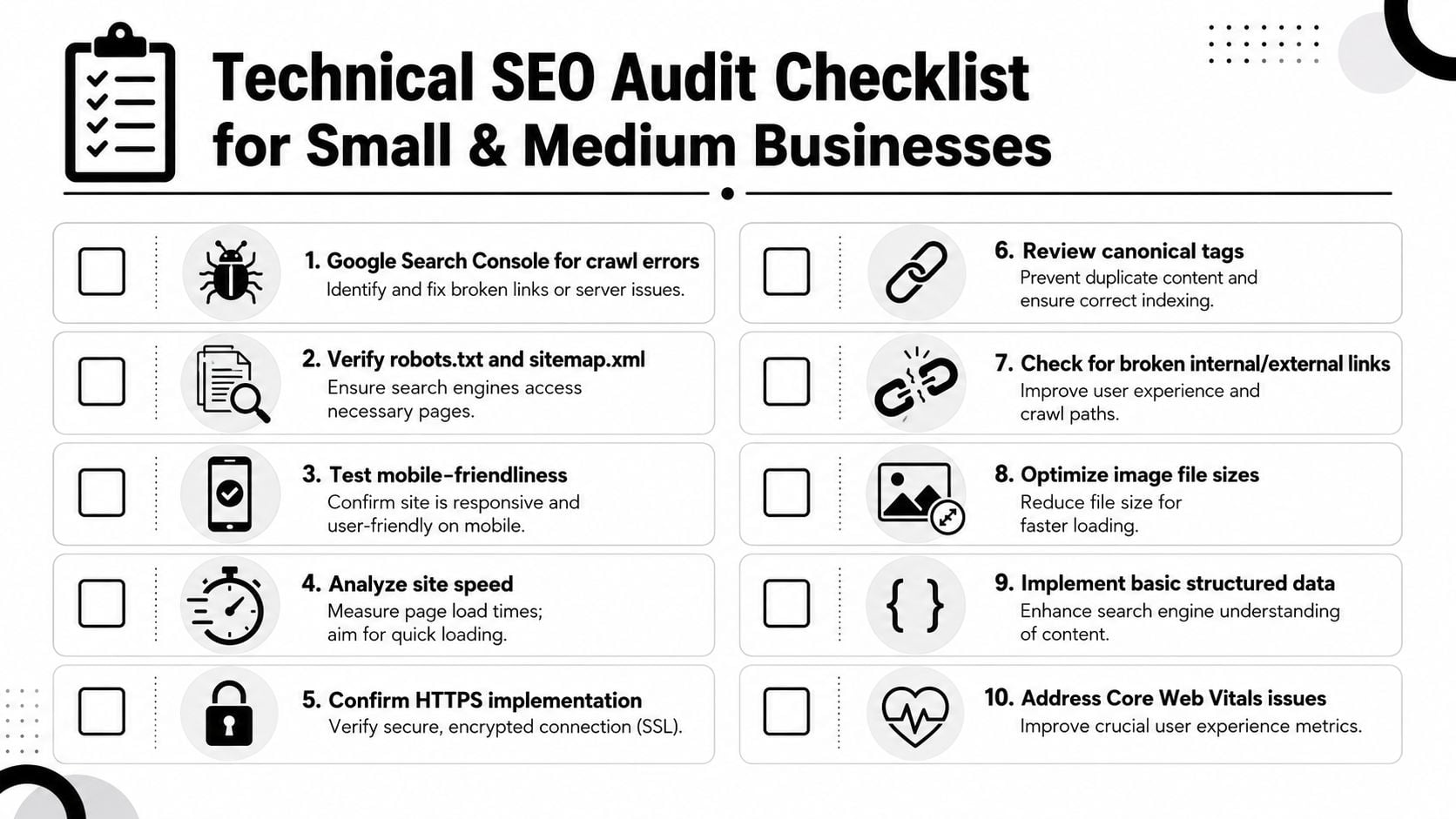
High priority checks
Start with the essentials. These are the items most likely to affect whether your pages can be found and used.
- Check whether your key pages appear in Google: Search for your brand name and your main services. If your core pages are missing, that's a red flag.
- Open the site on your own phone: Don't just glance at the homepage. Test service pages, product pages, and contact forms.
- Make sure the contact path works: Call buttons, forms, enquiry pages, and booking steps should all work without friction.
- Look for obvious indexing issues: If pages that should be visible aren't showing, you may need to investigate crawl or index settings.
A more detailed SEO checklist for new websites can help if your site is newly launched or recently rebuilt.
Medium priority checks
These checks matter because they affect user experience and search understanding, but they don't need to be solved all at once.
- Review page speed: Focus on your most important pages first, not every blog post or archive page.
- Check for broken links: Dead links waste attention and make a site feel neglected.
- Look at your navigation: Ask whether a new visitor could find your services quickly.
- Review page duplication: If several pages say nearly the same thing, Google may struggle to understand which one matters most.
Here's a simple way to prioritise:
| Priority | What to focus on | Why it matters |
|---|---|---|
| High | Indexing, mobile use, contact paths | Affects visibility and leads immediately |
| Medium | Speed, broken links, navigation | Affects trust and usability |
| Lower | Mark-up improvements, fine tuning | Helps refine search understanding |
Good to have checks
Once the basics are covered, look at the details that strengthen the site over time.
- Confirm HTTPS is active: Your site should load securely.
- Check that images aren't unnecessarily heavy: Large files often slow down key pages.
- Review basic structured data: This can help search engines interpret your content more clearly.
- Ask whether each important page has a purpose: Thin or outdated pages can muddy the overall picture.
This short video is useful if you want a visual walkthrough of common technical SEO checks.
If you only do one thing this week, check whether your main money pages are indexed, mobile-friendly, and easy to contact you from.
Essential Tools to Check Your Technical Health
You don't need an expensive software stack to start checking technical SEO. A few accessible tools can answer most of the first questions business owners have.
The screenshot below shows the place many website owners should start.
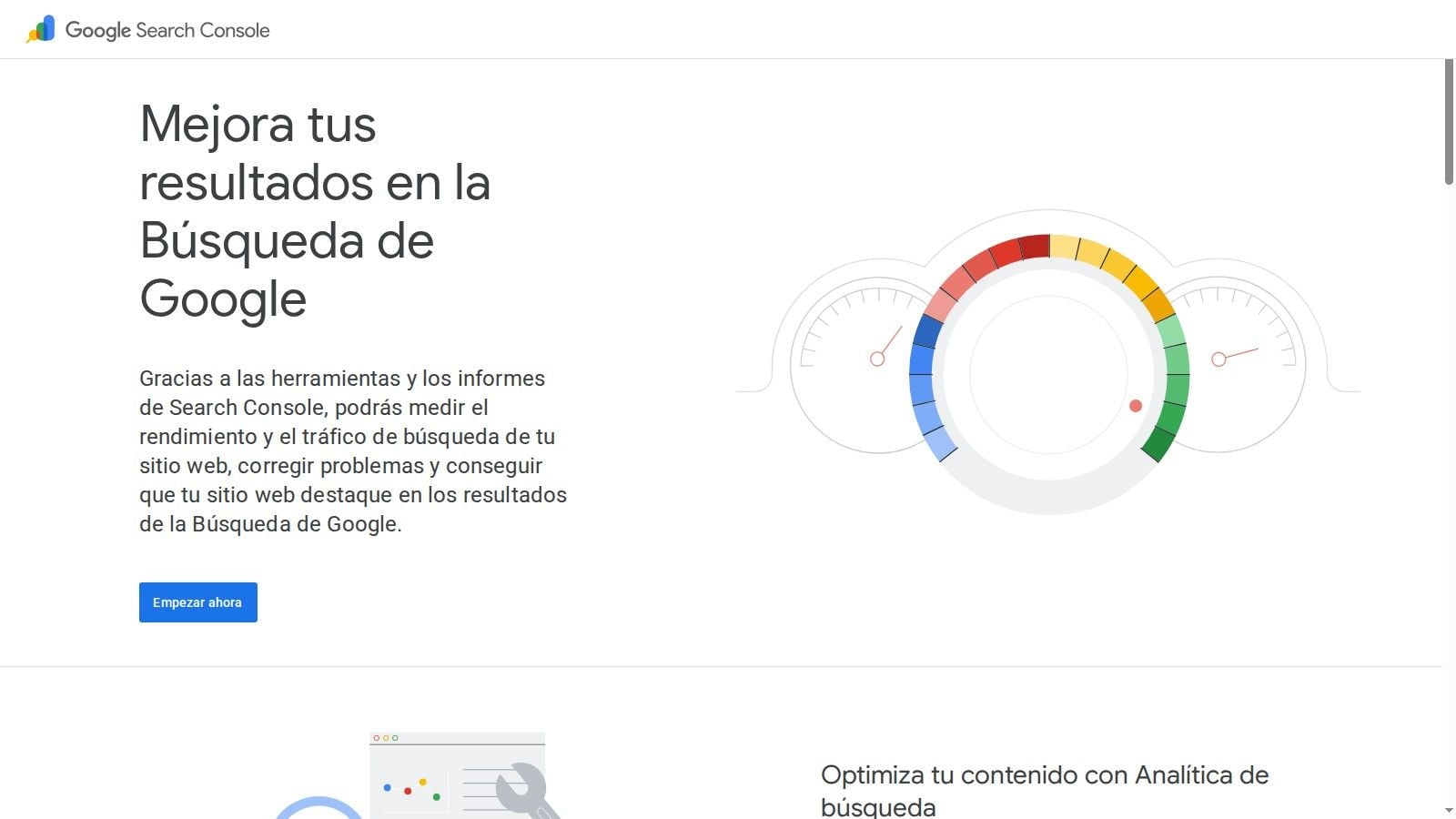
Google Search Console
If you only learn one tool, make it Google Search Console.
It's the closest thing you have to a direct line from Google about how your site is being crawled and indexed. You can see which pages are indexed, which pages have problems, and whether there are usability or performance issues worth reviewing.
The reports can look intimidating at first, but you don't need to use all of them. Start by checking indexing status, page-related issues, and Core Web Vitals. If you're already using Google Analytics for website reporting, Search Console adds the search visibility side of the picture.
Google PageSpeed Insights
This tool helps you test how a page performs and where it may be frustrating users.
Use it on your homepage, top service pages, and key landing pages. Don't get stuck chasing perfection. Look for obvious issues such as heavy images, poor mobile performance, or pages that feel slow in real use.
For business owners, the value is simple. It helps you answer, “Is this page likely to feel smooth or annoying?”
A crawler such as Screaming Frog
A crawler scans your website in a similar way to how a search engine explores it.
That makes it useful for finding broken links, missing page elements, redirect chains, and structural issues. The free version is often enough for a small site.
If you're managing a small brochure site, this may be as far as you need to go on your own. If you're running a larger WordPress setup, eCommerce catalogue, or custom platform, the findings usually need someone technical to interpret them properly. One option in that situation is DesignStack, which offers technical SEO audits and fixes covering areas such as HTTPS, page speed, crawlability, indexability, and structured data implementation.
How an Agency Can Elevate Your Technical SEO
There's a point where DIY checks stop being enough.
If your site is small, fairly standard, and hasn't changed much, you can often spot the basics yourself. You can check whether pages are indexed, see if the mobile layout feels clumsy, and identify obvious speed issues. That's useful. It helps you ask better questions and avoid neglecting the technical side altogether.
When DIY is enough
A business owner can usually handle the first layer when the tasks look like this:
- Basic checks: Is the site secure, live, and visible?
- Simple fixes: Replace broken links, compress some images, tidy navigation
- Routine monitoring: Keep an eye on Search Console for new issues
That level of involvement is healthy because it keeps your website connected to real business priorities.
When specialist help makes sense
Professional help becomes more valuable when the risks get bigger or the site gets more complex.
Examples include a full website rebuild, a domain change, a platform migration, a large eCommerce catalogue, persistent indexing issues, or performance problems that aren't solved by simple image compression. Structured data can also get more complex once you move beyond basic business information into products, reviews, or custom content types.
An agency can also help when the challenge isn't one issue, but the combination of them. A site may be slightly slow, slightly confusing, and slightly hard to crawl. Each issue looks minor alone, but together they drag down visibility and conversion.
Sometimes the real problem isn't a broken page. It's that nobody has owned the technical foundation for long enough to keep it healthy.
For many SMEs, that's the tipping point. You don't need a developer on payroll, but you do need someone who can spot what matters, fix it cleanly, and keep the site moving in the right direction while you focus on running the business.
Building a Future-Proof Digital Presence
Technical SEO isn't a one-off job you tick off after launch. It's ongoing maintenance.
Websites change. Pages get added. Plugins update. Products come and go. New service pages are published, old ones are removed, and small technical issues creep in. That's why a site can start strong and still lose visibility later if nobody checks the foundations.
The good news is that you don't need to master every technical detail yourself. You just need to understand the role technical SEO plays. It helps search engines find your pages, helps users move through the site smoothly, and helps your website support enquiries, sales, and trust.
For a small business, that's the core answer to “what is technical SEO?” It's the work that makes your website properly usable, properly visible, and properly fit for growth.
If you'd like a second pair of eyes on your website, DesignStack can help you review the technical basics in plain English and identify the issues most likely to affect visibility, leads, and user experience.