Website SEO Audit Services: What They Cover and Cost
When an audit hands you a long, automated list of warnings and no clear order of work, what have you bought?
That's the gap between a scorecard and a roadmap, and it's the difference most owners notice only after they've paid. A useful audit answers three plain questions: what's stopping search engines from finding and ranking your pages, what's stopping visitors from enquiring, and which few fixes give the best return on your budget.
This guide covers what professional website SEO audit services check, what lands in the report, how the process runs and what the different pricing models buy you. I'll be straight about where cheap audits fall short and where a bigger fee earns its keep.
Table of Contents
- What a Website SEO Audit Covers
- Technical Checks That Decide Visibility
- Accessibility and AI Checks Most Audits Miss
- What Lands in Your Audit Report
- What Audit Services Cost in the UK
- How the Audit Process Runs Week by Week
- Turning Findings Into Ongoing SEO and Redesign Work
- Choose a Local Partner and Book Your Audit
What a Website SEO Audit Covers
A website SEO audit works like an MOT. The tester ignores the paintwork. They check the brakes, the lights, the emissions and the suspension, then mark which faults would fail the test today and which can wait until next year. An audit is a structured health check of how search engines find, read and rank your pages, and how visitors use them once they arrive. Order the faults by what they cost the business, not by how many warnings a crawler printed.
A full service covers five areas. A good provider scopes all five to your goals rather than running the same template over an eight-page brochure site and a shop with 4,000 products.
| Area | What is checked | Typical evidence | Typical output |
|---|---|---|---|
| Technical | Crawlability, indexing, Core Web Vitals, redirects, HTTPS and structured data | Search Console data, a full crawl, server logs and field speed data | A prioritised fix list ranked by severity |
| On-page | Title tags, meta descriptions, headings, internal links and image alt text | Crawl export and manual page sampling | A page-by-page rewrite brief |
| Content | Match to search intent, thin or duplicate pages and gaps against customer questions | Query data and a full content inventory | A plan showing which pages to update, merge or create |
| Backlink | Quality of linking domains, spammy links and lost mentions | Backlink index export | Outreach or link clean-up recommendations where needed |
| User experience | Navigation, mobile layout, form completion and page clarity | Mobile testing, analytics funnels and session recordings where available | Usability fixes ranked by likely impact on enquiries |
Most UK adults use search engines, so an audit that only asks whether the homepage loads leaves the channel untested. Crawling, indexing, page titles, mobile usability and speed all belong in the scope. So does accessibility: can someone finish the enquiry on a phone, with a keyboard, or with a screen reader? And can an AI search tool read the page well enough to describe the offer accurately? Many templates still skip those two, and they change which fixes you fund first.
The three layers most audits are built on look like this:
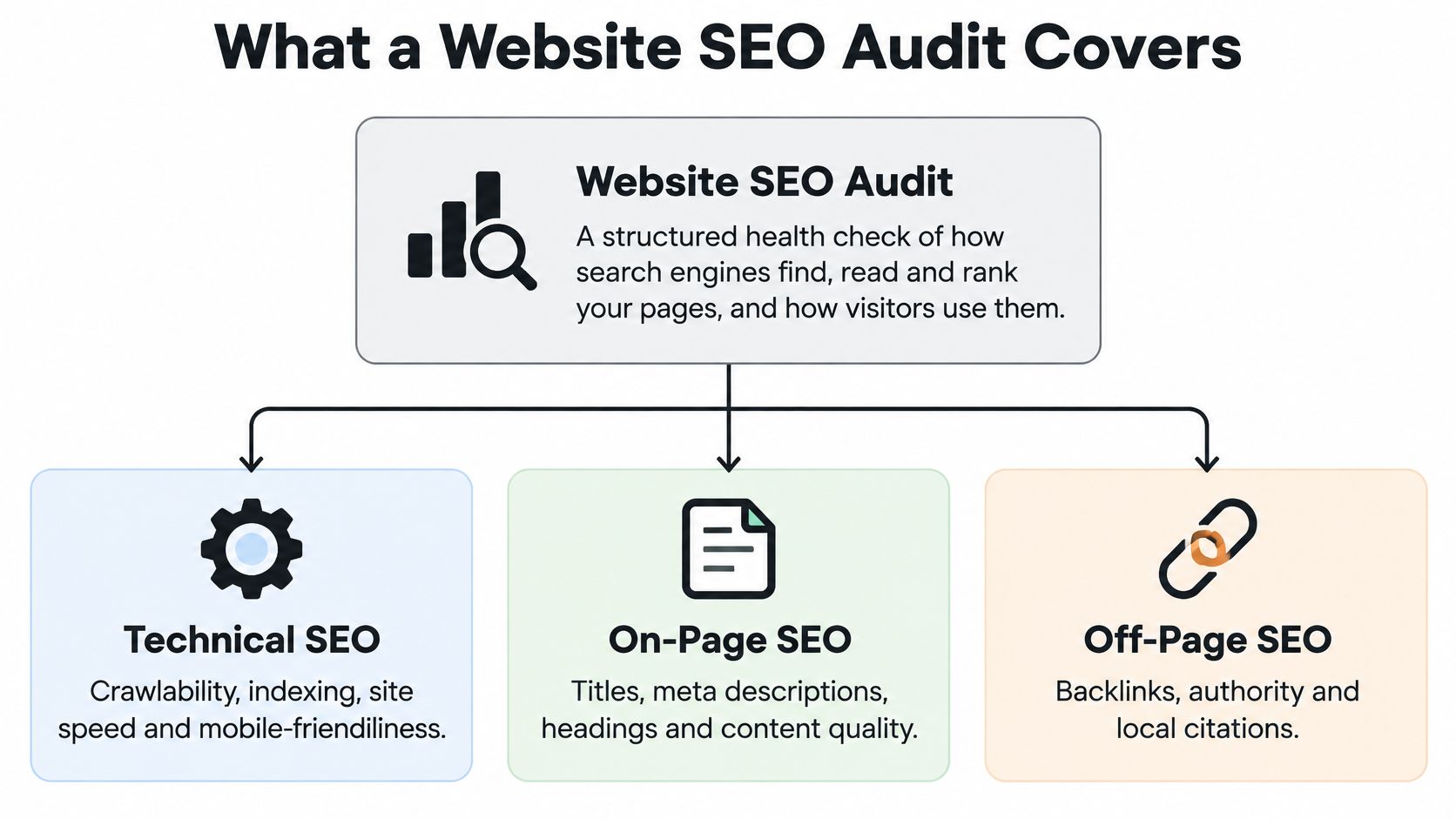
Technical, on-page and off-page work sit under those layers. The table is wider on purpose. Content quality and on-site experience decide whether a ranking turns into an enquiry. I would read the output column before any score. A rewrite brief and a short list of usability fixes you can schedule beat a long warning export nobody will action.
Scope is the decision owners skip. Log-file analysis across a million filtered URLs answers a question a five-page site does not have. A good provider says which areas it is weighting, which it is leaving light, and why that order follows your enquiries rather than a generic severity score.
Technical Checks That Decide Visibility
A single speed score tells you almost nothing you can act on. Two sites can post the same Lighthouse number while one loads instantly for a visitor in Weymouth and the other stalls on a weak rural connection.
That's why a credible technical audit triangulates three sources. A full crawl and server logs reveal blocked, orphaned, repeatedly crawled or non-indexed URLs. Search Console confirms which pages Google has indexed. Chrome User Experience Report data shows how real UK visitors experience your priority templates. This walkthrough of a Core Web Vitals audit sets out the same three-way method, and it's the right one because each source catches a failure the others miss.
The field metrics are judged against fixed thresholds, and they're worth knowing before a report lands in your inbox:
| Metric | Target threshold | What it measures |
|---|---|---|
| Largest Contentful Paint (LCP) | 2.5 seconds or less | Loading speed of the main content |
| Interaction to Next Paint (INP) | Below 200 milliseconds | Responsiveness to user input |
| Cumulative Layout Shift (CLS) | Below 0.1 | Visual stability while the page loads |
Segment Before You Prioritise
Results should be split by URL type: homepage, service page, product or category page, checkout and contact form. Pages that carry commercial value and fail in field data come first. A slow blog archive is an irritation. A slow checkout is a leak.
The Fix Order That Saves Money
Work in the sequence your visitors feel. Server response and caching come first, then render-blocking JavaScript and CSS, then image dimensions and compression, then long main-thread tasks that delay interaction. Compressing images on top of a crawling server is wasted effort, because the first problem masks the fix for the second.
Rule of thumb: if a developer offers to "do the speed work" as one job, ask which of those four layers they'll tackle first. The answer tells you whether they've done this before.
Lab scores can improve while real users still struggle, so re-test in field data after release rather than on the day you ship. If you want the groundwork before commissioning anything, our explanation of what technical SEO actually involves covers the fundamentals in plain English.
Accessibility and AI Checks Most Audits Miss
Can a visitor use your site with a keyboard, and can AI systems identify what your business offers? An audit that misses either question risks overlooking barriers for customers and unclear signals about your business.
A contrast or structure problem can look like this:
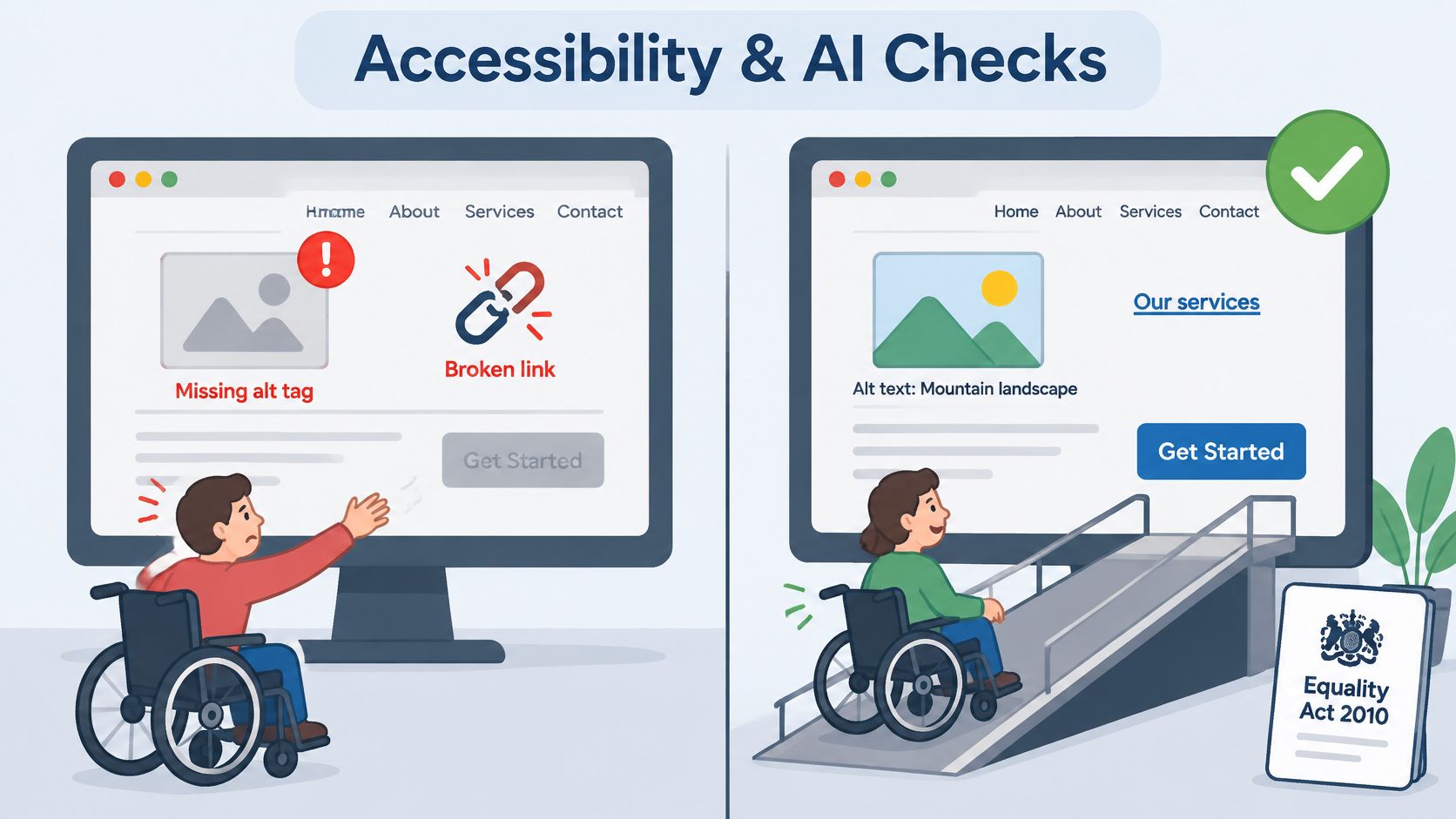
UK guidance says businesses providing services to the public have a duty under the Equality Act 2010 to make reasonable adjustments for disabled people. It also identifies WCAG 2.2 AA as a useful target beyond public-sector websites (One.com's website accessibility guide). Automated checks can flag some issues, but they cannot establish whether a keyboard user can complete an enquiry or whether a screen reader announces a price table clearly.
Check focus order, form labels and error messages, heading sequence, colour contrast and image alternatives. Alt text should convey an image's meaning where it matters, rather than describe a decorative graphic or repeat a file name. A contact form that cannot be completed by keyboard users deserves attention before a minor issue with a decorative image.
These checks also overlap with search: descriptive headings, useful link text, clear navigation and accurate image descriptions help people and search systems understand a page.
AI discoverability is another audit check. The practical questions are whether AI tools can identify your business, location and services correctly, and whether important details such as prices and FAQs are clearly structured. For a sector-specific example, see this guide to auditing law firm AI visibility. Treat experimental suggestions such as llms.txt cautiously; they are not guaranteed fixes.
An audit should turn these findings into priorities, balancing customer access and clear information against the cost and effort of each change. For more on the relationship between accessibility and search, see this guide to a website accessibility audit.
What Lands in Your Audit Report
A report isn't a PDF to file. It's a set of working parts, and each part answers a different question for a different reader.
| Report part | What it contains | Why it matters |
|---|---|---|
| Executive summary | Top five issues and their expected business impact | Lets owners decide quickly where to spend |
| Findings log | Each issue with affected URL pattern, severity and evidence | Shows exactly where the problem sits |
| Recommended fix | Code or CMS change written for the developer or editor | Removes guesswork from implementation |
| Priority roadmap | Fixes grouped into quick wins, medium work and major projects | Matches the work to budget and timescale |
| Validation criteria | What success looks like after release, such as indexed pages or passing field metrics | Proves the fix worked |
Read the executive summary first and check it names money, enquiries or visibility. If it opens with "missing meta descriptions" and no commercial framing, the report was written for a search engine, not for you.
The findings log is the core. Every entry should carry the URL pattern affected, a severity rating, the evidence (a screenshot, a log entry, a Search Console export) and one sentence on what breaks if it stays unfixed. That structure is what lets an editor fix a title tag on Thursday without ringing anyone. Indexation and structured data belong here rather than in a separate appendix, because an accidental noindex, a conflicting canonical or JavaScript-only navigation keeps valuable pages out of Google's index entirely, and invalid schema removes eligibility for enhanced results instead of adding it (Matrix Bricks on SEO audits).
The most common report failure isn't a missing finding. It's a finding nobody can act on because the evidence stops at "page speed is poor".
For a Dorset business serving local and national customers, the log should also check consistent business name, address and telephone details across the site, clear service areas, and local landing pages that stand apart from duplicate doorway pages. Validate Product, LocalBusiness, Service or Review markup only where that information appears on the page. Once the fixes are live, analytics for your website is how you confirm the enquiries moved, not just the rankings.
What Audit Services Cost in the UK
I'm not going to invent a price for you here, and you should treat any article that leads with a firm figure and no scope with suspicion. Quotes vary with page count, template complexity, whether implementation support is included and how much of the work is manual review against automated export.
What varies less is the shape of the market. Four models cover most of what UK businesses buy:
| Model | Best for | What you get |
|---|---|---|
| One-off audit, small site (under 50 pages) | Sole traders and local shops | Crawl, prioritised findings and a summary call |
| One-off audit, mid-size or eCommerce site | Growing firms and online shops | Full technical and on-page review with a written roadmap |
| Audit plus action plan | Businesses without in-house developers | Audit with detailed fix specifications and a follow-up review |
| Enterprise or multi-site audit | Large catalogues or several domains | Audit segmented by site section, with workshop sessions |
| Monthly SEO retainer | Businesses wanting continuous monitoring | Ongoing checks, reporting and implementation support |
The trade-off is between a list and a plan. A cheaper audit often gives you findings in a spreadsheet and leaves the fixes to you. A more expensive one adds fix specifications written for a developer, plus a review once the changes are live. If your site is built on WordPress with a handful of templates, the second option usually pays for itself in avoided developer hours.
We build websites at a fixed cost, and I'd argue it's fair to hold an audit to the same standard. Ask for a fixed fee against a defined scope in writing, including what happens if the crawl turns up three times the pages you expected.
The first question to ask any provider isn't the price. It's what happens after the report is delivered. An audit with no route to implementation tends to sit in a folder, and the issues it found are still there a year later. Our WordPress SEO services exist mainly because that gap is so common.
How the Audit Process Runs Week by Week
The process is more predictable than the price. Five stages cover it, and you'll recognise the shape of a well-run job:
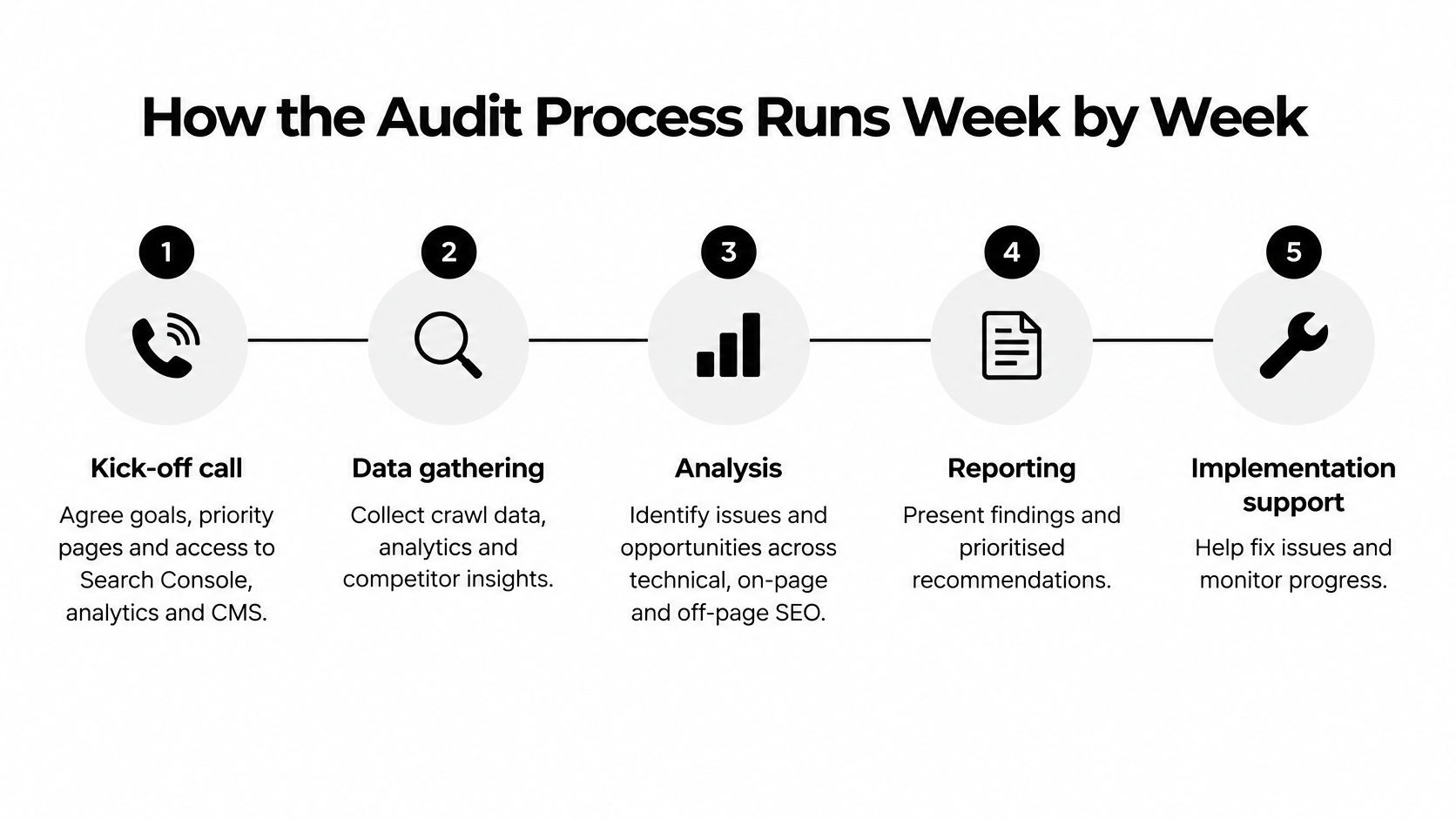
- Kick-off call. Agree goals, priority pages and the commercial outcomes you want. You'll need to provide Search Console access, analytics and CMS logins, plus a list of your key services.
- Data gathering. A full crawl, server logs and field speed data are collected. Send your current sitemap and flag any pages running paid campaigns so they're treated carefully.
- Analysis and triage. Findings are scored by severity and business impact, then grouped. Expect a short conversation here about which issues you're happy to live with.
- Report and walkthrough. The findings are explained, questions get answered and the roadmap is agreed. This is the meeting worth attending in person.
- Fix sprint. Agreed changes are made and checked, either by your developer or by the audit team. Someone on your side needs to approve copy and template changes.
- Re-test and validation. Results are measured against the success criteria set in the report. Access to analytics stays open so the numbers can be compared like for like.
For a small brochure site, a week or two of analysis is typical. A mid-size or eCommerce site with thousands of URLs takes longer, often three to four weeks, and the fix sprint adds days or weeks on top depending on developer availability.
Delays rarely come from the analysis. They come from slow access approvals, so send logins on day one. If your site sits with an agency or a former developer, ask them for Search Console access the same day you commission the audit. A good process from the client side looks like this:
A good kick-off call ends with a short written list of agreed priorities: the three to five pages that matter most and the two or three outcomes you'd judge success by. Everything after that should map back to those.
Turning Findings Into Ongoing SEO and Redesign Work
An audit is most useful as the start of a cycle rather than a document with a completion date. Two routes follow it, and the findings usually make the choice obvious.
The first is ongoing SEO. Quick wins get fixed in the first month, medium projects are scheduled across the next quarter, and the audit is repeated every six to twelve months or after any platform change. The second is a redesign, chosen when the audit shows that structure, templates or the CMS itself are the root cause and patching will keep failing.
Here's the test I'd apply. If more than a third of your high-priority fixes need new templates, plan a redesign. If fewer do, patch, monitor and re-audit in six months. That single ratio stops owners from buying a rebuild they didn't need, or pouring money into a theme that can't support the work.
The competitive case for doing this properly keeps strengthening. The UK Government's Business Data Survey 2026 found that 78% of businesses said they had a website in 2025-26, up from 68% in 2023-24, with 76% of sole traders reporting one. Having a site no longer differentiates you. Being findable, fast and clear does.
Where a rebuild is the answer, the audit becomes the requirements document, and the redesign is measured against the same validation criteria as the original fixes. We include three rounds of design changes as standard on redesign projects, which suits this approach: the audit tells you what the new templates must do, and the revisions close the gap between the brief and the build. Keep a running list of deferred findings either way, so the next audit starts from evidence instead of memory.
Choose a Local Partner and Book Your Audit
Choose an audit provider by checking how they define the work, price it and handle implementation. Ask what pages are included, how findings will be prioritised and which checks will confirm that fixes have worked. A useful audit should give you a business roadmap, not just a score.
Accessibility and AI discoverability also deserve clear answers. Ask whether the review examines how people using assistive technology access your site and how clearly its content can be understood by AI systems.
A local partner can bring knowledge of the area's search context, while a remote provider may suit you just as well if the scope and communication are clear. DesignStack performs SEO audits and combines content, technical work, social media, paid promotion, research, content creation and organic SEO. The agency works with businesses across Dorset. Its SEO services in Bournemouth page provides more information about its search offering.
Before contacting a provider, gather access to Search Console, your current sitemap and a list of your five most important pages. These help define the audit's scope and keep the conversation focused on the pages that matter to your business.
For a plain-English review of what may be holding your site back in Google and AI answers, get in touch with DesignStack to talk through your website.