What Is WooCommerce? a Plain-English Guide for UK Shops
WooCommerce is a free, open-source plugin that adds online-shop functions to a WordPress website. It powers a large share of UK online shops, and the store's running costs and upkeep remain with its owner. So why do explainers call it “free” and leave it there?
Free describes the software licence, not the cost of running a shop. Hosting, security, backups, paid extensions and resolving checkout problems all need attention from the person responsible for the store.
That ownership is the key to understanding WooCommerce. Once the shop is live, you decide who handles its upkeep, security and tax responsibilities. The sections ahead explain what the system adds, how orders move through it and what to consider before choosing it.
Table of Contents
- What WooCommerce Is in Plain English
- What WooCommerce Adds to Your WordPress Site
- How One Order Moves Through the Store
- Who Uses WooCommerce and Where It Fits Best
- Pros and Cons Compared With Hosted Platforms
- Who Pays for Hosting, Security and Upkeep
- Selling Across UK and EU Borders Without Surprises
- Deciding Whether WooCommerce Suits Your Business
What WooCommerce Is in Plain English
Picture your website as a shop building. WordPress is the building itself: the walls, the windows, the signage outside, the layout inside and the noticeboard by the door where you pin up news. It gives you pages, posts, menus and a design. What it doesn't give you is a way to take money.
WooCommerce is what you fit inside. It's the till, the shelving, the stockroom, the card machine and the checkout counter. Install it and the same website that published your news can list products, take payments and email receipts.
The distinction matters more than it sounds. WooCommerce isn't a rented store builder. There's no monthly platform fee and no company sitting between you and your product data. The shop lives on hosting you choose, in a database you can export, under a design you control. You own the shop, and you also own the jobs that come with owning one.
Four words come up constantly, so here they are in plain English:
- Product: a single item you sell, with a photo, description, price and any variations such as size or colour.
- Cart: the running list of what a shopper has chosen so far, held while they keep browsing.
- Checkout: the page where they enter a delivery address and pay.
- Order: the permanent record of a sale, which appears in your dashboard and triggers the confirmation email.
One thing to get straight early, because it's where most newcomers get caught out: the software is free, the shop isn't. A domain name, hosting, an SSL certificate and any paid extensions each carry a cost, and those are the numbers that decide whether WooCommerce is cheaper for you.
That's the basic idea, and you now have the vocabulary for everything that follows.
What WooCommerce Adds to Your WordPress Site
Once the plugin is active, the change a shopper notices is simple: the site has products, a basket and a checkout. The change you notice is a dashboard full of orders, stock counts and settings. The diagram below shows how those pieces sit on top of the WordPress site you already have.
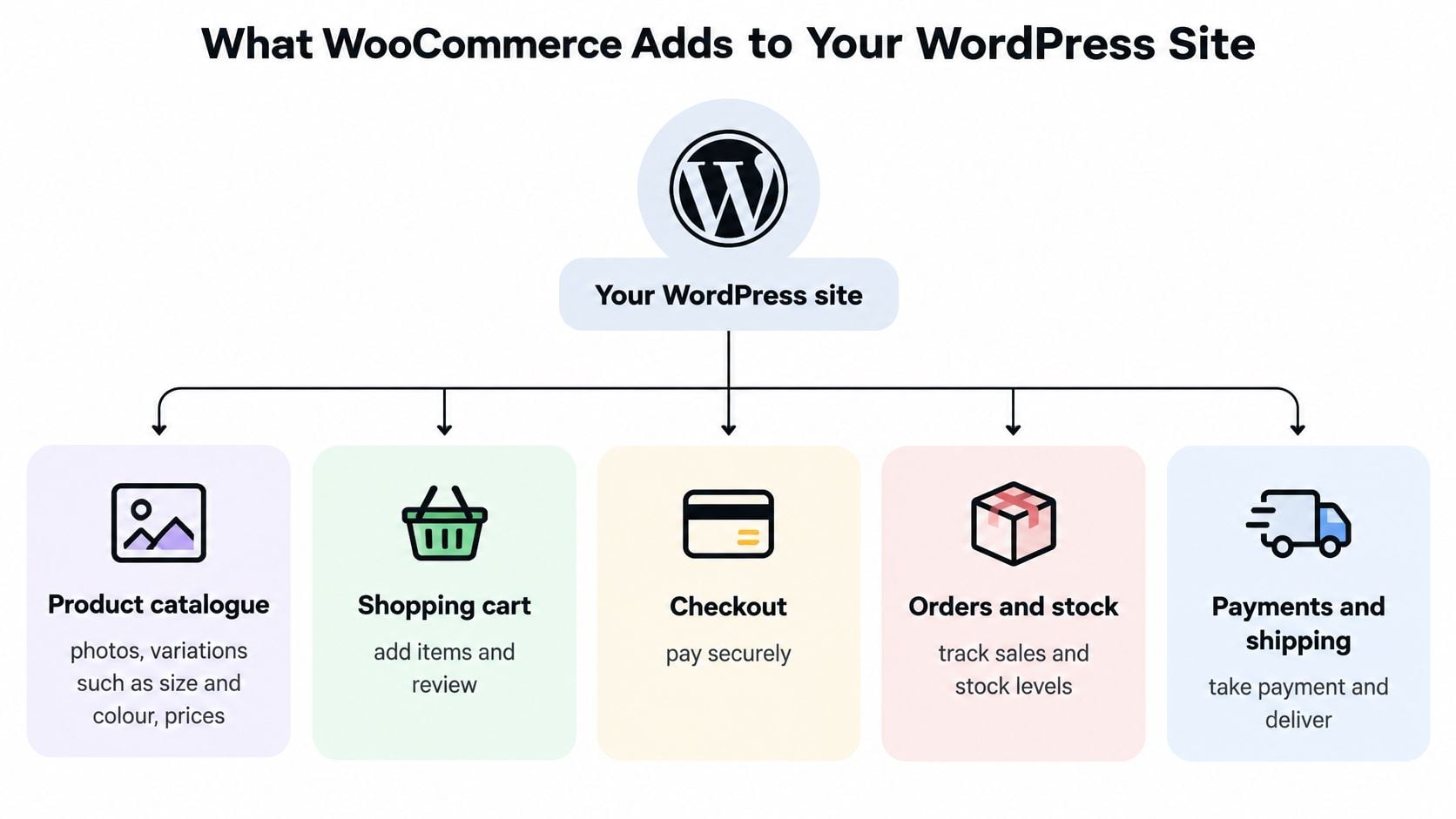
Take a candle shop with three scents in two sizes. Six variations, one small catalogue, and every feature below earns its place.
| Feature | What it does | Plain-English example |
|---|---|---|
| Product catalogue | Lists items with photos, variations and prices | A candle shop with three scents in two sizes |
| Shopping cart and checkout | Collects items and delivery details, then takes payment | A customer pays by card or PayPal |
| Stock management | Reduces quantities after each sale and flags low stock | Stops selling the last jar once it is gone |
| Shipping and tax settings | Applies delivery rates and VAT rules by region | A Dorset rate and a Highlands rate, with VAT set by delivery country |
| Order administration | Shows orders, refunds and customer emails in one dashboard | Printing a packing slip for a Tuesday order |
| Extensions | Add subscriptions, bookings or advanced shipping | A monthly candle subscription box |
The catalogue is where most of the setup time goes. Each variation carries its own photo, price and stock count, so six variations means six stock records. Underneath, products are a WordPress content type, which is why a product page can reuse the same template as your blog.
Cart and checkout hand the shopper from browsing to paying. The card details go to a payment gateway such as Stripe or PayPal, not to your server.
Stock management keeps you honest. Sell the last amber jar and the count drops to zero, so the shop stops taking orders for something you can't post.
Shipping and tax is the row that trips people up, because it needs decisions about geography. A candle posted to Dorchester and one posted to Dublin are two different transactions once VAT and delivery rules apply.
Order administration turns each sale into a record with the buyer's address, the items, the payment status and any note they left. Refunds and confirmation emails come from the same screen.
Extensions supply nearly all the extra behaviour: subscriptions, bookings, trade pricing, advanced shipping tables. They're also where ongoing costs accumulate. The Store Leads UK report shows how broad that use has become, with Home & Garden at 15.8% of UK WooCommerce stores, Business & Industrial at 8.4% and Food & Drink at 7.1%.
For day one, you need the catalogue, the cart, checkout, stock counts and a payment method. Everything else can wait until a customer asks for it. If you're weighing up the content side of the platform, why use WordPress to build a website explains the publishing and SEO argument that sits behind most WooCommerce builds.
How One Order Moves Through the Store
A single order passes through five stages, and each one depends on the last. Here's the journey for one amber candle in a 200g jar.
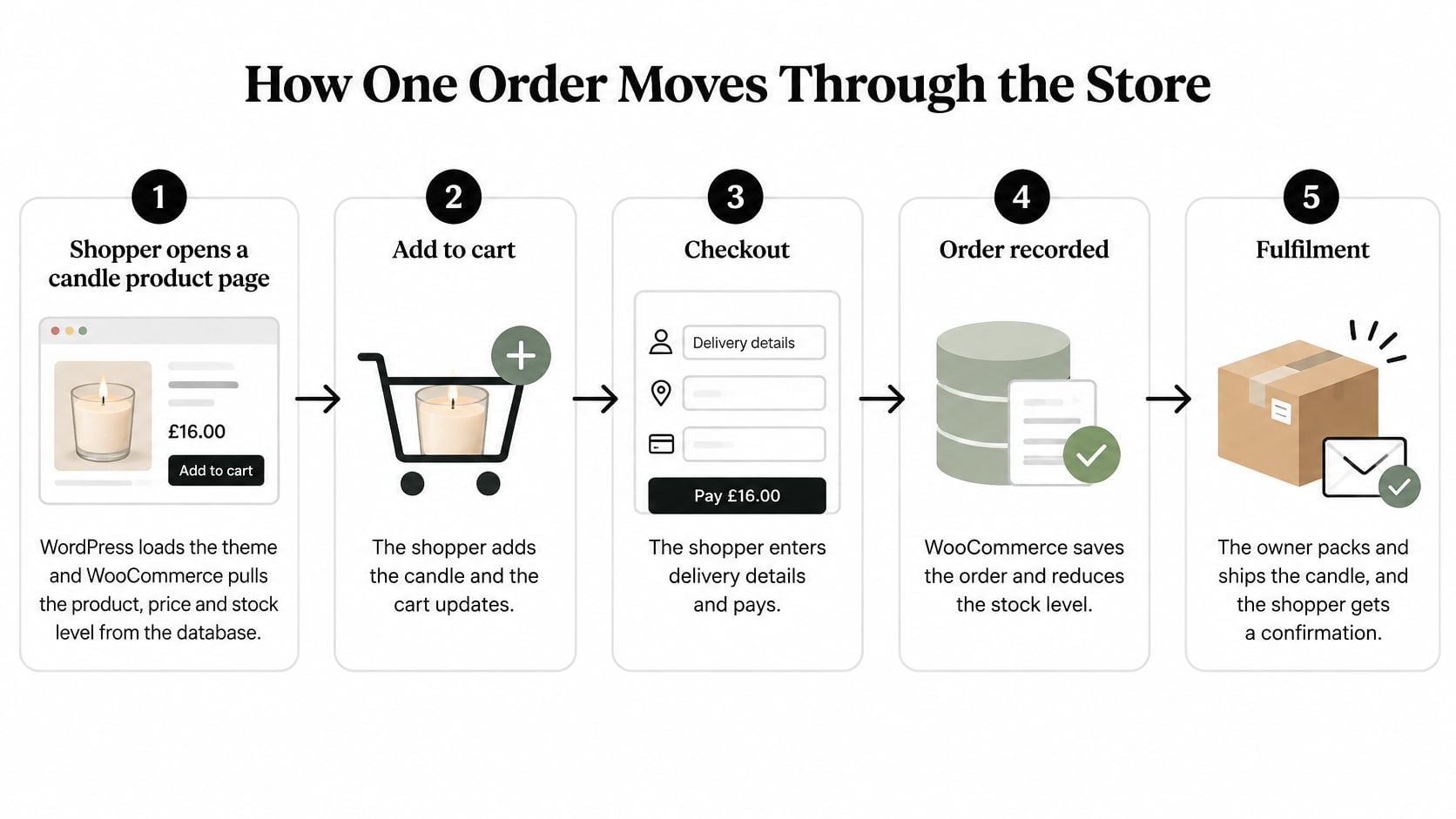
- The product page loads. WordPress runs the theme while WooCommerce pulls the product, price and stock level from the database.
- The jar goes in the cart. WooCommerce holds that selection for the visitor's session, so the cart survives a page refresh or a wander back to the blog.
- Checkout takes the details. The shopper enters a delivery address and card details, which go straight to the gateway.
- The order is saved. WooCommerce writes the order record, reduces stock by one and sends the confirmation emails.
- You pack and ship. Marking the order complete triggers whatever shipping notification you've set up.
Every stage runs through your hosting. WooCommerce extends the WordPress PHP and MySQL application model with product, order, customer, stock, tax, shipping and payment objects, and it exposes hooks, filters and APIs so other tools can plug in. That's the technical reality behind "it's just a plugin". It's an application wearing a plugin's clothes.
The chain is only as fast as its slowest link. A sluggish server delays the product page, the cart recalculation and the order write. Too many overlapping extensions add database queries to every page load. Poorly configured caching can serve a stale cart or, worse, a stale price.
The scale makes this worth taking seriously. The Office for National Statistics reported that online retail represented 28.0% of Great Britain's retail sales in September 2025, so checkout speed affects a large share of how people buy.
Here's the video walkthrough if you prefer to see the flow in motion.
The practical lesson is to treat the shop as an application rather than a page. Keep a staging copy for changes, test checkout after every update, keep overlapping extensions to a minimum and monitor PHP and database performance. When you connect a payment gateway integration, test a real transaction rather than assuming a green tick means the money moves.
Practical rule: if you change anything on the site, run one real card payment end to end before you tell anyone it's live.
Who Uses WooCommerce and Where It Fits Best
Four kinds of business turn up at WooCommerce most often, and the fit isn't identical for any of them.

The ceramics maker in Weymouth. Around 40 pieces, made in small batches, sold alongside a blog about glazes and firing techniques. WordPress already suits the writing, and the shop sits on the same domain, so a reader who finds a glaze article can buy a bowl without being sent elsewhere. Small catalogue, occasional stock shortages, a clear fit.
The bakery taking weekend pre-orders. Here the shop isn't really about stock, it's about capacity. You need collection slots capped at what the ovens can produce, which means a booking or pre-order extension and a weekly check on the limits. WooCommerce works, but the extension choice does the heavy lifting.
The B2B supplier with trade accounts. Quotations, bulk pricing, account areas and invoice payment are all normal WooCommerce territory once extensions are in place. This is the profile where the platform is strongest in the UK. Firmbase's analysis of UK B2B eCommerce technology found 8,979 UK B2B companies with a detectable eCommerce platform out of 112,345 trading businesses, and WooCommerce appeared in 6,563 of them, 73.1% of that sample. Shopify followed at 1,610 companies (17.9%) and Magento at 2%. The split held by size too: 73.6% among firms with fewer than 10 employees, 72.3% among those with 10 to 50 staff and 69.8% among larger firms.
The membership club selling event tickets. A capped run of tickets works fine. Seat maps, timed entry across multiple halls and complex refunds start to strain the setup, and a dedicated ticketing platform usually wins.
Two things to hold in mind. Those percentages are technology-detection shares, not a census of every UK business, because only companies with an identifiable eCommerce system entered the sample. And the weakest fit is the very high-volume retailer with complex warehousing and multi-warehouse stock, where a dedicated platform's built-in logistics tend to pay for themselves.
Ask yourself three questions: does your content bring people in before they buy, do you need anything more than a catalogue and a checkout, and is someone around to keep it running?
Pros and Cons Compared With Hosted Platforms
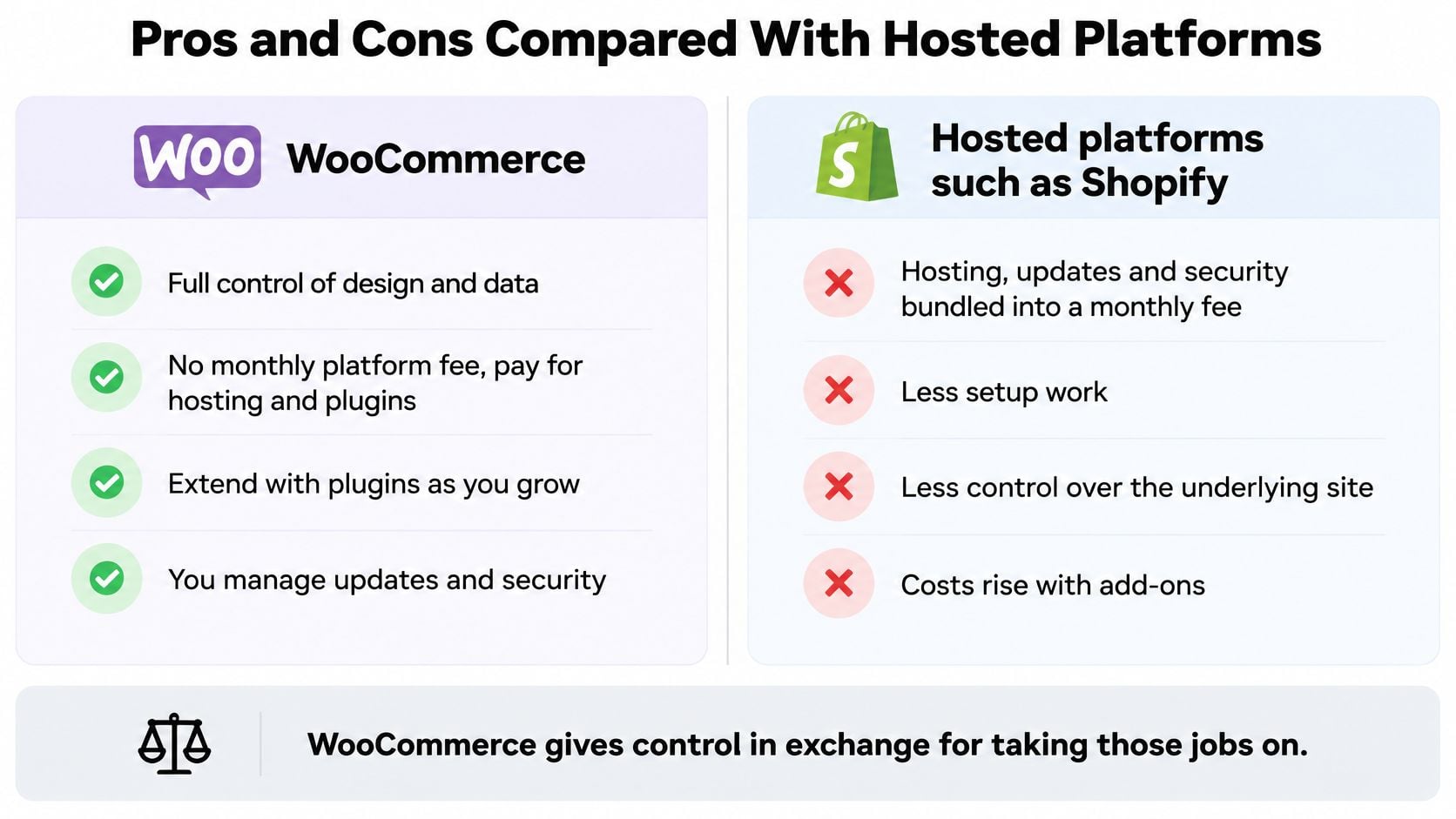
Would you rather manage the shop's technical upkeep yourself, or pay for a service that bundles much of it? Hosted platforms such as Shopify combine hosting, updates and security in a monthly fee. WooCommerce gives you more control, while leaving you to arrange those jobs.
Where WooCommerce may suit you:
- There is no fee for the core software. You still pay for hosting and any extensions you choose.
- You control the store's data and design. Products, customers and orders sit in your database, and you can change hosts or themes.
- Extensions add functions. Options include subscriptions, bookings, trade pricing, marketplace connections and low-stock alerts.
- The shop and your content share a site. Blog posts, service pages and product pages can support the same search strategy.
- You can move the store. If your hosting service no longer suits you, the site can be transferred elsewhere.
Where WooCommerce asks more of you:
- Updates need attention. WordPress, WooCommerce, the theme and plugins all need to be kept current and checked for problems.
- Security needs an owner. Someone must manage protection, malware checks and backups, and know how to restore a backup.
- Extension costs can add up. Paid tools may have renewal fees, so account for them when comparing the total cost.
- Speed depends on the setup. Hosting that cannot handle the store's needs can slow the checkout.
- Support is less centralised. Help may come from plugin forums, your host or a paid developer rather than one platform support team.
WooCommerce fits owners who value control and have time, technical help or a developer available to maintain the shop. A hosted platform may suit someone who prefers to focus on products and orders, even if the monthly fee is higher. Compare the trade-offs in this guide to the best online store platform for startups, and explore these eCommerce website builder comparisons as you weigh your options.
Who Pays for Hosting, Security and Upkeep
The licence costs nothing. A dependable shop costs money every month. Hosting, a domain, an SSL certificate, backups, security monitoring and any paid extensions each carry their own price and their own owner, and the Office for National Statistics retail sales bulletin tracks the online spending that depends on all of it working.
That's the trade-off people miss. A shop is a revenue channel, not a brochure that can look tired for a quarter. When it goes down, orders stop rather than merely slowing.
| Task | Usually handled by | What to check |
|---|---|---|
| Hosting and uptime | Your hosting provider | Slow hosting slows every step of checkout |
| Plugin and WordPress updates | You or your developer | Test on a staging copy before going live |
| Security monitoring | You or your host | Confirm firewall and login protection are active |
| Payment processing and card data | Your payment provider, with you | Card details should go straight to the gateway |
| Backups | You or your host | Check that a restore has actually been tested |
| Tax settings and VAT | You | The software does not confirm your rules are correct |
| Paid extensions | You | Each extension quotes its own renewal price, so add them up before launch |
Payment deserves its own note, because it scares people unnecessarily. If you use a gateway's hosted payment page or hosted card fields, card numbers never touch your server and your card-data obligations stay at the lightest level. Build your own card form and those obligations grow quickly. That's a design decision, not an accident, and it should be made deliberately.
A realistic five-year view depends on three things: how many premium extensions your shop needs, how much traffic and storage you're buying, and whether custom work is involved. A small catalogue on good hosting with two or three extensions is modest. Subscriptions, bespoke product logic, integrations with a warehouse system or high-availability requirements push the number up considerably, sometimes past a hosted plan's fee.
The question worth asking before launch isn't "what does it cost?" It's "who fixes the store when checkout breaks at 9pm on a Friday?" If nobody has a name in that answer, you're not ready to trade.
Managed hosting is often the sensible middle ground: the server, updates, caching and backups are handled, and you keep control of the shop itself. What managed WordPress hosting actually covers is worth reading before you compare quotes, because the word "managed" means different things to different providers.
Selling Across UK and EU Borders Without Surprises
Selling across borders adds decisions that WooCommerce's tax fields cannot make for you. The settings are tools; you remain responsible for choosing the right VAT treatment and checking what customers will owe.
UK-only sales. Domestic VAT rules apply, and you need to display prices and handle delivery charges appropriately. This is the simplest path to set up before adding overseas destinations.
Great Britain to Northern Ireland. Some goods movements follow different rules from ordinary domestic sales. Check how your products are classified before offering delivery there.
UK to EU sales. The import VAT and duties that apply depend on the consignment value and the destination country's rules. Confirm current thresholds with HMRC or an accountant before quoting a landed price, the total cost of the goods, delivery and any import charges. Otherwise, a customer may face an unexpected bill when the parcel arrives.
Keep invoices, consignment values, delivery records and a note of the VAT treatment applied to each order. These records help you answer questions about a return or a border charge. Selling into Ireland does not automatically mean you need an Irish company. If you are considering an Irish business structure for other reasons, you can learn how to set up a limited company in Ireland.
When to bring in help: Get advice if you sell into several EU countries, sell products that may carry excise duty, use a marketplace or third-party warehouse for fulfilment, or find that the customer's charge differs from the landed price you quoted. An accountant or fulfilment specialist can help check the rules and the figures.
Before building the shop, write down the countries you will serve, the products you will ship and how you intend to calculate the total price. A clear set of e-commerce website requirements helps make those choices part of the store setup rather than a surprise after the first order.
Deciding Whether WooCommerce Suits Your Business
WooCommerce suits a business that wants its blog and shop on one website, with content helping customers find products and buy them. It also gives you control over your store's design, data and hosting. The trade-off is that someone must keep the software updated, manage backups and handle tax settings.
Ask yourself who will look after the shop once it is live. If you or someone you can call can take responsibility for ongoing upkeep, WooCommerce may be a good fit. If no one can, a hosted platform may be easier to manage.
Before choosing, write down what the store needs to do:
- List your products and variations, and note where you will deliver.
- Choose hosting suited to an online shop, with a staging environment for testing.
- Set up the staging copy before installing extensions.
- Test checkout with a card payment, then issue a refund.
- Ask your accountant to confirm tax and delivery settings before launch.
DesignStack has experience building eCommerce stores on WooCommerce and other platforms. It can integrate a WooCommerce store so orders appear in your dashboard as normal, set up stock alerts and integrate payment services such as Stripe and PayPal. If you describe your shop, DesignStack can offer a plain-English recommendation.
The plugin may be free, but running the shop still takes time and responsibility. WooCommerce works best when you have a clear plan for who handles its upkeep and what you need the store to do. DesignStack builds responsive WordPress websites that are easy to use, and works with businesses across Dorset and beyond. If you are considering a WooCommerce store, visit DesignStack to start a conversation.