Why Use WordPress to Build a Website for Your Business
The popular advice is that WordPress is the easy, low-cost way to get a business online. That's only half true. WordPress can give a Dorset business more control, flexibility and room to grow than a closed website builder, but it also creates responsibilities that don't disappear after launch.
The better question isn't just why use WordPress to build a website. It's whether your business can use that flexibility responsibly. You'll need a plan for updates, security, accessibility, performance, content ownership and recovery. If you have that plan, WordPress is a pragmatic long-term foundation. If you don't, a simpler managed platform may be the more professional choice.
Table of Contents
- The Hidden Reality of WordPress
- Why WordPress Dominates UK Business Websites
- WordPress vs Managed Website Builders
- Building a Revenue-Ready Business Site
- The Cost of Ownership Beyond the Build
- Can Your Business Handle the Maintenance?
- Making the Right Choice for Your Business
The Hidden Reality of WordPress
WordPress isn't a set-and-forget website solution. It's a content management system, and that means someone must manage the content, software and services that sit around it. The platform gives you control over pages, forms, publishing, integrations and design, but control works both ways. You're also responsible for deciding what gets installed, who can edit it and how the site is kept safe.
That flexibility is WordPress's greatest strength and its most common weakness. A business can add an events calendar, booking workflow, product catalogue or customer resource area without changing platforms. It can also install too many plugins, use a poorly maintained theme, overlook updates and create a fragile site that becomes expensive to repair.

Flexibility needs boundaries
A sensible WordPress build starts with a defined purpose. Decide which content staff will edit, which functions genuinely support the business and which integrations are essential. Don't add a plugin because it looks interesting. Add it because it solves a documented problem and has a clear owner.
The same discipline applies to budget. A cheap build can become costly if nobody has allowed for hosting, software licences, backups, accessibility checks or technical support. Our guide to the hidden costs of cheap website design explains why the initial quotation rarely describes the complete financial commitment.
Practical rule: Treat WordPress as an operating system for your website, not a finished product you can abandon after launch.
For a small business, that distinction matters. You may not need a large technical team, but you do need an accountable person or partner who checks that the website remains secure, usable and commercially effective. WordPress is a strong choice when you're prepared to govern it. It's a poor choice when you're buying flexibility without planning to manage it.
Why WordPress Dominates UK Business Websites
WordPress's popularity reduces a practical risk that small businesses often overlook: dependence on an obscure platform or one specialist supplier. W3Techs reports that WordPress powers 40.1% of all websites worldwide and 58.6% of websites with an identifiable content management system. Those figures are global, but UK company data shows the same pattern locally.
Firmbase detected WordPress on 98,224 of 136,177 UK companies with an identifiable CMS, giving it a 72.1% share. Wix accounted for 10.4% and Squarespace 6.0%, while WordPress remained dominant across company sizes. It represented 72.0% of detected CMSs among firms with fewer than 10 employees, 71.8% among companies with 10 to 50 employees and 77.0% among firms with more than 50 employees.
What adoption means for a Dorset business
This market share isn't just an impressive headline. It creates a broad support ecosystem. You can generally find developers, hosting providers, maintenance specialists, training resources and compatible tools with relevant WordPress experience. If your original supplier stops trading or you need a second opinion, you're less likely to face a dead end.
The platform's longevity also supports continuity. A Dorset business can begin with a focused brochure site, then add publishing, lead generation, bookings, membership features or online selling without immediately replacing the CMS. That doesn't mean every expansion will be simple. It does mean you're starting from a foundation that many professionals understand.
A WordPress, Squarespace and Wix comparison is useful if you're weighing the platforms directly, but don't judge them only by the first day of setup. Consider who will maintain the site, how easily you can change suppliers and whether the platform can support your next commercial move.
The strategic benefit: WordPress gives a small business access to a familiar, transferable platform rather than tying its future to a niche system.
That's why WordPress is a pragmatic choice for many local retailers, professional-service firms, community organisations and start-ups. It doesn't remove technology risk, but its widespread adoption makes that risk easier to manage. You're choosing a mature ecosystem with plenty of available expertise, not an isolated tool that only one provider knows how to operate.
WordPress vs Managed Website Builders
Managed builders such as Wix and Squarespace remove much of the technical administration. The provider manages the hosting environment and presents a controlled editing experience. WordPress gives you deeper control, but you or your partner must take responsibility for more of the underlying system.
Neither option is automatically right. The deciding factor is whether you value operational simplicity more than ownership and extensibility.
| Feature | WordPress | Managed Builders |
|---|---|---|
| Initial setup | More decisions around hosting, theme and plugins | Faster, guided setup |
| Ongoing management | Updates, compatibility, backups and security need ownership | Provider manages much of the platform |
| Customisation | Broad control over code, content and integrations | Usually limited to supported features |
| Supplier choice | Easier to move between WordPress specialists | Greater dependence on the platform provider |
| Growth | Can support complex publishing, workflows and commerce | Suitable for simpler, contained requirements |
| Cost planning | Requires a complete maintenance budget | Often easier to understand at the outset |
| Technical risk | More control, but more responsibility | Less administration, but more vendor dependence |
Choose based on your operating model
WordPress is usually the better fit when you need editorial control, custom workflows, advanced integrations or a site that will change substantially. It also suits businesses that want to own their content and choose their hosting and support partner.
A managed builder may be more sensible for a small brochure site with a narrow purpose, few editors and no expectation of complex functionality. If you won't publish regularly, add integrations or sell online, WordPress's extra control may not justify the administration.
The mistake is to compare only the build price. Compare the complete operating experience instead. Ask who updates the software, who restores the site after a failure, who checks forms after changes and who handles a plugin conflict. Managed hosting can reduce the burden while preserving WordPress's flexibility, which is why managed WordPress hosting can be a useful middle ground.
My recommendation: Choose WordPress for a business asset you expect to develop. Choose a managed builder when simplicity matters more than portability or customisation.
A platform decision should reflect your actual capacity, not the enthusiasm of a salesperson or the feature list on a homepage.
Building a Revenue-Ready Business Site
A business website shouldn't stop at displaying your telephone number and opening hours. It should help people understand your offer, trust your organisation and take the next step. WordPress works well when you want to start with a clear marketing site and add commercial functions as the business becomes ready.

The commercial case is particularly relevant because internet sales represented 28.0% of total UK retail sales in September 2025, compared with 27.8% in August 2025. That doesn't mean every Dorset business needs a full online shop, but it does show why your website may need to support more than passive browsing.
Start focused, then add capability
A service business might launch with core service pages, enquiry forms and useful guidance. Later, it could add downloadable resources, email capture, appointment requests or a customer area. A retailer might begin with a product catalogue and then introduce payments, delivery options and stock workflows.
WordPress supports this gradual approach through its themes, plugins and integrations. The important point isn't that every function is available. It's that you can select functions around a commercial objective rather than rebuilding the entire website whenever your needs change.
For example, an online shop should be planned around product information, checkout usability, fulfilment and customer support. A membership organisation needs permissions, protected content and dependable account management. A local professional firm may gain more from strong service pages, enquiry routing and useful content than from an oversized feature set.
A platform can support growth, but it won't create a sales process on its own. You still need clear offers, persuasive copy, accurate product information, accessible forms and a way to measure enquiries or purchases.
This short video offers another perspective on building a business website that can support commercial activity:
The strongest WordPress projects begin with the customer journey, not the plugin catalogue. Build the foundation around what customers need to do, then add technology that makes that journey easier.
The Cost of Ownership Beyond the Build
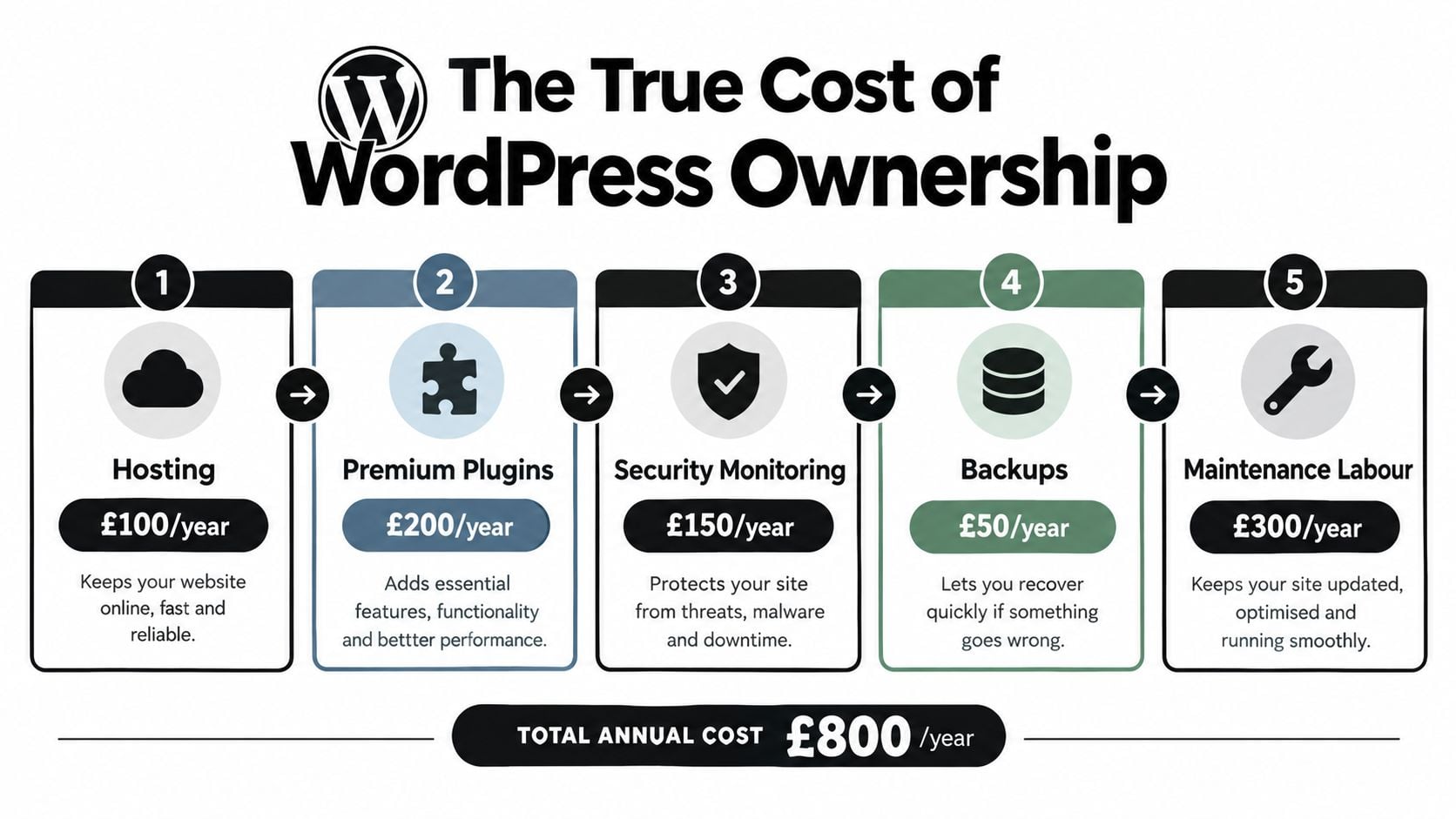
The WordPress software may be free, but a dependable business website is not cost-free. Your total cost of ownership includes hosting, premium plugins, security monitoring, backups, maintenance labour, accessibility testing, performance work and the time your staff spend managing content.
The exact mix varies by site. A simple brochure website has different needs from an online shop or membership platform. What matters is that you budget for the complete operating model instead of treating post-launch care as an optional extra.
Governance protects the investment
Assign responsibility for the basics before launch:
- Software updates: Someone checks WordPress core, themes and plugins, then tests important journeys after changes.
- Backups and recovery: Someone verifies that backups exist and knows how the site would be restored.
- Accessibility: Someone reviews headings, alternative text, keyboard navigation, forms and new content.
- Performance: Someone monitors page speed, image handling, scripts and mobile usability.
- Security: Someone manages permissions, strong authentication, monitoring and prompt responses to alerts.
- Content quality: Someone removes outdated information and keeps services, prices and contact details accurate.
This is not theoretical administration. The UK Government's monitoring of public-sector websites identified 26,171 accessibility issues, of which 13,882 were fixed and 3,693 remained unresolved. Only 70% of sites met the assessed compliance requirements, according to the UK Government accessibility monitoring report.
WordPress can help you manage recurring accessibility work through consistent templates, semantic structures, reusable components and editorial processes. It doesn't guarantee compliance. GOV.UK makes clear that an accessibility-focused design system still needs research, development and testing.
For a Dorset SME, the sensible approach is to document ownership and review routines. The practical details in this guide to website maintenance costs can help you identify expenses that are easy to miss during a build quotation.
Budget for continuity, not just launch day. A working website is an ongoing business system.
Can Your Business Handle the Maintenance?
WordPress maintenance is manageable when someone owns it. It becomes dangerous when everyone assumes somebody else is doing it. Before choosing the platform, identify the person or supplier responsible for updates, backups, accessibility reviews, performance checks and incident response.
You don't need to perform every task internally. You do need a named owner who can confirm that the task happened and escalate problems quickly.
Build a post-launch routine
Start with a written schedule that reflects the complexity of the site:
- Review changes before publishing. Check new pages, forms, links, images and calls to action.
- Test key journeys after updates. Submit an enquiry, test checkout or sign in to a protected area.
- Check accessibility manually. Use keyboard navigation and review form labels, focus states, headings and alternative text.
- Monitor performance. Use tools such as Lighthouse and Core Web Vitals monitoring to identify problems before users report them.
- Review access. Remove unnecessary user accounts and give editors only the permissions they need.
- Keep recovery practical. Confirm that backups can be restored and that someone knows the process.
Recent UK-focused audits found that only 2.7% of 4,324 audited UK small-business websites met Google's mobile Core Web Vitals thresholds, while 43% of UK businesses experienced a cyber breach or attack during the previous 12 months, according to UK website audit coverage. These figures don't prove that WordPress causes poor performance or breaches. They do show that a professional-looking launch doesn't guarantee a healthy website later.
Legal practices and other firms handling sensitive enquiries should use a documented routine. This practical resource on website care for legal practices is useful because it connects maintenance with accountability, content control and risk management.
If your team lacks the time or technical confidence, outsource the work rather than ignoring it. A defined WordPress maintenance and support arrangement can give you a reliable escalation point, provided it explains what gets checked, how often and what happens when something fails.
Making the Right Choice for Your Business
WordPress is right for your business when you need a website that can evolve and you're willing to fund its care. It suits organisations that want editorial control, adaptable content, custom integrations, strong ownership and a platform with a deep UK support ecosystem.
It's less suitable when your needs are static, your team wants no technical responsibility and a managed builder can meet the brief without compromises. Simplicity is a valid requirement. Don't choose WordPress merely because it's popular.
Use this decision test
Choose WordPress if most of these statements describe your business:
- You expect the website to gain pages, services, products or workflows.
- Staff need to publish and update content without relying on a developer for every change.
- You need integrations, bookings, membership, eCommerce or bespoke forms.
- You want flexibility in hosting and supplier choice.
- You can assign a maintenance budget and a responsible owner.
Choose a managed builder if your site has a narrow purpose, limited content changes and no demanding integrations. It may give you a cleaner operating model, even if it offers less control.
My advice to a Dorset business owner is straightforward. Select WordPress when it will become an active sales, publishing or service platform, then build governance into the project from the start. If you only need a simple online presence and won't use the extra flexibility, choose the simpler system and spend the difference on content, accessibility and customer experience.
The right answer isn't the platform with the longest feature list. It's the one your business can maintain, improve and trust.
DesignStack creates responsive WordPress websites, eCommerce builds and ongoing support for businesses in Dorset and across the UK. Visit DesignStack to discuss a website that matches your growth plans, maintenance capacity and commercial goals.