Wordpress Maintenance and Support
You only notice website maintenance when something breaks.
A contact form stops sending enquiries on Monday morning. A plugin update clashes with your theme the night before a promotion. A customer rings to say your checkout looks odd on mobile. Nothing about that feels technical when you're the business owner paying for the fallout. It feels like lost time, lost trust, and a job you suddenly didn't expect to have.
That's why WordPress maintenance and support is better understood like looking after a company vehicle. If the van starts every morning, passes its checks, and gets serviced on time, it helps the business run. Skip the oil changes, ignore the warning lights, and leave the tyres bald, and sooner or later you're stuck at the roadside when you most need to be moving.
A business website works the same way. It sells while you sleep, answers questions when you're busy, and often gives a customer their first impression of your company. If you're weighing up what level of care your site needs, or whether you're overpaying for a maintenance retainer you don't use, that's the practical decision that matters. A good business website doesn't just look polished on launch day. It stays reliable, secure, and useful long after launch.
Table of Contents
- Your Website Is Your Most Important Employee
- Understanding Maintenance vs Support
- The Core Tasks in a WordPress Maintenance Plan
- Sample Maintenance Plans and Pricing Models
- How to Choose the Right Maintenance Provider
- Local Support for Dorset Businesses with DesignStack
- FAQs and Your Practical Maintenance Checklist
Your Website Is Your Most Important Employee
A website doesn't clock off. It works through weekends, during lunch breaks, and when you're tied up serving customers. For many small businesses, it's the only part of the company that's always available to explain services, take enquiries, and build confidence before anyone picks up the phone.
That's why website problems hit so hard. A broken page isn't just an inconvenience. It can interrupt bookings, block sales, and make a healthy business look neglected. If you've ever logged in and found a strange error, a slow dashboard, or a layout that suddenly shifted, you already know the feeling. The stress comes from not knowing whether it's minor, urgent, or expensive.
The car comparison helps because it turns a vague technical topic into a business routine you already understand.
- Routine servicing: websites need updates, checks, and cleaning, just like a vehicle needs oil, tyres, and brake checks.
- Emergency repairs: if you skip the routine work, the repair bill usually arrives at the worst possible moment.
- Fit for purpose: a local brochure site has different needs from a busy online shop, just as a delivery van has different demands from a family car.
Your website doesn't need constant tinkering. It does need consistent care.
Most owners don't need to become WordPress technicians. They need a clear sense of what should be maintained, what can wait, and what level of support makes financial sense for their type of business.
Understanding Maintenance vs Support
People often use these two terms as if they mean the same thing. They don't. That confusion is one reason businesses end up disappointed with what they're paying for.
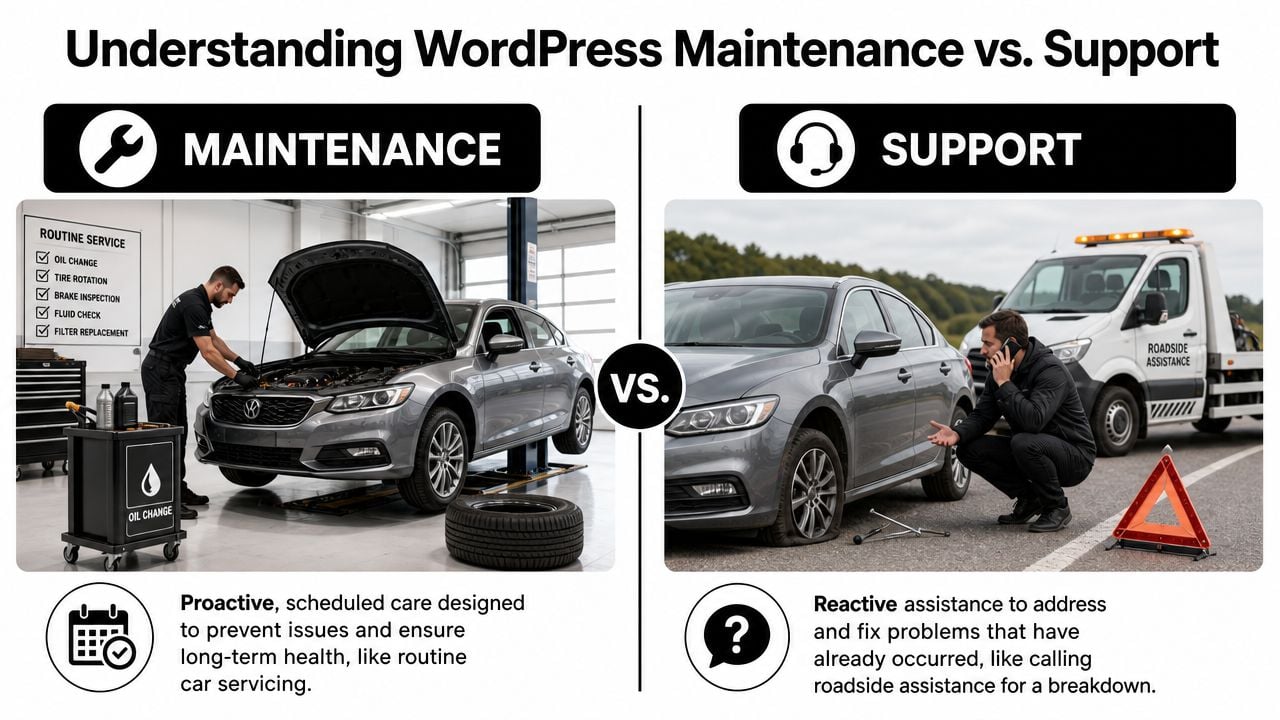
Maintenance is prevention
Maintenance is the scheduled work that keeps a website healthy. Think of it as the service history for your site. It includes updating WordPress core, themes and plugins, checking backups, scanning for security issues, monitoring uptime, and keeping performance in shape.
If your site runs on a content management system, regular maintenance matters because that system depends on many moving parts working together. WordPress itself updates. Plugins update. Themes update. Hosting environments change. Left alone, even a site that looked perfect at launch starts drifting out of date.
Support is problem-solving
Support is reactive. It's what happens when something has already gone wrong, or when you need a person to make a change.
That might include:
- Fixing a plugin conflict: a feature stops working after an update.
- Restoring a backup: the site breaks and needs rolling back.
- Repairing a hacked site: malware, spam pages, or suspicious redirects appear.
- Making requested changes: new pages, form edits, layout tweaks, or feature additions.
Support is valuable, but it usually costs more when maintenance has been ignored. Emergency work compresses everything into a rush. The provider has to diagnose the issue, stabilise the site, and often clean up a chain reaction rather than a single fault.
Practical rule: Maintenance reduces the chances of a breakdown. Support deals with the breakdown when it happens.
A good provider should explain where one ends and the other begins. If a package bundles both, ask how much of the fee covers routine checks and how much covers hands-on time for fixes or changes. That single distinction makes WordPress maintenance and support much easier to buy sensibly.
The Core Tasks in a WordPress Maintenance Plan
A maintenance plan only earns its keep if it covers the jobs that protect the site. Fancy wording doesn't matter. The routine does.
What has to happen every month
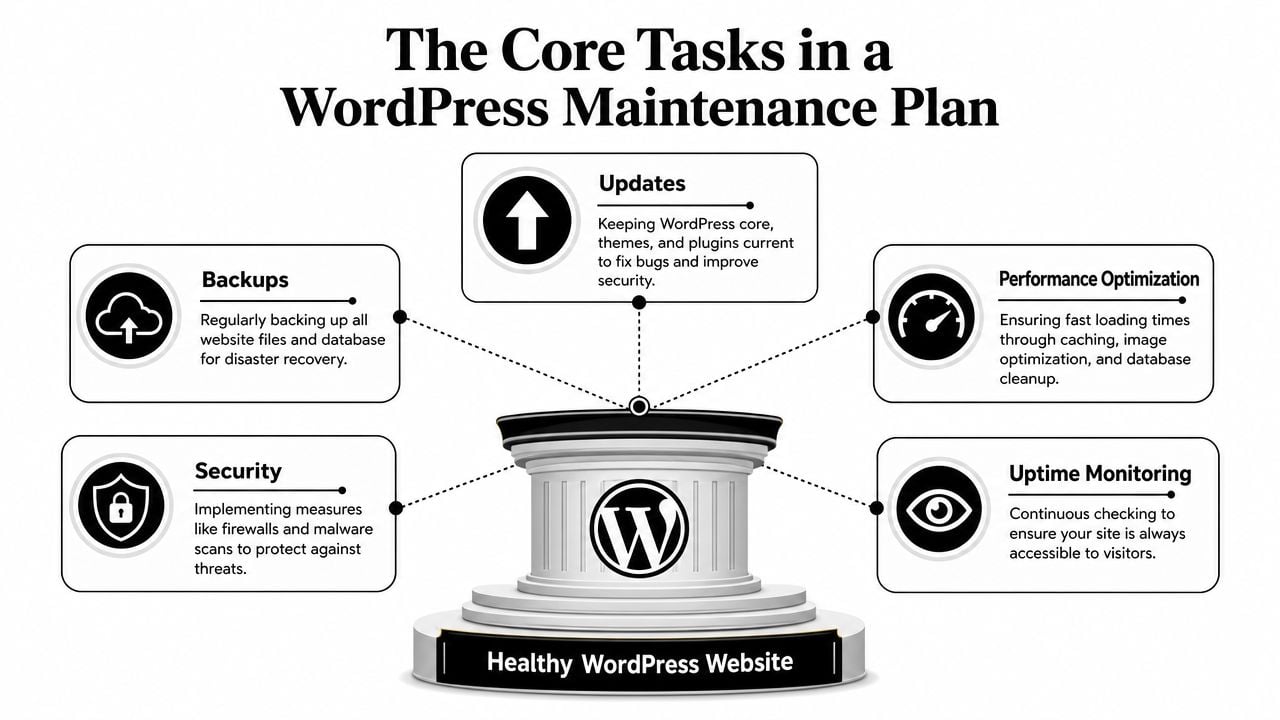
The first pillar is updates. It is a common source of many avoidable problems. In the UK market, 39% of WordPress hacks are directly caused by an outdated CMS, which is why monthly core and plugin updates are tied directly to breach prevention, according to website maintenance statistics for business sites. The same source also points to a practical rhythm of daily or weekly backups and security scans, monthly CMS updates, and quarterly full audits.
The second pillar is backups. If updates are the seatbelt, backups are the airbag. They don't stop the accident, but they give you a route back. For a simple brochure site, a recent clean backup might be enough to undo a bad update. For a busy shop or membership site, backup quality matters as much as backup frequency. You need to know the copy is usable and the restore process is tested.
A short explainer helps here if you want to see how routine WordPress care works in practice.
Then there's security. This goes beyond adding a plugin and hoping for the best. Proper security work includes malware scans, vulnerability checks, hardened login protection, and paying attention to newly released updates. If a known weakness appears in a plugin your site relies on, delay creates a window for attackers.
What separates proper care from checkbox maintenance
Performance often gets treated as optional. It isn't. A slow site makes everything else work harder. Ads underperform, enquiry rates suffer, and users give up before they've even seen your offer. Performance work can include image compression, caching, code cleanup, and database optimisation to remove clutter that builds up over time.
Uptime monitoring is the quiet part of the service. You may not notice it until it catches a problem before a customer does. A site can go down because of a hosting issue, a failed update, or a plugin fault. Monitoring helps someone spot that quickly instead of discovering it hours later through a frustrated email.
A solid plan usually includes these five areas:
- Updates with testing: not just clicking “update all”, but checking the site afterwards.
- Reliable backups: stored safely and easy to restore.
- Security checks: active scanning and sensible hardening.
- Performance work: enough to keep the site fast and usable.
- Monitoring: alerts when the site is offline or behaving oddly.
If a provider says they “maintain” WordPress but can't explain their backup restore process or post-update checks, you're not buying maintenance. You're buying hope.
The difference between cheap and effective maintenance usually sits here. Not in the dashboard reports, but in whether the routine is thorough enough to stop small issues turning into business interruptions.
Sample Maintenance Plans and Pricing Models
Most UK businesses don't need a bespoke contract full of jargon. They need a plan that matches their current site.
The market gives a useful benchmark. In the UK, the average monthly cost for basic WordPress website maintenance has reached £102.00 in 2025, with mid-range maintenance at £232.00 and high-end services at £550.00, according to UK WordPress maintenance cost analysis. That gives you a realistic frame for judging whether a quote is lean, fair, or padded.
Typical WordPress Maintenance Plans
| Feature | Basic Plan (Brochure Sites) | Business Plan (Marketing Sites) | eCommerce Plan (Online Stores) |
|---|---|---|---|
| Best fit | Simple company sites with a few stable pages | Active lead generation sites with regular campaigns | WooCommerce or revenue-critical sites |
| Core updates | Monthly | Monthly with closer review | Priority updates with testing |
| Plugin and theme updates | Monthly | Monthly | More frequent checks where needed |
| Backups | Regular scheduled backups | Regular scheduled backups with restore checks | Frequent backups with stronger recovery focus |
| Security scans | Basic | Ongoing | Ongoing with tighter oversight |
| Uptime monitoring | Usually included | Included | Included with quicker response expectations |
| Performance work | Light housekeeping | More active speed and optimisation work | Ongoing performance attention |
| Content edits | Usually limited or excluded | Often small support allowance | Often includes small support allowance |
| Typical UK monthly benchmark | Around £102.00 | Around £232.00 | Around £550.00 |
The basic tier suits businesses whose site acts like a digital brochure. It still needs care, but usually not constant hands-on attention.
The business tier fits firms that run campaigns, publish updates, and depend on forms or lead generation. More moving parts means more checking after updates, and more value in having support time built in.
The eCommerce tier is different because downtime has a direct trading cost. Shops need tighter backup discipline, stronger testing, and faster response when checkout, payments, or product functionality fail.
Retainer or break-fix
Here, many SMEs can save money.
Data discussed in a Reddit thread on WordPress website maintenance shows 68% of UK small businesses with hosting-managed security and backups only need ad-hoc support for complex issues. That doesn't mean retainers are bad. It means some businesses are paying monthly for support time they rarely use.
A simple decision framework helps:
- Choose a retainer if your site changes often, supports sales activity, or has enough complexity that small faults create real disruption.
- Choose break-fix support if your hosting already covers the basics, your site is stable, and you only need occasional expert help.
- Avoid the middle ground trap where you pay a monthly fee but still get charged extra for every meaningful task.
For many Dorset SMEs, the smartest choice isn't the biggest plan. It's the one addressing essential needs and leaving room to buy extra help only when the site truly needs it. If you want a clearer view of typical charging structures, this guide to website maintenance cost is a useful starting point.
How to Choose the Right Maintenance Provider
The right provider doesn't just promise peace of mind. They can explain their process in plain English and tie it to how your business works.
A lot of bad buying decisions happen because the proposal sounds reassuring but stays vague. “Security checks”, “priority support”, and “optimisation” can mean almost anything unless you ask how those things are delivered.
Questions worth asking before you sign anything
Start with the practical questions that reveal how they work.
- How do you handle updates? Ask whether they test changes before or after they go live, and what they do if an update breaks part of the site.
- What backups do you keep, and how fast can you restore them? A backup only matters if it can be used quickly.
- What happens if the site goes down outside office hours? You don't necessarily need round-the-clock cover, but you do need to know the expectation.
- Do you offer both retainer and ad-hoc support? Some businesses don't need a monthly support allowance.
- What reporting do you provide? A brief monthly summary can be enough if it shows completed updates, issues found, and work done.
That last point matters more than many owners realise. A provider who offers only one pricing model is more likely to force your site into their package rather than fit the package to your site. If you're looking for a specialist to compare, starting with a local WordPress developer near me search is often more useful than trawling generic marketplaces.
Ask providers how they'd handle a failed plugin update on your specific site type. Their answer tells you far more than their sales page.
Red flags that usually lead to headaches
Some warning signs are easy to miss at the quote stage.
- No staging or testing language: if they update everything live without checks, you're taking on more risk.
- No clear backup answer: if they can't explain retention, restore steps, or responsibility, keep looking.
- Unlimited promises: “unlimited edits” often hides long queues, exclusions, or vague definitions.
- No portfolio or track record: maintenance is trust work. You need evidence they've looked after real sites before.
- One-size-fits-all plans: a five-page trades website and a WooCommerce store shouldn't be pushed into the same support model.
The strongest providers usually sound less flashy, not more. They describe process, limits, response expectations, and trade-offs without trying to blur them. That's what good WordPress maintenance and support looks like when it's sold transparently.
Local Support for Dorset Businesses with DesignStack
For Dorset businesses, local support can make routine website care much easier. It's not only about distance. It's about context. A local agency is more likely to understand seasonal trade, local search intent, and the very practical way many SMEs balance budget against risk.

Why local context still matters
Maintenance isn't just technical. Content freshness matters too, especially for firms that rely on local visibility. A 2025 UK digital agency study found that 52% of Dorset business sites had stale blog posts or ignored local event mentions, causing ranking drops even when technically maintained, as noted in this piece on ongoing WordPress support and maintenance.
That rings true in practice. Plenty of sites are secure, updated, and still underperform because the business stopped adding current signals after launch. Offers expire. Team pages age. Local pages mention last year's event. The code may be healthy, but the website stops sounding active.
A simple onboarding approach
A sensible local process should feel straightforward:
- A short discovery chat to understand the site, hosting setup, pain points, and whether support is regular or occasional.
- A clear fixed-cost proposal that separates routine maintenance from extra development or content work.
- A managed handover where backups, updates, access, and monitoring are brought under control without disrupting the live site.
That kind of onboarding removes a common fear for business owners, which is that changing provider will create even more risk. It shouldn't. Good support starts by reducing uncertainty and documenting what exists before anything is changed.
FAQs and Your Practical Maintenance Checklist
By this point, most business owners are really asking one thing. Do I need a proper plan, or can I get by with occasional fixes? The answer depends on how critical the site is and how much risk you're willing to carry.
Quick answers to common questions
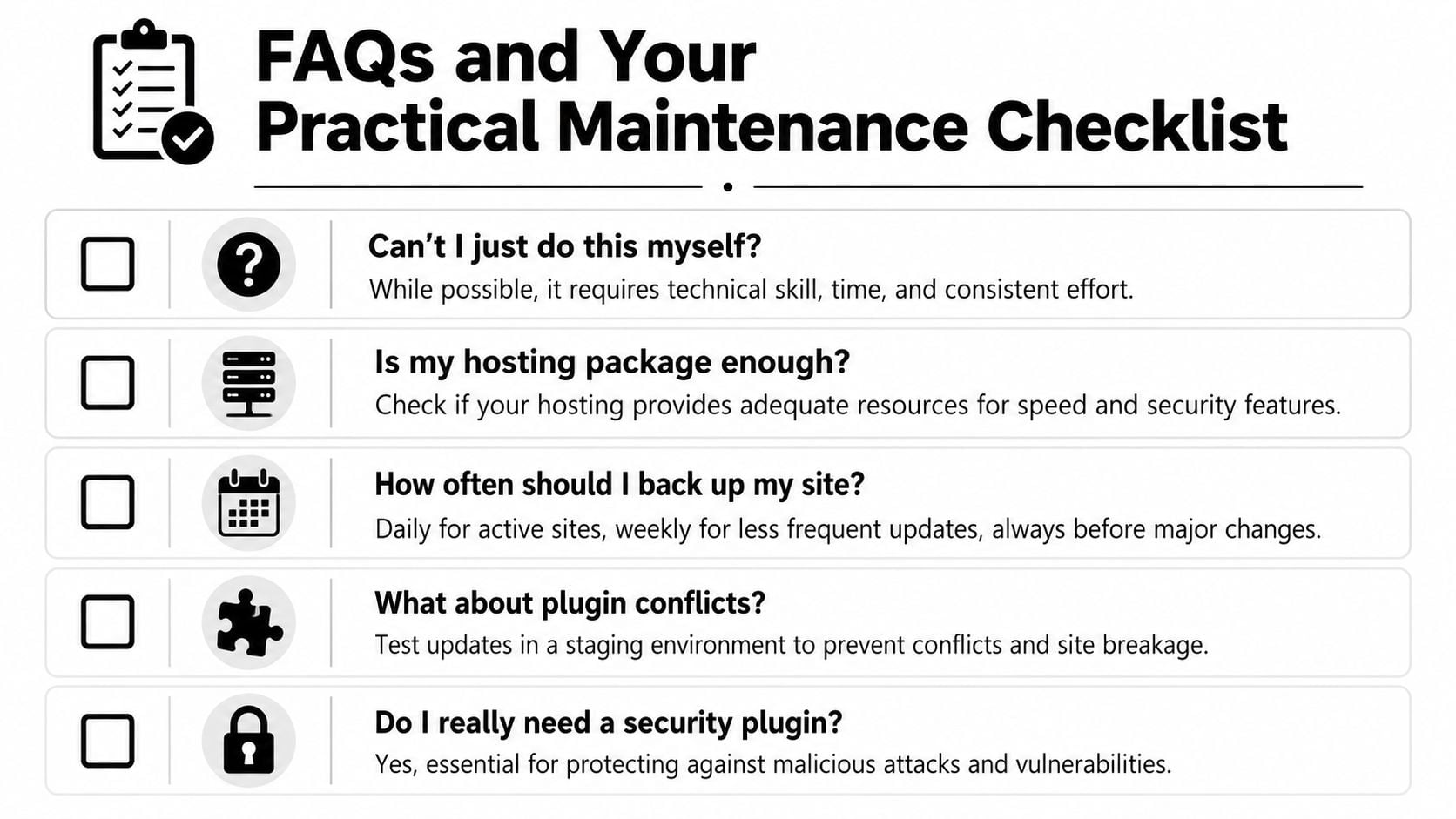
Can't I just do it myself?
Yes, if you're comfortable working in WordPress, checking updates carefully, managing backups, and troubleshooting conflicts. Consistency is the primary challenge. DIY often works until the business gets busy.
Is hosting maintenance enough?
Sometimes, but only for some sites. For UK SMEs, annual WordPress maintenance can range from £200 to £300 with managed hosting bundles to over £2,300 for full-service plans, while emergency developer work after a bad plugin update typically costs £50 to £100 per hour, according to this breakdown of WordPress web maintenance costs for small businesses. Hosting may cover backups, malware protection, and monitoring, but it often won't cover content edits, post-update checks, plugin conflicts, or business-specific fixes.
How much downtime is acceptable?
For a low-traffic brochure site, brief planned downtime may be manageable. For a lead-driven or sales-driven site, downtime should be rare, short, and controlled. The more the site contributes to revenue or enquiries, the less tolerance you should have for “we'll fix it tomorrow”.
A maintenance plan is partly a service plan and partly an insurance policy. You may not need every part every month, but you'll care about it when something fails.
A practical checklist for your own site
Use this as a quick audit.
- Check your last backup date: if you don't know where backups live or how they're restored, that's a risk.
- Review your plugin list: remove anything unused, outdated, or duplicated in purpose.
- Confirm WordPress core is current: don't assume auto-updates are handling everything cleanly.
- Test your forms: send a real message through your contact form and confirm it arrives.
- Check key pages on mobile: homepage, service pages, checkout, and contact page.
- Run a speed check: not for vanity, but to spot obvious problems like oversized images or broken caching.
- Look at your content dates: outdated offers, old testimonials, and stale blog posts weaken trust.
- Ask who owns what: hosting, domain, backups, premium plugins, and access should all be clear.
- Decide your support model: retainer if the site is active and business-critical, break-fix if it's stable and lightly used.
- Keep one human contact: when something goes wrong, you need a named person or agency to call.
If you can't answer half of those points confidently, your website probably needs more structure than it has now.
If you want a straightforward review of your current setup, DesignStack can help Dorset and UK businesses work out what level of WordPress maintenance and support they need, without pushing a bigger plan than the site requires.
DesignStack builds, hosts and looks after WordPress websites for businesses across Dorset. See our website design services or get in touch to talk about hosting and maintenance for your site.