

WordPress Developer Near Me: A Dorset Business Guide
Your website is live, but it is not pulling its weight.
A Dorset customer searches for what you sell. A competitor appears above you. Your phone stays quiet. On mobile, your site feels cramped, slow, or dated. You know it needs work, so you type wordpress developer near me and start scrolling through a mix of agencies, freelancers, directories, and nationwide platforms that all seem to promise the same thing.
That search is sensible.
For a local business, the problem is rarely just code. It is missed enquiries, weak local visibility, awkward updates, and no one to call when something breaks. The right WordPress partner fixes those things in a practical way. They help you make decisions about structure, content, speed, search visibility, and support after launch, not just colours and templates.
A good local developer should make the process simpler, not more technical. You should come away with a site that your team can use, customers can trust, and search engines can understand.
Why 'Near Me' Matters for Your Dorset Business
The biggest benefit of hiring nearby is not geography on its own. It is context.
A Dorset business has different needs from a national chain. A local retailer may have seasonal peaks. A service business may rely on enquiries from Weymouth, Dorchester, Portland, or nearby villages. A hospitality brand may need a site that handles mobile users well because many visitors are searching while they are already out and about.
Local context changes better decisions
A developer who works with Dorset firms tends to ask sharper questions early on.
They are more likely to think about:
- Local search intent: People often search for services by town, not just by company name.
- Regional competition: Your real benchmark is not a random London agency site. It is the business down the road winning the clicks you want.
- Seasonality: Tourism, events, and trading cycles affect content, promotions, and hosting choices.
- Practical collaboration: It is easier to resolve feedback when both sides understand the same market and customer base.
That matters because many website projects go wrong before any design starts. The brief is too vague. The structure is copied from another industry. The site looks acceptable but does not support how the business sells.
Local support is often the missing piece
Post-launch help is where many business owners get burned. The guidance gap is real. 68% of UK small businesses cite unreliable post-project maintenance as a top concern, 72% of Dorset-based firms experienced website downtime within 3 months of launch due to inadequate local support, and only 15% of freelance platforms offer region-specific vetting for WordPress eCommerce builds according to the UK Web Industry Report and related analysis cited in this freelance WordPress developer overview. The same source notes that local hires can reduce communication delays for SMEs.
If you have ever chased a developer who disappears after launch, that will sound familiar.
A website is not finished on launch day. It has only entered the stage where updates, fixes, content changes, and support suddenly become important.
Accountability is easier when your developer is local
Large freelance platforms are useful for building a shortlist, but they are often impersonal. Profiles can look polished while telling you very little about how the person communicates, whether they understand your area, or what happens after the final invoice is paid.
A nearby partner is easier to evaluate properly. You can inspect local work, ask local businesses about their experience, and judge whether the developer understands the market you trade in. If you want a broader view of what local website support can include, this page on website design in Dorset is a useful starting point.
Your Search Guide for Dorset WordPress Developers
Typing wordpress developer near me is only step one. The useful part is how you narrow the list.
If you search too broadly, you will get national directories, generic freelancer profiles, and agencies that say very little. If you search with local intent and a clear checklist, you can build a better shortlist quickly.
Start with local search terms that match your project
Google and Google Maps are still the most practical starting points.
Try searches that combine platform, service, and place:
- WordPress developer Weymouth
- WordPress developer Dorset
- eCommerce web design Dorchester
- WooCommerce developer Dorset
- WordPress support Weymouth
- membership website developer Dorset
Do not stop at the first results page. Open each promising company in a new tab and check the basics.
Look for:
- Evidence of real work: portfolio examples, not mock-ups only
- Clear services: design, development, support, hosting, SEO
- Named process: discovery, build, testing, launch, support
- Relevant sectors: retail, professional services, membership organisations, hospitality, trades
Use Maps like a vetting tool, not just a directory
Google Maps helps for a different reason. It tells you whether the business appears active and established locally.
Check:
- Review quality: Do reviews mention communication, deadlines, or support after launch?
- Business profile completeness: Is the listing maintained, or does it look abandoned?
- Location realism: Is it clearly based in Dorset, or does the listing feel rented and vague?
- Website quality: If a web developer’s own site is slow, cluttered, or confusing, take that seriously.
A developer’s own website should make you feel confident, not patient.
Ask local business networks who they trust
Dorset still works on referrals more than many people admit.
Speak to:
- Chambers and business groups: Community and trade organisations often know who local firms use.
- Other business owners: Ask who built their site, how the project ran, and what support was like afterwards.
- Printers, photographers, marketers, and copywriters: These people often know which developers are organised and which ones create chaos.
If you are hiring more broadly and want a practical overview of how to think about adding specialist help to your business, this guide on how to hire your first employee gives a useful framework for weighing fit, responsibility, and long-term value.
Build a shortlist with a simple filter
Do not collect twenty names. Collect five good ones.
Use this quick filter:
| Check | What you want to see |
|---|---|
| Local relevance | Dorset presence, local clients, understanding of nearby markets |
| WordPress focus | Not a vague “digital expert” who builds on everything and masters nothing |
| Clear offer | Defined services, sensible scope, support options |
| Proof | Real portfolio, testimonials, examples you can inspect |
| Communication | Fast replies, plain English, no jargon fog |
For a more detailed approach to evaluating fit and style, this guide to finding a website designer who understands your vision is worth reading before you start enquiries.
The Ultimate Vetting Checklist for Your WordPress Partner
Most business owners make the same mistake at this stage. They judge a developer by appearance alone.
A polished homepage means very little by itself. You need to know how the work is planned, built, tested, secured, and supported. You also need to know what trade-offs the developer makes. That is where weak projects usually show themselves.
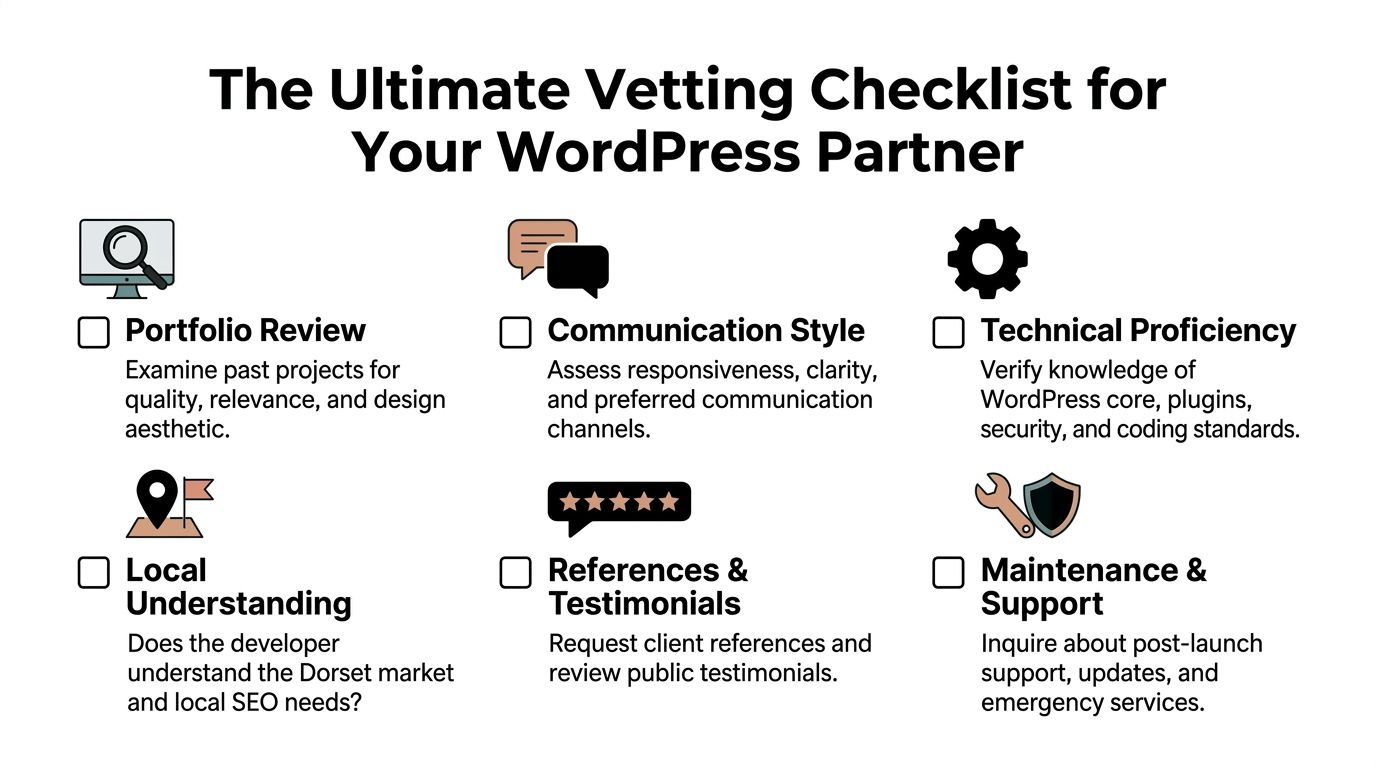
Check the portfolio for relevance, not just style
A portfolio should answer practical questions.
Can the developer handle your type of site? Have they worked on brochure sites, WooCommerce builds, booking flows, or membership areas similar to what you need? Are the examples easy to use on mobile? Do they look custom, or do they all feel like the same template wearing different logos?
Look for signs of thought, not decoration.
A strong portfolio usually shows:
- Varied project types: not ten near-identical layouts
- Industry fit: local services, retail, organisations, or whichever sector matters to you
- Functional detail: booking, checkout, gated content, forms, search, filtering
- Clean execution: spacing, readability, speed, sensible navigation
If every site looks flashy but awkward to use, treat that as a warning.
Ask how they run discovery
Professional WordPress work starts before design. In a strong UK agency workflow, discovery and planning typically take 10 to 15% of project time and include workshops and competitor analysis, according to this methodology summary and market data from Clutch’s WordPress developer research.
That is a good sign, not wasted time.
Without discovery, developers tend to guess. They guess at your page structure, your customer journey, your content needs, and the features that matter. Guesswork creates expensive revisions later.
Good discovery should cover:
- business goals
- target customers
- competitor review
- required integrations
- content responsibilities
- SEO priorities
- launch risks
Review their build approach
Here, the gap between “can use WordPress” and “can build reliable WordPress sites” becomes obvious.
The same UK methodology notes a more disciplined stack for responsive eCommerce work, including custom theme development with Advanced Custom Fields and Tailwind CSS, WCAG 2.1 AA compliance, plugin optimisation with WP Rocket and lazy loading, and security hardening with Wordfence or iThemes Security. It also references schema markup, testing across 50+ devices in BrowserStack, and 30 days of post-launch monitoring.
You do not need every tool on that list for every project. You do need a developer who can explain why they choose their stack.
Here is what to listen for.
When custom work makes sense
Custom development usually makes sense when you need a site built around your business process rather than around a theme’s limitations.
That includes:
- unusual page layouts
- custom content types
- membership areas
- better performance control
- tighter branding
- cleaner long-term maintenance
When off-the-shelf is acceptable
A pre-built theme or carefully chosen plugin can be fine for straightforward needs. The key word is carefully.
Using a mature plugin to handle forms, SEO basics, or caching is sensible. Using plugins to patch every weakness in a badly chosen theme is not.
Good WordPress builds do not win by having the most plugins. They win by having the right structure and the fewest moving parts needed to do the job well.
Test speed and mobile usability yourself
You do not need to be technical to spot warning signs.
Open portfolio sites on your phone. Tap around. Try the menu. Read a product page. Submit a form if there is a test one. If pages jump around, images load slowly, or the interface fights you, notice it.
The UK methodology above sets a target of Core Web Vitals scores above 90/100 on PageSpeed Insights for optimised builds. It also notes that plugin bloat affects 65% of UK WordPress sites and leads to 22% slower load times, with a recommendation to limit builds to around 15 to 20 plugins and carry out annual audits in that source.
That aligns with what many senior developers see in practice. Slowness usually comes from accumulated shortcuts. Too many plugins. Heavy page builders. Bloated themes. Uncompressed media. Weak hosting.
Ask where they stand on hosting and uptime
Hosting is part of the website, not an afterthought.
The same market summary reports a 98% uptime benchmark with providers like Kinsta versus 85% for shared hosting in the referenced UK comparison. That does not mean every project needs premium hosting. It does mean the cheapest hosting is often false economy.
Ask these questions:
- Where will the site be hosted?
- Is staging included?
- Who applies updates?
- What happens if a plugin breaks?
- How are backups handled?
- Who gets contacted in an emergency?
A good developer gives direct answers. A poor one talks around the issue.
Check their SEO thinking early
You are not hiring an SEO agency by default, but your WordPress developer should still build with search visibility in mind.
That means:
- clean page structure
- sensible heading hierarchy
- editable metadata
- schema where relevant
- fast mobile pages
- local landing page logic
- no technical barriers to indexing
The Clutch-linked methodology includes Yoast Premium and schema markup for local Dorset businesses. Those are tools and tactics, not magic. They only work when the site architecture and content plan make sense.
Vet support after launch
A site launch often exposes weak handovers. The build may be fine, but the support is not.
Ask whether the developer offers:
- training for your team
- a bug-fix period
- content tweaks after launch
- plugin and core update support
- monthly maintenance
- emergency help
You want clarity, not warmth. “We’re always here if you need us” is not a support plan.
Look for proof beyond the sales copy
Public reviews can help, but they are only one signal. The stronger test is whether the developer can walk you through decisions they made on past projects and explain why.
A mature partner should be able to discuss trade-offs like:
| Issue | Weak answer | Strong answer |
|—|—|
| Slow site | “We can add another plugin” | “We need to audit the theme, scripts, media, and hosting first” |
| SEO | “We install Yoast” | “We plan page structure, metadata, internal links, and local intent” |
| Accessibility | “We can look at that later” | “We design and build with accessibility in mind from the start” |
| Support | “Just email us if needed” | “Here is what is included after launch and what happens after that” |
Do not confuse satisfaction with suitability
The Clutch-linked summary reports 92% client satisfaction for top London and South West firms, and 78% reporting a 25 to 40% uplift in conversion rates post-launch, driven in part by checkout improvements that reduced cart abandonment by 35% on average in that cited source. Useful benchmarks, yes. But your decision still comes down to fit.
A developer can be well reviewed and still be wrong for your project.
If you need a clean, maintainable WordPress build with local SEO baked in, avoid anyone whose strength is mostly visual mock-ups or page-builder-heavy delivery. If you need custom membership functionality, avoid anyone who has only built brochure sites.
The best choice is usually the one who can explain your project back to you clearly, spot risks early, and show they have solved similar problems before.
Key Interview Questions to Ask a Potential Developer
By the time you speak to a shortlisted developer, you should already know their basics. The interview is where you test judgment.
You are listening for how they think, how they explain trade-offs, and whether they can keep a project organised without drowning you in jargon.
A useful primer sits below if you want a quick outside view before those conversations.
Ask about process, not just price
Start with this.
How do you run a project from kickoff to launch?
A capable developer should describe a sequence, not a blur. For more complex membership or portal work, a strong methodology can include requirements gathering with user stories in Jira, custom post types, REST API endpoints, MemberPress for gated content, Gutenberg blocks and React for dashboards, Zapier for CRM sync, Stripe for recurring payments, database optimisation, CDN setup, and Git-based CI/CD on staging according to this UK-focused summary from Upwork’s WordPress cost page.
You are not checking whether your own site needs every one of those pieces. You are checking whether they have a method.
What to listen for
- clear stages
- named tools where relevant
- staging before launch
- testing and sign-off
- a defined handover
Ask how they choose between custom code and plugins
When would you build something custom instead of using a plugin?
This tells you whether they are disciplined or lazy.
The same UK summary highlights a common risk. Over-reliance on page builders like Elementor is noted as widespread, with higher CPU usage and greater vulnerability exposure in that source, while stronger builds mitigate risk with custom PHP and thorough testing.
A good answer should sound balanced. They should not reject plugins completely, and they should not solve every problem by installing another one.
What to listen for
- they use plugins selectively
- they care about maintainability
- they consider performance and security
- they can explain the long-term cost of convenience
Ask how they communicate during the build
How often will I get updates, and how do you handle feedback?
This sounds simple, but it saves projects.
You want someone who can keep momentum without requiring you to chase them. Communication should be regular, structured, and easy to follow. Whether they use email, calls, a task board, or staged review rounds matters less than whether it is consistent.
If a developer cannot explain their update process before the contract is signed, do not expect it to improve once the project is underway.
Ask what happens after launch
What support do you provide once the site is live?
This answer reveals whether they think beyond launch day. The UK summary notes 88% on-time delivery for South England developers in GoodFirms 2026 rankings, and 82% success in reducing support tickets by 45% via self-service portals in that cited research. It also notes that Dorset agencies offering 1-month post-launch support avoided a share of common migration failures in that source.
The practical lesson is simple. Good handovers reduce stress.
What to listen for
- a defined support window
- bug-fix policy
- training or documentation
- maintenance options
- clear ownership of updates and hosting
Ask how they approach performance
What would you do if the site feels slow after launch?
The wrong answer is “we’ll install a speed plugin.” The stronger answer starts with diagnosis. Theme weight, scripts, image handling, database cleanup, CDN use, and hosting all affect speed.
The same UK summary cites less than 2-second load times linked with higher engagement for SMEs in that source. Even if your project is not eCommerce-heavy, the principle holds. Speed is a business issue, not a technical vanity metric.
Ask for a recent tough problem
Tell me about a project that got complicated. What happened, and how did you fix it?
This strips away sales language.
A senior developer should be able to talk about scope creep, messy content, old plugin conflicts, migration issues, third-party API problems, or unrealistic timelines. You want calm problem-solving, not blame.
Good answers usually include:
- what caused the issue
- how they communicated it
- what options they presented
- how they reduced risk
Budgeting for Your WordPress Project in Dorset
Budget questions get awkward when nobody defines the work properly.
The primary issue is not just cost. It is scope. A simple brochure site, a conversion-focused WooCommerce shop, and a custom membership platform may all sit under the WordPress umbrella, but they are very different jobs.
The three pricing models you will see
Most Dorset businesses will run into these options.
Fixed-cost project
This is usually the easiest model for small and medium-sized businesses to manage.
It works best when the deliverables are defined clearly. You know what pages, features, revision rounds, and post-launch support are included. The developer knows what they are pricing.
Fixed-cost pricing is usually a good fit for:
- brochure sites
- service business websites
- small to mid-sized WooCommerce projects
- redesigns with a clear brief
Hourly billing
Hourly pricing can work for open-ended tasks, support, and iterative improvements.
It can also become slippery if the brief is unclear. If you hear “we’ll figure it out as we go”, expect less certainty on final cost and timeline.
Hourly billing makes more sense for:
- ad hoc support
- phased improvements
- inherited sites with unknown technical debt
- consultancy before a larger rebuild
Ongoing retainer
A retainer suits businesses that need regular updates, landing pages, support, maintenance, or ongoing development.
This is often a better model after launch than during the main build, especially if your business changes offers regularly or relies on campaigns.
What changes the price
Two sites with the same number of pages can cost very different amounts.
The main factors are usually:
- Design complexity: custom layouts take longer than adapting a stock theme
- Content readiness: if your text and images are not prepared, the project slows down
- Functionality: bookings, membership, gated content, CRM sync, and custom dashboards all add development time
- eCommerce detail: product structure, variation handling, delivery logic, and checkout customisation all matter
- SEO setup: local landing pages, metadata planning, redirects, and schema add value but also time
- Revisions: unlimited revisions sound generous and often create drift
- Support level: training, maintenance, and post-launch tweaks should be defined upfront
A practical way to set a sensible budget
If you want cleaner proposals, send each developer the same shortlist of needs.
Include:
- Your business type and service area
- Whether this is a rebuild or a new site
- Key goals such as enquiries, bookings, or sales
- Essential features
- Any integrations
- Whether you need copy, branding, or SEO help
- Who will maintain the site after launch
That forces useful comparisons.
Cheap quotes are not always cheaper
The lowest quote often excludes the bits that matter later. Training. migration checks. performance work. redirects. support. testing. staging. content population. plugin licensing. hosting advice.
A fair quote should tell you what is included, what is not, and what triggers extra cost.
If the proposal is vague, the budget is not under control. It just looks lower on page one.
Red Flags to Spot Before You Sign a Contract
Some warning signs are subtle. Others are obvious and still get ignored because the quote looks attractive.
If any of the points below show up, slow down.
Vague proposals
If the proposal says things like “modern website”, “SEO-friendly build”, or “premium design” without defining pages, features, revision rounds, launch steps, or support, you are buying ambiguity.
That usually ends in disputes over what was meant to be included.
No clear answer on ownership
Ask who owns the domain, hosting account, design files, code, premium plugin licences, and final website assets.
If the answer is fuzzy, you may be walking into lock-in.
Too much dependence on one page builder
Page builders have their place, but some developers use them as a substitute for proper planning. If every solution starts with a bulky builder and another add-on, question the long-term effect on speed, stability, and editability.
They cannot explain technical choices in plain English
You do not need a lecture on the WordPress stack. You do need straightforward explanations.
If a developer hides behind jargon, one of two things is happening. They do not understand their own choices well enough, or they do not want you to ask follow-up questions.
No discussion of support after launch
This is a major one.
If support is treated as an optional extra to think about later, you are likely to feel abandoned the moment the site goes live. That problem often shows up alongside weak documentation and rushed handovers.
Their own website raises concerns
Pay attention to it.
If the agency site is confusing, dated, broken on mobile, or difficult to trust, do not assume your project will be different. If you want a few more signs that a site is underperforming before you even begin a rebuild, this list of red flags that your website needs a makeover is worth a quick read.
If you feel pressured to sign before the scope is clear, walk away. A good developer wants a clear project almost as much as you do.
Frequently Asked Questions
Can I update the WordPress site myself after it is built
Yes, if the developer has built the backend sensibly.
A good WordPress site should let you update text, images, blog posts, team pages, products, and basic page sections without fear of breaking the layout. This is easier when the build uses clean Gutenberg blocks, structured custom fields where needed, and a sensible content model.
Ask for training at handover. Ask for a short guide as well. Even a well-built site is easier to manage when your team knows what should and should not be edited directly.
What is the difference between a web designer and a WordPress developer
A web designer focuses on visual layout, brand presentation, user journeys, and interface choices.
A WordPress developer handles the build itself. That includes theme structure, custom functionality, performance, security, plugin decisions, integrations, and making the site work properly behind the scenes.
Many businesses need both skill sets. That is why agencies often combine design and development in one workflow. If one person is doing both, make sure they are competent in both areas rather than stronger in one and improvising the rest.
Is a cheap pre-made theme good enough
Sometimes, for a very basic site with limited ambition.
Often, no.
Cheap themes can look like a shortcut, but they frequently bring extra code, bundled features you do not need, awkward editing experiences, and dependency on theme-specific tools. That makes performance, security, and future redesigns harder than they should be.
A better question is this. Will the theme support how your business needs to sell, rank, and update content over time? If not, the lower upfront cost is not really a saving.
Should I choose a local Dorset developer over a remote specialist
Not automatically. Choose the best fit for your project.
But if your business depends on local visibility, quick communication, practical support, and someone who understands your market, local usually gives you a stronger working relationship. For many SMEs, that day-to-day reliability matters more than buying from the biggest name on a national platform.
How many developers should I speak to before deciding
Usually three to five is enough.
That gives you enough range to compare process, communication, and proposals without turning the decision into a second job. If ten firms all sound similar, the problem is usually that the brief is too vague.
If you want a Dorset-based team that handles WordPress design, development, branding, hosting, and post-launch support without fluff, take a look at DesignStack. They work with local businesses, retailers, and organisations that need clear communication, fixed-cost pricing, and a site that performs properly after launch, not just on presentation day.


Leave a Reply