What Is a Headless CMS? a Practical Guide for UK Businesses
A headless CMS is a content-management system where the back-end content repository is separated from the front-end presentation layer, delivering structured content through APIs to multiple channels. In the UK, that matters in a market where internet sales represented 26.3% of total retail sales in the first quarter of 2024 and reached 26.2% in June 2024 (Office for National Statistics retail data).
You might run a shop in Weymouth with a website, a mobile experience and products listed through a marketplace. A price changes, a product description needs correcting, or a promotion ends. Suddenly, somebody has to update several systems, check that the wording matches and hope an old image hasn't been left live somewhere.
That repetition is the practical problem headless architecture tries to solve. Instead of tying content to one website design, it stores reusable information centrally and makes it available wherever customers need it. The approach can be valuable, but it isn't a shortcut to a faster website or a lower-cost project. Your front-end team still owns performance, accessibility and much of the ongoing technical maintenance.
Table of Contents
- Introduction to Headless CMS
- What Is a Headless CMS
- Headless CMS vs Traditional CMS
- Performance and Accessibility Realities
- Use Cases and Integration Examples
- Migration Considerations for Businesses
- Conclusion and Next Steps
Introduction to Headless CMS
A traditional website often makes content feel like part of the page itself. An editor opens a page, changes a paragraph inside a template and publishes the result. That works well when the business has one main website and a modest publishing operation. It becomes less comfortable when the same product, service or article must appear in several places.
Suppose your Weymouth shop sells outdoor equipment. The product name, price, dimensions, availability message and photographs might need to appear on your website, in an app, within a marketplace feed and on an in-store display. Editing each destination independently creates extra work and increases the chance that a customer sees contradictory information.
A headless CMS changes the arrangement. Editors maintain structured content in one back-end system, while separate front ends decide how that content looks on each channel. The website can use one design, the app another and a campaign landing page a third, while all three draw from the same underlying information.
Practical rule: Choose architecture around the number and importance of your customer channels, not because “headless” sounds more modern.
It helps to understand the role of a conventional content management system first. A CMS gives people a way to create, organise and publish digital content without editing every line of code. A headless CMS keeps that editorial capability, then removes the built-in assumption that content will be displayed through one particular website template.
That separation can make a redesign less disruptive and content reuse more manageable. It can also introduce new responsibilities, including API design, previewing, caching, security and front-end development. The right question isn't whether headless is better. It's whether the flexibility solves a real operational or commercial problem for your business.
What Is a Headless CMS
At its simplest, a headless CMS separates the content repository from the presentation layer. The CMS stores structured information and makes it available through APIs, commonly REST or GraphQL. Websites, mobile apps, ecommerce interfaces, digital signage and other channels then retrieve that information and render it in their own way.
A useful analogy is a central restaurant kitchen. The kitchen prepares the ingredients and dishes, but it doesn't dictate whether a customer eats at a table, collects a takeaway or receives a delivery. The kitchen provides the food. Each service channel handles the presentation.
The digital version has three connected parts:
- Content repository: Editors create and organise products, articles, images, brand messages and other content in the CMS.
- API layer: The API acts as the delivery route, sending requested content to an approved application or front end.
- Frontend delivery: Developers build the website, app, display or portal that turns structured content into an experience for a particular audience.
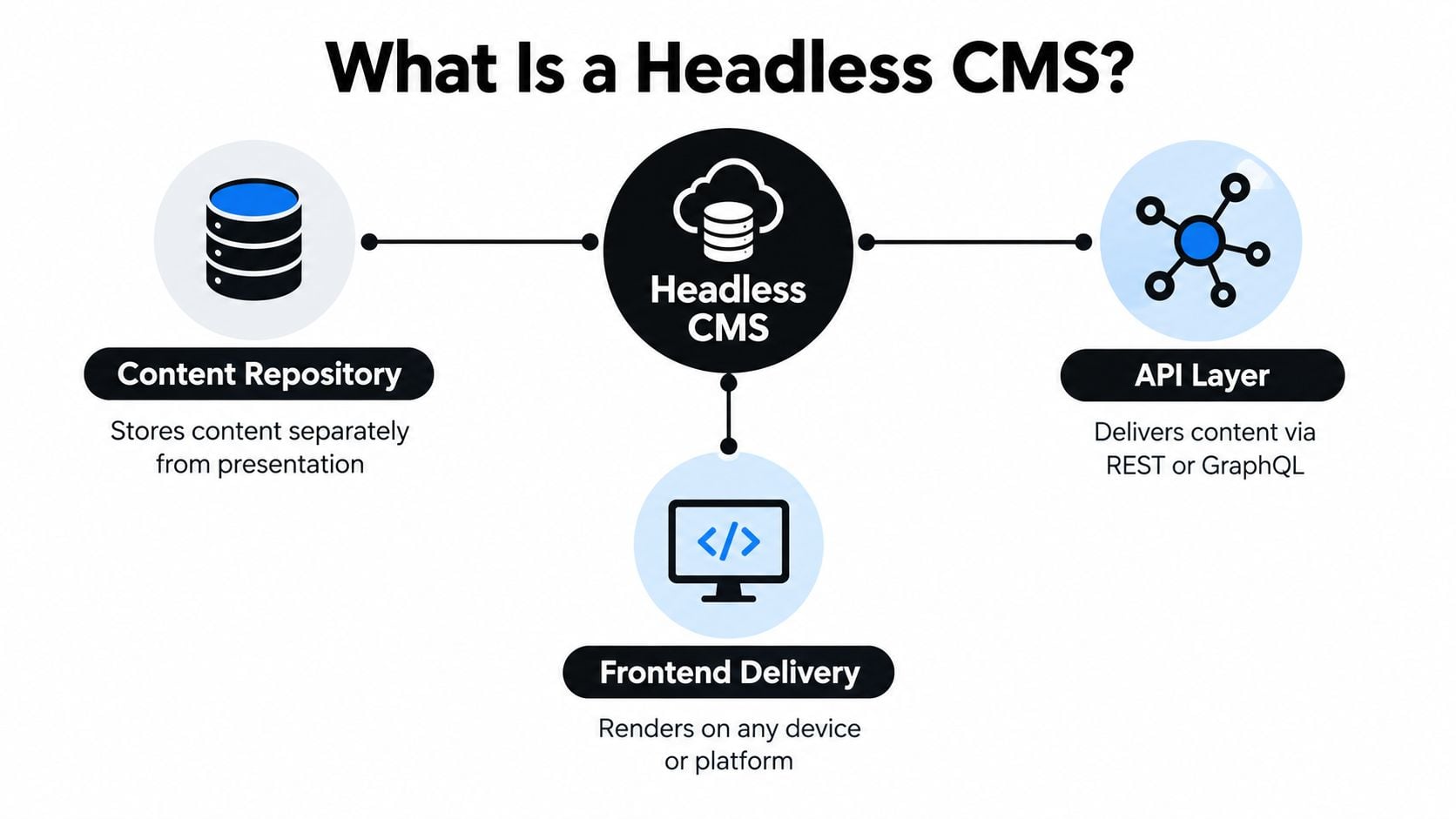
The important distinction is between what the content says and how the content appears. A product description can exist as fields such as product name, features, price and image. A web front end may display those fields in a product page, while an app presents them in a compact card.
This model treats content as reusable data rather than as a page locked to one design system. A retailer can update a single source and pass the change to connected channels, provided the integrations have been built and configured correctly. That last qualification matters. Headless doesn't remove the need for careful publishing controls, permissions, content modelling or testing.
For UK organisations, the relevance is commercial as well as technical. The ONS retail series records internet sales at a substantial share of total UK retail activity, so businesses increasingly need content that works beyond a desktop browser (ONS internet sales series). The architecture gives developers freedom over the presentation technology, while editors work with a central structure.
A headless CMS therefore isn't a website theme without a few features. It's a content service that supplies information to several independently built experiences.
Headless CMS vs Traditional CMS
A traditional CMS usually combines the editing system, database and presentation templates in one connected package. WordPress is a familiar example. The dashboard stores content, the theme controls its layout and the website's rendering system brings both together for visitors.
That arrangement offers a major advantage: simplicity. One team can install a theme, create pages, manage menus and publish without designing a separate API-led system. For a brochure website, local service business or small organisation with one primary channel, that may be exactly the right commercial choice.
A headless CMS makes a different trade. Editors manage structured content through an administration interface, while separate applications retrieve it through APIs. The same article, product description or brand asset can support multiple front ends without creating a separate editorial copy for each destination.
| Consideration | Traditional CMS | Headless CMS |
|---|---|---|
| Presentation | Content is closely connected to themes and templates | Developers choose and maintain the front end |
| Publishing | Often straightforward for one website | Designed for reuse across connected channels |
| Development | Faster to start with established themes and plugins | More planning is needed for schemas, APIs and previews |
| Flexibility | Convenient within the platform's conventions | Greater control over frameworks, layouts and integrations |
| Maintenance | Platform, theme and plugin updates need managing | CMS, APIs, front ends, integrations and hosting all need attention |
| Best fit | A focused website with conventional editing needs | Multiple channels or a highly customised digital service |
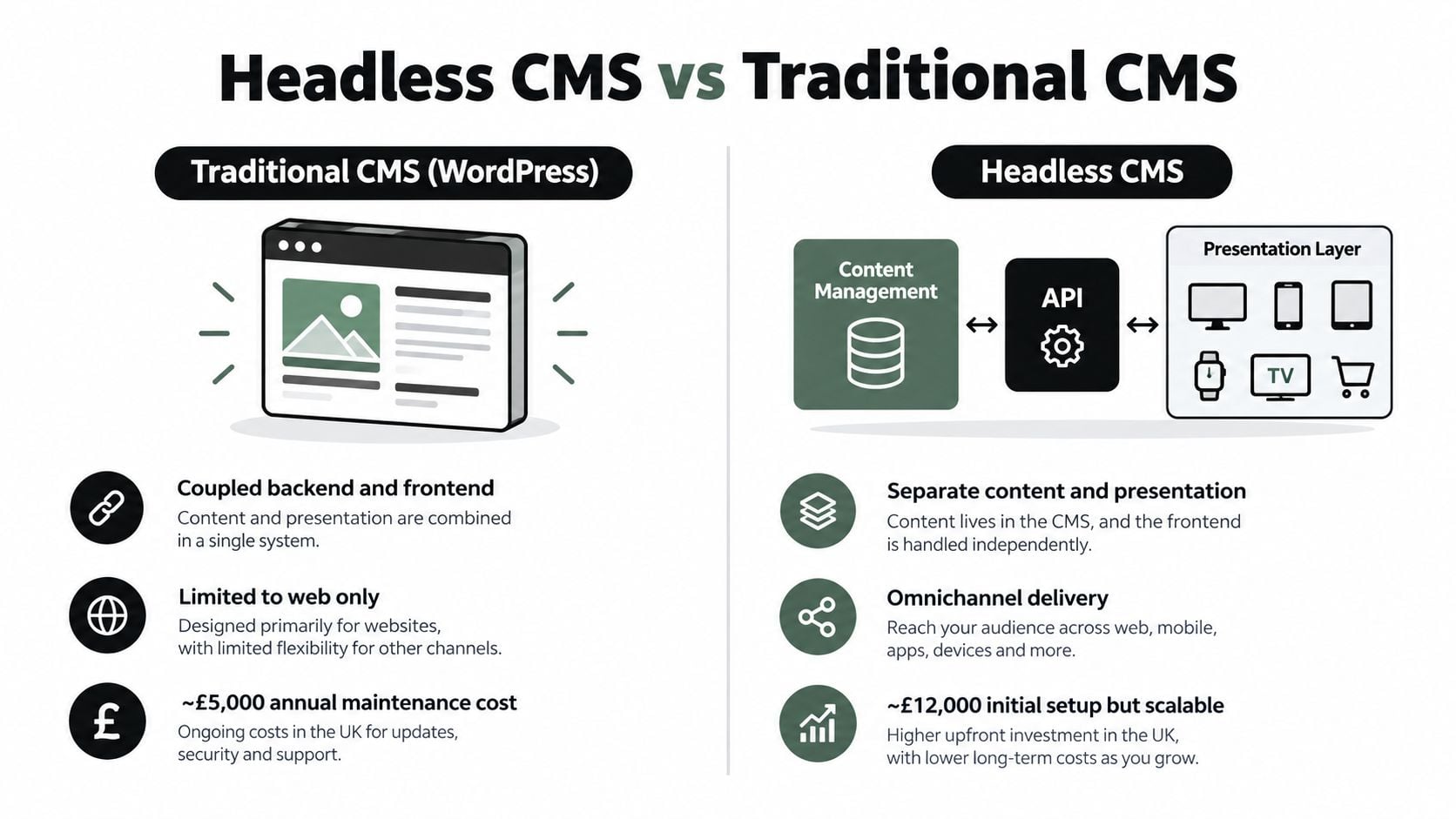
The difference isn't that one model is modern and the other is obsolete. It's a question of control versus complexity. Headless gives developers control over routing, rendering, integrations and component design. In return, the business must fund the people and processes that keep those parts reliable.
A conventional WordPress project can also expose content through APIs, making it possible to build a separate app or front end. That doesn't automatically turn the whole setup into a fully headless service, but it can provide a gradual route towards separation. If you're comparing platforms for a simpler site, this guide to WordPress, Squarespace and Wix can help frame the wider choice.
The following video gives a visual introduction to the architectural idea:
For a business owner, the decision should begin with a workflow problem. Are editors duplicating information across channels? Is the existing platform preventing a necessary customer experience? Or would a well-maintained traditional CMS already meet the need?
Performance and Accessibility Realities
A headless CMS doesn't automatically make a website faster. It gives developers more ways to shape delivery, including static HTML, server-side rendering, image optimisation, cached API responses and less client-side JavaScript. Speed comes from applying those options well, not from choosing the headless label.
A poorly engineered headless site can make several runtime requests before useful content appears. Large JavaScript bundles, slow third-party services and unoptimised images can create the same delays found in other architectures. For a small business, separating the back end from the front end can therefore increase maintenance work without improving the visitor experience.
Available benchmark material reports that 49.7% of websites pass Core Web Vitals on mobile, compared with 57.1% on desktop, while approximately 29% of UK sites don't meet Core Web Vitals requirements (UK website performance discussion). These figures describe a wider performance challenge, rather than proving that headless is the answer.
Speed needs an accountable owner
Before approving a build, agree who will measure and maintain:
- Core Web Vitals: Test Largest Contentful Paint and the other relevant signals on representative mobile devices and connections.
- Page weight: Track JavaScript, fonts, images and third-party scripts instead of assuming the framework will keep them small.
- API behaviour: Check response times, cache-hit performance, error handling and the user experience when a service is unavailable.
- Rendering: Decide which pages should be pre-rendered, server-rendered or generated when requested.
The same ownership question applies to accessibility. The CMS supports alternative-text fields and structured content models. Editors and developers must then ensure semantic HTML, keyboard navigation, visible focus states, sufficient colour contrast and accessible form labels are implemented correctly. Useful fields, editorial guidance and review processes help reduce inaccessible output.
UK public-sector websites are subject to the Public Sector Bodies Accessibility Regulations 2018. Private providers may also have duties to make reasonable adjustments under equality law. The European Accessibility Act, which began applying in June 2025, can affect UK businesses serving EU consumers in covered areas (UK accessibility guidance).
Accessibility belongs to the whole delivery team. Separating content from presentation separates responsibilities, not accountability.
A small business should treat accessibility testing, editorial training and ongoing fixes as part of the ownership cost. The same practical discipline applies to speed: a structured website loading speed review can identify avoidable delays, whatever CMS architecture runs the site.
Use Cases and Integration Examples
A headless CMS earns its keep when the same content must serve several customer experiences. A UK retailer could manage product names, prices, images, stock messages, buying guidance and promotional copy in structured content. That information might then support a responsive website, mobile experience, marketplace connection, campaign landing page and app.
The business case is not just about adding channels. A retailer may need customers to move between them without encountering different prices, outdated promotions or conflicting product information. Headless architecture can provide a shared content layer, while the team still decides which channels justify their implementation and support costs.
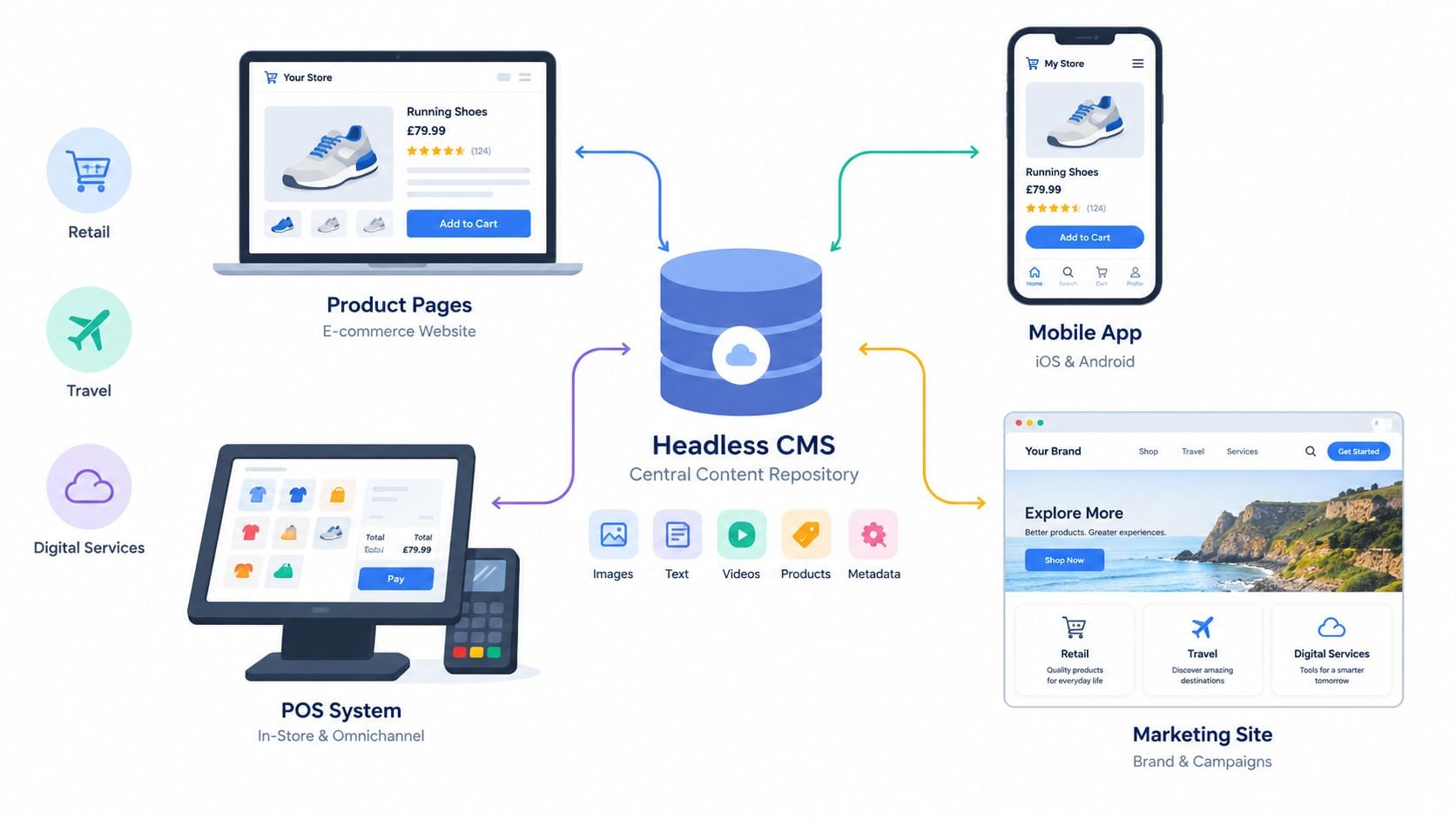
Where the pattern earns its keep
Headless ecommerce separates merchandising content from the storefront interface. Developers can create a custom product experience, while editors manage reusable product information, buying guides and campaign components. Before committing, a business should compare the expected commercial benefit with the extra work of maintaining integrations, testing and accessibility across each front end. Guidance on ecommerce build options can help frame that wider decision.
Headless WordPress preserves the familiar WordPress administration experience while a separate front end consumes content through the REST API or another integration route. This approach can suit a team that wants WordPress editing but needs a presentation layer adapted to a customer portal, campaign site or specialist interface.
Digital signage can retrieve centrally managed announcements, promotions or venue information and display them across screens in shops, offices or public spaces. The screen application controls the layout, while the content team controls the message. Someone still needs to check readability, contrast and update behaviour on the actual displays.
Mobile applications and portals can use the same service content as the main website. A customer account area, service portal or app can select the content it needs without reproducing every website template.
Multilingual campaigns benefit when content fields, approvals and translations are organised centrally. The front end can apply regional layouts or campaign journeys without forcing every market into an identical page structure. Local reviewers still need to confirm that wording, imagery and calls to action suit each audience.
Integration quality matters as much as the CMS. A property business may need listings, locations, availability and media from another system. Developers assessing that project can consult these integration docs while mapping how external property data should connect to a content service and public-facing interface.
A central repository does not mean one giant database owns everything. A sensible implementation assigns each field to the system best placed to manage it. An ecommerce platform may own price and stock, a CMS may own buying advice and editorial copy, and a digital asset service may manage images.
The result should be a clear source of truth for each field. Before choosing this architecture, map the customer journey and identify content that is duplicated, delayed or inconsistent. A standard online shop may gain little from a more complex stack if it does not need multiple experiences, custom interfaces or shared content across channels.
Migration Considerations for Businesses
Migration to headless is less like changing a website theme and more like redesigning the way content moves through the business. The visible website is only one part of the change. You also need to review content types, editorial permissions, integrations, previews, redirects, search behaviour, analytics and the front-end delivery model.
Start with the business problem. If editors are copying product information into several places, measure the time and error risk involved. If the current website cannot support an app or a bespoke customer portal, define the experience you need. If your only concern is slow pages, test the existing hosting, images, scripts and templates before assuming a new CMS will solve it.
A headless implementation commonly requires decisions about:
- Schemas: Define fields and relationships for products, articles, services, campaigns and reusable components.
- Authentication: Control which applications and users can access which content.
- Previewing: Give editors a reliable way to review content in its intended context before publication.
- Webhooks: Send controlled notifications when content changes and connected systems need to react.
- Cache invalidation: Ensure updated content reaches the right front ends without serving stale information indefinitely.
- Fallback behaviour: Decide what visitors see if an API or integration becomes unavailable.
- Security and permissions: Protect editorial accounts, tokens, environments and connected services.
- Front-end maintenance: Keep frameworks, dependencies, accessibility patterns and integrations supported after launch.
Choose a migration path
A full rebuild can be appropriate when the existing site has poor content structure, outdated templates or major experience limitations. It gives the team freedom, but it also creates a larger delivery and testing burden.
A phased migration moves selected content or customer journeys first. For example, a business might launch a new campaign front end while keeping the main website on its existing platform. This reduces the size of the first release and creates an opportunity to test editorial workflows.
A hybrid approach keeps a familiar CMS for conventional pages while exposing selected content through APIs. It may suit a business that needs a new app or interactive service without replacing a stable marketing website.
One available industry source reports headless CMS usage at 3.2% of websites globally in 2026, with higher adoption among enterprise sites. That is not a UK market measure, so it should be treated as directional context rather than proof that smaller UK businesses need headless (CMS market-share discussion).
For many organisations, the difficult cost isn't the first build. It's the continuing cost of maintaining several moving parts. A careful content migration service should therefore cover inventory, structure, redirects, media, metadata, approvals and post-launch validation, not just copying text from one database to another.
Conclusion and Next Steps
A headless CMS lets a business treat content as a flexible, reusable asset rather than a page tied to one template. Editors can manage structured information centrally, while developers create the right presentation for a website, app, ecommerce interface, display or portal.
That flexibility makes sense when you have multiple important channels, repeated content duplication, a need for highly customised front ends or a clear roadmap for connected digital services. It can also make future changes less disruptive because the presentation layer can evolve without rebuilding every piece of underlying content.
The trade-off is real. Headless doesn't guarantee speed, accessibility, SEO success or lower ownership costs. Your team still needs to design content models, build reliable APIs, create accessible components, manage previews, monitor performance and maintain integrations after launch.
For a local Dorset business that needs a straightforward information site, a well-optimised traditional CMS may be the more sensible choice. A strong WordPress implementation with accessible templates, sensible hosting, compressed images, careful plugin management and clear editorial processes can meet the commercial need without introducing unnecessary architecture.
Use these questions before deciding:
- What problem are we solving? Name the operational or customer issue in measurable terms.
- Which channels matter? Separate current requirements from speculative future ideas.
- Who owns the stack? Identify the people responsible for front-end development, accessibility, security and monitoring.
- Can editors work confidently? Test previews, approvals, structured fields and publishing recovery.
- What happens when something fails? Plan caching, fallbacks and support before launch.
If the answers justify separation, headless may be a strong foundation. If they don't, simplicity is a feature, not a compromise.
DesignStack helps Dorset and UK businesses plan, design and support responsive WordPress websites, ecommerce builds and custom online systems without losing sight of performance or accessibility. If you're weighing a traditional CMS against a headless approach, visit DesignStack to discuss the content structure, customer journeys and technical responsibilities your next project really needs.