Expert Content Migration Services for 2026
Your website still works, technically. Pages load. Enquiries arrive now and then. Staff know the odd workaround needed to update a service page or swap a hero image. But behind the scenes, it's become slow to manage, hard to trust, and risky to change.
That's the position many businesses reach before they start looking at content migration services. The problem usually isn't just design. It's that years of blog posts, landing pages, PDFs, product data, images, redirects, forms, and metadata have piled up inside a platform that no longer suits the business. Moving to something better sounds sensible. Moving everything without breaking anything sounds stressful.
A good migration project sits between those two realities. It gives you a controlled way to move from an awkward, ageing setup to a cleaner platform and a more useful website. Done well, it protects what still has value, removes what no longer serves anyone, and leaves your team with a site they can manage.
Table of Contents
- Is Your Website Holding Your Business Back
- What Content Migration Services Actually Involve
- The Business Case for Professional Migration
- A Typical Content Migration Workflow
- Protecting Your SEO and Data Integrity
- Beyond a Simple Copy and Paste
- Hiring a Migration Partner What to Expect and Ask
Is Your Website Holding Your Business Back
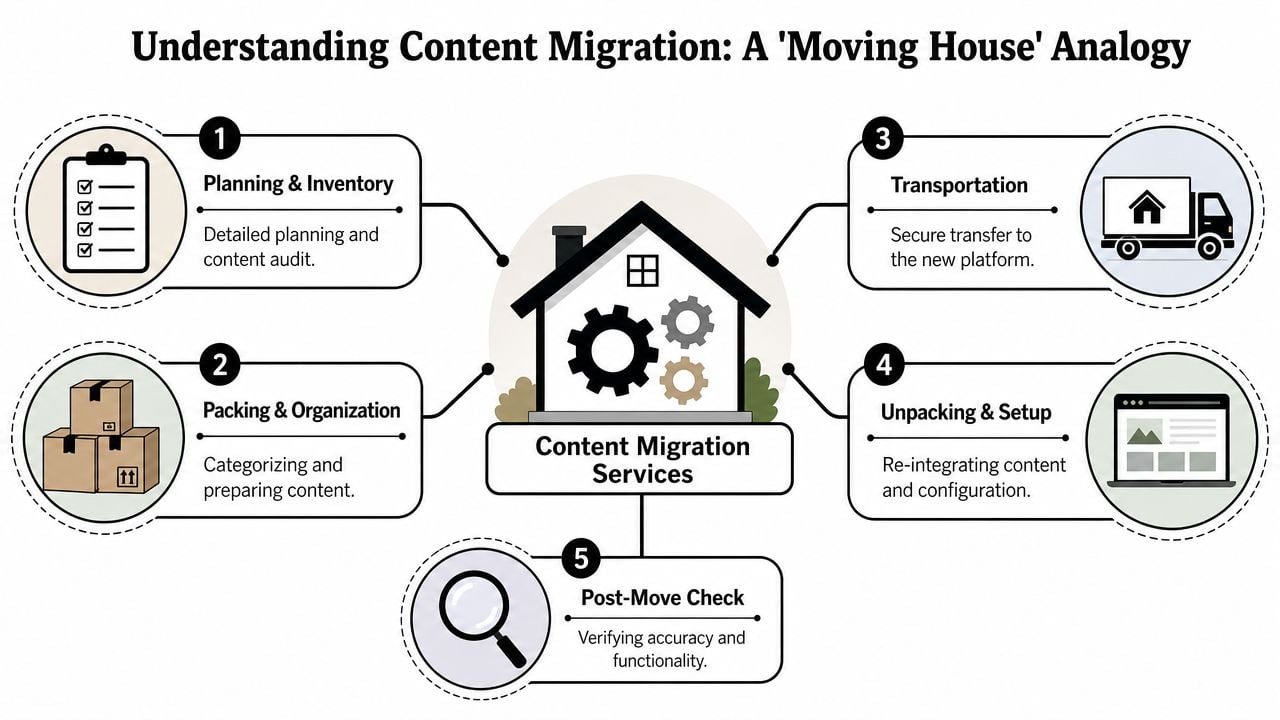
A common pattern goes like this. A business launches a site a few years ago. It grows in bits and pieces. New pages are added for new services. Staff upload documents wherever there's room. Old news posts stay live because no one wants to delete the wrong thing. The site becomes a loft full of useful items, forgotten boxes, and things nobody would pack if they were starting again.
At that point, the website doesn't just look dated. It starts slowing down decisions. Your team hesitates before editing pages. Marketing avoids campaign landing pages because publishing is fiddly. Sales sends prospects to PDFs because the website structure no longer helps people find answers quickly.
That's where content migration services earn their place. They aren't just about copying pages from one system to another. They provide a structured route out of a platform that's become a burden. The work includes auditing what exists, deciding what deserves to move, mapping it into a better structure, and checking that the new site works properly before and after launch.
This isn't a niche concern either. The UK cloud migration services market outlook states that the market generated USD 3,803.2 million in 2025 and is projected to reach USD 19,408.4 million by 2033, which shows how strongly UK organisations are investing in professional migration as they move away from legacy systems.
Businesses rarely come to migration because they're bored of their website. They come to it because the current setup is getting in the way of growth.
The signs usually show up in day-to-day work
- Updates take too long: Simple edits need technical help or too many approval steps.
- Content is duplicated: The same message appears across several pages, all slightly different.
- The structure feels historical: Navigation reflects internal departments, not how customers think.
- Confidence is low: Nobody wants to touch old pages in case something breaks.
If that sounds familiar, you don't need a frantic rebuild. You need a migration plan with judgment behind it.
What Content Migration Services Actually Involve
A content migration project starts with a decision that shapes the whole result. Are you transferring material into a new system as it stands, or are you using the move to reorganise content around what users need to find, understand, and do?
That distinction matters more than teams expect. A lift and shift can be the right call if the content model is sound, the information architecture still works, and the priority is speed. But many websites carry years of duplicated pages, outdated assets, inherited navigation, and content written for internal teams rather than customers. In those cases, migrating everything as-is usually preserves the same problems in a newer CMS.
What gets migrated
The inventory is broader than page copy alone. A proper migration plan covers the visible content, the structured fields behind it, and the supporting details that affect search, usability, and day-to-day editing.
- Core content: Service pages, product pages, blog posts, case studies, team profiles, FAQs.
- Media assets: Images, downloadable PDFs, icons, embedded media, alt text.
- Structured data inside the CMS: Categories, tags, custom fields, author information, dates.
- Commercial and functional content: Product descriptions, variations, order-related content, forms, gated resources.
- Hidden but important details: Meta titles, meta descriptions, internal links, canonical settings, redirect rules.
The destination setup matters too. If you're moving to WordPress or another modern platform, the key work often sits in deciding how content types, templates, and editor permissions should be configured. A plain-English guide to what a content management system does helps here, because migration choices are tied closely to how the new CMS stores and presents information.
Lift and shift or strategic overhaul
These are different jobs.
A lift and shift focuses on transferring content with minimal change. It suits sites with clean structure, reliable content governance, and a strong reason to preserve existing URLs, layouts, or records. It is usually faster, and it can reduce editorial effort during the project.
A strategic overhaul goes further. It reviews what content still earns its place, merges duplicates, rewrites weak pages, reshapes navigation, and maps information to user intent rather than company org charts. That takes more judgment and more time, but it is often where post-launch return comes from. The new site becomes easier to use, easier to manage, and more likely to support enquiries, sales, or lead quality.
In practice, many successful projects sit between the two.
Manual, automated, or both
The delivery method depends on scale, structure, and risk. Manual migration suits smaller sites or high-value sections where wording, layout, and page purpose need editorial scrutiny. Automated migration suits large volumes of structured content, especially where fields can be mapped reliably from one system to another.
Most serious projects use both. Scripts handle volume and consistency. People review edge cases, clean up formatting, check relationships between items, and improve content that should not be carried over untouched.
For a broader technical perspective, IMADO's complete guide is a useful reference because it explains WordPress migration options in practical terms, including where automation helps and where manual review still matters.
Practical rule: If every page is treated as equal, the project is a transfer exercise, not a content strategy.
The Business Case for Professional Migration
A professional migration isn't only about getting from old platform to new platform. It's about reducing operational drag.
When teams try to handle migration casually, they often underestimate the number of moving parts. A blog archive might import cleanly while service pages lose formatting. Product categories might move over while internal links point to old paths. Staff may spend days checking content manually because no one built a reliable mapping plan at the start.
Why internal teams struggle
Internal teams know the business well, but that doesn't always mean they should run the migration themselves. Marketing may know which pages matter, but not how metadata or structured fields should transfer. Operations may know the legacy system, but not the SEO implications of changing URL patterns. Leadership may want the new site live quickly, but not realise that a rushed launch can create months of clean-up work.
The strongest business case for professional content migration services is often the simplest one. They stop your most expensive people from spending their week checking copied text, chasing broken assets, or rebuilding records by hand.
That matters because commercial UK content migration services can achieve up to 90% cost reduction compared to manual projects by using automation to save staff time, connect older systems to modern platforms, and maintain data security.
What the investment really buys
The direct outcome is a moved website. The deeper value is broader.
| Business need | What professional migration helps with |
|---|---|
| Easier publishing | Editors work in a cleaner CMS with clearer templates |
| Lower risk | Fewer manual handling errors and fewer avoidable launch problems |
| Better consistency | Pages, media, and metadata follow agreed rules |
| Future flexibility | The site is easier to extend, redesign, or integrate later |
A migration project also forces useful decisions that businesses tend to postpone. Which pages are still valid. Which files should be retired. Which products need cleaner categorisation. Which old workarounds should never come into the new setup.
That's why the question shouldn't be “Can we move the website?” It should be “Can we improve the business while we move it?”
A Typical Content Migration Workflow
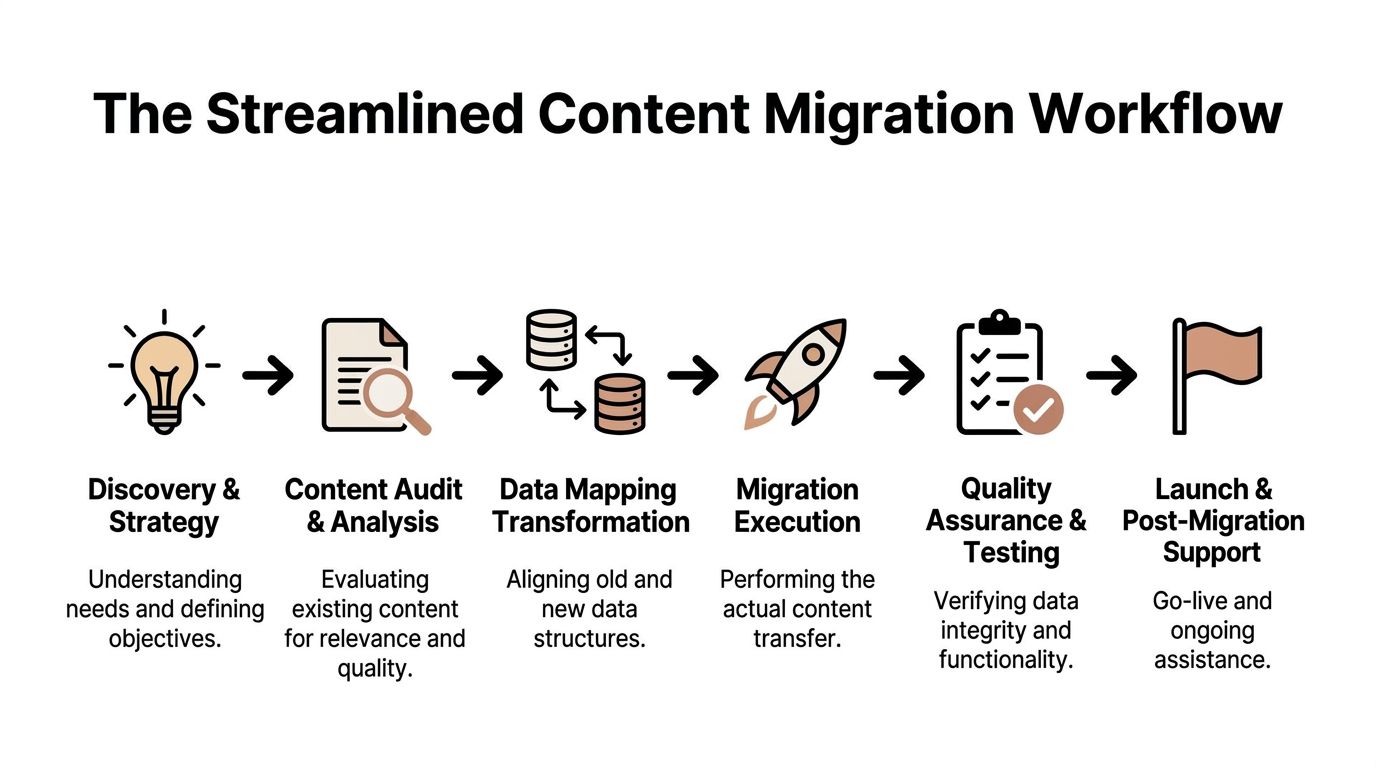
A good migration never feels like a blind leap. It feels like a sequence of controlled stages, each one making the next easier.
Discovery before anything moves
The first job is finding out what's really there. Not what people assume is on the site. What's live, indexed, duplicated, outdated, or hidden inside modules and media libraries.
This stage usually includes a content audit, a review of templates, and a look at how information is organised. If the old site grew without a clear structure, the migration team needs to define one before content starts moving. That's why understanding information architecture in practical terms matters. If the structure is weak, migrating into it just recreates the same confusion on a newer platform.
A straightforward discovery phase often answers questions like these:
- Which content types exist in the old system.
- Which pages still support current services or sales.
- Which assets need replacing, rewriting, merging, or removing.
- How the new site should group and surface content.
Preparation and transfer
Once the inventory is clear, preparation starts. Backups are taken. The new environment is configured. Content fields are mapped from old system to new system. Redirect plans are drafted. Templates are checked against the content they'll need to hold.
Then the transfer begins. Some items move through scripts or import tools. Others need manual handling because they contain unusual layouts, shortcodes, third-party embeds, or old formatting that won't survive a straight import.
The process needs discipline.
- Map before you move: If old fields don't line up with new ones, imported content lands in the wrong place.
- Start with lower-risk content: Blog archives and standard pages often reveal issues before critical sections are touched.
- Track exceptions: Every migration has awkward edge cases. Logging them early prevents repeated mistakes.
Most migration headaches don't come from the transfer itself. They come from poor preparation and undocumented exceptions.
Validation and launch
After the content arrives, thorough checking begins. Teams review page formatting, links, metadata, files, forms, search behaviour, and on-page consistency. Redirects are tested. Navigation is checked. Staff are shown how the new editing experience works.
Launch is only one moment in the workflow. The post-launch period matters just as much because that's when real users find oddities no staging environment can fully reveal.
A calm workflow usually includes:
- Structured QA: Spot checks and deeper reviews across page types.
- Editorial review: Removing awkward imported formatting and tightening messaging.
- Post-launch support: Fixing missed redirects, asset issues, and content anomalies quickly.
The smoother the workflow, the less your business feels the move.
Protecting Your SEO and Data Integrity
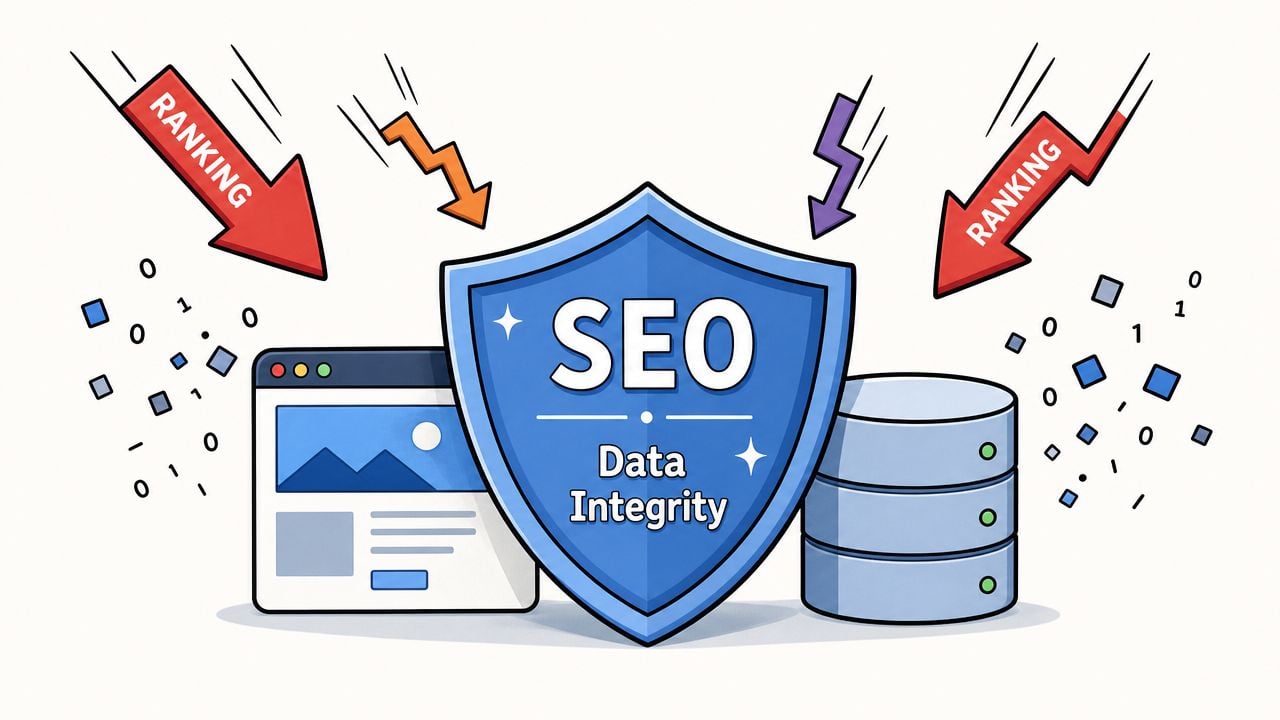
The two worries clients raise most often are easy to understand. They don't want to lose search visibility, and they don't want to lose data.
SEO protection starts before launch
Search performance can dip after a migration if key signals are lost or changed carelessly. That usually happens when URLs are altered without redirects, metadata is dropped, internal links still point to retired paths, or category structures change without a plan.
The practical fix is methodical, not glamorous.
- Keep a redirect map: Every important old URL needs a clear destination.
- Carry over metadata: Title tags, descriptions, and indexation rules need explicit handling.
- Protect internal linking: Navigation, contextual links, and related-content modules should point to the right new locations.
- Review template output: New themes and builders can create SEO issues if headings, canonicals, or archive behaviour aren't checked.
For teams planning this work, a detailed website migration SEO checklist helps surface the tasks people often forget until after launch.
If search traffic matters to the business, redirects and metadata can't be treated as tidy-up work at the end.
Data handling has to be deliberate
The second risk is less visible but more serious. During migration, content isn't just moving between two pretty front ends. Data is being transferred between systems, environments, and access layers. That includes personal data in forms, account areas, CRM-connected records, or customer service workflows.
The compliance point is clear. UK cloud migration guidance notes that under UK GDPR, personal data transferred between systems must remain encrypted throughout the entire process, and that phased validation of data integrity at every stage is a critical cost-saving and security measure.
That changes how responsible teams run migrations. They don't open up broad access just to make transfer easier. They validate in phases. They check source and destination environments at the same time. They close temporary permissions properly.
A useful companion read on ensuring data quality in migrations is worth a look because it reinforces the operational side of validation, not just the technical one.
This short explainer gives a helpful visual overview of the same discipline in practice.
Good migration work is cautious by design. That's not delay. That's protection.
Beyond a Simple Copy and Paste
A basic lift and shift can get a new site live faster. For document libraries, archived news, or low-value legacy pages, that can be the right call.
The problem starts when that approach is used across the whole site.
In practice, older websites usually carry the history of the business. New services were added. Teams changed ownership. Pages were built to suit internal structures, campaign deadlines, or one-off requests. Over time, the information architecture starts reflecting the company's org chart more than the questions customers arrive with.
A new design does not fix that on its own. It just presents the same friction in cleaner colours.
The projects that produce stronger post-launch ROI usually treat migration as a decision point. Content still moves across, of course, but it also gets reviewed, grouped, renamed, merged, retired, and rewritten around user tasks. That is where a migration starts earning its keep.
Why lift and shift often underdelivers
The risk is easy to miss because the transfer itself may be technically successful. Every page arrives. URLs are mapped. The CMS is populated. On paper, the project looks complete.
Yet users can still struggle to find pricing, compare services, understand delivery areas, or work out what to do next. Sales teams then compensate manually. Customer service answers the same basic questions. Marketing sends traffic to pages that were never structured to convert.
That is why the distinction matters. A lift and shift preserves content. A strategic overhaul improves how information works for the people using it.
As Boagworld's discussion of content migration strategy explains, migration delivers better results when teams review content priorities and structure rather than carrying old assumptions into the new build.
A new platform cannot rescue old thinking. If page structure still reflects internal politics instead of customer questions, the relaunch will feel newer, but not easier.
What a strategic overhaul looks like
A stronger migration starts with top tasks. What does a visitor need to know, compare, trust, or complete within the first few minutes? That question changes the shape of the whole project.
In real projects, that usually leads to work like this:
- Merging overlap: Several thin service pages often become one stronger page with clearer sections and fewer dead ends.
- Rewriting weak copy: Legacy content often talks about the business first and the buyer's problem second.
- Rebuilding hierarchy: Navigation labels, parent pages, and page groupings are organised around user intent.
- Improving connected systems: If forms, CRM records, booking tools, and stock data are still awkwardly joined up, the site will continue to feel disjointed. Early planning to streamline system integration helps carry cleaner processes into the new setup.
This is also where sitemap work becomes more valuable than many teams expect. A good sitemap forces decisions about priority, depth, and user journey before content is poured into templates. If that part of the project is still fuzzy, this guide to creating a website sitemap is a practical place to start.
The best migrations do more than relocate pages. They give the site a clearer job to do, and a better structure for doing it.
Hiring a Migration Partner What to Expect and Ask
A migration partner should make the process feel clearer, not more mysterious. You shouldn't come away from early conversations with a fog of jargon and a vague promise that everything will be “handled”.
Set expectations on cost and scope
Price depends heavily on site size, complexity, and whether the project is a straight transfer or a more strategic overhaul. For UK businesses, website migration pricing ranges in this market overview start at £3,000 to £8,000 for sites under 100 pages, rise to £8,000 to £20,000 for more complex projects, and can exceed £50,000 for larger enterprise migrations.
That range tells you something useful. Migration isn't admin. It's specialist project work involving planning, validation, SEO protection, and post-launch support.
If you're comparing providers, it helps to read advice on how to choose a web design agency because many of the same signs apply here. Clear process. Clear scope. Clear accountability.
Checklist for hiring a content migration partner
| Area of Concern | Question to Ask |
|---|---|
| Process clarity | How do you audit existing content before deciding what moves? |
| Scope control | What is included in the quoted migration, and what counts as extra work? |
| SEO protection | How will you handle redirects, metadata, and internal links? |
| Data integrity | How do you validate migrated content and protect sensitive data during transfer? |
| Content strategy | Will you challenge weak structure, or simply copy the old site into the new one? |
| CMS setup | How will the new platform make editing easier for our team? |
| Testing | What checks happen before launch and immediately after launch? |
| Support | What happens if issues appear in the days or weeks after go-live? |
| Communication | Who will manage the project and how often will we get updates? |
| Local credibility | Can you show examples of organisations similar to ours? |
A strong partner should answer these questions directly. Not with buzzwords. With a process.
That's also where local experience can help. If an agency can point to trusted names, including community organisations and established businesses, it gives you more confidence that they understand real-world constraints, not just ideal technical scenarios. Work for recognisable organisations such as the Weymouth & Portland Chamber of Commerce is a practical sign that the team knows how to balance deadlines, stakeholder input, and public-facing quality.
If your current site is awkward to manage, overdue for a rebuild, or carrying years of content baggage, DesignStack can help you plan the next step with clarity. As a Dorset-based agency with experience across WordPress builds, SEO-focused structure, branding, and ongoing support, the team can help you work out whether you need a straightforward migration, a content overhaul, or both.