Change Request Process: A Simple Guide for Web Projects
You're halfway through a website project, the layout is approved, the content is nearly done, and then someone says, “Can we just move this section, add one more feature, and change the homepage wording while we're at it?” That's the moment when a change request process stops being theory and starts protecting the work already agreed.
For small businesses, this isn't about paperwork for its own sake. It's about keeping the project fair, clear, and moving. A good process makes room for useful ideas without letting every quick thought turn into delay, confusion, or surprise costs.
Table of Contents
- What Happens When a Small Tweak Is Not So Small
- Why a Formal Change Process Is Your Project's Best Friend
- The Anatomy of a Change Request A 7-Step Workflow
- Key Roles and Responsibilities Who Does What
- Crafting the Perfect Change Request A Sample Template
- Common Pitfalls and How to Avoid Them
- Fostering a Partnership Through a Fair Process
What Happens When a Small Tweak Is Not So Small
You send a quick message asking for a small homepage change. Maybe the button text needs to be more specific, or a new section should sit above the fold. It sounds simple enough, especially when you're trying to keep momentum and the change feels minor.
Then the knock-on effects appear. A layout adjustment can affect mobile spacing, image choices, page content, approvals, and the order of tasks already booked into the sprint. That's why even a well-meant tweak deserves a proper look before anyone says yes.
A small request can touch several parts of a build
A website is connected work. If one element shifts, a designer may need to rework spacing, a developer may need to adjust templates, and content may need rewriting so the message still flows. If the request lands mid-stream, it can also affect other agreed items waiting behind it.
That's exactly why agencies use a website support and maintenance mindset, because live websites and active builds both need control, not guesswork. A proper request trail helps everyone see what changed, when it changed, and why it changed.
Practical rule: if the request changes scope, risk, or time, treat it as a change request, not a casual comment.
Good process protects both sides
A professional agency doesn't slow things down just to be formal. It asks for clarity because clarity prevents rework. The aim is to avoid the awkward moment where one side thinks something was included and the other side never priced it.
That's why the process feels especially helpful for SMEs. You get a fair way to ask for updates, and the agency gets a fair way to assess them. Nobody has to rely on memory, assumptions, or thread-hunting through old emails.
A well-run change request process isn't red tape. It's a shared language for deciding what belongs in the original plan and what needs a fresh decision.
Why a Formal Change Process Is Your Project's Best Friend
A formal process matters because it draws a clean line between the work you already agreed and the work you're now considering. That line protects your budget, your schedule, and the team's ability to finish the project properly. It also helps avoid scope creep, which is what happens when small additions accumulate until the original plan no longer fits.
This isn't a new idea in professional service management. The UK had a formal benchmark for controlled service changes when the British Standards Institution published BS 15000 in 2002, a milestone that helped shape later ITIL-aligned change control practices. That history matters because it shows why controlled change became a standard expectation, not an optional extra.
Fairness depends on visible decisions
A documented process gives both sides a record of what was requested, what was approved, and what was deferred. That record is useful when someone joins the project late, when a stakeholder asks why a feature moved, or when you need to revisit a decision after launch. It turns a memory-based discussion into something you can point to.
The same logic supports fixed-cost work and standard revision rounds. If a request sits outside the agreed scope, everyone can see that it needs a separate review rather than being smuggled into existing time. That makes the project easier to manage and keeps expectations realistic.
A light process can still be strict about clarity. It just doesn't need to feel heavy.
For clients choosing an agency, this also signals professionalism. A team that uses a defined change route is showing that it wants to keep the project stable, not improvise its way through delivery. If you're comparing providers, that's one of the practical questions to think about, alongside design quality and communication. Our guide to choosing a web design agency fits neatly into that decision.
At DesignStack, the point isn't to block ideas. It's to make sure every new idea gets handled in a way that protects the result you're paying for. That's what makes a formal change request process your project's best friend.
The Anatomy of a Change Request A 7-Step Workflow
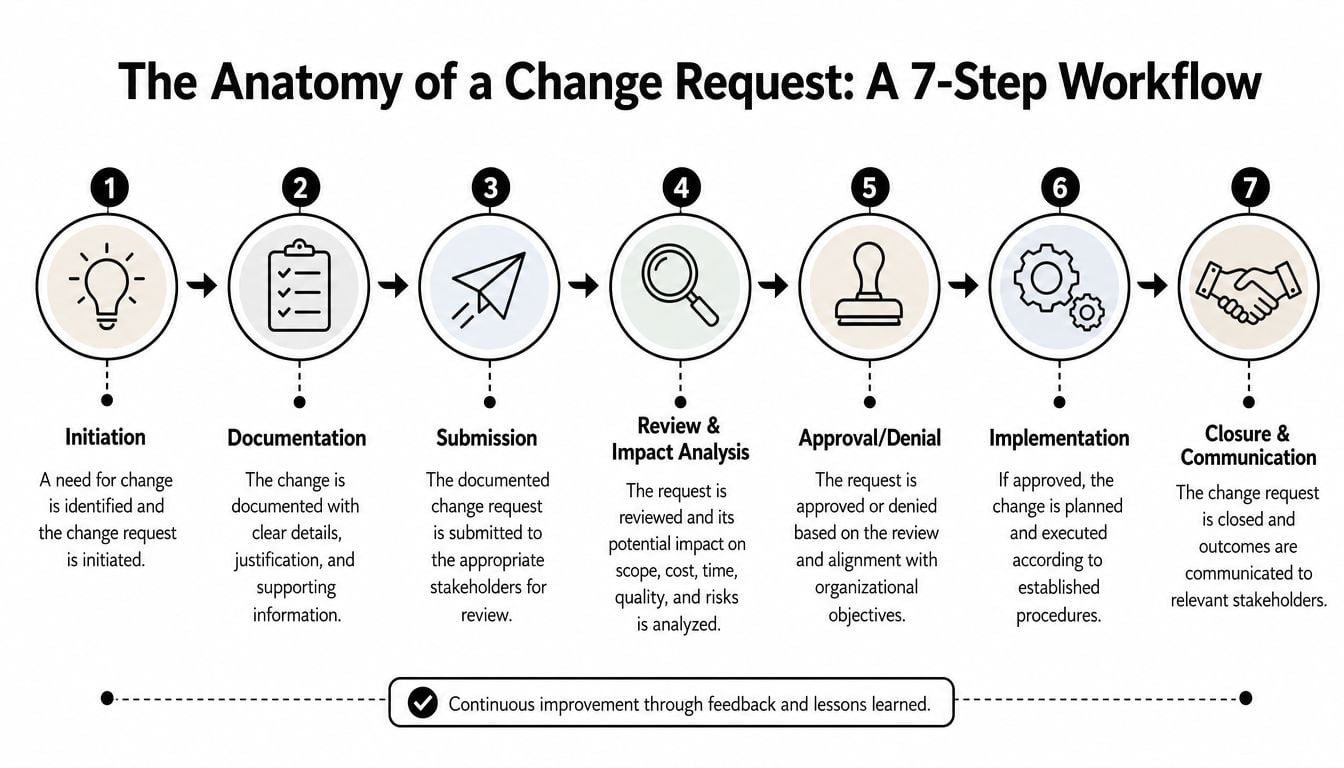
Here's the simplest way to think about the workflow. A request starts as an idea, gets written down, gets reviewed, gets approved or declined, and then either moves into delivery or closes without action. The value is in the trail, because the trail keeps the project understandable for everyone involved.
1. Initiation and documentation
A request usually starts when you spot something that needs to change. Maybe the copy on a service page is out of date, maybe a button should link somewhere else, or maybe a feature needs to behave differently. At this point, the best thing you can do is describe the change plainly and attach any examples that help the team see what you mean.
That first write-up matters because it reduces guesswork. If the team can understand the request in one pass, it can move faster and assess the impact with far less back-and-forth. A stronger brief also helps when the request sits alongside broader redesign work, which is why agencies often encourage clients to use a website redesign checklist before work gets too far along.
2. Submission and review
Once the request is logged, the agency checks whether it's a small adjustment, a medium task, or something that changes the agreed scope. The team then assesses dependencies, risk, and whether the change fits the current project stage. The goal isn't to complicate things; it's to stop hidden costs from building up.
A useful review also asks a simple question. Can this be done safely without pushing other work out of line? If the answer is yes, the request can move quickly. If the answer is no, the team can explain why and propose another route.
3. Approval and scheduling
If the change is accepted, it needs clear approval before implementation. That approval should include the time window, the expected effect on the schedule, and any limits the team needs to respect. A request that's approved in principle but never scheduled is still unfinished.
The infographic above reflects a seven-step flow, but real projects often use the same underlying logic in lighter form. That's especially helpful for SMEs, because it keeps the process disciplined without forcing you into a big enterprise-style system.
4. Implementation, testing, and closure
Once the work is built, it needs checking. If the request touches design, content, forms, or integrations, the team should verify that the change works in the right place and doesn't break anything else. After that, the final update should be recorded so the project history stays accurate.
Good practice: every approved change should end with a clear note of what was done, what was tested, and who confirmed it.
For a process model, structure matters most. A clean finish prevents the same conversation from returning later, and it gives you confidence that the project record matches reality.
Key Roles and Responsibilities Who Does What
A change request process works when people know their lane. Clients need to know when to provide detail and when to make a decision. The agency needs to know who reviews the request, who assesses the work, and who gives the final sign-off.
The client side and the agency side
On your side, the key roles are usually the requestor and the approver. The requestor describes the change, shares context, and sends any useful references. The approver confirms whether the change should go ahead once time and cost are clear.
On the agency side, the project manager keeps the request moving and makes sure it doesn't get lost between design, development, and client feedback. Designers and developers assess what needs to change, what it affects, and how risky it is. The final decision may sit with a project lead or the agreed client contact, depending on the setup.
Change Request Roles and Responsibilities
| Role | Primary Responsibilities |
|---|---|
| Requestor | Raise the change clearly, explain the reason, and attach helpful examples |
| Approver | Review the impact, confirm priorities, and give final sign-off |
| Project Manager | Log the request, coordinate reviews, track status, and keep communication clear |
| Designer | Assess visual and content impacts, flag layout or brand issues, and confirm feasibility |
| Developer | Review technical impact, estimate implementation effort, and build the change if approved |
| Tester or Reviewer | Check the change works as intended and confirm nothing else has broken |
A simple rule helps here. The person asking for the change shouldn't also be the person approving the cost if the project has multiple stakeholders. That separation keeps decisions honest and avoids later confusion.
If you're unsure what a web designer handles during this process, our what does a web designer do page gives useful context. It's often easier to write a better request when you know which part of the build you're affecting.
The cleaner the role split, the less time gets lost in follow-up questions.
That's especially important for small teams, where people wear several hats. A lean change request process should still make ownership obvious.
Crafting the Perfect Change Request A Sample Template
A strong request doesn't need to sound formal. It just needs enough detail for the agency to understand what you want, why you want it, and what you expect to happen when it's done. The clearer the brief, the faster the impact review.
What to include
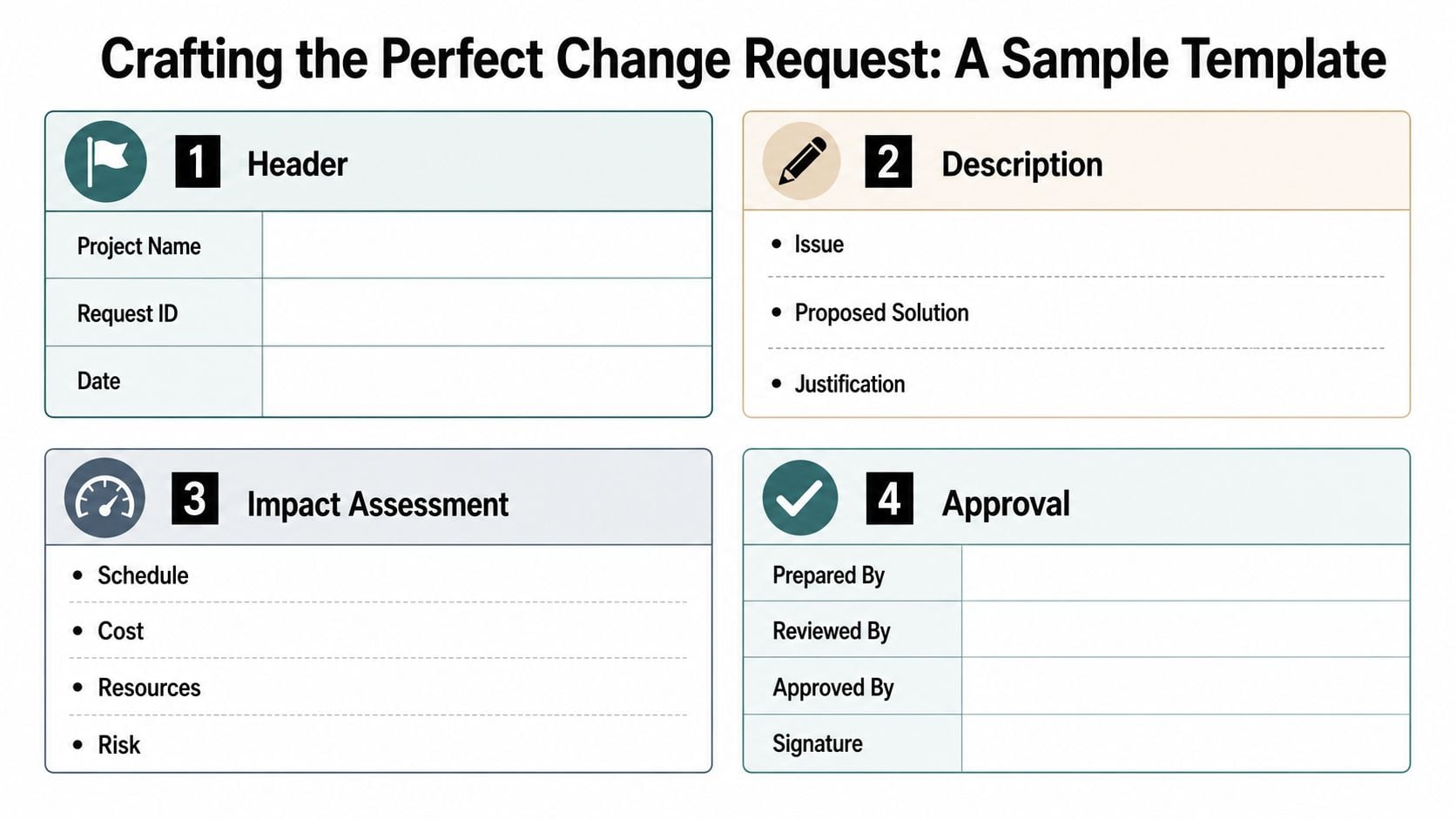
A practical template usually starts with the basics. Add the project name, a short request title, and the date. Then describe the change in plain language, not in vague language like “make it better” or “tidy this up”.
After that, explain the reason. You say what problem the change solves, or what outcome you're aiming for. If you have examples, screenshots, sketches, or references, attach them, because visual context cuts down on misunderstanding.
Why each field matters
The impact section is where the agency decides whether the request is small, medium, or outside the current scope. That's where schedule, resources, risk, and possible dependencies come into view. If the request touches pricing or outside suppliers, it can also help to think carefully about how any external costs are tracked, especially if you're already balancing operational tools and managing multiple currencies effectively in the background.
The final part is approval. That can be a yes, a no, or a request to revisit the idea later. Either way, the decision should be recorded so everyone knows what happened.
Sample checklist for a useful request
- Project name: State which site, campaign, or build the change belongs to.
- Request summary: Describe the change in one clear sentence.
- Reason for change: Explain the business need, user need, or internal issue.
- Supporting material: Attach examples, mockups, screenshots, or notes.
- Impact notes: Flag anything that might affect content, design, development, or timing.
- Desired deadline: Give the date you'd like the request considered by.
- Approval contact: Name the person who can confirm the decision.
If you want a fuller brief structure for this kind of work, our how to write a design brief resource is a useful companion.
A good template doesn't add bureaucracy. It saves time by making the first conversation more accurate.
Common Pitfalls and How to Avoid Them
The biggest problems in a change request process usually start with a mismatch between expectation and detail. One side thinks the change is obvious. The other side sees gaps that make the request unsafe to approve.
Vague requests create avoidable friction
A request like “update the page” leaves too much open. Which page, which section, which goal, and which outcome? If the agency has to guess, the review slows down and the risk of missing the mark goes up.
The fix is simple. Ask for the change in plain language and add context. Even a short explanation of why the request matters can turn an unclear note into something the team can work with.
Assuming every change is quick and free causes problems
Clients often underestimate the ripple effect of a small change. A wording tweak might be easy, but a layout change, a new integration, or a content restructure can affect multiple people and several tasks. If the request reaches the wrong stage of the project, it may also push other work out.
The answer is to separate the idea from the approval. A good request can be welcomed without being accepted automatically. That keeps the conversation constructive instead of reactive.
Bypassing the process slows things down
Informal emails and side messages feel fast, but they usually create more work later. The project manager may not see them right away, the request may not be costed, and the change may end up happening without a proper record. Then the team has to reconstruct what was agreed after the fact.
Practical rule: if it affects scope, it belongs in the process, even if the request came in casually.
Overthinking every detail can stall the project too
The other extreme is analysis paralysis. Some clients hesitate to request a change because they worry about bothering the team, while some teams over-review tiny items that could have been handled quickly. Neither approach helps.
The best fix is a light threshold system. Small low-risk changes can get a fast review, while bigger requests get fuller analysis. That keeps the process moving without making it loose.
For SMEs, the point is balance. A change request process should remove confusion, not create a new layer of it.
Fostering a Partnership Through a Fair Process
A good process keeps the conversation honest. You know what's included, what's changing, and what still needs a decision. The agency knows what to build, when to build it, and how to record the result.
That's what makes a lightweight system work for small businesses. It's detailed enough to protect quality, but simple enough to stay usable when things move quickly. Clarity, documentation, and shared expectations do more for a project than a long policy ever could.
If you're working with a digital partner, the right question isn't whether you need a process. It's whether the process helps you move faster with less risk. When it does that, it becomes part of the collaboration itself.
If you're planning a new website, a rebrand, or an ongoing support arrangement, DesignStack can help you set up a clear change request process that fits a small business project without unnecessary overhead. Visit DesignStack to talk about a web design or support package that keeps changes organised, visible, and easy to manage.