Website Support and Maintenance: UK Guide 2026
You've probably seen this happen. The new website goes live, everyone feels relieved, and then a few months later small problems start creeping in. A contact form stops sending. A plugin update clashes with the theme. The site feels slower on mobile. Nobody notices until an enquiry doesn't arrive, or a customer tells you something's broken.
That's why website support and maintenance matters. A website isn't a brochure you print once and leave on a shelf. It's closer to a front desk, a shopfront, and a sales rep rolled into one. If it goes wrong, the problem is rarely “technical” in any useful business sense. It's lost trust, missed leads, and disruption.
For UK firms, that shift from one-off builds to ongoing care is now the normal operating model. The global website maintenance services market was valued at USD XX million in 2024 and is projected to grow at a 4.00% CAGR through 2031, according to Cognitive Market Research's website maintenance services market report. Dorset businesses feel that same reality every day, whether they run a local trade business, a professional services firm, or a niche eCommerce shop.
Table of Contents
- Why Your Website Needs More Than Just a Launch
- What Is Website Support and Maintenance Really
- The Core Tasks of a Professional Maintenance Plan
- Understanding Service Plans and Pricing Models
- How to Choose the Right Maintenance Partner in Dorset and the UK
- A Practical Website Maintenance Checklist
- Frequently Asked Questions
Why Your Website Needs More Than Just a Launch
A launch is a milestone, not the finish line. Most SME owners don't buy a website because they want code, plugins, or admin logins. They buy it because they want enquiries, bookings, sales, credibility, and less friction for customers.
The trouble starts when a website is treated like a completed capital purchase instead of an operational asset. If your accountant vanished after year one, you'd see the risk straight away. If your insurer only cared on the day the policy started, you'd question the arrangement. Websites need the same mindset. They support business continuity.
A neglected site rarely fails in one dramatic moment. More often, it slips. Forms stop routing properly. An update creates a layout issue on iPhone screens. A broken image makes a key service page look half-finished. Search visibility softens because core pages aren't being improved, reviewed, or technically maintained. If you operate in a competitive local market, even a good-looking site can gradually lose ground.
A website that looks fine from the homepage can still be failing underneath.
That matters even more when the website carries a specific commercial role. A venue, solicitor, retailer, consultant, or tourism business doesn't just need pages online. It needs those pages to stay accurate, usable, and visible. If local search is part of your pipeline, maintenance and SEO also overlap. For example, this guide to UK wedding venue SEO is useful because it shows how content, technical health, and ongoing optimisation work together long after launch.
A business function, not a technical favour
Good website support and maintenance protects three things:
- Continuity: Your site stays available and usable when customers need it.
- Reputation: Visitors don't run into obvious faults that make the business look careless.
- Growth: You keep improving pages, tracking problems, and removing friction from enquiries or sales.
If a website brings in leads, supports existing customers, or answers pre-sale questions, maintenance isn't overhead for its own sake. It's part of how the business runs.
What Is Website Support and Maintenance Really
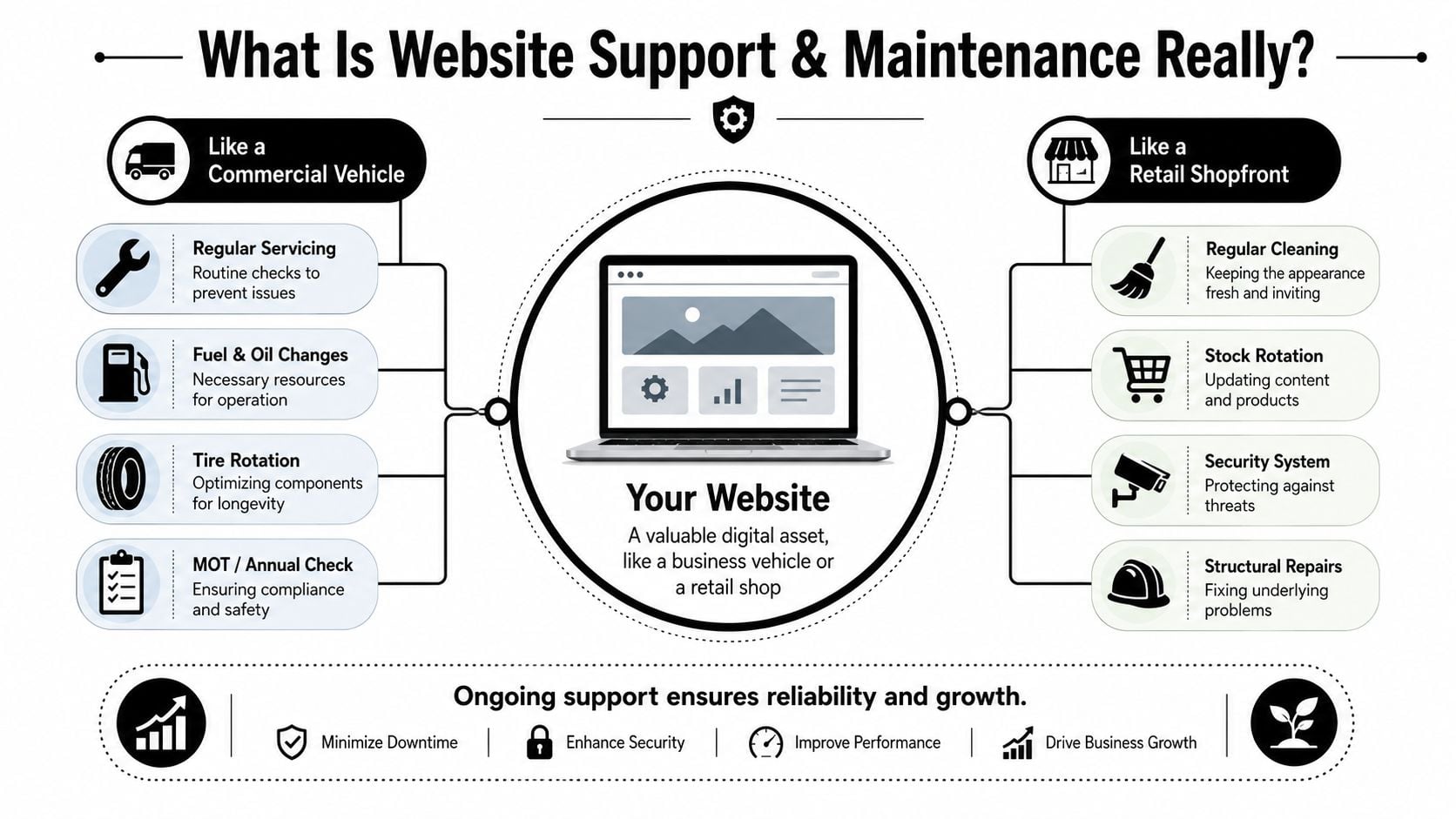
The simplest way to explain it is this. Maintenance is the planned work that keeps the website healthy. Support is the help you get when something changes, breaks, or needs attention.
Consider a commercial van. Routine servicing, tyre checks, and inspections keep it reliable. That's maintenance. A call because the side door won't shut properly before a delivery run, that's support. A website needs both.
Maintenance is prevention
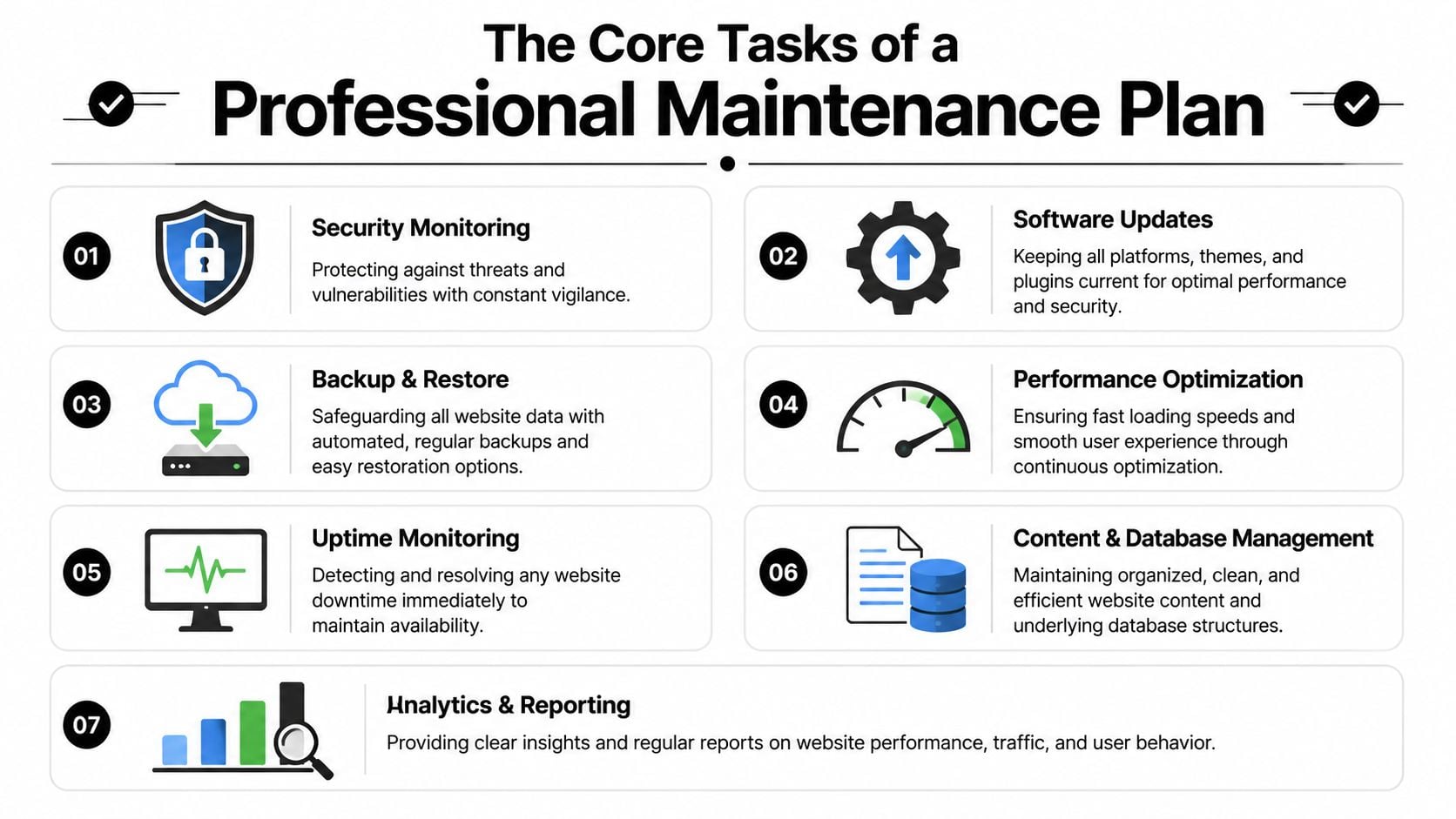
This is the structured, repeatable work that stops avoidable problems from turning into expensive ones. On a typical business website, that includes software updates, backups, uptime monitoring, security checks, performance reviews, and housekeeping around content or databases.
The key point is cadence. Preventive work has to happen before there's a visible issue. If someone only logs in when you email to say “the site's acting strangely”, that isn't a maintenance plan. That's reactive firefighting.
If you want a more detailed look at how hosting and care fit together, this overview of website hosting and maintenance is a practical starting point.
Support is response
Support is what happens around the edges of real business life. A staff member needs opening times changed. A banner needs updating. A landing page has a display issue. A form works on desktop but behaves oddly on mobile. An email notification needs rerouting to a new inbox.
Many businesses often encounter a common pitfall. They assume having “a web guy” available now and then is enough. It often isn't, because support without maintenance deals with symptoms, not causes. You can keep paying for fixes while the underlying platform drifts further out of date.
Practical rule: If your arrangement only starts when something breaks, you don't have website support and maintenance. You have emergency response.
A strong service combines both sides. Planned maintenance reduces risk. Responsive support keeps the business moving when small changes are needed. That mix is what gives owners peace of mind, especially when nobody in-house wants to spend Friday afternoon testing plugins or chasing form delivery issues.
The Core Tasks of a Professional Maintenance Plan
A proper plan should be concrete. If a provider can't tell you what they do each month, you're buying reassurance, not a service.
Security monitoring and patching
This is the first layer of protection. UK businesses should treat patching and backup cadence as resilience work, not admin. Independent guidance reflecting National Cyber Security Centre recommendations stresses keeping software updated and using offline, tested backups so systems can be restored after compromise, as explained in this summary of website maintenance services.
For a WordPress site, that usually means:
- Core updates: Keeping WordPress itself current.
- Plugin updates: Closing vulnerabilities and maintaining compatibility.
- Theme updates: Preventing issues caused by outdated templates.
- Security review: Watching for suspicious behaviour, malware signs, or unusual changes.
Security advice is one area where broader reading helps too. This piece on Finchum Fixes IT web application security is US-focused, but the operational lessons still apply. Good habits are good habits, whether the business is in Indiana or Dorset.
Software updates without gambling on live traffic
Updates are necessary, but rushed updates break websites. That's the trade-off. Leave software untouched and you increase security risk. Update carelessly on the live site and you can disrupt forms, layouts, or third-party integrations.
The better approach is staged testing. Apply changes in a safe environment first, check compatibility, then push them live once basic journeys work. This is particularly important on websites with booking systems, quote forms, event plugins, or eCommerce add-ons.
Here's the common mistake. Someone clicks “update all” in one go, assumes success because the homepage still loads, and moves on. The problem appears later on a page nobody tested.
A useful parallel sits in site speed work. Performance changes also need checking after each tweak, not blind optimism. If speed is a concern, this guide on how to improve website loading speed covers the kinds of issues that often sit behind sluggish pages.
To see the broader topic discussed visually, this short video gives a decent overview:
Backups and restore testing
A backup only matters if it can be restored cleanly. Many businesses hear “daily backups” and assume that's enough. It isn't, unless someone is also checking that the files are complete, recent, and usable.
Good backup practice usually includes:
- Automated schedules: So backups don't depend on memory.
- Off-site or offline copies: So recovery is possible after a serious incident.
- Restore checks: So the process has been verified.
- Clear retention rules: So older recovery points exist if a problem went unnoticed.
Performance optimisation and uptime monitoring
Performance work is partly technical and partly commercial. People don't care how elegant your stack is. They care whether pages load, buttons work, and the site feels trustworthy.
Uptime monitoring watches for outages. Performance optimisation looks at what slows the site down over time, such as oversized images, bloated plugins, uncached pages, database clutter, or scripts loading where they aren't needed. This is not one-and-done work. Sites change, and performance shifts with them.
Slow websites often die by accumulation. One script, one plugin, one oversized image at a time.
Accessibility and post-change QA
Better agencies distinguish themselves from generic maintenance packages. In the UK, accessibility maintenance has legal and operational implications. Public sector bodies have to meet WCAG 2.1 AA requirements, and UK equality law creates wider exposure where sites aren't reasonably accessible, as noted in this explanation of website maintenance and its importance.
In practical terms, maintenance should include recurring accessibility checks after changes to content, templates, themes, or plugins. Small edits can reintroduce problems with focus order, keyboard use, contrast, and form labels.
That's why serious maintenance includes post-change QA. Not just “did the update complete”, but “can a real user still complete the important tasks on the site”.
Understanding Service Plans and Pricing Models
Website support and maintenance is usually sold in one of three ways. Monthly retainer, pay-as-you-go support, or emergency-only help. All three have a place, but they suit different levels of risk.
A useful reality check is cost versus consequence. One study reports that 88% of online consumers will not return after a bad technical experience, and the same guidance places typical monthly maintenance spend for a small business website at roughly $35 to $500, with broader business retainers often ranging higher depending on complexity and security needs, according to this website maintenance cost guide. For most SMEs, that makes planned maintenance easier to justify than repeated avoidable fixes.
The three pricing models you'll usually see
Monthly retainer
This is the most practical option for businesses that rely on their site. You pay for an agreed scope, response standard, and a set level of ongoing care. It usually works best because someone is responsible before things go wrong.
Pay-as-you-go hours
This can suit a simple brochure site with very few changes. The downside is that preventive work often gets skipped because every task feels like a new decision and a new bill.
Emergency fixes only
This is the most expensive way to “save money”. It's often chosen by businesses that haven't had a problem yet. Then they hit a security issue, form failure, or update conflict and need fast help at the worst possible moment.
What an SLA actually means
An SLA is a service level agreement. In plain terms, it tells you what happens after you report a problem.
What matters most is this distinction:
- Response time: How quickly the agency acknowledges the issue.
- Resolution time: How quickly the issue is fixed.
Those aren't the same thing. “We respond within four working hours” sounds reassuring, but it doesn't promise the site will be back to normal in four hours. Good providers explain that clearly.
Here's a simple comparison table you can use when reviewing quotes.
| Feature | Basic Plan | Business Plan | eCommerce Plan |
|---|---|---|---|
| Monthly model | Retainer for essential upkeep | Retainer for active business sites | Retainer for revenue-critical websites |
| Core updates | Included on a scheduled basis | Included with wider compatibility checks | Included with closer release management |
| Backups | Regular automated backups | Regular backups plus restore checks | Frequent backups with recovery priority |
| Uptime monitoring | Basic alerts | Active monitoring with investigation | Active monitoring for critical services |
| Content changes | Limited small edits | Routine support requests included | Ongoing changes tied to trading activity |
| Post-update testing | Basic checks | Key page and form checks | Checkout, account, and payment journey checks |
| Reporting | Summary updates | More detailed maintenance reporting | Reporting tied to trading and operational risk |
| Best for | Small brochure sites | Lead generation sites | Online shops and booking-heavy sites |
If you're trying to compare likely spend levels in more detail, this guide to website maintenance cost in the UK helps frame the conversation.
How to Choose the Right Maintenance Partner in Dorset and the UK
The best maintenance partner doesn't just fix tickets. They reduce the number of tickets you need to raise.
That sounds obvious, but many agencies still sell maintenance as a vague comfort blanket. “We handle updates and backups” isn't enough. Most businesses won't know whether that's good or bad until there's a problem. You need to know how the provider thinks, tests, communicates, and documents their work.

A key question is how they handle post-change verification. Many maintenance guides stop at updates and backups, but measurable QA on critical user journeys like forms, checkout, and mobile usability is vital for UK accessibility expectations tied to WCAG 2.2 and the Equality Act 2010, as discussed in this article on website maintenance services.
Questions worth asking before you sign anything
Don't ask only what's included. Ask how the work is done.
- Ask for a sample report: A decent partner should be able to show what they check, what changed, and what needs attention.
- Ask about staging: If they update directly on the live site as standard, be cautious.
- Ask how they test forms: This is one of the most common silent failures on SME websites.
- Ask what happens after a plugin or theme update: You want a process, not a shrug.
- Ask who does the work: Some firms sell support, then outsource the technical side with little continuity.
If you're also reviewing infrastructure, this guide on how to choose a web hosting provider is worth reading because weak hosting often gets mistaken for poor maintenance.
Choose the partner who can explain their process in plain English. If they can't explain it clearly, they probably can't run it consistently.
Red flags that usually lead to trouble
Some warning signs appear early.
- Vague promises: “Unlimited support” often means nothing until you test the limits.
- No reporting: If there's no record of what was done, you're relying on trust alone.
- No mention of accessibility: That usually means it isn't part of their routine.
- No QA language: If they never talk about testing user journeys, they may only be checking whether the homepage loads.
- No local understanding: For Dorset firms, it helps when a provider understands local service businesses, visitor economy sites, membership organisations, and regional trading patterns.
A good partner feels organised, not dramatic. They don't wait for chaos to prove their value.
A Practical Website Maintenance Checklist
You don't need to do all of this yourself, but you should know what ought to be happening. If you have an agency, use this as a sense-check. If you manage the site internally, treat it as a working routine.
Daily or weekly
- Check key forms: Submit your main contact or quote form and confirm the message is received.
- Review visible pages: Look at the homepage, service pages, and top landing pages on desktop and mobile.
- Watch for obvious errors: Broken images, strange layouts, missing buttons, or warning messages need attention fast.
- Scan for uptime issues: Make sure someone is receiving alerts if the site goes down.
Monthly
- Apply planned updates: Core platform, plugins, themes, and supporting tools should be reviewed on schedule.
- Confirm backups completed: Don't settle for “it should be fine”.
- Review site speed: Large uploads, new plugins, and scripts often slow the site over time.
- Check user journeys: Test contact, booking, checkout, search, and key mobile actions.
Quarterly
- Review accessibility after changes: Especially forms, menus, buttons, contrast, and keyboard use.
- Audit unused plugins and features: Old tools create clutter and risk.
- Check page relevance: Outdated offers, staff details, prices, or service descriptions weaken trust.
- Assess performance trends: Look for patterns, not just isolated complaints.
Annually
- Review your platform and hosting setup: Make sure it still suits the business.
- Revisit permissions and admin access: Remove old users and tighten control.
- Audit priority content: Refresh high-value pages and update weak ones.
- Recheck your CMS setup: If you're unclear on how your platform works, this guide on what is a content management system helps clarify what should be manageable in-house and what should stay with your support partner.
Frequently Asked Questions
Can I do my own website maintenance
Yes, in some cases. If the site is simple and you're comfortable working in WordPress or another CMS, you can handle basic tasks such as content edits, visual checks, and routine reviews.
The problem is time and risk. DIY maintenance often gets delayed because it competes with actual business work. More technical jobs, like compatibility testing, restore checks, accessibility regression checks, and security review, usually need more experience than most owners want to build.
What's the difference between support and a new feature request
Support keeps the existing website working and up to date. A new feature request changes what the website does.
A text edit, image swap, or form setting update usually sits within support. A new booking flow, membership area, custom integration, or new landing page template is normally development work. Good agencies draw that line clearly so routine support doesn't turn into scope confusion.
How quickly should I expect a response
That depends on the plan, but you should always ask two questions. How quickly will you acknowledge the issue, and how quickly do you aim to fix it.
Critical problems should be prioritised differently from minor content edits. A homepage outage, broken checkout, or failed enquiry form needs urgent handling. A wording tweak doesn't. What matters is that the rules are clear before anything goes wrong.
Is accessibility really part of maintenance
It should be. Accessibility isn't a one-off box to tick at launch. Every theme change, plugin update, template adjustment, or content edit can affect usability for disabled visitors. If your provider never mentions ongoing accessibility checks, that's a gap.
If you want a website partner who treats support as part of business continuity rather than a loose aftercare promise, DesignStack helps Dorset and UK businesses with practical website support, hosting, and ongoing maintenance that keeps sites secure, usable, and ready for growth.