

Website Hosting and Maintenance: Your 2026 SMB Guide
Your website has just gone live. You've approved the design, checked the contact form, shared the link with a few people, and felt that quick sense of relief that the project is finally done.
It isn't done.
A live website is now part of your sales process, your credibility, your customer service, and your risk exposure. If it breaks, goes offline, gets hacked, loads slowly, or starts showing outdated content, that problem isn't “technical”. It's commercial. In the UK, that matters more than ever. The online advertising market reached a record £35.5 billion in 2023, and 50% of UK businesses experienced a cyber security breach or attack in the previous 12 months in 2024, up from 32% in 2021, according to the summary cited in this UK website maintenance cost guide.
That's why I tell clients to stop treating website hosting and maintenance like a minor line item. It's an operating cost tied to continuity, trust, and accountability. Before you move on from launch, work through a proper website launch checklist and decide who is responsible for the site once it's public.
Table of Contents
- Your Website Is Live Now What Happens
- Hosting vs Maintenance What Is the Difference
- Your Website Service Options Explained
- What a Good Maintenance Plan Must Include
- Decoding the Costs How Much Should You Pay
- How to Choose the Right Provider for Your Business
- The DesignStack Approach to Website Support
Your Website Is Live Now What Happens
The first mistake most businesses make is assuming launch is the finish line. It's the handover point.
Once your site is public, it needs a clear owner for security, updates, backups, uptime checks, and fault response. If no one owns those jobs, they don't get done. That's when small issues turn into expensive ones. An expired plugin licence, a failed update, a contact form that stops sending, a checkout issue that sits unnoticed for days. None of that looks dramatic at first. It still costs you.
The website is now part of operations
Your website isn't just marketing collateral. It's part of how customers assess whether you're reliable. If you run an eCommerce shop, take bookings, generate enquiries, publish service information, or support existing clients online, your website is now doing business work every day.
Practical rule: If your website affects leads, enquiries, bookings, sales, or trust, it needs a maintenance plan with named responsibility.
A lot of owners only discover this after something breaks. They thought they bought “a website”. What they bought was a digital asset that now needs support. Hosting keeps it available. Maintenance keeps it safe and usable.
Delay creates silent risk
Neglected sites rarely fail in one obvious moment. More often, they degrade. Pages get slower. Software becomes outdated. Security gaps widen. Spam gets through forms. Search visibility suffers because the site performs poorly or key pages stop working properly.
That's why website hosting and maintenance should sit next to insurance, accounting, and IT support in your thinking. Different service, same principle. You're paying to reduce disruption and protect the business.
Hosting vs Maintenance What Is the Difference
Most confusion starts here. People buy one and assume they've covered both.
Hosting and maintenance are connected, but they are not the same service.
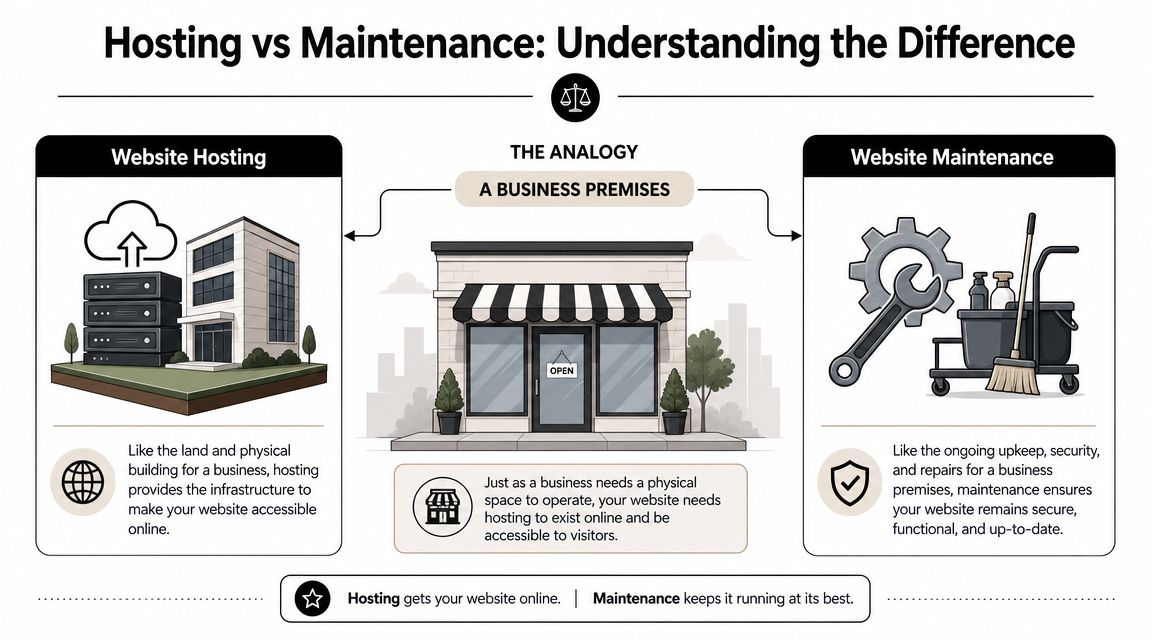
Hosting is the premises
Think of your website like a business premises.
Hosting is the building, the land it sits on, and the utilities connected to it. It gives your website somewhere to live so people can access it online. Without hosting, your site has nowhere to run.
That usually includes things like:
- Server space where the website files and database are stored
- Network access so visitors can load the site
- Basic infrastructure such as storage, resources, and availability
- Sometimes extra tools like SSL, staging, caching, or a CDN depending on the plan
If you choose poor hosting, your website may still be live, but it can be slow, unstable, or difficult to recover when something goes wrong.
Maintenance is the ongoing care
Maintenance is the property management side. It's the security checks, repairs, inspections, servicing, and issue resolution that keep the premises working properly.
For a website, that means tasks such as:
- Updating WordPress, themes, and plugins
- Checking backups and testing restores
- Monitoring uptime and performance
- Scanning for malware or suspicious activity
- Fixing compatibility problems after updates
- Checking forms, broken links, and key user journeys
Hosting makes the website available. Maintenance keeps it dependable.
Businesses often get caught out by cheap plans that only provide the first part. The site is “hosted”, but nobody is actively looking after it. That arrangement is fine for hobby projects. It's weak for a business website.
Why the distinction matters
If your provider only sells server space, you still need someone to manage the website itself. That could be your internal team, a freelancer, an agency, or a specialist support partner.
If you're using a CMS such as WordPress, this matters even more because the system changes over time. Plugins update. Themes update. Payment tools update. Browser behaviour changes. If you need a quick refresher on how a CMS works, this guide on what a content management system is is worth reading before you compare providers.
A sensible setup treats website hosting and maintenance as one joined-up business service, even if different people handle each part.
Your Website Service Options Explained
There isn't one universal answer. The right setup depends on how important the website is, how much technical responsibility you want to carry, and how quickly you need help when problems appear.
The four common service models
Shared hosting is the entry-level option. Your website sits on a server alongside many others. It's usually the cheapest route and often fine for brochure sites with light traffic and low complexity. The trade-off is simple. You get less control, less headroom, and less support when something technical goes wrong.
VPS hosting gives you a more isolated environment with stronger resources and more flexibility. It suits growing sites, busier businesses, and projects with custom requirements. The trade-off is that someone still needs to manage the environment properly. More control also means more responsibility.
Managed WordPress hosting is a better fit for many SMEs. It's designed around WordPress and often includes platform-specific support, performance tooling, backups, and a more controlled update environment. The main compromise is flexibility. You may have tighter rules about plugins, server access, or custom setups.
Agency-hosted support plans combine hosting with ongoing maintenance and a support relationship. This works well for owners who don't want to become part-time web administrators. You're paying for accountability, not just infrastructure.
If your wider business already relies on external systems and cloud platforms, it helps to understand how web hosting fits into the broader picture of IT cloud services. That context makes it easier to compare “just hosting” with a managed support model.
Comparison of Website Hosting and Maintenance Options
| Service Type | Ideal For | Typical Monthly Cost | Technical Skill Required | Key Trade-off |
|---|---|---|---|---|
| Shared Hosting | Small brochure sites, low-risk projects, early-stage businesses | Low | Low to medium | Cheap, but limited support and weaker performance headroom |
| VPS | Growing businesses, custom builds, busier websites | Medium | Medium to high | More control, but someone must manage it properly |
| Managed WordPress Hosting | WordPress sites that need stable performance and platform-aware support | Medium to high | Low to medium | Easier to run, but less technical freedom |
| Agency-Hosted Plan | Businesses that want one provider handling hosting and maintenance together | Medium to high | Low | Higher monthly spend, but less internal burden |
Which one I'd recommend
For most SMEs, I wouldn't start with the cheapest option. I'd start with the question: what happens if this site fails on a Tuesday morning?
If the answer is “we lose leads, we look bad, and nobody knows how to fix it”, shared hosting on its own is usually the wrong choice. A managed WordPress service or agency support plan is often the more sensible business decision.
One practical option in this category is DesignStack's hosting and care model, which combines hosting for web applications with monthly support tasks rather than leaving clients to manage the site alone. That structure makes more sense for businesses than buying server space and hoping nothing breaks.
What a Good Maintenance Plan Must Include
A proper maintenance plan isn't a vague promise that someone will “keep an eye on things”. It needs clear deliverables.
If a provider can't tell you exactly what happens each month, you're not buying support. You're buying reassurance language.
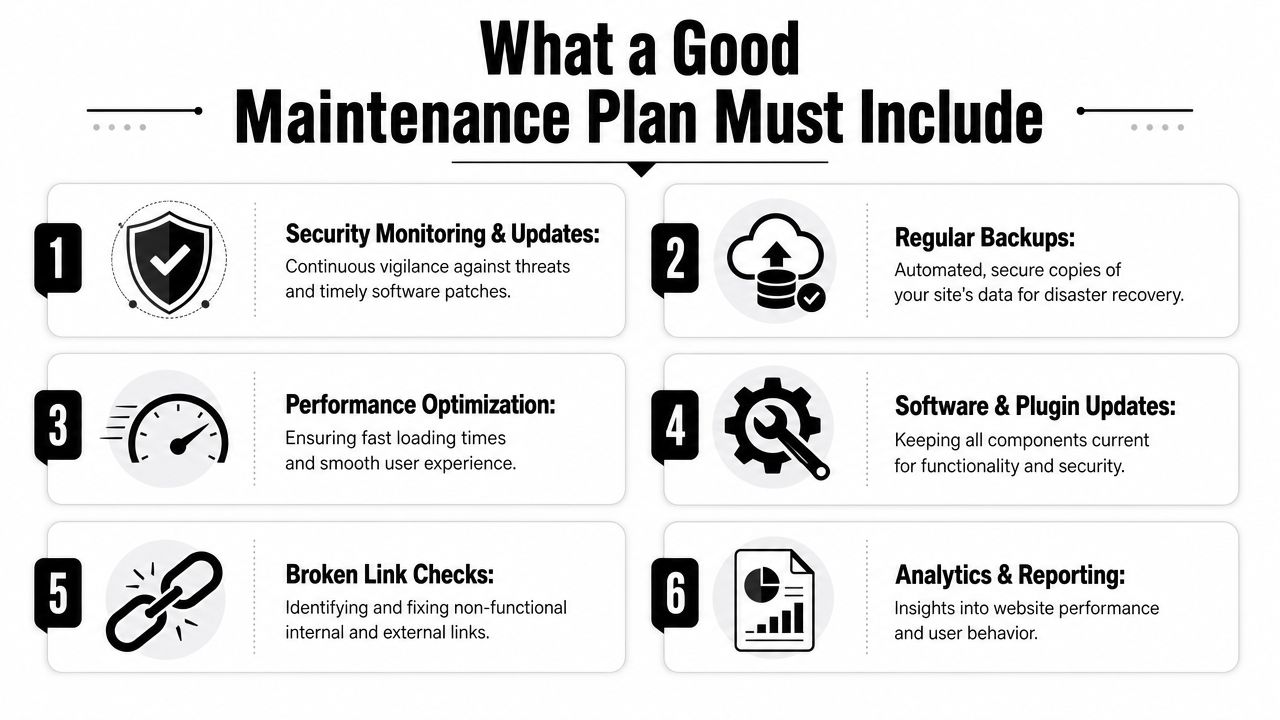
The non negotiables
A strong website hosting and maintenance plan should include these basics at minimum:
- Reliable backups that are automated, stored securely, and available for restoration when needed
- Core software updates for WordPress, themes, plugins, and any critical platform components
- Security monitoring to detect suspicious activity and reduce the chance of unnoticed compromise
- Uptime checks so outages get spotted quickly instead of being reported first by customers
- Performance oversight including caching, image handling, and general front-end efficiency
- Testing after changes because updates can break forms, layouts, checkout steps, or third-party tools
- Clear support terms including what happens in an emergency and who responds
If your provider includes backups but never tests recovery, that's incomplete. If they apply updates without checking the site afterwards, that's careless. If they promise support but can't define response expectations, that's a warning sign.
What matters most in practice
Speed is not cosmetic. It affects whether people stay long enough to act. Google reports that as mobile page load time rises from 1 to 3 seconds, the probability of bounce increases by 32%, and at 5 seconds it rises by 90%, as cited in this guide on critical website maintenance tasks. For an SME, that puts server response time, caching, image compression, and Core Web Vitals work firmly in the category of business protection.
A maintenance plan should protect revenue, not just software versions.
That's why I'd ask for specifics. How often are updates reviewed? What's monitored continuously? What happens after a failed plugin update? How are broken forms caught? If the answer is fuzzy, the service probably is too.
Use this as a buyer checklist
When you compare plans, look for practical evidence of process:
Backups with restore readiness
Ask whether recovery is part of the service, not just file storage.Update management with compatibility checks
Smart providers don't just click “update all” and disappear.Monitoring with human review
Alerts are useful. Action is what matters.Performance work tied to business outcomes
Slow sites leak opportunities. Fast sites remove friction.
If you want a benchmark for what UK businesses should expect from this type of support, this guide to website maintenance costs in the UK is a useful place to start.
Decoding the Costs How Much Should You Pay
Most owners ask the wrong pricing question. They ask, “What's the cheapest hosting package I can get?”
The better question is, “What am I risking if this setup fails?”
Cheap on paper expensive in reality
Budget hosting looks attractive because the monthly fee is easy to compare. What it hides is labour, downtime, and recovery friction. That's the full bill.
A useful UK framing comes from the idea of the true cost of cheap hosting for SMEs. As discussed in this piece on ignoring website maintenance, the better question is what setup remains cost-effective once you account for downtime, recovery time, maintenance labour, resilience, and customer trust. That's the right lens. A bargain plan stops being a bargain when your site goes down during a campaign, a plugin update breaks a form, or a security issue needs urgent clean-up.
If your website matters to the business, ultra-cheap hosting is usually a false economy.
What you are actually paying for
When you pay for a stronger service, you're not just paying for storage. You're paying for response, resilience, and less internal hassle.
A sensible quote usually reflects some combination of:
- Infrastructure quality such as speed, stability, and headroom
- Maintenance labour for updates, checks, fixes, and reporting
- Security handling including patching, scanning, and incident response
- Support access so someone can step in when things break
- Reduced owner involvement because your team isn't chasing technical issues
I wouldn't recommend choosing on price alone. Compare scope. Two plans can sound similar until you ask who restores the backup, who tests the forms, who fixes a failed update, and who picks up the phone when the site goes down.
For a broader overview of what businesses typically compare when budgeting, see this guide on how much website hosting costs. Use it to benchmark structure, not just headline pricing.
How to Choose the Right Provider for Your Business
Most hosting pages are full of claims about speed, security, and support. That doesn't tell you much. Ask harder questions.

The questions that expose weak providers
Start with accountability. You want to know what happens when things go wrong, not just when things go smoothly.
Ask questions like these:
- Who is responsible after launch if updates fail or the site goes offline?
- How are backups handled and what is the restore process?
- What monitoring is in place for uptime, security, and performance?
- What happens in an emergency outside normal working hours?
- Will you test critical functions such as forms, checkout, or booking flows after updates?
- Where is support delivered from and how quickly can I speak to someone who can act?
- What is included in maintenance versus billed separately?
A provider worth hiring should answer those directly. If you get broad language and vague assurances, keep looking.
Ask about compliance not just servers
A lot of businesses miss the legal side completely. That's a mistake.
A frequently overlooked UK issue is whether hosting and maintenance are part of your site's legal and compliance risk, not just its technical setup. UK businesses increasingly need to think about cookies, consent, accessibility, and security upkeep, and poor maintenance often becomes a compliance problem after a site is neglected or handed over without a clear operating model, as outlined in this article on why website hosting and maintenance matter.
That means you should ask:
- Who handles cookie and consent tooling when platforms or scripts change?
- Who is watching accessibility issues as the site content evolves?
- Who applies security updates that help reduce avoidable exposure?
- Who owns ongoing responsibility after the build phase ends?
For a practical shortlist of evaluation points, this guide on how to choose a web hosting provider is a useful companion when you're comparing proposals.
A quick explainer can also help if you want a simpler overview before signing anything:
The DesignStack Approach to Website Support
The businesses that handle this well usually make one smart decision. They stop separating “the website project” from “the website responsibility”.
That's the right approach in the UK now. Infrastructure expectations have shifted. By 2024, full-fibre broadband availability had reached 82% of UK premises, and 90% of UK adults were recent internet users in 2024, according to the summary cited in this UK website maintenance statistics overview. Customers expect websites to load reliably and work properly on everyday connections and devices. For SMEs, that makes uptime monitoring, CMS updates, security hardening, and performance tuning part of normal operations.
What good support looks like day to day
A sensible support model is straightforward:
- Hosting that suits the actual site, not a generic one-size plan
- Routine maintenance for updates, backups, and security checks
- Performance oversight so the site stays usable and commercially effective
- A real support relationship when something needs changing or fixing
That's the standard businesses should expect. Not mystery hosting. Not unclear handovers. Not “we built it, now it's your problem”.
For firms in Dorset and across the UK, that's where a local agency relationship can be useful. You're not just buying technical infrastructure. You're buying continuity, clearer communication, and a defined owner for the work that keeps the site live and credible.
If you want a website setup that covers hosting, updates, backups, security checks, and ongoing support without leaving loose ends after launch, speak to DesignStack. They work with businesses that need a site to stay fast, stable, and looked after, not just published.



Leave a Reply