


Caching Strategy for UK Websites: A Practical Guide
Most caching advice starts from the wrong assumption. It treats every website as if it needs aggressive layers of acceleration, when plenty of UK SMEs would get more value from simpler architecture, cleaner queries, and less moving parts. Caching is powerful, but only when the underlying workload benefits from it.
That matters in the UK because web performance ties directly to commercial outcomes. The UK's ecommerce sector generated about £127.41 billion in online sales in 2023, according to the Office for National Statistics, and Google held roughly 90% of the UK search market in 2024, also noted in the same reference. In plain terms, if your site is slow after a search click, you're not just losing polish, you're risking revenue and retention. For many sites, a caching strategy is a revenue-protection decision, not a technical hobby.
The catch is that caching can also hide a deeper problem. If your database design is poor, your queries are expensive, or your site is mostly write-heavy, a cache may just add complexity and stale-data risk without fixing the core bottleneck.
Table of Contents
- Why Caching Is Not Always the Answer
- Understanding the Five Caching Layers
- Balancing Freshness and Speed with TTLs
- Cache Invalidation Patterns That Actually Work
- WordPress Caching Plugins and Hosting Choices
- Measuring What Matters with Cache KPIs
- Recommended Setups for Different UK Businesses
Why Caching Is Not Always the Answer
A lot of teams reach for cache plugins before they've diagnosed the actual problem. That usually leads to fragile setups, confused expectations, and extra maintenance for no meaningful gain. AWS is blunt about this, it advises teams to be skeptical of the value a cache will bring and to justify it only when there's a real need in cost, latency, or availability terms, which is the right mindset for UK SMEs with limited dev time and hosting budgets AWS Builders Library.
Start with the bottleneck, not the plugin
If a site is write-heavy, caching often doesn't help much because the slow path isn't repeated reads, it's the write flow itself. The same goes for low-traffic sites where the overhead of TTLs, invalidation rules, and cache warming can outweigh the benefit. In those cases, a leaner database query, better indexing, or removing an unnecessary API call can produce a cleaner win than any cache layer.
Practical rule: if a page changes for almost every visitor, or the data behind it changes constantly, cache it only after you've proved a repeat-read pattern.
The other trap is premature layering. Teams add page cache, object cache, CDN cache, and browser cache all at once, then nobody can explain which layer is doing the actual work. That's when debugging gets slow and stale content becomes someone else's problem.
Ask these questions before you cache anything
A useful diagnostic starts with five questions. Is the content read far more often than it's written. Are users seeing repeated requests for the same data. Does the database show avoidable pressure during peak periods. Can you tolerate short-lived staleness. Will a cache reduce cost or just move the complexity around.
If the honest answer is no to most of those, don't force caching into the stack. Fix the bottleneck first, then add caching where repetition makes it worthwhile. That approach is especially sensible for UK SMEs, where the market is dominated by very small firms and maintainability often matters more than architectural cleverness.
Understanding the Five Caching Layers
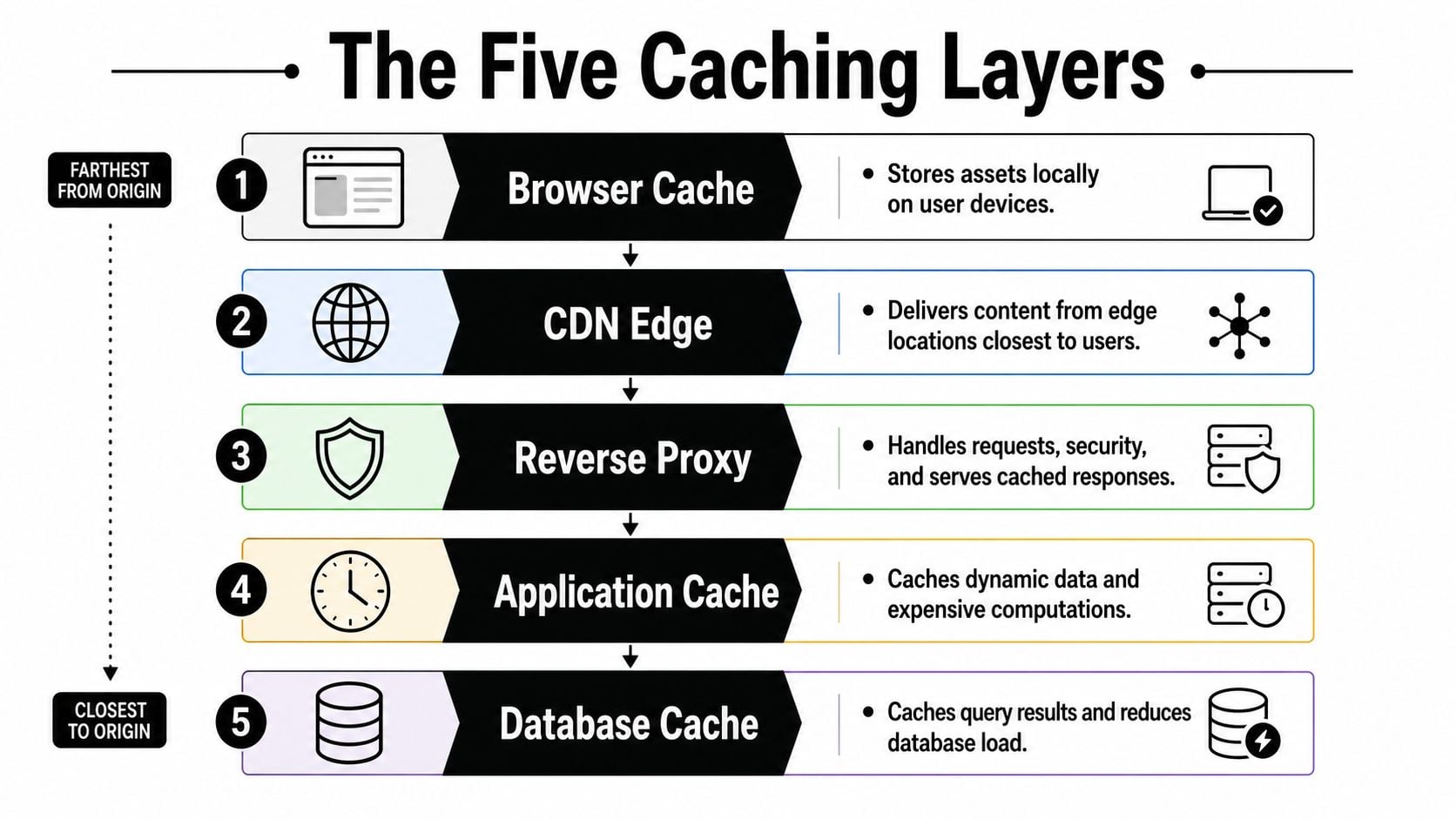
Think of caching like a restaurant kitchen. The customer's table is the browser, the front-of-house pass is the CDN edge, the chef's plated output is the reverse proxy or page cache, the prep station is the application cache, and the cold store in back is the database cache. Each layer saves work at a different point in the journey, and each one has its own trade-off between freshness and speed.
Browser and CDN caching handle the repeat visitors
Browser cache stores assets locally on the user's device. It's the closest thing to “free” speed you'll get, because the browser can reuse assets without asking your server again. That's why repeat visits often feel much faster when static assets are cached well.
CDN edge caching sits one step out. It serves images, CSS, JavaScript, and sometimes whole pages from locations closer to the visitor, which cuts round trips and helps geographically distributed audiences. For UK businesses with national traffic, that matters because users aren't all sitting next to your origin server.
If a visitor is seeing stale content in their browser, a practical first step is to check whether they need to follow clear browser cache steps before you blame the server.
Application and database caching protect the origin
The application cache usually stores hot objects, rendered fragments, or reusable API results in memory. Redis often earns its keep here, because it reduces repeated work in PHP or another application layer.
The database cache is the last line, and it's often the least visible to the people making frontend decisions. It helps absorb repeated reads and reduces pressure on the origin store, which is why tuning data access patterns matters so much. If your data model is messy, no cache layer will rescue it for long, and a focused database optimisation review is usually a better starting point.
When the same page fragment is being recomputed over and over, cache the fragment. When the real problem is a bad query, cache won't save you.
The key takeaway is simple. Don't think of caching as one switch. Think of it as a chain of small, targeted decisions, each one serving a different kind of repeat work.
Balancing Freshness and Speed with TTLs
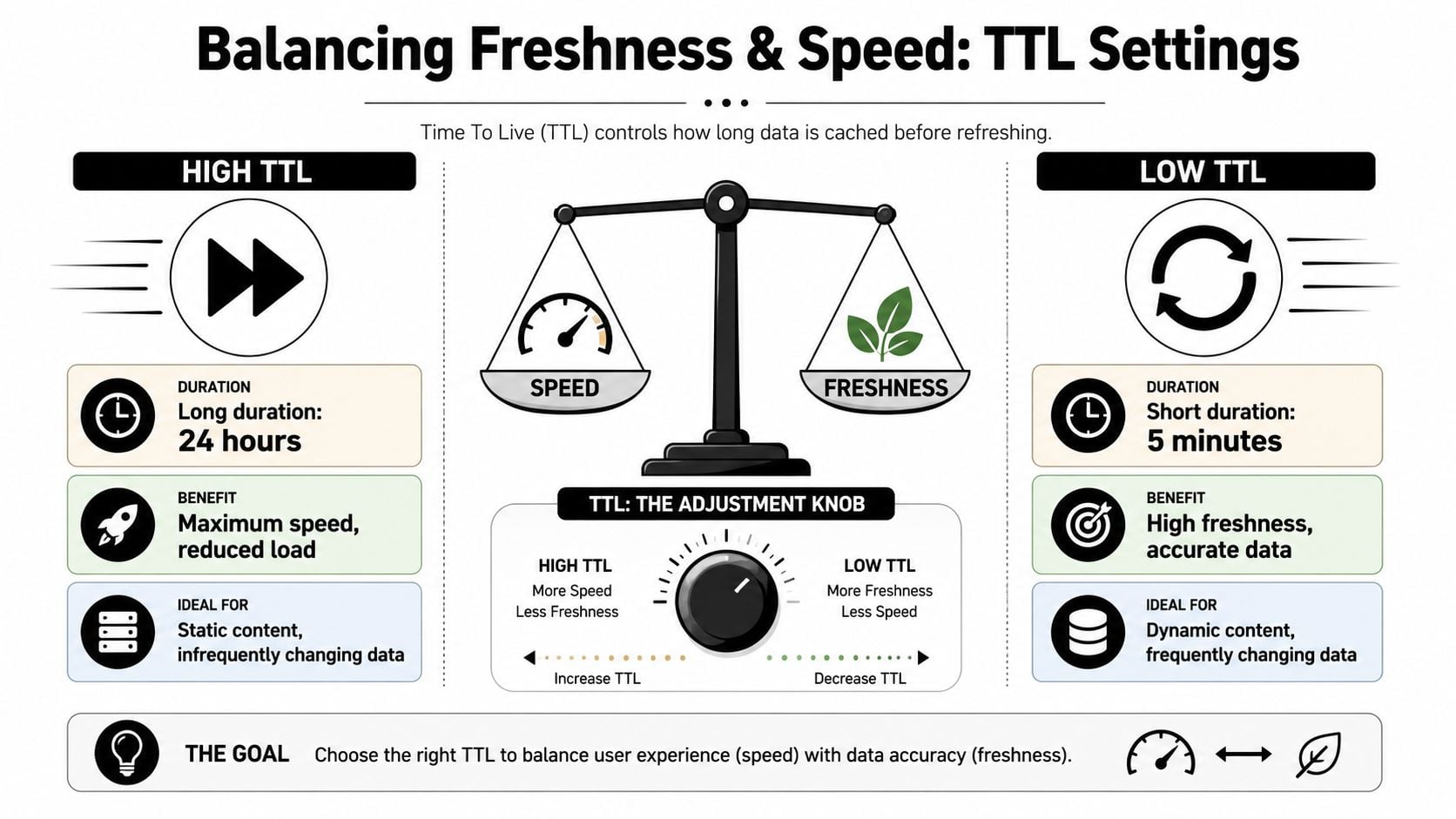
TTL, or time to live, is where most practical cache decisions live or die. Set it too long and users see stale prices, stock, or content. Set it too short and your cache stops doing the job you paid it to do.
Long TTLs suit stable assets, not volatile business data
Static files usually benefit from longer TTLs because they don't change often. CSS, JavaScript bundles, and logo assets are good candidates for more aggressive reuse, especially when file names change on deployment. That gives you speed without risking obvious content drift.
Product data, booking availability, and stock counts are different. Those should usually have shorter TTLs or even very selective caching, because freshness matters more than squeeze. If a customer sees a product as available when it isn't, the cache has just turned into a conversion problem.
Short TTLs need discipline
Short TTLs can be useful, but only if you manage them carefully. AWS recommends applying a TTL to all cache keys except write-through cases and being deliberate about expiration and eviction policies AWS caching best practices. The reason is straightforward, if lots of keys expire together, you can create a thundering herd where many requests hit origin at the same time.
That's where jitter helps. Staggering expiry reduces synchronized misses, which keeps your backend calmer during busy periods. It's a small operational detail, but on a UK retail site it can be the difference between stable and noisy.
For managed environments, it also helps to align TTL choices with hosting controls. A sensible managed WordPress hosting setup can give you more predictable cache behaviour than a patchwork of plugins with conflicting expiry rules.
Rule of thumb: if the business cost of stale data is high, shorten the TTL and accept a few more misses. If the data barely changes, extend the TTL and let the cache do its job.
The best TTLs aren't chosen by instinct. They're chosen by how often the underlying data really changes, and by how much stale content your users can tolerate.
Cache Invalidation Patterns That Actually Work
Caching is easy until content changes. Then the hard part starts, because a cache that never invalidates becomes a lying machine. The safest teams don't treat invalidation as an afterthought, they design it before the first key is stored.
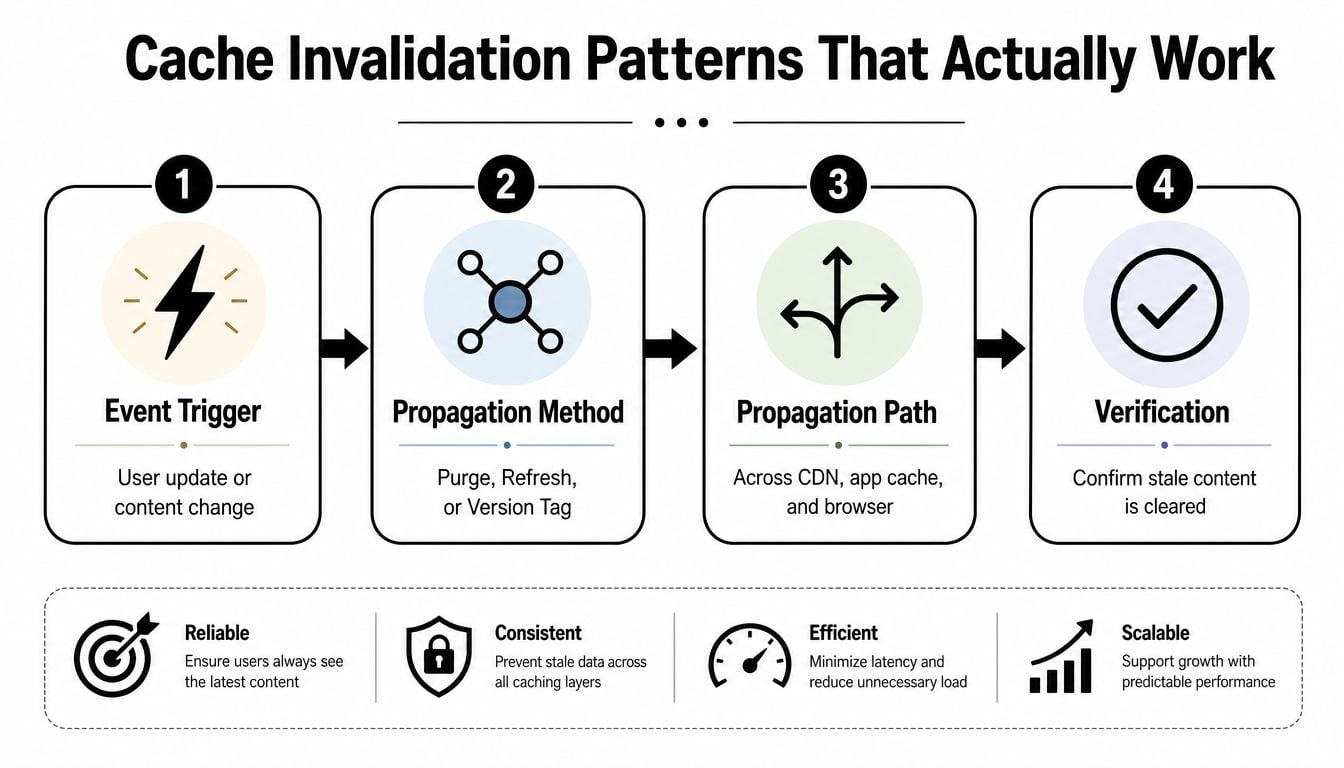
Time, events, and versions solve different problems
Time-based expiry is the simplest pattern. The cache forgets on schedule, so stale data eventually disappears without manual intervention. It's predictable, but it's also blunt, because fresh content may sit behind an unnecessary delay.
Event-driven purging is better when you know exactly what changed. A product update, post publish, or inventory adjustment can trigger invalidation of the affected keys. That gives you fresher content and less waste, but only if your dependency map is accurate.
Versioned cache keys are often the cleanest option when updates are tied to deploys or content revisions. Instead of trying to surgically update old entries, you create a new namespace and let the previous one age out naturally. That removes a lot of risk from partial invalidation.
Deleting a key is often safer than repairing it
The common mistake is trying to update one part of a cached object while assuming the rest still matches reality. That's where partial invalidation breaks down, especially when you don't fully understand every downstream dependency. A stale checkout rule or mismatched blog archive can be worse than a cache miss, because it creates user-facing inconsistency that's hard to spot quickly.
If you can't map the dependencies confidently, delete the key and repopulate it. Guessing at partial freshness is how stale data survives.
The other lesson is to verify the purge. A purge request that succeeds in one layer but not another gives you false confidence, and that's usually how teams end up blaming "cache weirdness" when the issue is incomplete propagation. The cache invalidation video walkthrough is useful here because it reinforces the operational steps, not just the theory.
WordPress Caching Plugins and Hosting Choices
WordPress makes caching look easy, then turns it into a decision tree. The right choice depends on whether you're running a brochure site, a growing WooCommerce store, or a content-heavy publication with frequent updates. The mistake I see most often is a site owner installing a plugin that solves one layer while making another layer harder to reason about.
Choose by site type, not by plugin hype
For a small brochure site, a simple page cache and a sane CDN setup are usually enough. You don't need a heavyweight stack if the site is mostly static, and you definitely don't need three overlapping optimisation plugins. For a growing store, object cache starts to matter because reusable query results can reduce repeated origin work, especially around catalog browsing and logged-in users.
For higher-traffic builds, the hosting layer matters more than the plugin layer. Managed hosts often build caching into the stack, which reduces the chance of conflicting rules between WordPress, server cache, and CDN cache. That's useful because the more places you can change a cache rule, the more places you can accidentally break it.
Compare options by operational burden
| Site Type | Page Cache | Object Cache | CDN | Typical Cost |
|---|---|---|---|---|
| Brochure site | Usually enough | Often unnecessary | Helpful for assets | Low-maintenance setup |
| Growing WooCommerce store | Strongly recommended | Useful for hot queries | Very useful | Moderate stack complexity |
| Content-heavy publisher | Essential | Often valuable | Important for reach | Higher operational attention |
A plugin like WP Rocket can make sense when you want a practical page-cache layer without building everything by hand. Redis Object Cache adds real value when the application repeatedly asks for the same objects and you've got the host support to run it properly. Hosting platforms such as Kinsta and WP Engine usually make the most sense when you want infrastructure-managed caching and less day-to-day tuning, while a more hands-on environment suits teams that want tighter control.
For ongoing support, a good WordPress maintenance and support plan matters as much as the initial configuration, because updates and content changes can break a cache stack faster than most owners expect.
The principle is simple. Pick the lightest setup that solves the problem, and only add layers when you can explain why each one exists.
Measuring What Matters with Cache KPIs
A cache that feels fast is not necessarily a cache that works well. Raw speed scores can flatter a site while hiding miss spikes, origin pressure, and poor invalidation behaviour. The metrics that matter are the ones that show whether the cache is reducing work without creating stale-data risk.
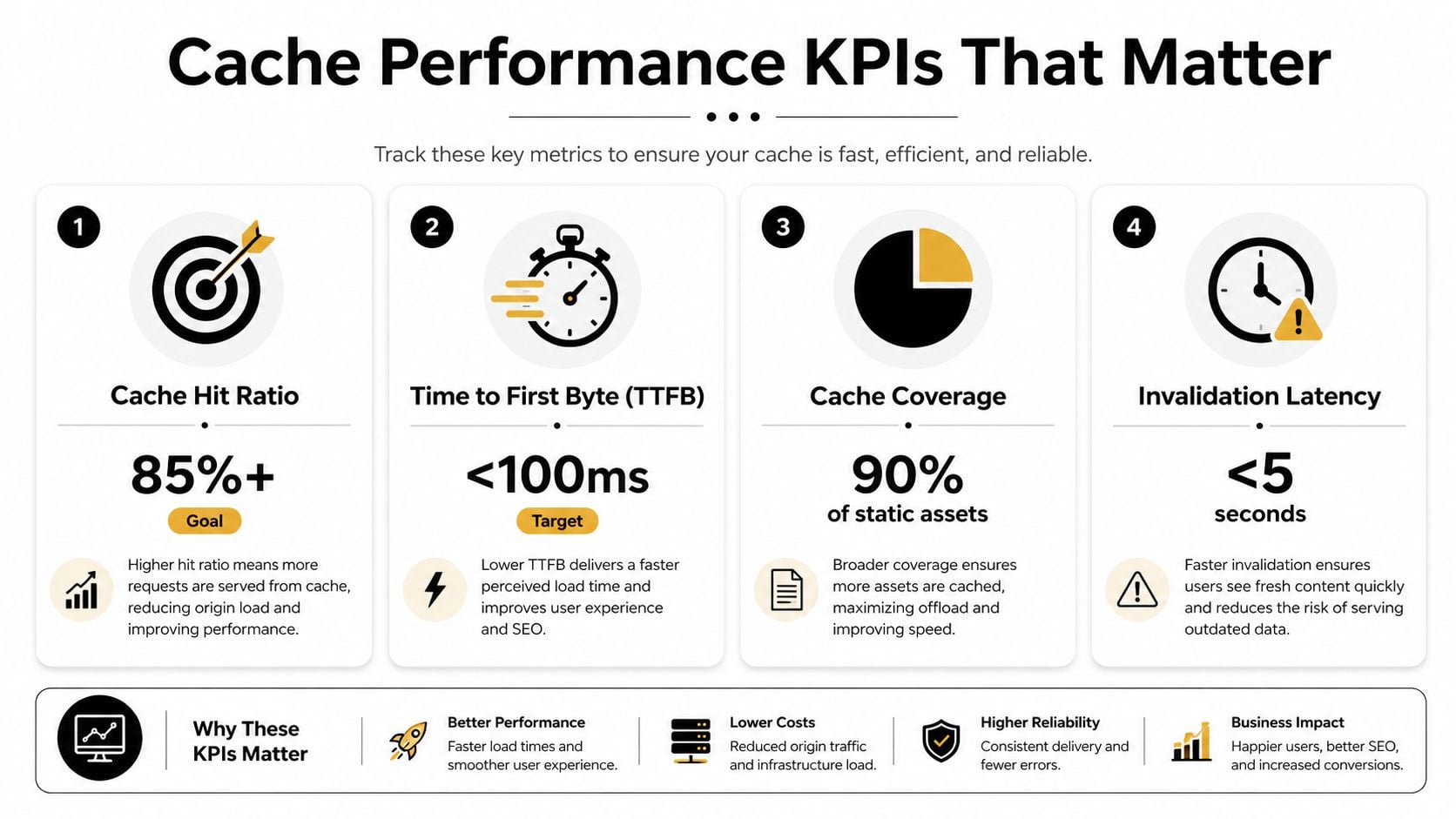
Track the right signals
The core metric is cache hit ratio. A common formula is hits divided by hits plus misses, and production guidance often targets 80%+ or even 90%+ for stable, high-traffic systems because the benefit comes from avoiding repeated origin requests Redis caching overview. That number matters because it tells you whether the cache is removing work.
You should also watch origin load reduction, tail latency, and time to first byte from the places your users connect from. The point is not to win a benchmark, it's to reduce the slowest, most expensive requests under real traffic conditions. If your cache hit rate is high but tail latency still looks ugly during campaigns, something upstream is still wrong.
Make alerts part of the strategy
A reliable cache setup needs alerts on miss spikes, memory pressure, and eviction anomalies. If misses suddenly rise, you may have bad TTLs, an invalidation bug, or a deployment that flushed too much at once. If memory pressure climbs, the cache may be holding too much low-value data.
Website analytics tracking helps here because the technical picture only becomes meaningful when you connect it back to actual user journeys. A fast cache on a page nobody uses is not a business win.
Measure the cache by what it saves, not by how impressive it sounds.
That means watching hosting load, response consistency, and whether the site stays stable during busy periods. If those improve, your cache is doing its job. If they don't, the stack needs a rethink.
Recommended Setups for Different UK Businesses
A good caching setup looks different depending on the business. A Dorset trades company, a WooCommerce brand, and a national publisher don't share the same risks, so they shouldn't share the same stack. The right answer is usually the simplest stack that protects the business from the specific kind of traffic it receives.
Local service business
For a brochure-style WordPress site, I'd keep it lean. Use browser caching for assets, a CDN for images and static files, and page caching on the host or through a lightweight plugin. Skip object caching unless the site has a genuine repeat-read problem, because most small service sites don't.
That setup keeps maintenance low and makes updates easier to reason about. It also means fewer chances of stale contact pages, broken forms, or confusing cache conflicts after routine content edits.
Growing ecommerce brand
For a WooCommerce store, I'd split the stack more carefully. Keep static assets on CDN and browser cache, use page cache only where it doesn't interfere with dynamic sessions, and add object caching for repeated database reads that support catalog browsing and account pages. That's also the kind of site where a TTL-first mindset matters most, because stock and pricing can change quickly.
If traffic spikes are a regular concern, the safe approach is to cache only the hottest repeatable reads and keep invalidation rules simple. A host with built-in cache controls usually helps here more than a pile of optimisation plugins.
Content-heavy publisher
For a publication, freshness and reach both matter. Browser and CDN caching should be strong, page caching needs careful invalidation around publishing workflows, and object caching can help when archive pages and repeated content fragments are queried constantly. The important thing is not to let a cache delay editorial updates longer than the newsroom can tolerate.
Website hosting and maintenance becomes part of the decision here, because the people who run the site need a support model that matches the cache rules. In practice, that means documenting what is cached, who can purge it, and what changes trigger invalidation.
If you want a caching strategy that fits your UK business without turning your stack into a maintenance headache, DesignStack can help you choose the right hosting, WordPress setup, and performance approach for the way your site works. Visit DesignStack to talk through your current site, identify the bottlenecks, and build a leaner setup that's faster, easier to maintain, and better suited to your customers.



Leave a Reply