

What Is the Difference Between UX and UI in Business?
People often throw around the terms UX and UI as if they’re the same thing. They’re not. The easiest way to think about it is to imagine building a house: User Experience (UX) is the architectural blueprint—the flow of the rooms, the placement of doors, and how a family will actually live in the space. User Interface (UI) is the interior design—the paint colours, the furniture, the light fittings, and all the tangible things that make the house look and feel like a home.
Defining UX and UI for Business Owners
For your website to be more than just a pretty online brochure, you need both disciplines working in harmony. One builds the logical foundation, and the other creates the visual appeal. Getting this partnership right is what turns casual visitors into loyal customers. Let's look at what each role really involves.
What is User Experience (UX)?
User Experience (UX) is all about the overall journey and feeling a person has when they use your website. A UX designer is obsessed with one question: How can we make this experience as simple, logical, and effective as possible? They are the user's advocate, mapping out the entire customer journey from the first click to the final purchase.
Their focus is on making sure your website is:
- Intuitive: Can someone find what they need without having to think too hard?
- Valuable: Does the site actually solve a problem or fulfil a need for the user?
- Frictionless: Are there any roadblocks or confusing steps that might cause someone to give up and leave?
Think of UX as the invisible science behind a great website. It’s the strategic thinking that ensures a product works brilliantly before any attention is paid to making it look brilliant.
What is User Interface (UI)?
User Interface (UI) design takes the strategic blueprint from the UX team and brings it to life visually. This is where the brand’s personality shines through. UI is everything a user can see and interact with, from the buttons and menus to the typography and colour palette. It answers the question: How should this look and feel to guide the user?
A UI designer’s job is to create a visually engaging and consistent experience across the entire site. They focus on crafting an interface that is not only beautiful but also clear and easy to navigate. This is a critical distinction in the world of web development, and you can delve deeper into the art of crafting digital experiences and understanding web design.
It's easy to see why people use UX and UI interchangeably. In casual conversation, it often doesn't matter. But when you're investing in your business's digital presence, knowing the difference is crucial. They are two distinct specialisms, each with its own goals, tools, and responsibilities.
Think of it this way: a UX (User Experience) designer is the architect. They draw up the blueprints, focusing on the structural integrity of the house, the flow between rooms, and how a family will actually live in the space. They’re obsessed with the why. A UI (User Interface) designer is the interior decorator. They choose the paint colours, the furniture, and the light fittings to make the house aesthetically pleasing and easy to navigate. Their focus is the how and the what.
This simple analogy gets to the heart of the matter. One discipline builds the logical foundation, and the other crafts the sensory experience.
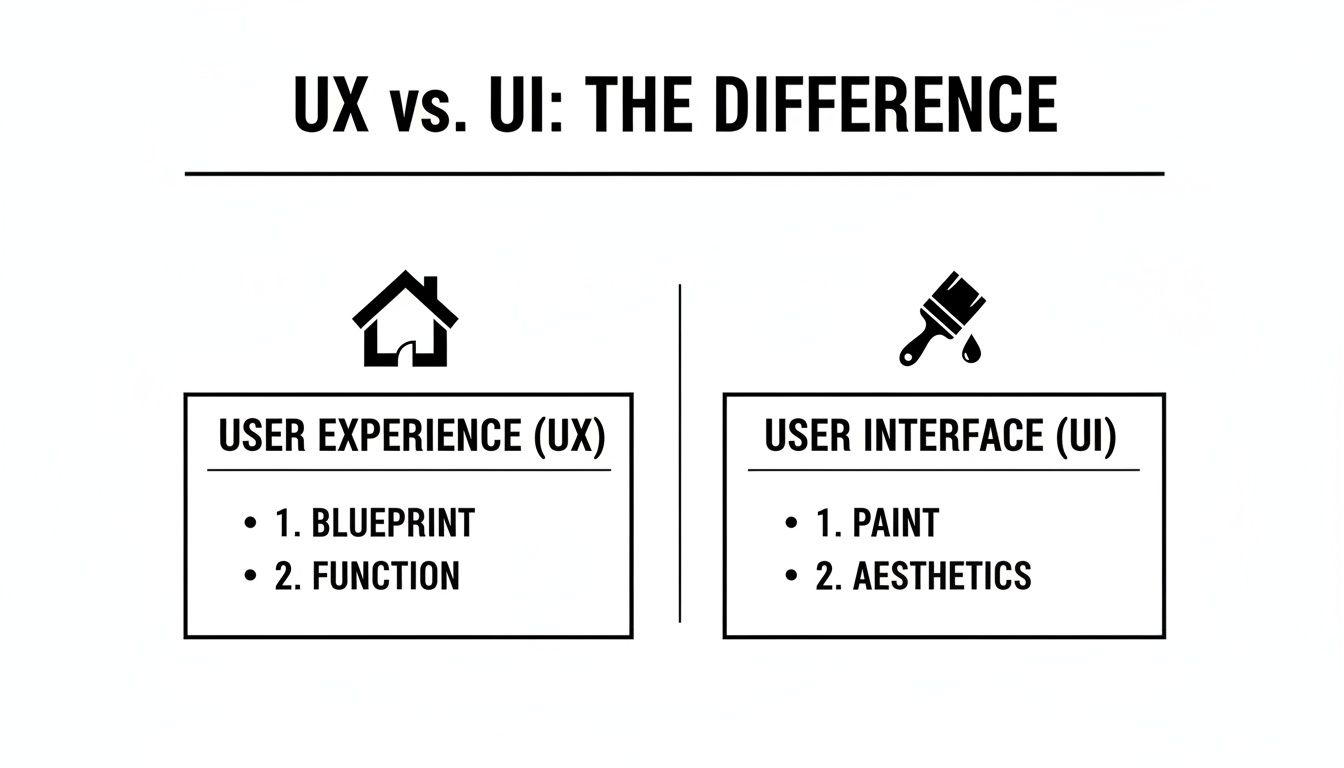
As you can see, both are absolutely essential. A beautiful website that's confusing to use is just as flawed as a logical one that looks dated and unappealing. You need both function and form to succeed.
To help clarify the specific contributions of each role, let’s look at their day-to-day responsibilities, the tools they use, and what they actually produce.
Comparing UX and UI Roles, Tools, and Deliverables
| Attribute | UX (User Experience) | UI (User Interface) |
|---|---|---|
| Primary Goal | Make a product or service usable, logical, and enjoyable to interact with. | Make a product's interface aesthetically pleasing, visually cohesive, and interactive. |
| Main Focus | The overall feel of the experience; the user's journey, problem-solving. | The look and feel of the product; presentation, visual design, and interactivity. |
| Key Responsibilities | User research, creating personas, mapping user journeys, information architecture, wireframing. | Designing visual elements, creating style guides, prototyping interactions, designing layouts. |
| Common Tools | Figma, Adobe XD, Miro, survey tools (e.g., SurveyMonkey). | Figma, Sketch, Adobe XD, Adobe Illustrator. |
| Typical Deliverables | User personas, journey maps, sitemaps, low-fidelity wireframes, usability test reports. | High-fidelity mockups, design systems, style guides, icon sets, interactive prototypes. |
This table gives a clear, at-a-glance view of where one role ends and the other begins. While their tools might overlap (Figma is a favourite for both), what they do with those tools is fundamentally different.
A Closer Look at the UX Designer's World
The work of a UX designer is deeply rooted in human psychology and research. Long before a single pixel is coloured in, they are busy understanding your audience. Their process is analytical, strategic, and entirely human-centred.
Here’s an actionable list of common UX tasks:
- Conduct User Research: Use interviews, surveys, and competitor analysis to get inside the heads of your customers. What are their goals? What frustrates them?
- Build Personas and Journey Maps: Create detailed profiles of your ideal users (personas) and then map out every single touchpoint those users have with your business (journey maps).
- Define Information Architecture (IA): Organise your website’s content so people can find what they need intuitively. This means creating a logical sitemap and clear navigation menus.
- Create Wireframes and Prototypes: Build simple, black-and-white layouts (wireframes) to plan a page's structure and function. This allows everyone to agree on the flow before any visual design begins.
- Run Usability Tests: Once a basic prototype exists, put it in front of real users to see where they get stuck or confused. This feedback is gold for refining the experience.
Stepping into the UI Designer's Studio
With the strategic blueprint from the UX designer in hand, the UI designer gets to work. Their job is to breathe visual life into the wireframes, ensuring the final product not only works well but looks and feels incredible. They are the visual storytellers.
A UI designer makes the experience tangible. They translate the user journey into a series of beautiful, branded, and interactive screens that guide the user effortlessly.
If UX makes a product functional, UI makes it feel special. It’s the difference between a tool that simply works and a tool people genuinely love using.
They focus on the sensory elements—what the user sees, touches, and interacts with. This involves creating a cohesive visual system, from high-fidelity mockups to the final, pixel-perfect assets handed over to the developers.
How UX and UI Work Together in a Project
It’s a common mistake to see UX and UI as rivals. In reality, they're sequential partners. Think of them as two specialists collaborating on the same project, where one builds the foundation and the other finishes the structure. A project never starts with colours and fonts; it starts with strategy.
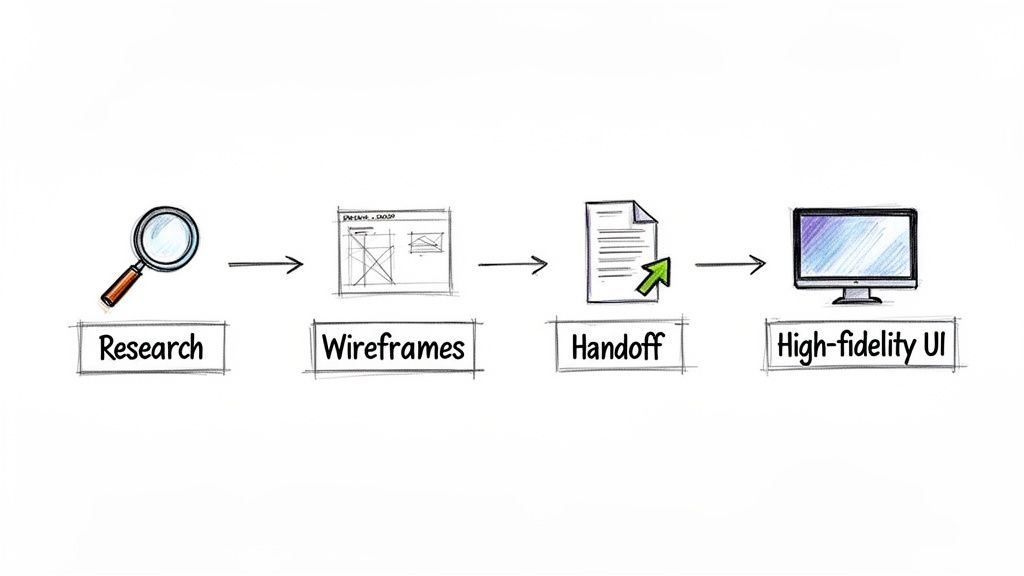
The process almost always kicks off with UX design. The UX designer is focused on the core logic and structure of the experience. Their job involves user research, mapping out the user journey, and creating low-fidelity wireframes—the basic architectural blueprint for the website or app.
Only when that strategic foundation is approved and solid does the UI designer step in. They take those bare-bones wireframes and breathe life into them, transforming them into a polished, visually appealing interface. This is where the brand’s identity, colour theory, typography, and interactive elements come into focus.
The Handoff: A Critical Step
The moment the project moves from UX to UI is often called the "handoff." But this isn't like a relay race where one person simply passes the baton. It's much more of a continuous conversation.
In the best projects, communication flows constantly. The UI designer has to understand the why behind the UX choices to make sure their visual design actually supports the user’s goals. In the same way, the UX designer might need to tweak the structure based on visual feedback or technical constraints that the UI designer uncovers.
The difference between a good product and a great one often comes down to how seamlessly the UX and UI teams collaborate. When they work in lockstep, the result is an experience that’s not just functional, but also feels right.
An Actionable Workflow Example
Let's say you're building a booking system for a local hair salon. Seeing how UX and UI work together here is the key to creating a system that fills appointment slots instead of one that just causes frustration.
Here’s what their collaboration looks like in practice:
UX First: Strategy and Structure
- The UX designer starts by researching how clients actually book appointments. Do they want to see specific stylists? Do they book several services at once? This isn't guesswork; it's data gathering.
- Next, they map out a logical user flow:
Select Service→Choose Stylist→View Calendar→Select Time→Enter Details→Confirm. - They then create simple, unstyled wireframes to test this flow. The goal is to iron out any dead ends or confusing steps long before a single pixel of final design is created.
UI Second: Visuals and Interaction
- Once the wireframes get the green light, the UI designer takes over. They apply the salon's branding—its unique colours, logos, and fonts—to craft a professional, trustworthy look.
- They design the calendar to be visually clear and easy to use on a phone, perhaps adding subtle animations to make the experience feel smooth and responsive.
- Most importantly, they ensure the final high-fidelity mockups don't lose the clarity of the UX-defined flow. The "Confirm Booking" button, for instance, must be prominent and satisfying to click.
This one-two approach prevents expensive mistakes. A beautiful calendar that’s impossible to navigate (a UI failure) is useless if the booking steps are fundamentally flawed (a UX problem). Investing in UX first is proven to deliver real-world results. For instance, data shows 67% of businesses reported 50% revenue growth from UX-focused redesigns, and hybrid UX-UI teams tend to outperform siloed ones by 40%. You can dig deeper into the numbers in this comprehensive Alida report.
The Impact of UX and UI on Conversions and SEO
The real difference between UX and UI hits home when you look at your bottom line. These aren't just fluffy design terms; they are serious tools for driving conversions and boosting your search engine rankings. When a great user experience works hand-in-hand with a sharp user interface, you get a high-performing website that doesn't just attract visitors—it keeps them.
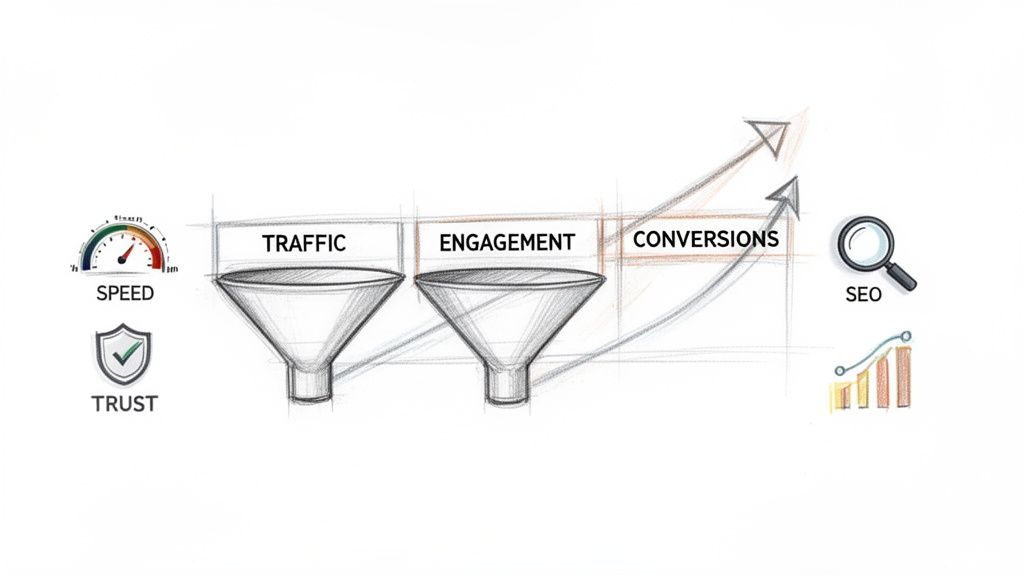
It’s easy to underestimate how much effective e-commerce and web design that converts can influence your online success. The goal is to build a digital asset that actively contributes to your business's growth, not just a passive online brochure.
How Good UX Improves Your SEO
Strong UX design is one of the most powerful, yet frequently overlooked, levers for improving your search engine optimisation (SEO). Think about it from Google's perspective: its job is to give users the best possible answers, which means sending them to websites that are genuinely helpful and easy to navigate.
When someone lands on your site and immediately leaves because they can’t find what they need, that’s a 'bounce'. It’s a huge red flag for Google, signalling that your page isn’t a good result for that search query.
Good UX has a direct impact on the SEO metrics that matter:
- Reduced Bounce Rate: When a layout is intuitive and navigation is clear, visitors stick around because they can actually find what they came for.
- Increased Dwell Time: A logical site structure and valuable content encourage people to spend more time reading and interacting, telling search engines your site has substance.
- Improved Mobile Experience: Making sure your site works perfectly on a phone is a massive part of modern UX, and it’s also a critical ranking factor for Google.
By concentrating on the user's journey, you naturally start checking the boxes that Google uses to rank websites. We build these principles into all our search engine optimisation services.
How Strong UI Drives Conversions
While UX builds the functional skeleton, UI design adds the muscle and skin that create trust and inspire action. A clean, professional, and trustworthy interface gives visitors the confidence to click 'buy', fill out a contact form, or sign up for your newsletter. It’s that final, persuasive push that turns a browser into a customer.
A polished UI makes the path laid out by the UX not only clear but also inviting. This means designing call-to-action buttons that stand out, creating a consistent brand aesthetic that feels reliable, and ensuring every button click and transition feels satisfying.
Ultimately, UX gets users to the right place, but it's the UI that convinces them to take the action you want them to take. That’s how you directly boost your conversion rates.
When to Prioritise UX Over UI on a Budget
Every small business owner knows the feeling. You have a limited budget and a long to-do list. When it comes to your website or app, one of the toughest calls is where to put your money first: UX or UI?
While you absolutely need both for a successful product, getting the timing right can be the difference between a smart investment and a costly misstep. Knowing when to focus on the solid foundation (UX) versus the visual appeal (UI) ensures your cash goes exactly where it will have the biggest impact, right now.
When Your Budget Should Favour UX
Putting your money into UX first is often the smartest play, especially if your project has any real complexity or you're trying something new. A beautiful interface can't rescue a product that's confusing or fundamentally broken.
You should lean heavily on UX when:
- You're launching a new, complex product. Think of a Software-as-a-Service (SaaS) platform, a custom booking system, or any tool that isn’t just a simple brochure. Your first job is to prove the concept works. That means spending your budget on user research, wireframing, and testing to make sure the core journey makes sense and actually solves a problem. Aesthetics can wait.
- You’re redesigning because of bad numbers. If your current site is bleeding visitors (high bounce rate), failing to make sales (low conversions), or getting negative feedback, those are symptoms of a poor user experience. Simply giving it a new coat of paint (UI) won't fix the leaky pipes. You need a deep UX audit to diagnose and fix the root causes first.
- Your audience has very specific, technical needs. Are you building something for engineers, scientists, or medical professionals? Function trumps form, every single time. These users need a tool that is efficient, clear, and powerful. A clean, function-first design is what they’ll thank you for, not trendy visuals.
Think of it this way: a solid UX is your minimum viable product. You can launch with a basic, clean UI, get real-world feedback, and improve from there. You can always refine the visuals later, but you can’t easily fix a fundamentally flawed user journey after you’ve already built it.
When You Can Focus More on UI
On the flip side, there are times when a stunning first impression is the main event. If the user’s path is already simple and well-established, you can shift your budget towards creating that immediate wow-factor through brilliant visuals.
Consider putting more of your budget into UI when:
- Your brand is your product. For a wedding photographer, a portfolio-driven interior designer, or an artisan jewellery maker, the website is the showroom. The goal is to create a breathtaking visual experience that showcases their work. The user journey is dead simple—look at beautiful things, then get in touch.
- The product itself is simple and familiar. If you’re building a straightforward blog, a basic brochure website, or an online CV, you don’t need to reinvent the wheel with extensive UX research. The user patterns are already well-understood. Here, your focus can shift to creating a memorable, unique, and polished brand experience that stands out from the crowd.
Your Checklist for Hiring the Right Designer
Understanding the theory of UX vs. UI is one thing. Finding a designer or an agency who truly gets it—and can apply it to your business—is another challenge entirely. Hiring the right partner can feel like a minefield, but asking sharp, insightful questions is your best defence. It’s how you separate the genuine experts from those who just create a pretty picture.
This checklist is designed to help you vet any potential design partner. Their answers will tell you everything you need to know about their process, their grasp of your business goals, and whether they have a structured approach that actually delivers results. A great partner will have no trouble answering these questions with confidence and clarity.
5 Key Questions to Ask a Potential Designer
Here’s a practical list to help you interview any designer, freelancer, or agency you're considering.
1. Can you walk me through your design process, from our first conversation to the final launch?
What you're listening for here are distinct phases. A professional process always starts with strategy and research (the UX groundwork) before a single pixel is designed. Pay attention to keywords like "discovery," "wireframing," "user testing," and "developer handoff." If they jump straight to talking about visuals, that’s a red flag.
2. How would you approach user research for a business like ours?
Don't accept vague promises. You want to hear about specific methods, such as competitor analysis, customer interviews, user journey mapping, or surveys. This demonstrates that their design decisions will be rooted in solid data, not just personal taste or assumptions.
3. What specific deliverables should I expect from the UX phase compared to the UI phase?
This question cuts right to the chase and tests their practical understanding of what the difference between UX and UI is. For UX, they should mention things like user personas, sitemaps, and wireframes. For UI, they should be talking about style guides, component libraries, and high-fidelity mockups.
4. How do you measure the success of a design once it goes live?
A designer focused on growth will immediately talk about business metrics. Look for answers that include tracking conversion rates, bounce rates, time on page, or specific user engagement goals. This confirms they see design as a commercial tool, not just an artistic exercise.
A partner who can't define what success looks like is never going to achieve it for you. Remember, you're not just buying a design; you're investing in a tangible business outcome.
5. Can you show me a case study where you improved business metrics specifically through UX changes?
This is where the proof is. Ask for concrete examples where their UX work led to a measurable improvement, like a documented increase in sales or a significant jump in user retention. For more tips on this, our in-depth article on how to find a website designer who understands your vision is a great resource.
Once you’ve found the right design team, the next step is ensuring they can work seamlessly with developers. If you're looking to build out your technical team, you might also find it useful to Hire LATAM developers to bridge that gap efficiently.
Common Questions We Hear About UX and UI
Even with the theory down, practical questions always pop up when it's time to invest in your digital presence. It’s one thing to know the difference between UX and UI, but quite another to understand how they function in the real world. Let's tackle some of the most frequent questions business owners ask us.
Can One Person Do Both UX and UI?
They absolutely can. In fact, you'll often see this hybrid role listed as a 'Product Designer' or 'UX/UI Designer', particularly in smaller companies and start-ups where budgets are tight.
However, it's vital to remember that UX and UI are two very different disciplines. A skilled hybrid designer knows precisely when to put on their UX hat (focusing on strategy, research, and structure) and when to switch to their UI hat (concentrating on the visuals, brand, and feel). For more complex projects, like a large e-commerce platform or custom software, you’ll get far better results by bringing in dedicated specialists for each role.
How Should We Budget for UX and UI?
There's no magic formula here; your budget split should hinge on your project's specific goals and how much is still unknown. A good way to think about it is to invest more heavily in the area that carries the most risk or uncertainty.
Here’s a practical breakdown:
- For a new, innovative app: You might pour 60-70% of your design budget into UX. The biggest challenge is proving the concept and making sure the core experience actually solves a real problem for your users. The initial visuals can be clean and functional.
- For a standard website redesign: If the user journey is already well-established, a 50/50 split often makes sense. The goal here is usually about modernising the look and feel while making smart, incremental improvements to how users already navigate the site.
Is UX Just for Websites and Apps?
Not even close. This is probably one of the biggest misconceptions we see. User experience is about every single interaction a person has with your brand, whether it happens online or in the physical world.
Any touchpoint where a user interacts with a system has a 'user experience' that can be designed and improved. This includes everything from unboxing a physical product to navigating a physical store or calling your customer service line.
At DesignStack, we build websites and brand experiences where strategic UX and beautiful UI work together to deliver real business results. Get in touch to discuss your project today.


Leave a Reply