Website Development on WordPress: A Practical UK Guide
You've probably got a WordPress website that works well enough, but not quite well enough. The pages load, enquiries arrive, and someone in the team can edit the content. Then a plugin update breaks the booking form, a new landing page looks different from the rest of the site, or a Saturday sales rush exposes a checkout problem nobody knew existed.
That's the reality of website development on WordPress for UK SMEs. The platform gives you control and flexibility, but it also leaves you responsible for decisions that hosted website builders hide. A successful build is less about choosing WordPress and more about managing the five stages that follow, plan, design, build, launch and maintain.
Table of Contents
- Why WordPress Still Makes Sense for UK Businesses in 2026
- Planning Your WordPress Project Before You Touch a Dashboard
- Choosing Themes, Plugins and an eCommerce Setup That Won't Bite Back
- Realistic Timelines and UK Cost Bands for a WordPress Build
- Performance, Accessibility and Security Habits That Matter
- DIY Versus Hiring a WordPress Agency in the UK
- Launch, Maintenance and SEO Habits to Keep Your Site Healthy
Why WordPress Still Makes Sense for UK Businesses in 2026
A Dorset brewery can lose Saturday sales because a payment plugin stops working. Customers still browse products and reach checkout, but the final step fails. Staff answer frustrated messages, while the eventual fix involves the plugin stack, hosting dashboard and a developer who did not build the site.
That outcome comes from treating launch as the finish line. Website development on WordPress usually works well for UK SMEs when ownership includes updates, testing and clear responsibility after launch.
WordPress has “come a long way since 2003”, according to its official UK history. Recent estimates place the UK at roughly 1.3 million to 1.4 million WordPress websites, with the country among the platform's leading global markets, as reported in UK WordPress market coverage. Estimates vary, but the business implication is clear: UK companies can access experienced agencies, freelancers, developers and support services without being tied to one supplier.
The platform suits different commercial jobs. A Dorset tradesperson may need qualified calls, a brewery may need product sales and event bookings, while a professional services firm may prioritise consultation requests. A public-sector organisation also has to treat accessibility as a delivery requirement, not a late design check. WordPress can support these needs, provided templates, forms, content and integrations are configured for the intended audience.
Ownership is another practical advantage. A business can change hosting, appoint a new developer and extend the site without rebuilding inside one closed vendor ecosystem. That freedom has an operational cost. Plugin renewals, compatibility testing, backups, security checks and hosting support all require time or a maintenance budget. Cheap hosting can create slower pages and harder troubleshooting, while an unmanaged plugin stack can turn a small change into a broken enquiry route.
A reliable build therefore depends on five working commitments: plan the commercial outcome, design around customer journeys, build the templates and integrations properly, test before launch, then maintain the site. Those commitments apply whether the site is built internally or by an agency.
Choose WordPress when the business needs control and room to grow, and has the skills or support to manage it. For a simpler brochure site, WordPress versus Squarespace or Wix is a useful comparison of that control against convenience.
Planning Your WordPress Project Before You Touch a Dashboard
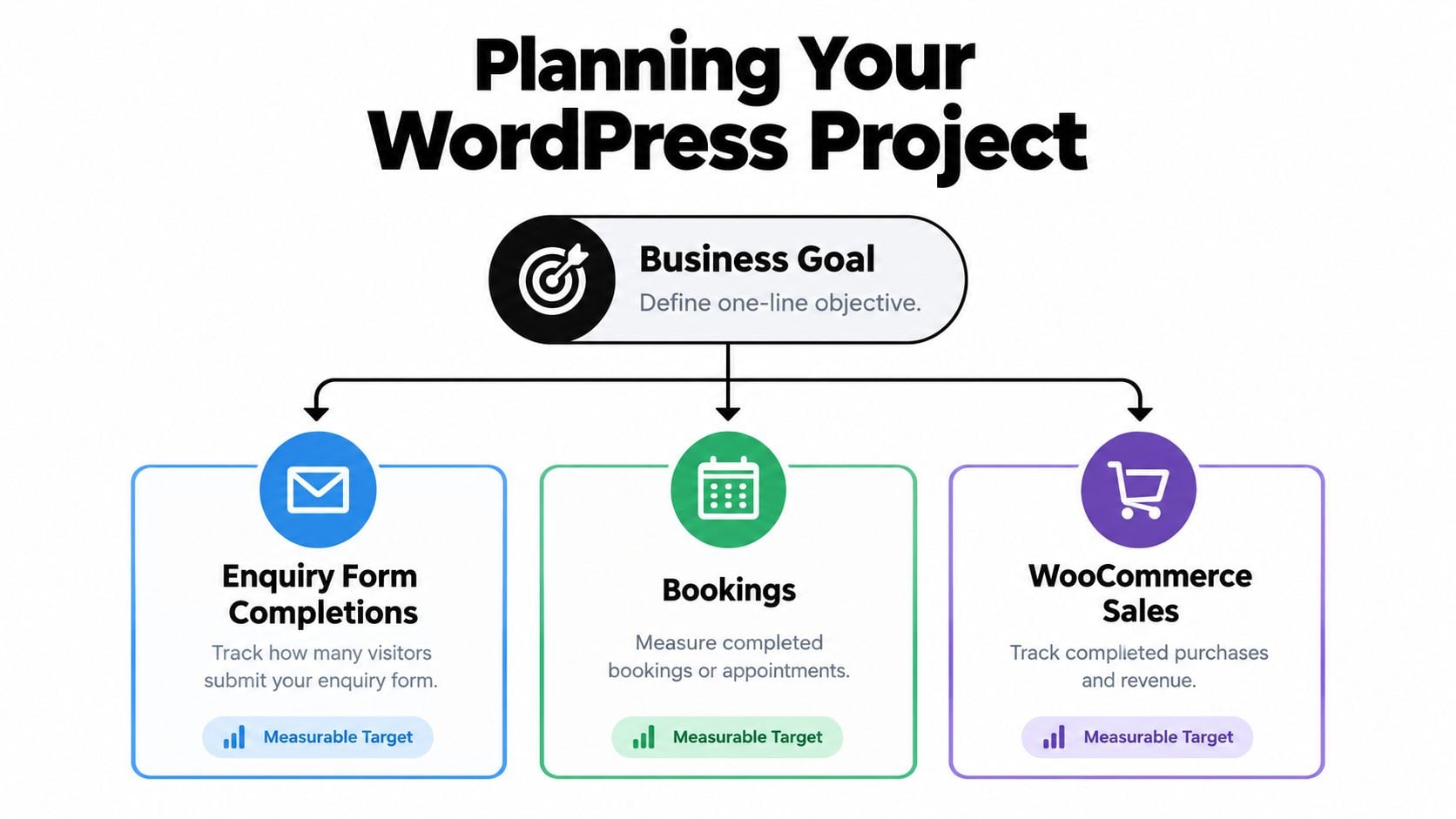
The first useful WordPress document is usually a single sentence. Write, “This website exists to…” and finish it with one commercial outcome. That might be generating qualified enquiries, securing bookings, selling products or helping an existing customer group find support.
A vague goal creates a vague build. A measurable conversion target gives every later decision something to answer to.
Start with the customer journey
A sitemap shouldn't be a list of everything the business wants to say. It should reflect how a visitor moves from a problem to a decision.
For a local service business, that might mean a focused home page, service pages, evidence of relevant work, an area page, FAQs and a clear enquiry route. An ecommerce site needs product discovery, category logic, delivery information, returns guidance and a checkout experience that doesn't create uncertainty.
Map the important journeys before producing page designs:
- New visitor: What do they need to understand immediately?
- High-intent visitor: What proof removes the final objection?
- Returning visitor: Can they reach the relevant service, product or account area quickly?
- Contact-ready visitor: Is the form short, clear and usable on a phone?
A well-written WordPress design brief should capture these decisions, along with brand requirements, integrations and approval responsibilities.
Audit content before migrating it
Old PDFs, service pages and blog posts often contain valuable search visibility, but some are duplicated, outdated or difficult to use. Create a simple inventory and decide whether each item should be migrated, rewritten, redirected or retired.
This is also the point to identify missing evidence. A tradesperson may need project photographs and service-area information. A professional firm may need clearer explanations of its process, expertise and outcomes. Delaying those decisions is one of the fastest ways to turn a planned launch into an unfinished website.
Treat hosting as part of the build
Managed WordPress hosting from providers such as Kinsta, WP Engine or Cloudways can offer a more controlled environment than a basic shared cPanel account. The right choice depends on traffic patterns, support expectations, technical access, backup arrangements and the complexity of the site.
Hosting affects more than server space. It influences security controls, caching, staging, recovery and page-speed budgets. Domain ownership and GDPR-conscious analytics choices belong in the same early conversation. If those decisions wait until launch week, they can delay testing and force compromises that were avoidable.
Choosing Themes, Plugins and an eCommerce Setup That Won't Bite Back
The cheapest WordPress decision is often the most expensive one to keep. A theme that looks impressive in a demo may load unnecessary features, lock content into a page builder or make future editing dependent on a specialist.
A lightweight block theme can suit a content-led business that wants a clean editing experience. Twenty Twenty-Four, GeneratePress and Kadence represent different points on the flexibility and convenience spectrum. Divi and Avada can help teams assemble pages quickly, but their convenience may come with more markup, more settings and a stronger dependency on the builder.
| Option | Best For | Trade-off |
|---|---|---|
| Lightweight block theme | Businesses prioritising maintainability and native editing | Requires more care during the initial design and template setup |
| GeneratePress or Kadence | Flexible business websites with reusable layouts | Extra features need disciplined configuration |
| Divi or Avada | Teams that need a visual page-building workflow | Greater builder dependency and a larger management surface |
| Custom theme or tailored block system | Distinctive brands with specific content needs | Higher initial development effort and stronger reliance on skilled implementation |
Build a small, deliberate plugin stack
Plugins earn their place when they solve a defined business problem. WPForms can support structured enquiry workflows, ACF can model custom content, and Rank Math can help editors manage on-page SEO settings. None of them removes the need for good content, testing or governance.
The danger appears when a site accumulates plugins because each one seems useful in isolation. A form plugin, gallery plugin, popup plugin, social feed plugin and several overlapping optimisation tools can create update conflicts, confusing admin screens and fragile dependencies. Free doesn't mean costless. Every additional plugin creates another item to review, update, test and replace if its developer abandons it.
Practical rule: If nobody can explain what a plugin does, who owns it and what happens if it stops working, it shouldn't be on the production site.
Choose ecommerce architecture around operational complexity
WooCommerce works well for many stock-based SMEs that need control over products, content and customer journeys. It becomes less comfortable when the business needs complicated subscriptions, extensive tax rules, several fulfilment systems or a payment setup that demands tight control over compliance responsibilities.
Shopify can reduce the amount of infrastructure a merchant manages, while a headless commerce approach can support a more specialised frontend and integration layer. Those options can also introduce recurring platform costs, development complexity or vendor dependency. The best choice depends on stock, fulfilment, subscriptions, reporting and payment requirements, not on which product has the most familiar marketing.
For a broader look at ecommerce theme decisions, compare WordPress themes for ecommerce projects before committing to a visual system.
Realistic Timelines and UK Cost Bands for a WordPress Build
A £2,000 quote can look attractive until you discover it covers only installation and page assembly. Another supplier may include content support, testing, training and post-launch fixes. Compare the scope before comparing totals.
DIY has the lowest direct spend, but the owner supplies design judgement, content, configuration and troubleshooting. A hybrid build gives specialist work to a freelancer or small team while the client prepares content and approves decisions. An agency build costs more, but usually brings structured discovery, controlled design, development, testing and clear accountability.
| Build Route | Typical UK Cost | Duration | Skill Required | Best For |
|---|---|---|---|---|
| DIY | Low direct spend, plus hosting, themes and tools | Flexible, dependent on available time | Comfortable with content, configuration and troubleshooting | Simple brochure sites and owners willing to learn |
| Hybrid | Mid-range professional investment | Several project phases | Client can supply content and approve work promptly | Small businesses sharing responsibilities with a specialist |
| Agency | Higher investment for broader scope and support | Planned discovery, build and launch programme | Agency leads technical delivery and governance | Revenue-critical sites, integrations and compliance-sensitive work |
These are planning bands, not promises. A small site with complex forms, booking logic or a carefully managed migration may take more work than a larger brochure site using straightforward templates. A local solicitor may prioritise enquiry quality and accessibility, while a trades business may need calls, quote requests and service-area pages to convert visits. Those targets affect the work, even when both sites use WordPress.
Read the quote, not just the total
Check whether the proposal explains:
- Content: Who writes, edits and uploads the copy?
- Design: How many templates and revision rounds are included?
- Technical work: Are integrations, forms, redirects and ecommerce settings specified?
- Testing: Does the project cover mobile, accessibility, browser and conversion testing?
- After launch: Who handles updates, fixes and training?
Stock photography, copywriting, accessibility review and maintenance may sit outside the headline build price. Public-sector projects and suppliers working with public bodies may also need accessibility work documented clearly, rather than treated as a last-minute check.
Ask how hosting, plugin licences, backups and support are priced after launch. A lower build fee can create a higher operating burden if the business must manage updates, renewals and faults without an agreed owner.
The Carlos Alba Media pricing guide offers another reference for forming useful questions before comparing proposals. For a UK-focused breakdown of WordPress website development costs, examine what each package includes instead of treating a published figure as a universal tariff.
Performance, Accessibility and Security Habits That Matter
A WordPress site can be slow, difficult to use or exposed to avoidable risks even on good hosting. The build decisions matter: how much code loads, how editors structure pages, how images are prepared and how administrators handle updates.
Core Web Vitals offer practical targets based on real-user visits. A page passes when at least 75% of real-user visits meet the relevant thresholds: Largest Contentful Paint of 2.5 seconds or less, Interaction to Next Paint of 200 milliseconds or less, and Cumulative Layout Shift of 0.1 or less, as summarised in UK Core Web Vitals guidance.
Performance starts with restraint
Choose a lightweight theme and use a page builder selectively. A builder can suit a campaign landing page, while making every template dependent on a large visual system can increase code, slow editing and make later changes harder.
Practical implementation habits include:
- Prepare media properly: Resize images for their display area and serve suitable modern formats such as WebP.
- Load selectively: Defer non-critical JavaScript and stop pages loading features they do not use.
- Cache intelligently: Consider object caching and a CDN when the site and its audience justify the added configuration.
- Measure real users: Lab tests help diagnose issues, while field data shows what visitors experience on different devices and connections.
GOV.UK's optimisation work reduced homepage CSS from 42 kB to 25 kB and improved LCP from 2.53 seconds to 2.35 seconds. The example shows why removing unnecessary assets can produce a better result than adding another performance plugin. The figures are documented in the same guidance noted above.
Accessibility is a delivery responsibility
WordPress states that its admin interface and bundled themes aim to align with WCAG 2.2 AA where possible. Its accessibility coding standards also require new or updated code to meet AA-level guidance, as explained in WordPress accessibility guidance. Themes, plugins and page content still need testing because that stated aim does not make every implementation accessible.
UK public-sector bodies must meet WCAG 2.2 AA under the Public Sector Bodies Accessibility Regulations 2018. Councils, education providers, charities and membership organisations should use that level as a practical benchmark for headings, colour contrast, keyboard navigation, focus states, skip links, labels and content workflows. For public-facing services, accessibility belongs in acceptance testing and editor training, not in a final check before launch.
Security needs a routine
The 2025 UK Cyber Security Breaches Survey found that 43% of British businesses experienced a cyber breach or attack in the previous 12 months, affecting about 612,000 organisations, according to the UK WordPress security overview. WordPress projects need operating controls from the start, particularly where a compromised site could disrupt enquiries, bookings or online sales.
Use managed updates where appropriate, protect administrator accounts with two-factor authentication, keep daily offsite backups, use a web application firewall or host-level firewall, and review the plugin list regularly. A quarterly audit should remove abandoned tools, check user access and confirm that backups can restore the site. A backup that has never been tested is only an assumption, not a recovery plan.
DIY Versus Hiring a WordPress Agency in the UK
DIY makes sense when the site is a modest brochure, the owner has time to learn and the consequences of a delay are limited. It can also be a good way to validate an idea before investing in a more custom build. The catch is that the owner becomes the project manager, content editor, tester and first line of technical support.
That time has a cost even when no invoice changes hands. Learning how to handle redirects, accessibility, SEO, security and plugin conflicts can slow the launch and distract from running the business. A site may look finished while still lacking a reliable recovery process or a clear conversion path.
The middle route often works well
A capable freelancer can deliver a personal service and move quickly on a focused project. That suits a straightforward site with a limited page count and few integrations. The risk is breadth. One person may not have equal strength in content strategy, UX, accessibility, ecommerce, SEO, development and support.
An agency usually brings a defined process, multiple disciplines and clearer accountability. That wider capability costs more, but it matters when the website supports lead generation, online sales, complex integrations or formal accessibility requirements. The agency relationship also needs scrutiny. Ask who will work on the project, how decisions are documented and what support exists after launch.
Use the business risk to choose
- Choose DIY if the budget is tight, the site is brochure-only and someone internally can maintain it.
- Choose a freelancer for a focused build with a clear brief, limited templates and no demanding integrations.
- Choose an agency when revenue depends on the website, the project includes ecommerce or integrations, or accessibility compliance is mandatory.
A polished homepage isn't the main measure of professional development. The stronger test is whether the business can update content, recover from a failure, understand its leads and keep the site healthy without starting the project again.
Launch, Maintenance and SEO Habits to Keep Your Site Healthy
Launch week should be treated as a controlled handover, not a celebration followed by silence. Before changing DNS or publishing the final version, test the key journeys on real devices and ask someone unfamiliar with the project to complete a form or find a product.
Use a launch checklist
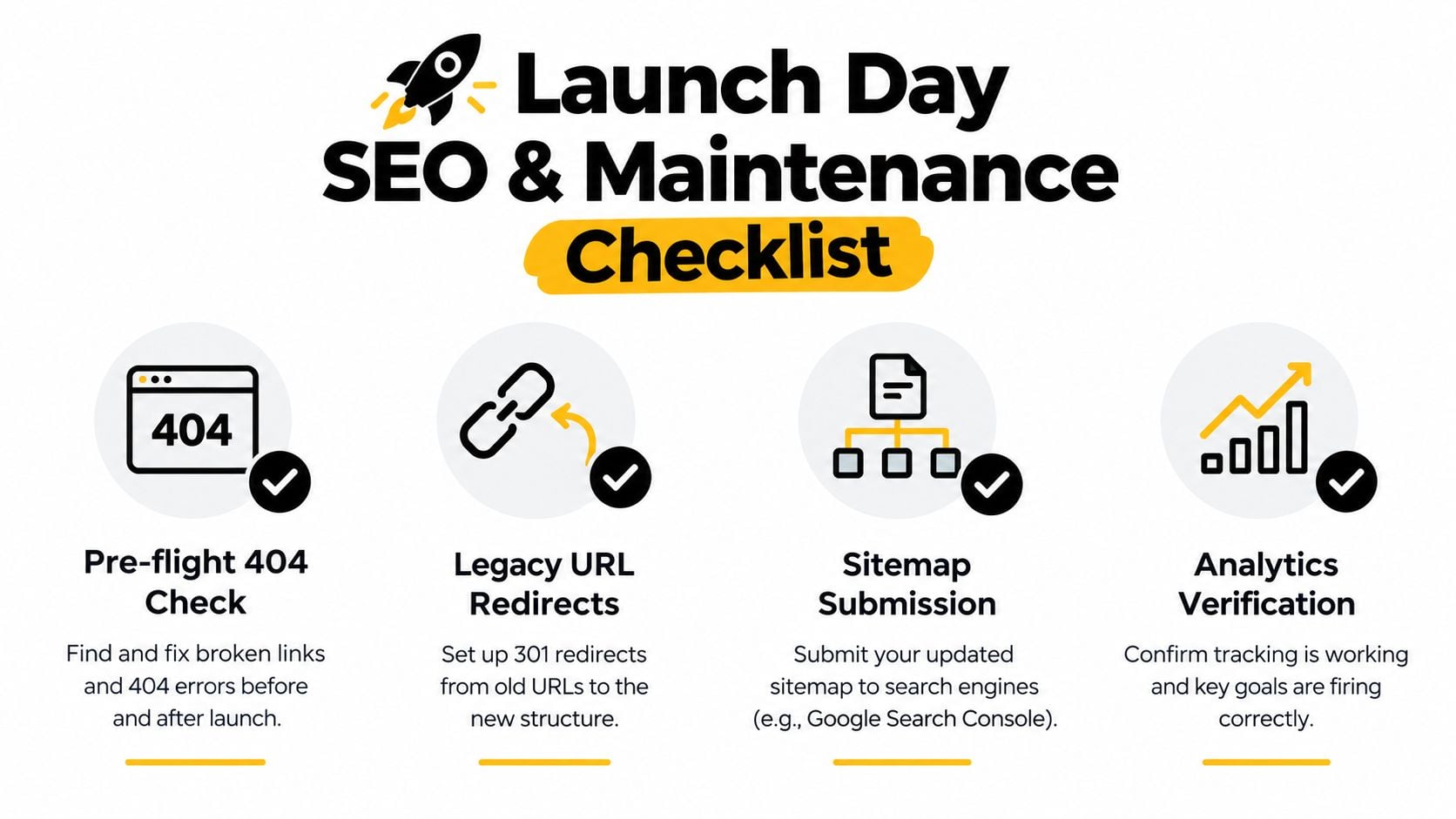
- Check errors: Crawl important pages and investigate 404 responses.
- Protect existing visibility: Add redirects from valuable legacy URLs instead of leaving old pages to disappear.
- Submit the sitemap: Add the XML sitemap to Google Search Console and Bing Webmaster Tools.
- Verify measurement: Test analytics, conversion events, form notifications and ecommerce tracking.
- Test contact routes: Send a genuine test enquiry and confirm that the right person receives it.
- Review privacy controls: Check consent behaviour, embedded services and the wording of privacy information.
- Check mobile layouts: Test menus, buttons, forms, tables and checkout on actual phones.
A practical website launch checklist is useful because launch mistakes often involve small details that nobody owns.
The first maintenance review should happen soon after launch, while the build decisions are still fresh. Use the next reviews to confirm that updates haven't changed layouts, forms or performance, and that new content follows the agreed structure.
Keep a simple operating rhythm
- Early review: Check core, theme and plugin updates, backups, uptime and form delivery.
- Ongoing review: Watch search performance, broken links, conversion tracking and user feedback.
- Regular technical review: Remove unused plugins, inspect the database, review administrator access and test recovery procedures.
- Content review: Refresh older service pages and posts, improve internal links and add evidence where customer questions have changed.
For SEO, create a content brief for each important service page. Define the search intent, useful questions, internal links and conversion action before writing. Track Core Web Vitals so a new template, image or plugin doesn't undo the work completed during development.
Here's a concise video walkthrough to use alongside the checklist:
Finally, record every administrator login, store recovery details securely and keep a written plan for a hosting outage or lost credentials. A WordPress website becomes an asset when someone knows how to operate it after launch, not merely how to publish it on launch day.
DesignStack delivers responsive WordPress websites, WooCommerce builds, hosting setup and post-launch support for Dorset and UK businesses. Visit DesignStack to discuss a build shaped around your customer journeys, conversion goals and long-term maintenance needs.