
Website Maintenance Services UK: Your 2026 Guide
You've launched your website. It looks smart, the pages are live, and for a moment it feels like a job ticked off the list.
Then real life starts. You spot an old staff photo still on the About page. A contact form stops sending messages. WordPress asks for updates you're not sure are safe to click. Your site is “online”, but you don't know if it's secure, fast, or losing leads without your awareness while you're busy running the business.
That's where many small business owners get stuck. The website becomes a black box. You know it matters, but you're not sure what proper care looks like, what it should cost, or whether a cheap monthly plan covers the things you'll need. If that sounds familiar, it helps to start with the basics of what makes a good business website. A good site isn't just well designed. It needs ongoing attention after launch.
This guide breaks website maintenance services in the UK into plain English. No technical fog. No vague promises. Just a clear look at what maintenance includes, what catches business owners out, and how to avoid paying a low monthly fee only to get surprise charges for small changes later.
Table of Contents
- Your Website Is More Than Just Live It Needs to Thrive
- Why Your Business Cannot Ignore Website Maintenance
- The Core Components of a UK Maintenance Service
- UK Website Maintenance Pricing and Costs in 2026
- How to Choose the Right Maintenance Partner
- A Local Focus for Dorset and Weymouth Businesses
- Your Hiring and Transition Checklist
- Frequently Asked Questions
Your Website Is More Than Just Live It Needs to Thrive
A live website isn't the finish line. It's more like getting the keys to a new premises. The lights are on, the sign is up, but someone still needs to lock the doors at night, fix faults, and make sure customers can get in without trouble.
For a small business, maintenance often starts as an afterthought. The website works on launch day, so it's easy to assume it will keep working. But websites age in small, quiet ways. Software changes. Plugins fall behind. Contact forms break after updates. A page that loaded quickly six months ago starts dragging because no one has tidied things up behind the scenes.
That's why website maintenance services in the UK matter so much. They turn a website from a one-off project into an asset that keeps doing its job properly.
A neglected website rarely fails all at once. It usually slips. A broken button here, a missed enquiry there, a slow page that puts someone off before you even know they visited.
Business owners often tell me the same thing. They don't mind paying for upkeep. They mind not knowing what they're paying for. That uncertainty is exactly what causes trouble with vague low-cost plans and unclear scopes.
Why Your Business Cannot Ignore Website Maintenance
Think of your website like a car. You wouldn't buy one, drive it daily, skip every service, ignore warning lights, and expect it to stay reliable. Your website works the same way. It needs regular checks if you want it to stay safe, fast, and dependable.
A website usually has several moving parts working together. WordPress core, themes, plugins, forms, payment tools, spam filters, hosting settings, image files, and third-party integrations all need watching. When one part changes, something else can wobble.
Small technical issues turn into business issues
A lot of owners hear “plugin update” and think it sounds minor. But its actual impact isn't minor at all.
- A broken form means a customer tries to enquire and hears nothing back.
- A slow page makes someone leave before they read your offer.
- A security issue can damage trust fast, especially if warning messages appear in the browser.
- Downtime means your shop front disappears, often when you don't realise it.
Professional maintenance links directly to business performance. According to UK website maintenance provider data summarised by Clutch, professional website maintenance services for UK SMEs typically deliver a 35 to 50% improvement in page load times and guarantee 99.5 to 99.9% uptime.
That's the practical value of regular care. Faster pages feel smoother to use. Strong uptime means people can reach you when they're ready to buy.
Maintenance is part of wider business resilience
Website care doesn't sit in a silo. It belongs alongside the rest of your business systems. If your laptops, email, backups, and cloud tools need regular attention, your website does too. Nutmeg Technologies makes a similar point in its guide to consistent IT support. Routine maintenance helps prevent bigger operational headaches later.
The same principle applies online. Reactive support costs more in stress, lost time, and emergency fixes than planned support usually does.
It also protects your search visibility
This part often gets missed. Search performance isn't only about keywords. Technical condition matters too. If pages load poorly, links fail, or the site structure becomes messy after updates, visibility can suffer. That's why technical maintenance overlaps with technical SEO foundations.
Practical rule: if your website brings in enquiries, bookings, or sales, maintenance isn't a nice extra. It's routine business protection.
The Core Components of a UK Maintenance Service
When people buy maintenance, they often picture someone “keeping an eye on the site”. That's too vague to be useful. A proper service should cover a handful of clear responsibilities, each with a different job.
Early on, it helps to see the shape of a complete service:
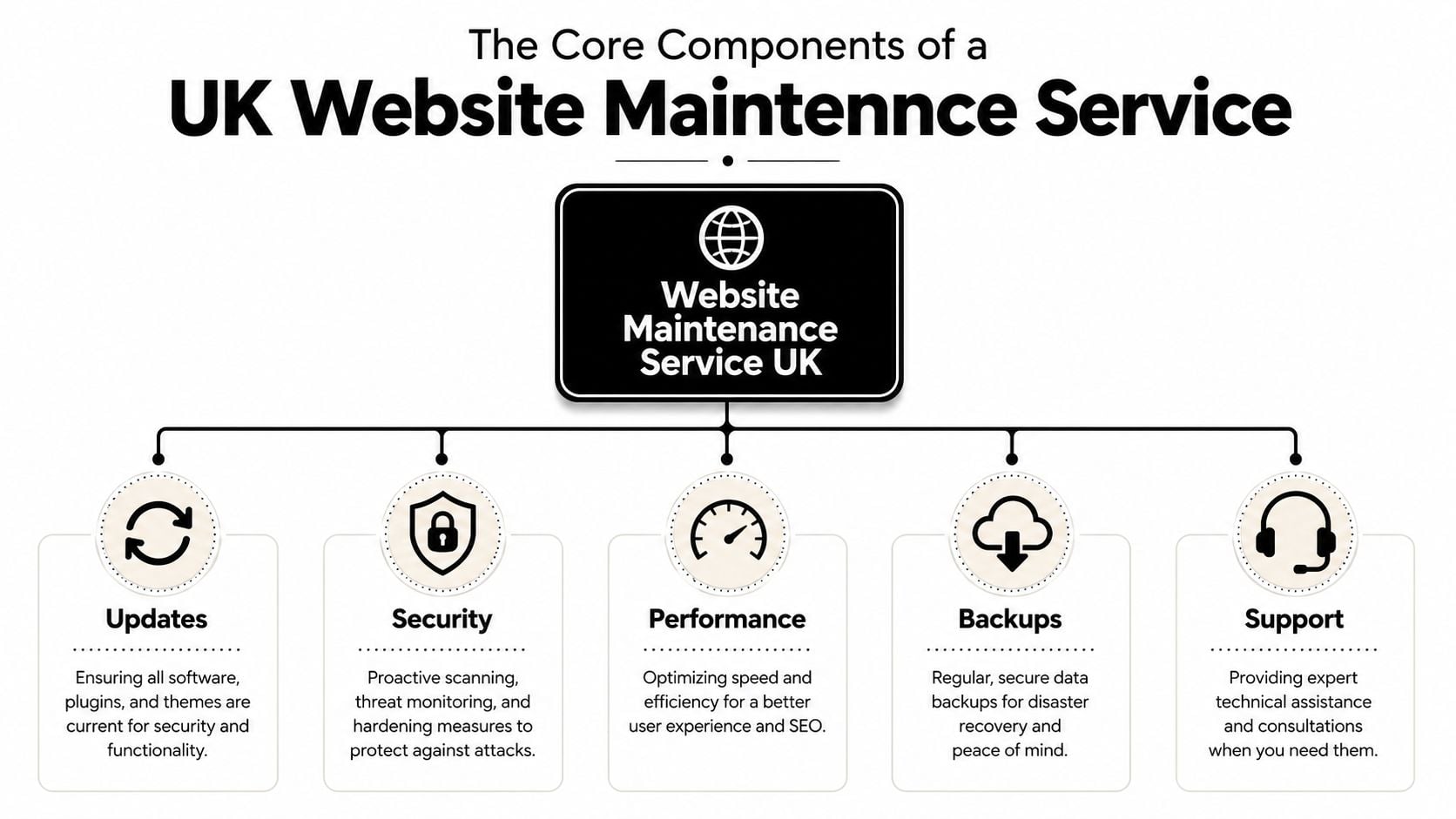
Updates keep the foundations stable
Updates are the routine servicing part of maintenance. They cover your CMS, theme, and plugins. On a WordPress site, that might mean updating WooCommerce, contact form tools, SEO plugins, or security add-ons.
The important bit isn't just clicking “update”. It's checking what those updates affect. A new plugin version can clash with your theme. A form may look fine on the front end but stop sending messages in the background. Good maintenance includes safe handling and post-update testing.
If your site sits on managed hosting and maintenance support, these checks are often easier to coordinate because the same partner can see both the website and the environment it runs on.
Security and backups are your safety net
Security isn't only about stopping dramatic hacks. It's about reducing everyday exposure. That means scanning for issues, monitoring suspicious activity, keeping software current, and tightening the setup so attackers have fewer easy openings.
Backups are the recovery side of that work. They give you a way back if an update fails, files are corrupted, or the site is compromised. A backup only becomes valuable when someone can restore it properly, so restoration planning matters as much as the backup itself.
Here's the easy analogy. Security is the lock on the door. Backups are the spare key and insurance paperwork if the lock fails.
Performance and support affect day-to-day business
Performance work keeps the site lean. That can include image optimisation, cleaning out unnecessary data, checking for resource-heavy plugins, and making sure key pages still load smoothly.
Support is where many business owners get caught out. They assume “maintenance” includes small edits such as swapping an image, updating opening hours, correcting a staff bio, or changing a call to action. Sometimes it does. Sometimes it absolutely doesn't.
That gap matters because the support side is often what businesses use most.
To see one aspect of maintenance in action, this short video gives useful context on ongoing website care:
Accessibility is no longer optional housekeeping
One area many packages still treat as an extra is accessibility. That's risky. A site can pass a check one month and fail the next after a menu change, plugin update, or form tweak.
DesignStack notes on its website support and maintenance page that 73% of UK websites fail basic accessibility checks, 31% of UK SMEs face legal pressure to comply, and only 12% of maintenance packages include mandatory accessibility reviews after plugin updates.
That's a serious gap. Something as ordinary as updating a contact form can affect keyboard navigation or labels for screen readers.
A solid maintenance service should include:
- Routine updates: core software, plugins, and themes handled carefully
- Security work: monitoring, hardening, and issue response
- Backups: regular copies with a clear recovery process
- Performance checks: speed, database tidiness, and general efficiency
- Support time: clear rules for edits, fixes, and minor changes
- Accessibility reviews: especially after content, form, or plugin changes
UK Website Maintenance Pricing and Costs in 2026
Pricing is where most confusion starts. Two providers can both advertise “website maintenance”, but one may offer mostly automated updates while the other includes hands-on checks, support time, reporting, and content help. That's why comparing fees without comparing scope causes so many misunderstandings.
The three pricing models you'll see most often
The first model is pay-as-you-go. You contact someone when something breaks or needs changing, and you pay for that piece of work. This can suit a very simple site that rarely changes, but it offers little predictability.
The second is a monthly retainer. You pay a set amount each month for ongoing care. This is the most common setup for small businesses because it spreads cost and gives you a regular support relationship.
The third is a bundled package. Maintenance is wrapped together with hosting, support, or design time. This can work well if the provider is clear about exactly what's included and what sits outside the monthly fee.
Cheap plans aren't automatically bad. Unclear plans are the bigger problem.
Typical UK website maintenance costs in 2026
Projected UK pricing for 2026 spans a broad range because service levels vary so much. According to this UK maintenance cost guide, small business website maintenance in 2026 ranges from £50 to £300 per month for standard support, while e-commerce sites needing 24/7 SLAs can run from £300 to £900+ per month. The same source notes budget plans start at £20 to £40, local specialists often charge £80 to £200 for human-led service, and larger agencies charge £200 to £500+.
Another UK pricing overview from EJK Web Solutions places core maintenance for small to mid-size sites within a broad £50 to £500 monthly range, with more intensive e-commerce support going higher depending on support hours and SLA demands.
Here's a practical summary.
| Service Tier | Typical Monthly Cost (VAT Excl.) | Best For | Key Features |
|---|---|---|---|
| Budget automated plan | £20 to £40 | Very simple sites that rarely change | Automated updates, limited hands-on support |
| Standard small business support | £50 to £300 | Brochure sites and service businesses | Routine updates, backups, security monitoring, some support |
| Local specialist human-led service | £80 to £200 | SMEs wanting direct contact and manual checks | Human attention, manual updates, clearer communication |
| Large agency support | £200 to £500+ | Complex or revenue-critical sites | Broader support, strategic input, account management |
| E-commerce with 24/7 SLA | £300 to £900+ | Online shops and higher-risk sites | Faster response, tighter monitoring, stronger support cover |
Why one £40 plan isn't the same as another
This is the key point. A lower monthly fee often buys automation, not judgment. The system runs updates and reports back. If something breaks afterwards, that repair may be chargeable. If you ask for a homepage banner change or a testimonial swap, that may also be chargeable.
A more expensive plan usually includes more human attention. Someone checks what changed, tests key functions, and deals with minor issues before they grow. That's often the difference between “software maintenance” and “business support”.
If you're trying to budget properly, it helps to review a more detailed breakdown of website maintenance costs and compare plans by scope, not headline price.
How to Choose the Right Maintenance Partner
Price matters, but clarity matters more. If you choose a provider only because the entry price looks low, you can end up paying more once normal requests start falling outside the plan.
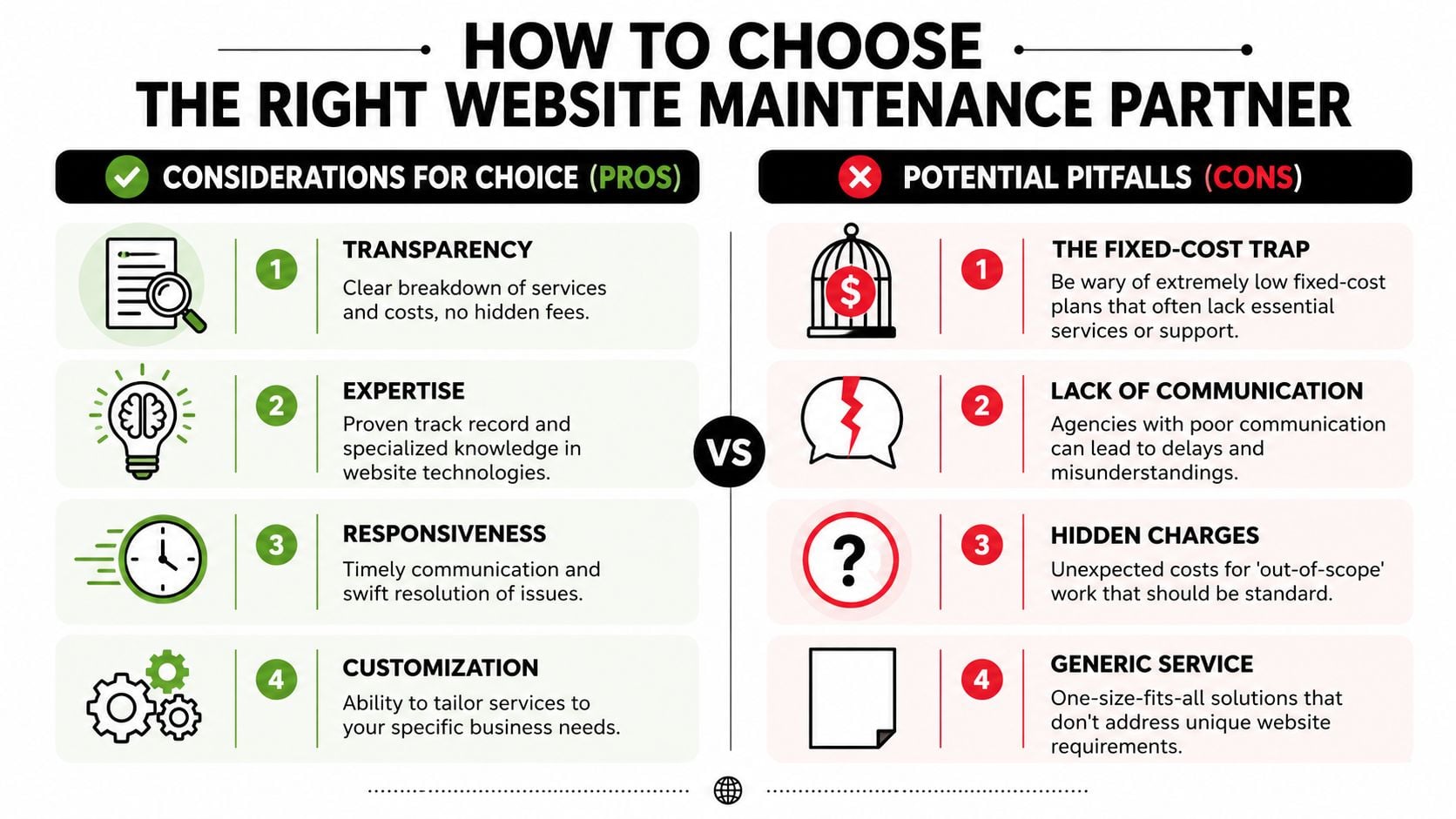
The fixed-cost trap in plain English
A common pattern in the UK market is the attractive flat fee. It sounds simple. You pay one monthly amount and assume your site is looked after.
The problem is that many plans define “looked after” very narrowly. Dotwise reports that many UK maintenance guides promote flat monthly fees of £40 to £100 without addressing scope creep, and 60% of SMEs expect content edits under basic plans, but those plans rarely include them.
That's the fixed-cost trap. You think you bought peace of mind. What you bought was a slim list of technical tasks, with routine business edits treated as extras.
One factual example of a more clearly scoped approach is DesignStack's fixed-cost model, which includes three design revisions and one month of post-launch updates as standard in its wider service offer. That kind of clarity matters because it tells you, in plain language, where the line is.
Questions worth asking before you sign anything
Ask direct questions and listen for direct answers.
What exactly is included each month
Ask whether the plan covers updates only, or also testing, backups, security work, reporting, and small edits.How are content changes handled
Clarify whether text swaps, image changes, blog uploads, and banner updates are included or billed separately.What counts as out of scope
A good provider should explain exclusions without hesitation.How are updates checked
You want to hear about testing, not just “we keep plugins updated”.What happens if the site goes down or breaks
Ask about response times, communication, and recovery steps.
If a provider can't explain their service in plain English, the problems won't start after you sign. They've already started.
Red flags that should make you pause
Some warning signs show up early.
- Vague wording: “Unlimited support” often sounds better than it works in practice.
- No mention of exclusions: if everything sounds included, ask for that in writing.
- No clear process: a provider should be able to explain updates, backups, and issue handling clearly.
- Poor communication: slow or fuzzy replies during sales usually don't improve after onboarding.
- One-size-fits-all plans: different websites need different levels of care.
The right maintenance partner doesn't need the cheapest price or the flashiest pitch. They need a clear process, realistic scope, and the ability to explain what you're getting without hiding behind jargon.
A Local Focus for Dorset and Weymouth Businesses
For businesses in Dorset, local support still has real value. That's especially true when your website isn't just a brochure, but part of how you generate leads, handle enquiries, or serve existing customers.
A local partner understands the area, the pace of local trading, and the fact that many owner-managed businesses want straight answers rather than a ticketing system and a long wait. If something on your site needs discussion, it's easier when the person helping you knows the local market and can speak to you like a neighbour, not a call centre script.

That local accountability matters. A business based in Weymouth or Dorchester will often prefer a provider they can speak to, meet, and build a working relationship with over time. If you're looking for that kind of support, a nearby WordPress developer in your area can often offer more joined-up help across design, maintenance, and practical updates.
There's also a reputational layer. Local agencies live with their reputation in the same business community as their clients. That tends to encourage clearer communication and steadier long-term support.
Your Hiring and Transition Checklist
Switching maintenance providers can feel awkward, especially if your current setup is messy. It doesn't need to be dramatic. Most smooth handovers come down to being organised before access starts changing hands.
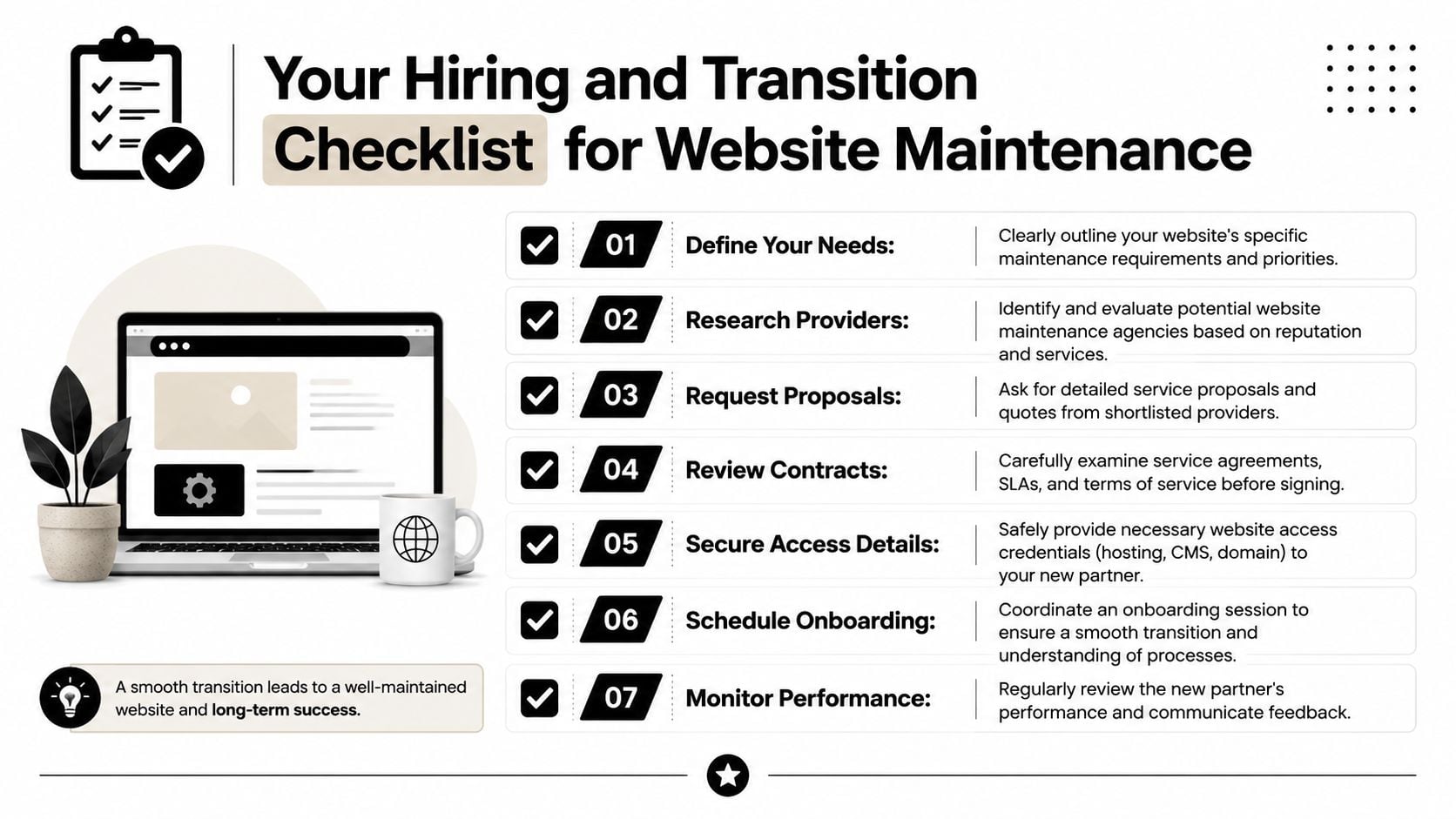
Use this checklist to keep the process tidy:
Define what you need
List the basics first. Updates, backups, security monitoring, content edits, performance checks, and emergency help.Audit the current setup
Gather login details for hosting, domain management, CMS access, plugins, email-related tools, and analytics platforms.Ask for a written scope
Make sure the provider states what's included, what's excluded, and how extra work is priced.Check support expectations
Confirm how to request help, when replies normally arrive, and what happens in urgent cases.Discuss backups before changes begin
A fresh backup before onboarding gives everyone a safer starting point.Plan the handover date
Avoid changing providers in the middle of a redesign, campaign launch, or busy trading period if you can help it.Review the first month closely
Read the report, ask questions, and make sure the service matches what was promised.
A clean transition isn't about technical wizardry. It's about good records, clear scope, and calm communication.
Frequently Asked Questions
Can I do website maintenance myself
Yes, if your site is simple and you're comfortable managing updates, checks, and backups. The risk is that DIY maintenance often gets postponed when business gets busy. It also gets harder once your site includes bookings, e-commerce tools, custom features, or multiple plugins.
How often should plugins and themes be updated
That depends on the software and how critical your site is, but updates shouldn't be ignored for long periods. What matters most is that updates are handled carefully and checked afterwards.
What happens if my site breaks after an update
A proper maintenance provider should investigate, roll back if needed, and restore normal function using backups or version control processes. This is why tested backups and post-update checks matter.
Does maintenance include content edits
Sometimes. Sometimes not. This is one of the first things to confirm in writing because it's where many disputes begin.
Is hosting the same thing as maintenance
No. Hosting gives your site a place to live. Maintenance is the ongoing work that keeps it secure, current, and functioning properly.
If your website has started to feel like a black box, DesignStack offers Dorset-based support across web design, hosting, and ongoing website care, with a fixed-cost approach that makes scope easier to understand before work begins.