Privacy Policy Templates for UK Small Businesses
You've probably got one of those privacy policy pages already, the kind you copied when the site first went live, then forgot about while you were busy with bookings, invoices, and running the business. The problem is that a privacy policy template only works when it matches the way your site really collects data, and most small businesses add new tools long before they update the wording.
If your website has a contact form, analytics, a checkout, or an email sign-up box, you're already dealing with personal data. Under UK GDPR, that means the policy has to act as a live transparency notice, not a dusty legal page, and it needs to line up with the actual processing on the site, not just a generic clause list. For a quick sense of how a template sits inside a wider site build, it helps to understand the content setup first, including how a site's pages and tools are managed in a CMS, such as the basics covered in what a content management system is.
Table of Contents
- Why UK Small Businesses Need a Real Privacy Policy
- UK GDPR Transparency Requirements in Plain English
- Three Privacy Policy Templates Compared
- Annotated Walkthrough of the Core Template Clauses
- Tailoring the Template to Your WordPress Data Stack
- Customisation Checklist Before You Publish
- Implementing the Policy in WordPress and Your Cookie Banner
- Common UK Legal Pitfalls and How to Avoid Them
- Quick Reference and Frequently Asked Questions
Why UK Small Businesses Need a Real Privacy Policy
Many Dorset businesses begin the same way. Someone copies a privacy page from an old site, changes the company name, and assumes it will work indefinitely. Then the site expands, a booking form is added, Google Analytics appears, maybe Stripe goes live, and the page no longer reflects what the business really does.
That mismatch matters because under UK GDPR, a privacy policy is really a legal transparency notice. The ICO expects privacy information to be concise, transparent, intelligible, easily accessible, and written in plain language, which is why a decent template is built around structured sections, not decorative legal prose. The notice has to tell people who you are, what personal data you collect, why you collect it, your legal basis for processing, who you share it with, how long you keep it, and what rights users have, as set out in the UK-facing guidance from iubenda's privacy policy template overview.
Template pages are starting points, not finished compliance
A brochure site with no forms and no tracking is one thing. A service business with a contact form, embedded maps, analytics, and a CRM is another. Once personal data enters the site through a form, cookie banner, checkout, or mailing list, the privacy page has to describe those flows accurately, not in broad strokes.
Practical rule: if you can point to a form, tracker, payment button, or third-party tool, your policy needs to mention it in plain English.
The core issue is not whether you have a page titled “Privacy Policy”. It's whether that page explains the site's actual data lifecycle. A template can give you the skeleton, but it can't know whether you use a forms plugin, a US-hosted email platform, or a payment provider that shows up at checkout.
That's why the better way to think about a template is as a compliance scaffold. It gives you the headings and prompts, then you customise each clause to match the way your website works today. For a small business, that usually means reviewing the policy whenever the stack changes, not just once when the site launches.
UK GDPR Transparency Requirements in Plain English
A privacy policy should read like something a visitor can use, not something written for a solicitor. If a person cannot see who controls the data, what is collected, and what happens to it next, the notice is too vague. UK GDPR transparency is built around plain disclosure, and a good template should make those points easy to find.
The basic disclosures are straightforward. Controller identity tells people which business controls the data. Contact details give them a way to ask questions or make a rights request. Purposes and legal bases explain why the data is used, and on what lawful ground.
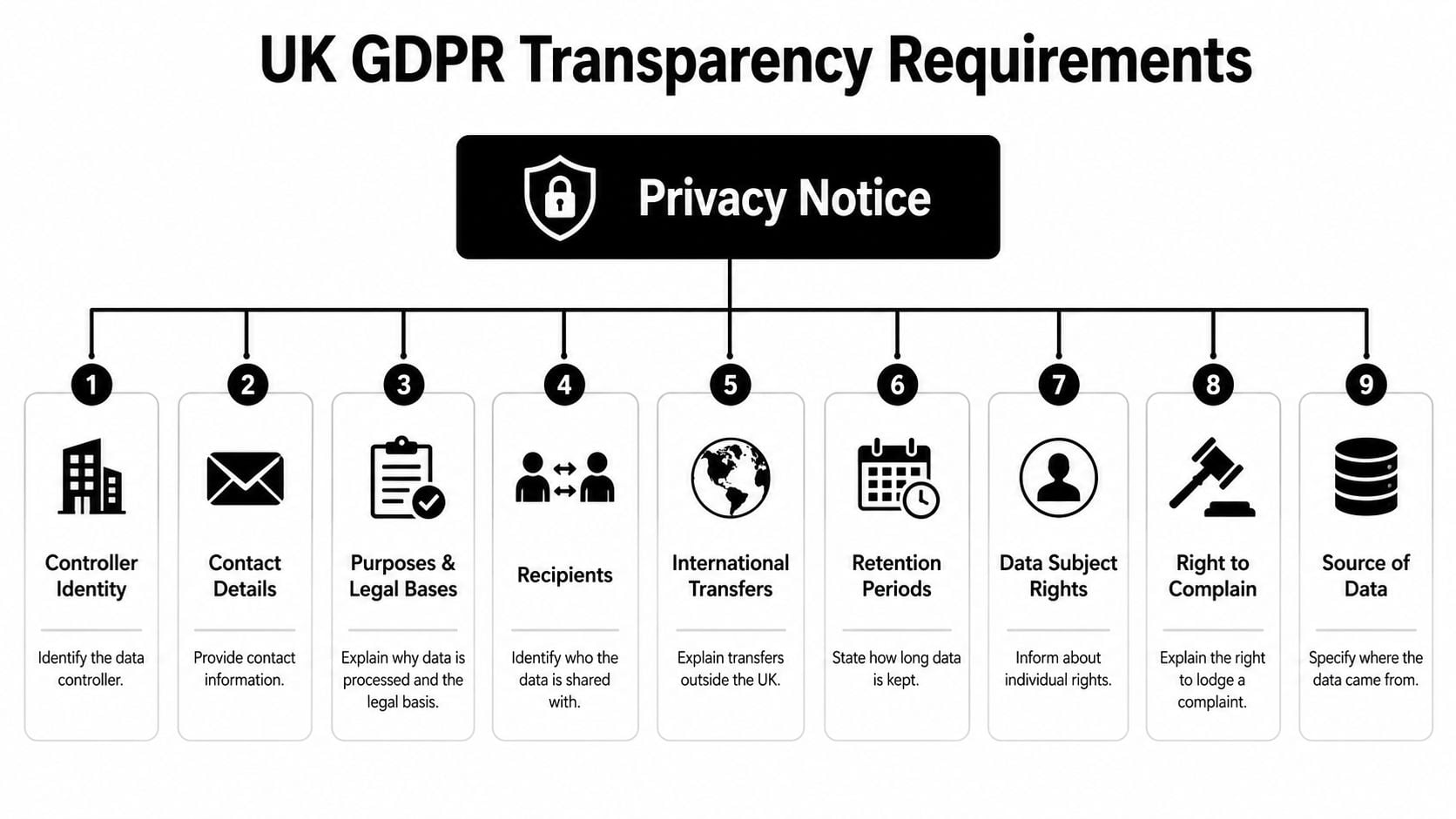
The nine disclosures your notice should cover
The usual UK GDPR structure also expects recipients, or categories of recipients, which means the third parties that receive or process the data. That is where your payment processor, email platform, hosting provider, or analytics tool belongs. For details on how tracking tools collect data, see our guide to analytics for websites. International transfers matter when those services store data outside the UK, and the notice should say what safeguards are used.
Retention periods explain how long each category of data is kept, or the criteria used to decide that. A small business can keep this specific without getting wordy, for example by saying financial records are kept for the period set out in the privacy policy and other records are reviewed against the business's own retention needs. The key is to state the rule plainly, so people can see whether the retention period matches the type of data and the reason it was collected. Data subject rights cover access, correction, deletion, objection, and related rights, while right to complain points people towards the ICO or the relevant complaint route.
A clear notice does more than satisfy a legal requirement, it helps the site owner spot gaps in the stack.
The last piece is automated decision-making or profiling, if it is used at all. Most Dorset small businesses will not need much detail here, but the section should still say whether it happens. A membership site, retailer, or service firm can usually keep this brief, as long as it is honest and specific.
Three Privacy Policy Templates Compared
Choosing the right template is mostly about matching the policy to the site's data flow. A one-page brochure site does not need the same depth as an ecommerce build, and a lead generation site has different disclosure points again. The useful question is not “Which template is best?” but “Which template is closest to my actual setup?”
| Template | Best for | Data flows covered | Complexity |
|---|---|---|---|
| Basic brochure site | Small service firms, local trades, portfolio sites | Contact form, analytics, cookies, hosting, simple enquiry handling | Low |
| eCommerce site | Online shops, product sellers, booking and checkout sites | Product orders, payment processors, shipping tools, account data, marketing emails | Medium to high |
| Lead generation site | Agencies, consultants, membership sign-up sites, quote request sites | Forms, CRM handoff, newsletter sign-ups, nurture emails, analytics, third-party embeds | Medium |
Pick the closest match, then trim or expand
A basic brochure template is usually enough if the site mainly captures enquiries and has a simple footer form. It should still cover analytics, cookies, and any third-party embeds, because those are common on even the smallest site. For a brochure site, the main job is keeping the wording short, accurate, and tied to the actual collection points.
An ecommerce template is broader because the data stack is broader. It needs to account for payment processors, customer accounts, order history, shipping, refunds, and email updates. If the shop uses multiple providers, the policy has to name them in the sharing section, not just say “third parties” and move on.
A lead generation template sits in the middle. It needs to explain what happens after someone submits a form, where the lead goes, which CRM receives it, and whether marketing follow-up is based on consent or another lawful basis. If you want the policy to survive an audit by your own future self, start with the closest template and adjust the clauses until they reflect the actual tools on the site, not the imagined ones.
Annotated Walkthrough of the Core Template Clauses
A strong template reads well because each clause does one job. If you strip away the legal dressing, the structure is simple, who you are, what you collect, why you collect it, who gets it, how long you keep it, and what people can do about it. The mistake small businesses make is leaving those sections abstract.
Who you are and what you collect
The opening section should name the controller in plain language. For a Dorset sole trader, that may be the business name and a contact email. For a limited company, it should be the registered business identity plus a route for privacy questions.
After that comes the data list. A generic template might say “personal information you provide”, but a UK small business should spell out what that means on the site, such as names, email addresses, phone numbers, invoice details, enquiry messages, and account information. If the site has a checkout or quote form, those fields should be named too.
Why you use it and what legal basis applies
The next clause should link each use to a purpose. Contact form data is used to reply to enquiries, order data is used to fulfil sales, and newsletter sign-ups are used to send updates. That's also the point where the lawful basis should match the activity, rather than being copied from a generic page.
If a clause says “we may use your data for any purpose”, it's too broad for UK GDPR style transparency.
The sharing clause needs similar discipline. Don't hide behind “trusted partners” if the recipients are Stripe, Mailchimp, Google, your hosting provider, or a CRM. The notice should make those relationships visible without over-explaining the back end.
Retention, rights, complaints, and updates
Retention is where many templates become vague. A proper policy should say how long data is kept, or how the period is decided, and it should be aligned with actual records, not wishful thinking. The rights section should explain access, correction, deletion, restriction, objection, and consent withdrawal where relevant, then point to the route for making a request.
A common mistake is copying a US-style “we may sell your data” line. If the business doesn't sell personal data, that wording is misleading and unnecessary under UK GDPR. Another common problem is leaving the update clause in place without checking whether it still reflects the current tools, forms, and third-party services.
The cleanest working rule is this, the policy should be readable, specific, and boring in the best way. If a customer can scan it and understand how their data moves through the site, the clause is doing its job.
Tailoring the Template to Your WordPress Data Stack
A WordPress site is rarely just a page builder and a contact form. Most small businesses bolt on forms, analytics, email marketing, payments, and sometimes a CRM or membership plugin. That's exactly where generic privacy policy templates fall apart, because the policy has to describe each moving part clearly.
The site's tool list should drive the wording. If you use Gravity Forms or WPForms, the policy should explain what fields are collected and where the submissions go. If you use Google Analytics or Plausible, the cookie and analytics wording has to match the actual tracker behaviour and consent setup.
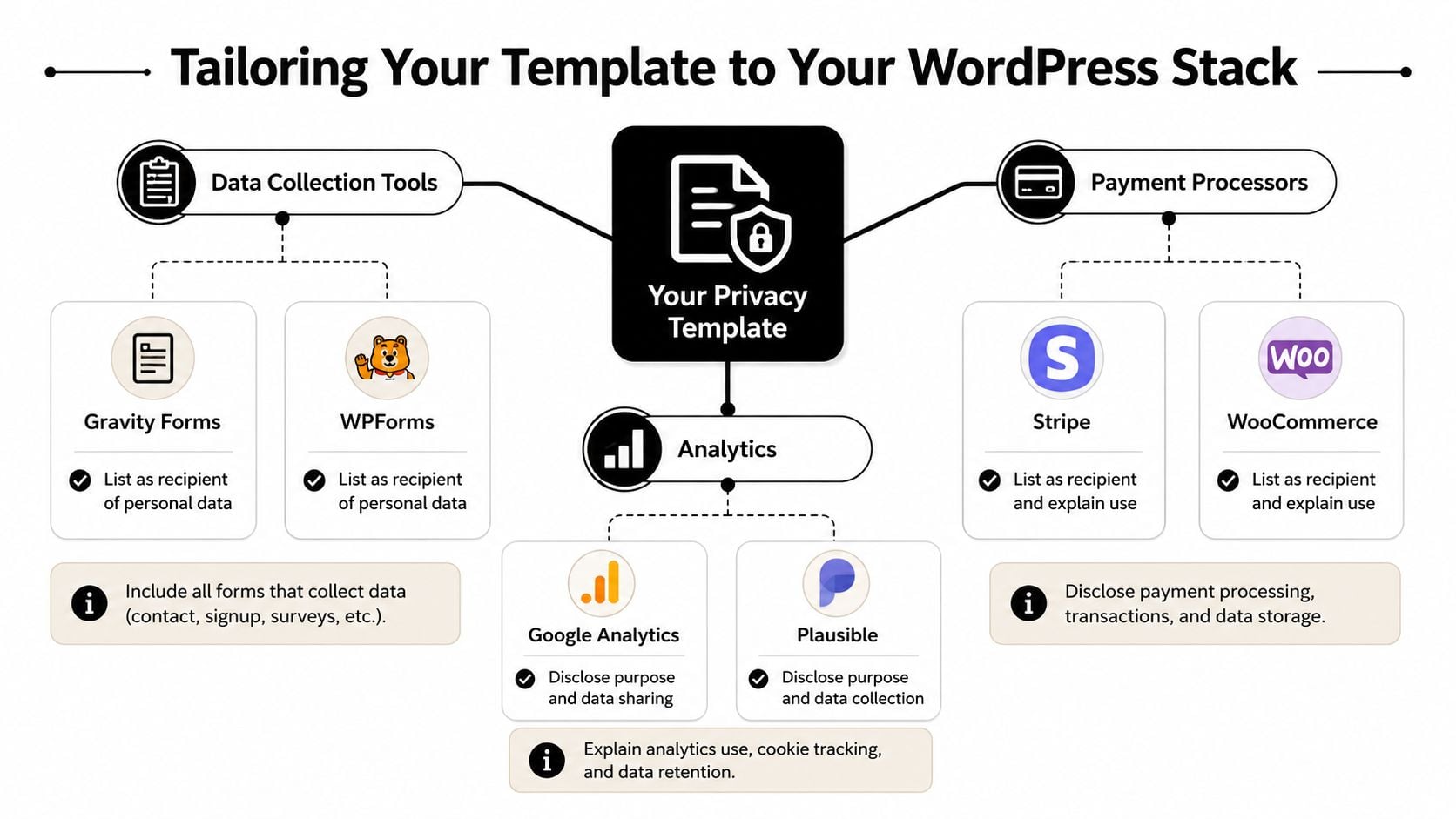
Match each tool to a disclosure
Payments need even more care. Stripe or WooCommerce PayPal should appear in the sharing section, and the policy should explain that payment details are processed to complete transactions, handle refunds, and keep records. If there's a membership plugin, the account and access data also need a place in the notice.
Email marketing platforms such as Mailchimp or ConvertKit belong in the section that covers newsletter sign-ups and promotional communications. If you rely on a CRM, spell out that form submissions may be passed into that system for lead handling and follow-up. The lawful basis depends on the context, so the wording has to match the actual use, not a one-size-fits-all phrasing.
Practical note: if you add a new plugin, you should assume the privacy policy might need an update before the plugin goes live.
The biggest mistake is treating WordPress as “just the website”. It's really a stack of vendors, each with its own data role. If you host the site on managed WordPress infrastructure, use a forms plugin for enquiries, and sync leads to a marketing tool, the policy should name each of those touchpoints in language the customer can understand. For the hosting side, a reminder like managed WordPress hosting considerations is useful because hosting and data handling are linked in practice, even if they sit behind the scenes.
Customisation Checklist Before You Publish
A template only becomes usable when the details are filled in carefully. Before publishing, it helps to work through the policy once in the same order a customer would read it, then check the actual site tools against each clause. The goal is a notice that reflects the live stack, not a draft that still reads like a placeholder.
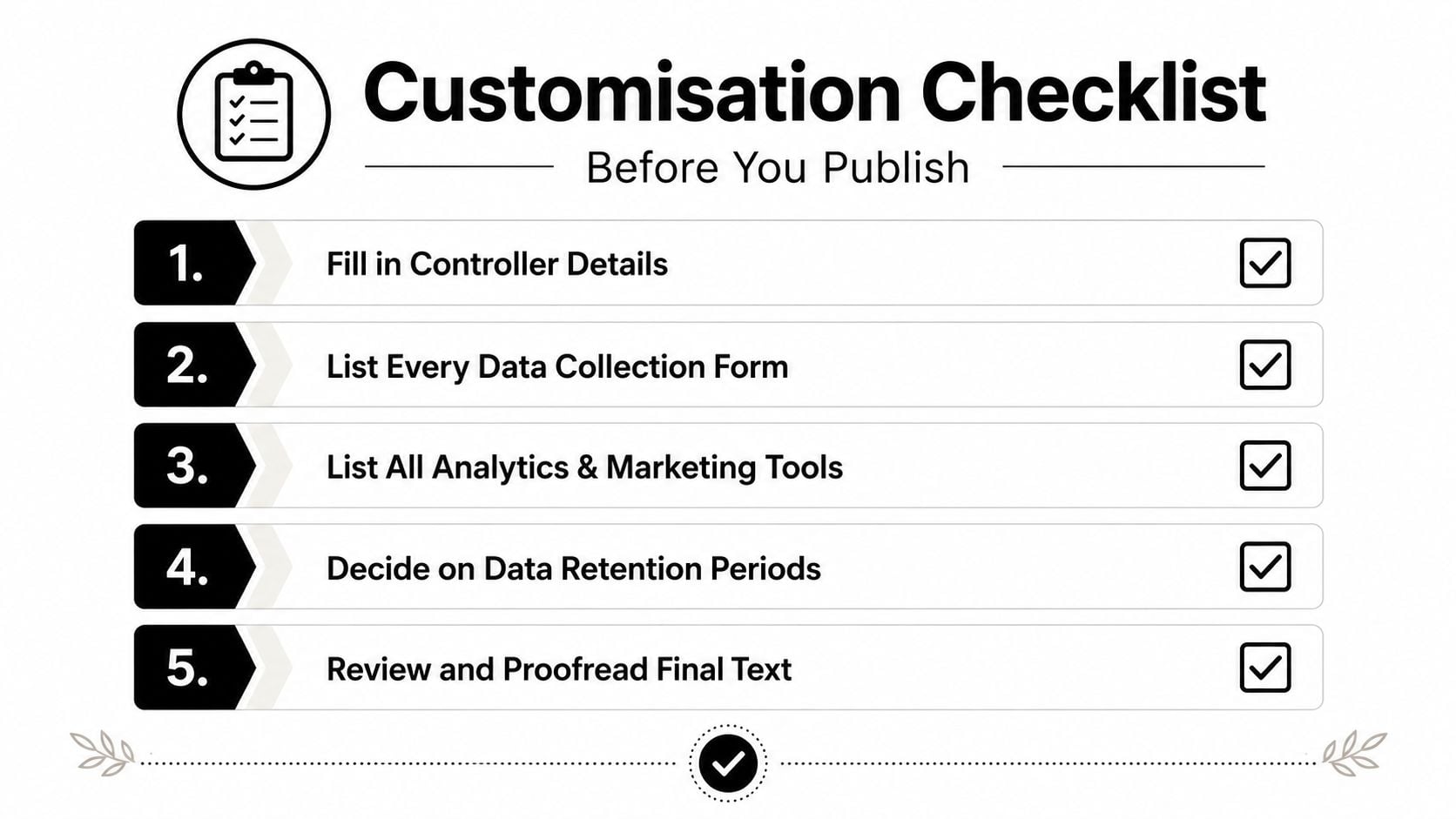
Fill the policy against the real data flow
- Fill in controller details. Add the business name, trading name if needed, and a live contact address for privacy questions.
- List every data collection form. Include contact forms, quote forms, checkout pages, newsletter boxes, and any embedded sign-up tools.
- List all analytics and marketing tools. Name the actual platforms so the disclosure matches the site's trackers and email stack.
- Decide retention periods. Set timeframes for each data category, including records that need to be kept for tax or operational reasons.
- Review and proofread the final text. Remove anything that doesn't apply, and make sure the language sounds like your business, not a copied generator output.
The policy should also include a cookie section if the site uses tracking, an international transfers section if data leaves the UK, and a children's data line if the site is aimed at or likely to be used by minors. If a business can't answer one of those items clearly, that's a sign the template hasn't been customised enough yet.
Keep the last updated date visible. A stale date can make a good policy look abandoned, even when the site itself is actively maintained. For a launch routine that sits alongside the legal checks, a website launch checklist is a sensible companion.
Implementing the Policy in WordPress and Your Cookie Banner
A privacy policy that exists only in the page editor is not much use. Users need to reach it from the places where they hand over details, and the site needs to show the same story in the policy, the footer, and the cookie setup. For a WordPress site, that usually means a permanent /privacy page, a footer link, and links wherever personal data enters the site.

Place it where data collection happens
Start with the footer, because that gives every visitor a simple route to the notice. Then add the link to contact forms, quote forms, checkout pages, sign-up pages, and any account creation screens. If a page asks for personal data, the privacy policy should be reachable from that page without making people hunt through menus.
Cookie tools need the same treatment. If you use CookieYes or Complianz, configure them so analytics and marketing scripts wait for consent where required, then test the site in a browser session with no saved preferences. The cookie banner and the policy should describe the same tracking setup, otherwise the site feels inconsistent and the disclosure loses trust.
The request process matters too. If someone asks for access, correction, or deletion, the site needs a clear email route or support workflow that someone can monitor. UK GDPR guidance usually gives businesses a one-month response window for data subject requests, so the contact path should be simple enough to handle those requests on time.
Once the policy is live, check the implementation as well as the wording. If scripts still fire before consent, or the privacy page is missing from the main collection points, the setup is not finished.
The wider trust stack matters as well. A plain HTTPS setup supports confidence, and SSL certificate installation basics sits naturally beside privacy work because both are part of making the site look safe and properly maintained.
Once the page is published and the banner behaves as expected, a short walkthrough video can help staff understand where the policy lives and why the wording matters.
Common UK Legal Pitfalls and How to Avoid Them
The biggest mistake is thinking the hard part ends when the page goes live. A published privacy policy can still be wrong, outdated, or incomplete. UK small businesses usually run into the same handful of issues.
The usual mistakes
- Copying a US template unchanged. US-style wording often includes concepts that don't fit UK GDPR well, so the fix is to rewrite the policy around UK transparency duties and the actual data flow.
- Ignoring international transfers. If the site uses US-hosted SaaS tools, the notice should say so and mention the safeguards used, instead of pretending the data never leaves the UK.
- Forgetting cookie consent on analytics. If analytics or marketing scripts run before consent where consent is required, the banner and the policy are not aligned.
- Leaving the update date stale. A policy with an old date can signal that nobody has checked whether the tools or processing have changed.
- Missing the request process. If people can't easily contact you about access or deletion, the rights section is weak in practice.
The cleanest fix is to review the policy whenever a new plugin, provider, or form is added.
The pattern behind all of these mistakes is the same. The template gets treated like a one-time legal download, when it should be treated like part of the website's maintenance routine. If the business changes its email platform, adds a new booking form, or switches payment providers, the notice should change with it.
A simple quarterly or launch-based review is usually enough for smaller sites, provided someone owns the task. The main thing is to keep the document tied to the live stack, not the version that existed when the site first launched.
Quick Reference and Frequently Asked Questions
If you're skimming, keep this rule in mind, keep what matches the site, change what doesn't, and remove what isn't true. A good privacy policy should name the controller, list the data collected, explain why it's collected, identify recipients, cover transfers, say how long data is kept, and point to user rights and complaints. If the policy no longer reflects the live tools on the site, it's not finished.
A template is usually fine for a straightforward small business site, but it stops being enough once the stack gets more complex, especially with multiple third-party vendors, children's data, or more involved marketing activity. At that point, the wording needs a proper legal review rather than another round of copy and paste.
FAQ
Can a privacy policy and a cookie policy live on the same page?
Yes, they can, if the combined page still stays clear and easy to use. For many small sites, that's practical, as long as the cookie section is distinct and easy to find.
Is a US privacy policy generator usable in the UK?
Only as a starting point. The wording needs to be checked and adapted to UK GDPR expectations, especially around lawful basis, rights, retention, and transfers.
How often should a privacy policy be reviewed?
Review it whenever the data stack changes, and keep a visible last updated date on the page. That matters more than leaving the document untouched for years.
If your site's forms, analytics, or payment tools have changed since the policy was written, now's the right time to bring the notice back into line with the current setup. A clear, well-crafted privacy page makes the site easier to trust, and it's much simpler to fix before the next launch than after a customer points out the gap.
A CTA for DesignStack.