
iOS App Development: A Practical Guide for UK Businesses
The popular advice is to start with a feature list and ask an agency for an iOS app quote. That's backwards. A native iOS app is a product, a compliance responsibility, and a long-term maintenance commitment. For many UK SMEs, a mobile-first website or progressive web app will solve the problem directly.
For businesses that need repeat usage, offline access, notifications, device integration, or a stronger retention loop, native iOS app development can be the right investment. The UK already has a substantial development ecosystem, with government research identifying an estimated 13,340 app developers and Apple's App Store used by 59% of surveyed UK app developers. The UK Department for Science, Innovation and Technology's technical report provides the market context.
The decision should come before the build. Choose the simplest technology that supports the business outcome, then plan the engineering, budget, and ownership around that choice.
Table of Contents
- Do You Actually Need a Native iOS App
- How iOS App Development Actually Works Week by Week
- Choosing the Tech Stack Without the Sales Pitch
- Realistic UK Costs and Timelines for an iOS App
- When to Hire an Agency and When In-House Wins
- Accessibility, Privacy, and Post-Launch Ownership
- Your Next Step if You Decide an iOS App Is Right
Do You Actually Need a Native iOS App
An iPhone audience alone doesn't justify an app. People may visit your website occasionally, but that doesn't mean they'll install, update, and regularly open a separate product. A native app earns its place when it does something materially better than a mobile website.
Start with the behaviour you need to create. If customers return frequently to manage bookings, collect loyalty rewards, monitor activity, access member content, or receive timely updates, an app may create useful habitual engagement. If they only need opening hours, contact details, a service description, or a one-off enquiry form, a responsive website is usually the more sensible answer.
A progressive web app sits between the two. It can offer an installable experience and selected app-like functions without requiring a full App Store product. It won't provide the same depth of iOS integration, but it can be a practical way to validate demand before committing to native development.
Match the format to the job
| Business need | Mobile-first website | Progressive web app | Native iOS app |
|---|---|---|---|
| Occasional information and enquiries | Strong fit | Usually unnecessary | Poor fit |
| Repeat account activity | Possible | Good option | Strong fit |
| Offline access | Limited | Useful in selected cases | Strong fit |
| Push notifications | Limited | Supported with constraints | Strong fit |
| Deep camera, location, Bluetooth, or device integration | Limited | Partial | Strong fit |
| App Store discovery and presence | No | No native listing | Strong fit |
| Fastest route to test an idea | Strong fit | Strong fit | More involved |
| Ongoing platform maintenance | Lower | Moderate | Higher |
The App Store also adds obligations that a website can avoid. Apple requires an accessible privacy-policy link in App Store Connect metadata and inside the app, clear explanations of collected data, and explicit permission through App Tracking Transparency when tracking users across apps or websites. That doesn't make native development a bad choice, but it does make it an operational commitment.
Accessibility belongs in the same decision. UK public-sector apps have legal accessibility obligations and must publish an accessibility statement, while commercial organisations still face a clear usability and reputational risk if their interface excludes people. Build accessibility into the product architecture rather than adding it after visual design.
Practical rule: If the core user action works just as well in Safari, don't build a native app yet.
For a Dorset retailer, a loyalty app can make sense if customers repeatedly check rewards or receive relevant updates. For a professional-services firm, a client portal may justify native features if users regularly upload documents, receive alerts, or work in areas with unreliable connectivity. Before commissioning work, compare the alternatives in this guide to mobile app development for small business.
The same discipline applies to other digital growth tools. If your objective is relationship-building rather than device functionality, an AI-powered LinkedIn growth tool may address the acquisition problem more directly than an app.
Write down the job in one sentence. Then ask whether native iOS functionality is essential to that job. If the answer is no, start with the mobile web route and keep your budget available for customer acquisition, content, and product improvements.
How iOS App Development Actually Works Week by Week
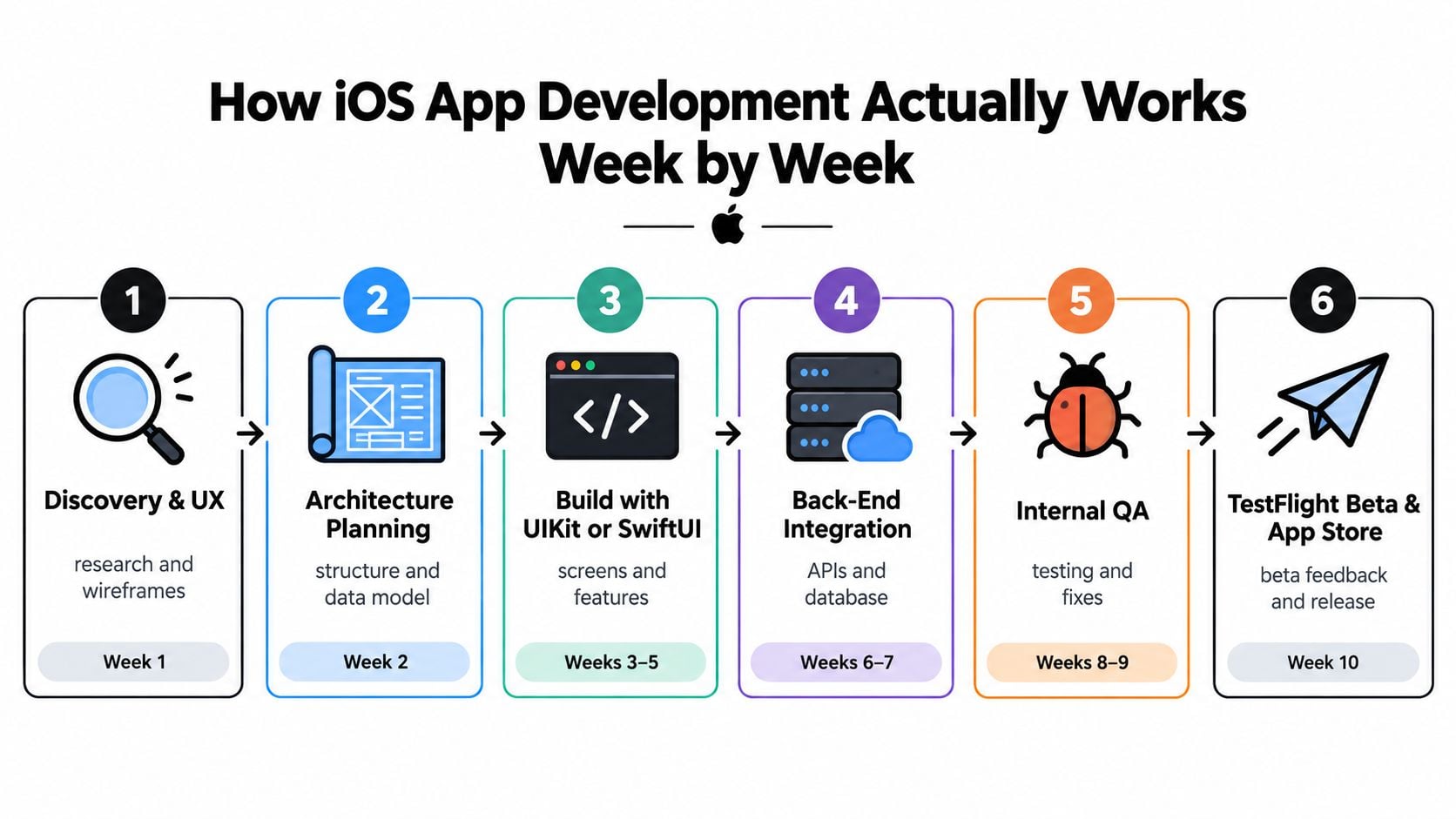
Professional iOS app development isn't a single build phase followed by a launch button. It moves through decisions that reduce risk, and each stage should produce something you can inspect before the next commitment.
Start with discovery and architecture
The opening stage turns a business idea into defined user journeys. A good discovery process identifies the target user, the primary action, account requirements, content needs, integrations, data flows, and launch constraints. Wireframes should show how someone moves through the product before the team spends time polishing screens.
Architecture planning follows. The team decides how the app will store state, communicate with APIs, handle authentication, manage errors, and support future changes. A cheap-looking project can become expensive if the owner keeps adding features without addressing the underlying data model.
Build the product, not a visual mock-up
The development team then creates the interface in SwiftUI, UIKit, or a considered combination of both. Screens need to connect to real services, not just display placeholder content. Back-end work may include account management, payments, notifications, content administration, analytics, and secure API access.
Internal quality assurance should cover more than whether buttons respond. Testers check loading states, failed network requests, account recovery, permissions, different screen sizes, accessibility paths, and data handling. TestFlight provides a controlled route for beta feedback before public release.
Treat release as a review point
App Store submission requires accurate metadata, privacy disclosures, screenshots, and a build that behaves consistently with its description. App Review can expose gaps in permissions, payments, account deletion, or content moderation. iOS updates can also introduce compatibility work, especially when an app depends on older APIs or third-party libraries.
A healthy project gives the client veto points at wireframes, technical scope, a working core journey, beta testing, and release readiness. Projects usually slip when late changes arrive after architecture decisions, when stakeholders review screens without testing real journeys, or when the team leaves privacy and accessibility until the final sprint.
For a useful overview of how different teams structure iOS and Android application development, compare the delivery stages rather than focusing only on the final interface.
The deliverable at each stage should make the next decision easier. If a milestone only produces more questions, the team hasn't finished the work.
Choosing the Tech Stack Without the Sales Pitch
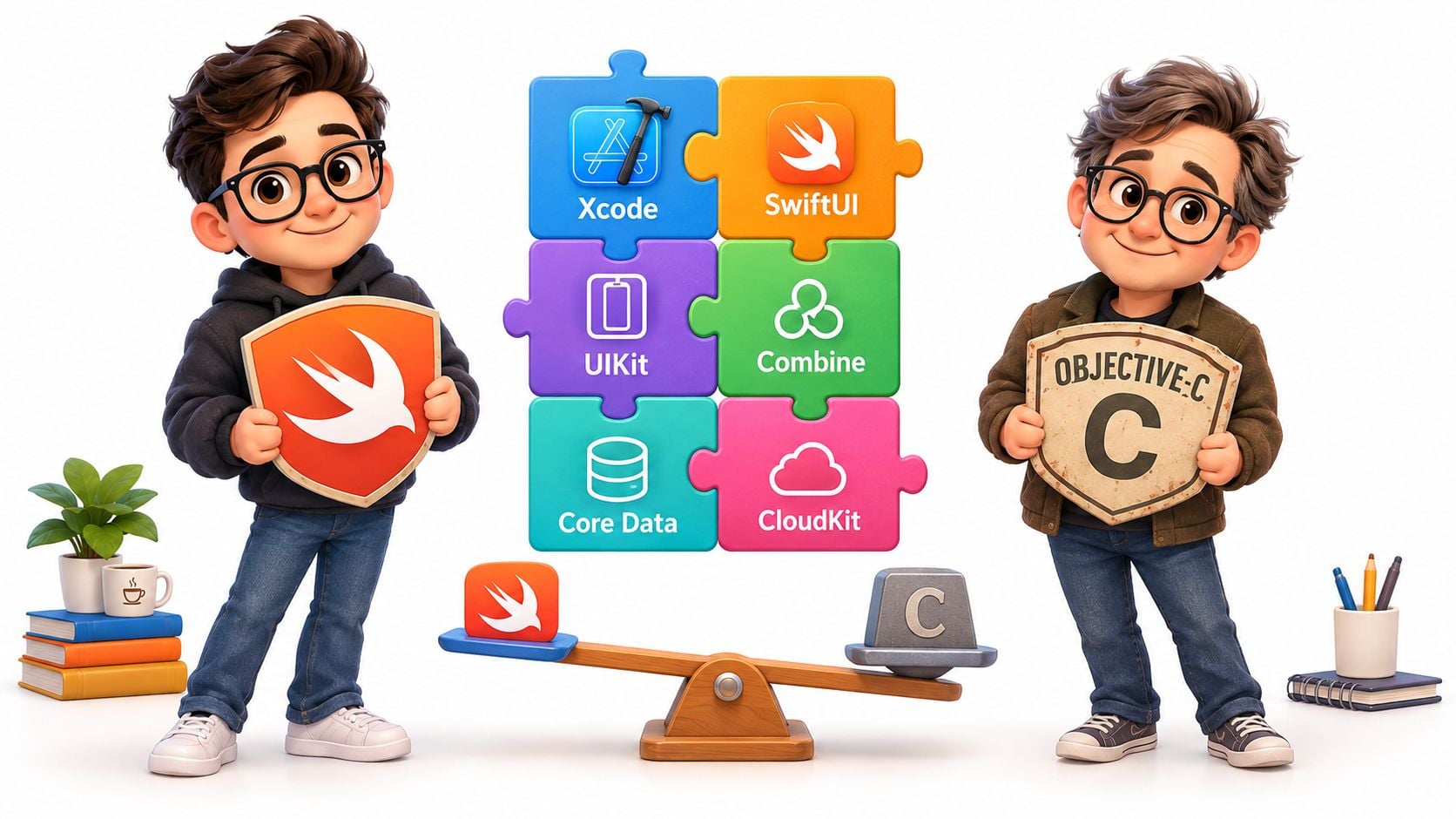
The technology names sound more complicated than the decisions are. For a new iOS product, the default recommendation is Swift with Xcode, using SwiftUI where it improves delivery and UIKit where mature control or legacy integration makes it the safer option.
Swift is Apple's modern language for iOS development. It supports strong typing, contemporary concurrency, and readable syntax, which makes it a sensible choice for new code. Objective-C still matters when you're maintaining an older app, integrating an established library, or working inside a codebase that already relies on Apple's earlier frameworks. It isn't the sensible default for a new SME product unless there is a specific technical reason.
SwiftUI or UIKit
SwiftUI lets developers describe the interface in a declarative style. For new screens, straightforward forms, settings, lists, and many account journeys, that can make iteration faster and reduce repetitive layout code. It also works well with modern Swift patterns.
UIKit remains valuable for complex navigation, highly customised interactions, older projects, and components where the team needs precise established behaviour. A capable studio won't choose one framework as a matter of fashion. It will explain which parts benefit from SwiftUI and where UIKit reduces risk.
The supporting Apple tools have clear roles:
- Xcode is the development environment for writing code, running simulators, profiling performance, signing builds, and submitting releases.
- Combine supports reactive data flows, although modern Swift concurrency may be more appropriate for some new work.
- Core Data provides structured local persistence when an app needs a managed data model and offline storage.
- CloudKit can support Apple ecosystem data storage, but it isn't automatically the right back end for a business that needs web administration, complex integrations, or non-Apple clients.
- Core ML and Create ML support on-device machine learning, which can reduce the need to send sensitive inputs to a remote service.
Native or cross-platform
React Native and Flutter can be sensible when Android and iOS must launch together, especially for a product with shared business logic and relatively standard interactions. They don't eliminate native expertise, however. Teams still need to deal with Xcode, iOS permissions, platform APIs, release signing, and device-specific behaviour.
Choose native iOS when performance, accessibility, Apple conventions, deep device integration, or on-device processing are central to the product. Choose cross-platform when reaching multiple operating systems quickly matters more than highly specialised iOS behaviour. The useful comparison is not “which framework is popular?” but “which technical compromise can this business afford?”
Read more about the trade-offs in cross-platform app development before accepting a one-codebase promise.
Realistic UK Costs and Timelines for an iOS App
A serious iOS app quote needs to include product definition, interface design, engineering, testing, release preparation, and ownership after launch. A low initial figure often excludes the back end, content administration, analytics, accessibility work, or the changes required when the first real users reveal flaws.
For 2026 planning, the supplied reference bands are useful starting points:
| Project type | Typical scope | Indicative UK cost | Indicative timeline |
|---|---|---|---|
| Focused MVP | A narrow product with one core workflow | £15,000 to £30,000 | 8 to 12 weeks |
| Mid-range app | Multiple screens, customer accounts, and a back end | £35,000 to £70,000 | 14 to 20 weeks |
| Complex app | Integrations, accounts, analytics, and substantial business logic | £80,000 to £150,000 | 24 to 36 weeks |
These are planning bands, not guarantees. A focused app can exceed its band if the “single feature” depends on payments, live data, complex permissions, or a custom administration system. A visually simple interface can still require demanding security, data synchronisation, or operational tooling behind it.
What changes the quote
Design complexity affects more than the number of screens. Custom interactions, animation, location workflows, media handling, and accessibility requirements all require additional decisions and testing. A clear design system usually reduces waste, while late visual changes can force rework across the codebase.
Back-end work is another major variable. Account creation, role-based access, document uploads, notifications, payments, reporting, and integrations each add implementation and support needs. Third-party services may speed up delivery, but they bring subscription costs, limits, dependency risk, and policy changes.
The initial quote should also explain:
- Release preparation: App Store metadata, signing, review support, and beta distribution.
- Testing coverage: Devices, operating-system versions, accessibility paths, failed requests, and real account scenarios.
- Ownership: Source code, Apple Developer access, cloud accounts, analytics, certificates, and documentation.
- Support: Bug fixes, operating-system updates, security patches, dependency changes, and small improvements.
- Business operations: Who uploads content, responds to users, reviews analytics, and approves future releases.
The mobile app development cost guide is useful when comparing quotes, but ask every supplier to separate one-off build costs from recurring ownership. A five-figure build that has no maintenance plan isn't a finished business case.
Timelines compress when the owner has a clear decision-maker, approved content, accessible designs, reliable API documentation, and a disciplined first release. They expand when stakeholders add features during development, approvals take too long, or the team discovers that an existing back end cannot support the intended product.
When to Hire an Agency and When In-House Wins
The agency-versus-in-house question isn't about which option sounds more professional. It depends on how long the product will live, how much iOS expertise already exists, how quickly the business needs a usable release, and who will own the app after launch.
An agency usually wins for a defined project with a fixed budget and a clear launch objective. You get access to product, design, engineering, testing, and release experience without carrying a permanent specialist team. That makes sense for a Dorset retailer testing a loyalty product or a professional-services firm adding a client portal to an established business.
In-house hiring becomes more compelling when the app is the central product and the roadmap will continue for years. A startup with a long product runway may need engineers who understand every technical decision, speak to users daily, and can change direction without renegotiating a project scope.
Use five practical tests
Project duration: For a contained build, an agency can assemble the required skills quickly. For continuous product development, internal ownership may create better feedback loops.
Existing expertise: If nobody in the business understands Swift, App Store release management, privacy disclosures, or mobile testing, don't pretend a part-time generalist can cover the gap. Hire a specialist supplier or recruit an experienced internal lead.
Budget shape: An agency suits a defined investment with staged payments and agreed deliverables. In-house suits a business prepared to fund salaries, management, equipment, recruitment, and the quieter work between releases.
Speed to launch: A coordinated studio can move quickly when the scope is stable. Internal teams can also be fast, but only when they already have the right people and decision authority.
Post-launch value: If the app will need frequent experiments, analytics reviews, and product changes, internal ownership gains value. If support is occasional, a retained agency arrangement may be more efficient.
The hybrid route
The strongest compromise is often discovery and initial build with an agency, followed by structured internal ownership. The supplier documents the architecture, hands over accounts and source code, trains the team, and remains available for specialist issues. Don't accept a handover that consists of a repository link and a final invoice.
Ask any agency for a fixed scope, revision policy, milestone schedule, testing responsibilities, release support, ownership terms, and post-launch response times. Request examples of how they handle rejected builds, accessibility defects, and operating-system changes.
Businesses considering distributed delivery can also review this guide to remote engineering teams, particularly when comparing communication, oversight, and handover responsibilities.
DesignStack is one Dorset-based option that combines app work with web design, branding, hosting, and post-launch support. Whether you choose that route, another agency, or an internal team, insist on a named technical owner. Apps fail more often from unclear ownership than from a missing framework.
Accessibility, Privacy, and Post-Launch Ownership
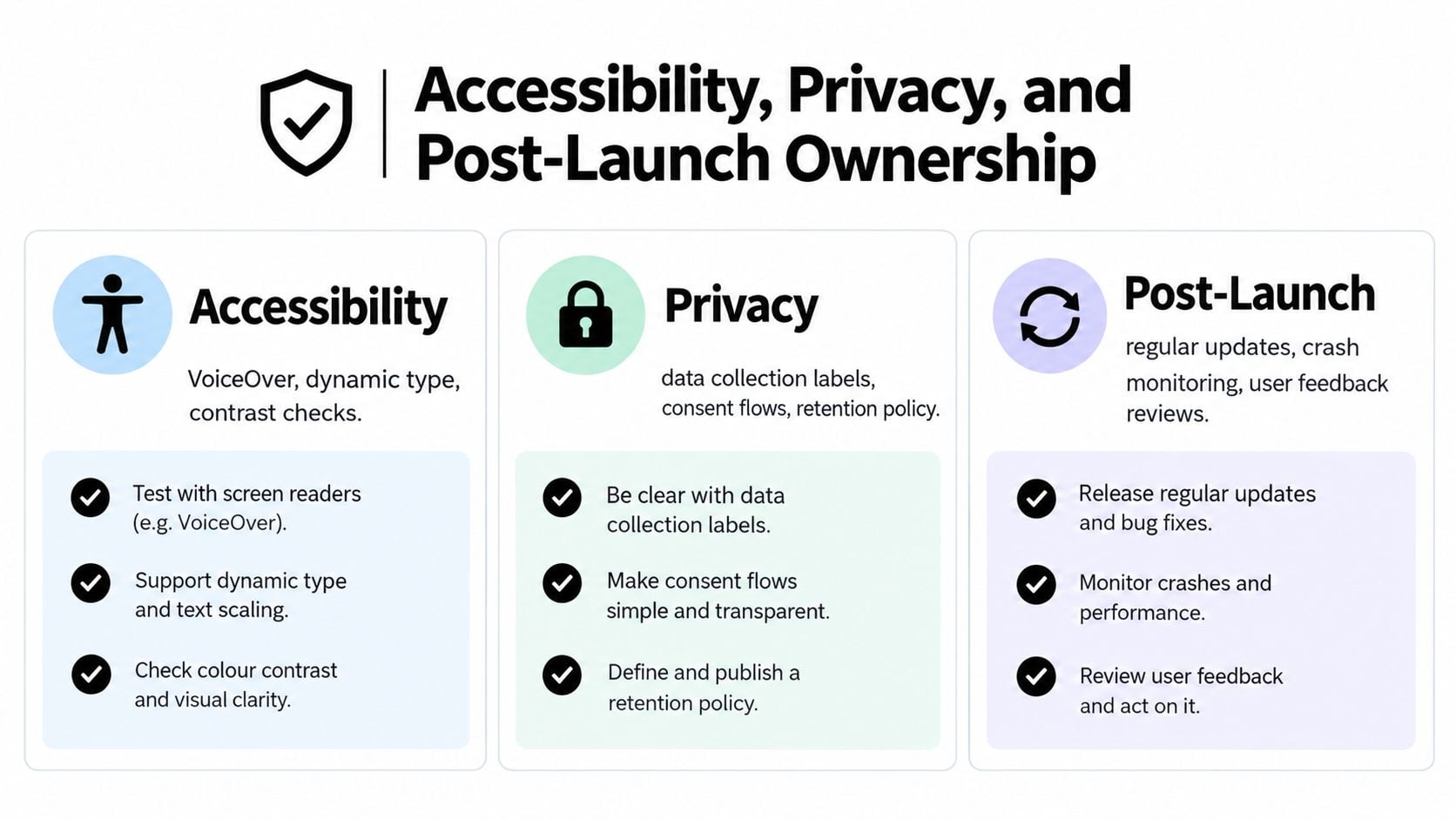
An app isn't compliant because it passed review once. Apple changes platform expectations, users report defects, operating systems evolve, and your own data practices change as new features arrive. Accessibility and privacy need an owner, a review rhythm, and a budget.
The accessibility baseline is practical. Custom controls should expose an accurate label, role, value, and action through UIKit or SwiftUI APIs. Text should support Dynamic Type without clipping, colour shouldn't carry information by itself, and VoiceOver, keyboard navigation, and switch control should be tested on real devices.
Government Digital Service monitoring covered 21 public-sector mobile apps between January 2022 and September 2024, and earlier testing found 21 accessibility issues in one audited iOS app. The reported failures included semantic labelling and control exposure under WCAG 4.1.2, keyboard operation under 2.1.1, text resizing under 1.4.4, visible focus under 2.4.7, and colour contrast under 1.4.3. The GDS accessibility monitoring report shows why accessibility testing needs to happen during development, not just before submission.
Build privacy into the architecture
Collect only the data required for a stated feature. Separate analytics identifiers from account data, ask for location or notification permission when the user needs the function, and document every data flow before implementation.
On-device processing can be a strong choice for classification, image analysis, or personalisation that doesn't require central aggregation. Apple recommends processing data on-device where possible, and iOS developers can use the Neural Engine and Create ML models to reduce network exposure and infrastructure dependence.
Where data must reach a server, use authenticated APIs, short-lived credentials, encrypted transport, and explicit retention rules. Keep the App Store privacy disclosures aligned with the shipped implementation. A mismatch between the app, its permissions, and its metadata creates avoidable review and trust problems.
Give ownership a calendar
A quarterly review should check permissions, privacy disclosures, analytics events, crash reports, accessibility regressions, third-party libraries, and operating-system compatibility. A new feature involving personal data should trigger a privacy review before development, not after release.
The UK has also introduced government-backed changes to Apple's App Store operation scheduled to take effect on 1 April 2026, including greater transparency around app review, ranking, data use, and requests for interoperable access to iOS functionality. The Competition and Markets Authority update makes the wider point clear. Store governance can affect product planning, so assign someone to monitor policy changes.
Use practical privacy resources such as these privacy policy templates as drafting support, but have the final policy reflect your actual data flows. Your maintenance agreement should state who reviews compliance, who pays for fixes, and what happens when Apple changes a required capability.
Your Next Step if You Decide an iOS App Is Right
Write down the business outcome, target users, core workflow, data collected, first-release budget, and launch deadline. Then ask an agency to compare native iOS, a progressive web app, and a mobile-first website before it quotes. Choose the route with the clearest ownership plan, not the longest feature list.
DesignStack supports UK businesses with app strategy, UX and UI design, native iOS and Android development, testing, launch, websites, hosting, and post-launch updates. Visit DesignStack to discuss whether your next step should be a focused app discovery workshop, a mobile-first website, or a properly scoped iOS build.