iOS and Android Application Development Explained
You run a Dorset business and keep hearing the same suggestion: “We should have an app.” Perhaps customers need an easier way to book appointments, members want quick access to information, or shoppers would benefit from a faster buying journey. The opportunity is clear, but the practical questions arrive quickly. Should you build for iPhone, Android, or both? Is native development worth the cost? Can a smaller business manage accessibility, app-store approval and updates after launch?
Those questions matter because an app isn't just a website placed inside a phone. It has its own design language, technical requirements, testing process and ongoing responsibilities. A sensible decision starts with your customers and business model, then works backwards to the right platform strategy.
This guide explains iOS and Android application development in plain English. You'll learn how native and cross-platform approaches differ, what an agency project looks like from first brief to launch, how UK costs vary by scope, and why accessibility and maintenance belong in the original plan. If you're still deciding whether an app fits your business, this guide to mobile app development for small businesses offers useful context before you commit to a build.
Table of Contents
- Introduction to iOS and Android Application Development
- What iOS and Android Application Development Really Means
- Native Versus Cross Platform Approaches Compared
- How an App Project Moves From Brief to Launch
- Timelines Costs and App Store Submission Explained
- Accessibility Testing and Ongoing Maintenance Essentials
- How DesignStack Supports Your App Journey From Idea to Growth
Introduction to iOS and Android Application Development
A local retailer might want customers to browse products, reserve stock and receive useful updates. A trades business may need bookings, job notifications and secure customer accounts. A membership organisation could want one place for events, renewals and documents. Each idea sounds like “an app”, but the right solution depends on what the app must do and who will use it.
The first platform decision is usually iOS, Android or both. In the UK, neither major platform can be dismissed casually. A UK government mobile ecosystems study reported that iOS and Android were each installed on roughly half of active UK smartphones, while the App Store and Play Store together accounted for more than 90% of native app downloads in 2020. The same report estimated 800,000 to 900,000 app developers and 2.5 to 3 million native apps available through Google Play at that time. The UK mobile app market data shows why platform planning affects reach, not just development technique.
A useful starting point: don't ask which platform developers prefer. Ask where your customers are, what they need to accomplish, and what the app must connect to.
The UK market has continued to expand. A later government Google roadmap estimated 2.8 to 3.4 billion first-time native app downloads in the UK during 2024, with 2 to 3 million apps available each month on Google Play in the UK. It also estimated that the UK app economy generated 1.5% of UK GDP. Industry data cited in current market reporting places the UK app development market at £32.3bn in 2026 and counts 15,282 businesses in the sector. These figures are set out in current UK mobile app development reporting.
For a small or medium-sized business, that doesn't mean you need a huge product team. It means you need a clear brief, realistic priorities and a delivery partner who can explain trade-offs without burying you in technical language.
What iOS and Android Application Development Really Means
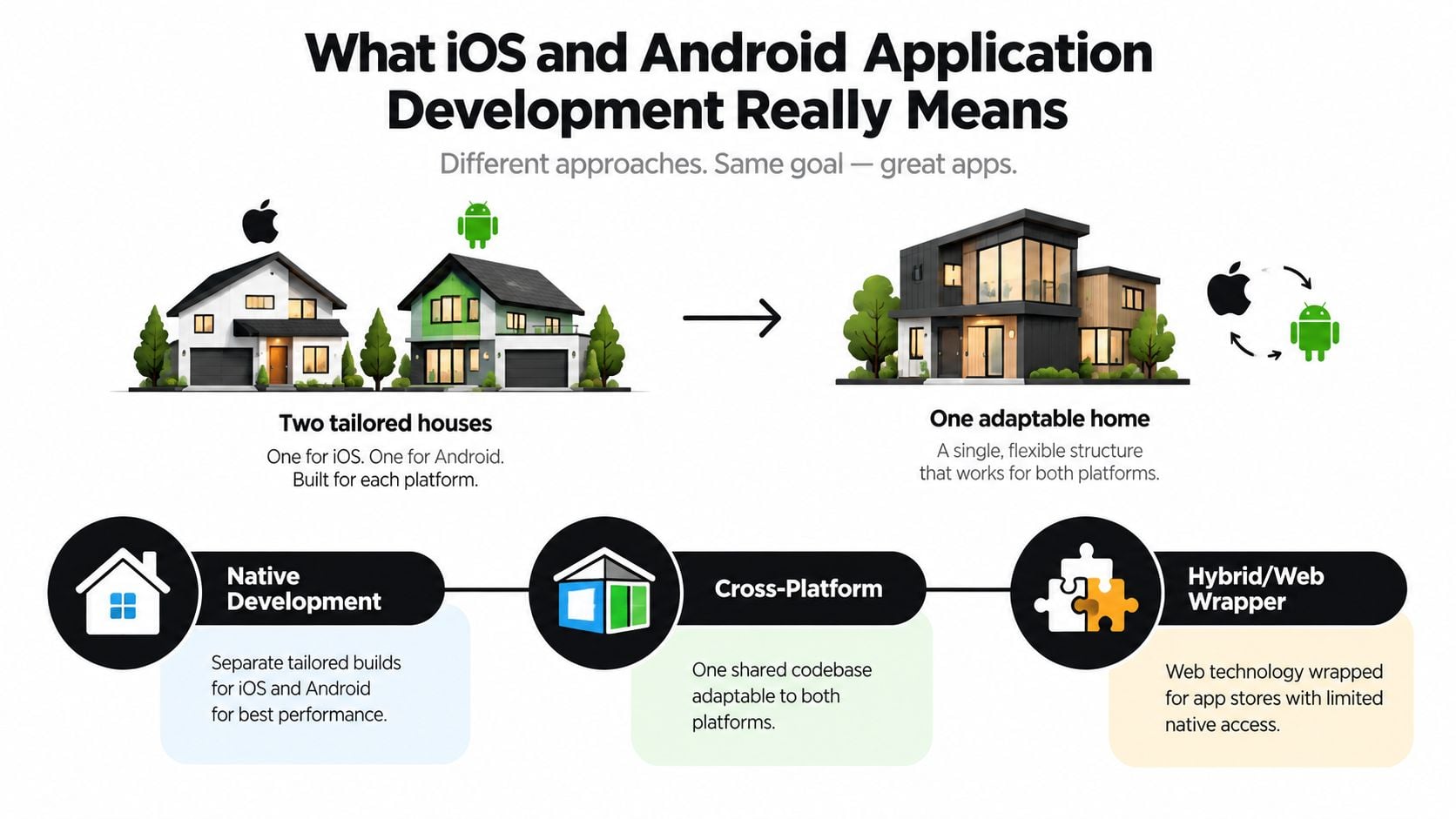
Think of app development as building a home. Native development is like commissioning two houses, one designed specifically for iOS and another built for Android. Each can use the materials, doors, controls and heating system that suit its environment best. The result can feel highly natural on each platform, but you're maintaining two related buildings.
Cross-platform development is closer to creating one adaptable modular home. A shared foundation and much of the internal structure serve both platforms, while selected details are adjusted for iPhone and Android. Flutter and React Native are two well-known frameworks used for this approach. They let a team share much of the application's code while still connecting to platform-specific capabilities where required.
A third model is a hybrid or web-wrapper app. This uses web technology inside an app-store package. It can suit simpler content-led services, but it may provide less direct access to device features and can feel less integrated if the experience depends heavily on native interactions.
The stages behind the finished app
Whatever approach you choose, a professional project normally includes more than writing screens. The team must understand the user journey, design the interface, build the backend services, connect payments or booking tools, test device behaviour and prepare store submissions.
Native iOS development uses Apple's tools and conventions, while native Android development follows Google's platform environment. Developers consider navigation, permissions, notifications, keyboard behaviour and accessibility differently because the operating systems present different controls and expectations.
Cross-platform frameworks reduce duplicated work, but they don't remove platform responsibility. A shared codebase still needs iOS and Android testing. Some features may require native extensions, and the interface shouldn't be forced into identical layouts if users expect each platform to behave differently.
Why platform choice affects the brief
A business app that displays articles and collects enquiries has different needs from one using Bluetooth hardware, intensive graphics or complex offline workflows. The more an app relies on device-specific functions, the more carefully the team must assess native implementation.
For many SMEs, a sensible route is to define the smallest useful first release, validate the customer journey and avoid expensive features that don't support the central business objective. The best technical choice follows that decision. It doesn't lead it.
Native Versus Cross Platform Approaches Compared
Native and cross-platform development can both produce a professional application. The difference lies in how the team shares code, handles platform-specific behaviour and manages future changes.
| Criteria | Native iOS and Android | Cross Platform Flutter React Native |
|---|---|---|
| Codebase | Separate platform-specific projects | One shared codebase for much of the product |
| Performance | Directly tailored to each operating system | Strong for many business apps, with extra care for demanding features |
| User experience | Closely follows iOS and Android conventions | Consistent core experience, with platform adjustments where needed |
| Device features | Direct access to platform APIs | Broad access, with native modules for specialised requirements |
| Initial delivery | More duplicated design and development work | Often quicker for a defined shared feature set |
| Maintenance | Changes may need work in both native codebases | Shared changes can reduce duplication, but platform testing remains essential |
| Best fit | Highly specialised, performance-led or platform-specific products | SMEs seeking broad reach and efficient iteration |
Native builds are attractive when your app depends on advanced camera controls, intensive graphics, specialised sensors or highly customised platform behaviour. The team can work directly with Apple and Google APIs, which gives them fine control over performance and interaction details.
Cross-platform development can suit a booking service, customer portal, loyalty app or commerce product where the business rules are largely the same on both platforms. Flutter uses Dart, while React Native uses JavaScript and connects shared application logic with native platform capabilities. That can help a smaller business release a coherent product without maintaining two entirely separate feature implementations.
The common mistake is treating cross-platform as automatically cheap. A lower initial build requirement can change once the project includes regulated data, payment services, an administration portal, offline mode, complex integrations or strict accessibility testing. The Android app development services a team provides should therefore be judged by its delivery plan and maintenance thinking, not just the framework name.
Decision rule: choose cross-platform when your core experience is shared and your team values efficient iteration. Choose native when platform-specific behaviour is central to the product rather than a small enhancement.
Business owners comparing suppliers can also use broader industry material, such as this guide to top app builders Australia, to understand how agencies describe native, cross-platform and no-code options. The geography isn't the important part. The useful comparison is whether a provider explains ownership, integrations and support as clearly as the initial build.
How an App Project Moves From Brief to Launch
A well-run app project should feel like a sequence of decisions, not a mysterious handover to developers. Your role is to explain the business problem, approve priorities and test whether the proposed journeys make sense. The delivery team turns those decisions into designs, code and a release plan.
Discovery gives the project boundaries
The first conversations should identify your users, business objective, existing systems and essential features. A booking app might need calendar availability, payment collection and automated confirmations. A retail app may need product data, stock information, customer accounts and fulfilment connections.
The team should also ask what can wait. A focused first release is easier to design, test and explain than a long list of possibilities. At this stage, clarify who owns content, data, store accounts and third-party subscriptions.
Design turns requirements into journeys
UX design maps what a user does from opening the app to completing a task. Wireframes expose missing decisions early, while clickable prototypes let you test navigation before development begins. An owner can spot problems such as a booking flow that asks for too much information or a checkout process that hides important costs.
Designers should consider iOS and Android conventions at this point. The two versions can share branding and business logic without making every control look or behave identically.
Development and testing happen in feedback loops
Developers build the agreed features, connect backend services and demonstrate working progress in regular sprints. Short reviews help you confirm that the product still reflects the original business purpose. They also make scope changes visible before they become expensive.
Testing covers different screen sizes, operating-system versions, permissions, connectivity conditions and real user journeys. Hybrid screens need particular care because embedded web content can behave differently from a standard browser. The team should verify iPhone WebView behaviour against Safari and WebKit, especially for authentication, payments and content-heavy pages.
Read this product lifecycle stages guide for a wider view of how products move from discovery through delivery and iteration. The same principle applies to apps: launch is a milestone, not the end of product responsibility.
Deployment needs preparation
Before submission, the team prepares store listings, screenshots, icons, descriptions, privacy information and production builds. You'll need to confirm the wording, imagery and account details. After approval, monitor the first release closely and give users a clear way to report problems.
Businesses planning this route can review mobile app development for startups to see how an agency can support discovery, design and delivery when internal technical resources are limited.
Timelines Costs and App Store Submission Explained
Cost depends on what the app must accomplish, how many systems it connects to and how much design and testing it requires. A brochure-style app and an enterprise marketplace may both appear as icons on a phone, but they represent very different delivery projects.
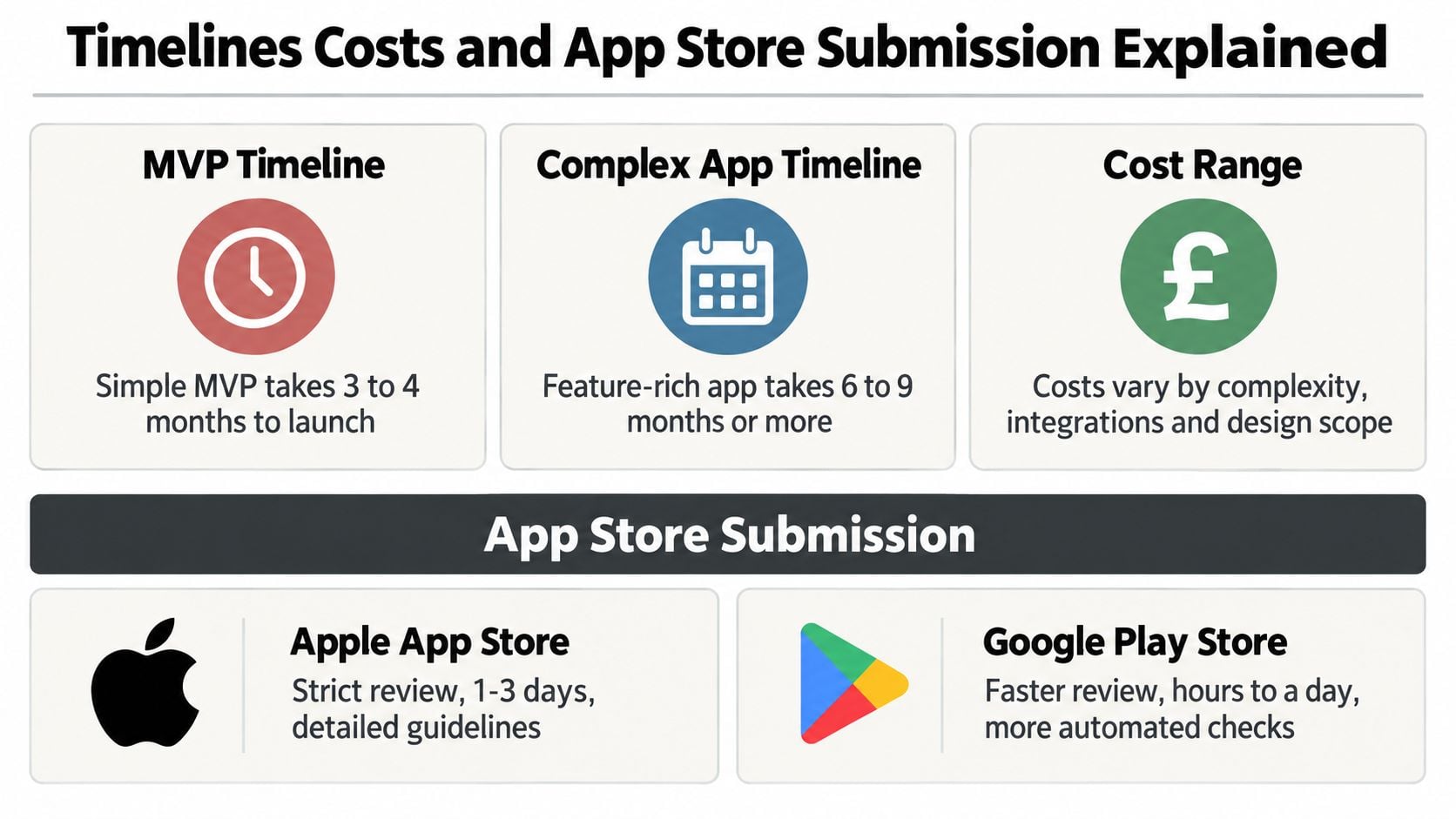
Recent UK pricing guides place a simple MVP at roughly £15,000 to £45,000, a cross-platform MVP at £35,000 to £90,000, and marketplace or enterprise applications at £80,000 to £250,000 or more. These ranges come from UK app development cost guidance, and they should be treated as planning bands rather than a quotation for your particular product.
Budget for the product, not only the first build
Your budget should account for UX, visual design, frontend and backend development, integrations, quality assurance, accessibility work, store preparation and project management. After launch, you may also need hosting, monitoring, security fixes, operating-system updates, content changes and new features.
That is why a cheaper first estimate isn't automatically better value. Ask what the quote includes, what it excludes and how the agency prices work after the initial release. A clear app development cost guide can help you prepare questions before comparing proposals.
The scope also affects timing. A small first release can move through discovery, design, development and testing with greater ease than a product with multiple user roles, complex payments or marketplace functionality. Don't approve a delivery date until the essential journeys, integrations and approval responsibilities are defined.
Store submission is part of delivery
Apple and Google each review submitted apps against their own requirements. Your team will need suitable icons, screenshots, descriptions, privacy details and functioning production builds. The app must also handle permissions, account creation, payments and user data in a way that matches the stated experience.
Common problems include incomplete functionality, unclear privacy information, broken login flows, misleading store descriptions and poor handling of restricted content. A rejection isn't necessarily a disaster, but it can delay the release and create avoidable work if the team hasn't prepared properly.
Budget question to ask: “What happens after the store approves the app?” The answer should cover monitoring, fixes, operating-system changes and a route for prioritising improvements.
Accessibility Testing and Ongoing Maintenance Essentials
Accessibility isn't a final polish task. For UK public-sector mobile apps, the Public Sector Bodies (Websites and Mobile Applications) Accessibility Regulations 2018 require compliance with WCAG AA criteria. The practical requirements include correctly labelled links, buttons and form fields, support for large text, suitable contrast, accessible media and clear error handling. Government guidance on mobile app accessibility monitoring explains how this work is assessed.
The latest monitoring period reported a 70% compliance rate for public-sector websites and mobile apps, up from 59%. That change shows that accessibility is being treated as a material quality gate, not a box to tick after launch.
Build inclusive controls from the start
Developers should use native accessibility APIs while building screens. On iOS, testers need to check VoiceOver. On Android, they should test TalkBack. Text should respect the user's font-size preference, every interactive control should have an accessible name, and focus should move logically through forms and navigation.
Retrofitting these details after release often means revisiting layouts, component behaviour and testing plans. Early accessibility decisions protect the user experience and reduce compliance risk.
Test the real conditions
A reliable QA plan covers physical devices, not only development simulators. Testers should examine small and large screens, poor connections, interrupted sessions, keyboard input, permission prompts and screen-reader navigation. For apps that combine native screens with web content, iOS deserves specific regression testing because Safari is the main mobile browser on iOS in the UK, with a 92.6% share of supply in 2020, according to UK government browser data.
Treat maintenance as normal ownership
After launch, the team should monitor crashes, review support messages, apply security updates and check compatibility as Apple and Google change their operating systems. Analytics can show where users abandon a journey, while structured feedback can reveal confusing content or missing features.
Maintenance isn't a sign that the original app failed. Phones, operating systems, security expectations and customer needs change. A support arrangement gives your business a controlled way to respond instead of waiting for a serious fault.
How DesignStack Supports Your App Journey From Idea to Growth
The safest app projects start with a business decision, not a favourite framework. Define the customer task, choose the platforms that match your audience, decide what belongs in the first release and include accessibility, testing and maintenance before approving the budget.
DesignStack is a Dorset-based digital agency offering web design, branding, hosting, SEO and native iOS and Android app development, alongside cross-platform options for businesses that need one shared codebase across both systems. Its stated delivery approach includes fixed-cost pricing, three design revisions as standard, regular project updates and one month of post-launch updates. Those details give an SME practical checkpoints during a project that can otherwise feel difficult to control.
The agency's wider experience with WordPress, eCommerce and custom online systems can also help when an app needs to connect with an existing website or business process. Its portfolio includes local and national organisations such as Crossfit Durnovaria, The Lobster Pot and the Weymouth & Portland Chamber of Commerce. You can review its mobile app development services in the UK alongside your wider digital requirements.
The next step is a focused conversation. Bring your customer journey, the problem you want to solve, any existing systems and your preferred launch priorities. A good agency should then help you turn that starting point into a realistic scope, platform recommendation and ownership plan.
If you're considering an iOS or Android app, DesignStack can help shape the brief, compare native and cross-platform routes, and plan delivery from discovery through post-launch support. Contact the Dorset team with your app idea and the business task it needs to improve, then start with a practical conversation about scope and budget.