Unlock Growth: Android App Development Services for UK
You're probably in the same spot many UK business owners reach after a few years online. Your website works, customers browse on their phones, and enquiries come in, but you can see the limits. A website is great for discovery. It's not always the best tool for repeat bookings, member access, order tracking, staff workflows, or timely updates.
That's usually when the app question appears. Not because an app sounds fashionable, but because day-to-day operations start to demand something faster, simpler, and more convenient on mobile.
For small and medium-sized businesses, Android app development services make most sense when the app solves a clear business problem. That might mean helping customers book in seconds, giving members a private area, letting staff update records in the field, or sending push notifications without relying on email being opened. The businesses that get value from apps tend to start there. They don't begin with a long feature list. They begin with one recurring friction point.
Table of Contents
- Why Your Business Might Need an Android App in 2026
- From Idea to Launch The App Development Process
- Choosing Your Path Native vs Cross-Platform Development
- Budgeting for Your App Realistic Costs and Timelines
- Selecting the Right Android App Development Partner
- How Local Businesses Thrive with Custom Android Apps
- Your Next Steps to Building a Successful App
Why Your Business Might Need an Android App in 2026
A lot of businesses delay app discussions because they assume a mobile-friendly website covers the same ground. Sometimes it does. Sometimes it doesn't.
If your customers only need to read about your services and send a contact form, a website may be enough. If they need to log in regularly, book repeatedly, receive updates, manage orders, or use your service on the move, an app starts to make more commercial sense.
When a website stops being enough
In the UK, mobile use isn't a side channel. Ofcom reported that 98% of UK adults had a mobile phone in 2024, and 88% used a smartphone. That's the practical backdrop for Android app development services. Your audience is already on mobile, and for many businesses that means the key question isn't whether customers use phones. It's whether your business gives them a smooth enough mobile experience.
For local firms, that often links directly to everyday revenue tasks. A salon may want easier repeat booking. A gym may need membership access and updates. A retailer may want a faster route to reorder. A service business may need customers to upload details or receive appointment reminders.
This is where broader digital planning matters. If you're already thinking about local visibility, leads, and repeat engagement, app planning should sit alongside your digital marketing for local businesses rather than as a separate project.
What an app does better
An Android app earns its keep when it removes friction.
- Push notifications: Useful for reminders, booking prompts, order updates, and member messages.
- Saved logins: People can return quickly without repeating the same steps.
- Offline access: Helpful for some staff tools, reference content, or limited-function field use.
- Faster repeat journeys: Regular users can complete common actions with fewer taps.
- Device features: Geolocation, camera access, and notifications are usually more natural inside an app.
Practical rule: Build an app when you need repeat use, not just first-time discovery.
A common mistake is treating an app as a smaller website. That usually leads to bloated screens, weak engagement, and features nobody opens twice. The better approach is narrower. Pick the thing your customers or team need to do often, then make that one flow quick and reliable.
From Idea to Launch The App Development Process
Most first-time app projects feel confusing because owners are shown deliverables before they're shown the logic. A clearer way to think about it is house building. You wouldn't start by choosing kitchen tiles before deciding what the building is for, how many rooms it needs, and whether the foundations can support it.
The same applies here.
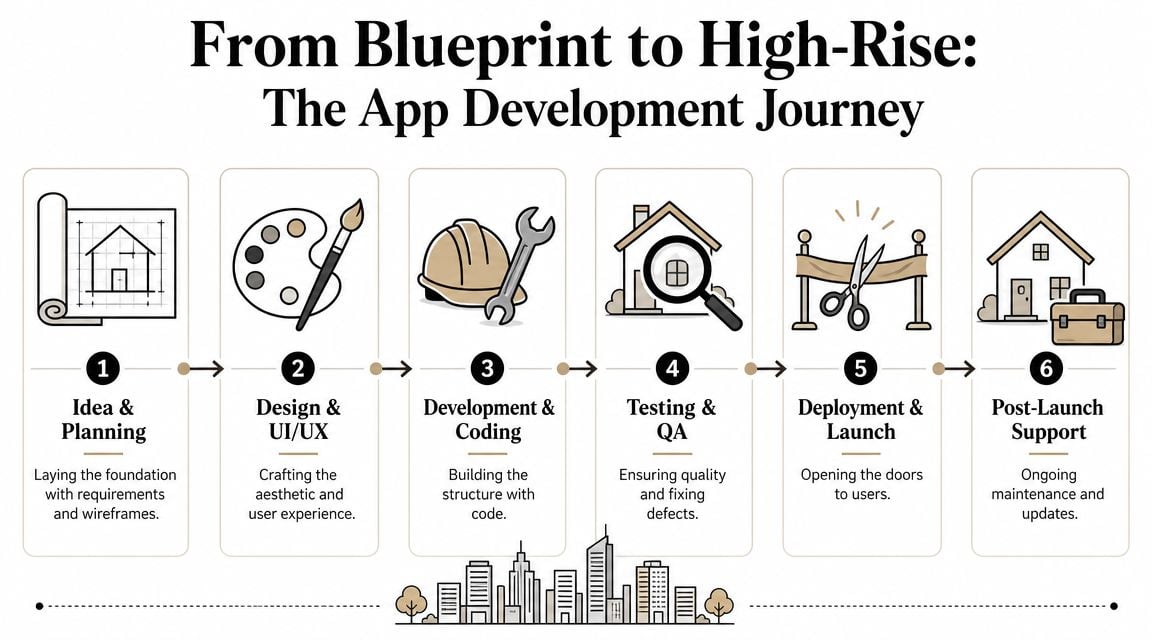
Discovery is the blueprint
Discovery is where the project gets smaller, sharper, and more affordable. That sounds backwards, but it's true. The more precisely you define the app, the less waste you build into it.
At this stage, a good team should help you answer questions like:
- What is the main job of the app?
- Who will use it first?
- What does version one need, and what can wait?
- Which existing systems must it connect to?
- What needs to happen after launch?
If you're an early-stage company, this is similar to the planning work covered in app development for startups. The discipline matters even more when budget is tight.
Design shapes the rooms people use
UI and UX design is where the app stops being an idea and starts becoming something people can interact with. In practical terms, this means user flows, wireframes, screen layouts, colours, buttons, and interaction patterns.
Small businesses often undervalue this step. They want to move to development quickly. That usually creates more cost later because unclear design leads to rework, not speed.
A strong design phase should answer simple questions fast. Can a customer book without confusion? Can a member find the right area immediately? Can a staff user complete a task while distracted, outdoors, or between jobs?
Bad app projects often don't fail because the code is broken. They fail because the user journey is clumsy.
For feedback during this stage, it helps to look at practical review tools and examples of real user response. Resources like Vibecode Mobile app feedback can help owners think more critically about usability before development goes too far.
Development builds the structure
Once the blueprint and layouts are agreed, the build begins. For many Android projects, the most practical stack is Kotlin + Jetpack Compose + Android Studio/Gradle. In plain English, that means using modern Android tools that support cleaner architecture, easier maintenance, and more consistent app behaviour over time.
That same stack often works alongside tools and services such as Jetpack libraries, Retrofit, Hilt, Room, Firebase, and AWS-backed APIs. You don't need to memorise those names. You do need a team that uses them deliberately rather than grabbing technology because it sounds current.
A technically solid process also tends to include API integration, push notifications, geolocation, analytics, and automated testing. These parts matter because small businesses rarely need an isolated app. They need one that connects to booking systems, stock tools, CRMs, payment services, maps, or member platforms without becoming fragile.
Testing and launch are the inspections and handover
Testing is where assumptions get challenged. Buttons that looked fine in designs may feel awkward on a real device. Login flows can break. Older devices can reveal performance issues. Notifications might arrive too late or not in the right context.
A proper QA phase checks the obvious things and the annoying edge cases. That includes navigation, device compatibility, crash handling, form behaviour, and third-party integrations.
Then comes deployment. Publishing the app is not the finish line. It's the handover. The app still needs monitoring, updates, and maintenance after release. That's why experienced teams treat launch as the start of live service, not the end of the project.
Choosing Your Path Native vs Cross-Platform Development
This is one of the first decisions that affects cost, speed, and long-term flexibility. It also gets explained badly far too often.
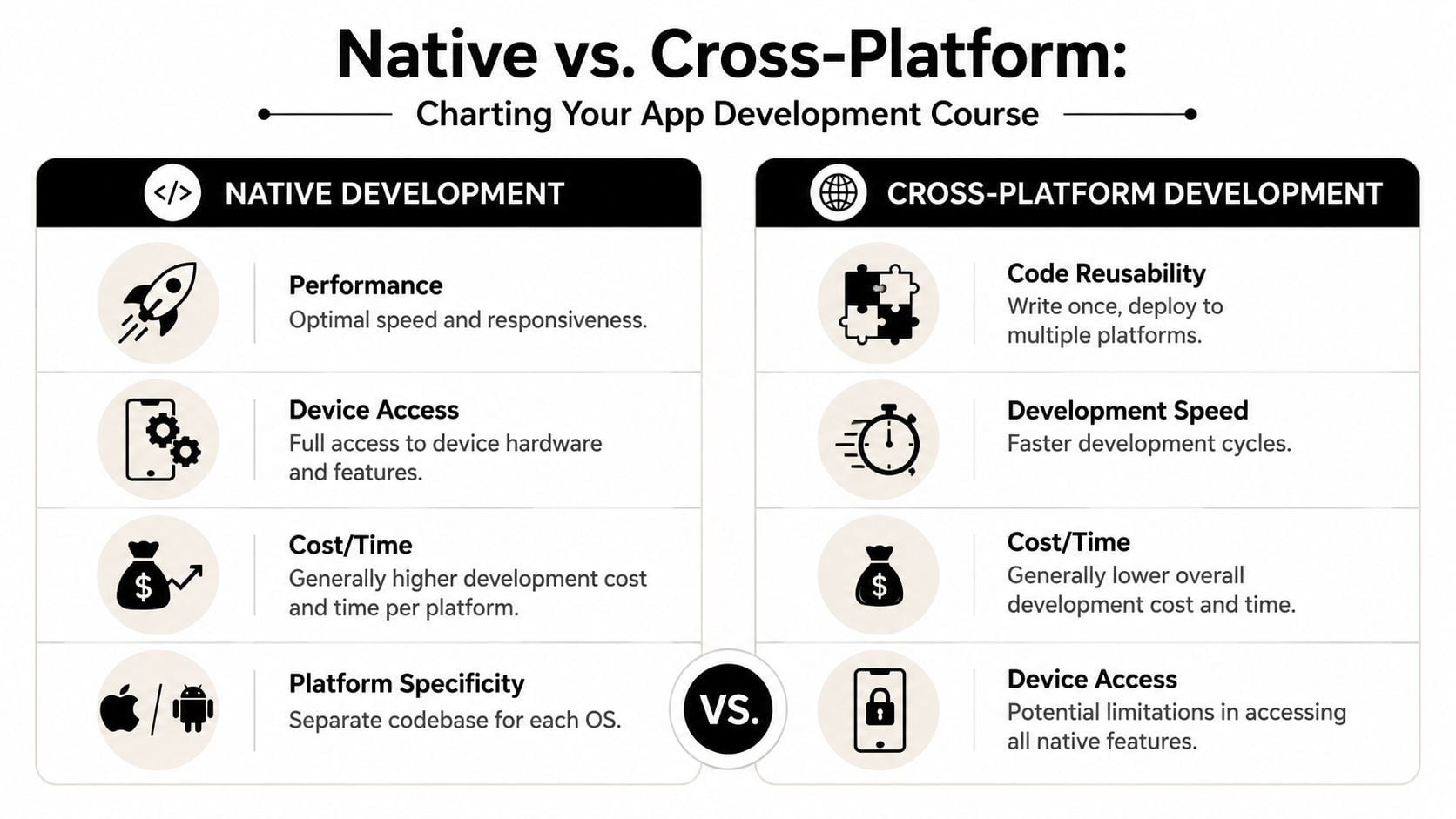
The easiest analogy is this. Native development is like a custom-fitted suit made for one platform. Cross-platform development is more like a very well-made ready-to-wear option designed to work across more than one.
The simple difference
A native Android app is built specifically for Android. For UK businesses focused on Android users first, that often means a stack built around Kotlin and Jetpack Compose, using the Android-focused tools mentioned earlier.
A cross-platform app uses one shared codebase to cover Android and iOS together. That can reduce duplicated effort and speed up an initial release when both platforms matter from day one.
For some owners, a cross-platform route will be enough. For others, native is the cleaner long-term choice. If you're comparing options for your mobile app development for small business, the decision should come from usage requirements, not trend-chasing.
Native vs Cross-Platform at a Glance
| Factor | Native Android App | Cross-Platform App |
|---|---|---|
| Performance | Usually stronger for Android-specific interactions and heavier workflows | Often good for standard business apps, but can involve compromises |
| Development cost | Higher if you later need a separate iOS build | Usually more efficient when launching on both platforms |
| Time-to-market | Fast for an Android-only focus | Often faster for dual-platform release |
| Device access | Full Android feature access | Can be more limited depending on framework and feature needs |
| Maintenance | Cleaner when Android is the priority | Shared code can simplify some updates, but not every issue |
| Scalability | Strong if Android is central to the product | Good for many SMEs, especially with simpler feature sets |
Later in the decision process, it can help to review broader mobile app development trends 2024 to see how teams are thinking about cross-platform tools in practice.
A short overview helps visual learners:
How to decide without overthinking it
Choose native Android first if:
- Android is your priority market: You want the best Android-specific experience.
- Your app relies on device features: You need tighter access to hardware or system behaviour.
- Long-term Android quality matters more than platform breadth: You'd rather do one platform well than two platforms loosely.
Choose cross-platform first if:
- You need Android and iPhone together: Both customer groups matter immediately.
- Your app is workflow-led rather than hardware-heavy: Booking, forms, accounts, and content often fit well.
- Budget needs one shared starting point: You want a sensible first release and a route to iterate.
Pick the path that suits your first two years of ownership, not just your launch month.
Budgeting for Your App Realistic Costs and Timelines
Most owners ask the same two questions first. How much will it cost, and how long will it take?
The honest answer is that price depends on scope, integrations, user roles, and post-launch needs. Timelines depend on how quickly decisions are made, how much content or system integration is involved, and whether the app is being built narrowly or trying to do too much in version one.
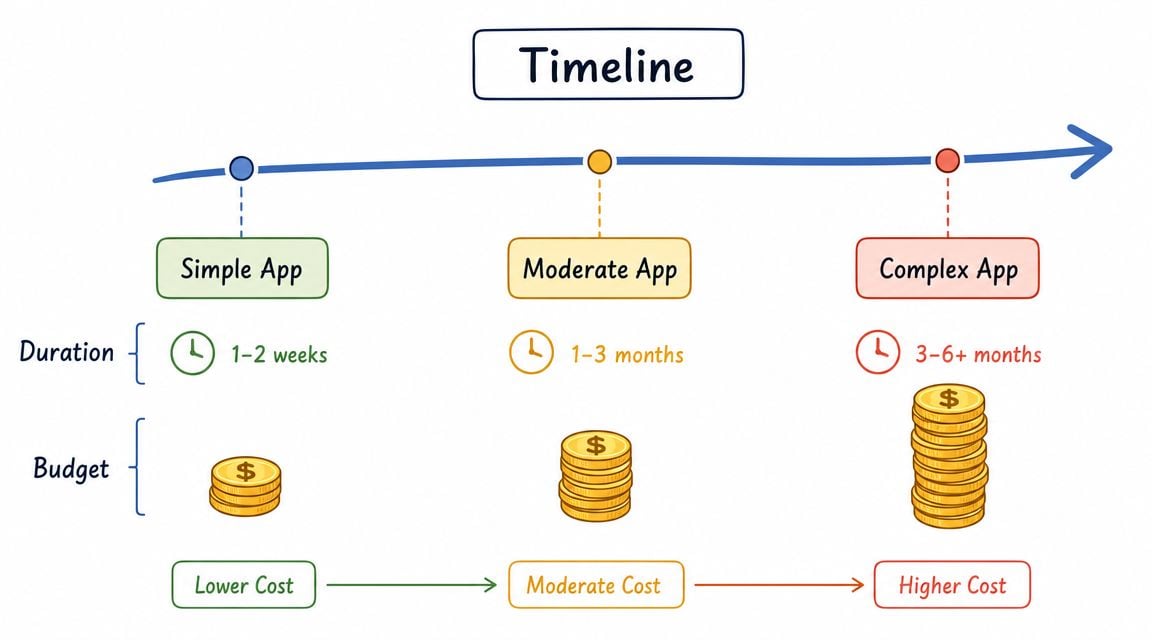
What actually affects price
The build itself is only part of the picture. The bigger cost drivers usually include:
- Feature complexity: Login areas, bookings, payments, staff permissions, and custom dashboards all add effort.
- Third-party integrations: Connecting to existing systems is often harder than designing new screens.
- Design requirements: Custom interfaces and multiple user journeys increase scope.
- Testing needs: Mixed Android hardware means more QA planning.
- Post-launch support: Updates, fixes, and compatibility work continue after release.
One of the most overlooked issues in UK Android work is total ownership cost. Lifecycle cost and update policy matter, not just build cost, because Android remains the dominant mobile OS in the UK and businesses need to think about OS and security support across mixed devices.
That matters far more than many agency quotes admit. A cheap launch price can become expensive if support expectations are vague.
Why fixed-cost pricing matters
For SMEs, fixed-cost pricing is usually easier to manage than open-ended estimates. It gives you a clear scope, clearer decision points, and fewer surprises when the project is underway.
That doesn't mean every part of app work can be frozen at the start. It does mean the agency should define what is included, what triggers extra work, how revisions are handled, and what support period follows launch.
If you're comparing app spend with broader digital investment, it helps to look at related budgeting discussions such as website cost for small business. The same principle applies. Initial build cost matters, but ongoing support often decides whether the project stays useful.
A healthy budget conversation should cover:
| Area | Why it matters |
|---|---|
| Scope | Prevents feature creep and endless revisions |
| Integrations | Avoids underestimating external system work |
| Testing | Reduces risk on real devices and Android versions |
| Maintenance | Keeps the app functional after release |
| Ownership | Clarifies who handles updates and future changes |
Selecting the Right Android App Development Partner
Plenty of agencies can show polished screens. Fewer can explain how they'll manage scope, communication, testing, and support when the app is live.
That difference matters more than portfolio style.
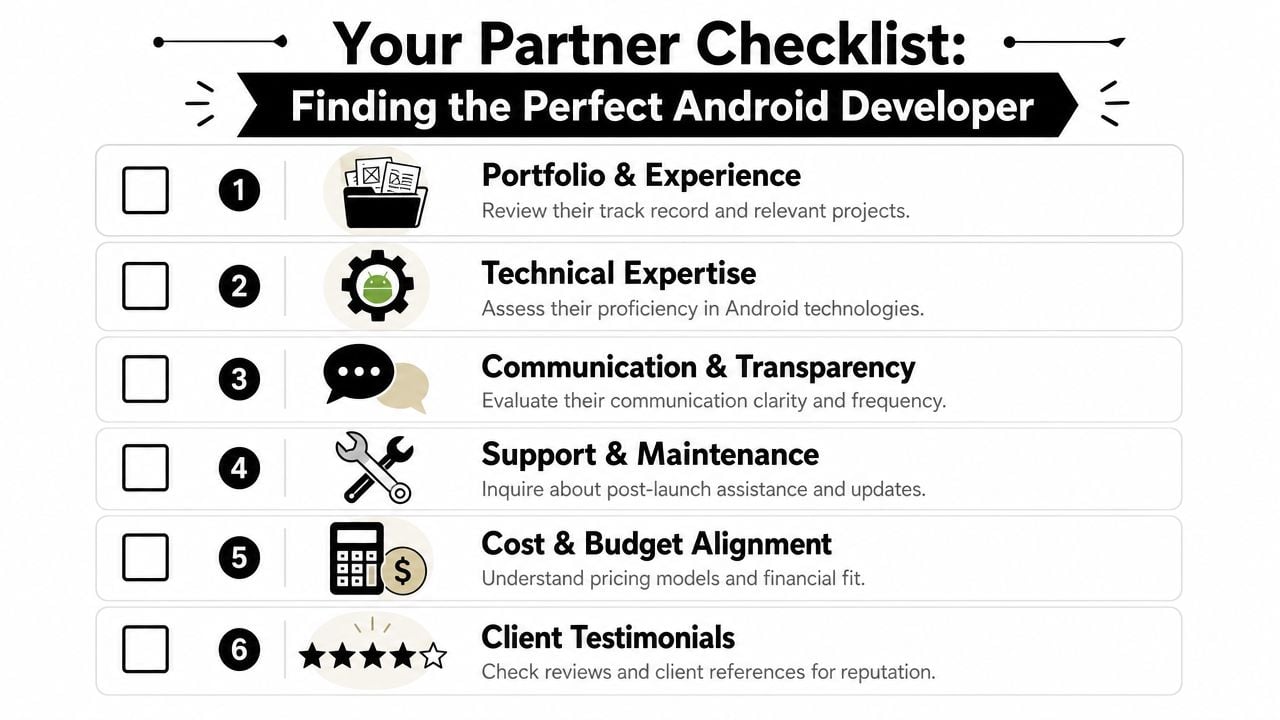
Questions worth asking before you sign
Use a shortlist and ask the same questions to each provider. That makes comparison much easier.
- How do you define version one? You want a partner who can cut scope sensibly, not just agree to every request.
- Who handles design, development, QA, and launch? Clear roles usually mean fewer handoff problems.
- How do you communicate during the project? Regular updates matter more than flashy presentations.
- What happens after launch? Maintenance shouldn't be an afterthought.
- How do you price changes? This tells you whether a “cheap” quote is stable.
If you're already weighing broader supplier fit, guidance like these insights on design partner selection can help you frame better questions before the first call.
What good answers sound like
The best answers are usually straightforward. A good partner talks clearly about process, risks, and trade-offs. They don't hide behind jargon.
Look for signs such as:
- Transparent scope control: They can explain what's in phase one and what isn't.
- Working knowledge of Android delivery: They understand modern Android tools, testing, deployment, and maintenance.
- Comfort with SMEs: They don't force enterprise process onto a small business budget.
- Support clarity: They can tell you how updates, bug fixes, and future changes are handled.
- Local communication fit: If you value responsive, direct communication, that should show early.
For businesses comparing digital suppliers, how to choose a web design agency is also useful reading because many of the same selection habits apply to app work.
A reliable partner won't just tell you what can be built. They'll tell you what shouldn't be built yet.
One practical example is DesignStack, a Dorset-based agency that offers app development alongside web, branding, and hosting, using fixed-cost pricing, regular project updates, and post-launch support as part of its wider delivery model. For an SME, that kind of structure is often more useful than a grand technical pitch.
How Local Businesses Thrive with Custom Android Apps
The value of an app becomes clearer when you link it to ordinary business problems. Local companies don't need abstract innovation. They need smoother bookings, better member communication, cleaner admin, and less friction for repeat customers.
The Lobster Pot
A hospitality or food-led business often runs into the same issue. Customers know the brand, but repeat actions still take too many steps. Menus live in one place, updates in another, and customer loyalty depends on people remembering to come back.
For a business like The Lobster Pot, a custom app model can make practical sense when it shortens that return journey. Think easier reordering, timely updates, location-aware information, or a more direct route to bookings and repeat purchases. The gain isn't “having an app”. The gain is making return visits easier than they are on a general-purpose website.
Crossfit Durnovaria
Fitness and membership organisations have a different problem. Their audience doesn't just visit once. They come back regularly and need ongoing access to schedules, announcements, member information, and community features.
That's where custom Android app development services become operational rather than cosmetic. An app can give members a quicker route to the things they use each week. It can also reduce admin pressure by moving routine interactions into a cleaner mobile flow.
The strongest app ideas usually come from repeated admin headaches.
Crossfit Durnovaria is a useful local example because it sits in the kind of category where frequency matters. If people interact with the business often, mobile convenience compounds over time.
Membership and community organisations
Community groups and chambers often sit somewhere between a service business and a membership platform. They need updates, event access, member resources, and a simple way for people to stay connected without digging through emails.
For organisations similar to the Weymouth & Portland Chamber of Commerce, an app can work well when it acts as a practical member hub. Not every organisation needs one, but those with regular events, private resources, or recurring communication often benefit from a dedicated mobile channel.
What tends to work well for local firms is:
- One core use case first: Bookings, schedules, reordering, member access, or staff tasks.
- Simple launch scope: Enough to be useful, not so much that the first release becomes slow or expensive.
- Clear support after launch: Especially important when users rely on the app weekly.
- A joined-up digital setup: Website, hosting, brand, and app should support each other.
What usually doesn't work is building a feature-heavy app just because competitors have one.
Your Next Steps to Building a Successful App
A successful app project is rarely about clever features alone. It comes from a clear business use case, realistic scope, and a partner who treats launch as the beginning of support rather than the end of delivery.
That matters even more in the UK app market because apps are no longer treated as niche digital extras. As smartphone use became the default interface, app development services took on more strategic weight, and Google Play quality signals now monitor areas such as crash rates and battery use over the last 28 days, which makes ongoing monitoring and maintenance a standard part of service delivery.
For a small business, that leads to a simple conclusion. Don't buy an app the way you'd buy a brochure. Build one the way you'd invest in an operational tool. Define the main problem, choose the right build path, set a realistic budget, and make sure support is agreed before development starts.
If you're at the stage where the idea is half-formed, that's normal. Most good app projects start with a rough problem statement, not a finished specification.
If you want to talk through an app idea with a local team, DesignStack is a practical starting point. A discovery call can help you decide whether you need an Android app, what version one should include, and how to approach pricing, timelines, and long-term support without overbuilding.