How to Implement Schema Markup Without the Guesswork
A small retailer can spend a weekend adding Recipe, Event and FAQ markup to a WordPress site, then wait weeks for a visible change that never arrives. Search Console shows no meaningful improvement, no new rich result appears, and the owner is left wondering whether the code failed or schema itself was overhyped.
The code may be perfectly valid. The problem is often the choice of markup. How to implement schema markup in 2026 starts with deciding which types still have a realistic path to visible search value, not with generating the longest possible JSON-LD block. Google's current guidance says only supported structured-data types can qualify for rich results, and its support is narrower than many generic tutorials suggest. Google's structured-data policies also make clear that valid schema and visible search enhancement aren't the same thing.
Table of Contents
- Why Most Schema Markup Guides Miss the Real Problem in 2026
- Choosing Schema Types That Still Earn Rich Results
- Writing JSON-LD the Way Google Actually Wants
- Adding Schema to WordPress and Custom Sites
- Testing and Validating Markup That Holds Up
- Common Pitfalls That Quietly Kill Your Results
- Your 30-Day Schema Rollout Checklist
Why Most Schema Markup Guides Miss the Real Problem in 2026
Many schema guides still present Schema.org as a large catalogue where every type deserves equal attention. That's technically understandable, but it's poor implementation advice. A vocabulary can contain useful relationships and properties without Google promising a visual search feature for every one of them.
The practical question for a UK business is simpler: does this page contain information that Google currently supports as a rich result, and does the markup accurately describe what visitors can see? FAQPage rich results have been removed for most sites, while HowTo rich results are no longer supported. Other types may remain useful for semantic clarity but won't necessarily create a visible enhancement.
Practical rule: Don't start by asking which schema you can add. Start by asking which page outcome you're trying to improve.
That distinction matters for Dorset retailers, tradespeople and professional services firms. A product page may justify Product markup because price, availability and reviews can be relevant to supported search features. A service page may need a carefully modelled LocalBusiness or Organisation relationship, but adding every possible service subtype won't automatically make the listing more prominent.
Before touching JSON-LD, audit the existing site. Test representative URLs, inspect the rendered HTML and identify whether a plugin, theme or developer has already injected structured data. The GOV.UK publishing manual provides a useful public-sector precedent: structured data is treated as part of live publishing workflows, with validation through Google and Bing tools and Dataset schema used on real transparency and statistics pages.
The same discipline applies commercially. Treat schema as part of the content model, not as decorative code added at the end of an SEO project. A page should have one clear primary entity, accurate properties and a delivery method your team can maintain.
If the wider technical foundations are unclear, review this guide to what technical SEO involves before implementing structured data. Schema can clarify a well-built page, but it can't compensate for inaccessible content, poor templates or indexing problems.
Choosing Schema Types That Still Earn Rich Results
Start with the page, not the schema generator. Article markup belongs on an article, Product markup belongs on a product page, and LocalBusiness markup belongs where the business details are presented. Organisation and BreadcrumbList markup can support site-wide understanding, but they don't replace page-specific structured data.
The table below is a practical prioritisation tool. “Eligible” means Google may consider the markup for a feature when the page, content and required properties meet its guidelines. It isn't a guarantee that the feature will appear.
Schema types worth prioritising
| Schema type | Google rich result in 2026 | Recommended use |
|---|---|---|
| Article | Supported for relevant article content | Blog posts, editorial pages and news-style content with a clear headline, author and dates |
| Product | Supported for eligible product information | Ecommerce product pages and editorial product content where the marked-up details are visible |
| LocalBusiness | Relevant local search support | Location and service pages with consistent business name, address, contact and opening information |
| Organisation | Supports entity understanding, with limited visual guarantees | Homepage, About page and brand identity data |
| BreadcrumbList | Supported breadcrumb presentation where eligible | Pages that sit within a clear site hierarchy |
| FAQPage | Restricted rich-result visibility | Use only where the page visibly contains genuine questions and answers, without expecting broad visual treatment |
| HowTo | No current HowTo rich result support | Don't implement for a search enhancement that Google no longer offers |
| SoftwareApplication | Supported in applicable software contexts | Downloadable or installable software pages with visible application details |
| Recipe | Don't prioritise without checking current support | Recipe content may be valid Schema.org data, but shouldn't be assumed to produce a visual result |
| Event | Don't assume a rich result | Scheduled events can still be described semantically, but confirm current eligibility before investing |
| JobPosting | Check the current feature documentation first | Recruitment pages need accurate job data, but support and presentation rules can change |
| Course and video extensions | Selective or reduced visibility | Use only when the content and current Google documentation clearly justify it |
Google's structured-data documentation should be the final eligibility check. If a type doesn't appear in the current rich-result guidance, skip it when your sole objective is a visual search feature. Schema.org validity alone isn't a commercial reason to deploy code.
For local firms, choose the most specific applicable subtype. A restaurant shouldn't be reduced to a generic LocalBusiness if the page clearly represents a restaurant. A downloadable application may be better represented by SoftwareApplication than by a broad WebApplication type. The type must still match the visible content.
Teams working on local entities can also use these advanced local schema testing steps alongside Google's own tools. They're particularly useful when a business has multiple locations, service areas or competing sources of business information.
A local schema plan should sit inside a broader local SEO strategy for businesses, because markup is only one signal among content, indexability, business details and local relevance.
Writing JSON-LD the Way Google Actually Wants
JSON-LD is usually the cleanest implementation format. Google recommends placing it in a script element in the page head or body, keeping it accessible to crawlers and ensuring every marked-up fact matches visible page content. Google's introduction to structured data specifically warns against adding information users can't see.
Keep the first version deliberately small. Add the required properties, then include relevant recommended properties that your template can maintain. A minimal Article object might look like this:
{
  "@context": "https://schema.org",
  "@type": "Article",
  "@id": "https://example.co.uk/guide/#article",
  "headline": "How to implement schema markup",
  "author": {
    "@type": "Person",
    "name": "Alex Smith"
  },
  "datePublished": "2026-08-29",
  "dateModified": "2026-08-29",
  "mainEntityOfPage": "https://example.co.uk/guide/"
}
For an ecommerce page, use Product only when the product name, image, description, price and availability appear on the page:
{
  "@context": "https://schema.org",
  "@type": "Product",
  "@id": "https://example.co.uk/product/item/#product",
  "name": "Example Product",
  "image": "https://example.co.uk/images/item.jpg",
  "description": "A description shown on the product page.",
  "sku": "ITEM-001",
  "offers": {
    "@type": "Offer",
    "priceCurrency": "GBP",
    "price": "49.99",
    "availability": "https://schema.org/InStock",
    "url": "https://example.co.uk/product/item/"
  }
}
A local entity should describe the business as represented on the page. Don't copy opening hours or an address into JSON-LD if the page doesn't display them:
{
  "@context": "https://schema.org",
  "@type": "LocalBusiness",
  "@id": "https://example.co.uk/#business",
  "name": "Example Business",
  "url": "https://example.co.uk/",
  "telephone": "+44 1305 000000",
  "address": {
    "@type": "PostalAddress",
    "addressLocality": "Weymouth",
    "addressCountry": "GB"
  }
}
FAQ markup requires particular care in 2026. The questions and answers must be visible, and you shouldn't add invented answers merely to complete a schema template:
{
  "@context": "https://schema.org",
  "@type": "FAQPage",
  "mainEntity": [
    {
      "@type": "Question",
      "name": "What areas do you serve?",
      "acceptedAnswer": {
        "@type": "Answer",
        "text": "We serve the areas listed on this page."
      }
    }
  ]
}
Breadcrumbs work best when they mirror the navigation users can follow:
{
  "@context": "https://schema.org",
  "@type": "BreadcrumbList",
  "itemListElement": [
    {
      "@type": "ListItem",
      "position": 1,
      "name": "Home",
      "item": "https://example.co.uk/"
    },
    {
      "@type": "ListItem",
      "position": 2,
      "name": "Guides",
      "item": "https://example.co.uk/guides/"
    }
  ]
}
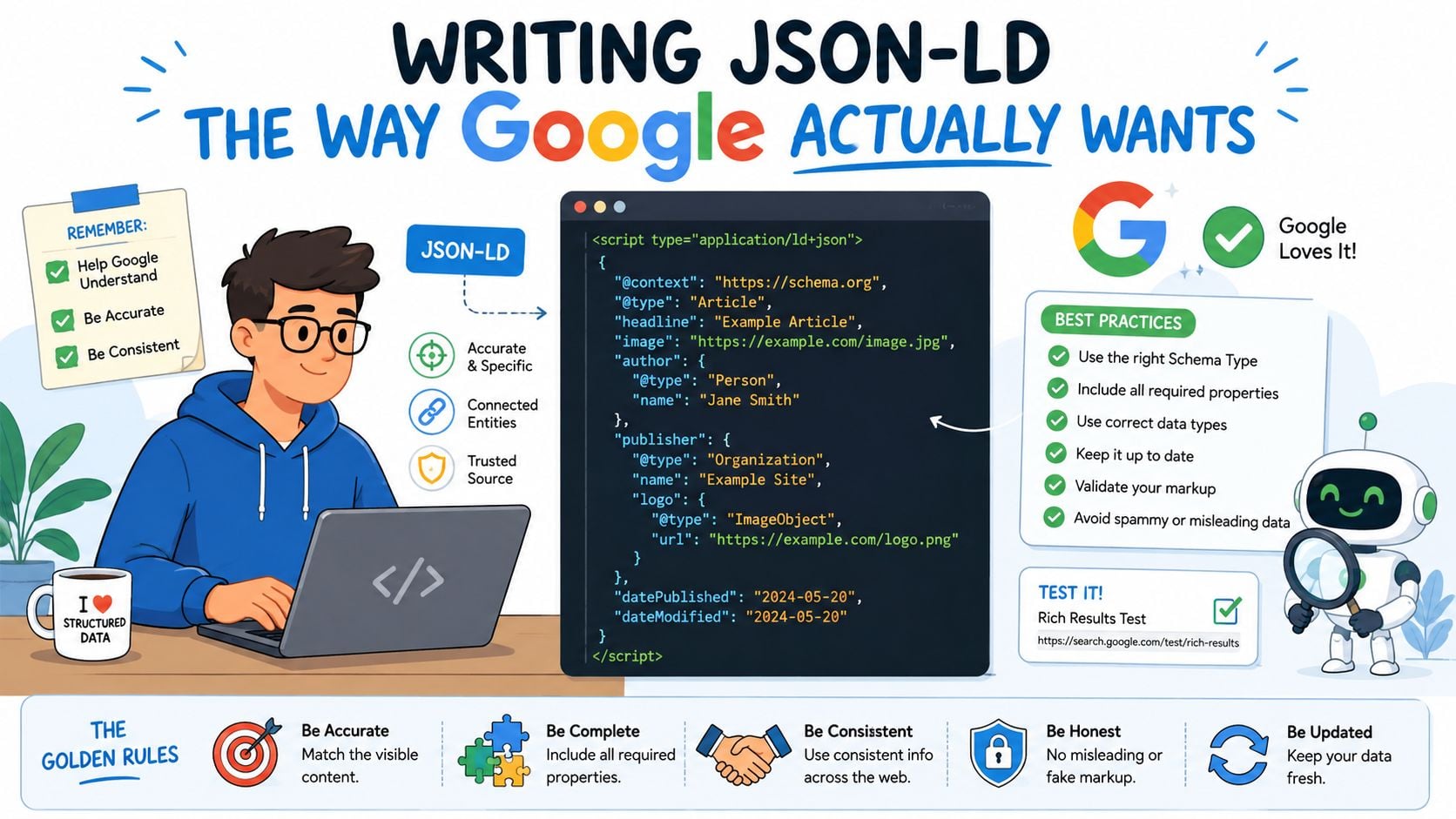
Use the most specific applicable @type, and connect related entities rather than repeating contradictory versions. For example, nest aggregateRating inside the correct Product or SoftwareApplication object, and nest author inside Article. Don't add ratings without genuine visible reviews, and don't create multiple primary entities with conflicting @id values.
Adding Schema to WordPress and Custom Sites
There are three sensible delivery routes. The right choice depends less on technical fashion than on who owns the templates, how often content changes and whether the team can test releases.
Theme-level code gives developers the greatest precision. A child theme or carefully managed functions.php implementation can use WordPress hooks such as wp_head, apply schema to specific templates and pull values from the same fields that generate visible content. The weakness is release dependency. A business may wait for a developer deployment to update a price, business detail or entity relationship, and poorly maintained theme code can be overwritten or duplicated.
Dedicated plugins are faster for most WordPress sites. Rank Math, Schema Pro and SEOPress can provide settings, template rules and integrations for common content types. Configure them so Article output appears on posts, Product output appears on WooCommerce single-product pages and LocalBusiness data is emitted once. Plugins win on speed and accessibility, but they can produce overlapping Organisation, WebPage, Article and BreadcrumbList objects when another plugin or theme is already active.
Google Tag Manager can help a marketing team test and ship JSON-LD without a full redeploy. A Custom HTML tag can inject structured data, but this route adds dependence on tag firing, consent configuration, JavaScript execution and caching behaviour. For important markup, server-rendered HTML is generally easier to inspect and more dependable than a client-side insertion.
| Method | Best for | Main risk |
|---|---|---|
| Theme or template code | Developers who need exact entity and template control | Markup becomes coupled to releases and theme maintenance |
| WordPress plugin | Site owners who need fast configuration and repeatable rules | Duplicate output, broad defaults and unnecessary markup |
| Google Tag Manager | Marketing teams running controlled experiments | Delayed or incomplete crawl visibility and fragile tag conditions |
On custom sites, hard-coded JSON-LD in the layout is usually cleanest. A build-time helper can inject Organisation data globally, while page templates supply Article, Product or LocalBusiness information from the same content model that renders the page. That approach aligns with UK data-governance principles around consistent, predictable and machine-readable structures, as described in UK data standards guidance.
Choose the route that matches ownership. A developer-managed custom build favours templates. A frequently edited WordPress site may favour a plugin with strict per-template controls. If you're comparing wider WordPress support options, WordPress SEO services can include implementation and validation as part of the technical work.
Testing and Validating Markup That Holds Up
Validation starts with Google's Rich Results Test. Enter a live URL or paste the code, then separate three questions:
- What did Google detect? This confirms the parser found structured data.
- What is eligible? Eligibility depends on the selected type, required properties and Google's current feature support.
- What failed? Errors can block eligibility, while warnings often identify missing optional information.
A warning about aggregateRating shouldn't lead you to invent a rating. If the business has no visible review data, leave the property out. Accurate, smaller markup is safer than complete-looking markup filled with unsupported or unavailable facts.
Inspect the parsed object rather than relying only on the green status. Check that @context is exactly that the selected@type' fits the page, and that URLs point to the canonical page or the correct related entity. Compare the JSON-LD against the rendered content in a logged-out browser and, where relevant, a mobile view.
Search Console provides the next layer. Its Enhancements reports can show whether Google has processed structured data across indexed URLs and whether issues appeared after a template change. The report can confirm discovery at scale, but it still doesn't guarantee a rich result will display for every eligible page.
For a larger rollout, use URL Inspection to check representative templates and Google's available inspection workflows for bulk verification. Interpret the states carefully. Detected means Google found markup, indexed relates to the page's indexing status, and eligible means the structured data meets the conditions for a supported feature. None of those states promises a permanent visual result.
A sensible monitoring routine is straightforward:
- After every template change: Re-run the Rich Results Test on affected page types.
- During the first month: Watch Search Console Enhancements regularly for new errors or coverage changes.
- After fixes: Record the URL, issue, deployment date and validation result in a shared log.
- Before major launches: Follow a wider website launch checklist so canonical, rendering and indexability checks happen alongside schema testing.
Common Pitfalls That Quietly Kill Your Results
More markup isn't a stronger implementation. It often creates competing descriptions of the same URL, especially when a plugin, theme and tag manager each add their own objects.
The most common audit failures are predictable:
- Over-markup: Stacking Article, NewsArticle, BlogPosting and WebPage as competing primary descriptions can make the page model harder to interpret. Use the type that best describes the page's main purpose.
- Hidden content: Don't mark up FAQs, reviews or service details that visitors can't see. Content hidden behind an interaction needs careful review, and content absent from the page shouldn't appear in JSON-LD.
- Outdated features: Older plugins may still emit HowTo, SpecialAnnouncement or event-related markup as if every type had the same search value. Check current Google support before retaining it.
- Duplicate output: A plugin and custom theme code may both generate Product or Organisation data. Test the rendered source and disable one source of truth.
- Fragmented identity: Inconsistent
@idvalues and incompletesameAsrelationships can split one business into several loosely connected entities.
Google's policies are especially important here. The structured data must represent the visible page, and adding misleading or irrelevant information can remove eligibility or create broader quality concerns. A technically valid object can still be a poor implementation if it describes a different reality from the visitor-facing content.
Every property should answer a real question about the page. If a user can't verify it from the page, don't mark it up.
A page that fails to appear may have a schema issue, but it may also have an indexing, canonical, content or internal-linking problem. Use this troubleshooting guide for websites that don't show up on Google to keep structured-data diagnosis in the right technical context.
Your 30-Day Schema Rollout Checklist
A controlled rollout prevents a site-wide plugin setting from creating hundreds of inconsistent objects.
Week one audits what already exists
Crawl representative templates with Screaming Frog or Sitebulb, then test key URLs in Rich Results Test. Record every detected type, its source and whether it matches the visible page. Check the homepage, a typical article, a product page, a location or service page and any important landing-page template.
Week two prioritises supported opportunities
Deploy the highest-value applicable type first. That usually means Article for editorial content, Product for genuine product pages or LocalBusiness for a physical or service-based business. Add BreadcrumbList where the hierarchy is real, then consider FAQPage only when the questions and answers are visibly present and current support makes the work worthwhile.
Week three validates the rollout
Run every important template through Rich Results Test, not just one URL. Confirm required properties, inspect the rendered HTML and submit the sitemap in Search Console. Fix errors immediately, then review warnings for accuracy rather than filling every optional field.
Week four measures and protects the implementation
Use Search Console's Enhancements reports to watch detection, eligibility and coverage. Review impressions and clicks for the affected page groups, but treat schema as an eligibility and presentation layer, not a guaranteed ranking switch. Set a quarterly re-audit reminder because templates, content and Google's supported features change.
Before publishing, verify three final rules:
- Specificity: The
@typeis the most specific accurate choice for the page. - Visibility: Every marked-up fact is available to users on the rendered page.
- Canonical alignment: URLs,
@idvalues and entity references point to the correct canonical pages. - Single ownership: One system generates each important entity, with no plugin, theme and tag-manager duplication.
- Current eligibility: The type still appears in Google's current rich-result documentation if a visual feature is the reason for implementation.
DesignStack builds and supports responsive WordPress websites and custom online systems, with SEO guidance that includes practical structured-data implementation and validation. Visit DesignStack to discuss a schema-ready website, technical SEO improvement or a supported rebuild for your Dorset or UK business.