
Android App Development: A UK Business Guide for 2026
A Dorset retailer may already have a website, social media profiles and an online booking system, yet still lose customers at the point of action. A shopper wants to check stock from the sofa, a member wants to renew a subscription on the train, or a field-based employee needs a reliable way to update a job without returning to a desk. If the mobile experience feels awkward, people often abandon the task rather than work around it.
That's where Android app development becomes a commercial decision, not a programming exercise. The right app can make a service easier to use, give staff a focused tool, or create a more direct relationship with customers. The wrong one can consume budget through unnecessary features, weak testing and ongoing maintenance that nobody planned for. For UK SMEs, the practical questions are reach, accessibility, privacy, platform choice and long-term ownership.
Table of Contents
- Why Android App Development Matters for UK Businesses
- Understanding Core Technology and Development Approaches
- Comparing Native Versus Cross-Platform Solutions
- The Android App Development Process and Timeline
- Cost Drivers and Maintenance Requirements
- Choosing Between In-House Teams and External Agencies
Why Android App Development Matters for UK Businesses
A local business rarely needs an app because “everyone has one”. It needs one because a particular customer journey is slow, repetitive or poorly served by a website. A leisure operator might need mobile bookings and digital tickets. A membership organisation might want renewals, announcements and event access in one place. A trade business could need secure job updates for employees working away from the office.
Android deserves serious attention in each of these cases. Android represented 53.11% of UK mobile operating-system usage in September 2026, compared with 46.88% for iOS, according to StatCounter's UK mobile operating-system data. That doesn't mean every project should launch on Android alone, but it does mean that treating Android as a secondary platform can exclude a substantial part of a UK audience.

Reach creates opportunity and competition
The UK ecosystem had already reached considerable scale before its current two-platform pattern became established. The Competition and Markets Authority mobile ecosystems interim report recorded that, in 2020, Android devices represented approximately 40–50% of active UK smartphones and 20–30% of active tablets. That equated to roughly 30–40 million active Android smartphones and 5–10 million active Android tablets.
The same report found that the Apple App Store and Google Play Store together accounted for more than 90% of native-app downloads in the UK in 2020. For a business, distribution through Google Play is therefore a route into an established customer channel. It's also a crowded environment, with approximately 800,000–900,000 developers making between 2.5 million and 3 million native apps available through Android devices at that time.
Commercial rule: Android reach only matters when the app gives people a clear reason to return.
A strong mobile strategy starts with the task, not the technology. Define the customer problem, identify where mobile makes the interaction better, and decide whether an app needs device capabilities such as notifications, camera access, location or offline use. A responsive website may be more sensible for occasional visitors, while an app can earn its place when users have a recurring reason to open it.
For businesses considering a mobile app development route for small businesses, Android support should sit alongside discoverability, retention, accessibility and release planning. Publishing is only the beginning. Customers judge the whole experience, from the first store listing and installation permission to speed, reliability and the quality of every subsequent update.
Understanding Core Technology and Development Approaches
Technology choices become easier when they're tied to business outcomes. An Integrated Development Environment, or IDE, is the workspace developers use to write, inspect, build and debug an application. Android Studio is the standard example for native Android work. An Software Development Kit, or SDK, provides the platform tools, libraries and interfaces needed to use Android capabilities such as notifications, camera features and secure storage.
The programming language is only one part of the decision. Kotlin is widely used for modern native Android applications because it supports concise, strongly typed code and works with Android's development tools. The more important question for an owner is how the app will handle accounts, data, permissions, payments, notifications and failures when the connection disappears.
A practical architecture framework
Use four questions before selecting a technical foundation:
- What must feel instant? A booking confirmation, barcode scan or field update may need responsive local behaviour rather than a screen that waits on several remote services.
- What data must be protected? Personal details, payment information and internal business records need careful storage, transmission and access controls.
- What happens offline? A warehouse, rural route or busy event venue may require local caching, retry queues and clear status messages.
- What will the team maintain? A technically elegant system still creates risk if nobody can understand its code, monitor its services or release fixes.
The backend is the service behind the app. It may manage accounts, content, orders, stock, bookings or integrations with existing business systems. A clean separation between the Android interface and backend services makes future changes safer, but it also means the project includes more than screens. Authentication, data models, monitoring, backups and support procedures need decisions before launch.
Design is part of the engineering
An app's interface is not decoration applied after development. Layout, navigation, error messages and empty states determine whether customers can complete a task. A useful primer on what user interface design involves can help non-technical stakeholders discuss structure and interaction with a design team.
Product teams should also be cautious with emerging features. On-device processing can suit private or connectivity-sensitive functions because information may be handled directly on the device, but compatibility, battery use, model availability and fallback behaviour still need testing. The principle is simple: use a new capability when it solves a real user problem, not because it appears in a platform announcement.
The same discipline applies to connected marketing workflows. If an app needs to coordinate with social campaigns or advertising operations, a plain-language guide such as Meta App Manager explained can clarify the surrounding platform terminology. That doesn't replace technical planning, but it prevents a business requirement from being lost between marketing and development teams.
Comparing Native Versus Cross-Platform Solutions
The choice between native Android and cross-platform development should follow the product's risk profile. Native Android development builds specifically for Android, usually with Kotlin and Android's own libraries. Cross-platform development uses a shared codebase to support Android and iOS, often through frameworks such as Flutter or React Native.
Neither option is automatically cheaper or better. A single shared codebase can reduce duplication, but platform-specific work doesn't disappear. Native modules, build configuration, store rules, device testing and different interaction conventions still need attention. Native development can provide closer control over Android behaviour, but a second iOS application requires separate implementation if iOS is part of the plan.
Native vs Cross-Platform Development Comparison
| Aspect | Native Android Development | Cross-Platform Development |
|---|---|---|
| Performance | Offers direct access to Android APIs and a platform-specific performance profile. | Can perform well for many business applications, but intensive or unusual features may require native extensions. |
| Development time | Focuses the team on one platform, though a future iOS version needs separate work. | Shares much of the application code across Android and iOS, which can shorten duplicated implementation. |
| Budget | Investment is concentrated in Android, with platform-specific expertise and testing. | Can reduce duplicated feature work, while framework expertise and native integration still affect the budget. |
| User experience quality | Makes it easier to follow Android conventions and tune behaviour for Android devices. | Supports a consistent product across platforms, but teams must check that shared components feel natural on each system. |
| Device capabilities | Provides the clearest route to Android-specific APIs, hardware and background behaviour. | Supports common capabilities well, but unusual hardware or operating-system features may need platform-specific code. |
| Maintenance | Android updates and device compatibility are handled directly within the Android project. | Shared changes can be efficient, although framework, plugin and native dependency updates add another maintenance layer. |
| Team requirements | Needs Android specialists who understand the platform deeply. | Needs cross-platform specialists who can also diagnose native Android and iOS issues when abstractions break down. |
When native is the sensible route
Choose native Android when the app depends heavily on Android-specific capabilities, demanding background behaviour, specialised hardware, advanced accessibility control or careful performance tuning. It's also a practical choice when Android is the first commercial priority and the team wants to avoid paying for a second platform before the product has proved its value.
A native build can also make debugging more direct. Developers work closer to the operating system, which helps when a permission flow, notification rule or manufacturer-specific issue behaves differently from the framework's expectations. The trade-off is that a later iOS version won't automatically inherit the implementation.
When cross-platform earns its place
Cross-platform development suits a product with broadly shared business logic and a genuine need to reach Android and iOS. Customer accounts, content, bookings and ordinary forms often fit this model. A shared approach can keep core behaviour aligned, which is useful when a small team must release features consistently across both platforms.
It doesn't remove the need for separate acceptance testing. An Android notification may behave differently from an iOS notification, and navigation patterns that feel familiar on one platform can feel awkward on the other. Teams should budget for platform-specific polish rather than assuming that one visual treatment will satisfy everyone.
For SMEs comparing UK mobile app development services, ask which features will be shared, which will be native, and who owns the framework upgrades. A proposal that promises one codebase without discussing device testing is incomplete. The best route is the one that protects the most important user journeys while keeping future change manageable.
The Android App Development Process and Timeline
Good Android app development is structured, but it isn't a conveyor belt. Requirements change when users see a prototype, technical constraints appear during integration, and testing often reveals a workflow that looked fine on paper. A capable team plans in stages while leaving room for evidence to change the product.
Start with a decision-ready brief
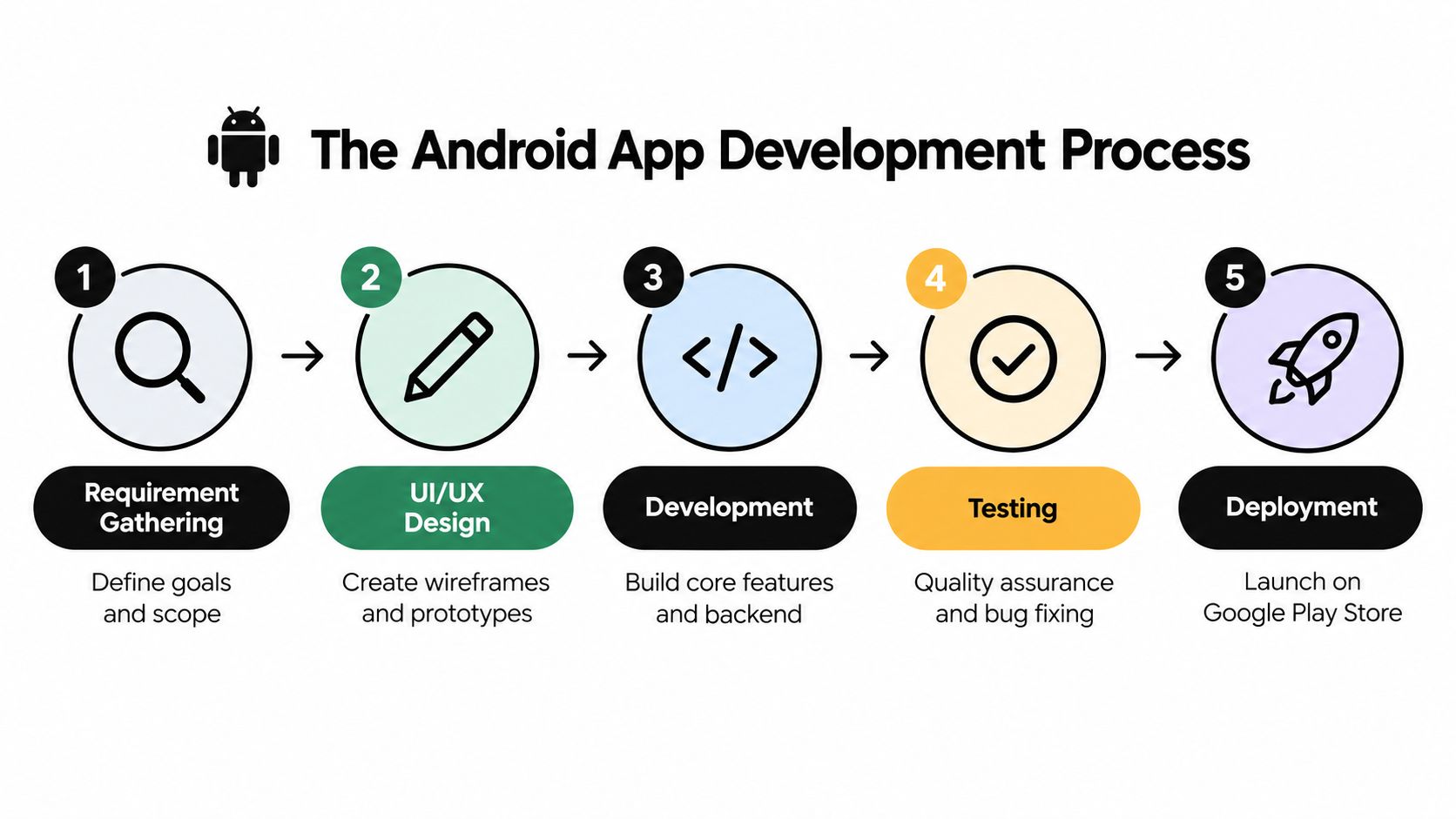
Requirement gathering defines the commercial outcome, target users, essential journeys, integrations and constraints. “Build an app for members” is not enough. The team needs to know whether the first release must support renewals, messages, event registration, digital cards or something narrower.
UI and UX design turns those requirements into journeys, wireframes and prototypes. Test the main task before committing to detailed visual design. A clickable prototype can expose confusing navigation at a stage when changing direction is still relatively straightforward.
Development covers the Android client, backend services, integrations, analytics and operational controls. Developers should agree how errors, loading states, failed payments, expired sessions and interrupted connections behave, rather than leaving these cases until the end.
Testing combines automated checks, exploratory testing, accessibility reviews and real-device validation. A release candidate needs scrutiny across screen sizes, operating-system configurations, permissions, network conditions, rotation, text scaling and interrupted tasks.
Deployment includes store assets, release notes, privacy information, content declarations and staged monitoring. Launch day is a controlled release, not the point at which the team stops observing the product.
Here's a practical explanation of the stages in motion:
Accessibility must enter before testing
UK businesses should treat accessibility as an engineering requirement. GOV.UK's Android accessibility guidance recommends testing mobile apps against WCAG 2.2 AA and highlights failures involving keyboard focus, including unclear focus indicators under success criterion 2.4.7 and illogical navigation order under criterion 2.4.3.
Native Android controls are usually a safer starting point than custom controls, provided developers expose meaningful labels, roles and states correctly. Test with TalkBack, keyboard navigation and switch access, then repeat with altered text sizes, dark mode, rotation and form-validation errors. Emulator testing alone isn't sufficient because real device settings and assistive technologies can reveal problems that a simulator doesn't reproduce.
Businesses planning app development for startups should also define a release gate. Every interactive element should have an understandable label, visible focus treatment, logical traversal order and an announced error state. That checklist protects customers and reduces expensive rework after launch.
Cost Drivers and Maintenance Requirements
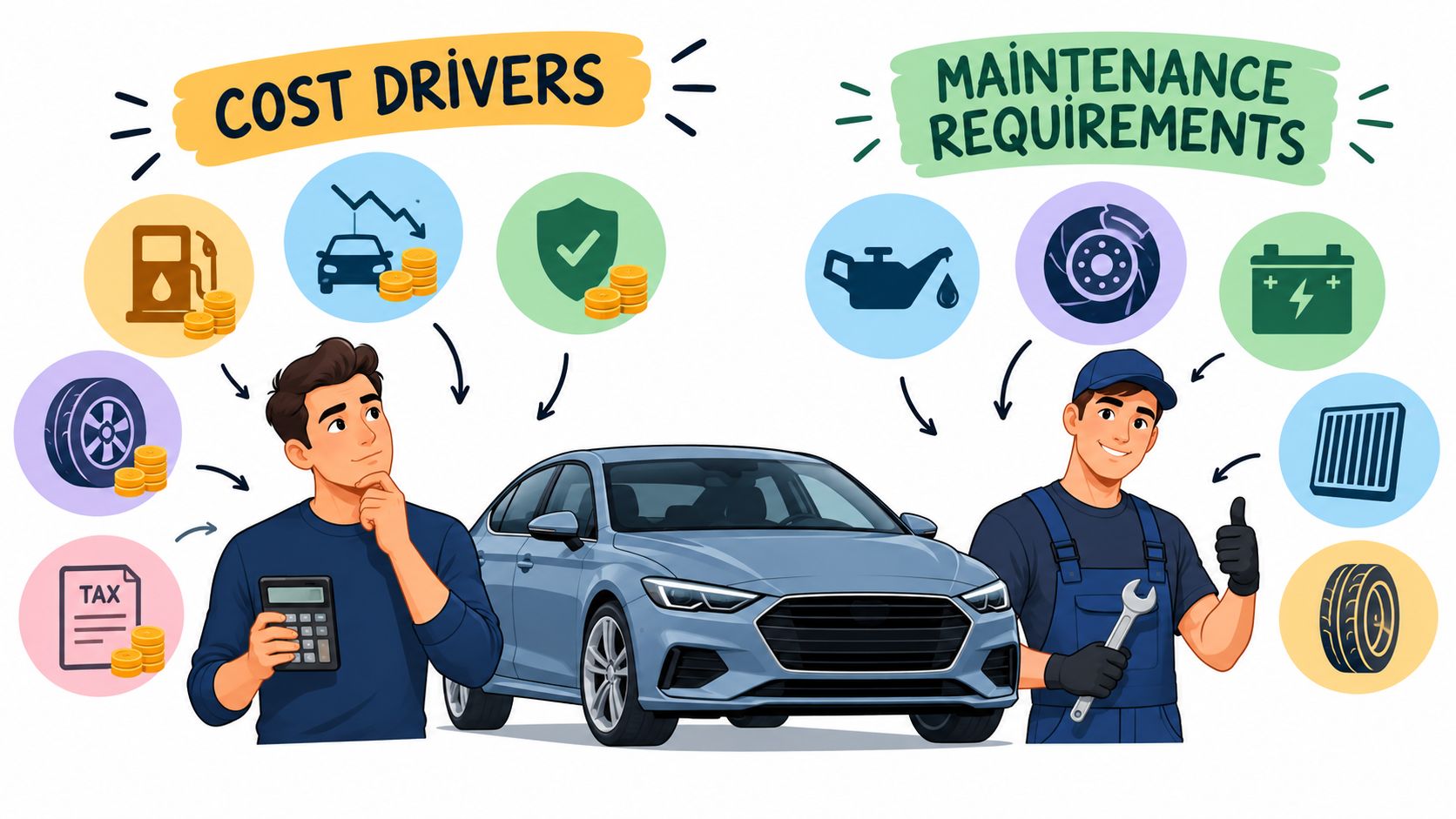
An app budget reflects decisions, not just hours of coding. The main cost drivers are usually the number and complexity of user journeys, the quality of the interface, backend requirements, third-party integrations, security expectations, device coverage and the amount of operational support required after release.
A catalogue app with read-only content has a different risk profile from a system that manages payments, bookings, staff permissions and customer records. Camera capture, location, Bluetooth, offline operation and push notifications can all be appropriate, but each adds design, testing and support questions. The cheapest estimate often excludes the edge cases that customers encounter first.
Build the total ownership picture
Separate the initial build from the ongoing obligations:
- Product changes: Customer feedback, new services, revised content and changes to internal processes will alter the app after launch.
- Platform compatibility: Android versions, device manufacturers, permissions and background rules change. The team needs a process for reviewing and testing those changes.
- Security and monitoring: Authentication, dependency updates, crash reporting, server monitoring and incident handling protect both the business and its users.
- Store operations: Listings, declarations, release notes, review responses and policy checks remain part of ownership.
- Support and analytics: A team must know whether a problem affects a particular device, operating-system version or user journey, rather than relying on vague complaints.
A maintenance arrangement should name responsibilities. Who reviews crash reports? Who answers urgent production issues? Who approves content changes? Who tests a new Android release? If the answer is “someone internally”, name that person and allow time for the work.
The app development cost guide is useful for framing those questions with a supplier. Ask for assumptions rather than a single attractive figure. A credible proposal explains what is included, what is excluded, how change requests are handled and how post-launch support works.
Privacy can reduce scope and risk
Permission design deserves commercial attention, especially for smaller organisations. UK government research identifies regulatory concerns as the largest barrier to technology adoption, cited by 19% of businesses, while data privacy and security concerns are the second-largest, cited by 17% in the Innovation Diffusion and Adoption Survey executive summary.
Google Play expects sensitive permissions to be necessary for core functionality, requested incrementally, clearly disclosed and used only for consented purposes. Before asking for camera or location access, challenge the requirement. Could the feature use a browser flow, an account-based process, approximate location or server-side processing instead? Fewer permissions can simplify onboarding, reduce approval risk and make the product easier to explain.
Choosing Between In-House Teams and External Agencies
An internal team gives a business direct control and accumulated product knowledge. It can be the right model for an organisation whose app is central to daily operations and whose leadership can support recruitment, technical management, security processes and continuous maintenance.
The difficulty for an SME is coverage. A production app needs more than one developer. Product decisions, UX, Android engineering, backend work, quality assurance, accessibility, release management and support all need ownership. If one person carries several of those roles, holidays, illness or competing priorities can create operational risk.
An external agency provides a ready-made group of specialists and a defined project process. That can make sense when the business has strong domain knowledge but doesn't want to build a permanent technical department. The arrangement works best when the client supplies decisive business input and the agency makes assumptions, dependencies and risks visible.
A useful test: choose the resourcing model you can maintain after launch, not simply the one that gets a prototype built.
For a Dorset business, DesignStack offers Android and iOS app design and development alongside web and digital services. The relevant evaluation points are practical: ask to see comparable work, understand who will deliver the project, confirm how accessibility and real-device testing are handled, and agree what support continues after release.

The strongest partnership is transparent about trade-offs. It won't promise that every feature belongs in the first release, or pretend that cross-platform delivery removes platform-specific work. It will connect the product roadmap to commercial priorities, protect accessibility and privacy from the start, and leave the business with a maintainable application rather than an impressive demonstration.
DesignStack can help UK businesses shape, design and develop Android applications, whether the project needs a native Android build or a cross-platform route for Android and iOS. Visit DesignStack to discuss your user journeys, technical requirements and post-launch support needs with a Dorset-based digital team.