


Is WordPress Good for Ecommerce Honest UK Guide
You're choosing between two very different ways of running an online shop. One route gives you a flexible WordPress website with WooCommerce, your own hosting and broad control over the customer journey. The other gives you a managed platform such as Shopify or BigCommerce, where much of the technical work is handled for a recurring fee.
For a small UK business, the difficult question isn't whether WordPress can sell products. It clearly can. The core question is whether the extra ownership pays for itself through better content, more control and a store that fits the way you operate.
Table of Contents
- Introduction Is WordPress a Smart Choice for Your Online Store
- How WordPress Powers Ecommerce with WooCommerce
- WordPress Versus Hosted Platforms Head to Head
- True Costs Performance and Scalability on WordPress
- Security Maintenance and Keeping Your Store Safe
- When WordPress Is the Right Fit and When It Is Not
- Our Recommendation for UK SMEs Choosing an Ecommerce Platform
Introduction Is WordPress a Smart Choice for Your Online Store
A Dorset retailer may begin with a simple catalogue, a few payment options and useful buying advice. Six months later, the same business may need product bundles, local delivery rules, a faster checkout and content that attracts search traffic. The original platform decision then affects both the customer experience and the owner's workload.
WordPress with WooCommerce gives that retailer room to adapt. It also makes the business responsible for hosting, updates, plugin compatibility, backups, security and performance. A managed platform takes more of that work away, but its subscription model and built-in limits can make unusual product journeys, content structures or checkout changes harder to implement.
The answer to “is WordPress good for ecommerce?” comes down to total ownership cost, not the feature list alone. Count the build, hosting, extensions and maintenance time. Then weigh those costs against the value of a site your team controls and can use for content-led selling. WordPress is the stronger fit when editorial content, bespoke customer journeys and long-term ownership contribute directly to sales. A hosted platform suits a business that values a predictable service and has little appetite for technical upkeep.
The decision in practical terms
| Your priority | Better starting point |
|---|---|
| Content, SEO and editorial control | WordPress with WooCommerce |
| Fast launch with minimal technical upkeep | A hosted platform |
| Bespoke checkout or product logic | WordPress with WooCommerce |
| Managed security and infrastructure | A hosted platform |
| Full ownership of website files and data | WordPress with WooCommerce |
The UK market already expects dependable payments, clear delivery information and a polished mobile experience. The Office for National Statistics figures summarised for UK ecommerce businesses record ecommerce sales by UK non-financial businesses at £688 billion in 2018, up from £582 billion in 2017. Website sales accounted for 20.5% of turnover among businesses with 10 or more employees. Those figures set the standard a small retailer must meet, regardless of its platform.
Start with the maintenance plan, not the brochure. Decide who will test updates, restore a backup, resolve a plugin conflict and improve performance when sales grow. If the store depends on guides, comparisons and other editorial content, ownership may justify that work. If the priority is a quick launch with fewer technical decisions, compare hosted options in this guide to the best website builders for ecommerce in the UK.
How WordPress Powers Ecommerce with WooCommerce
WordPress is the website foundation. WooCommerce is the ecommerce layer that adds products, baskets, checkout, orders, stock management and connections to payment and delivery services.
The basic structure is easy to understand:
- WordPress manages pages, posts, navigation and the wider website.
- WooCommerce manages the shop functions, including products, carts and orders.
- A theme controls the visual layout and user interface.
- Plugins and extensions add functions such as subscriptions, product bundles, trade pricing or advanced shipping.
- Hosting provides the server environment where everything runs.
That flexibility is the main reason WordPress works so well for content-led brands. A food producer can publish recipes beside product pages. A furniture retailer can build detailed buying guides. A service business can combine appointments, memberships and physical products without forcing customers into separate systems.
The UK adoption picture supports that practical use. A current UK WordPress ecommerce technology report lists WordPress on 153,697 ecommerce stores, with 94.9% of those WordPress stores running WooCommerce. The same report identifies Home & Garden at 14.2%, Business & Industrial at 8.2% and Food & Drink at 7.9% of UK WordPress ecommerce categories. That spread matters because it shows a platform used across established retail areas, not only by small experimental shops.
Ownership creates both freedom and work
With WordPress, your website files, content and database sit within a hosting arrangement you can change. You can move hosts, replace an agency or alter the checkout without asking a platform provider to approve the direction of your business.
That ownership also means someone has to make sensible technical decisions. A poorly chosen theme can add unnecessary code. Two plugins may try to alter the same checkout field. An extension may stop working after an update. WooCommerce gives you options, but it doesn't remove the need for judgement.
If you're moving away from WooCommerce, read practical guidance on avoiding pitfalls when migrating to Shopify before exporting products or changing URLs. Migration planning protects product data, redirects, customer expectations and search visibility.
Your theme deserves the same care. A useful starting point is this guide to WordPress themes for ecommerce, but don't choose on appearance alone. Check mobile layouts, product filtering, accessibility, checkout compatibility and how actively the theme is maintained.
WordPress Versus Hosted Platforms Head to Head
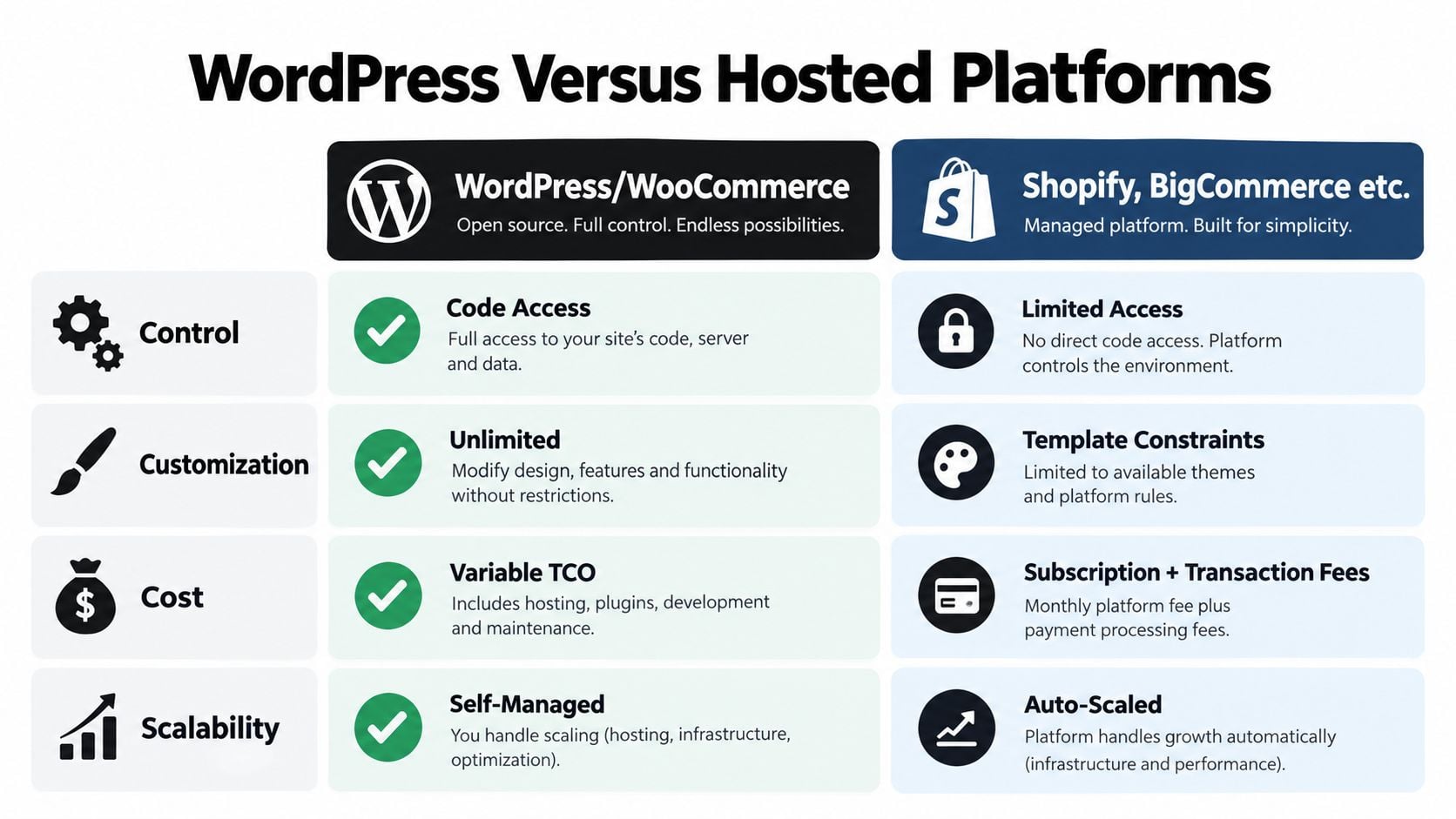
WordPress and hosted platforms solve the same commercial problem in different ways. WordPress gives you a toolkit and responsibility for assembling it properly. Shopify, BigCommerce and similar services provide a more controlled environment with fewer infrastructure decisions.
| Evaluation Criteria | WordPress with WooCommerce | Hosted Platforms like Shopify |
|---|---|---|
| Control | Broad access to code, data and hosting choices | More limited control within the provider's system |
| Customisation | Highly adaptable through themes, plugins and development | Strong within platform rules, with more defined boundaries |
| Content and SEO | Excellent for combining editorial content and commerce | Capable, but often more commerce-centred |
| Maintenance | Your team or agency manages updates and compatibility | The provider manages much of the core infrastructure |
| Performance | Depends on hosting, caching and extension choices | More predictable out of the box |
| Checkout | Can be shaped around complex requirements | Faster to configure, with platform constraints |
| Support | Depends on your agency, host and plugin suppliers | Centralised platform support, with plan-dependent limits |
The central distinction is ownership. WordPress is usually the better fit for a business that wants to customise the customer journey, connect commerce with a substantial content operation or retain direct control over its data and code. Hosted platforms suit owners who value a simpler operating model more than deep technical freedom.
The practical divide: WordPress lets you shape the system around the business. A hosted platform asks the business to work within a more managed system.
Where WordPress has the advantage
WordPress is particularly strong when organic search and helpful content sit at the centre of acquisition. You can publish landing pages, guides, buying advice and product content within the same content management system, then adjust templates and structured content around how customers research a purchase.
Custom checkout logic is another advantage. You may need trade customer fields, delivery restrictions, account-based pricing or a product configurator. WooCommerce can support those requirements, provided the implementation is tested and maintained properly.
UK-focused comparisons generally position WooCommerce as the right choice for WordPress users who want control and flexibility, while identifying plugin conflicts, performance tuning and security work as the main trade-offs in this UK ecommerce platform comparison.
Where hosted platforms win
Hosted systems remove many infrastructure decisions. You typically don't need to select a server, manage the WordPress core or investigate whether a plugin update has broken a payment flow. That simplicity has real value for an owner who wants to spend time on stock, marketing and customer service.
The limitation is that customisation follows platform rules. You can often extend the store through an app marketplace, but you may face recurring app charges, restricted checkout changes or dependence on a provider's roadmap.
For a broader small-business assessment, compare the requirements in this guide to the best ecommerce platform for small businesses. The right answer comes down to how much complexity you need and who will carry it.
The following video offers another perspective on the platform choice and the practical issues store owners need to consider.
True Costs Performance and Scalability on WordPress
The phrase “low-cost ecommerce” can be misleading. WordPress and WooCommerce may reduce platform licensing costs at the foundation, but a serious store still needs reliable hosting, a suitable theme, paid extensions, payment processing, development time and maintenance.
Your total cost of ownership usually comes from five areas:
- Infrastructure, including hosting, backups, staging and monitoring.
- Store functionality, such as payment, shipping, subscriptions and stock integrations.
- Development, covering design, configuration, testing and custom code.
- Maintenance, including updates, compatibility checks and troubleshooting.
- Operational time, especially when the owner or team handles tasks themselves.
A hosted platform bundles more of that work into its subscription. That doesn't automatically make it cheaper, but it makes the cost easier to predict. WordPress can be more economical when the business benefits from ownership and only needs a controlled set of extensions. Costs creep up when the site accumulates overlapping plugins, bespoke fixes and emergency support requests.
Performance depends on the stack
WordPress isn't slow. WooCommerce benchmark documentation reports a test completion time of 19.601 seconds and a mean time per request of 39.023 milliseconds, as recorded in the UK ecommerce platform performance reference. Those figures indicate that the application layer can perform quickly when the wider stack is tuned correctly.
Your actual customer experience depends on hosting capacity, database health, image sizes, caching, theme code, third-party scripts and the number of extensions active on the site. A fast benchmark doesn't excuse weak implementation. A budget server and a crowded plugin list can still produce a slow checkout.
Budget for performance before customers complain. Caching, image optimisation and proper hosting cost less than repeatedly losing shoppers to a sluggish basket.
Scaling is a management decision
A growing catalogue or busy campaign may require stronger hosting, better object caching, database optimisation and careful extension choices. WordPress can grow with a business, but scalability isn't automatic. Your agency or technical owner must watch resource use and test important journeys before traffic peaks.
Payment and VAT workflows need the same attention. UK merchants should confirm that product prices, tax treatment, invoices, delivery rules and payment gateways match their actual operation. Don't assume a plugin's description is a complete implementation plan.
If you want fewer infrastructure decisions, managed WordPress hosting can move some of the operational burden to a specialist provider. It won't remove the need for sensible plugin management, but it can give your team better support around backups, updates and performance.
Security Maintenance and Keeping Your Store Safe
Installing a security plugin isn't a security strategy. A WooCommerce store handles customer accounts, order information, payment integrations and business-critical data, so security has to be treated as a continuing operating process.
That process starts with a maintained WordPress core, trusted themes and carefully selected plugins. Updates need testing because an urgent security patch can also affect checkout, stock synchronisation or a bespoke integration. Apply changes on a staging copy where possible, then test browsing, account creation, basket, payment and confirmation emails.
Plugin risk needs active ownership
The wider WordPress ecosystem changes constantly. A UK ecommerce technology report on WordPress plugin footprints records that in June 2026, 707 of 61,187 actively trading UK ecommerce companies had a detectable WordPress plugin footprint from public websites. The same source discusses critical vulnerabilities reported in late 2025, including CVSS 9.8 issues affecting plugins such as King Addons for Elementor and ACF Extended.
Those facts don't mean WordPress is unsuitable for payments. They do mean you need to know what is installed, whether it is supported and who reacts when a vulnerability appears. A security plugin can help with scanning and firewall functions, but it can't decide whether an extension is necessary or whether an update has damaged your checkout.
A workable maintenance routine
A responsible store owner or support partner should cover:
- Update review: Check WordPress, WooCommerce, themes and extensions before applying changes.
- Backup validation: Keep independent backups and confirm that restoration works.
- Access control: Remove old user accounts, apply strong passwords and use appropriate permissions.
- Monitoring: Watch uptime, failed payments, unusual admin activity and critical vulnerability notices.
- Checkout testing: Run a test order after significant updates, including confirmation emails and stock changes.
- Compliance checks: Review privacy, cookie consent, payment handling and customer data processes.
A secure store is maintained, not merely installed.
Small businesses without a technical owner should make support part of the budget from the start. A WordPress maintenance and support service can provide a defined process for updates, backups and issue response, but you should still ask exactly what is included and how ecommerce testing is handled.
When WordPress Is the Right Fit and When It Is Not
WordPress is the right ecommerce platform when your store is part of a broader digital presence, not just a product grid. It works particularly well for brands that win customers through education, search content, detailed product stories or a distinctive buying journey.
A specialist food producer may need recipes, origin stories and seasonal collections alongside the shop. A Dorset tourism business might combine bookings, guides, memberships and physical products. A trade supplier may need account pricing and a customer portal. In each case, WordPress can keep the content and commerce experience in one environment.
Choose WordPress if:
- Content drives demand. Your customers need guides, comparisons or expert advice before buying.
- The buying journey is unusual. You need custom fields, bundles, subscriptions or account-specific rules.
- You value ownership. You want control over hosting, data, code and future suppliers.
- You have technical support. An internal person or agency can manage updates and performance.
- Your brand needs distinction. The storefront must do more than follow a standard template.
Choose a hosted platform if:
- You need to launch quickly. Your product range and checkout requirements are conventional.
- You want low maintenance. You'd rather pay for managed infrastructure than oversee it.
- Your team is small and non-technical. No one can safely own updates, backups and troubleshooting.
- Predictability matters more than customisation. A standard checkout is acceptable.
- You want centralised support. One provider handling the main platform is attractive.
WooCommerce remains widely used in the UK, with around 241,951 UK WooCommerce sites, and the UK is identified as its second-largest market in this WooCommerce market overview. Popularity is useful evidence of ecosystem depth, but it shouldn't decide the purchase by itself. As the market becomes more operationally demanding, a platform that your team can run reliably matters more than a large installed base.
Some businesses should take a hybrid view. Keep WordPress for content and brand storytelling, then connect a specialist commerce service where operational requirements justify it. Others should migrate from WordPress to a hosted platform if maintenance has become a recurring distraction and custom functionality no longer creates commercial value.
The honest test is simple. If losing access to your developer would leave you unable to update prices, fix checkout or respond to a security issue, you aren't ready to run self-hosted ecommerce without a support arrangement.
Our Recommendation for UK SMEs Choosing an Ecommerce Platform
For UK SMEs, WordPress with WooCommerce is a strong ecommerce choice when content, control and customisation contribute directly to sales. I recommend it when the business has a clear reason to own its website and a practical plan for maintenance.
The deciding factor is total cost of ownership. A flexible store can support custom products, delivery rules, checkout journeys and content-led marketing, but updates, hosting, backups, security and troubleshooting remain someone's responsibility. A hosted platform often makes better commercial sense for an owner who wants to add products, process orders and leave the underlying infrastructure to a provider.
Use this readiness check
Choose WordPress with WooCommerce when you can answer “yes” to most of these questions:
- Do you need content and commerce managed together?
- Will custom product, delivery or checkout rules improve the customer experience?
- Can you fund reliable hosting and ongoing technical support?
- Will someone review updates and test the buying journey?
- Do you want control of your website data and code?
Choose a hosted platform when the opposite is true:
- Is a conventional catalogue and checkout enough?
- Do you need an operation with minimal technical upkeep?
- Would troubleshooting fall entirely to the business owner?
- Does predictable setup matter more than complete control?
- Can you accept the platform's limits?
Start with the customer journey, not the theme. Document your products, payment methods, delivery areas, VAT requirements, integrations, content needs and reporting expectations. Then price the complete operating model, including support and maintenance, rather than judging the decision by the initial build cost.
WordPress is commercially credible for UK businesses, particularly those selling through education, editorial content or a distinctive brand experience. As noted earlier, UK businesses already sell online at significant scale. That does not remove the need for disciplined implementation, clear ownership and regular improvement.
If you want WordPress without handling every technical task alone, DesignStack provides fixed-cost WordPress and WooCommerce builds, technical setup, checkout testing, hosting options and post-launch support for UK businesses. Visit DesignStack to discuss your products, content strategy and maintenance requirements before committing to a platform.

Leave a Reply