Chatbot Implementation for UK SMBs
You're probably in one of two places right now. Either your team is drowning in the same questions every week, or you've had that nagging thought that “we should add a chatbot” because everyone else seems to be doing it.
Both instincts are fair. But most chatbot projects go wrong for the same boring reason. The business treats chatbot implementation like a software purchase, when it's really an operations job with a customer experience wrapper on top.
That matters more now because AI use has moved well beyond experimentation in the UK. The Office for National Statistics reported that use of at least one AI technology among UK businesses with 10 or more employees rose from around 12% in September 2023 to around 35% by June 2026, with larger firms more likely to adopt it, according to this UK business AI adoption summary. Separately, a UK business survey by the British Chambers of Commerce and Atos found that 45% of firms were already using AI for customer support and chatbots, while another 28% were considering it, as noted in this UK chatbot adoption roundup.
So yes, chatbot implementation is now normal. But normal doesn't mean useful. A bot that answers opening hours well is an asset. A bot that guesses, loops, and hides the human contact route is a liability.
Table of Contents
- Picking the Right Starting Point for Your Chatbot
- Comparing Chatbot Platform Options for SMBs
- Connecting Your Chatbot to WordPress and Back-End Systems
- Designing Conversations That Actually Help Customers
- Training, Testing, and a Safe Soft Launch
- Measuring Whether the Chatbot Is Doing Real Work
- Governance, Maintenance, and When to Bring in an Agency
Picking the Right Starting Point for Your Chatbot
Most small businesses start in the wrong place. They compare platforms before they've decided what the bot should do. That's backwards.
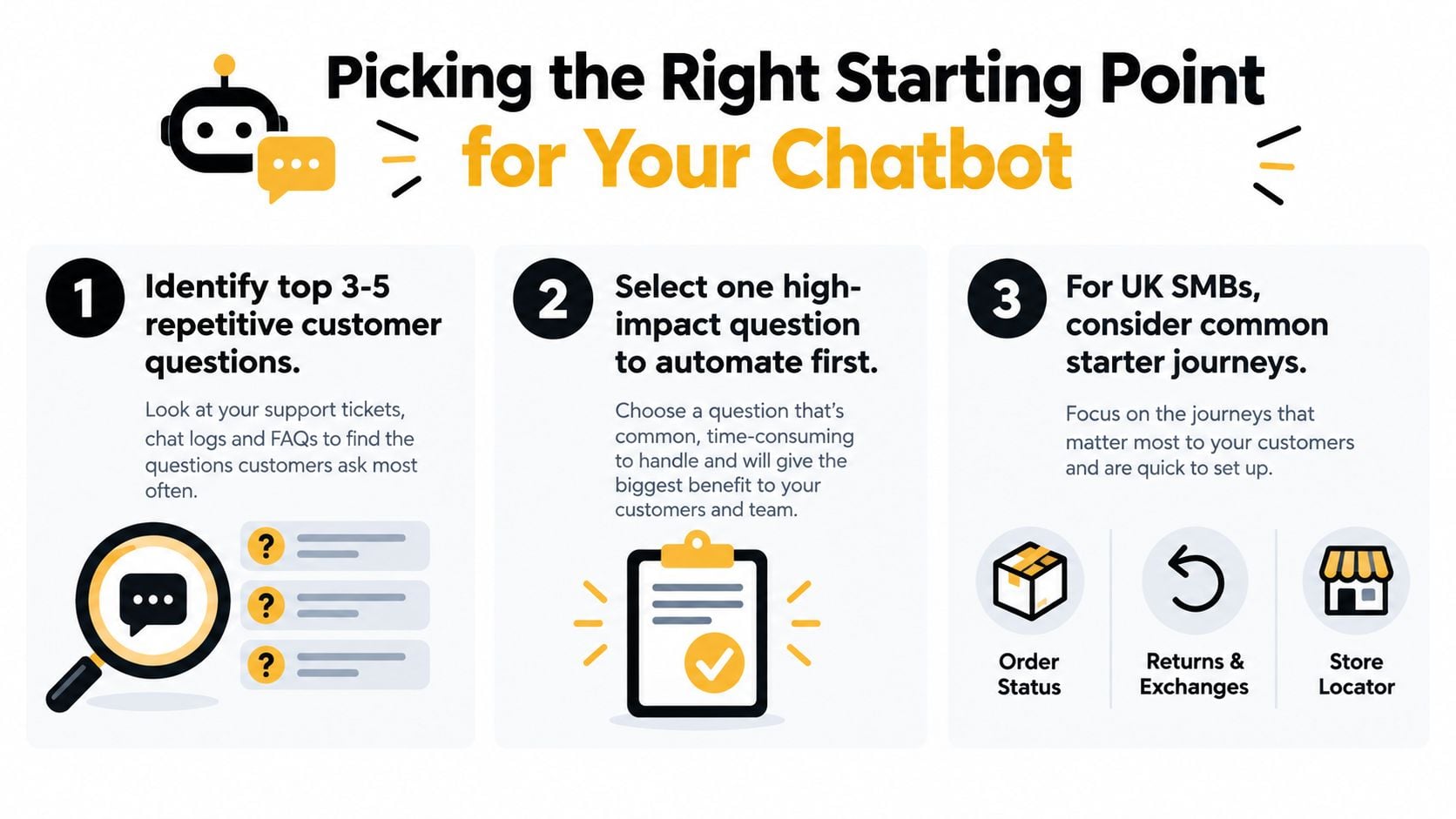
Start with the workload, not the widget. Write down the three to five customer questions that chew up the most time each week. Not the most interesting questions. Not the most strategic ones. The repetitive ones your staff answer over and over.
Pick one journey, not ten
For most UK SMBs, the best first chatbot journeys are dull on purpose:
- Order status queries if you sell online
- Opening hours and location questions if people still call to check
- Returns and exchange clarification if your inbox fills with policy questions
- Booking or callback requests if your team spends too much time going back and forth
Don't start with lead qualification on day one. It sounds commercial and clever, but it's harder to design than people think. Good lead handling needs sharper logic, better CRM integration, and stronger wording. A basic customer service journey is much easier to control.
If you're not sure which journey creates the most friction, map the steps with a simple customer journey mapping process and look for the points where customers stall or contact you for reassurance.
Practical rule: If a human can answer the same question in under a minute with the same answer nearly every time, it's a strong candidate for chatbot implementation.
Set one KPI and one guardrail
A pilot without a scorecard becomes theatre. Pick one primary metric for the first journey:
- Deflection rate if you want fewer routine contacts reaching staff
- Resolution time if customers are waiting too long
- Bookings completed if the chatbot's job is scheduling
- Completed requests if it's handling a simple operational task
Then add one guardrail metric. Usually that's customer satisfaction after the chat, or a manual review of failed conversations. Otherwise, you can “improve efficiency” while annoying everyone.
Keep the pilot narrow
Cap the first rollout to:
- One channel, usually website chat
- One use case
- One customer segment if your audience varies a lot
That constraint is healthy. If the pilot works, you expand with confidence. If it doesn't, you've lost a week or two of focused effort, not a quarter of drifting meetings and sunk costs.
Comparing Chatbot Platform Options for SMBs
There are three sensible routes for chatbot implementation. The right one depends less on features and more on your internal capability. Most businesses overbuy.
The three options in plain English
DIY SaaS platforms like Tidio, Intercom Fin, and Chatfuel are the fastest way to get moving. They're good when you want a live pilot quickly and don't need deep system logic straight away.
WordPress plugins like WPBot and ChatBot.com make sense when your site already lives in WordPress and your content structure is the centre of the project. For WooCommerce shops, that can be a practical shortcut.
Custom or agency builds using tools such as Dialogflow, Microsoft Copilot Studio, or OpenAI APIs are the grown-up option once the business case is proven. They take longer, but they're far better when the chatbot must talk properly to your CRM, support tools, booking system, or account data.
Chatbot platform options for UK SMBs
| Category | Typical Cost | Setup Time | Integration Depth | Best For |
|---|---|---|---|---|
| DIY SaaS | £30 to £300 monthly | Fast, often same day | Light to moderate | Testing demand, simple FAQ or support flows |
| WordPress plugins | Varies by plugin and setup | Fast to moderate | Moderate, strongest within WordPress and WooCommerce | Content-led sites and WordPress-first shops |
| Custom or agency builds | £4,000 to £25,000 | Six to ten weeks | Deep | Businesses needing CRM, helpdesk, eCommerce, or workflow integration |
My verdict on each route
DIY SaaS is the best place to start for most SMBs. It lets you learn cheaply, tighten the first flow, and prove whether customers will use the thing.
WordPress plugins are ideal if your site is already your operational hub. If your product catalogue, FAQ structure, and enquiry forms already run through WordPress, it's often the cleanest route.
Custom builds are where people get seduced by capability too early. They make sense when you already know the journeys that matter and you need tighter control over handoff, integrations, brand voice, and data handling. They are not where you start because a sales demo looked polished.
Buy the smallest system that can run the first journey properly. Complexity should be earned, not assumed.
Connecting Your Chatbot to WordPress and Back-End Systems
A lot of chatbot implementation falls apart. The front-end chat bubble looks fine, but the bot can't reach the systems that hold the answers.
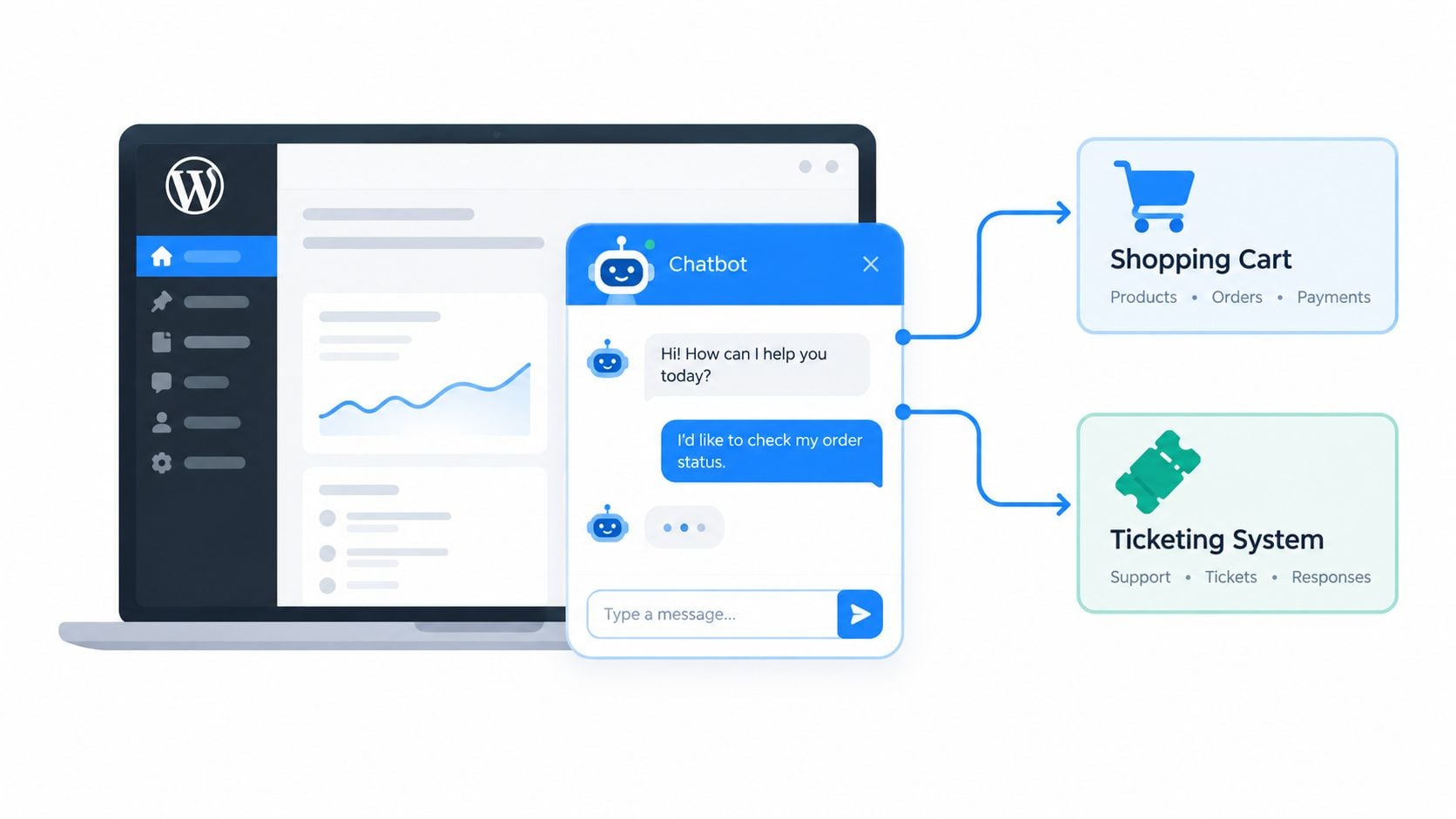
If your site runs on WordPress, begin with the boring question first. What does the bot need to fetch or trigger? That usually means things like order status, product availability, account lookup, contact creation, or booking requests.
Start with the systems of record
Your chatbot should not invent operational truth. It should pull from the systems you already rely on.
For WordPress and WooCommerce sites, that often means exposing the right WordPress or plugin endpoints and making sure access is limited to exactly what the chatbot needs. If you're still fuzzy on how your site manages content and functionality underneath, it helps to revisit what a content management system does in practice.
The easiest route for SMBs is usually a platform with ready-made WooCommerce connectors. Tidio and ChatBot.com are popular for that reason. They reduce the amount of custom glue required.
The integration points people forget
Most owners think about product data. Fewer think about the handoff chain.
These are the integration points that matter most:
- Helpdesk handoff so the transcript and customer details pass to a human agent
- CRM creation or update when a lead is qualified
- Calendar booking for service businesses that need the chat to end in an appointment
- Knowledge source alignment so the bot isn't reading outdated policies or pages
If the bot says “I'll pass this to the team” but your team receives a blank ticket with no context, the chatbot has created extra work, not less.
Use middleware when needed
Custom setups often need a middleware layer such as Zapier, Make, or a lightweight Node.js proxy. That's not a flaw. It's often the cleanest way to control what the bot can ask for, what gets logged, and what should trigger a human escalation.
Before you launch anything publicly, watch a practical integration walkthrough like this one, then compare it against your actual stack and process gaps:
Test with fake scenarios first
Run synthetic cases before customers touch it. Use fake order numbers, fake support issues, fake bookings, and fake escalations. You want to catch bad routing in private, not in front of a paying customer who already has a problem.
Designing Conversations That Actually Help Customers
A useful chatbot doesn't sound magical. It sounds clear, controlled, and honest about what it can do.
Take a common Dorset retail example. A customer visits your site after a parcel is delayed and types, “Where is my order?” This is the sort of query a chatbot should handle cleanly if the underlying systems are connected properly.
What good looks like in a real exchange
A solid conversation flow might look like this:
- The bot greets the customer and says it's an AI assistant.
- It asks for the order number, not a life story.
- It checks the current fulfilment or delivery status.
- It returns the update in plain English.
- It offers the next useful action, such as contacting support if the tracking looks wrong.
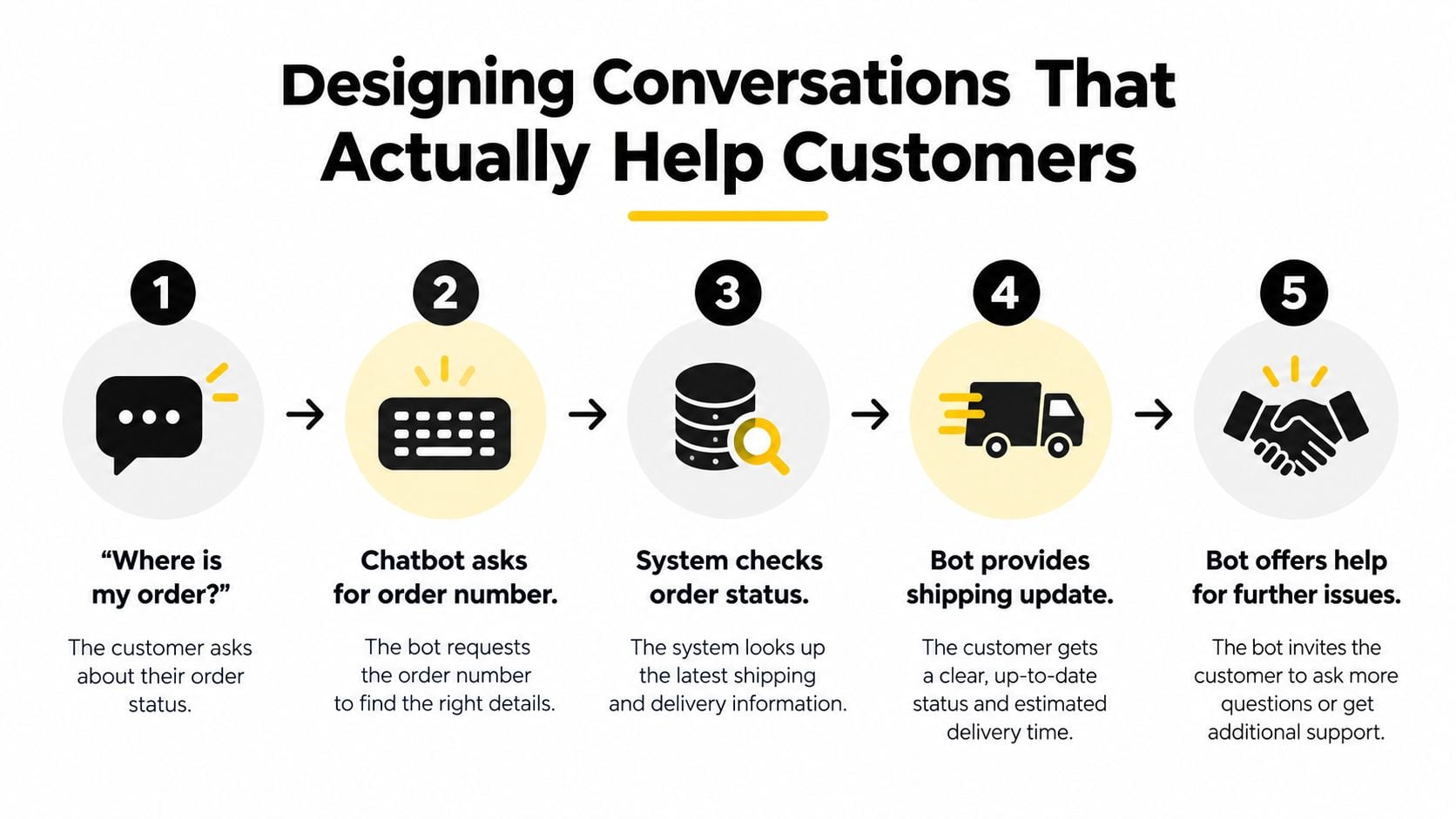
That flow is simple, but simplicity is the point. Most bad bots talk too much, ask vague questions, or pretend to understand when they don't.
If you're refining wording, structure, and clarity across the site as well as the bot, the same principles used in strong website copywriting apply here too.
The four conversation choices that matter
Disclosure
Tell people what they're talking to. “I'm an AI assistant and I can help with order updates, returns, and basic enquiries” is far better than trying to sound human and clever.
Fallback handling
When confidence is low, the bot should stop guessing. It should ask a clarifying question or offer a human route. The worst chatbot behaviour is bluffing.
If the chatbot doesn't know, it should admit it quickly and hand over gracefully.
Handoff to a person
This is the operational heart of chatbot implementation. If a customer says “I want to speak to a real person”, the bot shouldn't bury that route. It should escalate clearly and preserve context.
Tone
Keep the tone on-brand, but don't overdo it. Friendly is good. Overfamiliar is irritating. Short replies usually work best, especially on mobile.
UK wording pitfalls to avoid
Generic bots often trip over local language details. Watch for:
- Date formats that confuse day and month
- Policy wording that sounds American or too legalistic
- Terms like itemised billing or delivery windows that need to match how your business already speaks
- Regional phrasing if your customers use plain language and your bot replies like a procurement manual
Quick-reply buttons also matter. Put them where they reduce friction, not where they show off. “Track order”, “Return item”, and “Speak to support” are useful. A giant menu of eleven options is not.
Training, Testing, and a Safe Soft Launch
The fastest way to wreck trust in a chatbot is to launch it publicly before it's been trained on your actual business material. A bot that sounds fluent but uses wrong information is more dangerous than a bad FAQ page.
Train from what already exists
Your best training material is usually sitting in plain sight:
- FAQ content that already answers common questions
- Helpdesk tickets that show how customers phrase problems
- Product and service pages that define what you offer
- Returns, delivery, booking, or support policies that staff rely on
Don't start with guesswork. Pull language from real customer enquiries. That gives the bot far better grounding in how people ask for help.
Build intent examples like a grown-up
For each core intent, write a healthy spread of example utterances. Include neat phrasing, messy phrasing, typos, shorthand, and direct human requests such as “need a person” or “this didn't help”.
A proper test set should include awkward cases too:
- Typos and slang that real users will absolutely type
- Half-questions like “delivery delayed”
- Frustrated requests such as “just let me talk to someone”
- Policy edge cases where the bot should escalate rather than improvise
Reality check: If your team only tests clean, polite, perfectly written questions, you're not testing. You're rehearsing.
Roll out in stages
A safe launch is staged. Internal use comes first. Let your own team prod the weak spots, force handoffs, and break the flows.
Then open it to a limited slice of live traffic. Watch the conversations closely. If the bot starts looping, misrouting, or inventing answers, pause and fix it before wider rollout.
Watch these failure modes in week one
The first week tells you nearly everything:
- Hallucinated answers mean your guardrails are too loose
- Loop traps mean the flow logic is bad
- Ignored handoff requests mean the escalation design is broken
- Confident but vague replies usually mean poor knowledge grounding
Triage quickly. Some issues need a wording tweak. Others need retraining. A few mean the journey was the wrong first choice altogether.
Measuring Whether the Chatbot Is Doing Real Work
A chatbot doesn't earn its place because people clicked on it. It earns its place when it removes workload, shortens the path to resolution, or helps complete a useful customer action.
The UK government's public attitudes tracker found that 34% of the UK public used chatbots at least monthly in personal life and 24% used them for work, based on a later wave using a demographically representative sample of 4,947 UK adults, as detailed in the government's tracker survey write-up. That means regular usage already exists. Your measurement job isn't to prove chatbots are interesting. It's to prove your chatbot is useful.
Ignore vanity metrics
Total conversations can be mildly interesting, but it won't tell you whether the bot is pulling its weight. The stronger operational metrics are:
- Deflection rate
- First-contact resolution
- Handoff-to-human rate
- Customer satisfaction after chat
- Average handling time saved
- Conversion influence, if the bot supports a commercial journey
If you don't already track customer paths across support and sales, basic funnel analysis helps expose where the chatbot is reducing friction and where it's inserting itself.
Set a baseline before launch
Measure the existing process first. How are these questions handled today? Email, phone, live chat, contact form, or staff callback? Without a baseline, every chatbot result becomes opinion.
Then look for patterns rather than isolated wins.
Chatbot performance metrics and intervention triggers
| Metric | Healthy Range | Trigger Action |
|---|---|---|
| Deflection rate | Above 30% is a reasonable sign the first journey has enough coverage | Under 30% suggests intent gaps or weak flow design |
| Handoff-to-human rate | Lower is generally better if the bot is meant to resolve routine queries | Above 40% suggests the bot is fronting work it can't finish |
| First-contact resolution | Steady improvement over time | If it stalls, review knowledge gaps and flow logic |
| CSAT post-chat | Stable or improving | Falling scores usually mean poor answers, bad tone, or weak handoff |
| Average handling time saved | Clear downward pressure on repetitive staff work | If there's no relief, the bot may be adding a step rather than removing one |
| Conversion influence | Useful when tied to one clear commercial action | If unclear, simplify the journey and attribution setup |
Know when to tweak and when to rebuild
Use this rule of thumb:
- Tweak when the issue is wording, button placement, or a narrow misunderstanding
- Retrain when the bot misses common phrasing or uses shaky source material
- Rebuild the flow when customers keep needing a human because the journey itself was poorly chosen or badly sequenced
Small fixes are normal. Persistent confusion is structural.
Governance, Maintenance, and When to Bring in an Agency
A chatbot is not a “set it and forget it” tool. That fantasy is one of the worst habits in small business tech buying.
Once it goes live, someone has to own it. Not vaguely. Specifically. Someone needs to review the unanswered questions, failed handoffs, customer complaints, and outdated responses on a regular cadence.
Governance is part of chatbot implementation
The Office for National Statistics has noted that the share of UK businesses using AI for providing or personalising products or services is especially high among smaller firms, with around 31% of businesses with 0 to 9 employees doing so, according to the ONS article on artificial intelligence in UK businesses. That's useful context because adoption can rise faster than operational maturity.
In plain English, lots of firms are trying AI. Fewer are governing it properly.
What responsible maintenance looks like
Use a regular review rhythm:
- Weekly checks for unresolved queries, fallback spikes, and support complaints
- Monthly log reviews to spot recurring confusion and content gaps
- Quarterly retraining when products, pricing, policies, or seasonal services change
You also need clear ownership of the knowledge sources. If your returns policy changes but the bot still serves the old version, that's your process failure, not the model's.
The UK compliance layer people skip
If your chatbot collects personal data, GDPR considerations are already in the room. Privacy notice clarity, retention settings, consent logic where needed, and a clear route to human contact should be treated as baseline controls.
The UK government's implementation guide for the AI Cyber Security Code of Practice goes further than most business owners expect. It emphasises AI-specific risk assessments, logging considerations, encryption, transparent data-use communication, and advance notice of model updates, as outlined in the government's implementation guide for the AI Cyber Security Code of Practice.
That's the bit many “easy chatbot” guides gloss over. Tool choice matters, but governance matters more once customer data, service transcripts, or model changes enter the picture.
A chatbot that saves time but creates a compliance mess is not efficient. It's deferred cost.
Security and control basics
At minimum, lock down:
- Admin access so only the right staff can edit behaviour or integrations
- API key handling so credentials are rotated and scoped sensibly
- Plugin maintenance if you're using WordPress-based tooling
- Transcript access so customer conversations aren't floating around the business without controls
DIY vs Agency Build When to Escalate
| Factor | Stick with DIY | Bring in an Agency |
|---|---|---|
| Use cases | One or two tightly defined journeys | Multiple journeys with branching logic |
| Integrations | Simple website or WooCommerce needs | CRM, helpdesk, booking, or account system integration |
| Compliance exposure | Low-risk customer enquiries | Sensitive data, regulated services, or stricter review needs |
| Internal capability | Someone can own updates and testing | No clear owner, or no technical support in-house |
| Brand control | Basic tone and standard templates are fine | Strong voice control and tailored UX matter |
Be honest about the threshold
If your chatbot only answers a few standard questions on a brochure site, DIY is perfectly sensible. If it needs to route service issues, sync with back-end systems, preserve transcript history, and behave well under compliance pressure, bring in specialists.
That doesn't mean you need a bloated project. It means you need proper design, technical review, and customer experience thinking. If you're weighing that step up, it helps to understand what a creative agency in the UK should bring beyond just “building the thing”.
A cheap chatbot that damages trust is expensive in all the ways that matter.
If you want a chatbot tied properly into your website, content, and customer journeys, DesignStack helps Dorset and UK businesses plan the flow, build the right WordPress setup, and avoid the usual mess of disconnected tools. If your current site isn't ready for solid chatbot implementation, they can sort the foundations first and help you roll it out without making your support experience worse.