
Web App vs Website: Which Does Your Business Need?
Why pay for a bespoke web app if your customers mainly want to check a price, trust the team behind it, and book a slot without creating another password?
A web app vs website comparison needs to explain more than technical features. The practical question is what your business needs to deliver, and what you will have to maintain afterwards. Custom software can bring ongoing bug fixes and support work alongside the initial build. If the features do little for customers or staff, that upkeep becomes a cost without a useful return.
A brochure site can also fall short. Customers may need to complete a booking or purchase rather than just read about your services. Ofcom's 2025 report on how the UK goes online provides context on online habits, while the business decision starts with the task your customers need to finish. Treat your web presence as sales infrastructure, with a clear route from interest to action.
Start with the simplest setup that completes that task.
For a small firm, I would usually recommend a well-built website paired with proven third-party integrations before commissioning bespoke software. That approach still needs upkeep, but avoids making every booking or checkout feature a custom development responsibility. Reserve bespoke application code for workflows that genuinely set the business apart, rather than rebuilding functions an existing tool already handles.
Table of Contents
- Web App vs Website Side by Side
- How Purpose Decides What Gets Built
- What Each Option Costs to Build and Run
- Performance and Upkeep Standards for Each Model
- Which Model Fits Your Type of Business
- Choose Between a Website, a Web App or Both
Web App vs Website Side by Side
A website presents information so people can find you, understand what you offer, and get in touch, while a web app lets users act on live data and get personalised results back. Everything else in the comparison flows from that single difference.
| Criterion | Website | Web app |
|---|---|---|
| Main purpose | Inform, build trust and generate enquiries | Let users complete tasks and get results |
| How visitors interact | Read, browse and get in touch | Log in, submit data, book, buy or configure |
| Data handling | Mostly static content and form submissions | Stored user data, processed in real time |
| User accounts | Rarely needed | Usually required, with roles and permissions |
| Typical examples | Brochure site, service firm site, blog | Customer portal, booking system, quote calculator |
| Main risk | Looks good but does not convert visitors | Overbuilt and costly to maintain |
Where the line blurs in practice
In day-to-day business, the web app vs website split behaves more like a spectrum than two sealed boxes. Plenty of marketing sites include contact forms, newsletter sign-ups, live chat, or a small checkout, while many application platforms sit behind public landing pages that handle search discovery. Even content architecture blurs the boundary, as you can see when teams separate their publishing layer from interactive front ends using what a headless CMS actually does.
Because most owners aren't starting from scratch, the decision rarely comes down to getting online for the first time. According to the UK Government's Department for Science, Innovation and Technology (DSIT) Business Data Survey, 68% of UK businesses reported having a website in 2024. The practical question for most firms is what their existing presence needs to do next, and whether adding interactive portals or client workspaces should happen through dedicated platforms like Glanser web and portal solutions or stay lightweight on the main site.
Simple rule to keep handy: A website answers questions. A web app processes requests.
Before you compare quotes or shortlist features, run a thirty-second test on paper. Write down the single outcome a visitor must achieve on your most important page. If they're reading, weighing up your credibility, and sending an enquiry, you need a website. If they're logging in, changing stored records, or calculating a personalised result, you're moving into web app territory.
How Purpose Decides What Gets Built
Your business goal dictates the architecture long before anyone chooses a colour palette or a framework. Look closely at what has to happen behind the scenes, and builds fall into three distinct tiers.
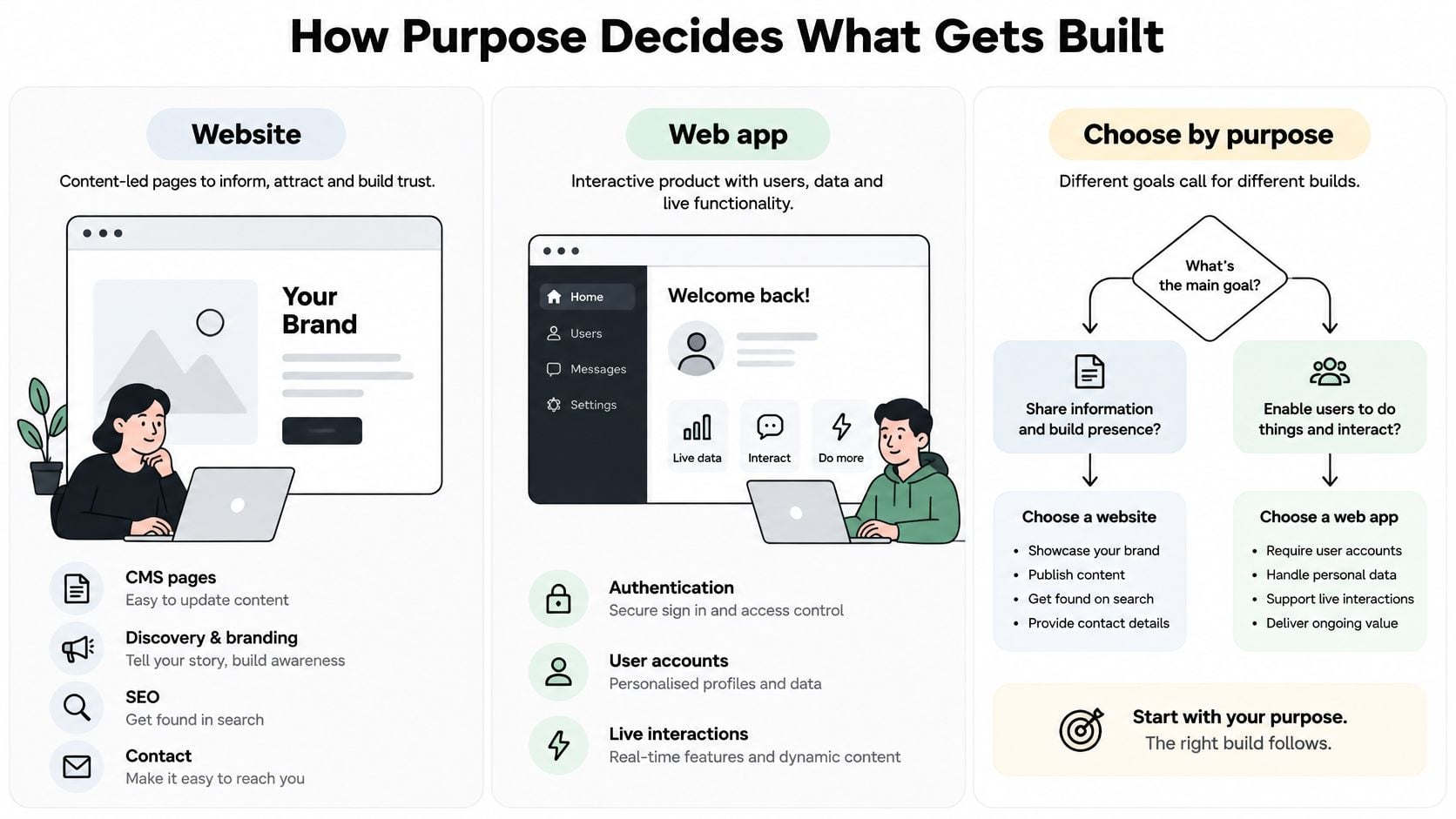
A content-led website serves pre-rendered or CMS-generated pages built for search visibility, clear branding, and fast enquiry paths. A transactional web app adds authenticated, stateful workflows, meaning the system remembers who signed in, what they saved last Tuesday, and what permissions they hold across portals, stock lists, quoting tools, bookings, or memberships. Between those two sits a common middle ground where a straightforward website carries targeted interactive components, such as a checkout, an appointment form, or a light account area, without turning the whole project into custom software.
Whichever tier you pick, interactive controls immediately raise the engineering bar for accessibility. Between January 2022 and September 2024, the UK Government Digital Service accessibility monitoring report audited 1,203 public-sector websites and 21 mobile apps and found accessibility issues on nearly all tested products; once notified, 68% fixed those problems or put short-term plans in place, resolving 743 of 880 identified issues. Menus, filters, checkout flows, and booking forms fail just as easily on a small eCommerce site as inside a bespoke portal if you don't bake requirements into early website planning and discovery.
Two scenarios that show stateful workflows
Take a Dorset dental practice comparing two builds. With a brochure website, a new patient checks treatments, reads clinician bios, checks parking details, and taps a phone number or enquiry form. With a patient web app, that same visitor signs in, completes a medical history form saved to their profile, picks a live hygienist slot tied to the clinic diary, and reschedules two weeks later without ringing reception.
Now compare a bespoke joinery firm. A portfolio website showcases fitted kitchens, explains timber grades, and invites site-visit requests. Turn that into a web app, and visitors enter exact wall dimensions, choose oak or ash finishes, toggle hardware options, receive a dynamic estimate pulled from current material rates, and save the specification so an estimator can refine it in an admin screen.
For a concise walkthrough of how these architectural differences play out in real builds, this short video breaks down the distinction clearly.
A feature checklist before you scope the build
Scan the functions below and count how many are essential on day one. Every "yes" pushes the technical complexity closer to a web app:
- User login and account recovery: Visitors create passwords, reset forgotten credentials, and return to private information.
- Saved customer data: The platform stores drafts, past orders, preferences, or uploaded files between visits.
- Live stock or real-time availability: Displayed prices, slots, or inventory change dynamically as other people book or buy.
- Integrated payments and invoicing: Card processing, deposits, recurring billing, or automated receipts run inside the workflow.
- Automated notifications: Email or SMS reminders fire when an appointment approaches, a quote changes status, or a renewal is due.
- Staff admin screens: Your team logs into a back-office view to approve requests, update records, or export reports.
- Role-based access control: Customers, staff, managers, or trade buyers each see different screens and permissions.
If you want a fast final filter, ask three blunt questions. Does the page output change depending on who is visiting? Does the system have to save user input and act on it later? Does a member of your team need a screen to manage that data? Answering yes to two or three puts you squarely in web app territory.
What Each Option Costs to Build and Run
Feature lists look harmless on a whiteboard. Budgets only diverge sharply once you see how user roles, stored data, and testing multiply the hours behind every single screen.
| Cost driver | Website | Web app |
|---|---|---|
| Scope and discovery | Pages, content and sitemap | User roles, data flows and edge cases |
| Design | Layout, branding and templates | A screen for each user journey and role |
| Build and integrations | Forms, SEO and a content editor | Accounts, databases, payments and APIs |
| Hosting | Entry plan such as the 10Gb plan at £100.00 a year billed annually | Higher resources and backups for database and user data |
| Maintenance | Content edits, plugin and security updates | Bug fixes, feature changes, data migrations and user support |
| Accessibility and testing | Pages, forms and menus | Every journey, logged-in state and error path |
Why custom app budgets climb faster than expected
On a conventional website, cost tracks mostly with page count, visual design, copywriting, and light form integrations. At DesignStack, we create websites at a fixed cost, so a business owner can agree the exact scope before build work starts. A web app rarely works that cleanly on day one because you aren't just designing ten pages; you're designing what each user role sees when logged in, logged out, half-way through a form, or hitting a failed payment.
Because of those branching states, a serious web app project normally requires a paid discovery phase before anyone can give you an honest fixed quote. Even before coding starts, reviewing a realistic breakdown of app development costs helps you separate essential workflows from expensive nice-to-haves. The same build-versus-buy maths shows up in regulated industries, too: just as fintech teams weigh building custom billing engines against white-label SaaS for payment providers, small businesses often protect their cash flow by integrating proven external tools instead of funding bespoke plumbing from scratch.
Hosting tells a similar story. A standard business site runs comfortably on an entry tier such as our 10Gb hosting plan at £100.00 per year when billed annually, backed by 100% SSD storage and weekly or monthly backups of web files, databases, and email. Once you store live customer bookings, account credentials, or financial records inside a web app, you're paying for higher server capacity, tighter database isolation, frequent backup snapshots, and a tested recovery procedure if an update breaks production.
Hidden running costs and three checks before you sign
Launch day is the cheapest day of a web app's life. The expenses that catch small firms off guard almost always arrive six months later:
- Staff time on user support: Every login system generates forgotten-password emails, browser quirks, and confused customers who ring your office.
- Third-party licences and API fees: SMS reminders, mapping APIs, payment gateways, and email delivery tools bill monthly and scale with usage.
- Data protection compliance: Storing personal or financial details triggers UK GDPR duties around retention policies, access requests, encryption, and breach response.
- Platform and rule changes: Browser updates, payment authentication rules, and tax or shipping changes force ongoing engineering even when you don't add a single new feature.
You rarely regret starting with a clean, fixed-scope website. You almost always regret paying twice to rebuild an over-specified app that nobody maintained.
Before you sign any proposal, run three practical checks. First, ask for a fixed quote tied to a named scope rather than an open-ended day rate. Second, get written clarity on what post-launch support covers (we include one month of post-launch updates as standard so early snags don't trigger surprise bills). Third, confirm in writing that your business owns the domain, content, database exports, and custom code outright.
Performance and Upkeep Standards for Each Model
Speed and accessibility aren't optional polish. On mobile connections, a sluggish interface costs you enquiries before a visitor even reads your opening headline, and web apps have far more moving parts that can stall the screen.
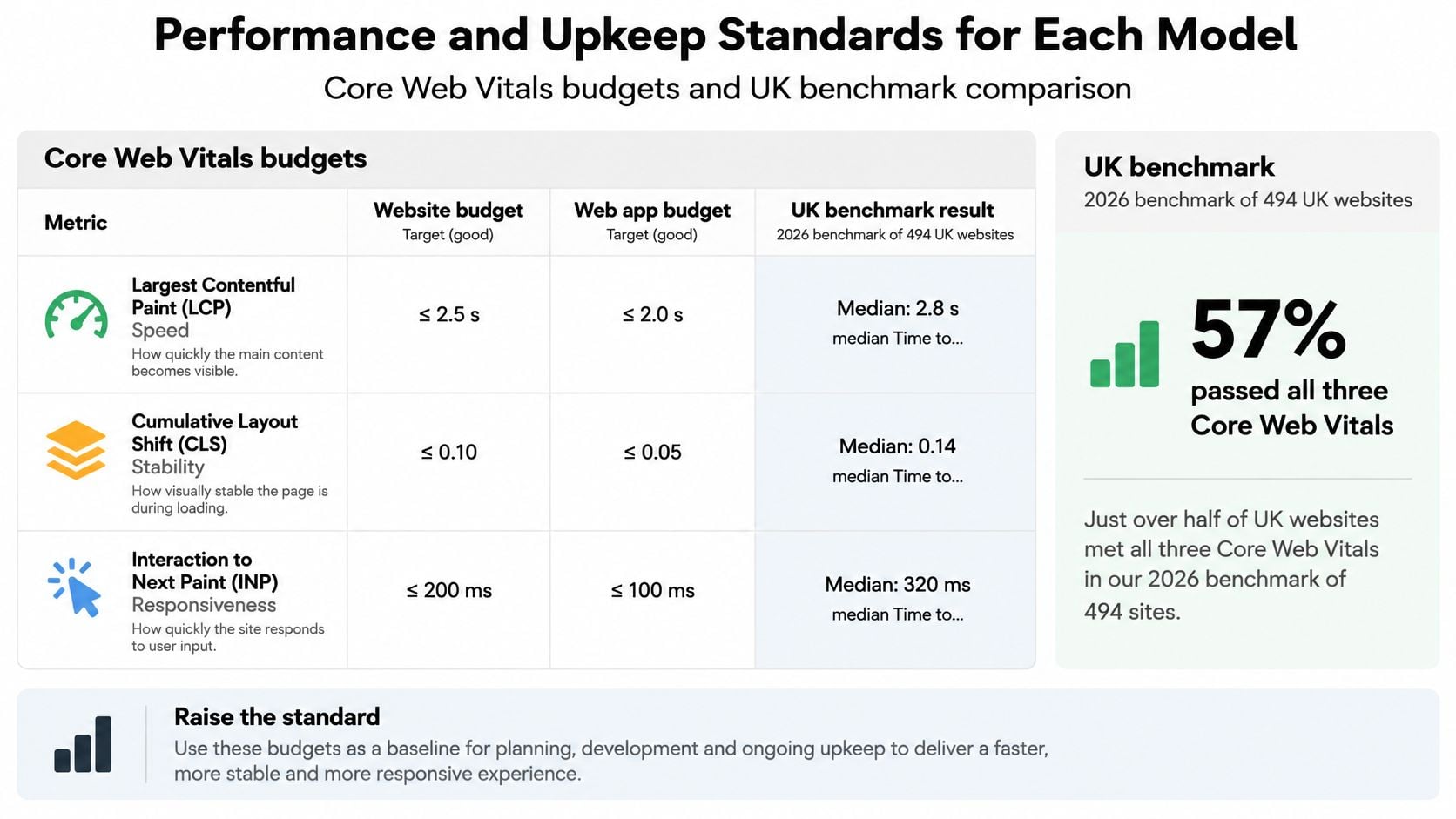
According to PerfDelta's 2026 UK website speed benchmark covering 494 UK websites, only 57% passed all three Core Web Vitals, with median UK values of 623 ms Time to First Byte, 3.4 MB page weight, and 1.4 MB of JavaScript. Across the individual metrics, 81% achieved a good Largest Contentful Paint result, 75% achieved a good Interaction to Next Paint, and 83% achieved a good Cumulative Layout Shift.
| Measure | Budget to aim for | UK benchmark result | Why a web app needs more care |
|---|---|---|---|
| Largest Contentful Paint | 2.5 seconds or less | 81% rated good | Large images and API-fed content can slow it |
| Interaction to Next Paint | 200 ms or less | 75% rated good | Every app interaction adds script work |
| Cumulative Layout Shift | 0.1 or less | 83% rated good | Dynamic panels and late-loading data move content |
| Time to First Byte | Below the 623 ms UK median | Median 623 ms | Server calls, authentication and databases add delay |
| Page weight | Well below the 3.4 MB UK median | Median 3.4 MB | Logged-in features add assets to every visit |
| JavaScript | Well below the 1.4 MB UK median | Median 1.4 MB | The bundle grows with each feature added |
Why performance degrades faster inside a web app
A content website has straightforward levers for speed. You pre-render or cache HTML pages, compress images into modern formats like WebP, serve fonts cleanly, and keep JavaScript minimal so the browser paints the main headline quickly.
A web app has to clear that first-load hurdle and then stay responsive after the page opens. Every filter click, calendar date switch, or saved form runs client-side code, hits an API endpoint, checks an authentication token, and re-renders parts of the screen. If your bundle balloons past the UK median JavaScript weight, mid-range Android phones stall on taps and push Interaction to Next Paint well past 200 ms.
For UK retailers and service businesses, set clear targets of Largest Contentful Paint under 2.5 seconds, Interaction to Next Paint at 200 ms or less, and Cumulative Layout Shift at 0.1 or less, then check those numbers with real-user field data rather than relying solely on desktop lab scores. Keeping both speed and security tight over time also needs a realistic budget for ongoing website maintenance costs, because unpatched plugins and neglected script libraries drag down both models.
Accessibility checks both models share
Fast pages still fail if visitors can't move through them cleanly. Treat WCAG 2.2 AA as an acceptance standard during discovery and test every release against six concrete checks across both public pages and logged-in journeys:
- Keyboard-only navigation: Tab through every menu, modal, filter, and checkout step without touching a mouse, making sure no pop-up traps focus.
- Visible focus states: Confirm that whichever button, link, or input is active shows a clear outline so keyboard users never lose their place.
- Semantic heading order: Use a logical H1-to-H3 hierarchy and genuine HTML buttons rather than clickable generic divs.
- Clear form error handling: Announce validation messages beside the relevant field in plain English instead of relying on a red border alone.
- Colour contrast: Check body copy, buttons, placeholder text, and status badges against WCAG contrast ratios so light grey labels don't disappear in daylight.
- Screen-reader output: Test dynamic notifications, cart totals, and logged-in account areas with NVDA or VoiceOver so state changes are spoken clearly.
The strongest architecture for most firms is progressive enhancement. Load clean, fast public content first so search engines and impatient mobile visitors get instant answers, then load heavier application scripts only when someone actively opens a configurator, booking flow, or account area.
Which Model Fits Your Type of Business
Choosing between a site and an app gets much clearer when you stop thinking about software categories and look at actual business models alongside the people buying from them.
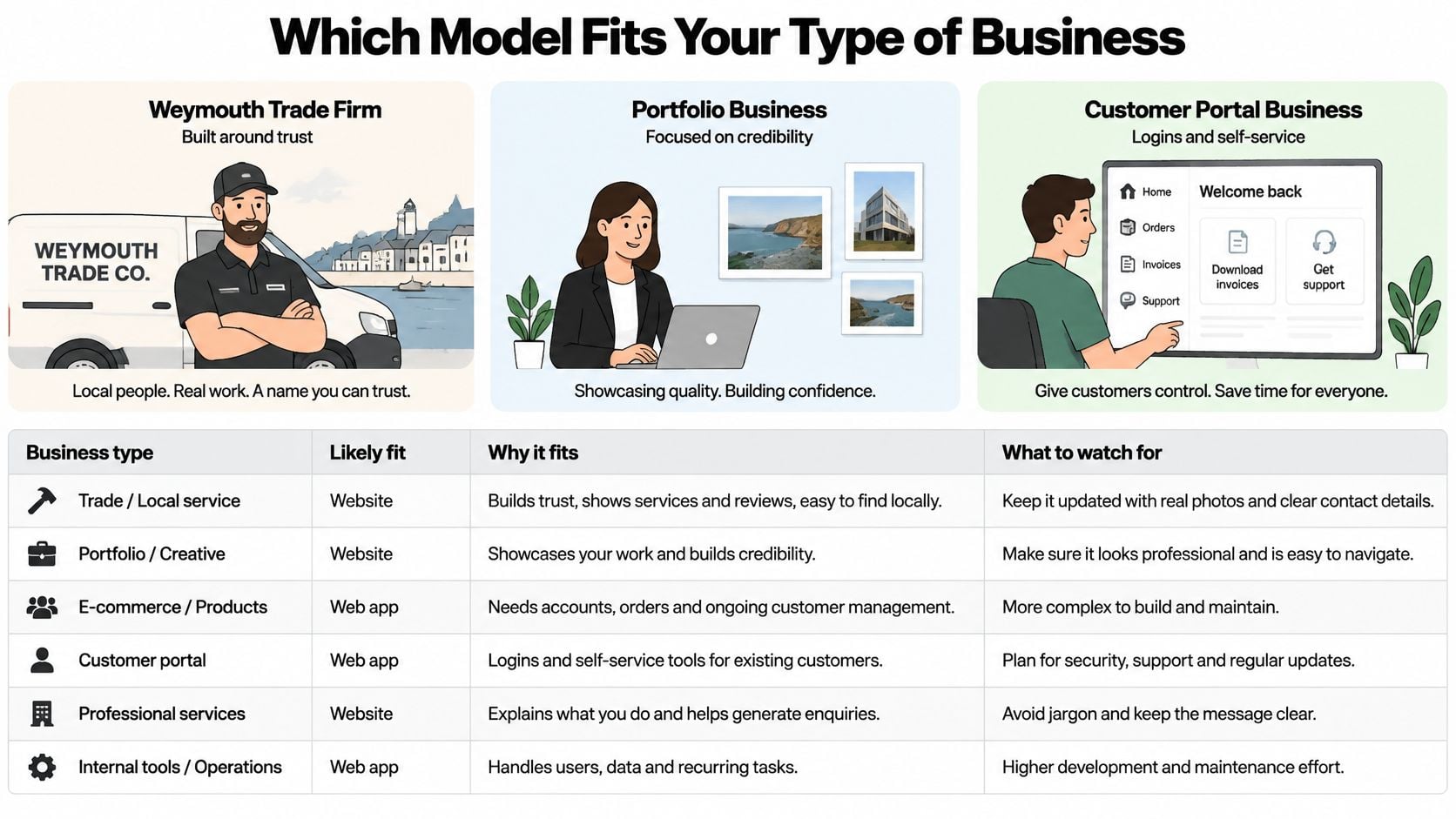
| Business type | Likely fit | Why it fits | Watch for |
|---|---|---|---|
| Local trade or professional services | Website | Customers need trust, location and contact details | Add booking only if demand is steady |
| Local retailer selling a small range | Website with WooCommerce | Catalogue and checkout on one site | Stock accuracy across channels |
| Booking or appointment business | Website plus a booking service, or a web app | Live availability and confirmations | Double-booking and reminder failures |
| Membership or community group | Members area or web app | Logins, renewals and restricted content | Assisted sign-up for members with low digital skills |
| Quoting or configurator firm | Web app | Calculations depend on each user's input | Keep the quote logic maintainable |
| Multi-channel seller or subscription box | Integrated website plus services | Shipping rules, subscriptions and marketplace links | Overbuilding and duplicated stock data |
Three everyday scenarios
Picture a Weymouth trade firm, say an electrical contractor covering domestic rewires and landlord safety certificates. Their customers aren't looking for a dashboard; they want proof of accreditation, tidy photos of recent work, local coverage details, and a phone number that works with one tap. A clean, fast website generates steady enquiries without adding a single login screen to maintain.
Now take an independent shop selling forty curated gifts and local food hampers online. Building a custom retail web app from scratch would burn through years of margin. Instead, running a website with WooCommerce keeps the product catalogue and checkout under one roof: at DesignStack, we integrate a client's WooCommerce store so orders appear in their dashboard as normal, connect merchant services such as Stripe and PayPal, and hand over a website editor that makes page and product edits quick regardless of technical skill level.
Next, consider a local membership association or community sports club where members renew annually, check restricted notices, and sign up for fixtures. Here, authenticated access earns its keep, though even then you don't always need bespoke code from day one. Clubs often adopt ready-made platforms like a Sports Club App for rosters and renewals, or weigh a browser-based members portal against dedicated mobile app development for small businesses when push notifications and daily engagement justify native iOS and Android builds.
Why digital exclusion changes the commercial maths
A web app can look slick in a boardroom demo and still lose you revenue if it locks out the customers most likely to buy. Research from Good Things Foundation's Digital Nation 2025 report shows that 29% of older people feel left behind as services move online, 33% of people who are offline find council and government services difficult to use, and 77% of people with no basic digital skills are over 65.
If your membership group, local shop, or professional practice serves older residents, rural households on patchy mobile data, or customers using older laptops, forcing an app-only booking or payment flow creates real friction. Offer plain-language forms, assisted sign-up by phone, simple account recovery, and a visible human contact route alongside any digital portal.
Match your digital model to your customers' actual skills and devices, not to the most impressive feature list in a pitch deck.
Choose Between a Website, a Web App or Both
Small firms are adopting digital tools faster than ever, which is why the brochure-site-only reflex is outdated too. According to the UK Government's Longitudinal Small Business Survey 2025, 74% of SME employers used technology or web-based software to sell to customers or manage the business in 2025, up from 69% in 2024 and 61% in 2023.
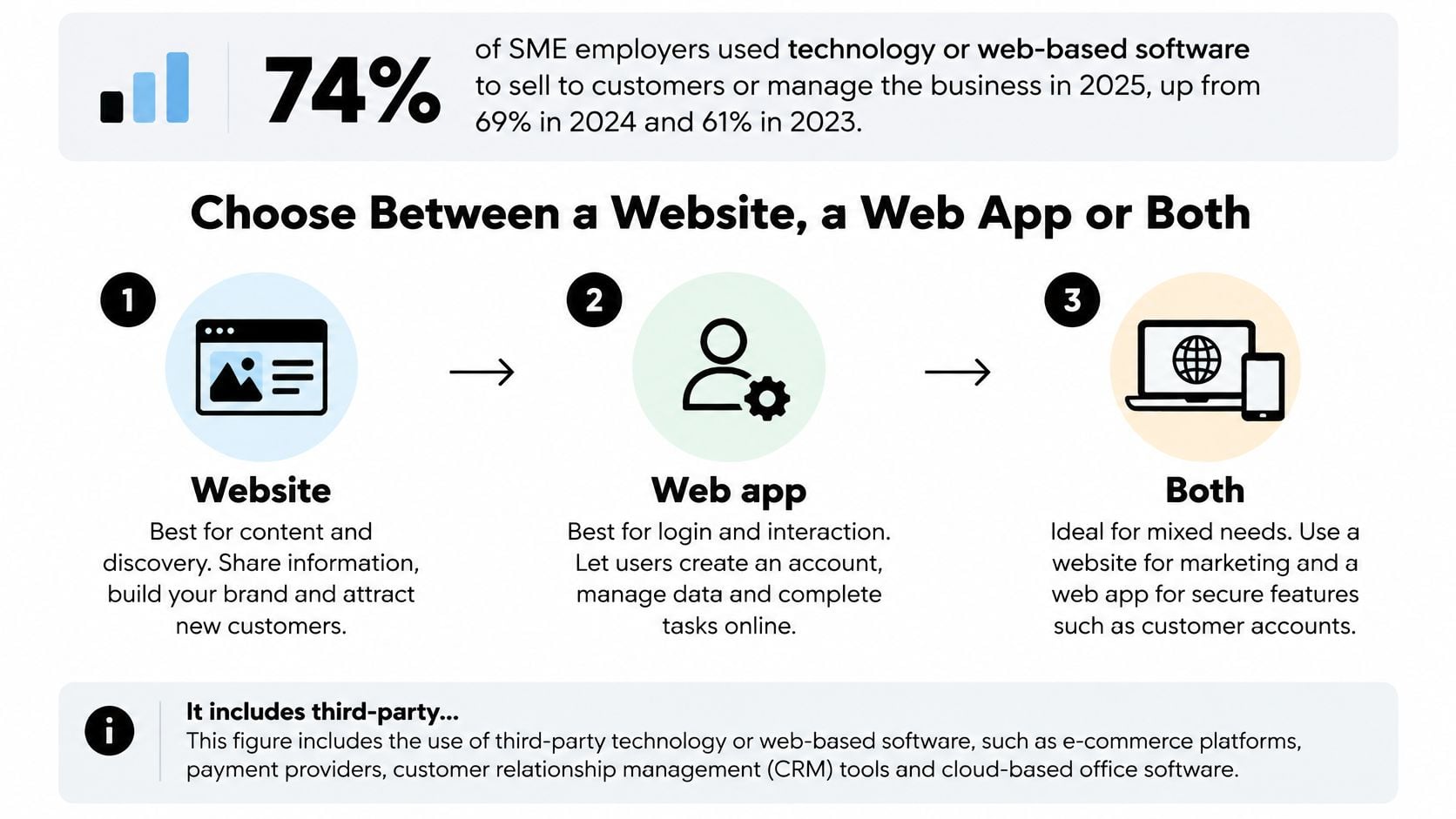
Read that figure carefully, though. It measures technology and web-based software broadly, including off-the-shelf accounting, booking, and eCommerce tools. It proves SMEs need working digital operations, not that every business should fund bespoke software engineering.
To decide cleanly, work through this six-step sequence before you commission anything:
- List the customer tasks: Write down every concrete action a visitor needs to complete on your site, from reading a service guide to booking or paying.
- Flag logins and live data: Circle only the tasks that require a user account, saved history, or real-time inventory.
- Audit existing plugins and SaaS tools: Check whether WordPress plugins, WooCommerce, booking widgets, or payment gateways already solve each circled task reliably.
- Isolate true competitive gaps: Reserve custom web app development strictly for workflows that differentiate your offer and can't be handled by an off-the-shelf tool.
- Price the full lifecycle: Add monthly licences, UK GDPR administration, backups, and staff support time to every custom component before approving it.
- Launch the public site first: Put a fast, conversion-focused website live, then watch analytics and customer enquiries to see which interactive tasks people all demand.
Why the hybrid path wins first for most SMEs
In practice, that sequence puts most small businesses on a hybrid architecture: a strong public front door backed by proven third-party tools. At DesignStack, we build responsive WordPress websites that stay easy for your team to manage, and we integrate eCommerce setups with external marketplaces such as eBay and Amazon so selling across channels doesn't demand a bespoke app from scratch. Working with a local team also keeps those scope decisions grounded through clearer communication, in-person meetings, and faster response times as your priorities evolve.
Put your answers from earlier together to make the final call. Mostly "no" answers on logins, saved data, and staff admin screens mean a well-crafted website is the right tool. Mixed answers point straight to a hybrid setup where your website handles discovery and trust while proven integrations handle bookings, checkout, or subscriptions. Only when almost every answer is "yes", and the software itself is the core product your business runs on, does a full web app justify the build and maintenance spend.
Overbuilding is almost always the most expensive mistake a growing firm makes online. A fast, accessible website paired with two or three reliable integrations will regularly outperform a heavy custom app when reach, search visibility, and customer trust matter more than deep personalisation.
Take one practical step this week. Write down the top three jobs a customer must finish on your site, underline any that really require a login, and ask every prospective agency for a fixed-cost proposal that spells out exact scope, hosting, automated backups, and post-launch support side by side.
Whether you need a fixed-cost responsive WordPress website, a WooCommerce store linked to Stripe, PayPal, eBay, or Amazon, reliable SSD hosting, or a bespoke online system or native mobile app, our team in Weymouth can help you scope the right build without paying for complexity you don't need. Bring us your three customer tasks and we'll give you a straight view on whether a website, a hybrid setup, or an application fits your budget best. Visit DesignStack to explore our work and start a conversation about your next project.