
How to Write a Website Brief That Gets Results
You've been asked to get a new website moving. The old one is difficult to update, the leadership team wants a more credible online presence, and an agency is waiting for enough information to prepare a proposal. Someone opens a generic template, adds “modern design”, “mobile-friendly” and “SEO”, then sends it over.
That document may look complete, but it leaves the decisions that control cost, delivery and risk unresolved. A useful website brief explains why the project exists, what must be delivered, who owns each decision, and what happens after launch. It gives the agency enough context to recommend the right solution, rather than guessing what a list of pages might cost.
Table of Contents
- Why Your Website Brief Is the First Step to Success
- Understanding the Core Principles of Effective Briefing
- Structuring Your Website Brief for Maximum Clarity
- Incorporating Mobile-First and SEO Requirements
- Avoiding Common Pitfalls in Website Briefing
- Creating Your Ultimate Website Brief Checklist
Why Your Website Brief Is the First Step to Success
A vague brief rarely fails on the first day. Everyone is enthusiastic, the ideas sound reasonable, and nobody wants to slow the project down with awkward questions about budget, content ownership or technical constraints. The trouble starts later, when “a new website” turns into competing interpretations.
The director expects a lead-generation site. The marketing manager assumes the agency will rewrite every page. The internal IT team believes it will host the finished build. The agency has priced a straightforward rebuild, but the client later reveals that the site must preserve search visibility, connect to a booking platform and migrate years of content. Each assumption becomes a change request.

A website brief is a control document, not a formality. UK government project guidance describes a Project Brief as an early document that defines objectives, scope, deliverables, business benefits, assumptions, constraints, risks, stakeholders, resources, and outline time and cost estimates. It also frames the brief as the document that states what the project is expected to achieve and aligns stakeholders before delivery begins. UK government project guidance provides a useful foundation for applying that discipline to a web project.
Turn opinions into decisions
The brief should make disagreements visible while they're still cheap to resolve. “We need a premium feel” needs a practical interpretation, such as a clearer service hierarchy, stronger proof, considered photography and a defined approval process. “We want more enquiries” needs a description of the enquiry types that matter, the actions visitors should take and the evidence the team will use to judge progress.
It also helps when choosing an agency. A focused guide to choosing a web design agency can help you assess fit, communication and delivery experience, but the quality of the comparison still depends on the information each supplier receives.
Practical rule: If a requirement affects price, timing, content, technology or approval, put it in the brief.
The strongest briefs don't pretend every answer is known. They separate confirmed requirements from open questions, identify assumptions, and ask agencies to explain their recommendations. That creates a more productive conversation than asking several suppliers to respond to an attractive but undefined vision.
Understanding the Core Principles of Effective Briefing
The most reliable way to write a website brief is to borrow the structure of a proper project brief. The UK government guidance referenced above expects early documentation to cover the project's purpose, boundaries, outputs, benefits, assumptions, constraints, risks, stakeholders, resources and indicative time and cost. That structure works because it deals with both what the team wants to make and the conditions under which it must be delivered.
Start with the problem, not the homepage. Describe what currently prevents the organisation from serving its audience or meeting its commercial objective. A slow content workflow, unclear service navigation, poor accessibility, outdated integrations or an unsafe publishing process may matter more than a visual refresh.
Define the boundaries before the solution
Scope is where a brief becomes useful to a supplier. State what's included, what's excluded and what still needs investigation. If the project is a first release, explain the smallest viable set of features that must work at launch. A practical explanation of how to scope MVP features can help teams distinguish essential functionality from attractive additions that can wait.
Use four categories:
- Objectives: The business result the website must support.
- Deliverables: The tangible outputs, such as research, information architecture, wireframes, visual design, development, migration, testing, training and documentation.
- Constraints: Existing brand rules, procurement requirements, accessibility obligations, integrations, internal availability or a fixed launch event.
- Risks and assumptions: Dependencies that could change the plan, including late content, uncertain data quality, unavailable system access or unclear ownership.
Benefits should be expressed in terms the organisation can recognise. “A better website” is difficult to approve. “A clearer route for prospective clients to understand services and make an informed enquiry” gives designers, writers and developers a shared direction.
Build in governance
Name the project sponsor, day-to-day contact, subject-matter reviewers and final approver. If several departments can request changes but only one person can approve them, say so. Include how feedback will be collected, how many review stages are expected and what happens when stakeholders disagree.
The guidance also supports a milestone-led sequence, with the brief issued before procurement, supplier responses, interviews or pitches, a contract decision, project kick-off, delivery milestones and a target launch. Giant Digital's UK website brief guidance is a useful complementary reference for shaping those dates into a supplier-ready process.
Structuring Your Website Brief for Maximum Clarity
A good brief should be easy for a busy agency team to scan and detailed enough for its specialists to price responsibly. Put the most important context near the beginning, then move from business need to audience, scope, delivery and operational detail.
Use a decision-friendly order
A practical structure looks like this:
- Project overview: Summarise the organisation, the current situation and the reason for change.
- Problem and objectives: Explain what isn't working and what the new site must help achieve.
- Audience: Describe priority user groups, their needs, knowledge level, concerns and likely tasks.
- Scope: List the parts of the website and service that are included, plus explicit exclusions.
- Content: State what exists, what needs rewriting, who supplies imagery, and who approves each content type.
- Functionality: Describe forms, search, ecommerce, bookings, log-in areas, integrations, multilingual needs or other required behaviour.
- Design direction: Provide brand assets, accessibility expectations, competitor references and examples of useful patterns.
- Technical requirements: Record CMS preferences, hosting expectations, analytics, security, environments and support.
- Timeline and procurement: Give the brief issue date, response window, decision date, build start, content sign-off, testing and intended go-live.
- Response criteria: Tell suppliers how proposals will be assessed and what their response must contain.
A sitemap is helpful, but it isn't a complete information architecture. List the main user journeys as well. A visitor looking for a service, checking eligibility, comparing options or submitting an enquiry may cross several page types, and those journeys reveal requirements that a page list hides.
Make deliverables testable
Avoid “provide design and development”. Ask for named outputs, such as approved wireframes, a component library, populated templates, redirect mapping, analytics configuration, editor training and launch support. For internal teams, even a folder structure diagram can clarify where copy, imagery, brand files and approvals should live before production begins.
A wireframe in web design is also valuable when it answers a specific question about hierarchy, content priority or interaction. It shouldn't become a decorative deliverable that creates another approval layer without resolving anything.
| Weak wording | More useful wording |
|---|---|
| Modern, engaging website | Clear routes for priority audiences to understand services and enquire |
| SEO-friendly build | Agreed content structure, metadata approach, redirects and technical SEO responsibilities |
| Easy to manage | Named editors can create, update, review and publish agreed content types |
| Launch quickly | Milestones with owners for content, approvals, testing and release |
Include a budget range if you can. It helps agencies distinguish between a lean solution and a more involved discovery, content or integration programme. If you can't provide a figure, explain the procurement constraints and ask suppliers to show options and assumptions rather than hiding uncertainty inside a single total.
Incorporating Mobile-First and SEO Requirements
A website brief that treats mobile and search as finishing touches is already behind the way people use public websites. GOV.UK reported that 61% of monthly visits were on mobile by December 2025, and that around two-thirds of visits came from external search engines. Those figures are documented in the GOV.UK account of how people used the service in 2025.
That evidence changes the brief. “Responsive” shouldn't be a checkbox. Ask how navigation, tables, forms, filters, media and consent interfaces should behave on smaller screens. Identify the content people need first, then require the agency to demonstrate how that priority survives different viewport sizes and input methods.
Compare the real requirements
| Superficial brief item | Requirement worth specifying |
|---|---|
| Mobile-friendly | Mobile layouts, touch interactions, readable content hierarchy and usable forms |
| SEO included | Search research, information architecture, migration plan, metadata, structured content and measurement responsibilities |
| Fast website | Performance targets to be agreed, image handling, hosting assumptions and testing method |
| Good user experience | Priority journeys, accessibility expectations, error handling and evidence used in testing |
The UK market is crowded. The brief notes roughly 11.1 million .co.uk domains and that 78% of UK small business owners already have a website, based on the same UK-oriented evidence supplied for this guidance. For a small business, a brief therefore needs sharper differentiation than “look professional”. Explain which audience you want to attract, what alternatives they currently consider and why they should choose you.
SEO responsibilities must be allocated. Who researches topics? Who writes titles and descriptions? Who checks internal links, redirects and indexability? Who owns Search Console and analytics access? Ask for a baseline review of the existing site, including valuable pages, rankings, conversions and technical liabilities, without assuming that every old URL deserves to survive.
Watch the explanation below for a practical introduction to responsive principles.
Finally, define what “success” means after launch. UK website guidance recommends setting success measures, budget and stakeholder sign-off early, rather than leaving judgement to personal preference. The guide to responsive web design can help non-specialists use the right language when discussing device behaviour with suppliers.
Avoiding Common Pitfalls in Website Briefing
Most templates ask about the logo, colours, page count and desired launch date. Those details have a place, but they rarely cause the worst handover problems. The expensive surprises usually sit in the operational layer, where the new site meets old URLs, existing systems, hosting arrangements and the people responsible for keeping everything healthy.
Don't confuse page count with scope
A page count says little about complexity. A templated article, an interactive directory, a membership area and a product catalogue may each count as one page while requiring very different design, content and development work. Describe templates, content types, user actions and integrations instead.
Define conversion evidence, too. If the objective is more qualified enquiries, specify what counts as qualified, which forms or calls need tracking, and who will review the data. If the objective is self-service, identify the tasks visitors should complete without contacting staff. UK-oriented guidance highlights the need to ask what proof will support conversion, what success should look like in the first 90 days, and who owns approval and content supply. This practical UK small-business briefing guidance explores that gap in generic templates.
Treat launch as a transfer of responsibility
For a redesign or replacement, include an operational schedule covering:
- Migration inventory: Identify pages, files, users, forms, databases and integrations that need review.
- Redirect ownership: State who maps old URLs to new destinations, tests redirects and monitors errors after release.
- CMS administration: Name the organisation that owns licences, administrator access, editorial roles and recovery procedures.
- Hosting and support: Record who provides hosting, security updates, backups, monitoring, incident response and routine maintenance.
- Tracking protection: Confirm how analytics, consent, tag management and access controls will be preserved or replaced.
- Sign-off rules: Set out who approves content, design, accessibility, security, user acceptance and launch.
A migration isn't complete because the new homepage loads. It's complete when useful content has a destination, critical journeys work, forms reach the right people, tracking is understood and the internal team knows what it owns. The website accessibility guidance is a useful reminder that accessibility needs to inform design, content, development and testing, not just appear as a statement in the footer.
The handover is part of the product. If nobody can explain who maintains the site on the first Monday after launch, the brief is unfinished.
Ask each agency to state what it needs from you and what it will leave behind. That simple request exposes hidden dependencies early, especially when an incumbent supplier controls hosting, domains, analytics or content systems.
Creating Your Ultimate Website Brief Checklist
Before sending a brief to agencies, ask whether another person could understand the project without attending your internal meetings. The document doesn't need to predict every design decision, but it should remove ambiguity from the decisions that affect price, risk and ownership.
Project and audience
- Project context: Explain who you are, what you provide and why the website needs to change.
- Problem statement: Describe current frustrations, limitations and missed opportunities.
- Business objectives: Connect the website to a clear organisational outcome.
- Priority audiences: Record who matters most, what they need and which journeys take priority.
- Evidence: Provide relevant analytics, search data, user research, enquiries or service feedback where available.
- Success measures: State how the team will judge the site after launch and who reviews the evidence.
Scope and delivery
- Site structure: Include the proposed sitemap, content types and important user journeys.
- Features: Separate essential launch functionality from later enhancements.
- Content plan: Assign responsibility for copy, editing, photography, video, translation and approval.
- Design direction: Supply brand assets, examples, constraints and accessibility expectations.
- Timeline: Include brief issue, supplier responses, decision, kick-off, content sign-off, testing and go-live.
- Proposal criteria: Explain how you'll compare approach, experience, cost, assumptions and support.
Technical and operational checks
- Migration: List existing URLs, files, integrations, forms and data that require investigation.
- SEO continuity: Request redirect planning, content retention decisions, metadata ownership and measurement access.
- CMS ownership: Confirm administrator roles, training, licences, publishing workflow and recovery responsibility.
- Hosting: Decide whether the agency, your IT team or another supplier will provide and manage it.
- Post-launch support: Define maintenance, security, backups, monitoring, fixes and response expectations.
- Approval authority: Name the final decision-maker and document how conflicting feedback will be resolved.
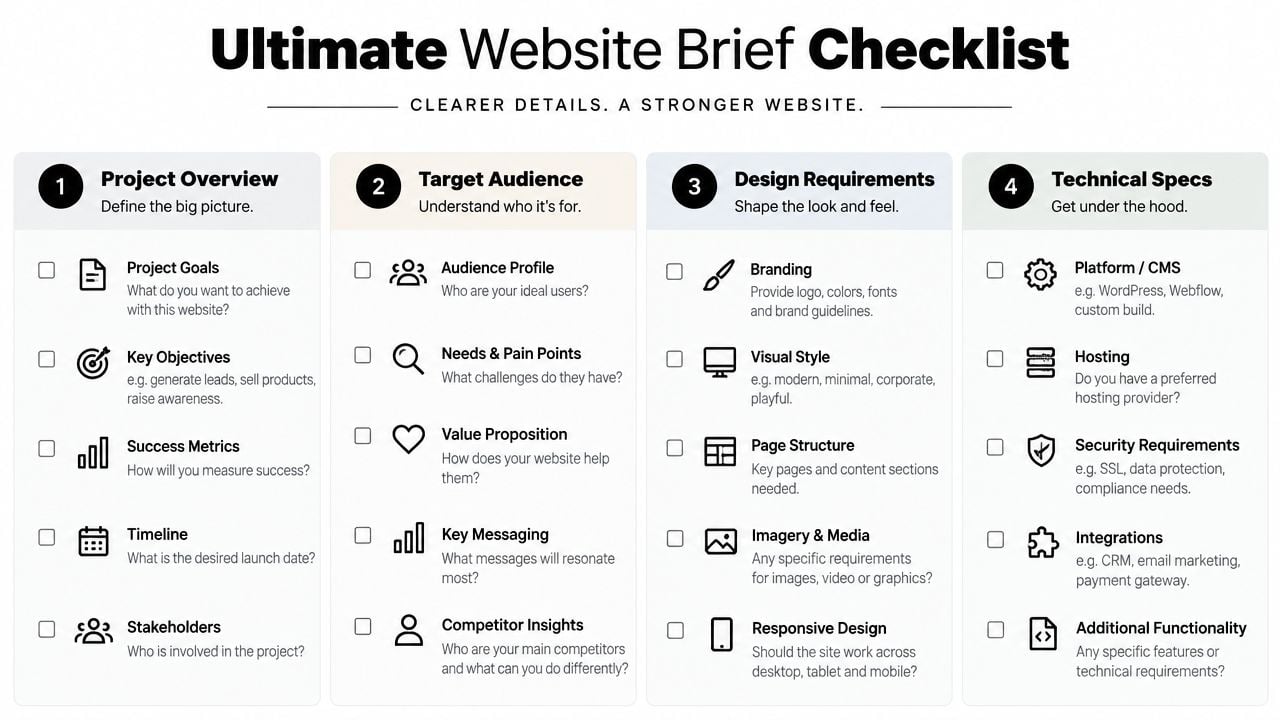
Keep the finished brief concise enough to use, but attach the detail suppliers need, such as content inventories, brand guidelines, existing reports, technical documentation and known URL lists. The website launch checklist can help you turn the final review into an accountable release process rather than a last-minute collection of approvals.
DesignStack can help turn a loose website idea into a practical project brief, then support responsive WordPress, ecommerce or custom web delivery alongside SEO guidance, hosting and post-launch updates. Visit DesignStack to discuss your objectives, migration concerns and ownership requirements before requesting proposals.