

What Is Website Maintenance and Why It Matters in 2026
Website maintenance is the ongoing work that keeps a site secure, available, accurate, accessible and fast, and 43% of UK businesses, approximately 612,000 organisations, reported a cyber security breach or attack in the previous 12 months. It isn't a one-off task after launch. It combines software updates, security monitoring, backups, performance checks, content accuracy, accessibility upkeep and SEO housekeeping.
A Dorset business owner usually notices the problem when a customer does. A booking form stops sending enquiries, a payment button fails after a plugin update, or a service page still shows last season's opening hours. The site may look perfectly normal in the browser, while the part that generates business has stopped working.
That's why website maintenance should be treated as an operational discipline, much like maintaining laptops, vehicles or payment equipment. Some work prevents faults. Other work responds when something has already gone wrong. Both belong in the plan.
Table of Contents
- The Real Meaning of Website Maintenance
- The Core Tasks That Keep a Website Healthy
- Schedules, SLAs and the Difference Between Prevention and Response
- Why Maintenance Is a Risk Management Function
- Costs, Pricing Models and DIY Versus Agency
- A Practical Maintenance Checklist for Small Businesses
- Choosing a Local Agency You Can Trust
The Real Meaning of Website Maintenance
A café in Dorset once discovered that its online booking form had stopped working the night before a bank holiday. The website loaded, the menu looked fine and the contact page appeared normal. Nobody had tested the form for three months, so enquiries failed during one of the busiest trading periods of the year.
That is the difference between a website that is online and a website that is being maintained.
Website maintenance includes:
- Software updates: Keeping the CMS, plugins, themes, server software and dependencies current.
- Security monitoring: Watching for suspicious activity, malware, failed logins and vulnerable components.
- Backup and recovery work: Creating copies, storing them away from the live site and checking that restoration works.
- Performance checks: Reviewing load times, hosting behaviour, image delivery, caching and browser compatibility.
- Content accuracy: Updating prices, opening times, services, team details, policies and seasonal information.
- Accessibility upkeep: Checking that new pages, images, forms and third-party components remain usable.
- SEO housekeeping: Fixing broken links, validating redirects, checking sitemaps and keeping structured data accurate.
A content management system, such as WordPress, makes publishing easier, but it also introduces moving parts. If you're responsible for a content management system, you need to understand which components are being updated, who can change them and what happens if an update causes a conflict.
Monitoring isn't the same as maintenance
Uptime monitoring tells you that a page responds, or that it doesn't. It won't necessarily tell you that a form no longer sends emails, a checkout rejects payments, a cookie banner has stopped recording consent or a search engine is seeing the wrong canonical URL.
Active maintenance involves checking the functions that matter to the business. That means submitting forms, testing key journeys, reviewing logs, checking backups and examining changes before they reach the live website.
Practical rule: If a failure could cost an enquiry, order, booking or reputation, it needs an owner and a test, not just a monitoring notification.
Skipped tasks create technical debt. An old plugin may continue working for months, but it becomes harder to update safely when several other components have also fallen behind. A forgotten administrator account, an expired domain renewal method or an untested backup can turn a small fault into a long recovery.
For a useful comparison with broader technology upkeep, the SMB IT maintenance guide provides helpful context on why scheduled checks and clear ownership matter. The same principle applies to a small business website: prevention needs a routine, and repairs need a route to the right person.
The Core Tasks That Keep a Website Healthy
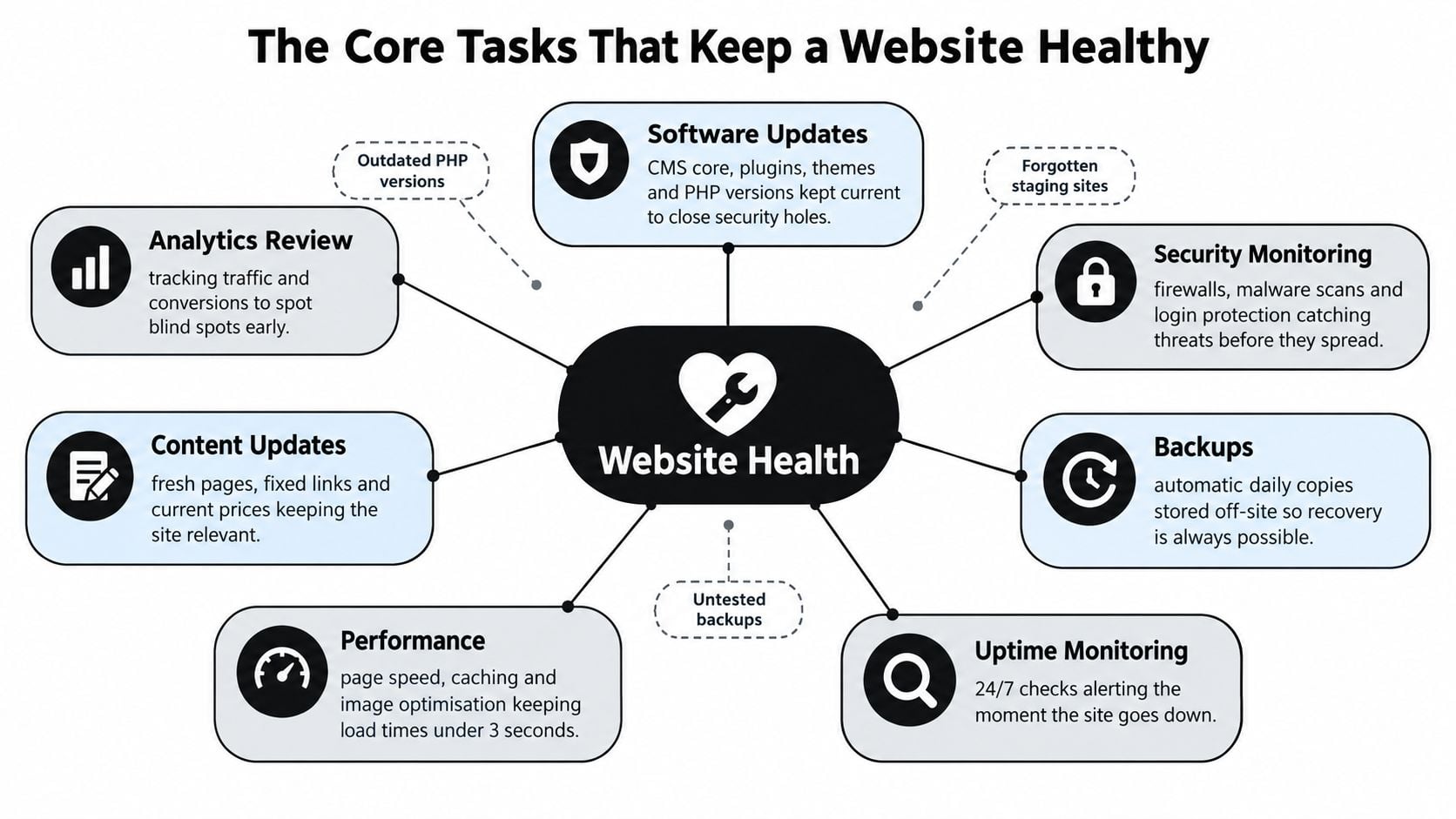
A healthy website needs two kinds of work: scheduled prevention and a clear response when something fails. The practical tasks fall into seven categories. They overlap, but each protects against a different type of failure.
Software updates
Maintain the CMS core, plugins, themes, PHP version and connected services. Updates often fix security weaknesses and compatibility problems, but applying them directly to a busy live site creates avoidable risk. A staging copy gives someone a safe place to test menus, forms, checkout, analytics and page layout before release.
WordPress sites need particular care when an administrator installs a plugin and then forgets it. An abandoned plugin may keep running without a clear owner, increasing the maintenance burden and making later conflicts harder to diagnose. Record what is installed, who owns it and what happens if it must be removed.
Backups and recovery
A backup only helps when it contains the required files and can be restored. Use the 3-2-1 approach, with three copies on two different types of storage, including one copy held off site. The exact setup depends on the hosting provider and platform, but the separation matters.
Schedule backups around how often the website changes. Keep them separate from the live server and test restoration rather than relying on a successful job notification. Someone should restore a copy, check the site and record what worked. That record becomes useful during an incident, when there is little time to guess.
Security monitoring
Security work includes malware scanning, firewall rules, login protection, administrator access reviews and credential rotation. Uptime alerts have a place, but they will not identify every threat. Check for suspicious file changes, repeated failed logins and vulnerable software as part of the same routine.
The UK Government's Cyber Security Breaches Survey 2025 reports that 37% of businesses experienced phishing attacks in the previous year and that ransomware affected 3% of businesses. Smaller firms are exposed too, often with fewer people available to spot and contain a problem. Keep an incident contact route and decide in advance who can disable an account, restore a backup or contact the hosting provider.
Performance control
Review image sizes, caching, hosting response, database health and unused scripts. Test representative mobile journeys, not just the homepage in a desktop browser. Google's mobile-site research (Google Mobile Site Speed Playbook) reports that 53% of users leave a mobile page when it takes more than three seconds to load, and cites findings that pages loading one second faster achieved up to a 27% increase in mobile conversion rates. The research is global, but the technical causes affect UK visitors too. Use this practical guide on how to improve website loading speed when checking the main causes.
Content accuracy
Check service descriptions, prices, opening times, contact details, team profiles, stock images and downloadable documents. A broken link is usually quick to repair. An old price, incorrect availability or outdated contact detail can do more harm because visitors may trust the page and act on it.
SEO housekeeping
Review redirects after URL changes, sitemap health, indexation signals, schema validation, metadata and important internal links. SEO maintenance means keeping search engines and visitors pointed towards the right page, with a clear purpose and no dead ends. Check these items after significant content, template or platform changes rather than treating them as a separate one-off exercise.
Accessibility and compliance
Accessibility requires repeated checks because ordinary content changes can introduce problems. Staff may upload images without useful alternative text, add a low-contrast promotional banner or install a component that changes keyboard behaviour.
The Government Digital Service tested 1,203 public-sector websites and 21 mobile apps between January 2022 and September 2024, identifying 26,171 accessibility issues. Only 13,882, or 55.3%, were fixed during the monitoring cycle, while 68% of organisations had fixed findings or established short-term plans after approximately 12 weeks, as detailed in the UK accessibility monitoring report.
For a UK business, routine maintenance should include automated scans, keyboard testing, assistive technology checks on important journeys, contrast testing and an accurate accessibility statement. Review cookie consent behaviour and privacy notices after analytics or advertising tools change. Each task needs an owner, a record and a defined route for urgent faults.
Schedules, SLAs and the Difference Between Prevention and Response
A maintenance schedule should reflect how the website is used. A brochure site with occasional enquiries has different exposure from an eCommerce site taking orders throughout the day. Neither should rely on an annual check.
A workable maintenance rhythm
Weekly work should include reviewing uptime and security alerts, checking recent backups and testing one important form or customer journey. If the site takes bookings or payments, rotate the test through the key paths rather than testing only the homepage.
Monthly work should include updates on staging, a broken-link sweep, a performance check with Lighthouse or PageSpeed Insights, and a review of analytics for unusual changes. Release updates in a controlled window, record what changed and keep a rollback route.
Quarterly work is deeper. Audit the plugin and integration list, review user permissions, check SSL and domain renewal arrangements, inspect the database, sample accessibility on key pages and examine whether old content still matches the business.
Annual work should include a disaster recovery exercise, an SEO content review, a design and mobile usability assessment, a compliance review and a renegotiation of hosting or support arrangements where the current service no longer fits.
This cadence isn't a rigid law. A campaign-heavy retailer may need more frequent checks, while a small professional services firm may prioritise content and enquiry forms. The important point is that every task has an owner, evidence of completion and a route for escalation.
Prevention and response are separate disciplines
Preventive maintenance is scheduled and predictable. Incident response begins when the site is down, compromised or no longer completing an important function. A business needs both.
Monitoring data covering 38,544 websites and 1.8 million confirmed outages found that 61.4% of sites went down at least once between March and December 2025. The median outage lasted 1.9 minutes, 98.6% were resolved within an hour, and 68% began outside the standard 9-to-6 working day, according to the website outage analysis. That makes out-of-hours ownership a practical question, not a theoretical one.
| Task | Frequency | Owner | Response target |
|---|---|---|---|
| Uptime and security alert review | Weekly, with automated alerts | Site owner or agency | Immediate acknowledgement for a critical alert |
| Software updates and staging tests | Monthly, or sooner for urgent patches | Developer or agency | Planned release window |
| Backup verification | Weekly review and scheduled restoration tests | Hosting provider or technical owner | Escalate a failed backup the same working day |
| Accessibility and content review | Quarterly | Site owner with specialist support | Prioritise barriers affecting key journeys |
| Major outage or checkout failure | As required | Named incident lead | Written critical incident SLA |
| Non-urgent content or layout defect | As required | Site owner or support team | Agreed queue and review date |
A sensible SLA states who receives the alert, who can access the site, who can restore a backup and what the business should expect outside office hours. It shouldn't promise instant resolution if nobody has the authority or access to provide it.
Hosting choice also affects monitoring, support and recovery, so use this guide on how to choose a web hosting provider when reviewing the technical foundation.
Why Maintenance Is a Risk Management Function
A customer can complete a checkout on Monday and meet a broken payment process on Tuesday. The homepage may still load, so the problem remains invisible until someone reports it. A contact form can show a successful submission while messages fail to reach the inbox.
Each failure needs a different response. Defacement calls for containment and a security investigation. A checkout fault needs the business owner involved immediately. A silent form failure needs a test submission, mail delivery checks and a review of recent changes.
The Cyber Security Breaches Survey 2025 found that 43% of UK businesses reported a breach or attack in the previous 12 months, down from 50% in 2024. The remaining exposure is enough reason to treat maintenance as risk control, rather than cosmetic editing.
Measure detection and recovery
Two operational measures make response performance easier to manage:
- Mean time to detect, or MTTD: the time between a failure occurring and the team or monitoring system identifying it.
- Mean time to resolve, or MTTR: the time needed to restore the affected service or apply a safe workaround.
A small business does not need an elaborate dashboard. Record when an alert arrived, who acknowledged it, what action was taken and when the affected customer journey worked again. Those records show whether an SLA is realistic or merely reassuring wording.
| Incident type | Detection target | Resolution target | Business impact if missed |
|---|---|---|---|
| Site unavailable | Automated alert as soon as possible | Restore service under the critical SLA | Lost enquiries, bookings and confidence |
| Suspected compromise | Security alert and human review | Contain first, then remediate safely | Data exposure, reputational damage and extended downtime |
| Payment or booking failure | Test transaction or customer report | Escalate immediately to the incident lead | Abandoned purchases and missed appointments |
| Form delivery failure | Scheduled form test and inbox review | Repair and verify with a real submission | Leads can disappear without visible evidence |
| Broken content or layout | Routine review or user report | Resolve through the normal support queue | Confusion, reduced trust and weaker journeys |
Prevention reduces the chance of failure. Incident response limits the cost when prevention falls short. Both need named owners, access permissions and a written route from alert to recovery. Without those details, an SLA can promise a response that nobody has the authority or access to deliver.
A maintenance plan is not insurance in the legal sense, but it serves a similar operational purpose. Keep recovery instructions with the maintenance record, including backup access, hosting contacts and the person who can approve a change. Before moving hosting, domains or major site structures, review this website migration SEO checklist to identify risks that can affect visibility as well as availability.
Costs, Pricing Models and DIY Versus Agency
There isn't one honest price for website maintenance. The cost depends on the platform, integrations, publishing frequency, security requirements, content workload and response expectations. A site that only needs occasional technical checks should not be sold the same package as a store with complex checkout and frequent campaigns.
Three common buying models
Ad-hoc hourly support gives you control over the work you request. It suits occasional content edits or a known technical repair, but it can be slow during an outage and encourages owners to postpone preventive tasks.
A fixed monthly retainer creates a regular slot for updates, backups, monitoring and agreed support. It makes budgeting easier, although you need to check whether unused time carries over and whether urgent work sits inside or outside the agreement.
A bundled hosting and care package can combine hosting, staging, security monitoring, backups, updates and technical assistance. It reduces the number of suppliers involved, but ask what happens if you leave, where backups are stored and whether you receive administrator access.
Published prices vary too widely to treat a generic figure as a promise. Ask for a written scope rather than comparing monthly totals alone. The hidden DIY cost includes staff time, tool subscriptions, testing, documentation and the opportunity cost of leaving the site unattended while the owner handles customers.
| Model | Typical monthly cost | Average response time | Coverage limits |
|---|---|---|---|
| DIY | Internal time plus tools | Depends on staff availability | Limited by skills, access and out-of-hours cover |
| Freelance support | Quoted by task or agreement | Depends on availability and SLA | May rely on one person for all knowledge |
| Agency or managed care | Quoted by scope and response requirement | Defined by contract | May exclude new features, content volume or third-party failures |
The practical rule is simple. Keep maintenance in-house only if someone has protected time, understands staging and backups, and can take responsibility when an update fails. Otherwise, outsourcing is often cheaper than paying for an avoidable emergency, provided the supplier documents its work and gives you a clean exit route.
Review the distinction between routine support and larger remedial work in this guide to website maintenance cost before asking for proposals.
A Practical Maintenance Checklist for Small Businesses
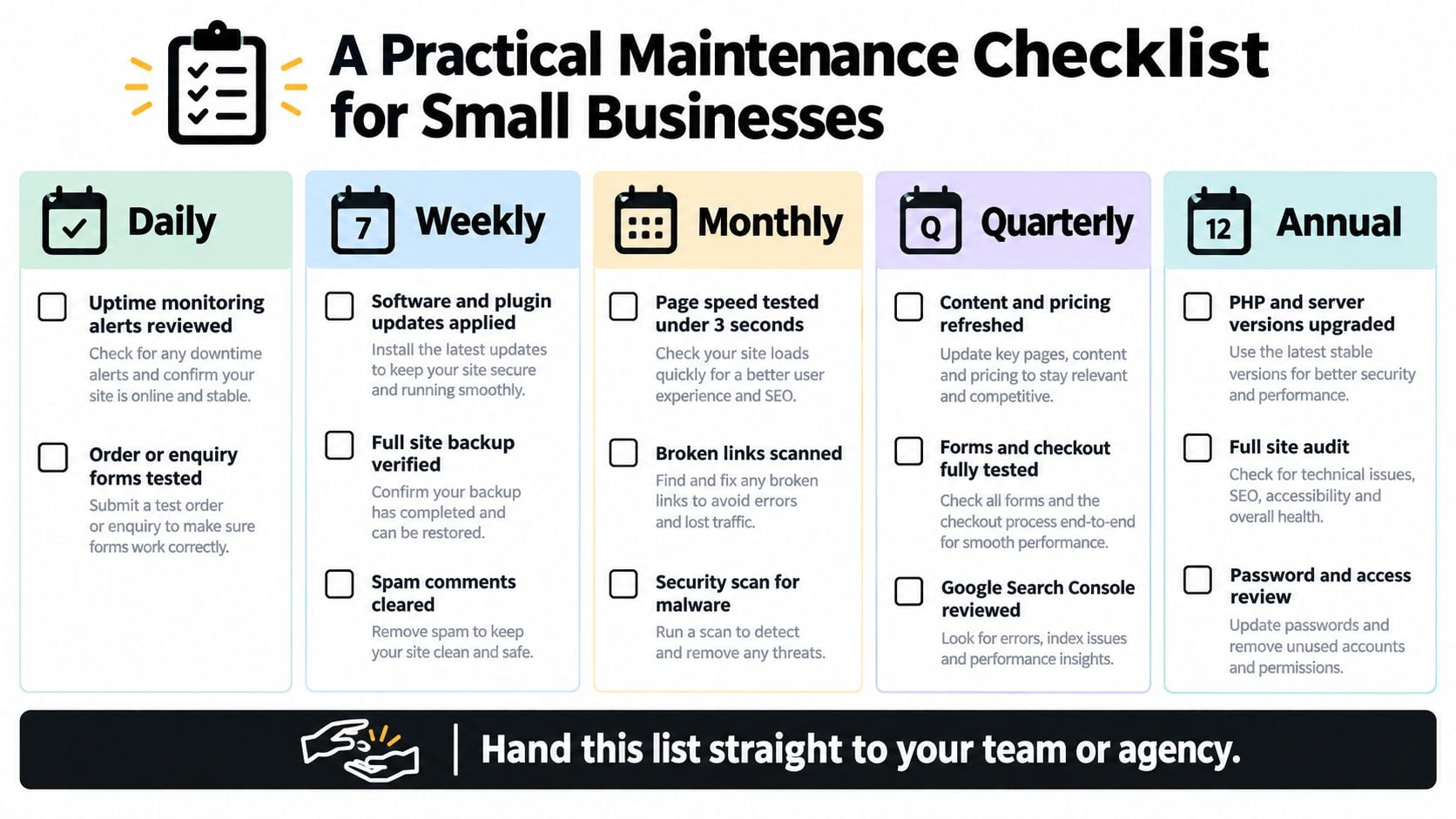
Use this checklist as a handover document. A non-technical owner can assign the operational items internally and contract the tasks that require hosting, code, security or accessibility expertise.
Daily checks
- Uptime alerts, site owner: Review alerts and confirm whether the homepage and one important service page load.
- Enquiry or order test, site owner: Submit a test form or review the latest genuine order and confirm that notifications arrived.
- Customer-facing changes, in-house staff: Check urgent notices, opening times, stock messages or campaign banners that affect today's visitors.
These checks should be brief, but they need a named person. An alert sent to an unattended inbox isn't a monitoring process.
Weekly checks
- Security review, agency or technical owner: Review malware, firewall and failed-login alerts.
- Backup review, hosting provider or agency: Confirm that scheduled copies completed and that storage remains available.
- Update review, developer or agency: Check CMS, plugin, theme and server updates, prioritising security fixes.
- Broken-link sample, in-house staff: Test important menus, contact links, booking buttons and calls to action.
- Spam and form review, site owner: Clear unwanted submissions and investigate unusual patterns.
Apply updates on staging where possible. A release record should note the date, components changed, tests completed and rollback option.
Monthly checks
- Restoration test, agency or hosting provider: Restore a backup in a safe environment and record the result.
- Performance audit, developer or agency: Test representative mobile pages with Lighthouse or PageSpeed Insights, then investigate any release that pushes a page beyond three seconds under representative mobile conditions, a threshold supported by Google's mobile-site research on abandonment (Google mobile-site research).
- Analytics review, site owner or SEO specialist: Look for unusual traffic, enquiry or conversion changes and connect them to recent releases.
- Content review, in-house staff: Check prices, services, contact information, downloads and important landing pages.
- Search checks, SEO specialist: Review Search Console coverage, redirects, sitemap status and important structured data.
Quarterly checks
- Accessibility audit, agency or trained staff: Run automated scans, test keyboard navigation and review key journeys with assistive technology. The eCommerce accessibility analysis found 97.4% of 115 UK eCommerce sites had at least one critical or serious issue, with 73.9% showing a colour-contrast problem and 72.2% having missing or unclear link text. Treat these as recurring maintenance risks, not merely launch defects.
- Access review, technical owner: Remove unnecessary users, check administrator roles and confirm that former staff no longer have access.
- SSL and domain review, site owner: Confirm renewal ownership, payment details and expiry notifications.
- Content freshness review, marketing owner: Refresh outdated pages, imagery, calls to action and seasonal information.
- Integration test, developer: Test booking, payment, email, analytics and CRM connections after relevant changes.
Annual checks
- Disaster recovery exercise, agency or hosting provider: Rehearse restoring the site and confirm who makes the recovery decision.
- Dependency review, developer: Assess PHP, server, CMS, plugins, themes and third-party services for replacement or upgrade work.
- Password and permission audit, site owner: Rotate credentials and document who has access.
- Full SEO and content audit, SEO specialist: Review search intent, duplicate content, redirects, internal linking and underperforming pages.
- Hosting and support review, business owner: Check service quality, backup access, response arrangements and renewal terms.
Keep the checklist somewhere more reliable than one person's memory. A shared maintenance log should show the task, date, owner, outcome, follow-up action and evidence, such as a test submission or restoration note.
Choosing a Local Agency You Can Trust
Choose a maintenance partner through evidence, not a polished sales page. Shortlist three or four Dorset-based or UK-wide providers that can show relevant SME work, then ask who will maintain the site after the contract is signed.
A useful provider should be able to explain its release process in plain English. Ask whether updates happen on staging, how backups are separated from the live site, what security monitoring covers and how the team handles a failed deployment. You should also receive a named technical contact or a clearly managed support route, not an inbox where urgent problems disappear.
Questions worth asking
- What does the agreement include? Ask whether updates, backups, security checks, uptime monitoring, performance reviews, content edits and technical repairs are separate services.
- What happens outside office hours? Find out who receives alerts and whether the response differs for a brochure site, booking system and eCommerce checkout.
- How do you prove the work? Request monthly update records, backup confirmations, monitoring information and notes from any restoration test.
- What are the incident levels? Insist on written response arrangements for critical, high-priority and routine faults.
- Can I leave cleanly? Confirm that you retain domain ownership, receive administrator access and can export the site, content and backups.
- Who handles third parties? Clarify responsibility for payment providers, email platforms, cookie tools, hosting and external integrations.
- Do you carry appropriate insurance? Ask about professional indemnity cover and the limits of the agency's responsibility.
A cheap maintenance plan with no response promise is not a low-cost safety net. It is a list of tasks you may still have to coordinate yourself.
Red flags to take seriously
Be cautious if pricing is vague, the scope excludes the components most likely to fail, monitoring dashboards cannot be shared or the provider refuses to name the person handling technical work. Long lock-in periods without a transition plan are also a concern.
Prefer a partner that documents changes and can hand the website back without drama. That includes hosting credentials, backups, licences, source files, content ownership and a record of recent updates. A website that cannot be transferred cleanly is a business liability, regardless of how attractive it looks.
For Dorset businesses, a local relationship can make communication easier, but location shouldn't replace technical proof. Ask for references from current clients, review the contract carefully and choose the supplier that can explain what happens at the awkward moment, not only what happens during a normal month.
DesignStack provides Dorset businesses with responsive WordPress websites, eCommerce builds, hosting, updates, backups, security checks, performance reviews and technical support. If your site needs a clear maintenance plan with defined ownership and practical ongoing care, visit DesignStack to discuss what should be protected first.



Leave a Reply