

How Long Does It Take to Build a WordPress Website
For a typical UK small-business WordPress website, plan for 4–10 weeks from an approved brief to launch. A focused brochure site often takes 3–8 weeks, while WooCommerce, memberships, custom workflows, or integration-heavy builds commonly move towards 6–12 weeks or more.
That's the answer most business owners need when they're trying to book a launch date, coordinate a rebrand, or replace a site that's steadily losing enquiries. But a single number can be misleading. Installing WordPress is rarely the part that holds up a project. The actual schedule usually depends on content, decisions, design approvals, testing, accessibility, integrations, and what happens after the site goes live.
I've seen Dorset businesses ask for a four-week launch while their copy is still being written, product information is incomplete, and three directors need to approve every page. I've also seen a well-organised business launch efficiently because the branding, content, decision-maker, and technical access were ready before development began.
The useful question isn't only “How long does it take to build a WordPress website?” It's how long does it take to produce a secure, accessible, tested website that your team can use?
Table of Contents
- What you are actually waiting for
- How a real WordPress build unfolds week by week
- What pushes a WordPress timeline longer or shorter
- Realistic WordPress build timelines for UK businesses
- How to work with an agency without slowing things down
- Why launch is not the finish line
What you are actually waiting for
A business owner will often ask a designer for a date, hear “a few weeks”, and open a spreadsheet with one line marked “website launch”. That's understandable, but it treats the project as if the visible page build is the whole job.
A professional WordPress project starts before anyone builds the homepage. The team needs to agree the audience, page structure, user journeys, functionality, content responsibilities, design direction, and technical requirements. After that come implementation, content population, search engine configuration, security checks, responsive testing, accessibility review, client acceptance, fixes, deployment, and early post-launch monitoring.
Practical rule: A homepage that looks finished isn't the same as a website that's ready for customers.
For a straightforward UK brochure site with around 5–10 pages, a practical benchmark can be 3–6 weeks when approved copy, imagery, branding, and access credentials are supplied at the start. UK WordPress project guidance explains why the schedule is driven by discovery, information architecture, responsive design, implementation, testing, SEO configuration, security hardening, review, and deployment rather than by WordPress installation itself.
That distinction matters in Dorset, where many SMEs are fitting a website project around client work, seasonal trading, or a small internal team. A site for a local accountant, trades business, community organisation, or professional service may not need complicated software, but it still needs accurate content, working forms, mobile layouts, sensible navigation, and a reliable handover.
The visual launch versus the responsible launch
A fast visual launch can mean that the pages have been assembled and appear correctly in a browser. A responsible launch also checks whether:
- Forms work: Enquiries reach the right inbox and provide useful information.
- Mobile layouts hold together: Customers can read, tap, scroll, and complete actions on smaller screens.
- Content is usable: Headings, links, image alternatives, and page structure support different users.
- Search basics are configured: Titles, descriptions, redirects, indexing controls, analytics, and XML sitemaps are reviewed.
- The site can be maintained: Staff know how to edit content, and someone owns updates, backups, and security.
The difference can add time, but skipping it doesn't remove the work. It moves the risk into the first weeks after launch, when a broken form or inaccessible checkout is more disruptive.
This is why I separate development time from total project time. WordPress and a suitable theme can be configured quickly. Getting a business from approved brief to a stable, tested, usable website takes longer because several tasks depend on one another.
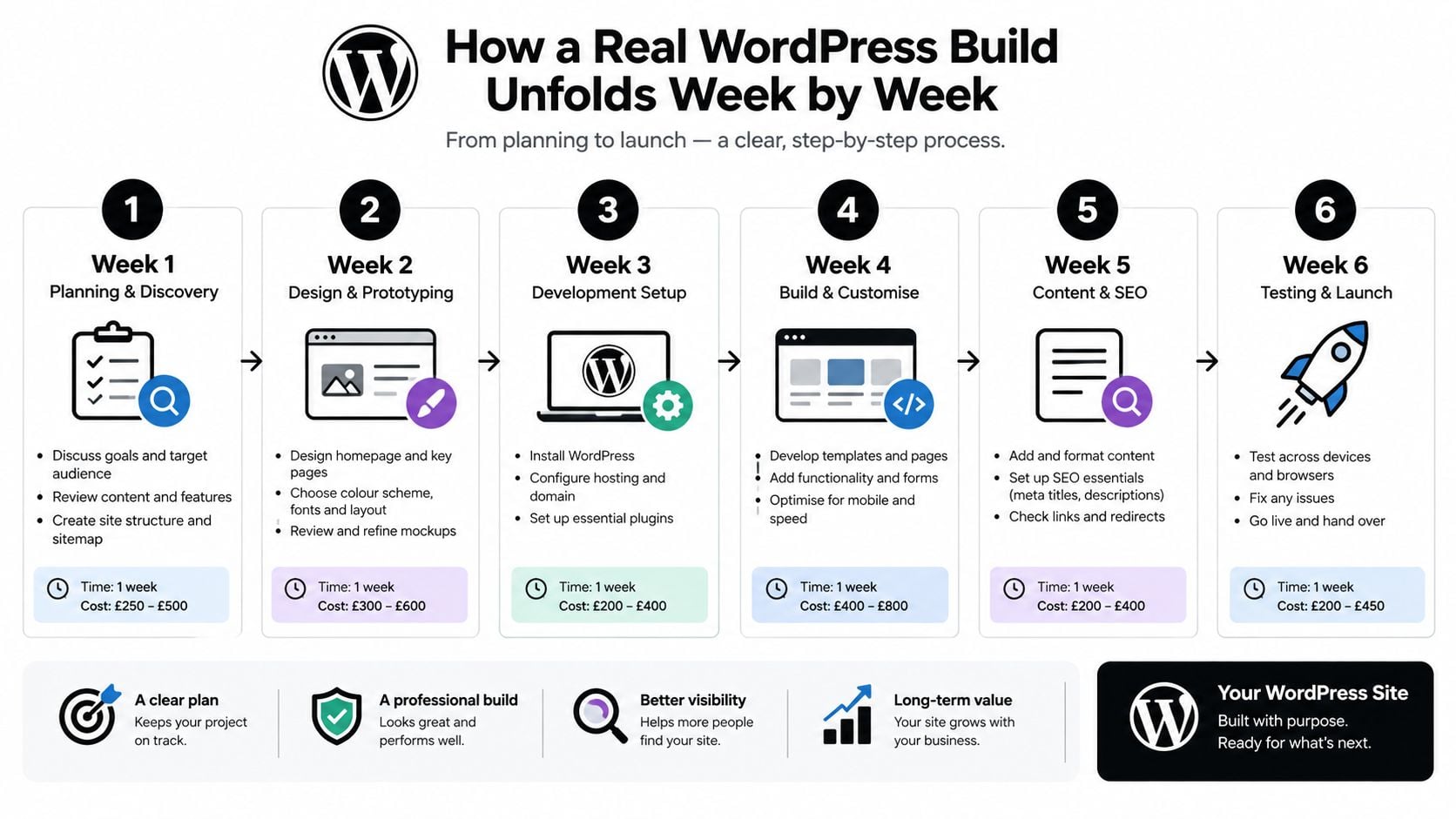
How a real WordPress build unfolds week by week
A WordPress build works best as a sequence of decisions, not as a collection of unrelated tasks. Some work can overlap, but the critical path still depends on the client supplying information and approving work at the right points.
Early planning establishes the boundaries
The agency begins with discovery, sitemap planning, page priorities, calls to action, and technical requirements. The client needs to explain the business, customers, services, internal processes, existing systems, and any compliance considerations.
A useful distinction appears between a website and a web application. A brochure site may need pages and a contact form. A membership organisation may need accounts, restricted content, payments, email automation, and staff permissions. Those requirements change the work long before any design is approved.
A business owner who wants to understand the role of the agency during this stage may find this explanation of what a web designer does useful, particularly when responsibilities are being divided between strategy, design, content, and development.
Design only stabilises when the structure is clear
The designer turns the agreed structure into responsive layouts, usually starting with key templates rather than every page at once. Navigation, typography, colour, spacing, calls to action, forms, and mobile behaviour need to work as a system.
Designers can use placeholder copy for early direction, but final wording changes line lengths, page height, headings, buttons, and content hierarchy. If the client supplies major copy changes after design approval, the agency may need to revisit layouts rather than paste in new text.
Development turns approved decisions into a working site
The developer sets up the WordPress environment, implements the theme or block template, builds reusable sections, configures forms, adds integrations, and populates content. SEO settings, image handling, redirects, cookie controls, backups, and security hardening belong in this stage too.
The client's job is to provide content, credentials, product or service information, and answers to technical questions. The agency's job is to translate the approved structure and design into a reliable experience, then test it rather than assuming that a page that looks right must work correctly.
Testing and handover protect the launch
The final phase includes browser and device checks, link testing, form submissions, responsive review, accessibility checks, analytics verification, redirects, performance review, and deployment. Client acceptance should be based on a defined review process, not an open-ended invitation for every stakeholder to redesign the site.
A business that's also planning a blog may benefit from this practical guide for aspiring WordPress bloggers, especially when deciding how posts, categories, authorship, and ongoing publishing will fit into the initial build.
A six-week project doesn't mean six uninterrupted weeks of developer activity. It means the client and agency have kept the work moving through a chain of dependencies, with enough time for corrections before customers see the result.
What pushes a WordPress timeline longer or shorter
The biggest timeline differences come from decisions the business can influence. A focused project with approved copy, final imagery, existing branding, one decision-maker, and a defined feature list can move efficiently. A project with incomplete content, several reviewers, and changing requirements creates rework at every stage.
Client-controlled variables
The client can shorten the critical path by preparing:
- Final copy: Page text should be approved, not described as “nearly ready”.
- Brand assets: Logos, fonts, colour references, photography, and usage guidance should be available.
- Access credentials: Hosting, domain, analytics, email, payment, booking, and third-party system access should be arranged securely.
- Decisions: One person should consolidate feedback and have authority to approve each stage.
- Scope: New features should be assessed for their effect on testing, budget, and launch timing.
Late content is particularly disruptive because it affects design and development at the same time. A new service page may alter navigation, internal links, calls to action, search configuration, and mobile layouts. Large quantities of old content can also require a planned content migration service rather than casual copying and pasting.
Technical scope changes the type of work
WordPress can make publishing flexible, but flexibility doesn't make every feature quick. WooCommerce may involve variable products, taxes, stock, delivery zones, refunds, customer accounts, transactional email, payment gateways, and external APIs. A membership site introduces access rules, account journeys, content restrictions, and support processes.
Accessibility adds a genuine design and engineering stage. The WebAIM Million analysis found detectable WCAG failures on 94.8% of one million analysed home pages in 2025, compared with 95.9% in 2024 and 97.8% in 2019. The dataset is global rather than UK-only, but it demonstrates why a professional project should allow time for contrast, keyboard navigation, headings, alternative text, forms, responsive layouts, and browser testing. The UK accessibility discussion and source context also links inclusive access with the Equality Act 2010 framework.
For UK businesses selling digital services or products into the EU, the European Accessibility Act took effect in member states on 28 June 2025. A UK accessibility guide covering this cross-border consideration explains why accessibility needs to appear in information architecture, copy, design, development, and testing, rather than being left until the final afternoon.
The quickest build is usually the one with the fewest unresolved decisions, not the one where people skip quality checks.
Realistic WordPress build timelines for UK businesses
The table below gives planning ranges rather than promises. It's designed to help a Dorset or UK SME identify the project type that most closely matches its requirements before discussing a fixed launch date.
| Project type | Typical timeline | Main schedule drivers |
|---|---|---|
| Focused brochure site, around 5–10 pages | 3–8 weeks | Approved content, branding, page structure, responsive design, forms, SEO configuration, testing, and client approvals |
| Professional starter site with wider review or content requirements | 4–10 weeks | Discovery, copy readiness, design revisions, content population, accessibility review, QA, and stakeholder decisions |
| Moderate WooCommerce or membership site | 8–14 weeks | Product or member data, accounts, payments, delivery or access rules, staging tests, training, and failed-journey checks |
| Integration-heavy store or custom workflow | 10–24 weeks or more | APIs, stock synchronisation, shipping, tax treatment, bespoke logic, catalogue complexity, security, and multiple approvals |
The 3–8 week brochure range reflects UK planning guidance for smaller sites, while a separate benchmark identifies 4–8 weeks as a realistic allowance for a professional starter site when scope and content are controlled. The UK website build timeline guidance makes the important distinction between a simpler brochure build and a project involving eCommerce, integrations, or bespoke functionality.
The brochure site
A focused brochure site is usually the easiest project to estimate. The business needs a clear sitemap, approved copy, brand assets, contact forms, responsive templates, and a manageable review process. A shorter timeline is possible when the design system and functionality are tightly constrained, but a hurried launch can still leave accessibility, redirects, analytics, or content issues unresolved.
The store or membership site
A store isn't just a set of pages with a payment button. The agency has to test product rules, customer accounts, checkout, transactional messages, refunds, delivery or access logic, and mobile journeys. This guide to ecommerce website build times is useful when a business is deciding whether its requirements fit a standard store or need deeper custom development.
For a moderate store or membership build, 8–14 weeks is a practical estimate, with longer schedules where integrations or several stakeholders are involved. UK guidance also recommends reserving time for backups, security updates, accessibility checks, performance testing, failed-payment scenarios, staff training, and staging verification. GOV.UK's accessibility strategy guidance sets out expectations around semantic structure, keyboard operation, understandable content, consistent behaviour, and WCAG principles.
The complex build
Integration-heavy projects need engineering time because each connected system creates more combinations to test. An inventory platform, booking system, payment provider, CRM, or membership database can all behave differently when data is missing, delayed, duplicated, or rejected.
The same planning principle appears in other digital products. AppLighter's timeline breakdown for shipping a React Native app is a useful reminder that delivery estimates need to account for work beyond the visible interface, including validation and release preparation.
How to work with an agency without slowing things down
Asking an agency to “go faster” rarely solves the underlying problem. The fastest projects usually have a client who makes decisions promptly, supplies usable material, and understands that each approval opens the next stage.
Start with one accountable decision-maker. That person doesn't need to write every word or make every design choice alone, but they do need to gather internal feedback and return one agreed response. When five people send separate opinions on the same layout, the agency has to reconcile contradictions before any change can be made.
Prepare before the first workshop
Create a working folder containing:
- Page copy: Drafts should be close to final, with service details, team information, calls to action, and contact details checked.
- Images: Use properly licensed, suitable-quality photography and identify where alternatives or captions are needed.
- Brand references: Include logos, colour preferences, fonts, print materials, and examples of websites the team considers appropriate.
- Technical details: List forms, booking tools, payment services, email platforms, analytics, CRM connections, and old URLs.
- Approval rules: Decide who signs off the sitemap, design, content, and final site.
A clear design brief writing guide can help turn a general request into useful information about audience, objectives, tone, functionality, constraints, and approval expectations.
Approve in stages, not all at once
A sensible workflow approves the structure first, then the design direction, then the implemented pages, then the tested site. Don't wait until launch week to mention that the navigation needs to change or that a service page is missing.
A consolidated review cycle protects both time and budget. It also gives the agency a fair chance to identify problems while they're still cheap to fix, rather than discovering them during deployment.
Don't trade away testing for a date
Removing browser checks, mobile testing, accessibility review, or payment testing may produce an earlier handover, but it doesn't produce a safer launch. If the site contains customer journeys, the business needs to know that those journeys work under realistic conditions.
The practical compromise is to control scope rather than cut quality. Launch a smaller, well-tested site if necessary, then add lower-priority features through a planned second phase.
Why launch is not the finish line
A WordPress website becomes an operational asset when it goes live. The launch date is only the point at which responsibility shifts from a project team to the people who need to keep the site secure, accurate, and useful.
Recent WordPress ecosystem reporting recorded 11,334 new vulnerabilities in 2025, a 42% year-on-year increase, with 91% found in plugins. The security reporting and its limitations show why the figure should be treated as ecosystem-wide context rather than a UK-specific forecast, while still making the operational point clear: plugin choices, updates, compatibility checks, backups, monitoring, and recovery planning deserve attention.
Build time and ownership time are different
A site can be technically complete while its ownership arrangements remain unclear. Who applies updates? Who checks that forms still deliver? Who reviews backups? Who investigates a compatibility problem after a plugin changes? Who can restore the site if an update fails?
These questions matter particularly to SMEs without an in-house technical team. A shorter build that relies on excessive plugins, rushed verification, or unclear maintenance responsibility may create a longer support burden than a more carefully planned project.
Include stabilisation in the estimate
A credible schedule should allow time for:
- Content acceptance: The client checks wording, contact details, links, images, and page ownership.
- Technical QA: The agency verifies forms, analytics, redirects, responsive behaviour, accessibility, and integrations.
- Deployment checks: The live environment is tested after migration, not assumed to match staging.
- Staff training: The people editing pages, products, posts, or members learn the correct workflow.
- Post-launch corrections: Small issues found under real usage have a defined route to resolution.
Ongoing support through a WordPress maintenance and support service can cover the practical work that follows publication, depending on the arrangement agreed with the agency.
For a business planning a campaign, seasonal launch, or new trading period, the right question is therefore not how quickly the pages can be built. Ask what must be ready before launch, who owns each task, how accessibility and testing will be handled, and what support exists after publication.
DesignStack helps Dorset and UK SMEs plan, design, build, test, and support responsive WordPress websites, including brochure sites, eCommerce projects, and custom online systems. If you're working towards a launch date, visit DesignStack with your scope, content position, and target date so the team can help shape a realistic route to launch.



Leave a Reply