

WordPress Website Hosting Explained for UK Businesses
Sarah, a Dorset florist, launched her first WordPress website to collect wedding enquiries. The gallery looked beautiful on her laptop, but her old shared host took nine seconds to load it on a phone. Over one weekend, two prospective couples gave up before submitting an enquiry, then the hosting renewal arrived at three times the launch price.
That's not a server specification problem. It's a business risk.
WordPress website hosting affects whether customers can reach you, whether an online shop completes a sale, whether someone answers when the site fails, and whether your annual budget still makes sense after the introductory offer ends. WordPress remains a mainstream platform in the UK, with one 2026 estimate placing it on 45% of UK websites and another independent report estimating roughly 1.39 million UK WordPress websites (UK WordPress market data). Your hosting decision deserves the same care as your website design.
Table of Contents
- Why WordPress Hosting Matters for Your UK Business
- The Four Main Types of WordPress Hosting
- Key Features That Actually Affect Your Site
- Matching Hosting Type to Performance and Security Needs
- What WordPress Hosting Really Costs in the UK
- Choosing the Right Setup for Your Site
- How DesignStack Approaches WordPress Hosting for SMEs
- Three Questions to Answer Before You Buy
Why WordPress Hosting Matters for Your UK Business
A local firm can lose calls during a Monday morning rush when its contact page times out. A WooCommerce shop can watch customers abandon baskets at checkout. A professional services website can lose search visibility when slow delivery harms Core Web Vitals and visitors leave before reading the page.
For a UK SME, hosting is a business decision with four practical risks: lost sales, wasted staff time, poor support, and an annual bill that changes after the introductory offer.
Uptime is a sales issue
An outage can stop enquiries, payments, bookings, and staff access to WordPress. Smaller businesses usually have fewer alternative routes to market, so a failed website can hurt disproportionately.
Look beyond an uptime badge. Ask whether the provider publishes a meaningful service level agreement, explains exclusions, and offers a remedy when it misses its commitment. UK providers commonly advertise 99.99% uptime SLAs and 24/7 support, according to a UK public-sector hosting listing (UK managed hosting service details). The figure is only useful if the provider explains how it is measured and what happens after a failure.
The renewal price is the price that matters
An introductory offer can make almost any package look affordable. Renewal rates show whether hosting belongs in next year's budget, or whether switching providers will become an unwelcome distraction.
Independent UK pricing roundups place typical annual hosting costs for a small business site closer to £150 to £350 after renewal, depending on the tier and extras (UK WordPress hosting costs). Compare VAT, backups, email, premium security, and CDN charges before choosing a plan. A low first-year price means little if the renewal cost strains your cash flow.
Practical rule: Choose hosting you can comfortably renew, not hosting you can barely afford during its launch promotion.
Support deserves the same scrutiny. A generic ticket reply will not solve a broken booking form after a plugin update. You need a provider that understands WordPress, WooCommerce, themes, caching, backups, and the pressure of UK business hours.
Decide who owns backups and security before you sign up. If you must patch plugins, scan for malware, test restores, and troubleshoot conflicts yourself, you are buying server space rather than a hands-off service. The right hosting arrangement reduces uptime risk and gives your team a clear person to contact when the website fails.
The Four Main Types of WordPress Hosting
Most UK business owners only need to understand four categories. The labels overlap between providers, but the responsibilities and trade-offs are clear enough to guide a sensible choice.
Shared hosting
Shared hosting is like a busy high-street shop floor. Many businesses rent space in the same building and share the underlying facilities. It's cheap to start, simple to buy, and suitable for a modest brochure site, basic blog, or new business with limited operational complexity.
The drawback is control and consistency. Other accounts can affect available resources, while backups, updates, security checks, and performance tuning may remain partly yours. Shared hosting still dominates the entry-level market because the starting price is attractive, but the cheapest plan can become expensive in staff time when something goes wrong.
VPS hosting
A virtual private server is your own lock-up unit in the same building. You receive a more defined slice of resources and greater control over the environment, but someone still needs to configure, update, monitor, and secure it.
VPS hosting suits marketing teams, freelancers, and agencies running several sites. It's also a strong option when a business has a technical owner who wants control over caching layers, PHP settings, firewall rules, and staging. Without that knowledge, the extra control quickly becomes extra responsibility.
Managed WordPress hosting
Managed WordPress hosting resembles a serviced office. Someone else handles routine maintenance, security patching, backups, caching configuration, and much of the platform administration. You still need to manage your content and choose sensible plugins, but you're not expected to become a server administrator.
This has become especially attractive to UK agencies and WooCommerce shops. The monthly fee buys reduced operational burden, faster help, and a clearer owner for routine maintenance.
Cloud hosting
Cloud hosting is like renting warehouse space that can flex when orders rise. It can provide a useful route for sites with changing demand or unusual resource needs, but the word “cloud” doesn't automatically mean faster or better support.
Cloud plans suit businesses that need scalable infrastructure and have someone capable of managing it. Prices have become more accessible, with cloud hosting becoming more mainstream as packages have moved below £40 per month in some comparisons. Read the service description carefully, because providers use “cloud” for very different levels of management.
| Hosting Type | Best For | Typical UK Price | Who Patches & Updates | Main Trade-Off |
|---|---|---|---|---|
| Shared | New brochure sites and small blogs | Entry-level pricing | Often partly the customer | Lowest cost, least control |
| VPS | Several sites or a technical team | Varies by resources and management | Customer or managed partner | More control means more responsibility |
| Managed WordPress | SMEs, agencies, and WooCommerce | Typically £15 to £40+ monthly | Provider or managed partner | Higher recurring cost |
| Cloud | Variable demand and custom infrastructure | Can sit below £40 monthly for some plans | Depends on the service | More choice, more complexity |
These are business models, not rankings. Pick the tier that matches the consequence of failure and the amount of technical work your team can absorb.
Key Features That Actually Affect Your Site
For a UK audience, server location is a practical business choice. A London-hosted origin can reduce network delay before caching helps. London testing recorded UK time to first byte at 18 to 25 milliseconds on a London edge setup and 22 milliseconds on a London-hosted cloud instance, while US-hosted WordPress plans recorded roughly 251 to 276 milliseconds without a CDN (UK WordPress hosting performance comparison).
A nearby origin will not repair oversized images, poor code, or a badly built plugin. It does give a UK customer base a sensible starting point, particularly when a slow first response could cost a lead or interrupt a purchase.
Cache intelligently, not blindly
Check whether the provider includes server-level page caching, object caching, and a current PHP environment. Full-page caching serves ready-made pages quickly to visitors who do not need personalised content. Object caching reduces repeated database work, which matters for logged-in users, WooCommerce baskets, search, and membership features.
A CDN can deliver cached assets from an edge location closer to the visitor. One UK benchmark recorded an LCP of approximately 543 milliseconds without a CDN and improved LCP by 71 milliseconds with CDN delivery. Use that as an illustration of how the delivery stack can affect results, not as a promise for every website.
For broader context on faster page rendering for businesses, separate faster delivery from a preloader effect. A preloader changes what visitors see while content arrives. It does not replace proper hosting, image optimisation, or caching.
Pay for protection you can verify
The security basics should be clear in the plan:
- Automatic patching: The provider should state what it updates and how it handles failed updates.
- Web application firewall: A WAF can filter common malicious traffic before it reaches WordPress.
- Off-site backups: Backups should be separate from the live server and tested regularly.
- Free SSL: HTTPS should be included, not added as an unexpected charge.
- WordPress-aware support: Ask whether support can investigate plugin conflicts, rather than only restart services.
Support responsiveness matters when a checkout fails on a Saturday or a plugin update breaks a contact form. Compare website hosting and maintenance with the hosting plan itself. Maintenance often shows whether you are buying a cheap login or an accountable service with someone responsible for keeping the site working.
Matching Hosting Type to Performance and Security Needs
The right tier depends less on the label and more on who owns the risk. A small brochure site can run perfectly well on shared hosting when the pages are well built and the business can tolerate occasional hands-on troubleshooting. A membership site with logged-in visitors behaves differently because much of its content can't rely on the same public page cache.
| Hosting Type | Typical UK TTFB | Security Responsibility | Best Fit |
|---|---|---|---|
| Shared | Depends heavily on provider and neighbouring accounts | Mostly customer, with varying provider tools | Small brochure site with modest demands |
| VPS | Can be strong with a UK location and careful configuration | Customer or technical partner | Several sites with a dedicated technical owner |
| Managed WordPress | UK-focused stacks can deliver low-latency responses | Provider handles core platform tasks, customer manages content choices | Most SMEs and small online shops |
| Cloud | Depends on architecture and region | Shared between provider and technical owner | Custom, variable, or scalable workloads |
Performance is about consistency
Ask whether the provider includes full-page caching, object caching, CDN integration, and a staging environment. A staging site lets you test a plugin or theme update away from the live website. That matters more than a generous headline storage allowance when a booking form or checkout needs to stay available.
A managed plan generally gives an SME the clearest operational route. The provider can maintain the server stack while your team concentrates on sales, content, and customer service. You'll still need sensible plugin choices and a process for approving changes, but the routine infrastructure work has an accountable owner.
Security is a responsibility map
Shared hosting often gives you tools and expects you to use them. VPS hosting gives you control and expects you to know what you're doing, unless you pay for management. Managed WordPress hosting places more routine responsibility with the provider, while cloud hosting can split it across several services.
The useful question isn't “Does this plan include security?” Ask, “Who notices the problem, who fixes it, and who confirms the restore works?”
For Dorset SMEs, that clarity is often worth more than squeezing a few pounds from the monthly bill. Choose VPS or cloud when you have a named technical owner. Choose managed WordPress when the business needs dependable day-to-day operations without maintaining the platform internally.
What WordPress Hosting Really Costs in the UK
The launch price rarely reflects what a UK business will pay to keep its website online. Renewal pricing commonly sits around £8 to £10 or more per month for shared hosting, £10 to £20 for mid-tier shared or cloud hosting, and £15 to £40 or more for managed WordPress hosting aimed at small businesses.
Budget against the renewal bill, not the introductory offer. These bands show the likely annual commitment:
| Tier | Introductory Price | Realistic Renewal | Annual Range |
|---|---|---|---|
| Budget shared | Often promoted as a low launch offer | Around £8 to £10+ monthly | Around £96 to £120+ |
| Mid-tier shared or cloud | Usually discounted at sign-up | Around £10 to £20 monthly | Around £120 to £240 |
| Managed WordPress | Often positioned as a premium service | Around £15 to £40+ monthly | Around £180 to £480+ |
The hosting charge is only one part of the website budget. VAT may apply, while the domain, email, premium plugins, CDN, backup retention, and professional maintenance may appear as separate costs. Ask for the post-introduction invoice before you buy, and check whether support or backup features carry limits.
Match spend to the site's job
A straightforward company website with service pages has different demands from a WooCommerce shop. An online shop relies on product data, baskets, payments, transactional emails, stock updates, and reliable performance during promotions. A membership site adds logged-in users and dynamic pages, which require more careful caching and support.
Use this guide to compare website hosting costs before signing up, then get the renewal price in writing. A plan that only fits the budget during its introductory period is the wrong plan for the business.
The lowest invoice can create the highest labour bill. Restoring a failed update, chasing generic support, or rebuilding a lost page takes time away from sales and customer service. Managed hosting earns its higher monthly cost when it gives a small business a responsive support route and a clear owner for routine problems. For a brochure site, shared hosting may be sufficient. For a shop where downtime affects orders, paying for dependable support is the sensible choice.
Choosing the Right Setup for Your Site
Start with the website's role, not the hosting brand. A local service firm with a brochure site and a blog usually needs dependable page delivery, backups, SSL, and WordPress-aware support. Shared hosting can work while the site remains straightforward, but move to managed WordPress when slow support, recurring resource limits, or risky updates start consuming your time.
A growing WooCommerce shop selling across the UK should usually begin with managed WordPress. The shop needs reliable checkout performance, careful caching, malware monitoring, tested backups, and someone who understands what happens when a payment or stock plugin conflicts with an update. The trigger to upgrade is not a fashionable specification. It's evidence that the current setup struggles during campaigns, product launches, or normal trading activity.
Membership and learning sites need the most thoughtful setup of these examples. Logged-in users, dashboards, course content, forums, and payment integrations create a workload that public page caching can't solve on its own. Choose managed WordPress if you don't have a technical owner, or a VPS or cloud environment if someone on your team can manage server configuration and security properly.
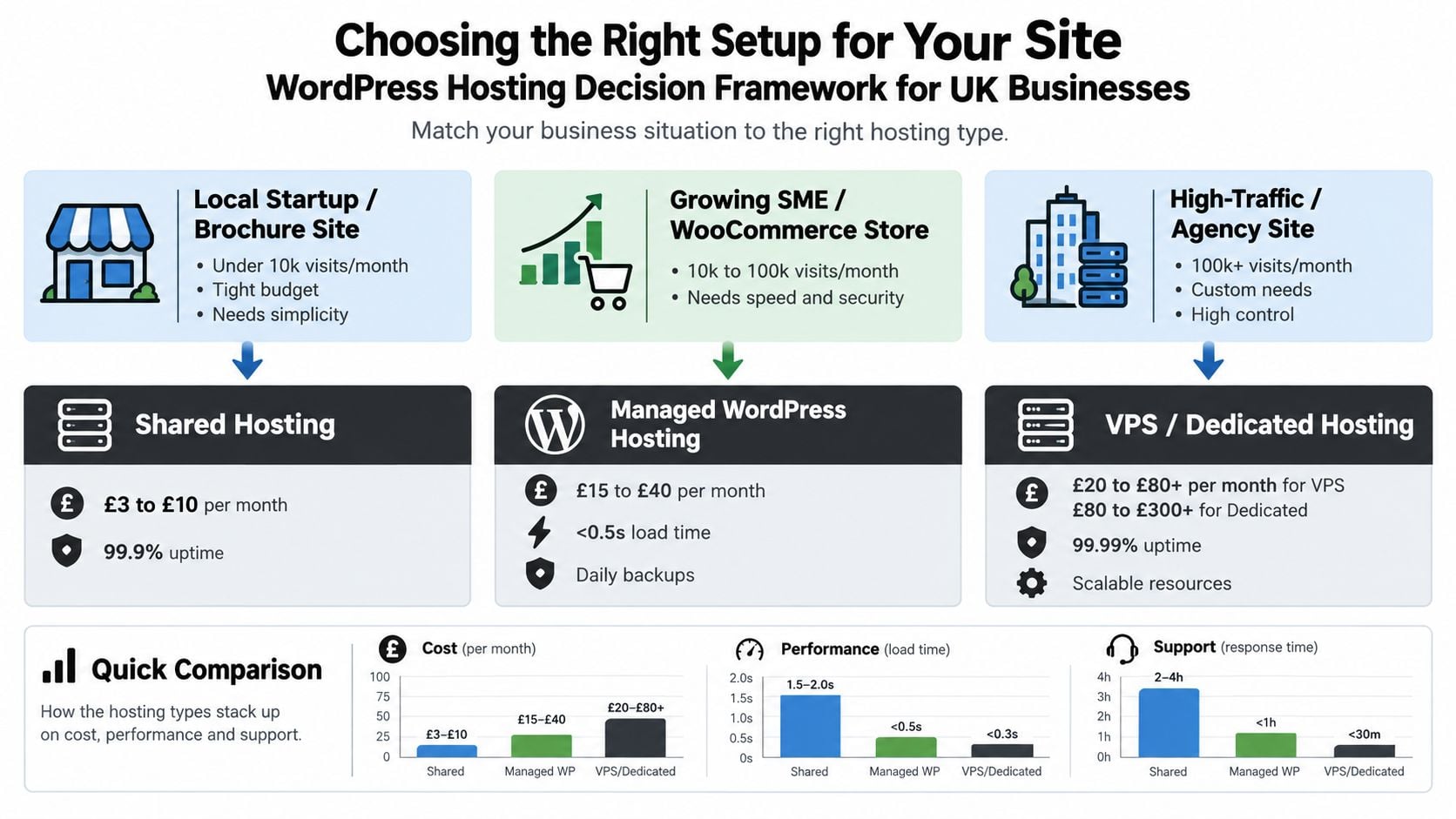
Use how to choose a web hosting provider as a checklist, but make the final decision against your own risk tolerance. If you're unsure, answer these questions:
- Who needs access? A simple public site has different caching needs from a site with logged-in customers.
- Who will respond? If nobody in-house can investigate a failed update, pay for a service that includes that responsibility.
- What would an outage cost? An information-only site may cope with disruption that would immediately affect a shop or booking system.
How DesignStack Approaches WordPress Hosting for SMEs
Generic hosting providers often leave a gap between do-it-yourself shared hosting and a large agency retainer. A Dorset business may not need a dedicated platform, but it still needs someone to handle migrations, routine updates, security checks, backups, and the unpleasant moments when a plugin update breaks a live page.
DesignStack offers managed WordPress hosting as part of its broader website support work. The service can include setting up the hosting environment, keeping key components updated, monitoring security, running backups, and helping when something goes wrong. UK-located servers, automatic updates, daily malware scanning, and a staging environment are practical safeguards for businesses that want a maintained website rather than a bare hosting login.
A hands-on onboarding process
A sensible migration starts with the existing site, not a rushed change of nameservers. The team should review the current WordPress installation, identify outdated plugins, check the backup position, prepare the new environment, and test the site before launch.
A typical workflow includes:
- Migration review: Confirm what is moving, what needs updating, and whether email or third-party services need separate attention.
- Staging checks: Test theme, plugin, forms, payments, responsive layouts, and performance away from the live site.
- Launch checklist: Confirm pages, enquiries, analytics, redirects, SSL, backups, and monitoring.
- Post-launch watch: Check for errors and unexpected behaviour after visitors return to the site.
Support responsiveness should be a defined service expectation, not a vague promise. Ask what response window applies during working hours and how out-of-hours emergencies are handled. That answer tells you more than a list of server features.
This approach suits a business with a substantial brochure site, a growing WooCommerce shop, or an organisation that has outgrown shared hosting but doesn't need to run its own infrastructure. Review the WordPress maintenance and support service to see how hosting and ongoing website care can sit together.
DesignStack is one option among managed providers. Compare the responsibilities, renewal terms, backup process, and support arrangement before choosing. The right package is the one that leaves your team clear about who owns the site when something fails.
Three Questions to Answer Before You Buy
Before comparing hosting brands, write down three answers.
First, what traffic and growth do you realistically expect? A local brochure site, WooCommerce shop, membership platform, and agency-managed collection of sites have different demands. Choose shared hosting for simplicity when the risk is low, managed WordPress when you need operational help, and VPS or cloud when a technical owner needs control.
Second, how much technical time do you have? If nobody can safely test updates, monitor security, investigate errors, and restore backups, a cheap plan may transfer the work to you rather than remove it. Paying for managed support can be a sensible business expense when downtime affects enquiries or sales.
Third, what is the complete annual budget? Use the renewal figure, then add VAT where applicable, domain and email costs, backup or CDN extras, and any premium plugins. The cost of website development is only part of ownership. Hosting and maintenance continue after launch.
Write those answers beside the realistic price bands, then ask a specialist to audit your current site before recommending a tier. Request a hosting audit or migration quote from DesignStack, with a review of your WordPress setup, renewal costs, performance risks, backups, and support needs.
DesignStack helps Dorset and UK SMEs move from unreliable shared hosting to managed WordPress hosting, with migration support, updates, security monitoring, backups, and ongoing help when the site needs attention. Visit DesignStack to request a hosting audit or migration quote based on your actual website and business requirements.


Leave a Reply