

Web Design on WordPress: A Practical Guide for UK Businesses
You've spent three weekends choosing a WordPress theme, adjusting colours and nudging sections into place. The homepage looks respectable, but a visitor still can't tell what you do, who you help or what they should do next. That's the point where many Dorset business owners start searching for a new theme, when the problem is usually the project underneath it.
Good web design on WordPress isn't mainly about finding a prettier template. It's about choosing a site structure, editing system, hosting setup and maintenance routine that your business can live with after launch. WordPress is already a mainstream platform in the UK, with an estimated 1.41 million UK WordPress websites and about 86.6% of the UK CMS market, according to UK WordPress market data. That reach gives you choice, but it also gives you plenty of ways to build something awkward.
Table of Contents
- Why Your WordPress Project Deserves a Better Brief
- Themes, Builders and Responsive Design Explained
- The Real Pros and Cons of WordPress for Business
- SEO and Performance Decisions You Should Make on Day One
- Hosting, Security and Accessibility as the Operational Backbone
- When to DIY and When to Hire a WordPress Agency
- Site Structures That Actually Work for UK SMEs
- Your Next Steps From Reading to Scoping
Why Your WordPress Project Deserves a Better Brief
A café owner in Dorset can lose weeks inside WordPress without making a meaningful decision. The logo gets uploaded, a starter theme gets installed and the homepage fills with stock images, service descriptions and a contact button. What's missing is a clear answer to the question every visitor brings with them: why should I choose this business?
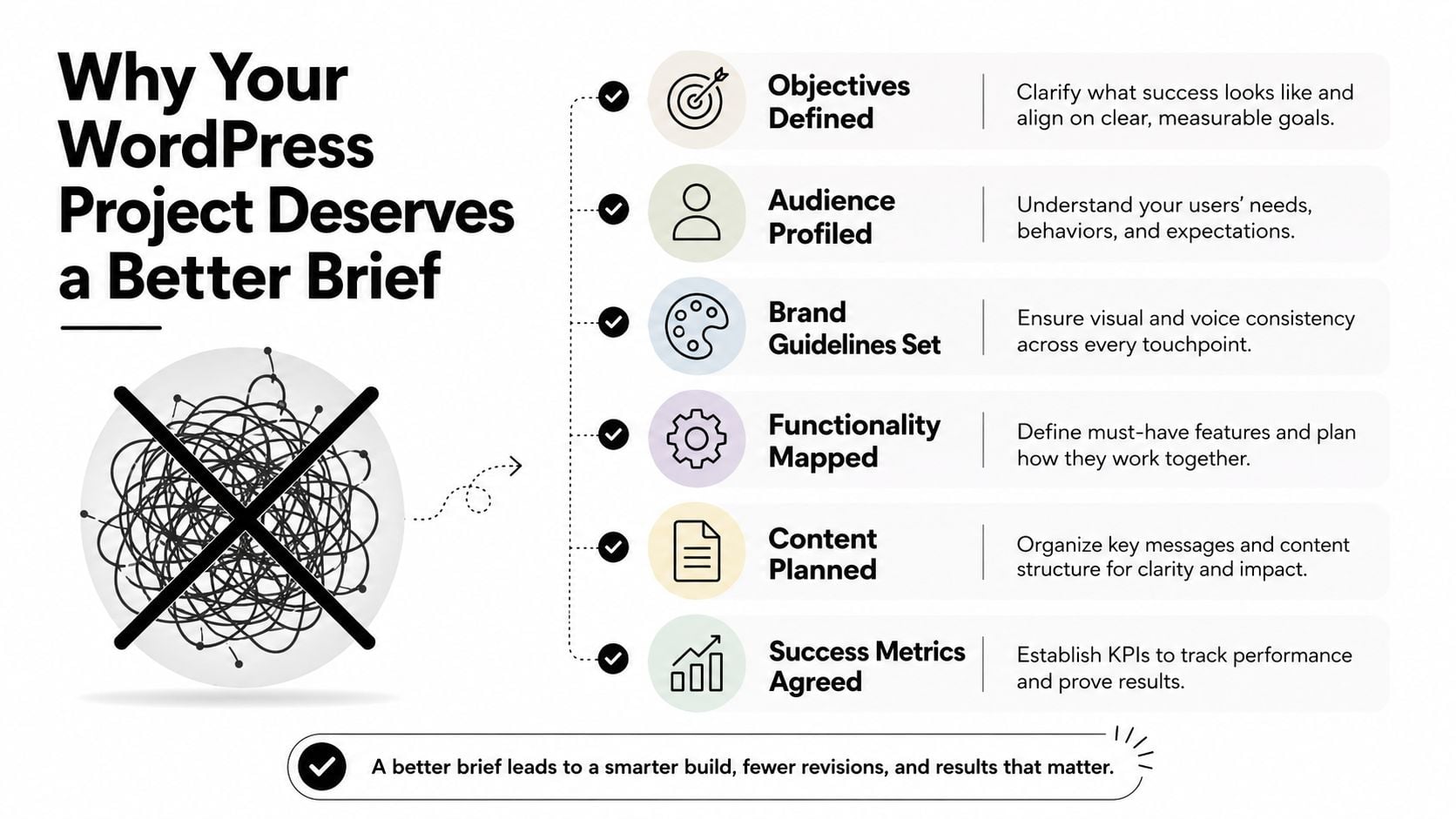
Most rebuilds go wrong before anyone opens the Customiser. The owner hasn't agreed the audience, the sitemap, the content responsibilities or the action the site must generate. A designer then makes sensible visual decisions on top of an unclear brief, and the business eventually asks for a rebuild because the site feels polished but ineffective.
A useful brief forces five decisions:
- Audience: Are you speaking to local homeowners, trade buyers, professional clients, tourists or an existing membership base?
- Action: Should visitors call, request a quote, book an appointment, buy a product or join a mailing list?
- Brand: Which colours, typefaces, photography, tone and existing materials must stay?
- Ownership: Who writes the service pages, approves changes and handles updates after launch?
- Success: What should improve by the three-month and twelve-month reviews, such as better enquiries, clearer product journeys or stronger visibility for priority services?
Write the brief before you buy the theme
Spend a day writing the brief before you spend money on a theme, premium plugin or page-builder licence. Set out the primary customer, the main call to action, the pages you need, the content you already have and the features that can wait. A practical guide to writing a design brief will help you turn vague preferences into decisions a developer can use.
Practical rule: If a requested feature doesn't support an agreed audience, action or business objective, it belongs on the backlog, not in the first build.
Your brief should also name the people responsible for content. “The team will provide copy” isn't ownership. Name the person who writes, the person who approves and the person who maintains the site. That single decision prevents a finished design from sitting empty while everyone waits for someone else.
Treat the brief as an insurance policy against six-month regret. It won't remove every change, but it gives you a foundation for deciding whether a feature, template or visual flourish earns its place.
Themes, Builders and Responsive Design Explained
WordPress themes, page builders, blocks and responsive layouts aren't four versions of the same thing. They're four layers of a build, and confusing them is how business owners end up locked into a setup they can't comfortably maintain.
The theme controls the site's broad presentation and templates. A classic theme uses established template files and often relies on the Customiser, while a block theme can use Full Site Editing to adjust headers, footers, templates and content with blocks. Block themes can give owners more control in the editor, but a well-built classic theme may be the calmer choice for a small organisation that values predictable maintenance.
The Gutenberg block editor sits inside WordPress itself. You can extend it with focused tools such as GenerateBlocks, or move to a larger visual builder such as Elementor or Divi. Lightweight block extensions generally keep the editing model close to WordPress. Heavier builders can make complex visual work quicker, but they may introduce more layers between the content and the front-end output.
For businesses comparing providers, it can help to browse design service categories before you brief anyone. The important question isn't which builder has the longest feature list. Ask whether the person building the site can explain what happens if you change theme, remove the builder or hand maintenance to another developer.
Responsive design starts with the smallest screen
Responsive design means the layout adapts to the available screen, not that a desktop page gets squeezed until it technically fits. Review the build at 360px, 768px and 1440px before you polish the desktop view. Check navigation, tap targets, forms, headings, product grids, cookie controls and sticky elements at each width.
The responsive web design guide gives the useful distinction: mobile-first design starts with the constraints that matter most, then adds space and complexity for larger screens. Your CSS, child theme and typography choices sit above the theme and builder decision. They give you control, but they can't rescue a bloated foundation or an unclear content hierarchy.
My recommendation is straightforward. Use the simplest layer that can deliver the site you need, keep global styles consistent and make sure another competent person can edit the result without learning a private visual language.
The Real Pros and Cons of WordPress for Business
WordPress is popular because it solves several business problems at once. A UK industry summary reports that WordPress powered 41.3% of websites globally, while another UK-focused summary places it at about 86.6% of the UK CMS market, compared with Joomla at 3.5% and Drupal at 2.6%. You can review those figures in the UK web design industry overview.
That adoption creates practical advantages. You'll find developers, documentation, themes and plugins for most ordinary business requirements. You own the WordPress installation and content rather than placing everything inside one closed site builder. The platform supports straightforward publishing, and WooCommerce gives retailers a familiar route into online selling.
The case for choosing it
A small UK firm can start with a modest brochure site, then add a resource area, booking flow, catalogue or shop when the business is ready. That flexibility matters for a Dorset business whose requirements may change with seasonal demand, new services or a move from local enquiries into online sales.
WordPress also gives you portability. You can change host, replace a plugin or commission a different developer without rebuilding every page from scratch. That doesn't mean migration is effortless, especially where a builder has stored content in proprietary formats, but the underlying ecosystem gives you more routes than a tightly managed SaaS platform.
The costs people underestimate
The software's flexibility creates work. Someone must review updates, maintain backups, remove abandoned plugins, investigate conflicts and respond when a theme change affects the layout. A low-cost site becomes expensive when nobody inside the business knows what each plugin does or who is allowed to update it.
Performance can suffer when a builder adds excessive assets, when images arrive uncompressed or when plugins duplicate the same function. Theme switching can also damage content presentation if page sections depend on a builder's shortcodes or custom components. These aren't reasons to reject WordPress. They're reasons to document the build and choose fewer moving parts.
WordPress is a good business platform. It isn't a maintenance-free business platform.
Compare it with a SaaS builder or a static site generator. A SaaS product may reduce technical upkeep but limit ownership and customisation. A static build may be fast and secure, but publishing and commerce workflows can require a different technical process. Choose WordPress when its editing freedom, ecosystem and growth path justify the operational responsibility.
SEO and Performance Decisions You Should Make on Day One
SEO gets expensive when a designer treats it as a plugin installation at the end of a project. Search-friendly WordPress design starts with the page hierarchy, the content model and the templates visitors will use repeatedly.
Begin with information architecture. Group related services under clear parent topics, use descriptive page names and decide which pages deserve a place in the main navigation. A Dorset accountant might separate accounts, tax advice and payroll rather than placing every service in one long page. The blog should support those priority topics with useful articles and internal links, not compete with the pages that generate enquiries.
Use semantic HTML through well-structured blocks. Give each page one clear main heading, use subheadings in order and make links describe their destination. Build reusable templates for service pages, posts and products so editors don't create a different heading hierarchy or call-to-action pattern every time.
Make performance a layout constraint
Your designer should decide image dimensions before upload, use modern formats where the hosting setup supports them and avoid loading large hero images on pages that don't need them. Limit decorative video, review every external script and load fonts carefully. Caching can help, but it can't compensate for oversized assets, unnecessary plugins or an overloaded page builder.
Core Web Vitals give your team a useful performance language. Don't promise a score before testing the actual site, but agree that the build will be assessed against these practical targets:
| Metric | Good | Needs work | Design lever |
|---|---|---|---|
| Largest Contentful Paint | Fast loading of the main content | The hero or primary content arrives late | Image size, hosting, font loading and above-the-fold layout |
| Interaction to Next Paint | Responsive interaction | Buttons and menus feel delayed | Script control, builder output and third-party tools |
| Cumulative Layout Shift | Stable layout | Content moves while loading | Reserved image space, font handling and advert or embed dimensions |
Schema markup should reflect the page type, such as a local business, service, product or article. Internal links should guide a visitor from a broad service page to a specific offering and then to contact or booking. If you want specialist support, WordPress SEO services can be scoped alongside the design rather than bolted on after launch.
Ask for SEO in the wireframe. Require page titles, headings, content modules, breadcrumbs, internal links and calls to action to appear in the design system. That's how you avoid a visually impressive site with nowhere sensible to put the information search engines and customers need.
Hosting, Security and Accessibility as the Operational Backbone
Hosting, security and accessibility belong in the same conversation because they all affect whether people can use your site reliably. A managed WordPress host usually suits a small business that wants support with WordPress-specific issues. Shared hosting can be economical but often gives you less control and less focused help. A VPS can offer greater control, but someone must understand server administration, monitoring and patching.
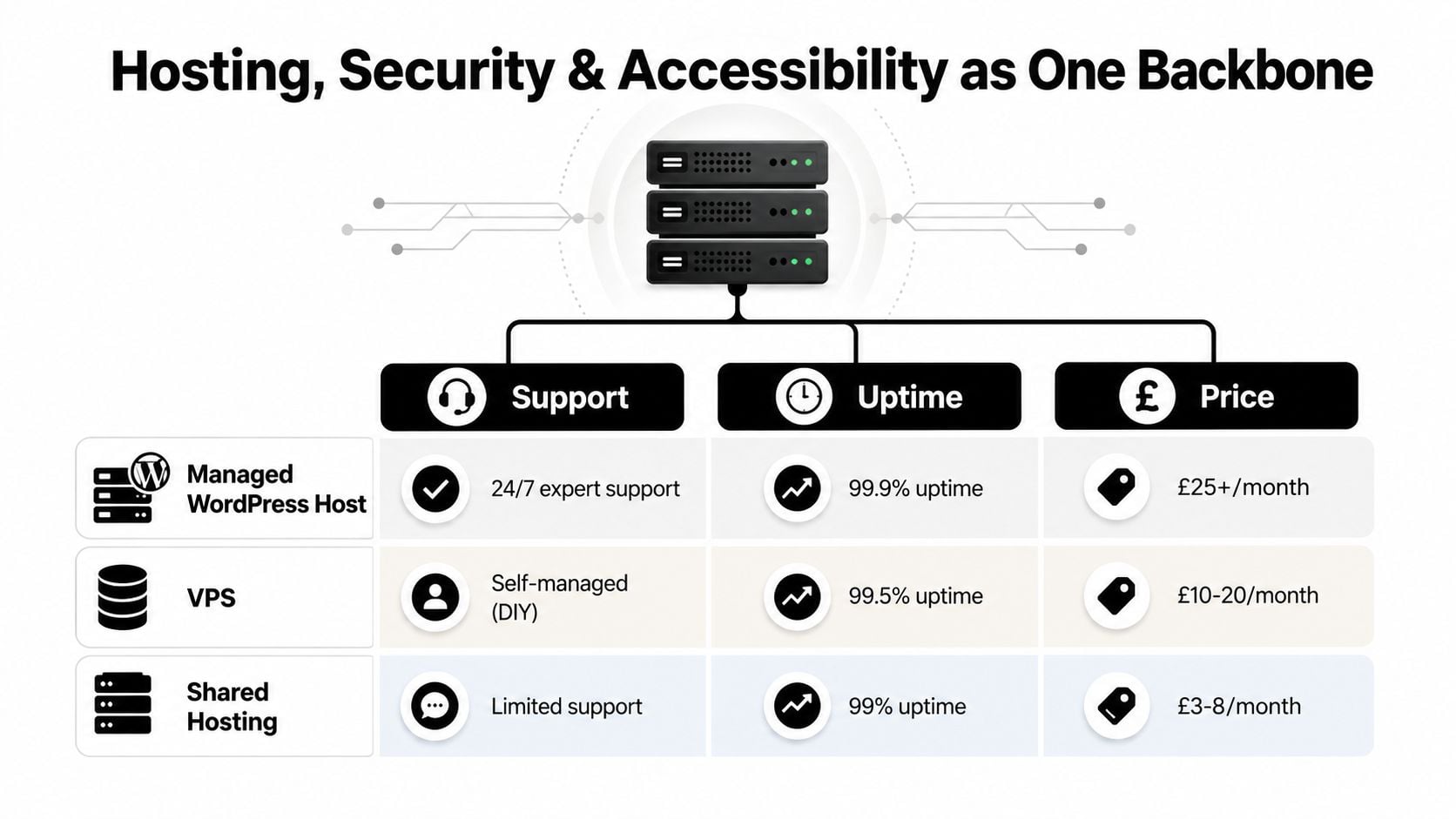
Choose based on who will respond when the site fails, not just on storage or advertised speed. Confirm backup frequency, restoration support, staging facilities, malware response and the location of support. A cheap package isn't cheap if a broken update takes your team away from paying customers.
Security needs an owner
Your minimum operational stack should include:
- Updates: Apply WordPress, theme and plugin updates through a tested process, not random clicks in the dashboard.
- Backups: Keep recoverable backups separate from the live installation and test restoration.
- Access control: Use strong passwords, two-factor authentication and individual user accounts with limited permissions.
- Protection: Add a web application firewall and sensible login protection, then remove unused plugins and administrator accounts.
- Documentation: Record the host, licences, integrations and update responsibilities so the site doesn't depend on one person's memory.
A managed arrangement can remove some of the routine burden. If you're comparing that route, review what managed WordPress hosting includes rather than assuming the label guarantees every security task.
Accessibility is part of the build
GOV.UK guidance tells public-facing digital services to check accessibility problems, fix issues within reason, publish an accessibility statement and keep new features accessible. GOV.UK accessibility guidance also makes clear that accessibility needs continuing attention, not a single audit.
The Equality Act 2010 requires reasonable adjustments for disabled users. For a practical target, aim for WCAG 2.2 AA in a 2026 WordPress build, as UK-focused guidance recommends, and test the things automated tools miss: keyboard navigation, focus states, labelled forms, meaningful link text, skip links, colour contrast and useful alternative text.
Automated checkers are useful for finding obvious faults, but they won't judge every real interaction. Test with a keyboard, zoom the page, use a screen reader where possible and ask disabled users to complete meaningful tasks. Accessible design is better maintenance because semantic markup and clear forms help every visitor, not only those using assistive technology.
When to DIY and When to Hire a WordPress Agency
DIY works when the site is simple, the owner has time to learn and the business can tolerate a slower build. An agency earns its fee when the project carries more risk, needs specialist integrations or must launch without the owner becoming the full-time project manager.
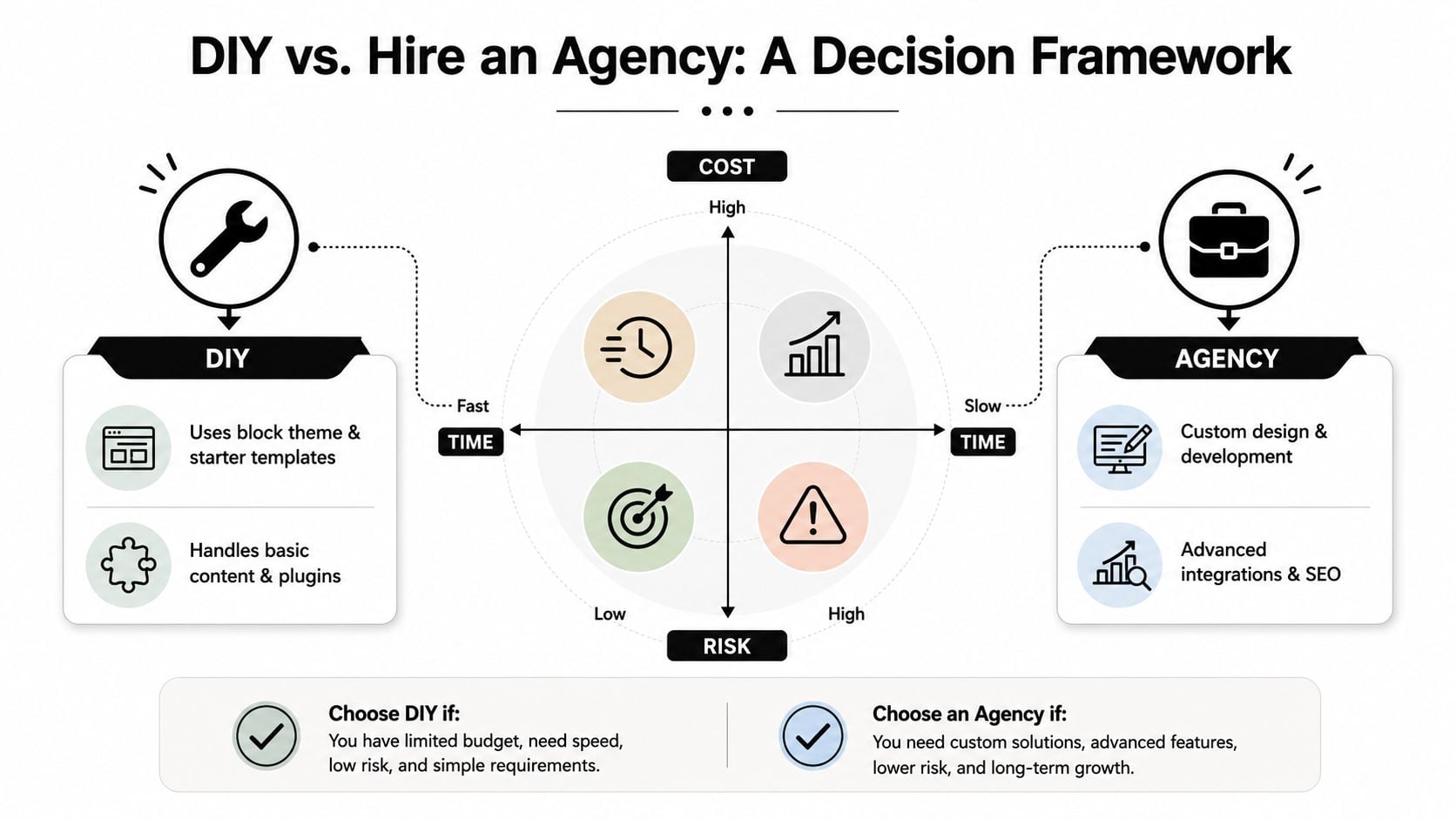
Use four questions to place your project:
| Question | DIY points towards | Agency points towards |
|---|---|---|
| Cost | You can invest time instead of development spend | Lost owner time costs more than outside expertise |
| Time | The launch date is flexible | You have a fixed campaign, opening or rebrand deadline |
| Risk | A brochure site can survive small mistakes | Payments, personal data or business-critical leads are involved |
| Complexity | Pages, posts and basic forms are enough | You need WooCommerce customisation, membership, multilingual content or integrations |
A capable owner can build a credible site with a block theme, starter patterns, a small plugin set and carefully prepared content. That route still needs a maintenance calendar. If security updates are being ignored, plugin conflicts are piling up or every change takes several hours, DIY has passed its useful point.
Compare agency engagement models
Ask whether a quote covers strategy, sitemap, content support, design, development, testing, training, launch and post-launch care. Some agencies work on a fixed project fee, some separate design and development, and others offer a retainer for updates, hosting and SEO. Compare deliverables rather than comparing a single headline price.
A good developer should explain the theme and builder choice, identify likely maintenance risks, show how the site behaves on small screens and describe what happens if you leave the agency. You should receive administrator access, documentation and a clear list of licences and renewal responsibilities.
Guidance on choosing a web design agency can help you prepare questions before requesting proposals. The right choice is the one that matches your internal capacity, not the one with the most elaborate homepage portfolio.
Site Structures That Actually Work for UK SMEs
A good WordPress site makes the next decision obvious. The visitor shouldn't have to understand your internal departments, plugin setup or preferred terminology. They need a route from their problem to the relevant proof, then to a sensible action.
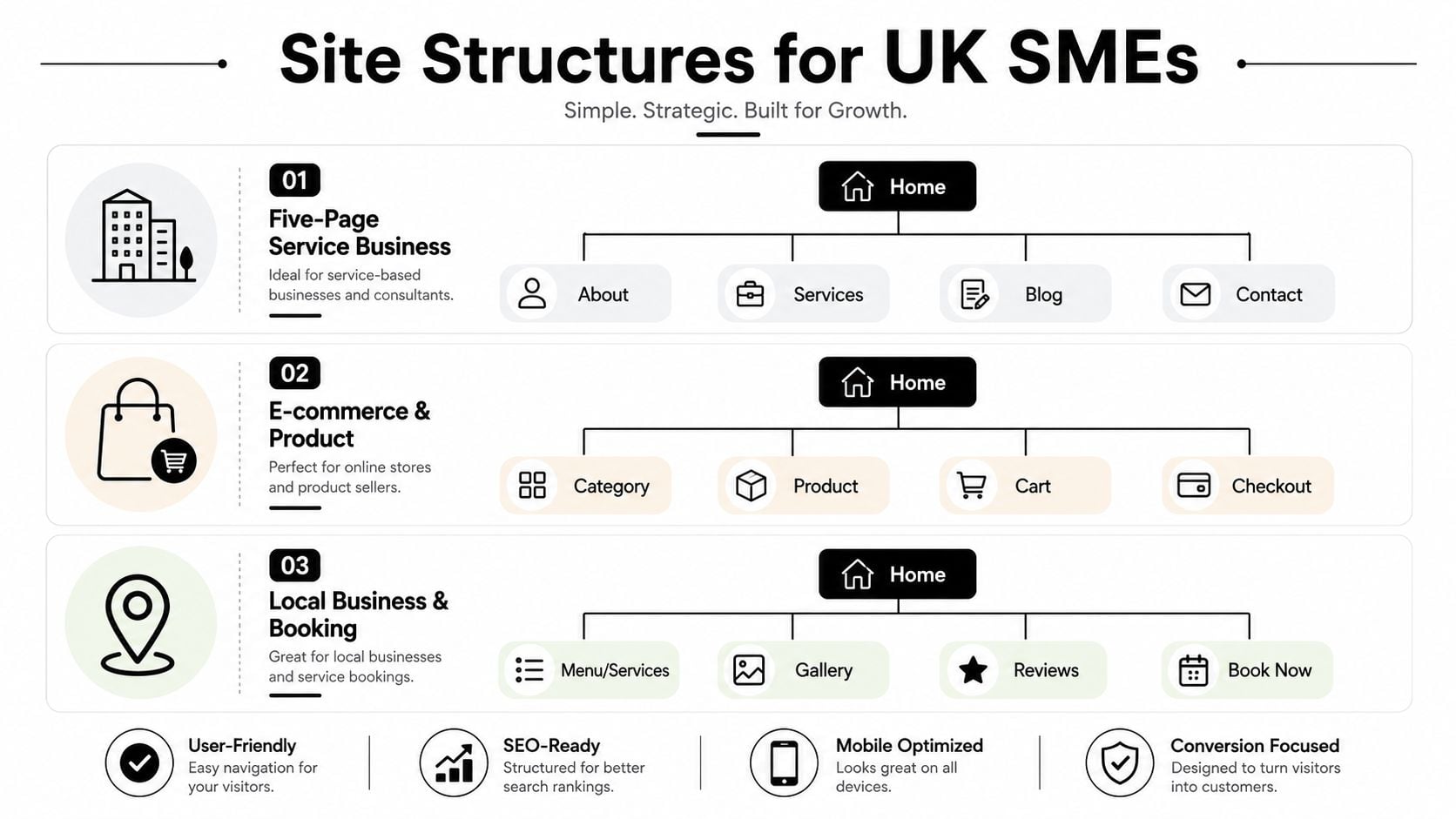
A service business for Dorset clients
A Dorset accountant, solicitor or building firm can often start with Home, About, Services, Case Studies and Contact. Put individual services beneath Services in the page hierarchy, then add location pages only for towns the firm serves. A Weymouth page should contain locally relevant information, not a copied template with the town name swapped.
Case studies should support the service pages, not hide in an isolated blog category. Include the client problem, the work completed and the outcome in plain language. Keep the main navigation short, then use contextual links within service pages to guide visitors towards proof and contact.
A local retailer using WooCommerce
A local shop needs a category-led store, not a catalogue that forces every product into one flat list. Build clear product categories, useful filters and product pages with delivery, returns, stock and collection information close to the purchase action.
WooCommerce dominates UK WordPress commerce. It powers 94.9% of UK WordPress ecommerce stores, while WordPress is installed on 153,697 UK ecommerce stores, according to UK WordPress ecommerce data. That concentration makes WooCommerce a sensible starting point, but the build still needs discipline around extensions, checkout fields and product images.
Place a local-delivery FAQ where customers can find it, and give the contact page practical details such as collection arrangements, opening hours and a map. A Google Business Profile link can support local discovery, but don't let an automated feed replace useful contact information.
A membership or community organisation
A community group may need Paid Memberships Pro or MemberPress, gated content tiers and a members-only resource library. Start by mapping the access rules before designing the dashboard. Which resources are public, which belong to each membership level and what happens when a subscription expires?
Keep account, payment and resource journeys separate from the marketing navigation. Members need a reliable route to log in, update details, find documents and contact support. The public site still needs clear pages for membership benefits, pricing, events and joining.
In all three structures, the blog should earn its place by answering questions that support the primary journey. Don't use it as a dumping ground for every announcement. Categories, parent pages, URL conventions and plugin responsibilities should be documented before content production begins.
Your Next Steps From Reading to Scoping
Give yourself one working week to turn an idea into a buildable WordPress project. Don't start by browsing themes. Start by making decisions that a theme can't make for you.
Day one
Write a one-page brief covering the business goal, primary audience, main call to action and the three competitor sites you want to inspect. Note what each competitor does well, where its navigation gets in the way and which content your business can provide that they can't.
Day two
List the pages, content types and integrations. Separate must-haves from later additions. Decide who supplies copy, photography, product data and approvals. If nobody owns those tasks, your launch plan isn't ready.
Day three
Shortlist hosting and choose a theme and editor approach. Ask whether a block theme, GenerateBlocks, Elementor, Divi or a custom build gives you the right balance of editing control, performance and future flexibility. Keep the plugin list deliberately short and record the purpose of every addition.
Day four
Set an accessibility and SEO baseline. Check heading structure, keyboard access, form labels, colour contrast, image alternatives, page titles, internal links and mobile layouts. Decide how updates, backups and restoration will be handled after launch.
Day five
Set a realistic budget band based on scope, content readiness, technical risk and ongoing support. Then choose DIY or agency work. Ask shortlisted developers who owns the accounts, what happens after launch, how they test updates, how they handle accessibility and whether they provide training and documentation.
The most important decision is ownership. A WordPress site isn't a finished product that can be forgotten after launch. It's a business asset that someone must be able to update, brief, secure and improve.
DesignStack provides Dorset-based WordPress web design, responsive builds, WooCommerce development, hosting, SEO support and post-launch updates for businesses that need a site they can manage properly. Visit DesignStack with your brief, and use the conversation to scope a WordPress website around your customers, content and long-term ownership.

Leave a Reply