


SEO for Ecommerce Websites: A Practical Playbook
Organic search generated 65,233,725 visits, or 58.6% of total UK ecommerce traffic, in one analysis of UK ecommerce performance, even though organic traffic had fallen 12.9% year on year. That combination matters: search remains the biggest acquisition channel for many online retailers, but visibility is becoming harder to retain. (UK ecommerce performance analysis)
For a small WooCommerce shop, SEO isn't a side project you tidy up after the products are uploaded. Category architecture, filter URLs, product copy, structured data and page speed all affect whether Google can find the right page, understand it and present it to a buyer. This guide brings those jobs together into one practical workflow for SEO for ecommerce websites, with the settings and decisions that tend to make a difference.
Table of Contents
- Why Ecommerce SEO Is Different and Why It Matters
- Designing a Site Structure Google Can Actually Crawl
- Optimising Product and Category Pages That Convert
- Technical SEO Essentials for Online Stores
- Content Strategy for Collections, Blogs and Buying Guides
- Measuring Ecommerce SEO the Right Way
- Your 30/60/90 Day Ecommerce SEO Action Plan
Why Ecommerce SEO Is Different and Why It Matters
A WooCommerce shop's SEO problems begin in its architecture. Products, categories, variants and filter URLs can all compete for crawl attention and internal link equity before a buyer reaches checkout.
The UK market gives this work commercial weight. Online retail sales were reported at £127.41 billion in 2024, compared with £123.3 billion in 2023, and online sales accounted for 28% of UK retail sales. (UK online retail market commentary) The same market data indicates that online retail is part of ordinary buying behaviour, with 98% of UK adult internet users visiting an online retail service in May 2025 and 71% using the internet to search for information related to a potential purchase.
For a small WooCommerce shop, competing across every broad commercial query against Amazon or major marketplaces is an inefficient use of time. Specific buying intent offers a more realistic route, such as waterproof hiking boots in a particular size or material. Category targeting, product detail and technical controls need to support that route together, rather than sit in separate SEO checklists.
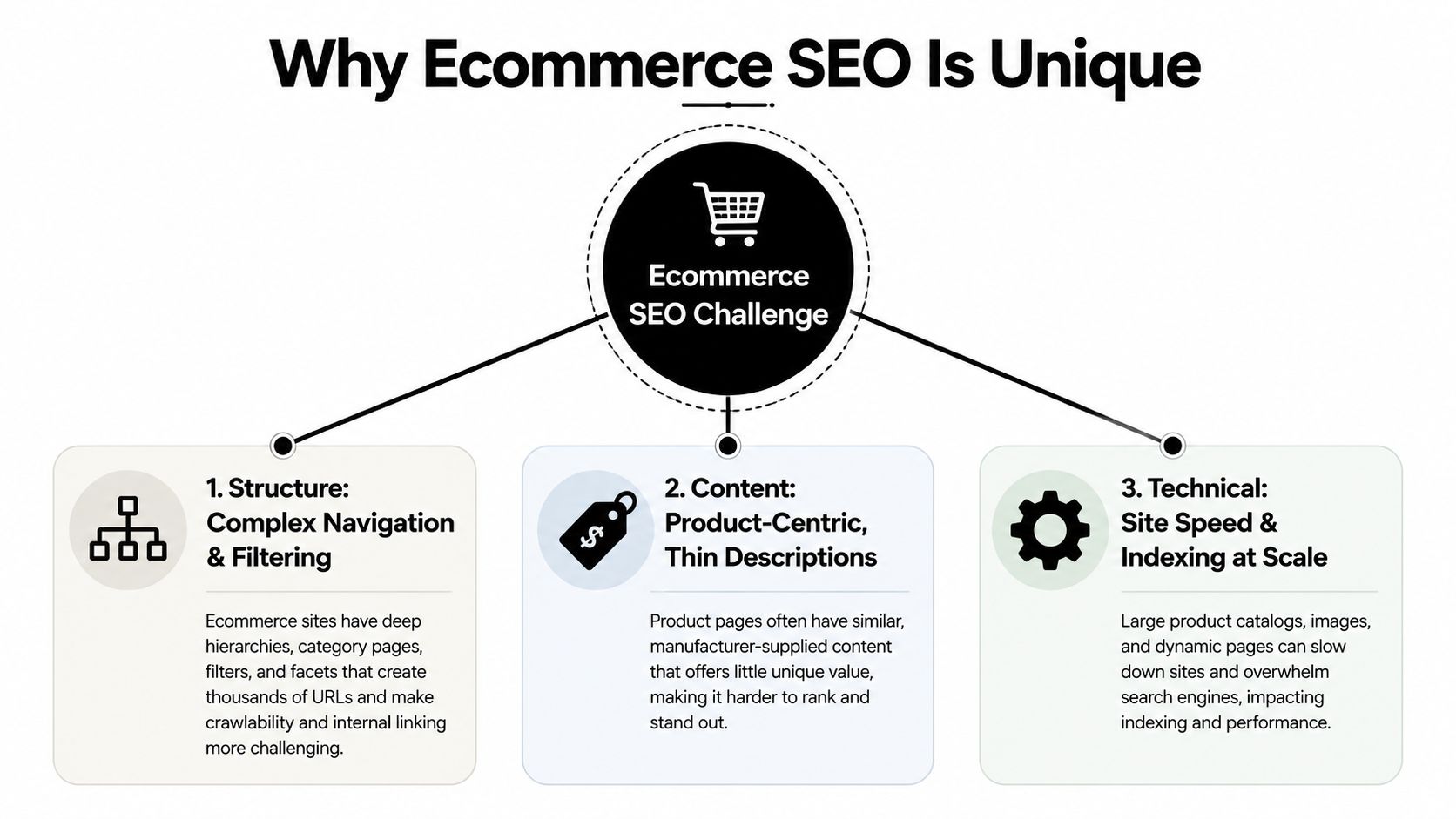
The three problems that compound
- Structure: Near-duplicate product URLs and overlapping categories make it harder to establish which page should rank.
- Content: Product pages need original information that matches search intent and answers a buyer's practical questions.
- Technical hygiene: Faceted navigation, redirects, scripts, image weight and indexing controls can generate large volumes of low-value URLs.
Use one workflow across these areas:
- Crawlable structure gives important categories and products a clear route from the homepage.
- Conversion-focused on-page optimisation aligns titles, headings, descriptions and images with shopper needs.
- Ruthless technical hygiene keeps filters, variants and plugins from diluting the site.
That combination makes SEO a margin play. A useful product page can attract relevant searches after publication, while a paid click stops delivering traffic when its budget runs out.
Designing a Site Structure Google Can Actually Crawl
Site architecture is the route from the homepage to a product. If that route is confusing, users struggle to browse and search engines receive weaker signals about priority.
Keep important products within three clicks of the homepage where the catalogue allows it. A WooCommerce footwear shop might use:
Home → Footwear → Women's Footwear → Women's Hiking Boots → specific product
Each level should represent a genuine buying intent. “Footwear” is broad, “Women's Footwear” narrows the audience, and “Women's Hiking Boots” describes the product group. The product page then handles the exact model and attributes.
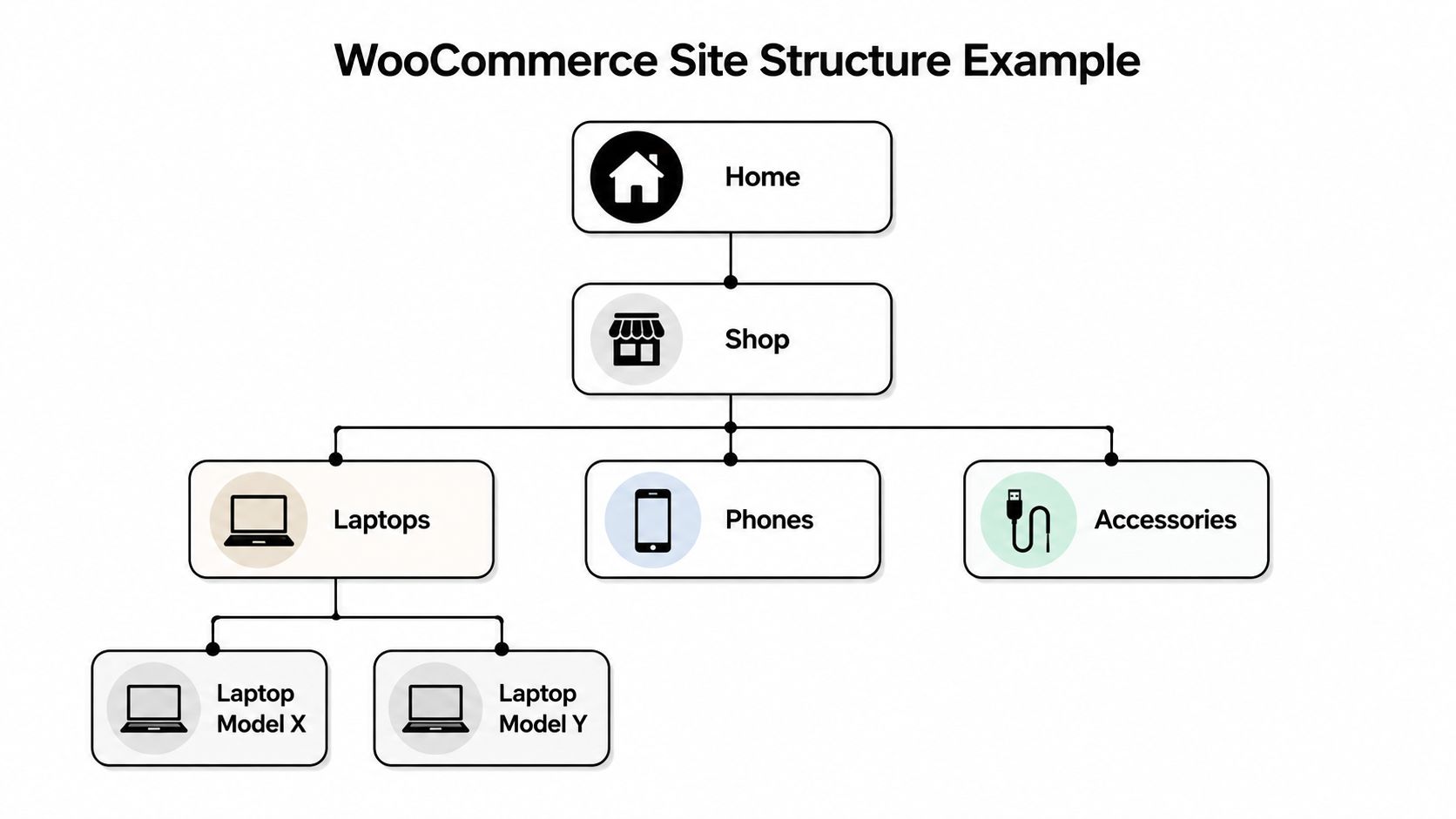
A practical WooCommerce setup
WooCommerce doesn't need an elaborate custom URL system for most small shops. Keeping the default /product/ and /product-category/ structures is usually safer than changing URLs for cosmetic reasons. Configure the product category taxonomy so parent and child categories reflect the catalogue, then use one primary category for each product wherever possible.
Putting one product into several loosely related categories can create awkward breadcrumbs and competing internal paths. Assign products where shoppers would naturally expect to find them, then use related-product links or curated collections for secondary relationships.
Breadcrumbs help users understand their position and give crawlers contextual internal links. Configure them through Yoast SEO, Rank Math or your theme, then check that the visible trail matches the logical hierarchy and that BreadcrumbList structured data represents those same relationships. For a plain explanation of how the URL inventory fits together, use this guide to create a website sitemap.
Filters, stock and discovery
Link buying guides and blog posts back to category hubs, not only to individual products. A guide about choosing hiking boots should point to the hiking boots category, relevant subcategories and a small selection of products, giving authority and users a sensible next step.
Don't mass-delete out-of-stock products. Keep a temporarily unavailable product live when it has useful content, links or a realistic chance of returning. Show the stock status clearly, suggest alternatives and preserve the URL. Remove or redirect only when the product has no continuing value and there isn't a suitable replacement.
A shop with thousands of products can haemorrhage crawl demand if every colour, size, brand and sort combination creates a crawlable URL. Faceted navigation needs rules before the catalogue grows, not after Search Console fills with excluded or duplicate URLs.
Optimising Product and Category Pages That Convert
A product page has two jobs. It must make the product relevant to a search, then remove enough uncertainty for the shopper to act. Treating either job as secondary produces pages that may look optimised in a plugin preview but feel unhelpful to real buyers.
Product page recipe
Use a consistent title pattern:
Brand + Product Name + Key Attribute, such as Size, Colour or Material, | Category
For example, “North Ridge Trail Shell Waterproof Jacket, Navy | Women's Hiking Jackets”. Keep the H1 focused on the product name and don't repeat the entire title tag mechanically.
Write the meta description as sales copy. State the benefit, clarify who the product suits and add a legitimate price, delivery or returns hook when relevant. It should help a searcher decide to click, not merely repeat keywords.
The main description should answer three questions:
- What is it? Explain the product type, construction and important specifications.
- Who is it for? Identify the use case, fit, experience level or problem it addresses.
- Why this one? Translate features into benefits and explain the meaningful difference from alternatives.
Aim for a substantial, original description rather than manufacturer copy. Include sizing, materials, care information, delivery expectations and objections that commonly delay a purchase. For more ideas on making copy useful rather than padded, see these tips for jewellery store SEO in 2026.
Category pages need to sell the collection
A category page shouldn't be a bare product grid. Give it an introduction that defines the collection, explains selection criteria and points shoppers towards useful subcategories. Add comparison guidance, FAQs and links to the products or groups that matter most commercially.
For a high-priority category, place concise explanatory copy near the top if it supports browsing, then add deeper material below the grid. Don't force a large block above the products if it pushes the shopping experience out of view. Use headings to separate buying guidance, common questions and related collections.
Images and snippet control
Use descriptive filenames such as navy-waterproof-hiking-jacket.webp, not camera-generated strings. Alt text should identify what the image shows, for example “navy waterproof women's hiking jacket”, without stuffing several variations into one attribute.
Serve modern formats such as WebP or AVIF, provide appropriate dimensions and lazy-load images below the fold. Keep the main product image available quickly because it contributes to the first impression and helps shoppers assess the item.
Use the Yoast SEO or Rank Math snippet preview while editing the page. It puts the title and description beside the actual product workflow, which is more practical than drafting metadata in a separate document. For the writing itself, this resource on product descriptions that sell provides a useful copy framework.
Technical SEO Essentials for Online Stores
A WooCommerce store can lose organic visibility through one template setting. Faceted navigation, variants, pagination, structured data and page speed affect groups of URLs at once, so technical SEO work should follow the catalogue rather than a generic audit checklist. The practical workflow joins crawl rules, product schema and category decisions, then tests the result on representative pages.
Make a decision for every filter
A common WooCommerce mistake is allowing every colour, size, price and sort combination to generate a URL that search engines can crawl. A filter should receive a crawlable, indexable URL only when it represents meaningful search demand, has enough products to help shoppers and can support distinct metadata and page content. Other filters can remain useful in the interface without becoming indexable destinations.
| Scenario | Recommended Action | Risk If Ignored |
|---|---|---|
| A facet represents a clear product intent and has useful inventory | Create a controlled landing page with unique content, internal links and a canonical URL | Search engines may never discover a valuable collection |
| A facet creates near-duplicate content with little distinct value | Use noindex while allowing necessary crawling, or canonicalise to the parent category when the content is substantially equivalent |
Duplicate URLs can dilute signals and waste crawl attention |
| A sort order changes only arrangement, not products | Keep it out of indexable SEO pathways and avoid linking it as a search destination | Search engines may process multiple copies of the same listing |
| A parameter combination creates uncontrolled URL growth | Prevent internal links where possible, then use carefully tested robots rules for unnecessary crawl paths | Blocking the wrong URLs can hide links and useful content |
| A colour, size or SKU variant has its own distinct search intent and content | Give it a stable URL only if it can stand alone; otherwise canonicalise to the main product | Variants may compete with one another or fail to consolidate signals |
Robots.txt controls crawling, not indexation by itself. Blocking a URL can stop a crawler from fetching it, but it does not reliably remove a URL already known to search engines. It can also hide canonical tags and internal-link signals. Test rules against real parameter combinations before publishing them.
Canonicals, pagination and schema
Every indexable product should normally use a self-referencing canonical. Variant URLs should consolidate to the main product unless the variant needs its own search result and supporting content. Recheck canonicals after changing WooCommerce plugins, themes or permalink settings, because template updates can alter them across the catalogue.
Google no longer relies on rel="next" and rel="prev" for pagination in the way many older guides suggest. Use crawlable numbered links, or an accessible “load more” control backed by HTML anchors and discoverable URLs. Infinite scroll may suit shoppers, but deeper products still need an equivalent crawlable path.
Structured data should match both the page and what shoppers can see:
- Product, with product identity and relevant attributes.
- Offer, with price, currency and availability where shown.
- BreadcrumbList, matching the visible breadcrumb trail.
- Review, only when genuine review content is present and eligible.
Google recommends using Product structured data and/or Merchant Center feeds for product-rich results. Validate JSON-LD with a schema validator, test representative URLs in Google's Rich Results Test, fix errors before publishing and monitor Search Console's Performance report by Search Appearance. (Google product structured data guidance)
For a broader explanation of crawlability, indexability, speed and structured data, see this guide to technical SEO audits and fixes.
Performance that affects browsing
A category page can feel slow because of product-list images, tracking scripts or app assets, even when the product template looks acceptable in isolation. Compress listing images, reserve their dimensions to reduce layout movement, lazy-load below-fold items and remove third-party plugins that no longer serve a business purpose.
Check mobile category pages as well as product pages. A slow filter delays product discovery, a cart drawer that shifts the page interrupts checkout, and an oversized hero image can postpone usable content. Review these interactions with the same priority as technical test scores, because the crawlable page still has to support browsing.
DesignStack offers technical SEO audits and fixes covering crawlability, indexability, page speed and structured data. This can help identify problems created across WooCommerce templates after plugin or theme changes.
Content Strategy for Collections, Blogs and Buying Guides
A collection page is a commercial landing page, not a filing cabinet for products. Give every important top-level category a clear introduction that explains what belongs in the range, who it serves and how shoppers should choose. Link to the strongest subcategories and include trust information where it reduces hesitation.
Use subcategories for more specific intent. A page for women's hiking boots can target a different need from a page for waterproof hiking boots in a particular size, provided the catalogue supports that distinction and the page offers useful choice.
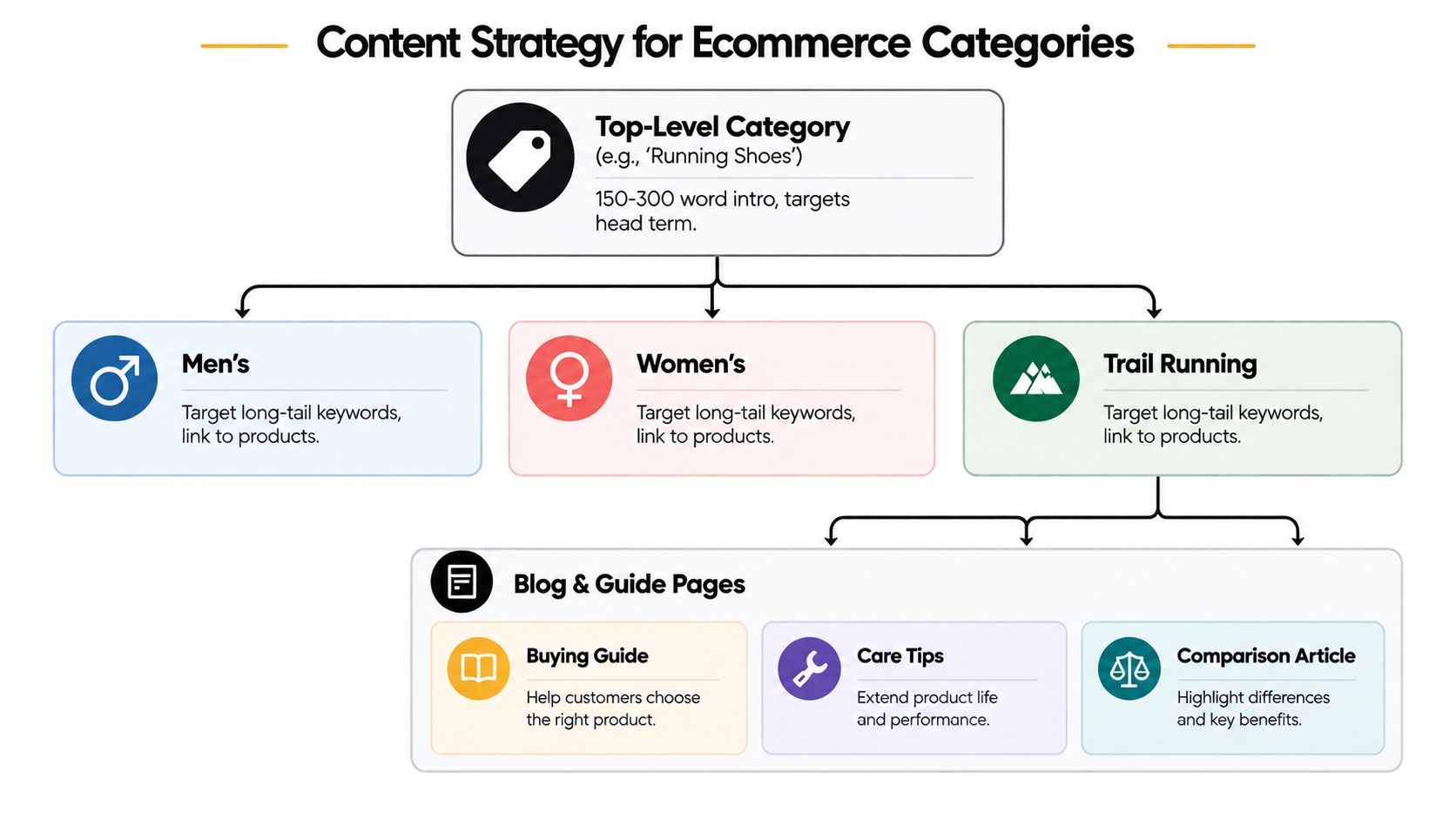
Build guides around decisions
Buying guides should help people choose, compare or use a product. Topics such as choosing running shoes for flat feet, comparing materials or selecting the right size are stronger than generic posts that merely mention a category.
Link each guide to the relevant category hub and a small, carefully chosen group of products. The links should answer the reader's next question. A guide about waterproofing boots might link to waterproof boot collections, care products and specific models with the relevant construction.
Practical rule: Every editorial page should have a defined commercial destination, even when the page itself isn't trying to sell immediately.
Prevent cannibalisation and archive bloat
A blog post targeting the same broad term as a category page can compete with the page that should handle the transaction. Either change the article's intent, narrow its topic to a buying question, consolidate overlapping content and redirect the weaker URL, or keep the category focused on product selection while the guide handles advice.
Use WooCommerce product categories for catalogue structure. Tags should describe meaningful cross-category relationships, not create an archive for every colour, feature or internal phrase. Disable or noindex thin tag archives and internal search-result pages when they don't offer a useful standalone experience.
Retailers that also use local marketplaces should keep the roles clear. A guide such as Loyaltie's advice on how to sell on a local platform can support distribution thinking, but your ecommerce site still needs one authoritative category and product structure. For broader planning, DesignStack's explanation of content strategy is a useful reference when mapping editorial work to commercial pages.
Measuring Ecommerce SEO the Right Way
Rankings and sessions are useful diagnostics, not the final score. A product can attract impressions and clicks while producing little commercial value, and a category can convert well even when its average position looks unremarkable.
Start with a baseline for organic sessions, organic conversion rate, average order value and cost of goods sold, then segment it by device and landing-page type. A practical UK benchmark places organic ecommerce conversion at roughly 2.31% to 2.8%, with one report showing device variation from 1.89% on desktop to 2.61% on tablets. (UK SEO statistics and benchmark methodology) Use those figures as orientation, not as a target that overrides your own margins, catalogue and customer journey.
Use three measurement lenses
Visibility includes impressions, average position, indexed pages and the relationship between submitted and indexed URLs. Search Console URL Inspection can confirm whether Google selected the canonical you intended for product variants and whether the page is available for indexing.
Engagement includes organic click-through rate by template, product-list interaction and the difference between category and product landing behaviour. AI Overviews make click-through rate more fragile. One UK summary reports organic CTR falling from 1.41% to 0.64% for queries with AI Overviews, while another cites a fall from 1.76% to 0.61%. (UK ecommerce search visibility data)
Revenue should connect organic sessions with transactions, revenue and assisted conversions. In GA4, create landing-page groupings for products, categories and blog guides, then compare organic revenue by page type rather than relying on one site-wide average.
Review one template or page group each week. Run a technical crawl with Screaming Frog each month, especially after WooCommerce, WordPress or SEO plugin updates. For broader measurement setup, use this guide to analytics for websites.
Use a simple decision rule:
- A category ranking from 8 to 20 with weak CTR usually needs a sharper title and description.
- A category ranking from 21 to 50 usually needs stronger content, internal links and clearer intent.
- Flat impressions usually point to indexability, demand alignment or insufficient discovery.
Your 30/60/90 Day Ecommerce SEO Action Plan
Small shops make progress faster when they sequence work strategically. Don't spend a week polishing descriptions for products Google can't crawl, and don't publish guides while category URLs compete with filter combinations.
Days 1 to 30, remove technical friction
Install Rank Math or Yoast SEO, then confirm the basic controls rather than accepting every default. Submit XML sitemaps in Search Console, inspect indexation, noindex thin tag archives and internal search pages, set product canonicals and repair broken redirects.
Compress images and enable reliable page caching. Check that important category and product links exist in HTML, that out-of-stock pages have a deliberate status and that filter URLs aren't creating uncontrolled crawl paths.
Gate: Check whether priority pages are indexed, whether canonical signals are correct and whether organic conversions are being recorded. Don't move on until the measurement is trustworthy.
Days 31 to 60, improve pages with commercial value
Choose the 20 highest-revenue products and rewrite their title tags and meta descriptions around real attributes and benefits. Add unique H1s and useful descriptions to your 10 most important category pages, then review breadcrumbs and internal links from related content.
Deploy Product structured data through the SEO plugin, validate representative URLs and add accurate alt text to hero images. Work from the live WooCommerce editor and snippet preview so the changes match the template customers use.
Gate: Compare impressions, clicks, landing-page engagement and organic transactions against the baseline. Look for movement by product and category template, not only across the whole domain.
Days 61 to 90, expand demand and authority
Publish two buying guides aimed at transactional long-tail questions, then create one comparison article for each main category. Link every piece to its relevant collection and selected products, while keeping the article's intent distinct from the category page.
Build relationships with suppliers, complementary businesses and relevant publishers for useful editorial mentions. Track category-level organic revenue in GA4 and document which pages support assisted conversions.
Gate: Keep the work that improves qualified visibility or revenue, revise pages that attract impressions without engagement and stop producing content that has no clear search or commercial role.
A WooCommerce shop doesn't need a perfect system before it starts. It needs controlled templates, clean indexation, useful category pages and a review habit that catches regressions before they spread across the catalogue.
DesignStack builds responsive WordPress and WooCommerce websites with SEO support, structured content and technical foundations suited to growing online shops. Visit DesignStack to discuss a practical ecommerce website, SEO audit or improvement plan for your business.


Leave a Reply