


How to Fix 404 Errors for Improved SEO & UX in 2026
You've probably seen it in Search Console, a crawl report, or a browser tab after clicking a link that should have worked. A page is missing, the URL is wrong, and suddenly there's a list of 404 Not Found errors staring back at you.
That's irritating, but it's not automatically a disaster. Google Search Central says many 404s don't need fixing and that 404 responses do not harm indexing or ranking; the primary job is to sort the broken URLs that still matter commercially from the ones that can be left alone. For a small business, that means focusing on pages that still support enquiries, bookings, product discovery, or campaign traffic, not chasing every dead URL on the site. If you want a quick technical refresher before you start, this guide to technical SEO is a useful companion.
The practical mindset is simple. If a page has moved, use a 301 redirect. If it's permanently gone and has no replacement, a clean 404 or 410 is fine. If the broken URL came from your own site, fix the internal link at the source. That triage approach saves time, protects user experience, and keeps you focused on the URLs that still matter to the business.
Table of Contents
- What Are 404 Errors and Should You Panic
- How to Find All Your Website's 404 Errors
- Prioritising Your Fixes A Triage Plan for SMBs
- Practical Fixes for 404 Errors with Code Examples
- Designing a Custom 404 Page That Helps Visitors
- Keeping Your Site Healthy with Proactive Monitoring
What Are 404 Errors and Should You Panic
A 404 error means the browser reached the server, but the server couldn't find the page at that address. In plain English, the link is broken, the page was moved, or the URL was typed badly. That's all it means, even if the wording looks dramatic in a report.
For most business sites, a 404 is a signal to investigate, not a reason to panic. Google's guidance is clear that many missing pages are normal, and the error itself doesn't damage ranking or indexing. What matters is whether the broken URL still affects customers, search visibility, or internal navigation. If it doesn't, leaving it as a clean error can be perfectly sensible.
Practical rule: fix the URLs that still carry business value, not every dead page you've ever published.
What the error is telling you
A 404 usually points to one of three situations. The page was deleted, the URL changed, or another page links to the wrong address. Those are different problems, and they need different fixes.
That's why the cheapest-looking solution, slapping a redirect on everything, often creates more work later. If you redirect irrelevant URLs to unrelated pages, you can end up with soft 404s, which is exactly the kind of tidy-looking mess that wastes time and confuses users. If content is gone for good and there's no logical replacement, a proper 404 or 410 is cleaner than forcing a bad redirect.
What matters for a UK business
For SMEs and local organisations, a broken link isn't valuable because it exists, it's valuable because of what it used to do. A missing booking page, product page, or campaign landing page can cost enquiries. A random old article URL with no traffic and no links often doesn't need any action at all.
So start with business intent. Ask whether the page was part of a sales journey, whether it still has live internal links, and whether anything outside your site still sends people to it. That gives you the right fix faster than treating every 404 as equal.
How to Find All Your Website's 404 Errors
The cleanest starting point is Google Search Console. Open the Pages report, look for Not found (404) entries, and export the list so you can work through it properly. Don't rely on memory or spot checks, because missing URLs tend to hide across categories, blog posts, old campaigns, and template changes.
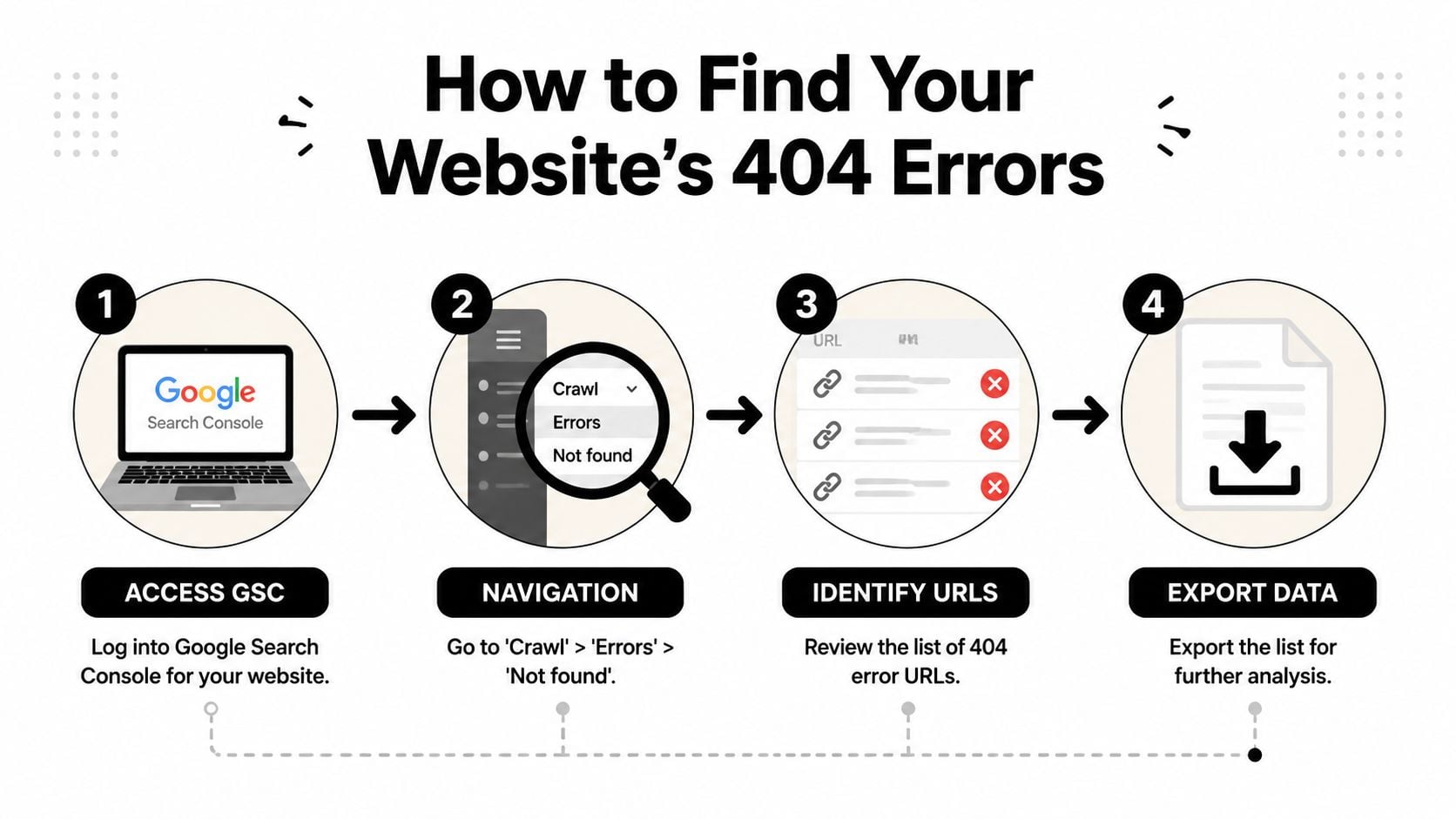
A tidy export becomes much more useful if you keep it alongside your wider reporting. If you're already tracking behaviour and landing pages, the notes in this overview of website analytics help you connect broken URLs to user journeys instead of treating them as isolated faults. For a broader toolkit, the round-up of best free website audit tools is a handy reference when you need another crawler or checker alongside Search Console.
Don't stop at the URL
The important diagnostic step is the Page Referrer. UNC's web guidance makes the decision tree very clear, the referrer tells you whether the broken URL came from your own site, from an external site, or from Google's search results. That changes the fix.
If the referrer is internal, update the link on your site. If another website is sending traffic to a bad URL, ask them to correct it if the link matters. If Google is surfacing the error, check whether the old page should be redirected, restored, or left to return a clean error. Most articles jump straight to redirects and skip this step, which is why teams waste time fixing the wrong thing.
Build a usable working list
Once you've exported the URLs, add notes for source, referrer, and likely action. Keep one spreadsheet rather than scattering issues across emails or task cards. That makes it much easier to hand the work to a developer, a content editor, or a marketing colleague without losing context.
Good triage starts with origin, not with the redirect. If you don't know where the broken link came from, you can't choose the right fix.
A crawl tool can help confirm what Search Console already hints at, especially after a migration or redesign. The goal isn't a huge audit document. It's a clear, ordered list of broken URLs that tells you what to fix first and why.
Prioritising Your Fixes A Triage Plan for SMBs
A long 404 list can feel messy fast, so the trick is to rank it by business impact. The highest priority is anything that directly blocks users from moving through your site. Broken internal links sit at the top, because they affect navigation, trust, and conversion paths at the same time.
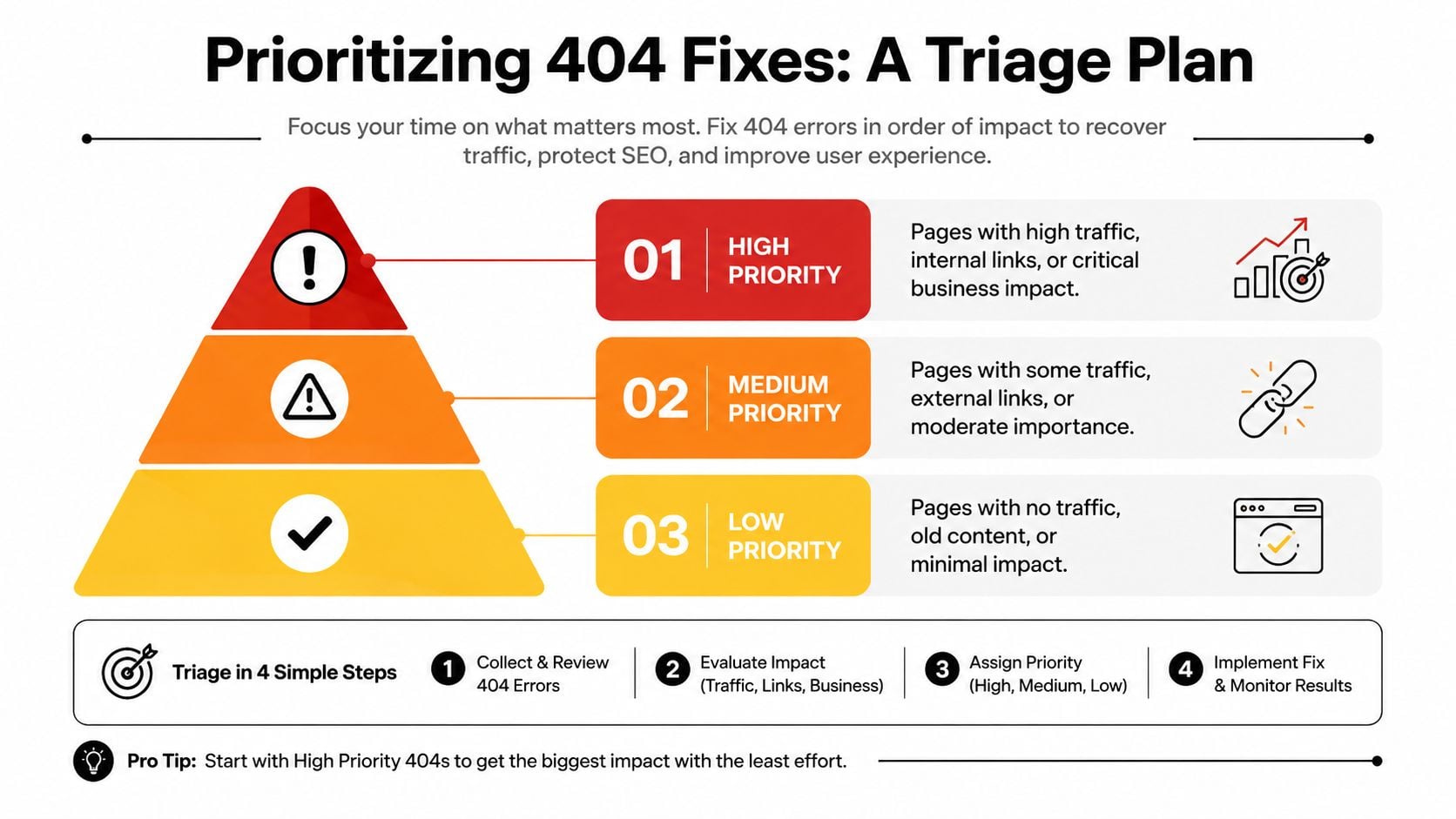
In practical UK SEO workflows, the best approach is to export broken URLs from Search Console, crawl the site, and then rank the list by internal links, backlinks, and historical traffic. That's the same logic used in the guidance from Bright SEO Tools on fixing 404 errors for better SEO, and it's a sensible way to avoid spending half a day on dead URLs nobody sees. A single spreadsheet works best when it's mapped to one of three actions, 301 redirect, restore or recreate, or intentionally return 410.
High priority
These are the URLs that matter most to revenue or usability. A broken product page, a missing service page, or a dead internal link from a menu item should be dealt with quickly. If customers can't move from discovery to enquiry, the 404 is no longer just a technical issue, it's a commercial one.
Medium priority
These are pages with some external value, but less immediate impact. A blog post with a backlink from a local partner, a campaign page mentioned in a newsletter, or an old resource linked from a printed flyer belongs here. Fix them, but don't let them crowd out the pages that are actively blocking users.
Low priority
These are the URLs that don't justify urgent work. They may be mistyped links from elsewhere, old pages with no traffic, or historic addresses that no longer have a useful replacement. If they're obsolete and not linked from anywhere important, leaving them to return a proper error is fine.
Useful filter: if a broken URL doesn't support bookings, enquiries, or discovery, it usually doesn't deserve first place in the queue.
That triage mindset keeps the work honest. You're not trying to erase the existence of every 404, you're trying to protect the paths that still generate value for the business.
Practical Fixes for 404 Errors with Code Examples
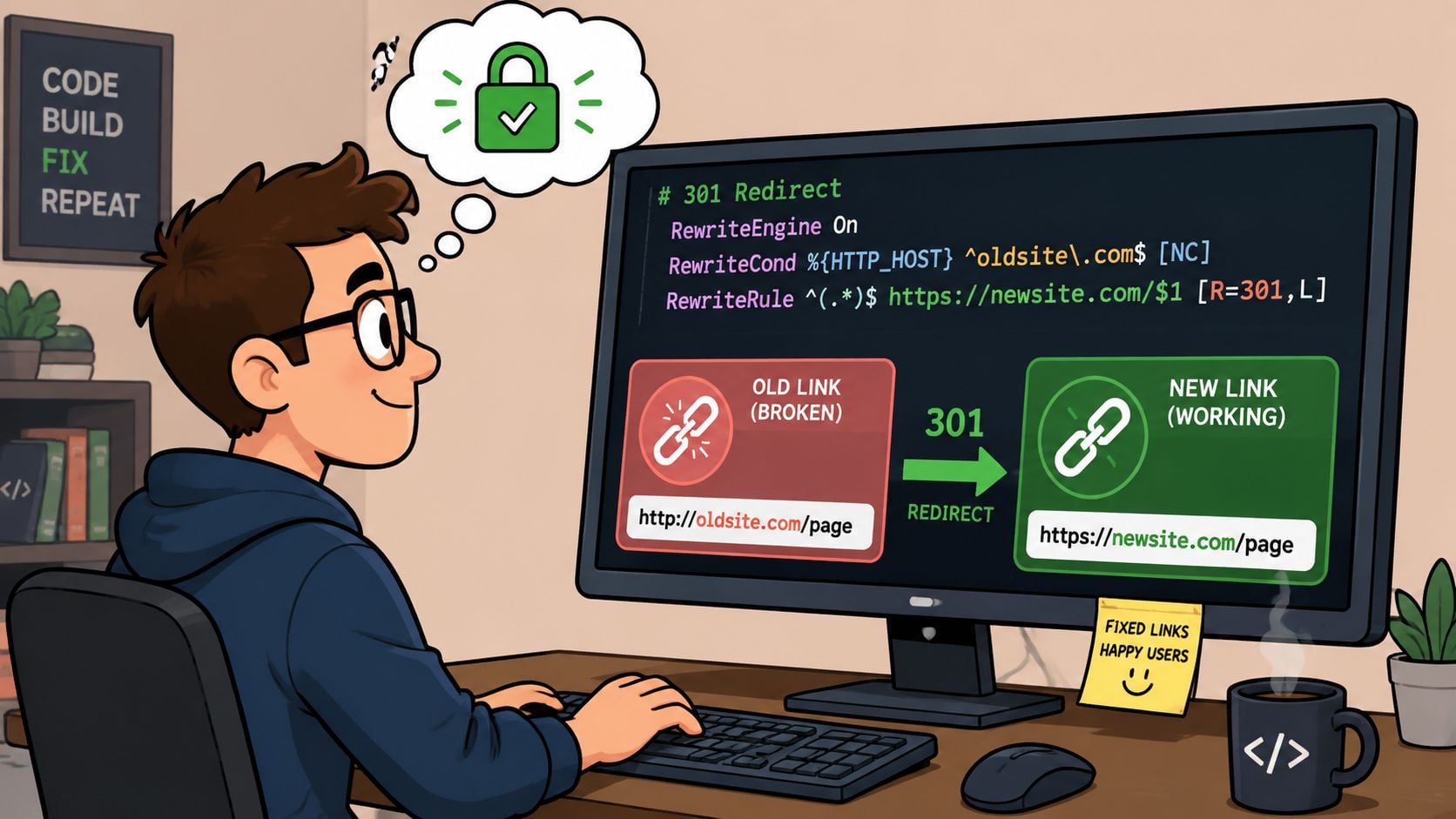
The first thing to get right is matching the fix to the fault. A page that moved permanently needs a redirect. A page that was deleted by mistake should usually be restored. A broken internal link should be corrected at the source, not patched over with a redirect that hides the underlying problem.
Use a 301 redirect when the old page has a clear replacement
A 301 redirect tells browsers and search engines that the old URL has permanently moved. Use it when the new page is the closest match, not just because it feels neat to redirect somewhere. That distinction matters, because irrelevant destinations can create soft 404 behaviour and a poor user journey.
For Apache sites, a simple redirect in .htaccess looks like this:
Redirect 301 /old-page /new-page
For Nginx, a permanent redirect is usually written like this:
rewrite ^/old-page$ /new-page permanent;
Only use those patterns when the destination is relevant. If the old URL was a seasonal landing page and the nearest match is the current campaign page, that can be sensible. If there's no meaningful replacement, forcing a redirect usually makes the experience worse.
Restore content when the page still deserves to exist
If a page was removed by mistake, restoring it is often better than redirecting it. That's especially true for pages with backlinks, search demand, or a history of enquiries. A restored page keeps its original purpose intact instead of diluting it into a different page.
For WordPress-driven sites, the fix is often broader than a single page. As noted in Up North Media's discussion of soft 404 errors, it's important to think carefully about whether a redirect really solves the user's problem or merely moves it elsewhere. That's especially relevant on larger content sites where deleted pages accumulate over time.
Fix the source when the link is yours
If the broken URL is linked from another page on your own site, edit the source page directly. That is usually the cleanest fix because it removes the problem rather than disguising it. You'll get a better internal linking structure, and you won't create another maintenance task for the future.
Treat WordPress 404s as a routing problem first
On WordPress sites, a widespread 404 often points to a permalink or template issue rather than dozens of broken pages. Re-save the permalink settings to refresh the rewrite rules, clear page, CDN, and browser caches, then crawl again to see whether the errors disappear. If the same URLs still 404, the fault is usually in the theme, CMS routing, or cached edge content, so inspect the rendered HTML and compare it with a known-good page of the same template before making a sitewide change.
The same thinking applies after a redesign or migration. If a whole category archive suddenly fails, the problem is often structural, not editorial. For ongoing help with that kind of maintenance, WordPress support and maintenance is worth keeping close if you don't want these issues resurfacing after every update.
Later in the process, if you're unsure whether the page has been correctly restored or redirected, a quick re-crawl is the safest verification step. It's also a good moment to check whether your custom redirect has landed users on a page that matches their intent.
A tidy fix is one that removes friction for the visitor and makes future maintenance easier for you. If it creates a new dead end, it isn't really a fix.
Designing a Custom 404 Page That Helps Visitors
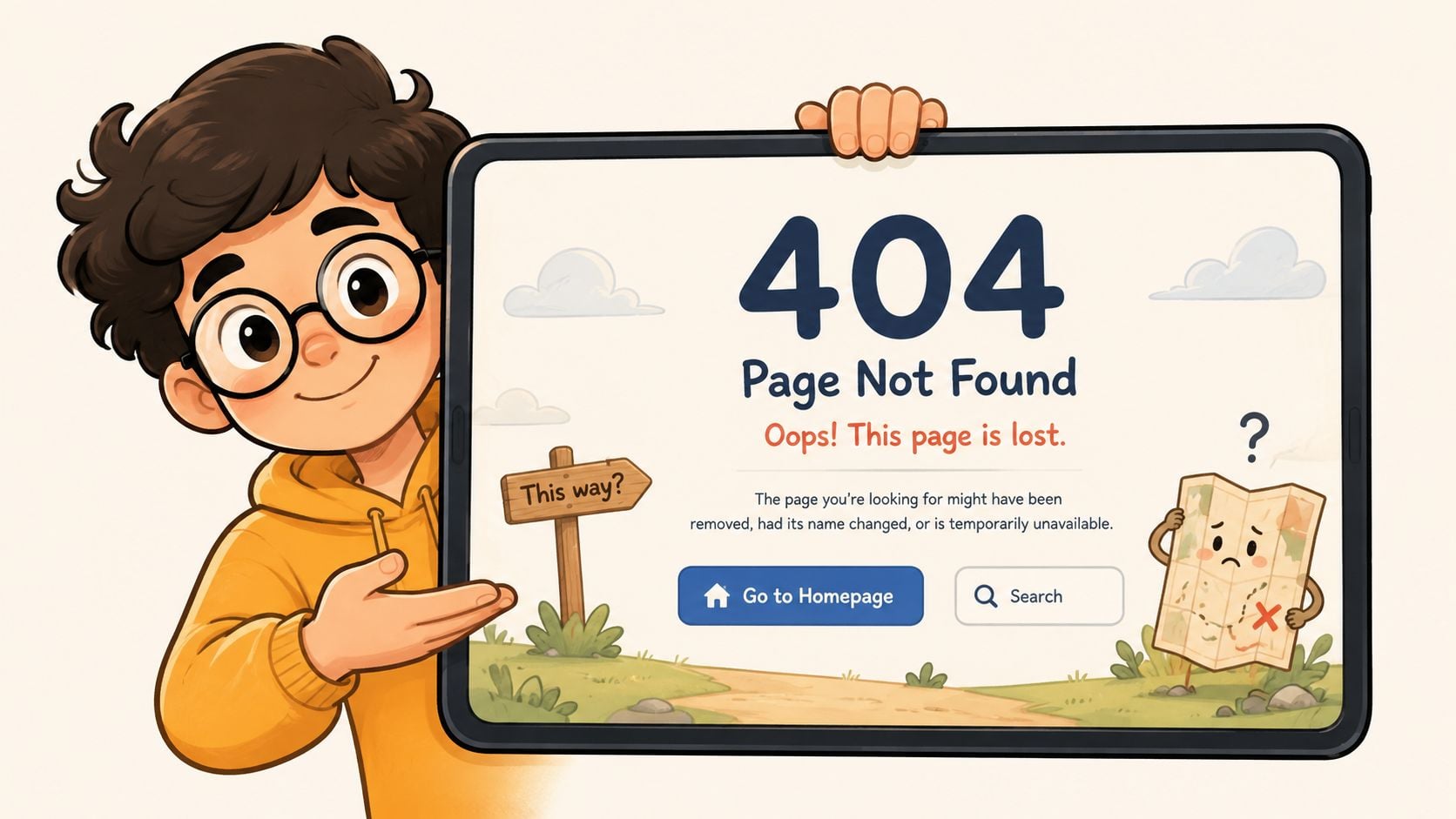
A strong custom 404 page doesn't pretend the error didn't happen. It acknowledges the miss, helps the visitor recover, and gives them somewhere useful to go next. That's far better than a plain server message that leaves people stranded.
Nielsen Norman Group has long recommended a custom 404 page with a plain apology, likely mistyped URL suggestions, and a search field, and Google reiterated years ago that outdated URLs should be removed from sitemaps, stopped from being linked, and replaced with corrected versions. That combination still works because it respects what the visitor is trying to do. If you want help thinking through usability more broadly, website user experience improvements are closely tied to how people recover from dead links.
What a useful 404 page should contain
The essentials are straightforward.
- Clear apology: tell the visitor the page can't be found without sounding robotic.
- Search field: let them look for the page or product they wanted.
- Direct links: send them to the homepage, key service pages, blog, or contact page.
- Consistent branding: keep the page visually aligned with the rest of the site so it still feels trustworthy.
A helpful 404 page is not a substitute for repairing broken links. It's a safety net for the traffic you couldn't save in time. That's especially useful on eCommerce sites, where category and product URLs tend to change during seasonal updates or stock changes.
Why this matters for small businesses
People landing on a dead page often aren't angry, they're just trying to get somewhere quickly. If you give them a sensible route forward, you reduce the chance they leave immediately. You also make your site feel maintained, which matters for trust.
A branded 404 page can still be simple. The main job is to answer the visitor's next question before they have to ask it. That keeps the experience humane, even when the URL failed.
Keeping Your Site Healthy with Proactive Monitoring
404 fixes work best when they're part of a routine, not a one-off rescue. Sites change, products disappear, pages get renamed, and marketing campaigns come and go. A broken URL will happen again, so the primary goal is to catch it early and decide quickly whether it needs a redirect, a restore, or no action at all.
A monthly review in Google Search Console is enough for most small businesses to stay ahead of obvious problems. Pair that with a crawl of the site after bigger changes, such as a redesign, migration, or template update. If you want a dependable maintenance partner for that sort of ongoing housekeeping, website support and maintenance is the kind of service that prevents small issues turning into recurring ones.
A simple maintenance habit
Use the same rhythm each time.
- Check Search Console: look for new 404s and note where they came from.
- Crawl the site: confirm whether the broken link is internal, external, or generated by a template issue.
- Triage the list: sort by business value, not by volume.
- Fix the source: update internal links, redirect only where there's a close match, and leave obsolete URLs alone.
That approach keeps the site tidy without over-engineering it. It also stops 404 management from becoming an endless fire drill.
The best sites aren't the ones that never produce errors. They're the ones with a reliable process for spotting, sorting, and fixing the errors that matter most. If you stay consistent with that workflow, your SEO and user experience both get better over time.
If you'd like a practical handover on broken links, redirects, or a WordPress 404 issue that keeps coming back, DesignStack can help. We build and support UK websites with the kind of maintenance discipline that stops small errors turning into bigger problems, and we're happy to review what's happening on your site.



Leave a Reply