

Mobile App Development for Small Business Success
You’re probably in one of two positions right now.
Your business already has a decent website, it works well enough on mobile, and customers can find you. But you’ve started noticing a pattern. People browse quickly, disappear quickly, and don’t always come back. Or you’re watching competitors make it easier for customers to book, buy, reorder, or get updates without returning to a browser every time.
That’s the point where mobile app development for small business stops being a vanity project and starts becoming a practical commercial decision. For many UK small businesses, the question isn’t whether an app sounds impressive. It’s whether an app can create a stronger repeat-purchase loop, reduce friction, and justify the cost.
We look at app projects that way at DesignStack. Not as a technology exercise, but as a business system. If an app won’t improve retention, simplify a customer task, or connect cleanly with the tools you already use, it usually shouldn’t be built yet.
Why Your Small Business Needs More Than a Website in 2026
A Dorset café owner sees the same behaviour every week. Customers stand in the queue with phones in hand. A retail customer checks opening times, then later forgets to come back and buy. A gym member means to book a class but gets distracted after opening a browser tab. The website isn’t broken. It just isn’t close enough to the customer.

That gap matters because a mobile website and a mobile app do different jobs. A site is still essential. It helps customers discover you, compare options, and find information. An app sits on the device, shortens the route back to your business, and gives you a direct channel for repeat use.
A website gets found. An app gets reused
That distinction is where many first-time app projects go wrong. Owners assume an app is a smaller version of their website. It isn’t. The value comes from habits. If customers need to order often, book regularly, collect rewards, or receive timely updates, an app can remove steps that a website can’t.
For many businesses, the website should come first. If your current site is outdated, slow, or unclear, fix that before you invest further. A strong responsive website design foundation gives your app something useful to connect to rather than forcing the app to compensate for weak core systems.
Practical rule: Build an app when your customers need a shortcut back to your business, not just another place to read the same content.
Retention is the real commercial case
The strongest argument for an app isn’t novelty. It’s customer retention. UK SMEs with mobile apps report 35% higher customer retention rates compared to web-only counterparts, and 72% of UK small businesses are planning app investments by 2026 to benefit from 5G rollout, according to the British Chambers of Commerce digital report reference.
That lines up with what we see in practice. Businesses that benefit most usually have one of these patterns:
- Repeat transactions such as food orders, product reorders, or class bookings
- Ongoing customer membership like clubs, gyms, associations, or loyalty schemes
- Frequent service interactions including appointments, reminders, and status updates
A website is still your public storefront. An app becomes your repeat-business engine. If your growth depends on keeping customers engaged after the first visit, that difference matters far more in 2026 than it did even a few years ago.
An Actionable Checklist to Decide If You Need an App
A Dorset café owner told us the same thing we hear from many small businesses. Customers were happy to order, but repeat orders still depended on people remembering the website, logging in again, and starting from scratch. That is usually the real test for a first app. It should remove friction from a repeat action that already matters to revenue.
An app is a business decision before it is a technical one. If it will not save staff time, increase repeat purchases, improve bookings, or strengthen loyalty, it is probably the wrong project for now.
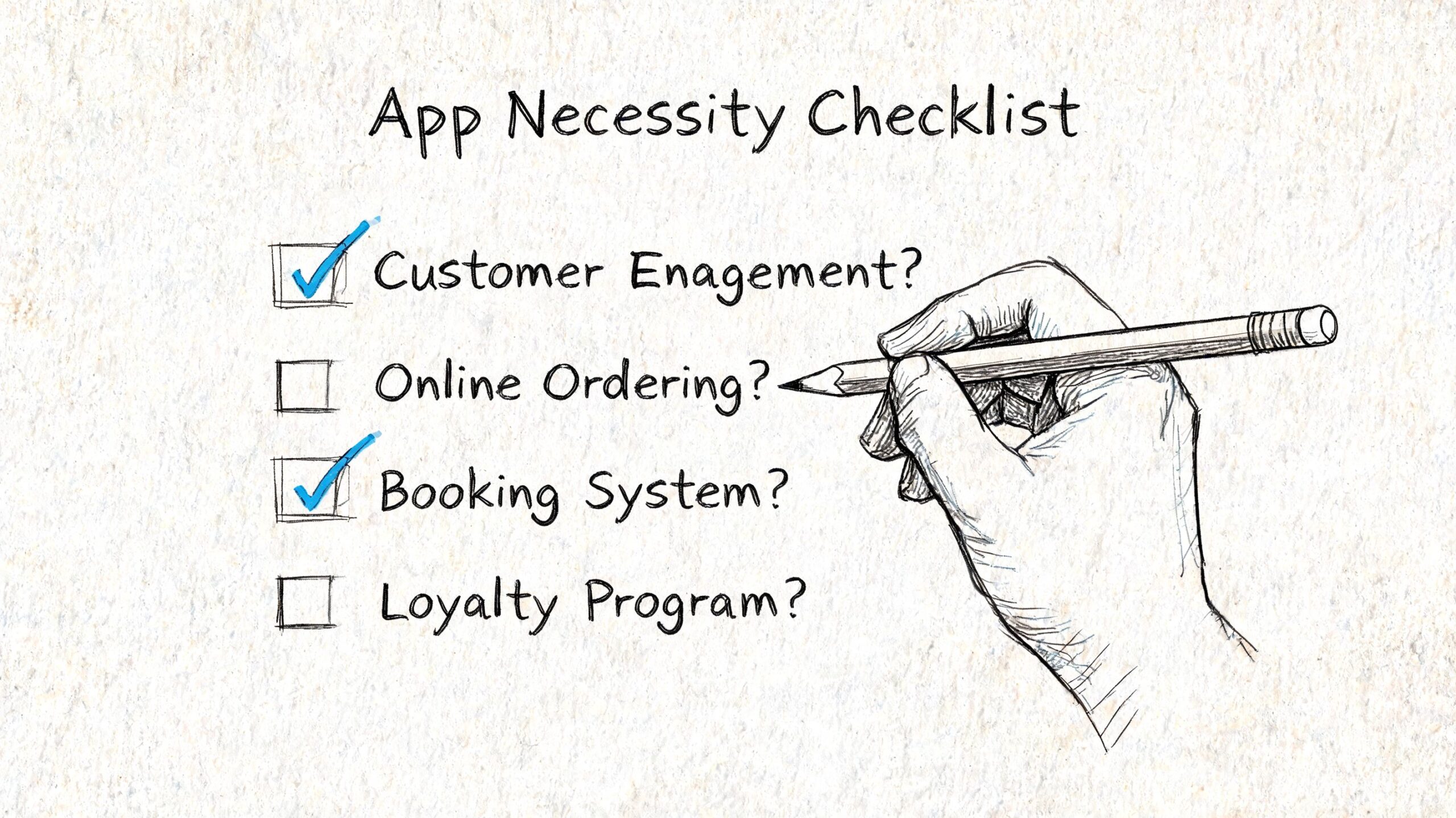
The decision checklist
Use these questions before you speak to a developer or agency.
Do customers return often enough to justify an install?
Apps suit businesses with repeat behaviour. That includes reorders, recurring bookings, memberships, classes, local delivery, and event attendance.Can you point to one repeated task that should be faster on mobile?
Good examples are booking an appointment, reordering a usual purchase, checking class times, tracking an order, or accessing member benefits. If the app shortens that task to a few taps, the case gets stronger.Would an app improve retention, not just acquisition?
Many first apps fail because they try to attract new customers instead of serving existing ones better. Loyalty points, saved preferences, account access, and personalised offers tend to work better than brochure-style content.Do timely updates matter to the customer experience?
Push notifications can help with booking reminders, delivery updates, last-minute schedule changes, and limited offers. They also create a GDPR obligation, so consent, privacy notices, and data handling need to be planned properly from day one for UK users.Can your current systems support an app without creating duplicate admin?
If your bookings, products, customer records, or content already sit in a system you can connect to, the app becomes easier to run. If staff would need to update the website and the app separately, costs rise quickly.
The financial filter
Budget usually settles the question.
For many UK small businesses, a first cross-platform app sits somewhere between a modest marketing spend and a serious operational investment. Industry estimates from Clutch's UK app development pricing guide put typical app projects in the tens of thousands rather than the low thousands. That is why the commercial case needs to be specific.
At DesignStack, we advise clients to check three things before approving any build:
You know the action you want to increase or simplify.
Examples include repeat orders, appointment attendance, membership renewals, or customer self-service.You can measure success in pounds, hours, or retention.
If you cannot track revenue uplift, reduced admin time, fewer missed appointments, or higher repeat purchase rates, ROI becomes guesswork.You are willing to launch a smaller first version.
The best early apps do one or two jobs well. They do not try to include every feature raised in the first workshop.
If the brief is “our competitors have an app”, stop there. If the brief is “customers keep dropping off at this repeated step”, there is something useful to build.
When the answer is probably no
Hold off on an app if any of these apply:
- Your offer is still changing and customer demand is unproven
- People buy once or twice a year with little need for ongoing access
- Your team cannot support updates, customer questions, or basic maintenance
- The app would mostly replicate website content
- You have not sorted GDPR basics such as consent, privacy notices, and data retention
In those cases, fix the underlying business process first. A sharper website, a better booking flow, or a cleaner CRM setup often produces a faster return.
The right first app is narrow, useful, and measurable. That is how small businesses keep risk under control and give the project a fair chance of paying back.
Decoding Your App Development Options
A Dorset retailer wanting loyalty repeat purchases, a local clinic trying to cut missed appointments, and a trade business chasing faster quote approvals should not all build the same kind of app. The right choice depends on what the app needs to do, what systems it must connect to, and how much complexity the business can afford to support after launch.
The main options are straightforward once you strip away the jargon. Native means separate apps for iPhone and Android. Cross-platform means one codebase serving both. No-code or low-code means using a platform with pre-built logic and templates. Agency-led delivery is different. It is the way the work is planned, designed, built, tested, and managed.
The four routes in plain English
Native apps suit projects where performance, device-level features, or a highly specific user experience matter enough to justify building for each platform separately. That can be the right call for apps using advanced camera functions, heavy offline usage, or complex location handling. For a first small business app, it is often more build cost and more maintenance than the commercial case supports.
Cross-platform apps are usually the practical middle ground. One codebase keeps development and updates more controlled, while still giving access to the features most SMEs need. For booking, ordering, account access, loyalty, field service workflows, and member portals, this route is often hard to beat on cost versus capability.
No-code and low-code tools work for simple internal tools, prototypes, and narrow customer journeys. They are useful when speed matters and the app logic is basic. The trade-off appears later. Integrations can become awkward, branding can feel constrained, and GDPR handling needs close checking because your customer data may sit inside third-party platforms with limited control over how things are configured.
Agency-led delivery reduces mistakes that happen before a single line of code is written. At DesignStack, we see first projects go off course when the business chooses a technology before sorting out user journeys, integrations, data handling, and support responsibilities. The build method matters, but the delivery process often decides whether the app pays back.
Comparing App Development Approaches for Small Businesses
| Approach | Best For | Avg. Cost (UK) | Time to Market | Key Pro | Key Con |
|---|---|---|---|---|---|
| Native | Businesses needing platform-specific performance or deeper device features | Higher than cross-platform builds because iOS and Android are developed separately | Slower | Strong performance and full platform control | Higher build and maintenance overhead |
| Cross-platform | Most SMEs launching on iOS and Android together | £15,000 to £40,000 for many SME projects, as outlined in the NZ Apps app development guide | Moderate | Better cost efficiency across two platforms | Some limitations for highly specialised features |
| No-code or low-code | Early validation, simple workflows, low complexity apps | Lower upfront cost | Faster | Quick to test and launch | Limited flexibility as requirements grow |
| Agency-led project | SMEs needing strategy, design, integrations, testing, and launch support | Varies by scope and technical route | Depends on scope | Better project control and clearer decision-making | Results depend heavily on partner quality |
What usually works for a first app
For many UK small businesses, cross-platform is the sensible starting point. It keeps the first release commercially realistic and avoids paying twice to prove one idea. That matters if you are already funding design, backend work, app store preparation, testing, and post-launch support.
It also fits the way regional businesses tend to operate. A retailer in Dorset may need the app to talk to Shopify or WooCommerce. A clinic may need bookings synced with existing practice software. A service firm may need customer logins tied to a CRM. In these cases, the hard part is rarely the buttons on the screen. It is getting data, permissions, notifications, and admin processes working properly without creating extra manual work for staff.
Native still has its place. We recommend it when the app itself is becoming a major product or when specific platform features impact the business case.
Where small businesses get this wrong
The common mistakes are predictable:
- Choosing native too early before customer demand or usage frequency has been proven
- Choosing no-code on price alone and finding out later the app cannot handle required integrations or data rules
- Judging proposals by feature count instead of asking how updates, security fixes, and support will be handled
- Ignoring compliance at the build-choice stage when GDPR, consent records, push notifications, location data, or payment flows affect the technical setup from day one
That last point matters more in the UK than many owners expect. If your app collects personal data, stores customer preferences, tracks location, or sends marketing notifications, the platform choice can affect how easily you can configure consent, retention, access controls, and deletion requests. A cheaper route that creates compliance friction later is rarely the cheaper route in practice.
A first app does not need the most advanced stack. It needs the build method that matches your budget, your systems, your support capacity, and the return you expect to see. DesignStack offers app development as one part of a wider delivery process including UX, backend integration, and launch support, but the essential factor is whether the team can explain trade-offs clearly and scope the first version with discipline.
Planning Your App Budget and Timeline Realistically
Budget anxiety is usually justified. Small businesses don’t get into trouble because app development is impossible. They get into trouble because the first quote only covers the visible part of the project.
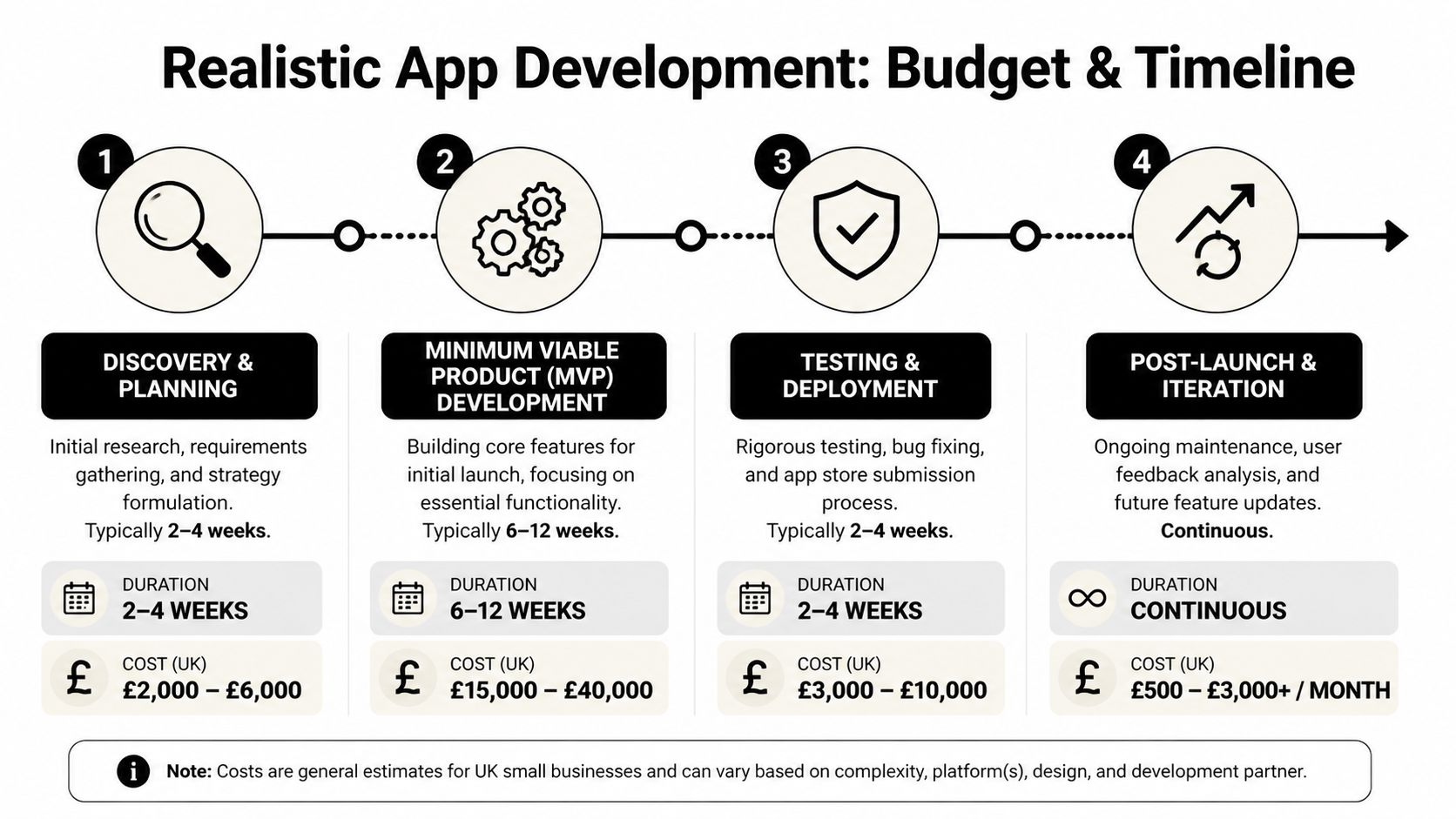
What the budget usually includes, and what it often misses
UK small businesses face average app development costs of £20,000 to £50,000, while 68% cite budget constraints as the top barrier. Hidden costs such as App Store fees of 30% on iOS and annual maintenance of 15 to 20% are often missed, according to this UK small business app cost overview.
That hidden-cost problem is common because many owners compare only the initial build quote. In reality, the full budget often needs to account for:
- Discovery and planning so the scope is properly defined before development starts
- Design work including user journeys, interface design, and revisions
- Development for the app itself plus API or backend work
- Testing and launch support including store submission and issue fixing
- Ongoing maintenance for updates, compatibility, bug fixes, and security work
- Store and transaction costs where relevant to the app’s commercial model
A fixed-cost model can help here because it forces clearer scope decisions early. It doesn’t make the project magically cheaper, but it does reduce the risk of a vague estimate turning into a moving target.
A realistic timeline for a first app
Most viable first app projects move through four stages rather than one long build.
Discovery and planning
During this phase, priorities are set, integrations are checked, and business rules are clarified. If this phase is rushed, the development phase usually becomes expensive.
MVP development
The first version should focus on the one or two core actions customers need most. This focus helps many projects save money by refusing to build “nice to have” features too early.
Testing and deployment
Apps need proper testing on real devices, not just a designer’s preview. Payment flows, booking logic, notifications, and user accounts all need checking before release.
Post-launch iteration
Launch isn’t the finish line. It’s the point where real user behaviour starts informing what should be improved next.
Budget reality: The cheapest first quote is often the most expensive route if it ignores maintenance, revision cycles, or integration work.
For a broader outside perspective on how development costs are commonly broken down in another market, this NZ Apps app development guide is useful. The regional pricing differs, but the structure of the cost thinking is relevant. Discovery, complexity, integrations, and post-launch support all matter more than a headline number on its own.
Defining Your App's Core Features with an MVP
The easiest way to waste money on a first app is to build the tenth version first.
A better approach is the Minimum Viable Product, or MVP. That means launching the smallest version of the app that solves the main user problem properly. Not a rough draft. Not a half-finished product. A focused version with the right essentials.
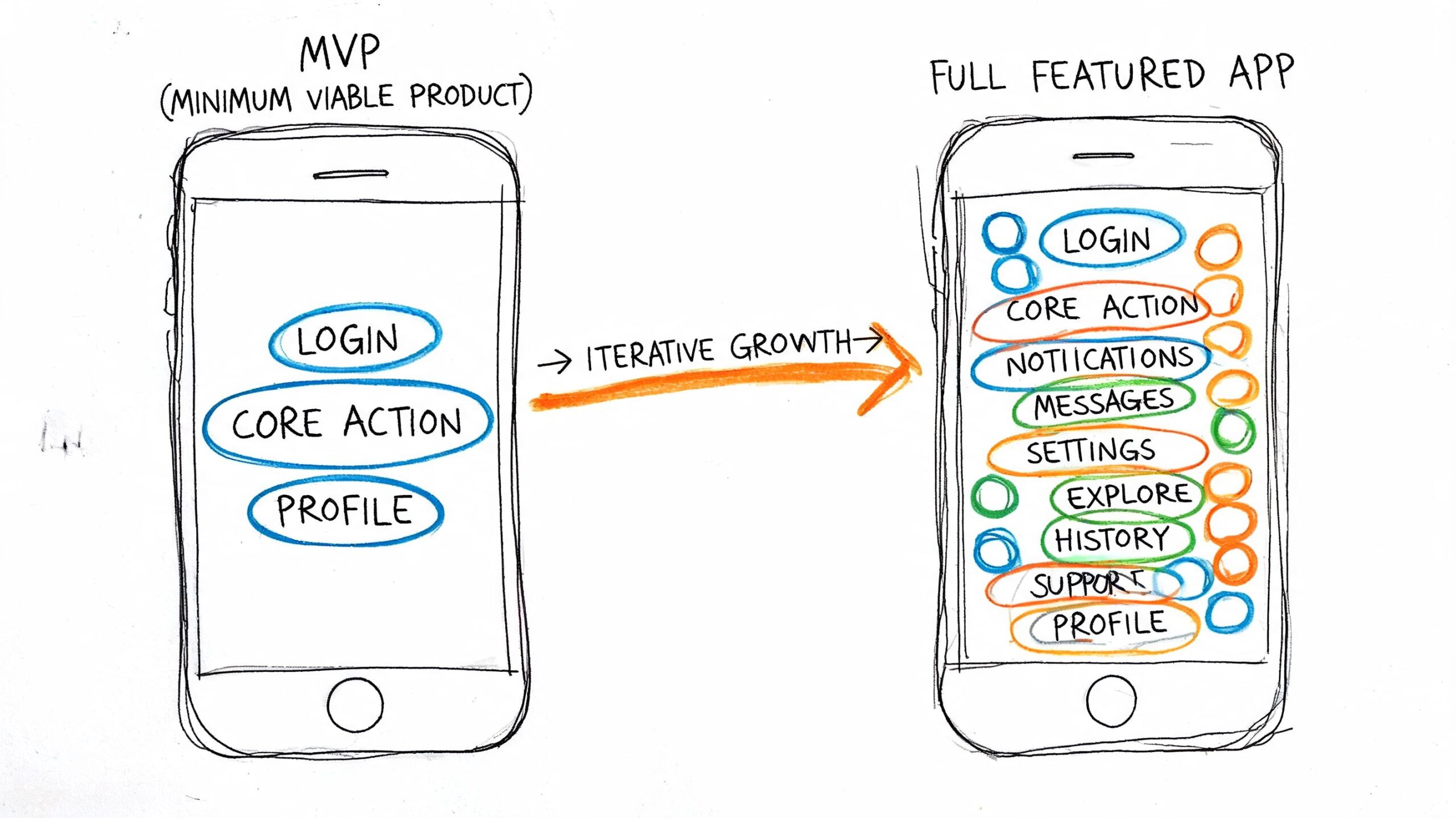
Think skateboard before car
A useful analogy is transport. If your final vision is a car, you don’t start by building half a car. You start with something that already moves the user from A to B. In product terms, that means delivering one complete outcome first.
For a restaurant, the MVP might be table booking and opening hours. For a gym, class schedules and member booking. For a retailer, account login, reorder, and order status. The point is to identify the smallest useful product that customers would return to.
Use the MoSCoW method
This is one of the simplest ways to stop scope from drifting.
Must-have
These are the features without which the app fails its purpose. Booking, login, payments, product browsing, or order tracking often sit here.Should-have
Helpful features that improve the experience, but can wait if needed. Saved favourites, more advanced filtering, or richer account settings usually fit here.Could-have
Nice ideas that shouldn’t delay launch. Extra content sections, gamified rewards, or social features often land in this bucket.Won’t-have for now
This is the most important category because it protects the budget. It creates a clear list of ideas that are postponed rather than endlessly debated.
If every feature feels essential, the scope hasn’t been prioritised yet.
A single well-chosen feature can do more work than a crowded app. Push notifications in SMB apps achieve open rates of 40% versus email’s 20%, and apps using this kind of engagement can increase user lifetime value by 18%, according to this SMB app engagement reference.
That matters because many first apps don’t need twenty features. They need one repeat-use feature and one re-engagement feature. A retailer in Dorset, for example, may get more commercial value from reorder reminders and local flash-sale notifications than from a long wishlist of advanced content screens.
A short visual explanation helps here before feature decisions get too abstract.
A simple MVP exercise
Write your feature list, then ask these three questions against each item:
- Does this solve a repeated customer problem?
- Will customers use it within the first week after download?
- Can we measure whether it improves bookings, purchases, or retention?
If the answer is no, it probably doesn’t belong in version one.
Integrating Your App with Your Business Ecosystem
An app becomes much more useful when it isn’t working alone.
Many first-time app projects fail without notice because the app looks fine on the surface but creates extra admin behind the scenes. Staff end up updating products in one place, appointments in another, and customer records somewhere else. That setup doesn’t scale well, and it usually frustrates both the business and the customer.
The app should connect, not duplicate
For most SMEs, the app should pull from systems that already matter. That often means:
- Your website or eCommerce platform for products, content, and account data
- Your CRM for customer records and segmented communication
- Your payment gateway for secure checkout or stored purchase history
- Your booking or scheduling system for appointments, classes, or reservations
If your business already runs on WordPress or WooCommerce, app integration can be especially practical because it reduces duplicated content management. Product updates, service pages, blog content, and account activity can stay aligned rather than becoming separate workloads.
Data becomes more useful when systems talk to each other
The biggest gain from integration often isn’t visual. It’s operational.
If an app is connected properly, customer actions can feed into analytics, trigger follow-up communication, and give you a much clearer picture of what people do after downloading. If your tracking setup needs improvement, our guide to Google Analytics 4 for practical reporting and measurement is a useful place to tighten that side before or during an app project.
An isolated app creates another admin task. An integrated app creates a cleaner customer journey and better business data.
There’s also a strategic product lesson here. SaaS founders think about MVPs this way because disconnected products are harder to validate and harder to grow. If you want a broader view of that logic, this piece on how to build and validate your SaaS MVP is worth reading. The examples are SaaS-focused, but the principle carries over directly to small business apps. Build the smallest useful product, then connect it to the workflows that already matter.
How to Choose the Right UK Development Partner
A poor development partner rarely fails in the pitch. The problems usually show up later, when the quote keeps changing, GDPR questions get brushed aside, and nobody can give you a straight answer about support after launch.
For a UK small business, especially one running lean in places like Dorset or across the South West, that risk is commercial before it is technical. The wrong team can leave you with an app that costs more to maintain than it returns, or one that collects customer data in ways that create avoidable compliance work.
The shortlist questions worth asking
Start with how they run projects, not the tools they name.
How do you handle discovery and scope control?
Ask what happens before any build starts. A good partner should be able to explain how they turn business goals into a defined first release, what assumptions they test early, and how changes are approved once work is underway.What happens after launch?
App stores change requirements. Operating systems update. Bugs appear in real usage, not only in testing. You need to know who monitors this, how quickly issues are handled, and whether support is included or billed separately.How do you approach integrations?
A useful answer should cover the systems you already rely on, such as your website, CRM, booking platform, payment provider, stock system, or internal admin process. If they treat the app as a standalone product, expect more manual work later.Who takes responsibility for GDPR-related implementation decisions?
The right answer is rarely "your solicitor can sort that". Your legal adviser may set policy, but your development partner still needs to configure forms, permissions, data storage, retention logic, and third-party tools correctly.Can you explain the MVP in business terms?
If the conversation stays at feature level, push harder. The first version should be tied to a result you can measure, such as more repeat bookings, fewer phone-based admin tasks, or better customer retention.
UK compliance needs practical handling
A UK app project should include an informed conversation about privacy and data handling early, not once the build is nearly finished.
The Information Commissioner's Office sets out clear expectations around lawful basis, consent, transparency, security, and accountability in its UK GDPR guide for organisations. For a small business app, that usually affects account creation, marketing permissions, analytics tools, push notifications, payment flows, support forms, and any customer data shared between systems.
We have seen this catch businesses out. A perfectly decent app can still become expensive if nobody decided where data is stored, which provider processes it, who can access it internally, or how a subject access request would be handled. Those are not edge cases. They are standard project questions.
What a good UK partner looks like
A reliable partner tends to show the same habits from the first call.
- They challenge features that do not support the business case
- They explain cost, speed, and complexity trade-offs in plain English
- They understand how UK SMEs buy, sell, and support customers
- They document scope, assumptions, exclusions, and support terms clearly
- They treat post-launch maintenance as part of the delivery plan
Regional fit matters too. Shared working hours help. Familiarity with UK customer expectations helps. Understanding the circumstances of owner-managed businesses helps even more.
If you are comparing proposals, use a defined app development process for UK businesses as a benchmark and look closely at what each agency includes before development starts, during testing, and after release. Two quotes can look similar at the top line and be completely different in practice.
Choose the team that protects the commercial case for the app, not the team that adds the most features to the proposal.
The best partner helps you spend less on the wrong work. They narrow the brief, make trade-offs visible, and keep the app tied to revenue, retention, efficiency, or customer service gains. That is what makes a first app project viable for a small business.
If you’re weighing up your first app and want a practical view of scope, cost, integrations, and compliance before committing, DesignStack can help you map the project properly. The aim isn’t to push every business into an app. It’s to work out whether an app is the right tool, what version should be built first, and how to launch it without unnecessary complexity.



Leave a Reply