


Website Redesign Strategy That Actually Works for UK SMEs
You're halfway through a website redesign, and the project has already become more expensive than expected. The homepage has three competing hero concepts, your developer is waiting for approved copy, someone's added a chatbot to the wish list, and nobody can say which business result the new site must improve. The conversation has drifted from “make it easier for customers to enquire” to “can we add more animation?”
That's a familiar place for a Dorset SME to land. A redesign sounds like a design project, but the hard work is prioritisation. You need to decide what stays, what changes, what gets measured, and what gets cut before visual polish consumes the budget.
A useful UK benchmark is GOV.UK. It recorded 1 billion visits and 2.3 billion page views in 2025, with an average of 85 million visits per month. By December 2025, mobile accounted for 61% of monthly visits, compared with 13% in 2012, a shift that makes mobile-first navigation and fast task completion practical requirements rather than fashionable extras (GOV.UK usage data).
Table of Contents
- Why Most SME Redesigns Drift and How to Avoid It
- Setting Goals, KPIs and Stakeholder Alignment
- Mapping Information Architecture and UX
- Content Strategy and SEO Migration in One Plan
- Choosing Your Build Approach and Stack
- Timeline, Roles, QA and Launch Day
- Post-Launch Monitoring and Continuous Optimisation
Why Most SME Redesigns Drift and How to Avoid It
Most redesigns drift because the team treats the website as a collection of features. A new homepage, a revised colour palette, a blog, an animation system, and a new CMS all sound productive, but none of them proves that customers will find the right service or complete an enquiry.
Treat the work as six linked decisions:
- Discovery: What evidence shows that the current site is failing?
- Goals: Which business and user outcomes matter?
- Information architecture: How should people find their way around?
- Content: Which pages deserve investment, consolidation, or retirement?
- Build: Which technology supports the goals without creating maintenance trouble?
- Launch and optimisation: How will you protect search visibility and improve the live site?
The first 70% of your effort should sit in the first four decisions. That isn't a claim about a measured industry ratio. It's a practical allocation rule. If the team spends most of its early energy choosing fonts and animations, developers will build against assumptions that should have been tested first.
Start with evidence, not the stakeholder wishlist
Begin with a four-week discovery sprint. Pull Google Analytics 4 landing-page, device, engagement, and conversion data alongside Google Search Console queries, clicks, impressions, and indexed-page information. Export the current URL list, then score every important page against traffic, commercial intent, conversion contribution, search visibility, and content quality.
Interview five to eight existing or recently lost customers. Ask what they came to do, where they hesitated, what information they trusted, and what they expected to find but couldn't. Keep the competitor review narrow. Study two direct rivals, concentrating on their navigation, service explanations, enquiry routes, proof, and mobile experience rather than collecting a gallery of visual references.
Practical rule: If a proposed feature doesn't solve a documented user problem or support an agreed KPI, it belongs outside the first release.
Accessibility needs to enter discovery too. UK public-sector bodies have had a dated accessibility obligation since the Public Sector Bodies (Websites and Mobile Applications) (No. 2) Accessibility Regulations 2018 came into force on 23 September 2018, including the requirement to meet accessibility standards and publish an accessibility statement (UK accessibility regulations guidance). That timetable is specific to public-sector organisations, but the planning lesson applies to every SME. Accessibility is cheaper to design into templates than to retrofit after launch.
Produce a brief that can kill scope
Your discovery output should fit on one page:
- Business problem: What is costing the organisation opportunities, time, or trust?
- Priority audiences: Which users matter most to the first release?
- Top tasks: What must visitors complete without assistance?
- Evidence: What do analytics, search data, interviews, and support queries show?
- Goals: Which outcomes will determine whether the redesign worked?
- Scope boundaries: What won't be included, and why?
- Risks: Which content, integrations, accessibility issues, or redirects need early attention?
- Decision owner: Who can approve or reject changes?
Use this guide to writing a design brief if your team keeps revisiting the same decisions. Findings should reduce scope as often as they extend it. If a blog has no owner, don't build an elaborate publishing workflow. If the current booking system works and isn't causing user friction, don't replace it because a new platform looks more modern. If five interviews reveal that people can't understand your services, improve the offer and page structure before commissioning decorative design.
Setting Goals, KPIs and Stakeholder Alignment
A redesign goal should tell the team what will change, how it will be measured, and when someone will review it. Keep the set small enough that a director, developer, content lead, and designer can remember it during a difficult trade-off.
Use the discovery evidence to write three to five SMART goals. A good goal might focus on completing an enquiry, improving page experience, preserving organic visibility, or resolving accessibility failures. Avoid “make the site feel more premium”. That may be a valid creative direction, but it isn't a decision rule.
| Goal | KPI | Baseline | Target | Owner |
|---|---|---|---|---|
| Make service enquiries easier to complete | Qualified enquiry submissions | Current GA4 baseline | Agreed improvement after baseline review | Marketing lead |
| Improve mobile task completion | Mobile conversion rate and form completion | Current device baseline | Agreed improvement after testing | Website owner |
| Protect organic visibility during migration | Indexed priority URLs and organic landing-page performance | Current Search Console baseline | No unexplained loss after launch | SEO lead |
| Resolve accessibility defects | Verified issues by severity and conformance level | Discovery audit | Critical issues resolved before launch | Developer |
| Improve content findability | Search exits, internal search refinements, and task testing | Discovery baseline | Fewer failed searches and clearer paths | Content lead |
Don't use a target because it sounds ambitious. The sample figures in a planning document should be replaced with your own verified baselines, not copied from another business. Website success measurement guidance can help you choose metrics that connect activity to outcomes.
Assign one owner to each goal. Stakeholder alignment then becomes a weekly 30-minute review, not a ceremonial kickoff. Every new request gets tested against the goal set: does it improve a priority task, protect search, meet an accessibility requirement, or reduce operational effort? If it doesn't, park it.
Mapping Information Architecture and UX
Your sitemap shouldn't mirror the organisation chart. Customers don't think in departments. They think in questions, problems, products, locations, eligibility, price, evidence, and next steps.
Start with the top 20 pages by relevance, using analytics, search data, enquiry records, and support conversations. Put those pages into a card-sorting exercise and group them into four or five intent-led buckets. “Our departments” may be an internal label. “Find a service”, “understand the process”, “see proof”, and “contact the team” are more useful navigation ideas.
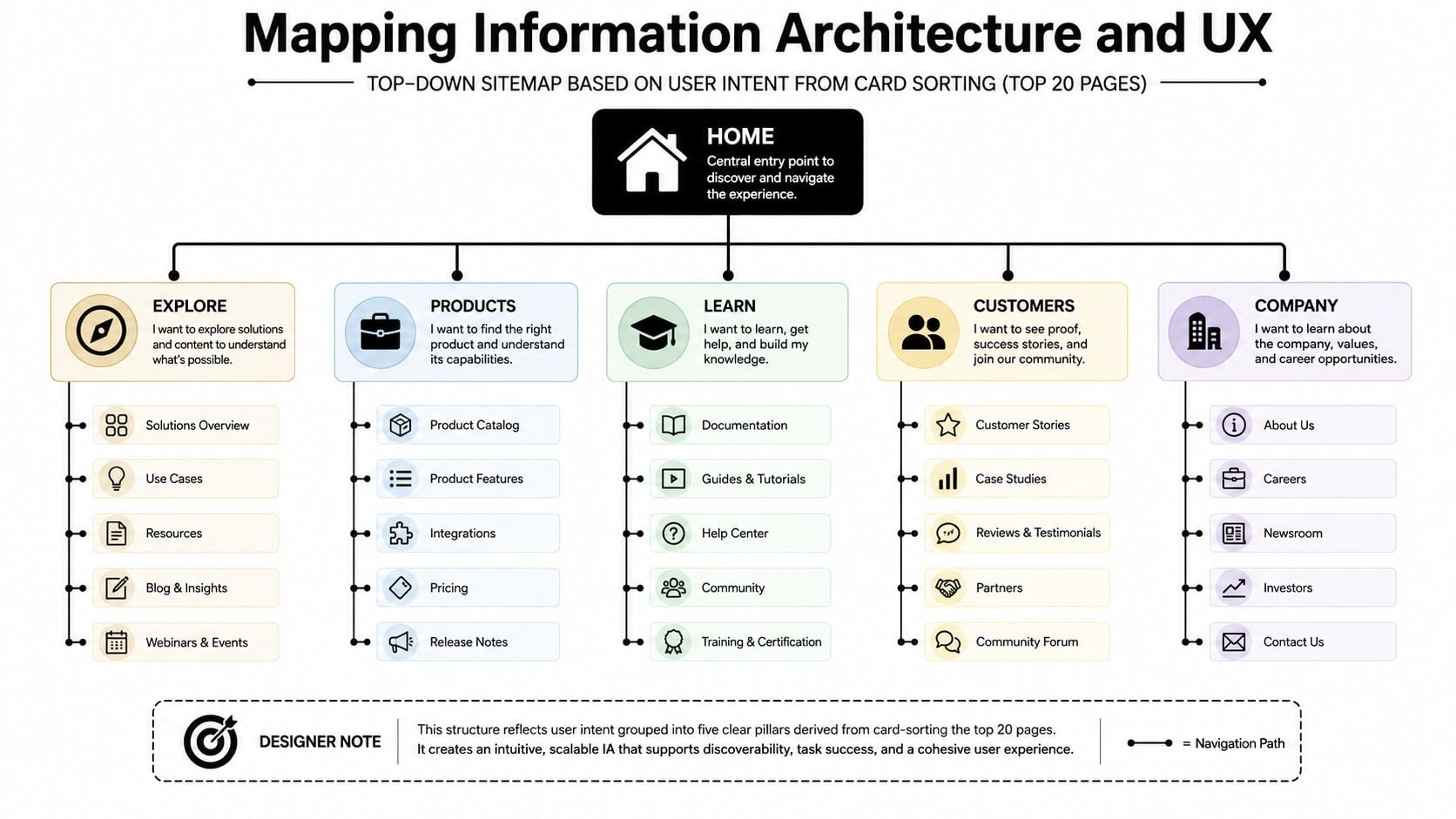
Prune pages that serve no agreed audience, task, or KPI. Then define a content model. For example, a service page might require a clear summary, audience fit, outcomes, process, evidence, FAQs, related services, and a primary enquiry route. A developer can build reusable components from that model. Without it, every page becomes a one-off design argument.
Wireframe before visual design
Create low-fidelity wireframes for the homepage, category or sector page, service or product page, and contact route. Test the structure before anyone spends time selecting photography. Ask five internal users to find a core service, understand what happens next, and locate a way to ask a question. Internal users aren't a substitute for customers, but they can expose obvious structural confusion early.
Build accessibility into these wireframes. Plan visible keyboard focus, logical focus order, skip links, associated form labels, usable target sizes, meaningful headings, and sufficient colour contrast. The UK benchmark is sobering. In the cited public-sector survey, 64% of responding sites were WCAG single-A compliant and 61% were double-A compliant (UK website metrics report). Treat those levels as checks throughout discovery, component design, and QA, not as a final audit box.
The deliverables are straightforward: a documented sitemap, a content model, annotated wireframes, and test notes. For a deeper explanation of the structural work, see what information architecture means.
Content Strategy and SEO Migration in One Plan
For an SME, content strategy and SEO migration are usually the same workstream. The pages that explain your services are also the pages that attract search traffic, earn links, answer objections, and generate enquiries. Letting the writer plan content separately from the SEO lead creates avoidable gaps between the new sitemap and the old search footprint.
Audit every existing URL that ranks, attracts organic visits, supports a conversion path, or has valuable links. Classify each page before writing begins.
| Action | Trigger | Example | Follow-up |
|---|---|---|---|
| Keep and improve | The page has useful demand or commercial intent | A service page receives relevant organic visits but has weak messaging | Rewrite, improve internal links, test conversion route |
| Merge | Several pages answer the same intent | Separate thin pages cover closely related services | Choose a primary URL, combine the useful material, redirect the rest |
| Redirect | The URL has value but the destination is changing | An old service slug is being replaced | Map the old URL directly to the closest new page |
| Delete | The page is obsolete and has no strategic value | An expired announcement with no traffic or links | Return the appropriate response, remove internal links, record the decision |
For each retained page, write a brief containing the target query, search intent, primary topic, supporting questions, internal links, conversion action, evidence requirements, and an appropriate content length based on the search results. Don't force a word count when the task can be answered clearly in less space.
Map old URLs to new URLs one-to-one wherever possible. Avoid sending unrelated retired pages to the homepage. Prepare redirects in advance, test them on staging, compare crawls, and validate important changes in Search Console after launch. The website migration SEO checklist is useful for keeping content, redirects, metadata, canonicals, and crawl controls in the same delivery plan.
Writing needs its own schedule. A site with dozens of pages can become the critical path if copy starts after development. Put page briefs, approvals, photography, metadata, and redirects into the project tracker from the beginning, with one person accountable for editorial decisions.
Choosing Your Build Approach and Stack
Choose the platform your team can maintain after launch, not the one that produces the most impressive sales demonstration. For a UK SME with a modest page count, a carefully configured templated CMS or hosted builder will often be more practical than a bespoke application. The right choice depends on your integrations, editorial workflow, performance requirements, and internal confidence.
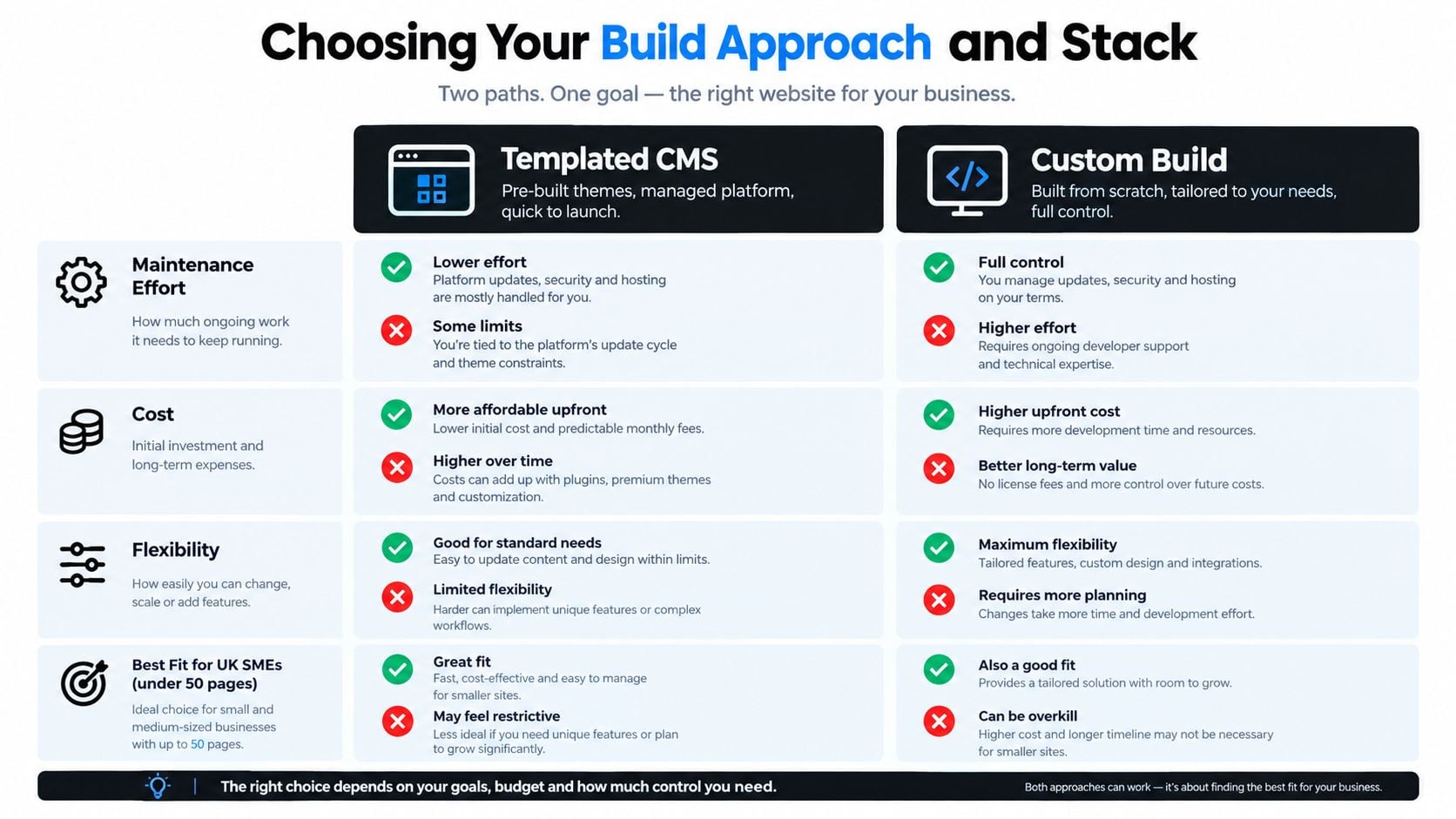
| Approach | Advantages | Trade-offs | Sensible fit |
|---|---|---|---|
| Templated WordPress | Flexible editing, established ecosystem, reusable blocks, familiar publishing | Needs disciplined plugin and hosting management | Marketing sites, local services, eCommerce, content-led SMEs |
| Hosted builder such as Webflow | Managed hosting, visual editing, quick front-end iteration | Platform constraints and recurring dependence on the provider | Teams prioritising controlled marketing pages and simpler integrations |
| Bespoke build | Maximum control over workflows, interfaces, and integrations | Higher technical dependency, testing burden, and long-term ownership cost | Genuine product differentiation or complex operational systems |
| Raw page-builder setup | Rapid initial assembly and broad visual controls | Can create inconsistent markup, editing complexity, and performance problems | Only with strict component governance and a clear maintenance plan |
A raw Elementor or Divi build can look like the quickest route, but the ownership experience often worsens as more people edit pages and exceptions accumulate. A component-led WordPress build with a quality block theme gives editors room to work without turning every page into a separate technical object.
Match the stack to the KPI. If the primary goal is lead generation, prioritise fast templates, reliable forms, CRM connections, clear consent handling, and useful confirmation messages. If the goal is organic reach, prioritise clean content models, metadata controls, structured data where appropriate, XML sitemaps, internal linking, and an editorial workflow people will use.
DesignStack is one UK option that combines responsive WordPress websites, eCommerce builds, custom online systems, SEO guidance, hosting, and post-launch support. Treat any agency or platform as a candidate to assess against your brief, maintenance skills, integrations, and measurable goals.
Timeline, Roles, QA and Launch Day
A focused SME redesign can be organised across an 8 to 12 week delivery arc, provided decisions happen on time and content doesn't arrive at the end.
| Period | Main work | Accountable roles |
|---|---|---|
| Weeks 1 to 2 | Discovery, analytics review, content audit, technical assessment, brief | Sponsor, website owner, SEO lead |
| Weeks 3 to 4 | Sitemap, card sorting, content model, wireframes, migration map | UX lead, content lead, SEO lead |
| Weeks 5 to 7 | Visual design, component build, CMS setup, content production | Designer, developer, content lead |
| Week 8 | Internal QA, accessibility checks, form and integration testing | Developer, website owner, external reviewer |
| Week 9 | User testing across mobile and desktop, issue triage | Website owner, reviewer, representative users |
| Week 10 | SEO migration rehearsal, crawl comparison, staging review | SEO lead, developer |
| Weeks 11 to 12 | Soft launch, fix window, approval, full cutover | Sponsor, developer, website owner |
Name the roles even if one person holds several. The sponsor protects the business case. The day-to-day owner makes decisions. The developer owns implementation and technical fixes. The designer owns the interface system. The content lead owns page quality and approvals. An external reviewer can challenge assumptions before they become launch defects.
Track every defect to closure
Use a spreadsheet, Trello board, or issue tracker with the page or template, description, severity, owner, due date, status, and verification note. This matters for accessibility as much as functionality. UK monitoring found 29,787 accessibility issues, of which 16,482 were fixed, a 55.3% remediation rate (UK accessibility monitoring report). Discovery without ownership leaves a large fix backlog unresolved.
Before launch, check:
- Redirects: All approved 301 redirects work and don't create chains.
- Search controls: Staging restrictions are removed only when production is ready.
- Tracking: Analytics and tag management fire across every important template.
- Forms: Submissions arrive, confirmations display, and consent records correctly.
- Sitemap: The production sitemap contains the intended canonical URLs.
- Monitoring: Uptime and error monitoring are active.
- Rollback: The team has documented and rehearsed the recovery route in staging.
A short soft launch or controlled release gives the team a fix window before wider promotion. Keep the old site available in a recoverable state, but don't let “we can roll back” replace proper testing.
Post-Launch Monitoring and Continuous Optimisation
Launch day starts the measurement cycle. Assign one person a repeatable Monday routine that answers the agreed KPIs, rather than maintaining a dashboard nobody uses. The first 70% of post-launch effort should go towards finding and fixing issues that affect visibility, enquiries, and key journeys.
A practical review can fit into one focused session:
- Search Console: Check crawl errors, indexing changes, important queries, and unexpected landing-page losses.
- Analytics: Compare the current period with the baseline, split results by device, and investigate unusual changes on priority templates.
- User behaviour: Review a heatmap or session recording for one high-intent page. Look for hesitation, dead clicks, and form confusion.
- Feedback: Triage contact-form comments, support questions, sales objections, and requests for missing information.
- Issue tracker: Give each fix a named owner, due date, and verification note.
Report mobile and desktop separately. As noted in the introduction, the 61% mobile share in December 2025 benchmark shows why blended totals can hide problems. Your audience may differ, so compare mobile and desktop conversion rates, form completion, landing-page engagement, and revenue contribution in your own analytics. GOV.UK usage figures provide a useful UK reference point, not a target to copy (GOV.UK 2025 usage figures).
| Cadence | Time required | Tools | What to check |
|---|---|---|---|
| Monday review | Short weekly session | GA4, Search Console, feedback inbox | Indexing, conversions, device differences, urgent defects |
| Monthly review | Management review | Analytics reports, page-speed testing, issue board | KPI movement, technical patterns, content gaps |
| First 30 days | Stabilisation period | QA checklist, monitoring tools, user feedback | Critical bugs, broken journeys, tracking, redirects |
| Next 90 days | Focused optimisation sprint | Analytics, recordings, testing tools | Three commercially important pages with weak conversion performance |
| Quarterly | Content and technical review | Search Console, CMS, accessibility checks | Outdated claims, internal links, accessibility regressions, new opportunities |
For the first 30 days, protect core journeys before adjusting minor visual details. Then select a small optimisation sprint where commercial intent overlaps with weak conversion performance. Test one meaningful change at a time, such as clearer service messaging, a shorter form, stronger proof, or a more visible next step. Record the result and keep changes that improve the agreed outcome.
Use website analytics guidance to connect reports with decisions. Refresh important content quarterly, and record the trigger for the next strategic review. Triggers may include sustained performance problems, repeated Core Web Vitals failures, a major offer change, or an architecture that no longer supports the business. A full redesign should respond to evidence, with 24 to 36 months used as a planning horizon rather than an automatic deadline.
If your SME website needs clearer structure, stronger conversion paths, protected SEO, or a maintainable WordPress build, speak with DesignStack. The Dorset-based team supports discovery, web design, branding, SEO, hosting, implementation, and post-launch updates, with the plan organised around priorities rather than a feature list.



Leave a Reply