


What Is User Generated Content: UK Business Guide 2026
User generated content is any text, image, video, review, or social post created by customers or users rather than the brand itself, and it has become a primary trust signal for UK consumers making purchasing decisions. In the UK, the scale is hard to ignore, with 95% of adults going online every day and 78% of 16 to 24-year-olds using video-sharing platforms daily. DataReportal also estimated 54.8 million social media user identities in the UK in 2025, which is why UGC is now a mainstream business input, not a niche marketing trick.
For a small business owner, that shift changes the question. It's no longer just “should we use customer content?”, it's “how do we collect it, get permission for it, moderate it properly, and turn it into something useful on our website and in search?” That's the practical side most explainers skip, and it matters because UGC only helps when it's handled well.
Table of Contents
- Understanding User Generated Content in the UK Market
- The Main Types of User Generated Content
- Why User Generated Content Drives Business Growth
- How to Source Authentic User Generated Content
- Managing Consent Rights and Moderation
- Integrating User Generated Content into Your Website and Marketing
- Measuring Success and Getting Started Quickly
Understanding User Generated Content in the UK Market
UGC is content created by real customers, fans, or users rather than by the brand itself. In practice, that means reviews, photos, short videos, tagged posts, comments, Q&A threads, and forum contributions that other people can see, trust, and act on. It's the customer saying, “This is what I experienced,” which is why it feels different from a polished advert.
The UK is a strong UGC market because the audience is already online in large numbers. Ofcom reported in 2024 that 95% of UK adults go online every day and 78% of 16 to 24-year-olds use video-sharing platforms daily. That gives brands a huge pool of people who are constantly consuming and producing the exact kinds of content businesses later repurpose as social proof, and DataReportal's 2025 UK digital report estimated 54.8 million social media user identities, about 80% of the population. Ofcom's 2024 update on online habits and DataReportal's 2025 UK digital report point to the same reality, UGC is now part of everyday UK browsing behaviour.
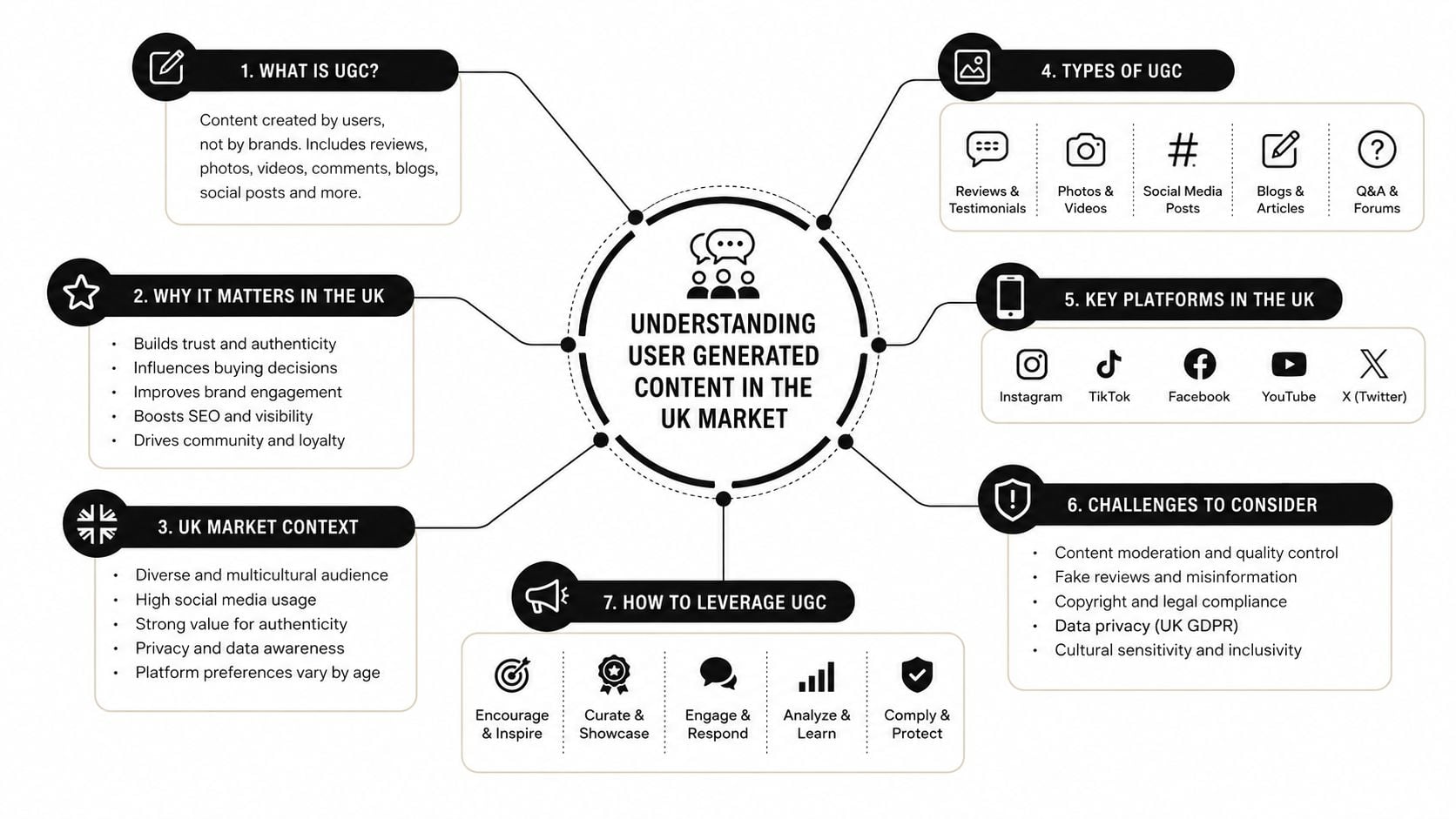
What UGC looks like in real business use
A restaurant might showcase customer reviews and tagged Instagram stories. A product brand might use unboxing clips and customer photos. A local service business might rely on testimonials, Google reviews, and community recommendations.
Practical rule: if a real customer created it, and your business can use it to help another buyer feel more confident, it's probably UGC.
The important thing for UK SMEs is that UGC isn't limited to one channel. It works across search, social, local listings, and onsite trust signals. That makes it less like a campaign asset and more like a content layer that sits around the entire customer journey.
The Main Types of User Generated Content
Not all UGC behaves the same way, and small businesses get better results when they match the format to the job it needs to do. A review does one job. A tagged photo does another. A forum answer does something else again. Once you separate them, it becomes much easier to decide what to ask for, where to display it, and how much moderation it needs.
Written proof that helps buyers decide
Review-based UGC is the most familiar form. It appears on Google, TripAdvisor, Trustpilot, product pages, and service pages, and it's often the first thing a buyer checks before taking the next step. For a local retailer, that might be a stream of Google reviews. For a hospitality business, it may be guest feedback that shapes bookings. For a professional services firm, it could be testimonials that reinforce credibility, like the kind of evidence discussed on DesignStack's testimonial web design page.
Written UGC also includes comments beneath social posts, Q&A threads, and longer customer stories. These pieces may not look dramatic, but they often answer the exact objections a buyer is already thinking about.
Visual and social content that shows the product in use
Visual UGC usually means customer photos and videos. That includes unboxings, before-and-after shots, short clips of a product in use, and tagged Instagram posts. For eCommerce businesses, visual UGC helps buyers see scale, texture, and real-world use that a studio shot can't always capture.
Social mentions and tags are a related layer. When someone shares a story, tags your brand, or posts a short recommendation, they're adding social proof in a format that feels native to the platform. A brand can use that content on a gallery page, in paid social, or in email, but only after checking rights and context.
UGC works best when the format matches the buyer's hesitation. Reviews calm doubt, visuals show reality, and social mentions signal that other people are already paying attention.
The broad categories are useful because they keep your process sane. A business that treats every mention as the same kind of asset usually ends up with clutter, unclear permissions, and weak reuse. A business that sorts content by type can decide what belongs on a product page, what belongs in social, and what should stay as community interaction. For site structure and content planning, DesignStack's content strategy guide is a useful reference point for thinking about where each type of content belongs.
Why User Generated Content Drives Business Growth
UGC drives growth because it affects three things buyers care about, trust, clarity, and confidence. That combination matters more than slick visuals alone. People want to know whether other customers had a good experience, whether the product or service worked, and whether they're about to make a mistake.
Trust changes the buying mood
The UK's Competition and Markets Authority said in 2022 that online reviews materially affect buying decisions, and it noted that around 89% of consumers consult reviews before buying, while 94% say negative reviews have put them off a purchase. Those figures explain why review-based UGC is commercially important. It doesn't just decorate a page, it shapes whether a buyer proceeds at all. The CMA's findings on online reviews also show why businesses can't treat review management as a side task.
The 2024 DMCC Act strengthened the UK regime around fake and misleading online reviews, which tells you something important. Government now treats UGC as part of the commercial infrastructure, not just informal chatter. That's a big change for SMEs that rely on trust to win local and repeat business.
Fresh customer content helps search and conversion
UGC also helps because it keeps pages alive with language real people use. Reviews, comments, and Q&A threads often add natural keywords, long-tail phrases, and product details that brand copy misses. That can improve discoverability because your site keeps accumulating fresh, machine-readable text that search systems can interpret.
On the conversion side, social proof reduces hesitation. A buyer who sees a genuine review, a customer photo, or a helpful Q&A answer usually needs fewer mental steps before enquiring or purchasing. That's why UGC belongs on the page where the decision happens, not just in a social feed.
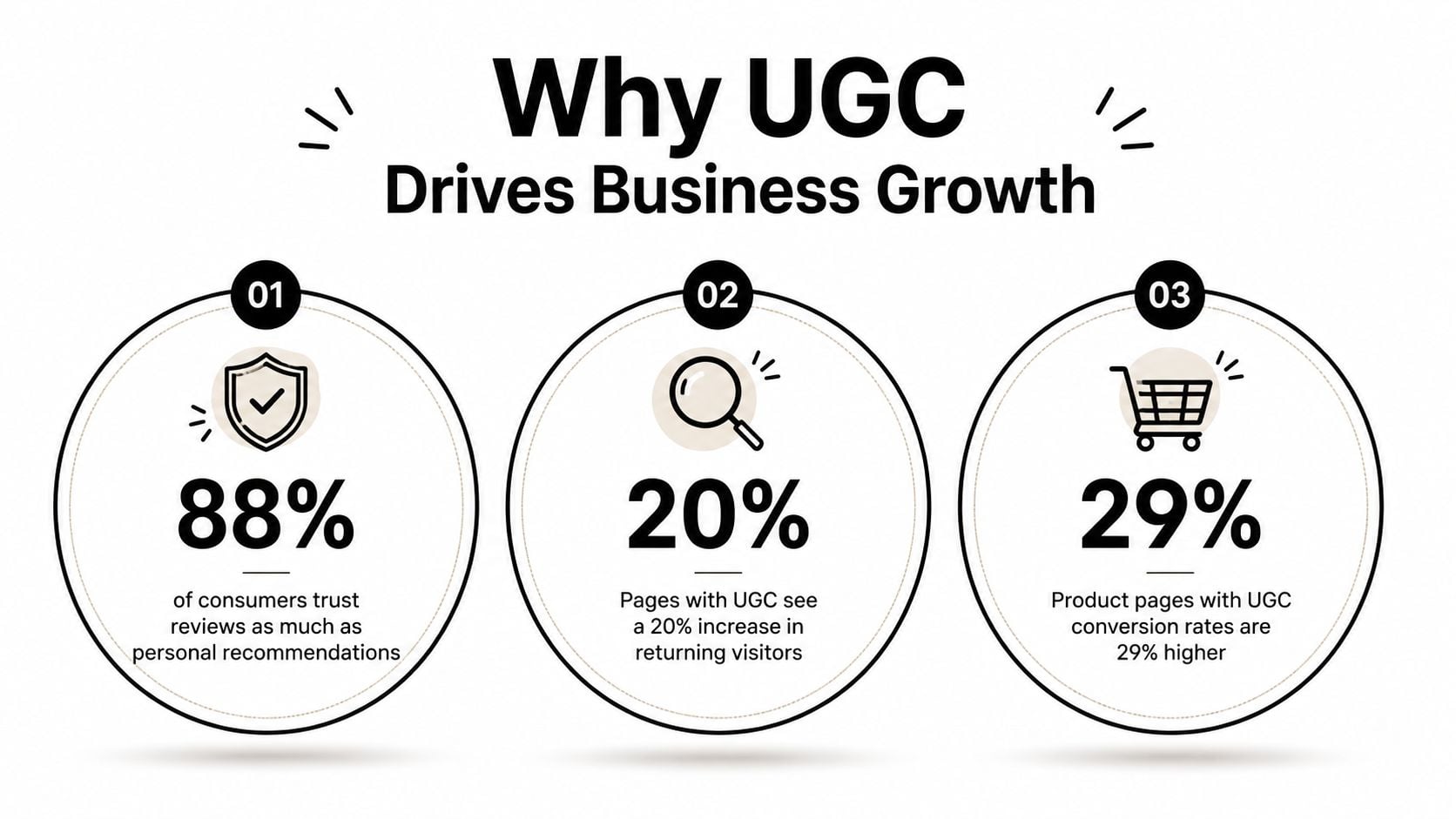
Bottom line: UGC works because it lowers perceived risk. Buyers trust people like them more than polished brand claims, and that trust has direct commercial value.
If you're optimising page content, DesignStack's image optimisation guide is a useful reminder that media-heavy UGC still needs to load cleanly and work on mobile.
How to Source Authentic User Generated Content
The easiest UGC to use is usually already out there. Most businesses don't need a giant campaign on day one, they need a simple system for noticing what customers are already saying and making it easy for more people to contribute.
Start with the customers who already know you
Post-purchase review requests are the most reliable place to begin. A short email after a successful order, booking, or support interaction is often enough to prompt a rating or a few lines of feedback. In a shop or showroom, signage can do similar work by reminding people to share a photo, tag the business, or leave a review.
Social media contests can help too, but they work best when the ask is simple. Ask people to post a tagged image, use a short hashtag, or share a short clip about their experience. The point is not to make them perform, it's to make participation easy.
Find content that's already sitting in plain sight
A lot of useful UGC is already live on social platforms, in comment threads, or in community spaces. Search your brand name, product names, location tags, and common misspellings. Watch for recurring phrases customers use to describe what they liked, because those words often make better site copy than internal marketing language.
For event-led businesses, practical collection tools can save a lot of admin. If you need to collect guest images at a wedding or similar event, a tool such as collect wedding guest images can make it easier for attendees to upload photos without chasing people one by one.
The best sourcing process is the one your team will actually keep doing. Small, repeatable requests beat ambitious campaigns that no one has time to maintain.
A simple habit also helps here. Set up regular checks for brand mentions, saved searches, and incoming tags, then store the best items in one place so they don't disappear into social feeds. That makes later permission requests, moderation checks, and reuse much easier to manage.
Managing Consent Rights and Moderation
This is the part many guides skip, and it's the part that usually saves a business from trouble. If a customer made the content, that doesn't automatically mean you can put it on your website, in an ad, or in a brochure. You need permission, and you need a record of it.
Permission needs to be clear and traceable
Adobe's guidance is straightforward, brands should ask permission before sharing UGC and should have a system for curation and rights management. For UK SMEs, the safest habit is to get the permission in writing wherever possible, even if that's just a clear email reply, a platform-native share permission, or a short form confirmation. Keep the original creator's name, the date, the content link, and the agreed usage terms together so you can prove where the asset came from.
That record matters because UGC is defined by third-party authorship, which means the business is handling someone else's content. The practical response is to store author metadata, timestamps, and moderation status so every item can be reviewed later without confusion. A simple spreadsheet or database can do this, as long as the information is complete and easy to search.
Moderation protects the brand and the customer
A moderation workflow doesn't need to be complicated. It just needs to be consistent. Remove or reject harmful content, verify suspicious reviews, and decide what happens when a post includes sensitive personal information, competitor baiting, or obvious spam.
Useful rule: if you wouldn't want the content copied into an email to your worst customer complaint thread, don't publish it without a review.
The AI issue makes governance even more important. Some content that looks like UGC may be creator-led, edited heavily, or assisted by AI. That doesn't make it worthless, but it does mean a business should know what it's reusing and why. For contract clarity around ownership and usage terms, DesignStack's contract guidance page is a sensible reminder that written agreements matter when creative assets are involved.
The cleanest approach is to treat UGC like any other brand asset, with approval, status, and a removal path. That keeps the business safer and makes it much easier to reuse content confidently later.
Integrating User Generated Content into Your Website and Marketing
UGC becomes much more valuable once it stops living only on social media and starts supporting the whole website. That means placing it where buyers make decisions, not just where people scroll for entertainment.
Put the right content on the right page
Reviews and testimonials belong on product pages, service pages, and landing pages where they can reduce doubt at the moment of decision. Customer photos and short videos work well in galleries, on homepage sections, and beside products that need context. A local firm can use testimonials to support credibility, while an eCommerce brand can use customer images to show fit, colour, and real-world use.
Structured data helps too. Reviews, ratings, and Q&A can be organised so they feed website schemas, internal search, and trust signals more cleanly. That doesn't mean stuffing pages with markup for the sake of it, it means making sure the content is structured enough for both people and systems to understand.
Keep the experience usable
Mobile responsiveness matters because a lot of UGC is visual and consumed on phones. If a gallery loads badly, or a testimonial block pushes the call to action too far down the page, the content can backfire. Manual embedding gives you tighter control. Automated platforms save time. The right choice depends on how often you publish, how much moderation you need, and whether the site team can maintain it.
UGC also works well beyond the website. You can feature customer stories in newsletters, reuse approved posts in paid social, and keep Google Business Profile content fresh by responding to reviews and highlighting recurring themes in your messaging. The main point is simple, UGC should behave like structured content inside a wider content system, not as a loose pile of screenshots.
Measuring Success and Getting Started Quickly
If you can't see whether UGC is helping, you'll either underuse it or waste time managing it badly. The cleanest way to judge it is to track a few practical signals and compare them over time rather than chasing vanity metrics.
Track the signals that matter
Review volume tells you whether customers are participating. Sentiment trends show whether feedback is broadly positive or whether the same problems keep resurfacing. Social mention frequency tells you whether people are talking about the brand without being prompted, and engagement on pages that feature UGC shows whether the content is earning attention.
For websites, compare pages with UGC against pages without it. Look at enquiry behaviour, scroll depth, and conversions where possible. For search, monitor whether fresh customer language starts appearing in the phrases people use to find you. A solid reporting setup, like the kind covered in DesignStack's website analytics guide, makes it easier to see which content is moving behaviour.
Use a simple 30-day rollout
- Week one, audit what already exists. Check reviews, tags, comments, and mentions, then sort the best content by format and quality.
- Week two, request more of it. Add a review request email, a QR code at point of sale, or a short social prompt that asks for a photo or clip.
- Week three, lock down permissions and moderation. Create a short approval checklist, decide who signs off, and keep a clear record of each asset.
- Week four, publish the first reusable pieces. Place one review block, one customer photo section, or one testimonial set onto the website and see how people respond.
That first month doesn't need to be perfect. It needs to be repeatable.
Best starting point: pick one content type, one channel, and one owner. A small business that keeps the process simple is far more likely to sustain it than a team that tries to launch everything at once.
UGC works best when it becomes part of your routine, not a one-off campaign. Once you have the sourcing, permission, moderation, and publishing steps in place, it stops feeling risky and starts behaving like a dependable asset.
If you want help turning customer reviews, photos, and testimonials into something that works properly on your site, DesignStack can help you plan the structure, design the pages, and build the technical foundations around it. Visit DesignStack to talk through a website, branding, or content setup that makes UGC easier to collect, manage, and use with confidence.



Leave a Reply