

Customer Journey Mapping: UK Guide to Growth in 2026
You've put time into your website, tightened up your offer, posted on social media, maybe even paid for ads. People are visiting. Some enquire. Far fewer buy than you expected.
That usually isn't one big problem. It's a chain of small ones.
A customer lands on your site and can't tell if you serve their area. They like your work but don't understand your pricing. They start your contact form on mobile and give up halfway through. They call later, no one answers, and they book with someone else. From your side, it looks random. From their side, it feels obvious.
That's where customer journey mapping helps. It gives you a practical way to see your business from the customer's point of view, not just through analytics, assumptions, or internal habits. For UK SMEs, that matters even more because 78% of UK small businesses lack dedicated CX teams and rely on manual, low-cost methods, which leaves a real gap in practical guidance for local firms working without expensive software, as noted in this client journey mapping guide for small organisations.
If you also want to understand the decision-making patterns behind why people hesitate, compare, or buy, this guide on how to boost sales with consumer psychology is a useful companion. And if your issue feels more like “traffic is fine, conversions are not”, a proper look at your website funnel analysis often shows where the journey is breaking.
Table of Contents
- Understanding Your Customer's Path to Purchase
- What Is a Customer Journey Map?
- Practical Benefits of Journey Mapping
- Exploring the Five Stages of the Customer Journey
- How to Build Your First Customer Journey Map
- Turning Insights into Website and Brand Improvements
Understanding Your Customer's Path to Purchase
Most owners first notice the problem in fragments. Enquiries are patchy. Good leads mention they “weren't quite sure”. Existing customers say the service was great, but getting started felt harder than it should have. None of that shows up neatly in a dashboard.
Customer journey mapping is the process of following the path a real buyer takes, step by step, and asking what they see, what they need, and where they get stuck. Done well, it shifts your thinking from “how do I sell this?” to “how do I help someone move forward with confidence?”
For a Dorset restaurant, that path might begin with someone seeing a friend's photo, checking opening times on Google, browsing the menu on mobile, trying to book a table, arriving at the venue, and deciding afterwards whether they'd recommend it. For a local accountant, it may start with a search for tax help, move through trust signals and service pages, then hinge on how easy it is to ask a first question.
Practical rule: If customers keep asking the same questions before buying, your journey already has a visible gap.
What catches smaller firms out is that the weak point often sits between channels. Your Instagram looks polished, but your website copy is vague. Your homepage promises quick service, but the enquiry process feels slow. Your printed leaflet and your Google Business Profile describe different things. The customer experiences all of it as one brand, even if you manage it in separate places.
That's why a basic map on paper, a whiteboard, or a shared spreadsheet can be more useful than a complicated software setup. You don't need a CX department to spot friction. You need a clear view of what the customer is trying to do next.
What Is a Customer Journey Map?
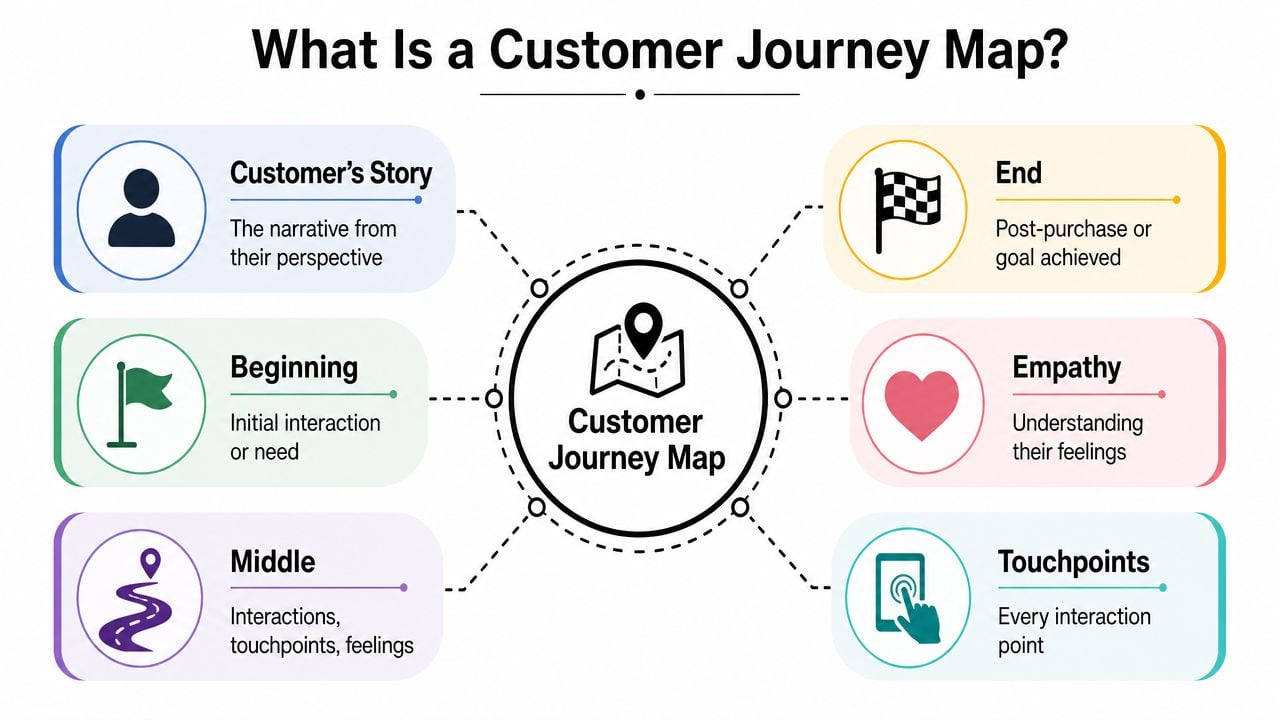
A customer journey map is a working view of how one type of customer experiences your business from first trigger to after-sales follow-up. For a small UK business, that usually means laying out the steps on paper, a spreadsheet, or a whiteboard so you can see what the customer is trying to do, what they encounter, and where the experience starts to wobble.
A journey map is best understood as a customer story.
It has a beginning, a middle, and an end, but it is not written from your side of the desk. The starting point might be a search, a recommendation, or a problem that suddenly needs solving. The middle covers the checks people make before they trust you. The end could be a purchase, a booking, a signed proposal, a delivery, or the point where they decide whether to come back.
That makes it different from a funnel. A funnel tracks progress towards conversion. A journey map shows the experience around that progress, including the delays, doubts, and mixed signals that often get missed in reporting. If you are trying to improve enquiries or sales, it helps to understand the difference between a traffic problem and a trust problem. That is often where practical website fixes come from, especially if you are also working on improving your website conversion rate.
The four parts that matter
A useful map does not need design polish or specialist software. It needs enough structure to show what is happening.
The customer type
Start with one clear group. A landlord looking for emergency repairs will behave differently from a couple planning a wedding venue viewing. If you try to map everyone at once, the result gets vague fast.The stages of the journey
These are the main phases someone moves through. You can use standard labels if they fit, but smaller firms usually get better results by naming the stages in plain English, such as "searching", "shortlisting", "asking questions", "booking" and "aftercare".The touchpoints
These are the places where the customer meets your business. Search results, review sites, your website, email replies, phone calls, quotes, invoices, your front desk, and even parking instructions all count if they shape the decision.Customer thoughts and feelings
Focusing on these elements makes the map useful. Write down what the person may be wondering at each step. Can I trust these people? How long will this take? What happens after I enquire? For many SMEs, the biggest gains come from answering those questions earlier and more clearly.
A map without customer emotion is only a process chart. The commercial issue often sits in the uncertainty between steps.
If you want a second plain-English take on the basics, this overview to learn about CX from Divimode is worth reading.
Here's a helpful walkthrough if you prefer a visual explanation first.
Practical Benefits of Journey Mapping
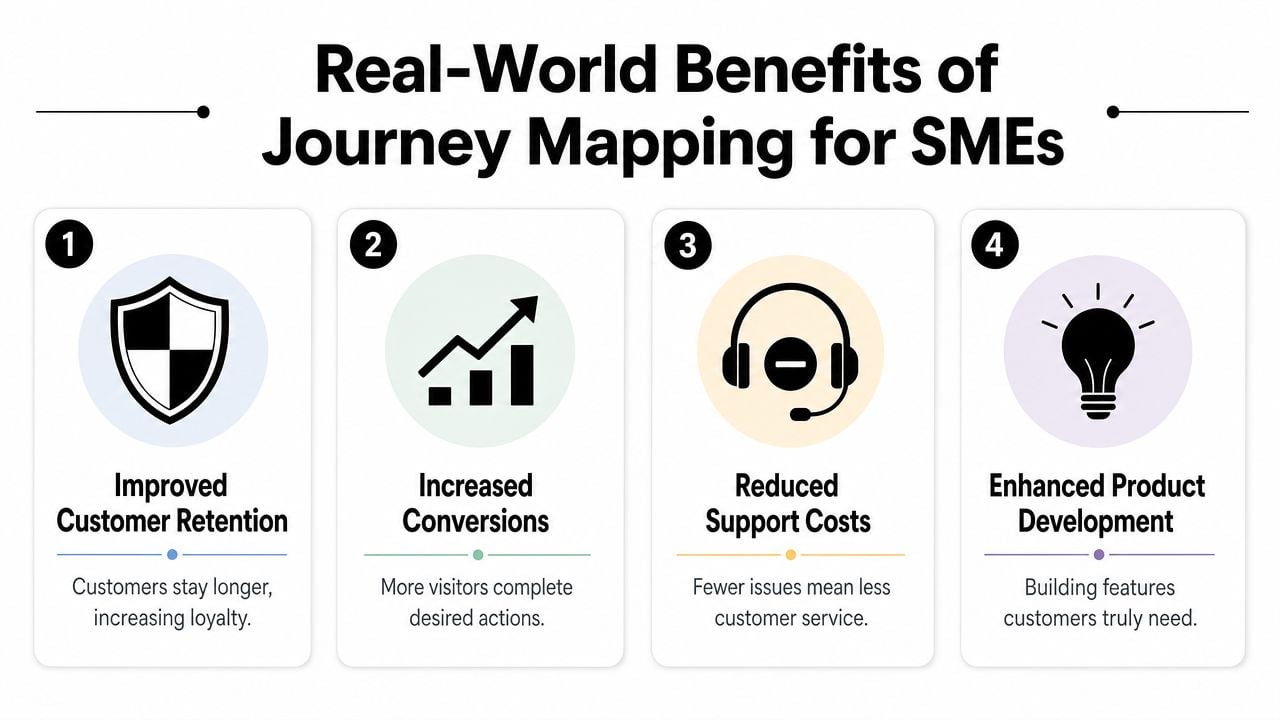
A small business owner often sees the symptom first. Enquiries are patchy. Good leads go quiet after the quote. New customers buy once and never return. Journey mapping helps you find the point where confidence drops or effort rises, so you can fix the cause instead of spending more on traffic or more time chasing replies.
For UK SMEs, that is usually the biggest win. You do not need a CX platform or a workshop full of Post-its to spot what is going wrong. A simple spreadsheet, a few recent customer conversations, and a clear view of your website, emails and handover process are often enough to reveal problems you can act on this week.
Common examples include:
- Unclear next steps: A visitor reaches a service page and still cannot tell whether to call, book, or request a quote.
- Trust gaps: People cannot quickly find proof, pricing context, or a clear explanation of what happens after they enquire.
- Message mismatch: Your Google ad, social post and landing page sound like three different businesses.
- Operational friction: Sales replies quickly, then onboarding slows down and momentum disappears.
As noted earlier in the article, UK government guidance links journey mapping with practical performance measures such as retention, conversion and customer satisfaction. That matters because it keeps the exercise grounded. The map should help you make better business decisions, not produce a tidy diagram that nobody uses.
Website problems often sit at the centre of the journey, especially for service businesses that rely on enquiries. If the offer is hard to understand or the next step feels uncertain, conversion suffers even when traffic is decent. In that case, work on the journey and work on the site usually happen together. This guide on how to improve website conversion rate is a useful next step.
The same applies after the sale. Many smaller firms put all their effort into getting the lead, then lose goodwill in the handover. A vague welcome email, slow document collection, or unclear timeline can undo a strong first impression. Tools and processes such as Carti client onboarding automation can help if onboarding is the weak point, but the map should come first so you know what requires attention.
What changes in day-to-day decisions
Journey mapping improves judgement because it gives context. Instead of arguing about whether a page needs more text or a different button colour, you can ask a more useful question. What does the customer need to know, feel, or do at this step?
That shift helps smaller teams prioritise fast.
| Business issue | What a journey map helps you see |
|---|---|
| Low enquiry rate | Whether visitors understand the offer and trust the next step |
| Poor lead quality | Whether your messaging is attracting the wrong people early |
| Repeat business is weak | Whether the post-purchase experience feels neglected |
| Too many basic questions | Whether key information is buried, vague, or inconsistent |
I see the same pattern in a lot of SME projects. The business tweaks isolated parts of the experience. One email gets rewritten. A new ad goes live. The homepage gets refreshed. Sometimes that helps, but lasting improvement usually comes from fixing the handoff between stages, where uncertainty builds and people disengage.
Exploring the Five Stages of the Customer Journey
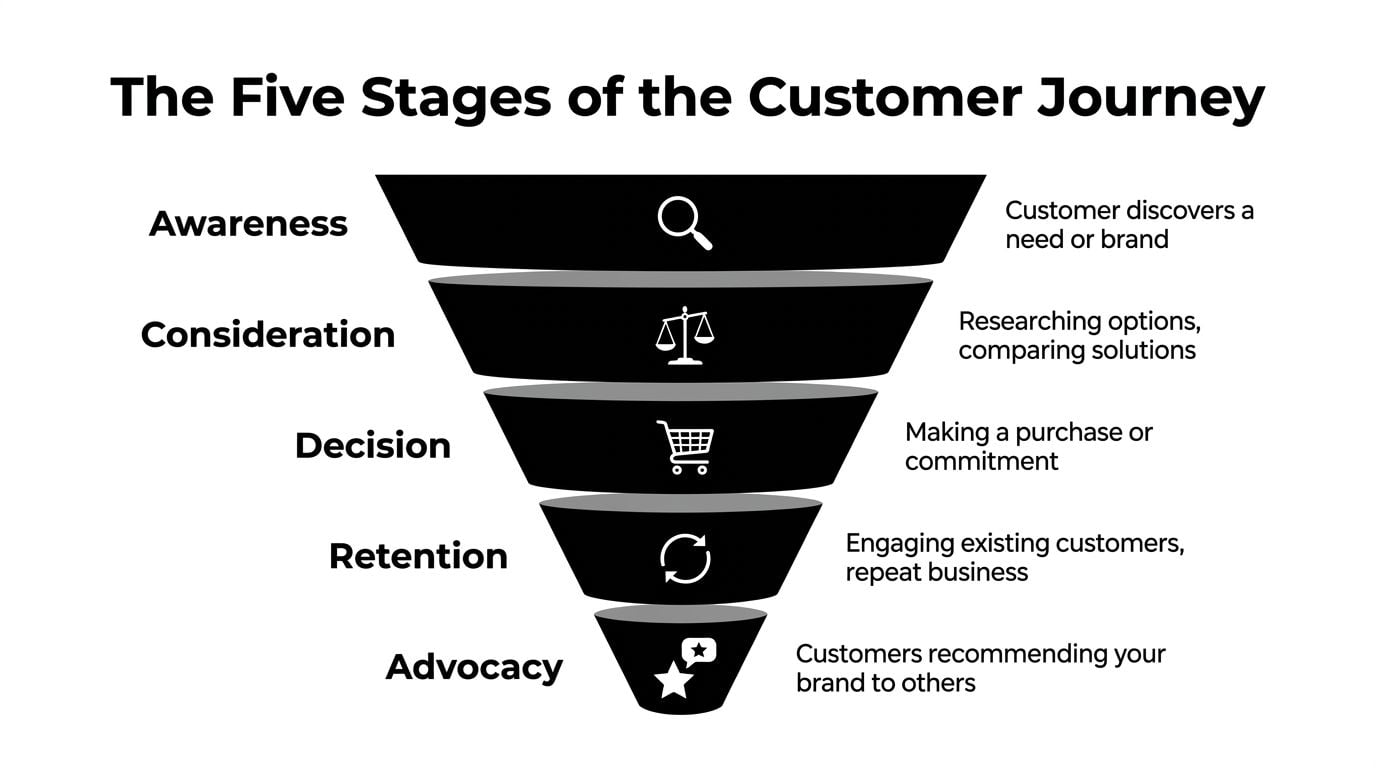
A five-stage model gives you a practical starting structure. It won't fit every business perfectly, but it's useful because it forces you to think beyond the moment of sale.
Awareness and consideration
Awareness is when someone first notices a need or notices you. For a local café, that might be a passer-by seeing the frontage, a branded van, or a tagged Instagram post. For a trades business, it could be a Google search, a recommendation in a local Facebook group, or signage outside a recent job.
At this stage, the customer isn't asking, “Should I buy now?” They're asking, “Is this relevant to me?” Good awareness touchpoints are clear, local, and instantly understandable. Weak ones are vague, cluttered, or forgettable.
Consideration starts when they actively compare. They visit your website, scan your services, read reviews, check prices, or look for examples of your work. At this stage, many SMEs lose people. The business knows what it offers, so it assumes the website explains it clearly. The customer often sees the opposite.
Common friction in consideration includes:
- Too much jargon: Buyers can't translate your service language into their problem.
- Thin proof: There are no reviews, examples, or specifics that reduce risk.
- Poor mobile experience: The site works on desktop but feels awkward on a phone.
- Hidden process: People can't tell what happens after the first enquiry.
If your service business has a structured first-step process, learning from approaches like Carti client onboarding automation can help you think about how to remove early friction after someone says yes. And if your awareness stage is weak, a sharper content strategy for business websites often makes the whole journey easier.
Decision retention and advocacy
Decision is the point where the customer is ready to act, but still needs reassurance. They may want one final sign of trust. That could be straightforward pricing, fast answers, proof of experience, or a simpler booking process.
This stage often breaks for boring reasons. Forms are too long. Calls to action are unclear. Payment options feel awkward. The business asks for commitment before it has built enough confidence.
Retention begins after the sale. For a retailer, that could be delivery updates and how returns are handled. For a consultant, it's onboarding, communication, and whether the client feels guided instead of left waiting. Plenty of companies win the sale and then create a messy first week.
Advocacy is what happens when people recommend you, leave a review, tag you online, or come back without much persuasion. It's not a separate marketing trick. It's the result of the earlier stages working properly.
The strongest referrals usually come from customers who found the journey easy, not just the final outcome good.
A Dorset restaurant is a useful example. Awareness may come from a recommendation or social post. Consideration happens on the menu page and booking screen. Decision hinges on whether booking is quick and whether the venue feels trustworthy. Retention comes from the in-person experience and follow-up. Advocacy appears when someone posts a photo, leaves a Google review, or suggests the place to friends.
How to Build Your First Customer Journey Map
Most first attempts fail for one simple reason. The business tries to map everything at once.
Start smaller. Pick one customer type, one journey, and one business problem.
Start with one business problem
A proven process begins with a “business goal”, then uses research built from “analytical/statistical data and anecdotal evidence”. The same guidance recommends limiting the scope to no more than “three personas” and says maps should be reviewed and updated regularly, as outlined in the IxDF guide to customer journey maps.
For a small business, a good first goal might be:
- Why do people visit our service pages but not enquire?
- Why do leads ask for a quote and disappear?
- Why do first-time customers not return?
Bad goals are broad and fuzzy. “Understand our customers better” sounds sensible, but it won't help you decide what to change on Monday morning.
Working rule: One map should answer one pressing commercial question.
Create one simple persona. Not a poster full of invented lifestyle details. Just enough to keep the map grounded in a real type of buyer. Job role, context, need, likely objections, and what success looks like from their point of view are enough.
Gather evidence without expensive tools
You don't need a software stack to do good customer journey mapping. You need honest inputs.
Start with what you already have:
- Website analytics: Look at the pages people visit before enquiring, where they drop off, and which devices they use.
- Sales and enquiry emails: Read the questions people ask before they commit.
- Customer reviews: Reviews often reveal what customers valued and what nearly put them off.
- Frontline knowledge: The person answering the phone usually knows where confusion starts.
- Short customer chats: A handful of direct conversations can expose friction quickly.
Mix hard signals and soft signals. Analytics may show that visitors abandon a contact page. Customer comments may explain why. Both matter.
A simple way to capture this is in a shared doc or spreadsheet. If you already track leads and conversions, this guide on how to measure website success helps you connect the map to things you can monitor later.
Sketch the map and look for friction
Use a wall, a notebook, a whiteboard, Google Sheets, Miro, or even sticky notes. The best first map is often messy.
Build it stage by stage. For each step, write down:
- Customer goal: What are they trying to achieve here?
- Touchpoint: Where does this interaction happen?
- Customer action: What do they do next?
- Feeling or pain point: What might slow them down?
- Opportunity: What small change would improve this part?
Here's a simple template you can copy.
| Stage | Customer Goal | Touchpoints | Customer Actions | Feelings/Pain Points | Opportunities |
|---|---|---|---|---|---|
| Awareness | Realise there's a suitable provider | Google search, social post, recommendation | Notice brand, click through, ask around | Unsure if you serve their need or area | Make value proposition and location clearer |
| Consideration | Decide if you're a credible option | Website pages, reviews, email replies | Compare services, scan proof, check pricing | Confused, sceptical, overloaded | Simplify service pages, add proof, clarify process |
| Decision | Take the next step | Contact form, call, checkout, proposal | Enquire, book, pay, accept quote | Hesitation, trust concerns, form fatigue | Shorten forms, improve CTA, answer objections |
| Retention | Feel supported after purchase | Emails, onboarding, delivery updates, follow-up | Read updates, ask questions, use service | Uncertain, ignored, overwhelmed | Create smoother onboarding and clearer updates |
| Advocacy | Share a positive experience | Review request, social media, repeat visit | Recommend, review, reorder | No prompt, low emotional payoff | Ask for reviews at the right moment |
Once the map is filled in, don't try to fix everything. Circle the points where a small improvement could remove disproportionate friction. Those are the changes that tend to pay back first.
What usually doesn't work is overdesigning the map, involving too many opinions, or debating wording for days. What does work is choosing one journey, grounding it in real evidence, and using it to make a handful of better decisions.
Turning Insights into Website and Brand Improvements

A journey map only becomes useful when it changes something visible. For most SMEs, that means the website, the messaging, the follow-up, or the way the brand presents reassurance.
From friction to fixes
If your map shows confusion in the consideration stage, the answer usually isn't “do more marketing”. It's to make the current journey easier to understand.
A few examples:
Customers don't understand what you do
Tighten the homepage headline, simplify service page copy, and show who you help in plain English.Visitors like the offer but hesitate to enquire
Add clearer process steps, testimonials, location details, and realistic expectations about response times.People drop off on mobile
Reduce clutter, shorten forms, improve button placement, and make contact options obvious.New customers feel uncertain after buying
Build a simple onboarding email sequence or welcome page that explains what happens next.
Journey mapping is especially useful for brand work. A weak brand isn't always ugly. Often it's inconsistent. The tone on your website feels polished, your emails feel abrupt, and your printed material says something slightly different again. Customers read that as uncertainty.
For practical improvements at the interaction level, this guide on how to improve website user experience is a good place to start.
What to change first
Don't begin with the most creative task. Begin with the biggest point of friction closest to revenue.
A simple order of priority is:
Fix blocked actions
If people can't book, enquire, pay, or understand the next step, solve that first.Fix trust gaps
Add proof, clarity, and consistency where customers hesitate.Fix follow-up experience
A smooth first impression after purchase improves retention and recommendation later.Polish branding after clarity is in place
Better visuals matter more when the message and journey already make sense.
A brand earns confidence when the experience feels coherent from first click to follow-up.
Customer journey mapping helps you stop guessing which improvement matters most. It gives you a practical sequence. First remove friction. Then strengthen trust. Then refine the experience so more people stay, return, and recommend.
If you've mapped the journey and can see where customers are getting stuck, the next step is turning those insights into a clearer website, stronger brand, and smoother user experience. DesignStack helps UK businesses do exactly that with web design, branding, and conversion-focused improvements that make the customer path easier to follow.



Leave a Reply