


Mobile App Development Services UK: Your 2026 Guide
You're probably in one of two positions right now. Either customers keep asking for an app and you're trying to work out whether that's a real business need or just a fashionable request. Or you already know mobile matters, but every agency site seems to say the same thing, custom apps, smooth UX, scalable solutions, without helping you decide what to build, what it should cost, or what can go wrong after launch.
That's where most first app projects drift off course. The problem usually isn't coding. It's making the wrong early decisions: building a native app when a responsive website would do the job, under-scoping the backend, ignoring UK compliance, or treating launch as the finish line.
For UK SMEs, mobile can be a strong channel. But only when the app solves a clear business problem and fits your budget, team capacity, and operational reality.
Table of Contents
- Why UK Businesses Are Investing in Mobile Apps
- What Mobile App Development Services Actually Include
- Understanding App Development Costs and Timelines in the UK
- How to Choose the Right UK App Development Agency
- UK Legal, Accessibility, and Post-Launch Support
- Real-World App Examples from UK Businesses
- Your Hiring Checklist and Key Questions to Ask
- Frequently Asked Questions
Why UK Businesses Are Investing in Mobile Apps
A lot of business owners reach the same point. Their website gets traffic, their social channels are active, and their customers clearly live on their phones. The next question feels obvious: should we have an app?
In many cases, it's a sensible question. The UK mobile application market is projected to reach US$32.86 billion by 2030, up from US$14.21 billion in 2024, with a 15.4% CAGR from 2025 to 2030 according to Grand View Research's UK mobile application market outlook. That isn't a niche trend. It points to a market where mobile products are becoming part of standard commercial delivery.
What matters more than the headline number is what it means for a smaller business. Mobile is no longer just for banks, delivery platforms, or national retail brands. It's now a practical channel for bookings, account access, loyalty, field operations, member services, internal workflows, and repeat purchasing. If your customers need speed, convenience, and regular interaction, mobile deserves serious consideration.
Mobile works best when it solves a repeat problem
The strongest app projects usually share one trait. They remove friction from something people do often.
That could be:
- Repeat purchasing: letting customers reorder, save preferences, or access offers quickly.
- Service access: giving members, patients, clients, or tenants a simpler way to manage their account.
- Operational use: helping staff complete jobs, upload records, or check schedules while away from a desk.
- Retention: creating a direct channel for reminders, offers, booking prompts, or account activity.
If your app idea only sounds good in a pitch deck, it probably needs more work. If it shortens a task customers already do, it may have real value.
Practical rule: Build for frequency, not novelty. A modest app that supports a regular user behaviour usually outperforms a feature-heavy app nobody needs twice.
The business case has changed
A few years ago, many SMEs treated apps as optional. Now they're often part of a broader digital stack. Website, CRM, payment flow, customer account area, and mobile experience all need to work together.
That doesn't mean every UK business should commission a full iOS and Android product tomorrow. It does mean mobile app development services in the UK now sit inside mainstream business planning, not experimental spend. The question isn't whether mobile matters. The useful question is whether your business needs a full app, a lighter product, or a better mobile web experience first.
What Mobile App Development Services Actually Include
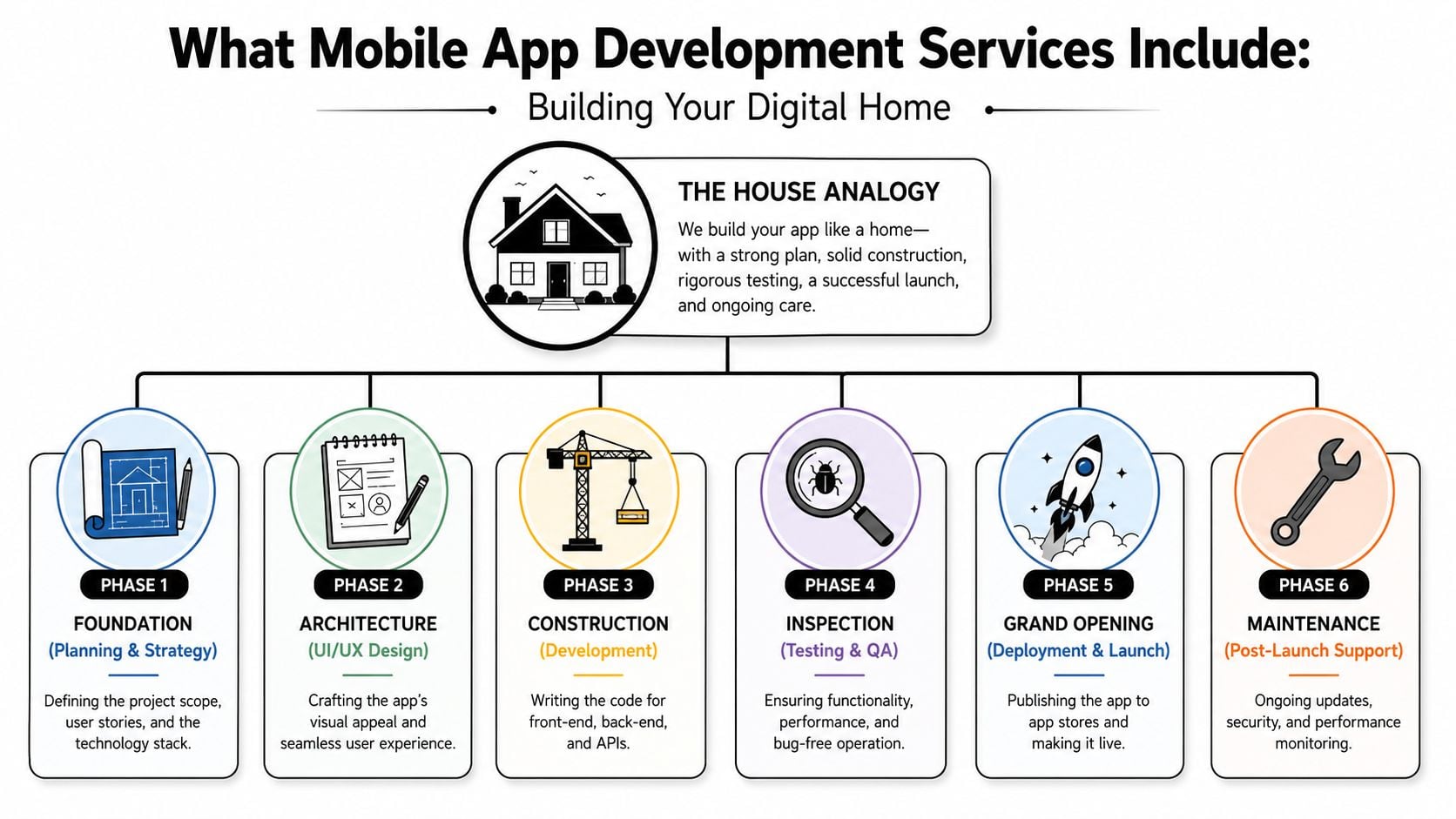
Many first-time buyers hear “app development” and picture coding. In practice, coding is only one part of it. A better comparison is building a house. Before anyone lays bricks, someone has to define the site, draw the plans, check the services, and work out how the building will be used.
That's what proper mobile app development services in the UK should include. Not just developers, but product thinking, design, architecture, testing, release management, and support.
The strategy work most clients don't see
The best part of a project often happens before a single screen is built. This is the foundation stage.
A solid agency should help you define:
- The business goal: Are you trying to increase repeat orders, reduce admin, improve booking flow, or create a member portal?
- The core user journey: What does the user need to do in the first minute, first session, and first week?
- The feature list: Which features are essential for launch, and which should wait?
- The technical shape: Does the app need a backend, logins, payments, location, push notifications, or third-party integrations?
If an agency jumps straight to visual mock-ups without doing this work, you're at risk of building something attractive but structurally weak.
The design phase then turns the brief into wireframes, user flows, and interface decisions. Good UI is not decoration. It's task design. Buttons, onboarding, account screens, checkout steps, and navigation all affect whether users complete the action you care about.
For businesses expanding into different regions or languages later, planning content structure early also matters. A useful mobile app localisation guide can help you think about store listings, in-app text, and cultural adaptation before those become expensive retrofit jobs.
Native, cross-platform, and backend decisions
The build phase is where many clients get pulled into technical jargon. Keep it simple. You are usually choosing between native development and cross-platform development.
The UK market context makes that choice important. 90% of the UK population owns a smartphone and people spend 4–5 hours per day on mobile devices, according to Netguru's UK mobile app market analysis. If mobile is where your users are spending time, platform choice affects reach, performance, and maintenance.
Here's the practical trade-off:
- Native apps are built separately for iOS and Android. They often suit products where performance, device features, and platform-specific behaviour matter.
- Cross-platform apps use a shared codebase across platforms. They often suit SME projects that need faster delivery, lower maintenance complexity, and broad coverage.
- Hybrid thinking is sometimes better than either label. Some businesses need a cross-platform front end with carefully engineered native modules for payments, camera use, or device integrations.
Behind the screens sits the backend. That includes databases, authentication, admin tools, APIs, and system connections. This is the plumbing of the house. Users won't see it, but they'll feel it when it fails.
If your app needs to sync customer records, inventory, bookings, subscriptions, or staff permissions, the backend is often more important than the visible screens.
Testing and deployment are the final stages many clients underestimate. QA should cover actual devices, user flows, crashes, edge cases, and store submission requirements. Then there's launch support, analytics setup, monitoring, and post-release fixes.
If you're comparing providers, look for a service encompassing the full product lifecycle, not just build hours. For example, some agencies bundle planning, design, development, and support as part of broader app development services, while others only handle coding against an existing spec. That difference changes both project risk and outcome.
Understanding App Development Costs and Timelines in the UK
This is the question most business owners ask first, and agencies often answer badly. “It depends” is true, but it isn't useful on its own.
The better way to think about app cost is to break it into moving parts. Complexity, integrations, design depth, platform choice, content workflow, testing, and post-launch support all shape the budget. The app itself is only part of the spend. Discovery, UX, backend setup, app store preparation, and ongoing maintenance matter just as much.
What you are really paying for
A smaller app with a narrow purpose is very different from a customer platform or internal system. The same is true of timelines.
Most budgets are shaped by these questions:
- User accounts: Do people need logins, permissions, or saved preferences?
- System integrations: Will the app connect to WordPress, a CRM, stock system, booking platform, or payment gateway?
- Content complexity: Are you managing products, offers, member documents, bookings, or dynamic data?
- Platform scope: Are you launching on one platform first or both?
- Admin requirements: Does your team need a dashboard to update content or handle support?
- Regulated data: If the app handles customer data, the planning and testing burden increases.
A common mistake is asking for a fully featured app before proving the core use case. For a startup or early-stage product, a focused MVP usually gives better learning. Businesses exploring that route often benefit from reviewing how agencies approach app development for startups because the scope discipline tends to be stronger than in enterprise-style builds.
How pricing models change the risk
The pricing model matters almost as much as the price itself. It changes who carries the risk when scope evolves.
| Model | Best For | Pros | Cons |
|---|---|---|---|
| Fixed Cost | Clearly defined projects with stable requirements | Easier budgeting, clear deliverables, simpler procurement | Less flexibility, change requests can become expensive, early assumptions matter a lot |
| Time and Materials | Projects where scope will evolve through discovery and testing | More adaptable, better for product iteration, allows decisions based on real feedback | Harder to predict final spend, needs active client involvement |
| Retainer | Ongoing roadmap work, post-launch iteration, long-term support | Good for continuous improvement, predictable monthly relationship, suits growth-stage apps | Not ideal for buyers who want a one-off build and no ongoing commitment |
There isn't a universal winner. Fixed cost suits tightly defined work. Time and materials suits products still being shaped. Retainers suit businesses that already know the app will need active development after launch.
If you're considering overseas delivery to reduce build cost, read an offshore mobile development guide with a critical eye. Offshore can work, but only when specifications, communication, QA ownership, and support responsibilities are tightly managed. Cheap build hours don't stay cheap when rework, time zones, and unclear accountability get involved.
What a realistic timeline looks like
Most first app projects take longer than clients expect because they count build time and forget decision time. Content approvals, API access, legal review, store assets, user testing, and change requests all add friction.
A typical flow looks like this:
Discovery and scoping
Clarify goals, users, features, integrations, and technical approach.Wireframes and design
Map screens, journeys, navigation, and interface patterns.Development setup
Establish codebase, environments, backend structure, and data flow.Core feature build
Implement main user tasks, admin functions, and external integrations.QA and refinement
Test across devices, fix issues, improve performance, and tighten flows.Store submission and launch
Prepare listing assets, submit builds, handle review feedback, and release.
Budgeting advice: Ask for a phased estimate, not a single total. You need to know what it costs to validate the idea, launch version one, and support the product after release.
The timeline depends on complexity, but the pattern is consistent. Focused apps move faster when decisions are quick and scope is controlled. Broader products slow down when stakeholders keep adding “small” features that each require design, logic, testing, and support.
How to Choose the Right UK App Development Agency
The UK market is crowded. IBISWorld estimates 15,282 app development businesses in the UK in 2026, with revenue growth and business growth both rising over the previous period according to IBISWorld's UK app development industry report. That means you won't struggle to find suppliers. You may struggle to find one that fits your business.
Look past the sales pitch
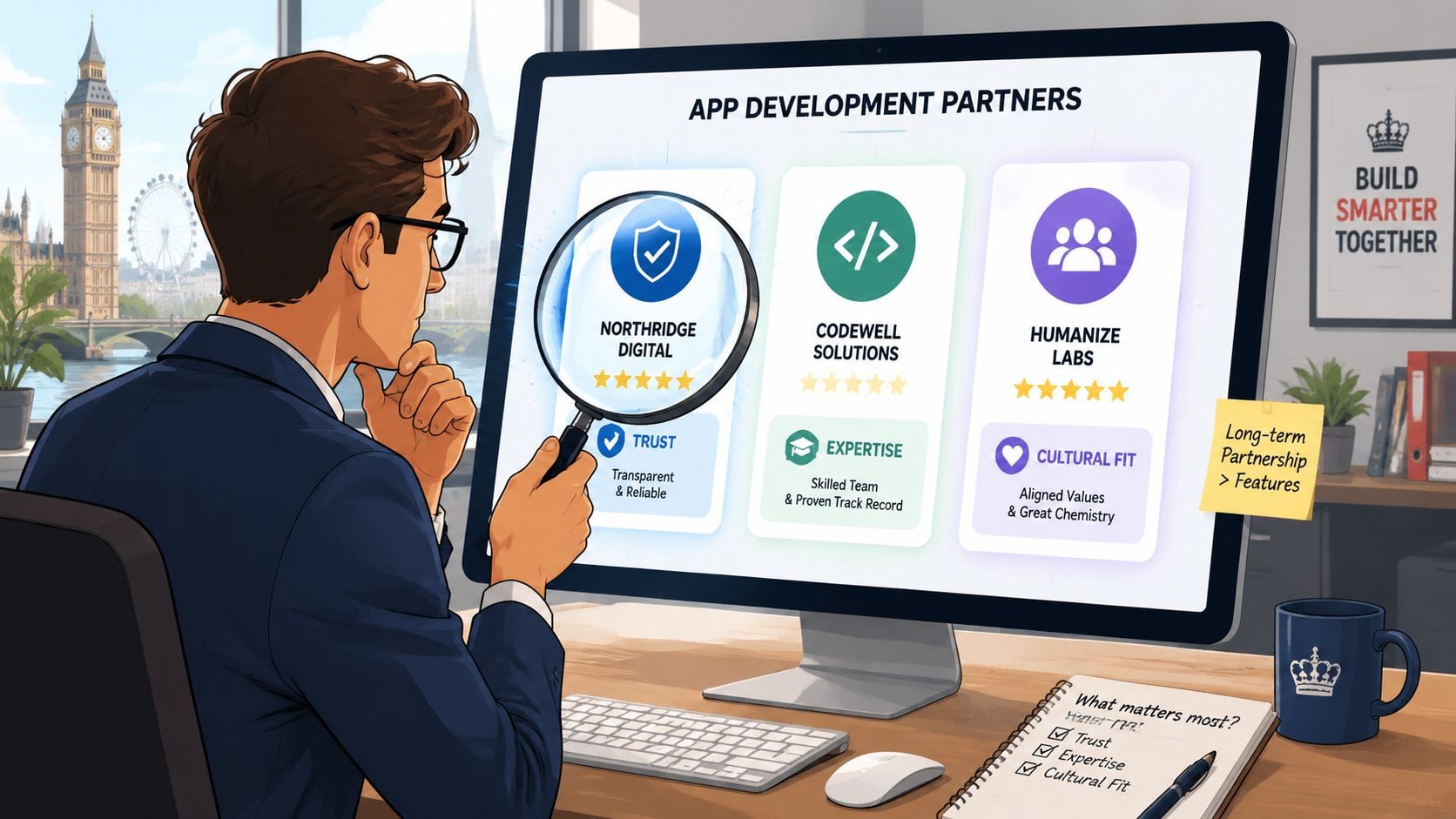
A polished website tells you very little on its own. What matters is whether the agency can show evidence of thinking, not just visuals.
Check these areas closely:
- Relevant project type: A flashy consumer app portfolio doesn't automatically qualify an agency to build internal tools, member portals, or operational systems.
- Process clarity: They should explain how discovery, design, build, QA, and support work in plain English.
- Technical judgement: Ask why they'd choose native, cross-platform, or web-based delivery for your use case.
- Communication habits: You need to know who runs the project, how often you'll speak, and how changes are handled.
- Post-launch ownership: If they go vague on support, expect trouble later.
An experienced team will usually push back on weak assumptions. That's a good sign. If they agree to every feature instantly, they may be selling hours rather than solving the problem.
Treat the agency as an operating partner
The best app projects come from relationships where the client brings business context and the agency brings product discipline. That's different from handing over a spec and waiting for delivery.
Ask to see how they think about:
- Architecture and performance
- Testing on real devices
- Accessibility and compliance
- Analytics and measurement
- Support after launch
This short video gives a useful overview of what to watch for when evaluating a build partner.
One strong sign is whether the agency can explain trade-offs without hiding behind jargon. A serious partner will say things like: this feature can wait, this integration is the main complexity, this flow needs simplification, or this doesn't need an app yet.
A good agency doesn't just tell you what it can build. It tells you what not to build yet.
For SMEs, local understanding can help as well. Regional businesses often have tighter budgets, fewer in-house technical staff, and stronger need for practical support. That doesn't mean you must hire nearby, but it does mean clear accountability matters more than big-agency theatre.
UK Legal, Accessibility, and Post-Launch Support
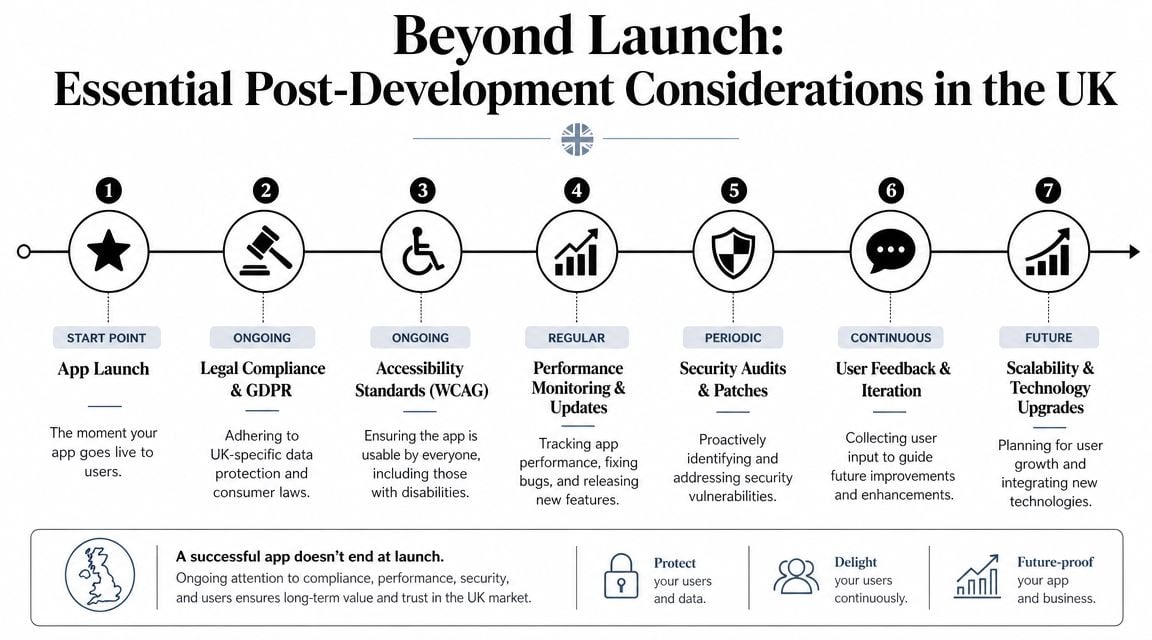
A lot of app projects are treated like a launch campaign. Build it, publish it, move on. That mindset causes problems fast.
In the UK, post-launch responsibility is not optional. Many UK businesses underestimate ongoing operational risk, especially around patching, app-store updates, and security vulnerabilities under UK GDPR, as highlighted in Clutch's UK app developer market overview. If your app handles personal data, booking details, account records, payment-related information, or staff access, the risk continues for as long as the app exists.
Launch is where responsibility starts
Three issues need attention from day one.
First, data protection. If the app collects personal information, you need clarity on what data is stored, why it is stored, where it is hosted, who can access it, and how long it is retained. Privacy decisions shouldn't be left until the app store submission week.
Second, accessibility. Many businesses still treat accessibility as a website-only concern. It isn't. Mobile interfaces need readable text, usable contrast, predictable navigation, touch targets that work properly, and support for assistive technologies where relevant. If you need a useful baseline for your wider digital estate, this guide on how to make a website accessible helps frame the same principles that often carry into app planning.
Third, support ownership. Somebody needs to handle OS changes, dependency updates, certificate renewals, bug reports, analytics review, and store compliance. If that responsibility is unclear, it usually lands back on the client during a stressful moment.
What support should cover in practice
A proper maintenance agreement should say what happens after release, not just promise “ongoing support”.
Look for terms covering:
- Security updates: patching libraries, frameworks, and known vulnerabilities.
- Compatibility work: keeping the app functional with iOS and Android updates.
- Bug triage: who investigates issues, how severity is assessed, and how fixes are scheduled.
- App store management: submissions, policy-related changes, and rejected update handling.
- Monitoring: crash reporting, performance checks, and uptime awareness for connected services.
- Change process: how small enhancements are priced and approved.
If marketing your app is part of launch planning, store presentation also matters. Strong screenshots and preview assets influence first impressions, and this advice on making App Store launch assets is useful when preparing visuals that support conversion rather than just filling required slots.
Owner's question: If the app breaks after an OS update on a Friday afternoon, who fixes it, how quickly, and under what agreement?
If you can't answer that before launch, the support plan isn't finished.
Real-World App Examples from UK Businesses
Most businesses don't need an app because “apps are the future”. They need one because a recurring problem is costing time, sales, or customer goodwill.
Retail loyalty without overbuilding
A local retailer wants more repeat business. The first instinct is often a full ecommerce app with accounts, saved baskets, push offers, and an in-app wallet.
That's usually too much for version one.
A better approach is a focused loyalty app tied to customer accounts, offer redemption, and simple purchase prompts. The business gets a direct mobile channel. Customers get a faster route to rewards and store updates. The team avoids taking on a large catalogue, complex fulfilment logic, and unnecessary admin before proving demand.
For small firms exploring this kind of route, examples of mobile app development for small business are often more useful than enterprise app case studies because the commercial constraints are closer to reality.
Member services that reduce admin friction
Membership organisations often sit on a pile of avoidable admin. Password resets, event bookings, document access, renewal reminders, and account updates all eat staff time.
An app can work well here when it acts as a self-service member portal. The value isn't novelty. It's reducing the volume of manual support and giving members a clearer digital route for the tasks they already expect to complete online.
The common mistake is trying to rebuild every back-office process in one release. A stronger rollout starts with the highest-friction tasks first, then expands once the operational model is stable.
Internal tools that save staff time
Some of the best app projects never appear in an app store search at all. They're internal.
Think of a field-based professional services team logging visits, uploading photos, completing checklists, and syncing notes back to a central system. A simple internal app can improve consistency, reduce delays, and cut the need to re-enter data later from paper notes or email trails.
Internal apps succeed when they reduce effort for staff in the moment. If the tool slows them down on site, adoption drops quickly.
These projects rarely need flashy branding. They need reliable login flows, offline thinking where relevant, clean forms, and sensible integration with existing systems. That's where practical product thinking beats feature inflation.
Your Hiring Checklist and Key Questions to Ask
The first agency call goes better when you show up with a structured brief and a firm set of questions. You don't need technical expertise. You need enough clarity to test whether the agency can think beyond delivery.
Ask these questions directly:
- Do we need an app at all: Based on our business model, would you recommend a native app, cross-platform app, PWA, or improved mobile website?
- What should version one include: Which features belong in launch scope, and which should wait?
- How will you handle discovery: What happens before design and development begin?
- Who is on the team: Will we have a project manager, designer, developer lead, and QA support?
- How do you price changes: If scope evolves, how are extra requests assessed and approved?
- What does testing include: Which devices, flows, and edge cases do you test?
- What happens after launch: Who handles updates, fixes, app-store submissions, and ongoing maintenance?
- How do you approach accessibility and UK compliance: How are those requirements handled during planning and QA?
A strong written brief helps these conversations stay useful. If yours is still loose, this guide on how to write a design brief is a practical place to start before you request proposals.
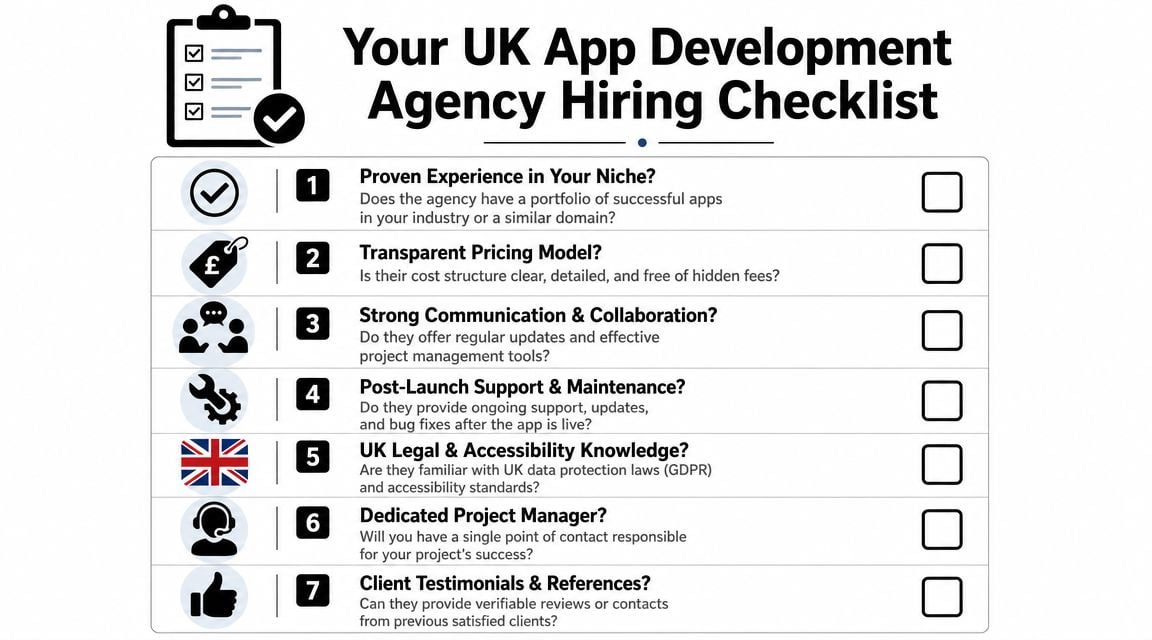
The goal isn't to catch agencies out. It's to see who answers clearly, challenges weak assumptions, and understands the commercial side of your project.
Frequently Asked Questions
Do I need a native app or would a website or PWA be better
Often, you don't need a native app straight away. That's one of the most overlooked parts of mobile app development services in the UK. A responsive website or Progressive Web App can offer a better ROI for many UK SMEs, especially in regional markets with tighter budgets and limited maintenance capacity, as noted in this UK SME app decision guide.
A simple decision test helps:
- Choose a mobile website first if users mainly browse, read, enquire, or book occasionally.
- Choose a PWA if you want an app-like experience without full app-store complexity.
- Choose a native or cross-platform app if users need regular logins, saved preferences, push notifications, device features, or repeated account actions.
Can an app connect to my existing website or WordPress setup
Yes, often it can. The key question is how cleanly your current setup exposes data and functions. If the app needs to pull products, bookings, member records, or account details from an existing site, the backend and API work become central. Sometimes integration is straightforward. Sometimes the website has to be restructured first.
Who hosts the app
Apps themselves are distributed through app stores, but the systems behind them still need hosting or cloud infrastructure. That may include databases, APIs, file storage, admin dashboards, and authentication services. You need to know who manages that environment, who monitors it, and who responds when something fails.
If you're weighing up whether your business needs an app, a PWA, or a stronger mobile website, DesignStack can help you scope the right option before you commit to a build. That kind of early decision-making usually saves more money than any later attempt to trim features.



Leave a Reply