

Ecommerce Website Logo Design: A Practical Guide
A logo can look sharp in a brand presentation and still fail the moment it hits a live store. I see it happen in ecommerce projects all the time. The wordmark shrinks too far in the mobile header, fine details disappear on product pages, and the favicon turns into an unreadable smudge in the browser tab.
Ecommerce website logo design has to be judged in the places where customers decide whether to trust you enough to keep shopping. That includes the mobile menu, checkout, paid ads, email receipts, account pages, and every other touchpoint where space is limited and attention is short.
The goal is a logo system that holds up under real trading conditions. That means testing for legibility at small sizes, preparing the right file formats for developers, and making sure the mark still feels like your brand whether it appears on a homepage banner or a checkout confirmation. Businesses investing in website design for small Australian businesses run into the same issue. A polished logo is not enough if the live implementation breaks consistency or slows down the build.
Costly mistakes usually start early. A logo gets approved as a single desktop lockup, then the team tries to force it into every placement later. That creates rework, inconsistent branding, and avoidable friction in the parts of the site that drive revenue.
Table of Contents
- Why Your Ecommerce Logo is Your Hardest-Working Employee
- Define Your Brand Strategy Before You Design
- From Concept to a Compelling Visual Identity
- Creating a Responsive Logo System for All Devices
- Mastering the Technical Details and File Formats
- The Final Handoff A Checklist for Your Developer
Why Your Ecommerce Logo is Your Hardest-Working Employee
A shopper lands on your store from a paid ad, scans the header on a phone, adds a product to basket, then hesitates for half a second at checkout. Your logo is present in every one of those moments. It helps the site feel established, confirms the buyer is still in the right place, and supports trust right before payment.
That is why ecommerce logo design needs to be judged as a working system, not a standalone graphic.
On an online store, the logo appears in the header, checkout, order emails, packaging inserts, social profiles, browser tabs, and sometimes an app icon. Each placement asks for something different. A detailed badge might look polished in a homepage mock-up and fail completely in a mobile header. A long wordmark may read well on desktop and become cramped beside search, account, and cart icons.
It has to work where sales happen
The useful question is simple. Can the logo still do its job when the customer is moving quickly?
Many buyers do not study branding. They glance. They scan category pages, compare prices, jump between tabs, and return later from an email or retargeting ad. If the logo becomes hard to read, too small to recognise, or inconsistent across touchpoints, the brand starts to feel less reliable than the products may be.
A practical standard I use is this: if the logo only looks right when it is large and isolated, it is not ready for ecommerce.
That is also why brand identity decisions should be connected to website implementation from the start. A strong mark needs clear rules for spacing, sizing, contrast, and alternate versions. If you need a broader reference point, this guide to brand identity design systems for digital brands explains how those decisions fit into the wider identity.
Where weak logos usually break
Weak ecommerce logos often fail in predictable places:
- Mobile headers: Long names, thin type, and intricate symbols lose clarity once the navigation gets tight.
- Checkout pages: The logo is usually smaller here, and any legibility problem becomes obvious at the exact moment trust matters most.
- Favicons and browser tabs: Full wordmarks rarely survive at that size. A simplified icon or monogram is usually needed.
- Email templates: Poor contrast, awkward proportions, or no reversed version can make order emails look disconnected from the store.
- Social avatars: Circular or square crops can cut off important elements if no platform-specific version exists.
These are expensive problems to discover after launch. Fixing them often means redesigning assets, updating code, replacing email templates, and revisiting packaging files. It is one reason logo work and website planning should happen together. If you are reviewing both at the same time, this resource on website design for small Australian businesses is useful because it shows how brand presentation and site structure affect each other in practice.
Trust comes from consistency
Buyers do not reward complexity. They reward clarity and repetition.
A strong ecommerce logo is recognisable on a homepage, in a cart drawer, inside an order confirmation email, and on a returns label. That usually means simpler shapes, clearer typography, stronger contrast, and a set of versions built for real placements. The goal is not to create one beautiful file. The goal is to create a logo system that keeps performing wherever the sale, support request, or repeat purchase happens.
Define Your Brand Strategy Before You Design
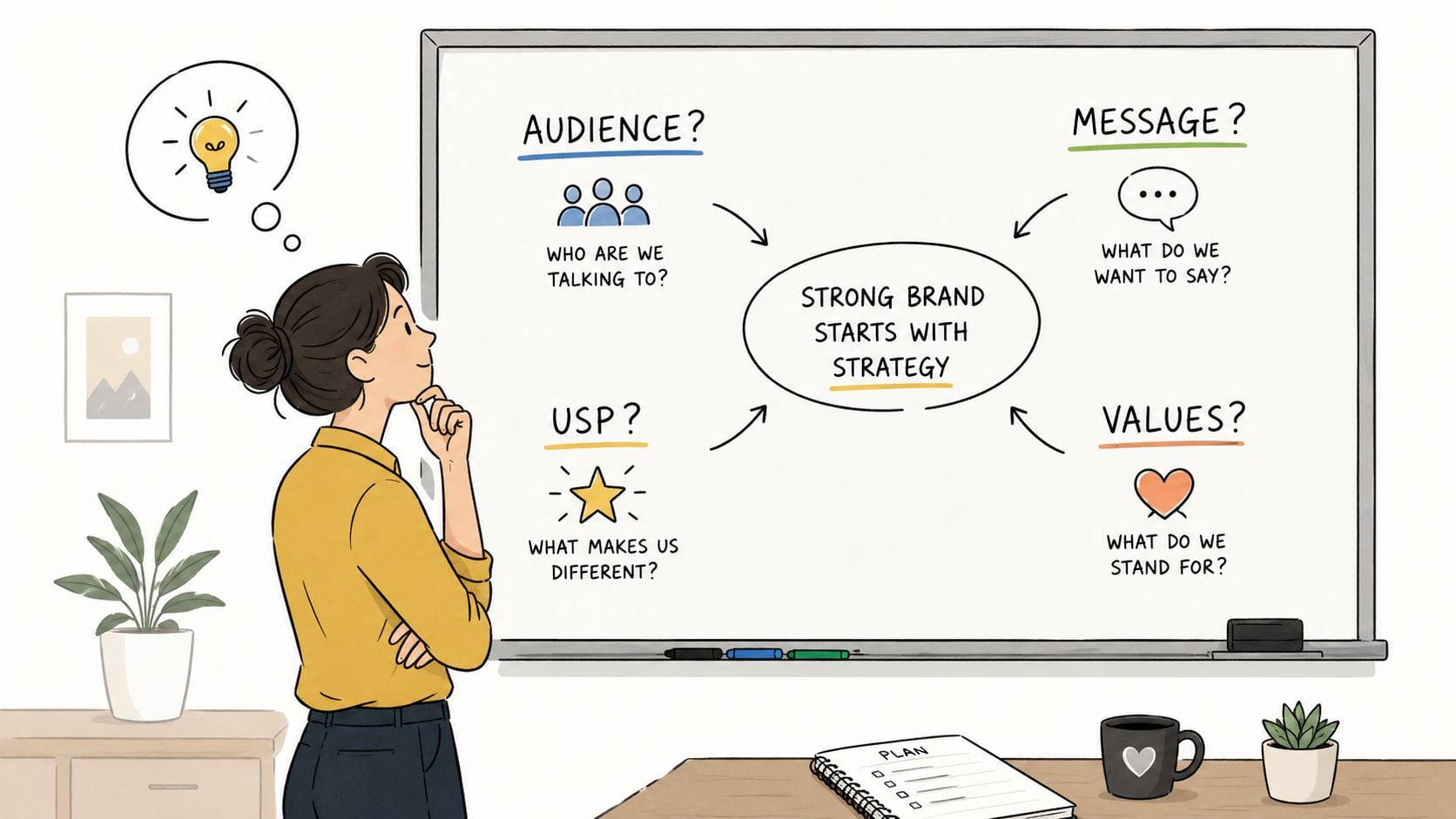
The fastest way to waste money on a logo is to start with style references before you've decided what the brand needs to communicate. A designer can draw dozens of polished options, but if the business hasn't defined its audience, position, and tone, the work usually turns into subjective debate. One person wants it “more premium”. Another wants it “friendlier”. Nobody agrees because the strategy isn't set.
That's a serious risk in a crowded market. The UK online economy was estimated at £693.4 billion in 2023, and the UK had 5.6 million private sector businesses in 2024, according to this logo statistics reference summarising UK market context. In a market that busy, your logo can't afford to be vague.
Start with the buyer, not the artwork
Before any sketching starts, answer a few hard questions:
- Who are you selling to: Not “everyone”. Be specific about price sensitivity, age range, expectations, and buying habits.
- What are they trying to avoid: Cheap-looking products, slow delivery, poor support, confusing returns, low quality.
- What should they feel when they see your brand: Reassured, excited, calm, premium, practical, specialist.
- What are competitors signalling visually: Luxury, speed, eco values, handmade quality, technical expertise.
- Where do you want to be different: Colour, tone, simplicity, category cues, naming style, typography.
If your answers are fuzzy, the logo will be fuzzy too. A strong mark is usually the result of clear decisions made early.
Useful prompts that save redesigns
I often find that clients get better answers when the questions are framed clearly. Try these:
- If your brand were a person, what three words would describe them
- If a new visitor saw only your logo and site header, what should they assume about the business
- Which competitors look generic, and why
- What would make your business feel out of place in your own category
- Are you trying to fit the category or disrupt it
Those prompts help you move beyond preference. They push the conversation toward positioning.
A logo can't fix an unclear brand. It can only visualise what's already been decided.
Study competitors without copying them
Many ecommerce businesses get stuck. They review ten competitor sites and conclude they all need a black sans serif wordmark because that's what appears “modern”. Sometimes that's the right answer. Often it just means the whole category looks interchangeable.
Look for patterns first. Are competitors relying on serif typography to signal heritage? Are they all using muted tones to imply premium quality? Are they all packing symbols into the logo because they think they need to explain the product category visually? Once you can see the pattern, you can choose where to align and where to break away.
If you need a broader explanation of the strategic side of branding, this overview of brand identity design is a useful starting point because it frames the logo as one part of a larger identity system, not the whole brand on its own.
Decide what the logo must do
A practical brief should define function, not just mood. For example:
- Must feel established enough for checkout trust
- Must remain readable on mobile
- Must support both product packaging and web headers
- Must allow a simplified icon version
- Must avoid looking too close to marketplace sellers in the same niche
That kind of brief leads to better design decisions than “clean and modern”. It also gives everyone a way to assess the work objectively.
From Concept to a Compelling Visual Identity
The creative process works best when strategy has already narrowed the field. At that point, design becomes a problem-solving exercise. You're choosing the form that best delivers the brand idea under ecommerce conditions, not searching endlessly for something “nice”.
A useful visual summary of that process is below.
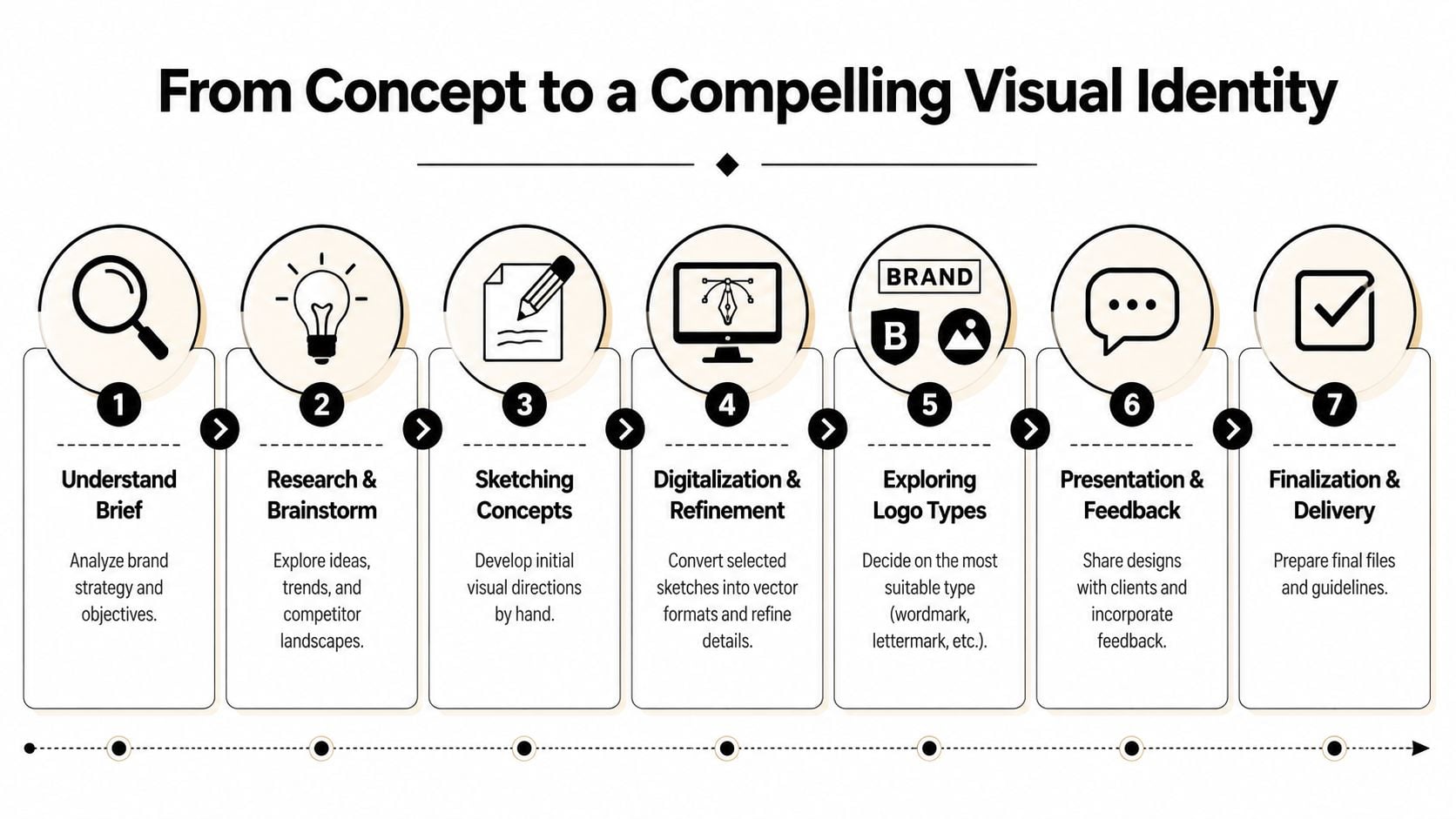
For ecommerce brands, the workflow should treat the logo as a scalable identity system rather than a single artwork, including multiple variations and testing across placements such as headers, packaging, and social profiles, as outlined in Shopify's ecommerce logo guidance.
Choose the right logo type for the business
Not every logo structure suits ecommerce.
| Logo type | Works well for | Watch out for |
|---|---|---|
| Wordmark | Short, distinctive brand names | Long names can become cramped on mobile |
| Lettermark | Brands with long names or multi-word names | Can feel generic if initials aren't distinctive |
| Combination mark | Businesses that need both name and recognisable symbol | Can become cluttered if both parts compete |
| Icon-only mark | Favicons, app icons, social avatars | Usually needs existing brand recognition to stand alone |
For many online retailers, a combination mark is the most flexible starting point. It gives you the full name when space allows, then lets you separate out the symbol for smaller placements later.
Colour and typography need ecommerce logic
Colour choices shouldn't be random, and they shouldn't be based only on what looks fashionable on Dribbble or Pinterest. In ecommerce website logo design, colour has to survive real interface conditions. A soft pastel can look elegant on white packaging and disappear in a website header. A low-contrast palette can struggle in dark mode, promotional banners, and paid social placements.
Typography is even less forgiving. A fashionable typeface with unusual letterforms might feel bespoke, but if shoppers misread the name in the header or checkout, the logo loses value quickly.
A practical test is to ask whether the typography still feels confident when it's small, not whether it feels dramatic when it's large.
Working advice: Pick fonts for legibility first, personality second. Ecommerce rewards clarity.
If you want a second perspective on the early making process, this article on logo design from Silva Marketing is helpful because it looks at how strategic choices shape the final mark rather than treating logo work as decoration.
Refinement matters more than raw ideas
Most good logos don't arrive fully formed in the first round. They improve through reduction. Extra lines come off. Spacing gets corrected. Curves become cleaner. Contrast improves. A symbol that looked clever in a sketch is dropped because it won't reproduce well online.
Later in the process, it helps to review examples and roughs against a practical creation checklist. This guide on how to create a logo for a business is useful for that because it keeps the focus on business fit, not just aesthetics.
Before final approval, I'd want to see the logo in these contexts:
- A website header on desktop
- A mobile menu bar
- A product page above the fold
- A checkout screen
- A square social profile
- A packaging mock-up
The video below gives another useful view of how logo thinking translates into practical brand execution.
A logo becomes compelling when it keeps its character across all those uses without needing special treatment every time.
Creating a Responsive Logo System for All Devices
A single static logo file isn't enough for modern ecommerce. That assumption causes more implementation problems than most businesses expect. What works in a wide desktop header rarely works unchanged in a mobile menu, a browser tab, or a social avatar.
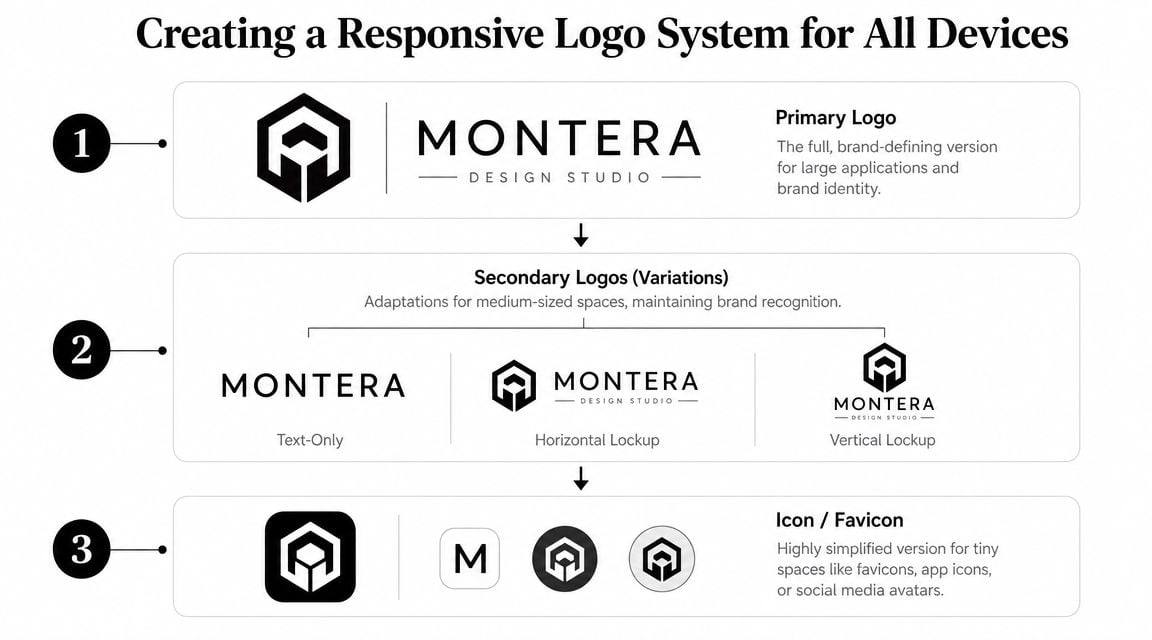
That's why the better approach is a responsive logo system. One core identity. Several deliberate versions.
The three versions most ecommerce brands need
At minimum, most online stores should plan for these:
Primary logo
This is the full version. It's usually the one used in large headers, brand presentations, and packaging where space is generous.Secondary version
This might be a stacked layout, a horizontal variant, or a text-only arrangement. It's useful when the primary mark doesn't fit the available space cleanly.Icon or favicon
This is the stripped-down mark for tiny placements. Often it's a symbol, monogram, or simplified character taken from the main logo system.
The mistake is trying to force the primary logo into every one of those jobs. That's like using a homepage banner image as a favicon. Technically possible, functionally poor.
Test the logo where customers actually see it
One of the most useful checks is also one of the most overlooked. Test the logo at 24 to 32 pixels, because that's often the size range where it appears on phones. The same source also notes that over half of UK online retail sales now come from smartphones, which makes mobile-first logo testing hard to ignore, as discussed in this responsive ecommerce logo article.
Here's the simple test:
- Put the logo into a real mobile header mock-up.
- Reduce it to the size your theme or platform will use.
- Check whether the name is still readable.
- Test it again in the checkout.
- Test the icon-only version as a favicon and social avatar.
If readability breaks at that stage, the logo system needs more work.
Don't approve a logo from a centred presentation slide. Approve it from a mobile header screenshot.
Responsive design and logo design have to work together
A logo can be technically well designed and still fail if the website layout doesn't support it. Header padding, menu behaviour, sticky navigation, and breakpoint rules all affect how the mark appears. That's why branding and front-end thinking should happen together.
If you want a useful technical overview, Nerdify's expert guide on responsive web development is worth reading alongside your branding work because it shows how interface decisions change what a logo has to do on different screens. For a more general foundation, this explanation of responsive web design helps connect layout behaviour with branding choices.
One practical note from real projects. Shopify themes, WordPress ecommerce templates, and marketplace listing slots all impose constraints. They won't redesign themselves around your logo. Your logo system has to be built to live inside those constraints cleanly.
Mastering the Technical Details and File Formats
A logo often breaks for the first time after approval, during implementation. The designer signs off on a polished concept. Then the developer gets one flattened PNG, uploads it to the header, and the mark looks soft on a Retina screen, jagged in email, or unusable for packaging artwork a week later.
That failure is usually technical, not creative.
An ecommerce-ready logo system needs the right formats, colour modes, export settings, and file names before development starts. If those details are loose, the brand ends up inconsistent across the storefront, checkout, order emails, ads, inserts, and print materials.
The core rule for production readiness
A logo should survive ordinary ecommerce use without special handling from the developer. That means it must stay clear at small sizes, work in one colour, and reproduce cleanly across digital and print contexts. As noted in this technical ecommerce logo guide, clarity, distinction, and small-size usability are the baseline.
That standard matters because ecommerce brands rarely control the display conditions. A logo gets dropped into payment pages, shipping notifications, social profile circles, marketplace listings, return labels, and packing slips. Each one strips away some of the ideal presentation from the original design file.
The File Formats You Need
Clients usually do not need more logo files. They need the right ones, exported for the right job.
| File Format | Best For | Why |
|---|---|---|
| SVG | Website headers, navigation, footer, inline web use | Vector format that stays sharp across screen sizes and densities |
| PNG | Social avatars, transparent overlays, platform uploads that reject SVG | Easy to place, supports transparency, widely accepted |
| JPG | Preview files, documents, non-transparent placements | Useful for basic sharing, but poor choice for primary logo delivery |
| AI / EPS | Source artwork for designers, printers, packaging suppliers | Keeps editable vector paths for future production work |
| Approval packs, supplier references, print handoff | Can preserve vector artwork in a format many vendors open easily | |
| ICO | Browser favicon use | Built for favicon implementation in desktop browser environments |
If the site logo is going into a theme header, SVG is usually the correct starting point. If the platform, app, or third-party tool has upload restrictions, PNG becomes the fallback. JPG is rarely the right main logo asset because it removes transparency and degrades more easily during reuse.
Colour modes and alternate versions
Web and print do not use the same colour setup. Stores often discover this late, usually when they need stickers, thank-you cards, box printing, or wholesale materials and the only approved assets are digital RGB files.
A usable logo pack should include:
- Full-colour RGB files for the website, email, paid social, and digital ads
- CMYK versions for packaging, inserts, labels, and printed collateral
- Black-only artwork for stamps, single-colour print jobs, and low-cost applications
- White or reversed versions for dark headers, hero banners, and dark-mode placements
Weak logo systems show up fast. If a mark depends on gradients, fine outlines, or a precise background colour to hold together, implementation gets harder and costs rise. The developer starts making judgement calls. The printer makes substitutions. The marketplace team uploads whatever file seems closest.
Keep master files separate from delivery files. The original artwork should stay untouched, while web exports should be compressed and prepared for the channel they serve. This guide on how to optimise images for websites is a useful reference for that distinction.
Naming and organisation matter more than clients expect
Poor file naming slows down launches. It also creates brand inconsistency because different teams pick different assets for the same job.
Avoid file names like logo-final-v2-new.png or header-logo-use-this-one.svg. They create doubt the moment someone opens the folder. Use plain, functional naming instead:
brand-primary-rgb.svgbrand-primary-cmyk.epsbrand-secondary-black.pngbrand-icon-white.svgbrand-favicon.ico
Folder structure should be just as clear. Separate source files, web exports, print files, and favicon assets. If a developer has to open six files to guess which version belongs in the checkout header, the handoff is not finished.
The Final Handoff A Checklist for Your Developer
The last stage is where expensive delays often start. The logo is approved, but the developer receives incomplete files, missing variants, no favicon package, and a vague note saying “use the black one on white backgrounds”. That usually leads to rushed exports, inconsistent implementation, and avoidable email chains.
A clean handoff saves time because it removes ambiguity. Your developer shouldn't have to interpret the brand. They should be able to implement it.
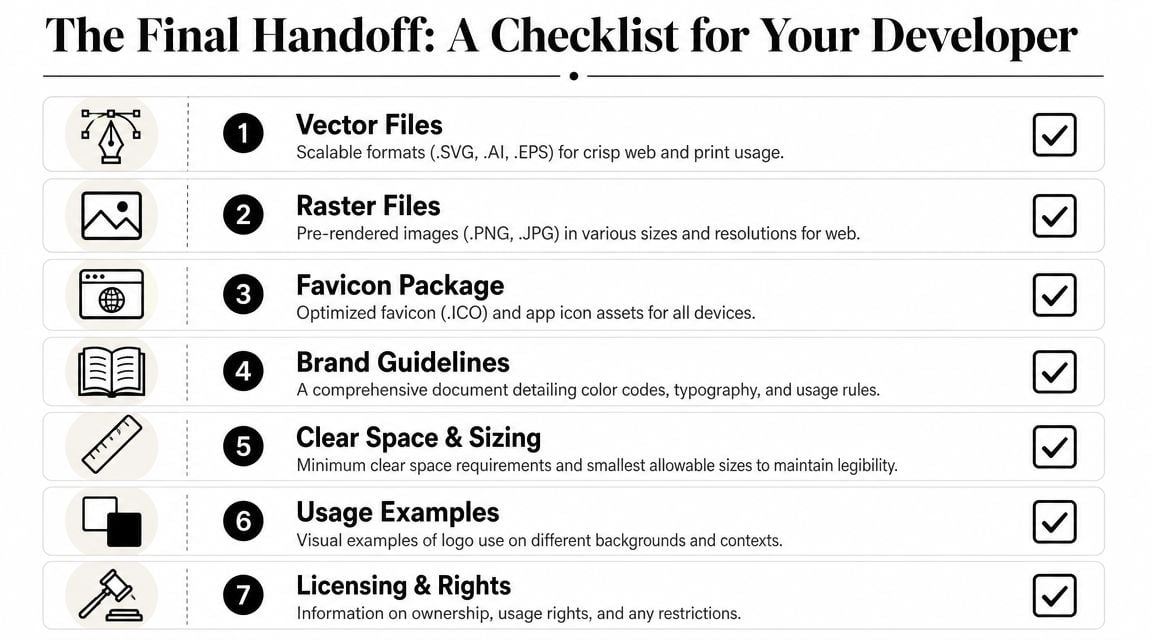
What your developer should receive
Use this checklist before launch:
Primary, secondary, and icon versions
Don't send one logo and expect the site build to adapt around it.SVG and PNG exports
SVG is usually the right choice for crisp website rendering, while PNGs help with channel-specific uses where a fixed raster asset is needed.Favicon package
Include the favicon asset and any related app or browser icon files already prepared.Brand guide
This should cover colour codes, font names, approved logo versions, and basic usage rules.Minimum size guidance
If the logo shouldn't be used below a certain size, document that clearly.Light and dark background examples
Developers need to know which versions to use on white headers, dark footers, overlays, and promotional panels.Licensing and ownership details
This matters for fonts, stock elements if any were used elsewhere in the identity, and long-term brand control.
What causes trouble during launch
The biggest handoff mistakes are usually simple:
- Missing source files
- No transparent-background assets
- No icon-only mark for tiny placements
- No style guide
- No clarity on spacing or safe area
- No test screenshots showing intended usage
If the developer has to ask which logo version goes in the checkout, the handoff wasn't finished.
Before launch, it also helps to run through a broader website launch checklist so the logo implementation is checked alongside the rest of the site. That catches issues like poor header contrast, missing favicon setup, or incorrect mobile rendering before customers see them.
A good ecommerce logo doesn't stop at approval. It reaches the site properly, displays correctly on every key touchpoint, and gives the business a brand system it can use without improvising every time a new asset is needed.
If you're planning a new store, rebrand, or logo refresh, DesignStack can help with the full process from brand identity and ecommerce website logo design through to responsive web implementation, launch support, and the practical asset handoff that keeps projects running smoothly.
Leave a Reply