

Social Media Integration: A Practical Guide
Around 79.7% of the UK population uses social media, so social media integration is now core infrastructure for reach, discovery and conversion, not an optional extra. With 55.5 million active social media user identities recorded in the UK in October 2025, a disconnected website leaves a substantial part of the customer journey outside your measurement and conversion systems.
For a Dorset business, that doesn't mean adding every possible feed, button and platform plugin. It means connecting the channels your customers use to the pages, products, forms and analytics that run the business. Done properly, social media integration makes a website easier to discover, easier to share, easier to trust and easier to measure.
Table of Contents
- What Social Media Integration Really Means in 2026
- Why UK Businesses Treat Integration as Core Infrastructure
- The Main Types of Social Media Integration
- Technical Approaches Explained Without the Jargon
- Platform-Specific Tips for UK Audiences
- Implementation Checklist and Measurement Framework
- Working with a UK Agency and Next Steps
What Social Media Integration Really Means in 2026
The UK audience is already large enough to change the priority of this work. DataReportal records 55.5 million active social media user identities in the UK, representing about 79.7% of the population, alongside 68.1 million internet users and 97.8% internet penetration in its Digital 2026 UK data (DataReportal UK digital data via Silkdrive). Social platforms sit beside traditional media in everyday consumption, with YouGov reporting that 67% of UK adults use social media at least weekly, compared with 70% who watch broadcast television weekly (YouGov's 2026 UK media consumption findings).
That scale makes a useful distinction necessary:
- Social presence means your business has profiles on Facebook, Instagram, LinkedIn, TikTok or another platform.
- Social media integration means those profiles connect with your website, campaign pages, ecommerce systems, CRM and analytics.
- Social conversion design means the journey from a post or social search to a contact, enquiry or purchase is deliberate and trackable.
In practice, integration can include share buttons, embedded feeds, social login, Open Graph metadata, pixels, UTM-tagged links, click-to-message buttons and shoppable posts. It covers owned, earned and paid touchpoints, rather than a row of icons in the website footer.
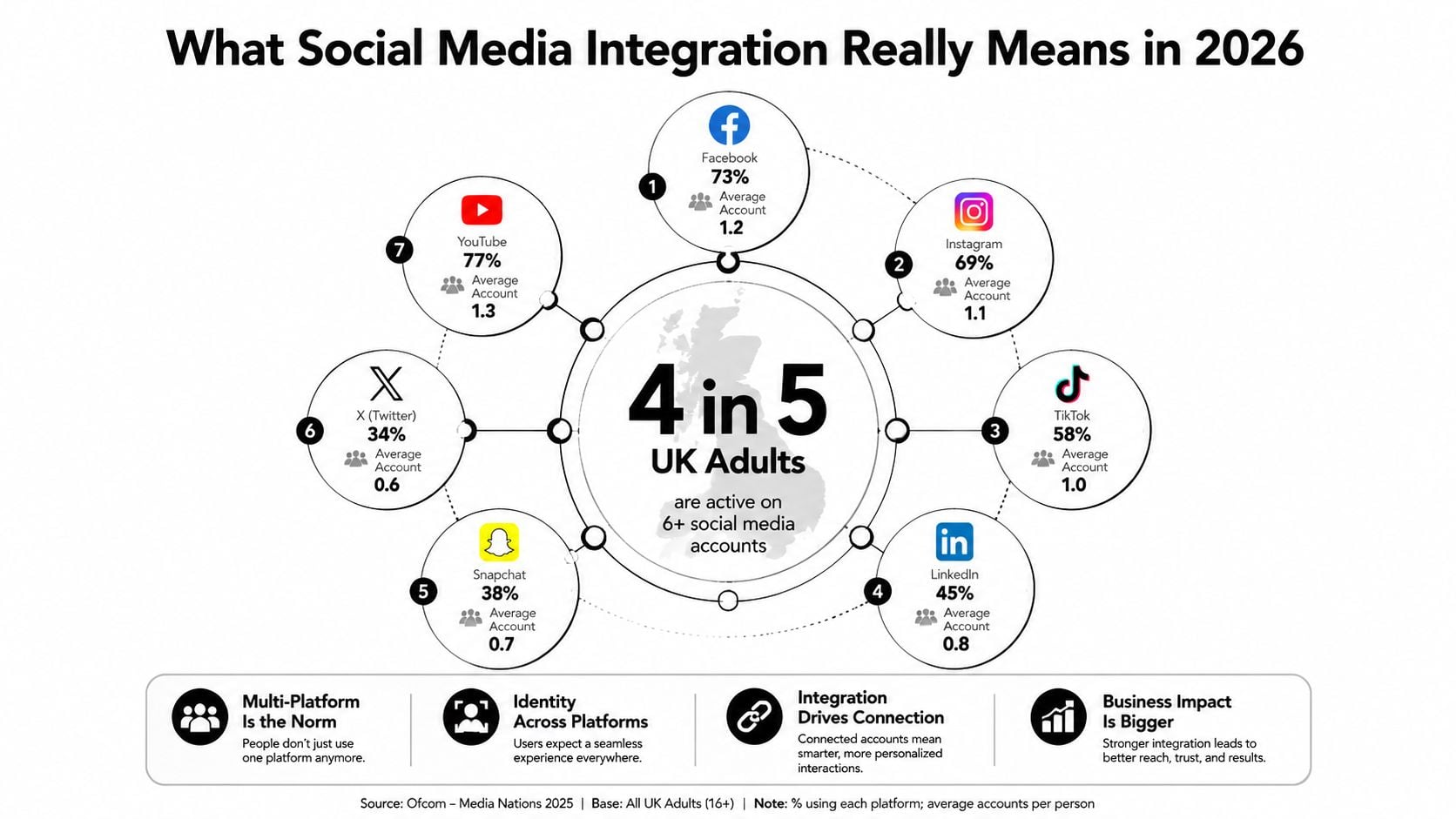
Presence is not the same as connection
A profile link sends visitors away from your website. An integrated journey gives them a relevant next step, such as viewing a product mentioned in an Instagram post, sending a WhatsApp enquiry from a service page or completing a form connected to your CRM.
The website also needs to communicate properly with social platforms. Open Graph tags control the title, description and image shown when someone shares a page. Tracking parameters help GA4 identify campaign traffic. Consent controls determine whether advertising pixels can operate lawfully.
Practical rule: Treat social integration as a maintained layer of content, code, consent and measurement, not as a plugin installation.
That maintenance matters because platforms change their APIs, privacy requirements, preview formats and commerce rules. A feed that works today may slow down a page tomorrow, and a tracking event can stop recording after a theme or checkout update. The useful question isn't “Which social plugin should we install?” It's “Which customer action should this integration support, and how will we know it happened?”
Why UK Businesses Treat Integration as Core Infrastructure
Social media has become both a discovery environment and a route towards purchase. Ofcom-linked reporting indicates that 43% of UK consumers use social media for search at least once a day, while 34% use video-sharing platforms such as TikTok for daily search (UK social discovery and referral data). That behaviour changes what a landing page needs to do. It must make sense when someone arrives from a post, a video result or a shared message, often on a mobile screen and without prior knowledge of the business.
The commercial case is particularly clear for ecommerce. UK social commerce is forecast to reach £9.1bn in 2025 and roughly £20bn by 2030, while 55% of UK consumers have already purchased directly through social platforms (Retail Economics social commerce report). A profile link alone can't support that journey. Product data, landing pages, checkout paths and conversion events need to agree.
| Benefit | What the SME actually sees |
|---|---|
| Qualified referral traffic | Visitors arrive on pages matched to the post, advert or video that introduced them. |
| Richer previews | Correct images, titles and descriptions appear when pages are shared on Facebook or LinkedIn. |
| First-party audience building | UTM-tagged campaigns and appropriate sign-in or signup flows create clearer records of customer journeys. |
| Shorter purchase paths | Shoppable content, product links and click-to-WhatsApp options reduce unnecessary steps. |
A Dorset service business might use LinkedIn lead-generation forms to capture an enquiry, then send the contact into a CRM with the campaign source attached. A local retailer could move a customer from an Instagram product discovery moment to a specific product page, rather than forcing them to search the whole catalogue.
For businesses reviewing their wider social media marketing in Dorset, the practical test is visible in the data. GA4 should show which social referrals engage with key pages and which assist enquiries or purchases. Platform event managers should receive meaningful actions, not just page views. The website should also make the next action obvious, whether that's booking, buying, calling or messaging.
Compliant tagging supports more than reporting. Where consent and platform policies allow, reliable conversion data can inform remarketing, Customer Match and lookalike audience activity. Poor tagging has the opposite effect. It creates disconnected reports, weakens optimisation and makes a busy social channel look less valuable than it is.
The Main Types of Social Media Integration
Social media integration works best when each connection supports a measurable customer action. A trade contractor, membership organisation and Dorset ecommerce shop will need different combinations, so treat the following as practical building blocks rather than a standard package.
Choose the integration that supports the action
Share and follow buttons
Place lightweight buttons on guides, blog posts and product pages where sharing is relevant. They are straightforward to add in WordPress, but too many scripts create clutter and can affect page performance.Embedded feeds
Instagram, YouTube and Facebook feeds can show recent activity on a homepage. They add visible freshness, although third-party requests may slow rendering. If a platform connection fails, the page can also display an empty space.User-generated content walls
Retailers can place approved customer images beside relevant products to provide social proof. Permission, moderation and disclosure need to be handled before publication.Social login
Social sign-in can shorten account creation for ecommerce and membership sites. It also creates decisions around consent, account ownership and reliance on an external platform.Click-to-message
WhatsApp Business and Messenger suit local services where customers ask questions before booking. Messages need a shared routing and response process, otherwise enquiries become difficult to track.Lead and signup connections
LinkedIn lead forms, Facebook lead ads and newsletter forms can send contact details to a CRM such as HubSpot. Field mapping, data governance and clear consent language determine whether the connection remains useful.Analytics and commerce connections
GA4, Meta Conversions API, Google Enhanced Conversions, Instagram Shop and TikTok Shop can connect social discovery with revenue. Accurate product data, consent controls and regular event checks are required.
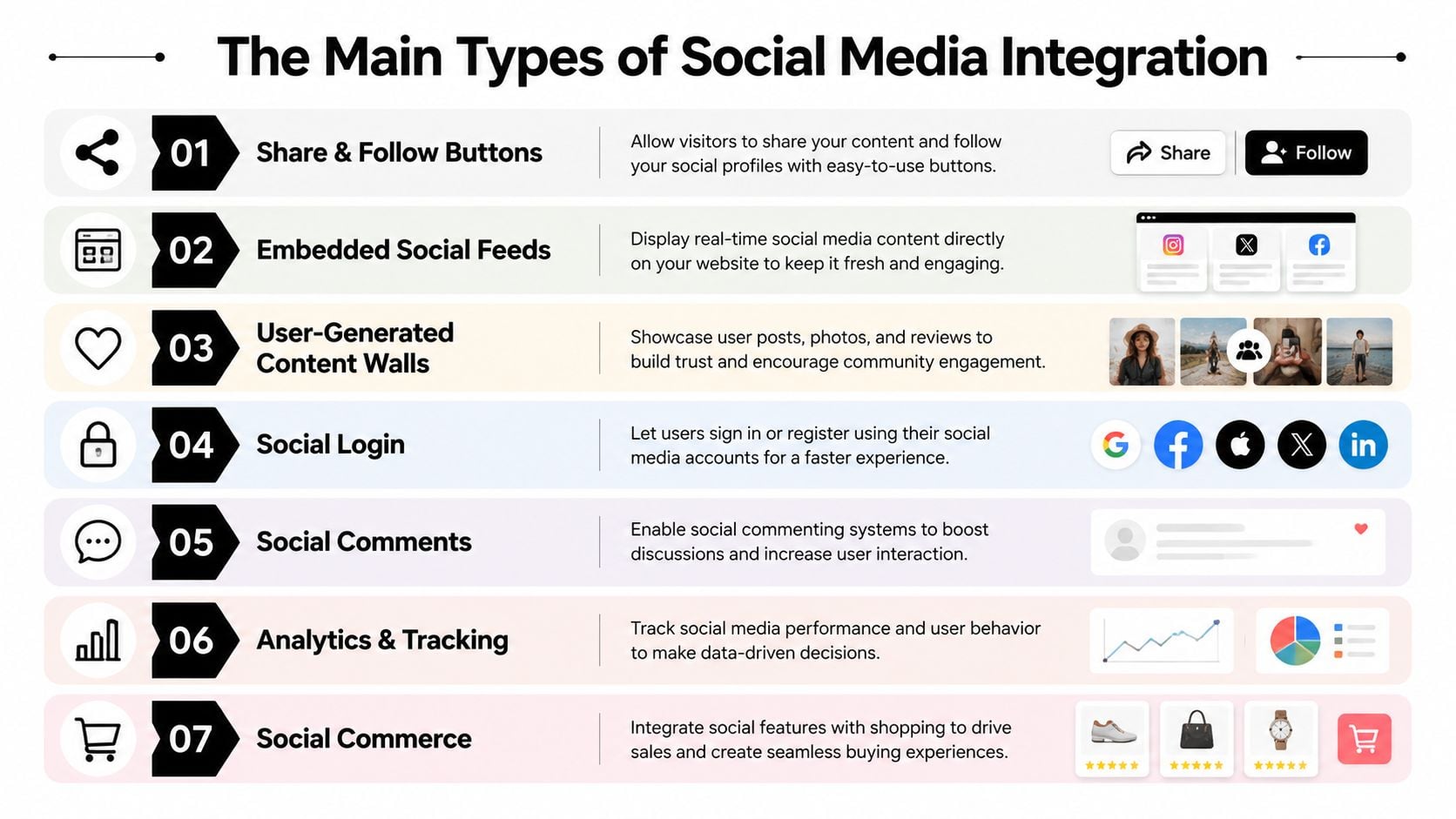
A small business should select integrations around its priority conversion. For local enquiries, click-to-message and lead routing may produce more value than a live Instagram wall. For product sales, catalogue synchronisation, shoppable content and event tracking deserve earlier attention.
Content distribution needs the same discipline. A clear content strategy for a business website helps decide which pages should receive social traffic and which formats suit each platform.
Use a short visual explanation when non-technical teams need to distinguish these integration layers:
Technical Approaches Explained Without the Jargon
Most website integration projects rely on four building blocks. You don't need to write the code, but you should know what each block does before approving a proposal.
Start with the page preview
Open Graph tags are instructions in a page's HTML that tell social platforms how to display a shared link. They define the preview image, title, description and canonical URL. For many WordPress sites, correcting these tags is the most useful first fix because a strong article or product page can lose attention when Facebook or LinkedIn displays the wrong image.
Pixels are small pieces of tracking code supplied by platforms such as Meta, LinkedIn and TikTok. They can record actions such as page views, lead submissions or purchases, subject to consent and platform rules. A pixel only helps when events are named sensibly, configured correctly and checked after website changes.
Widgets create the visible features people interact with, including follow buttons, social feeds, share bars and review displays. They're convenient, but every external script can affect page performance. I prefer a small number of purposeful widgets over a crowded homepage that asks several platforms to load at once.
APIs and SDKs allow deeper connections, such as catalogue synchronisation, lead routing or platform-specific commerce features. These are more powerful than a basic embed, but they need secure access, careful permissions and developer oversight. A Dorset shop launching a catalogue integration has different requirements from a consultant adding one LinkedIn share button.
| Approach | What it does | Best for | Effort level |
|---|---|---|---|
| Metadata | Controls shared link previews | Every content-led website | Low |
| Pixels and events | Records social campaign actions | Advertisers and ecommerce sites | Medium |
| Widgets | Adds visible social features | Social proof and simple sharing | Low to medium |
| APIs and SDKs | Connects systems and deeper platform functions | Commerce, CRM and bespoke workflows | High |
Cookie consent is part of the technical scope, not a final checkbox. The agency should explain what loads before consent, what waits for permission and how the site behaves if a visitor declines.
When comparing publishing and management tools, a practical overview of social assistant platform comparisons can help a business distinguish scheduling, monitoring and reporting functions before choosing a stack.
Platform-Specific Tips for UK Audiences
A single row of social icons treats every network as if it sends the same visitor with the same intent. It doesn't. UK platform reach varies considerably, with YouTube reaching 94% of adults, Facebook and Messenger 93%, and WhatsApp 90%, according to the Digital 2025 United Kingdom report. The right integration depends on who uses the platform and what they expect to do there.
Facebook and Messenger
Facebook remains useful for community activity, local discovery and established audiences. Make sure shared links use a strong image and clear description, and place Messenger or WhatsApp contact options on pages where customers typically ask practical questions.
For a Dorset café, that could mean a booking or menu page that opens cleanly from a community-group post. For a local retailer, it might mean a product offer that arrives with accurate availability and a direct route to contact.
Instagram and TikTok
Instagram is visual and discovery-led, so product pages need strong photography, useful captions and links that continue the same story. Approved customer content can work well on product pages, but only when the business has permission to reuse it and the feed doesn't compromise page speed.
TikTok often introduces a visitor through a short video rather than a conventional advert. A dedicated landing page should reflect the video's promise immediately, while TikTok Pixel events can support retargeting where consent has been obtained. Don't embed every video automatically. Select content that answers a buying question or demonstrates the product.
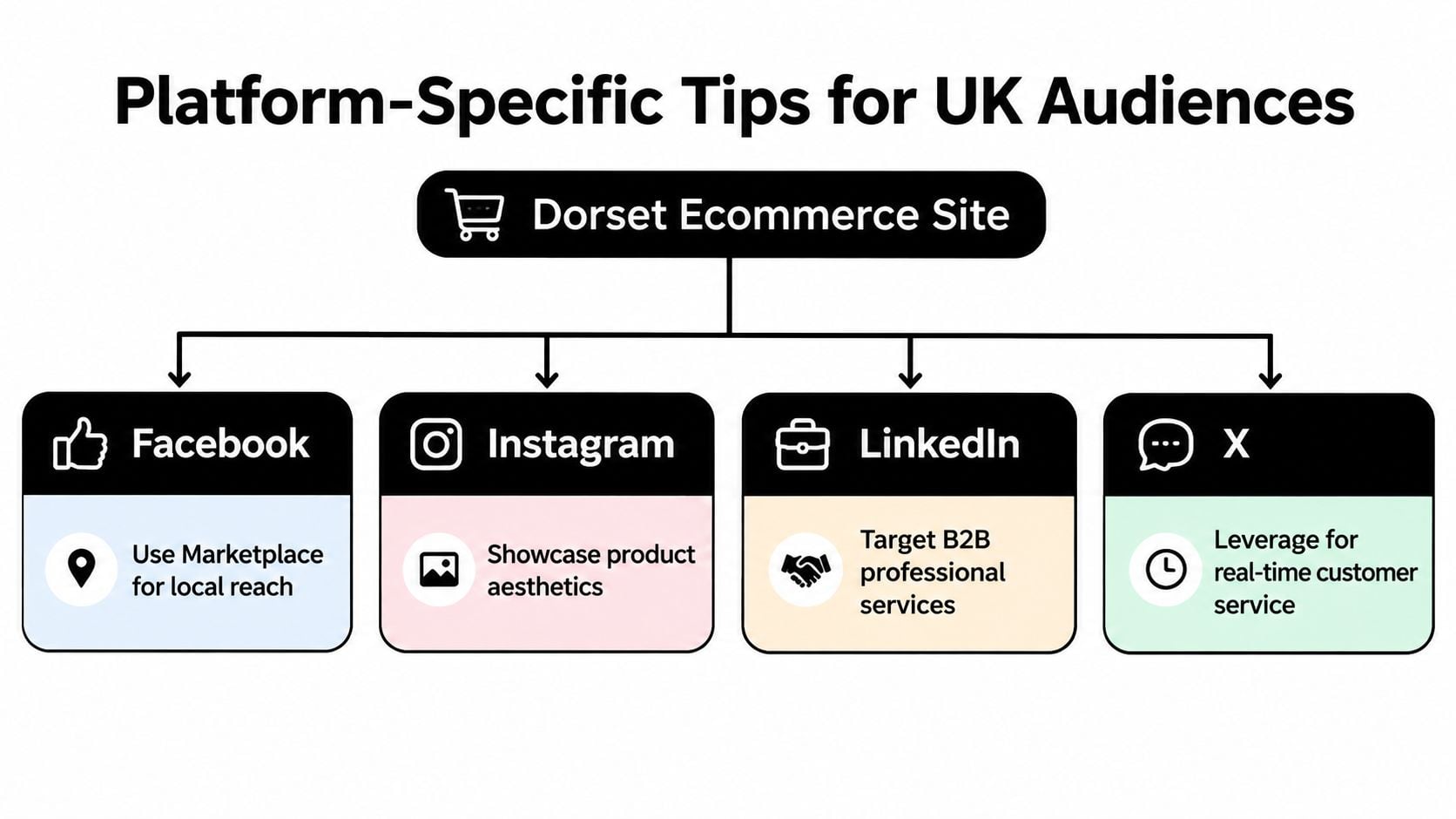
LinkedIn and YouTube
LinkedIn deserves a different treatment for professional services and B2B firms. Company Page links, document posts, employee advocacy and lead forms usually make more sense than a generic feed widget. A Poole consultancy might prioritise a downloadable guide with a properly attributed LinkedIn campaign, then route enquiries into its sales process.
YouTube works as both a video platform and a search environment. Product demonstrations, tutorials and playlist embeds can answer questions that a still image cannot. Keep the video near relevant written content, add descriptive page copy and avoid letting the player dominate the mobile experience.
Creator campaigns can also need paid amplification permissions. A useful explanation of social media whitelisting for creators helps clarify the difference between reposting creator content and running authorised advertising through a creator's identity.
Businesses considering a Facebook-focused presence can also review Facebook design examples and services before deciding which content should live on the site and which should remain native to the platform.
Implementation Checklist and Measurement Framework
A sensible social media integration project starts with one conversion and a clear baseline. Don't begin by asking an agency to “connect social media”. Ask it to make a specific journey measurable, such as a product purchase, booking request, membership signup or qualified enquiry.
Pre-build and build
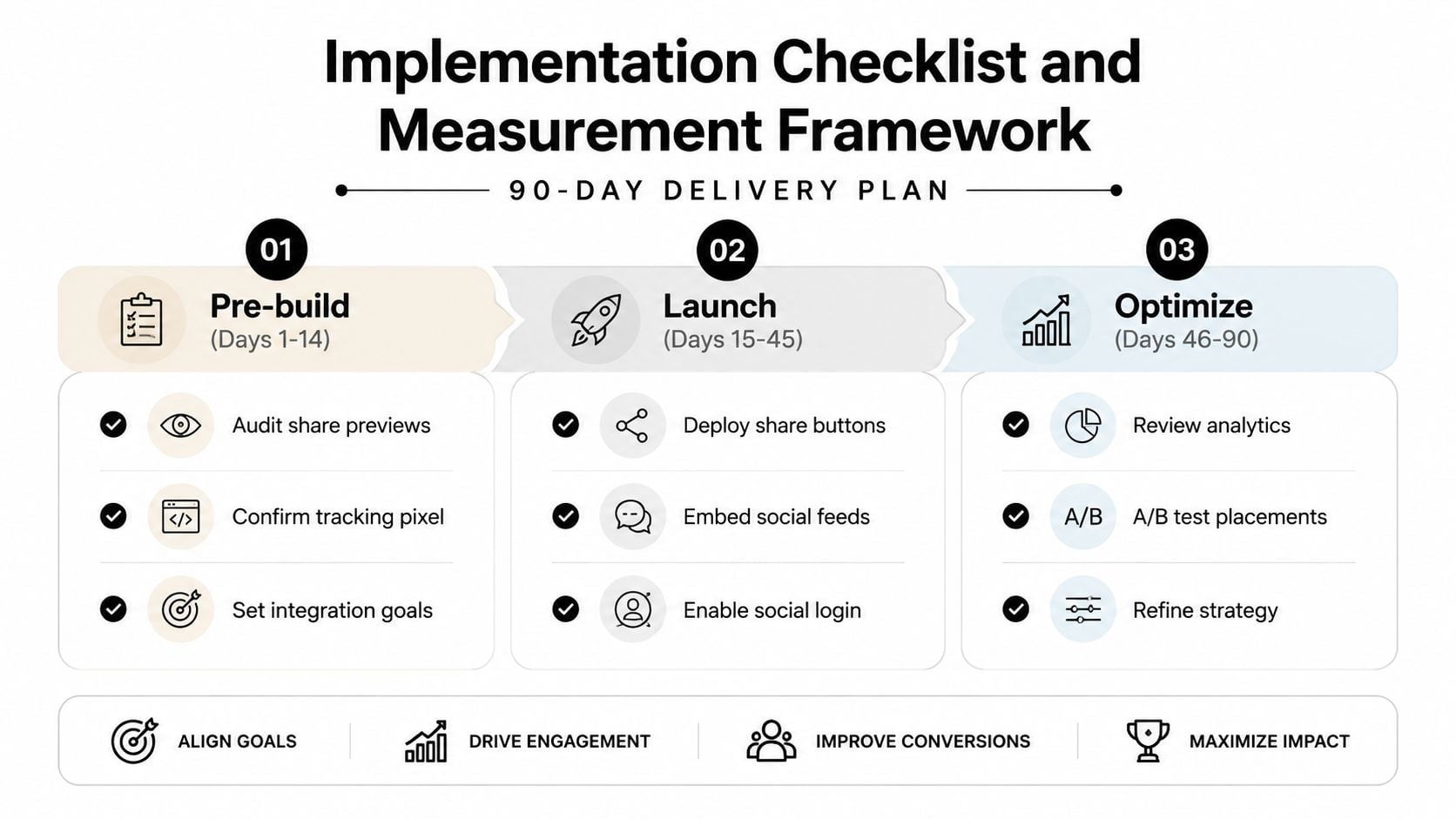
During the first phase, document the current website stack, active platforms, existing campaign links and the events already recorded in GA4. Share important pages through platform preview tools and check whether the image, title and description appear correctly. Confirm which pixels exist, which events they send and whether consent management controls them.
Then create a short platform content map. It should identify the page or product each network should send people to, the preferred format and the action that follows. This prevents a business from publishing attractive social content that leads to a generic homepage.
The build itself may include:
- Page metadata: Add Open Graph and relevant platform card tags across templates.
- Campaign tracking: Use a consistent UTM structure for social links.
- Events: Configure lead, signup, add-to-cart, checkout and purchase actions where relevant.
- Commerce: Connect catalogue and stock data before promoting shoppable content.
- Consent: Ensure every advertising or analytics technology follows the site's GDPR consent rules.
- Experience: Test embeds, buttons, forms and checkout on common mobile journeys.
Launch and review
At launch, check events in GA4 and the relevant platform event manager rather than assuming that installed code works. Test accepted and refused consent states, different devices, logged-in and logged-out journeys, and the path from a social post to the final action.
A useful dashboard should separate traffic from influence. Review social referral sessions, assisted conversions, campaign landing-page behaviour, preview engagement and attributed revenue where the data supports it. Don't judge the project only by follower numbers. A smaller audience that produces relevant enquiries can be more valuable than a larger audience with no measurable next step.
After the first month, correct broken previews, missing events and slow widgets. After the second, compare platforms and landing pages, then test different button placements or calls to action. By the third, you should know which integrations deserve ongoing investment and which features create maintenance without helping customers.
For broader reporting decisions, an analytics approach for websites can help align social measures with the rest of the site rather than leaving them in separate platform dashboards.
Working with a UK Agency and Next Steps
A good brief makes social media integration easier to price and easier to judge. Start with the current stack, including WordPress, WooCommerce, Shopify, CRM, email platform and consent tool. Add the audience split by network, the single conversion that matters most and a clear distinction between essential platforms and useful later additions.
Local scenarios make the difference clear. A Bournemouth café chain might need Instagram discovery to lead into reservations and location pages. A Poole B2B consultancy may need LinkedIn forms mapped into HubSpot with campaign attribution intact. A Dorchester retailer could require Meta Shops connected to a Shopify catalogue and a headless storefront. Those projects share a label, but they don't share the same scope.
Select the right working arrangement
A fixed-scope project suits a single-platform launch, metadata correction or defined ecommerce connection. A monthly retainer makes more sense when the business needs regular UGC approval, advertising checks, reporting and event maintenance. An ad-hoc hourly arrangement can work for isolated fixes, although it often becomes inefficient when several systems need diagnosing together.
Pricing signals should be judged by clarity rather than by a headline figure. A credible proposal names the integrations, dependencies, testing steps, consent work, reporting deliverables and post-launch support. An agency that installs plugins without checking the data layer may leave you with attractive features and unreliable numbers.
Teams scaling content production can also compare tools for scaling agency social media, particularly when several people need approval workflows, scheduling and platform access. Tool selection should follow the operating model, not replace it.
Ask the agency these questions before work begins:
- What will be measured: Which event proves that the integration is working?
- What will load: Which scripts and embeds affect page speed?
- What needs consent: How will pixels and advertising tags behave when consent is refused?
- Who maintains it: Who checks events after WordPress, theme or checkout updates?
- What happens next: Which page or workflow receives the visitor after the social click?
A UK business that wants a wider view of agency services can also review UK marketing agency support while comparing project, retained and ad-hoc options. The right partner should be able to explain the work in business terms, not hide behind platform jargon.
DesignStack offers responsive WordPress and ecommerce builds with SEO, content guidance, hosting and social media integration as part of a wider digital service. For a practical next step, book a free 30-minute social integration audit and ask for a review of your existing site, the two highest integrations for your sector and a phased build plan.
DesignStack can review your website, social journeys, metadata and tracking setup, then identify the integrations most likely to support enquiries or sales. Visit DesignStack to arrange the free 30-minute audit and receive a focused, phased recommendation.



Leave a Reply