

Managed WordPress Hosting: Fast, Secure Sites for UK SMEs
Your website might be doing a decent job on the surface. It loads, the contact form works most days, and you can update a page when you need to. But if you're a small business owner in Dorset, you probably know the feeling underneath that. You worry when WordPress asks for updates. You wonder whether your backups are working. You notice the site feels a bit sluggish on mobile, and you hope customers aren't giving up before they enquire.
That kind of website stress drains time. It also makes your site harder to trust as a business tool. A website should help you win work, answer questions, and support sales. It shouldn't sit in the corner like a boiler you're half-expecting to break.
Table of Contents
- Is Your Website Working Against You
- What Managed WordPress Hosting Really Means
- The Core Benefits for Your Business Growth
- Managed vs Other Hosting A Clear Comparison
- Understanding the Costs and Real Value
- How to Choose the Right Hosting Provider
- Why a Local Partner Is Your Best Asset
Is Your Website Working Against You
A common small business setup looks like this. The website was launched with good intentions, the hosting was chosen because it was cheap, and over time it became nobody's favourite job. Updates get delayed. Plugins pile up. The site stays live, but only just.
That creates business problems that don't look technical at first. Enquiry pages load slowly. Forms fail without anyone noticing. A small layout issue appears after an update and sits there for weeks. If you're relying on your website for leads, bookings, or trust, that kind of friction matters.
A better option is often managed WordPress hosting. Think of it as moving from "I hope this keeps working" to "someone is actively looking after it". The hosting company doesn't just give you server space. They handle the maintenance work that tends to trip businesses up.
A slow or fragile website isn't just an IT issue. It's a sales and credibility issue.
That shift isn't niche. The global WordPress Hosting Service Market was valued at 5.28 billion USD in 2025 and is projected to reach 10.5 billion USD by 2035. The same market report says this growth reflects demand for turn-key solutions that simplify website management for businesses. In plain English, more companies are deciding they'd rather pay for reliability than keep wrestling with technical chores.
If your current site feels more like a maintenance burden than a business asset, it's worth reviewing the basics of what makes a good business website. Hosting sits right under all of that. It affects speed, security, uptime, and your confidence to make changes.
What Managed WordPress Hosting Really Means
The term "managed WordPress hosting" sounds more technical than it needs to.
At a practical level, it means your hosting provider does more than rent you space on a server. They set up the hosting environment for WordPress, keep key parts updated, watch for security problems, run backups, and help when something goes wrong. For a busy SME, that changes hosting from a DIY job into a service.
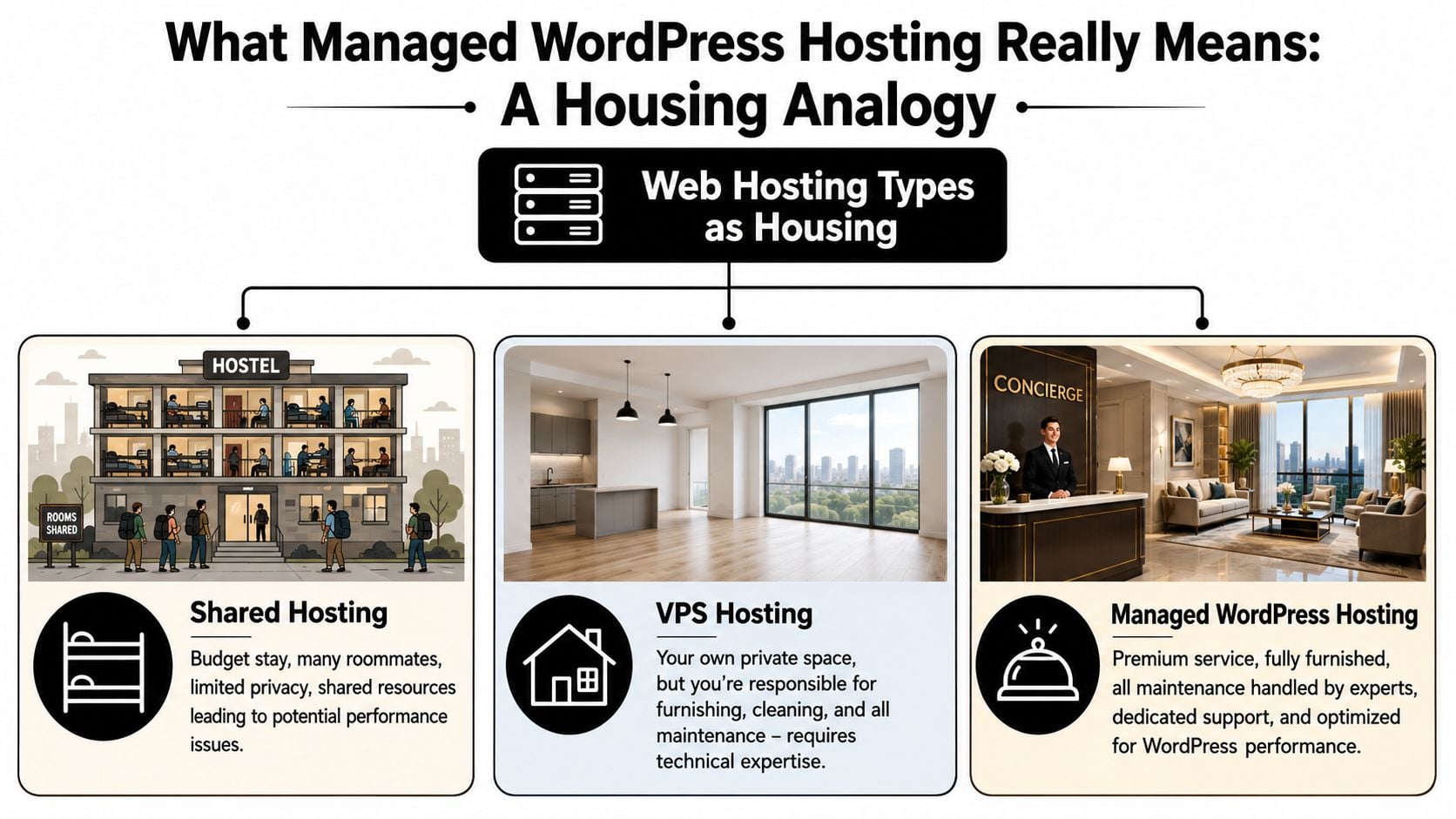
A simple way to separate the options is to look at who is responsible for the day-to-day work.
With shared hosting, you get a low-cost space to run your site, but you are still relying on a general setup used by lots of other websites. If another site on that server causes strain, your performance can suffer too. Support is often basic, and WordPress-specific help may be limited.
With a VPS, you get more control and more room to configure things properly. That can work well if you or your agency are comfortable managing servers. If not, it can feel like being handed the keys to an empty flat. The space is yours, but the maintenance list is now yours too.
Managed WordPress hosting sits in a different category. The hosting is built for WordPress from the start, and the routine technical jobs are included as part of the service. You are paying for stability, upkeep, and faster access to help, not just disk space.
What the word managed usually includes
Providers use the word "managed" a little differently, so it helps to check the detail. In most cases, it covers the WordPress tasks that cause the most trouble when nobody owns them properly.
That often includes:
- Core updates: WordPress itself is kept current, which reduces the risk of security issues and compatibility problems.
- Plugin and theme oversight: Updates are monitored more carefully, with less chance of old add-ons being left to cause trouble.
- Backups: Your website is copied regularly, so there is a restore point if an update, error, or hack damages the site.
- Security layers: Firewalls, malware scanning, login protection, and server hardening are often included.
- Performance tuning: Caching, image handling, database optimisation, and WordPress-friendly server settings help pages load more cleanly.
- Support from people who know WordPress: You spend less time explaining the basics to a generic hosting desk.
For UK SMEs, there is another point that gets missed. Where your website data is stored matters. If your business handles customer enquiries, booking details, or contact form submissions, GDPR-compliant data residency should be part of the conversation, not an afterthought. A provider or agency that can clearly explain where data sits, who can access it, and how it is backed up gives you a much firmer footing.
Why that matters in plain terms
Small business owners in Dorset usually do not need more server jargon. They need to know what changes on a normal Tuesday afternoon.
Here is the plain-English version:
| Hosting feature | What it means for you |
|---|---|
| Automatic updates | Less chance of your site being left behind and exposed |
| Daily backups | A practical recovery option if an update breaks the site |
| WordPress-focused setup | Fewer compatibility headaches with common themes and plugins |
| Security monitoring | Problems are spotted earlier, before they turn into a bigger mess |
| Expert support | Less time lost searching forums or waiting on generic replies |
| Clear UK-based support and data handling | More confidence around GDPR, response times, and accountability |
That last point matters more than many business owners expect. If your website goes down, or a form stops sending enquiries, fixed-cost support from a local partner such as DesignStack can be far easier to budget for than unpredictable emergency fixes from a distant provider.
Practical rule: If your website brings in enquiries, bookings, or sales, managed hosting is often a way to reduce avoidable risk and save staff time.
A simple brochure site that rarely changes may cope on a basic package for a while. Once the site starts carrying real business responsibility, managed WordPress hosting usually makes more sense because someone is looking after the parts that fail subtly until they become expensive.
The Core Benefits for Your Business Growth
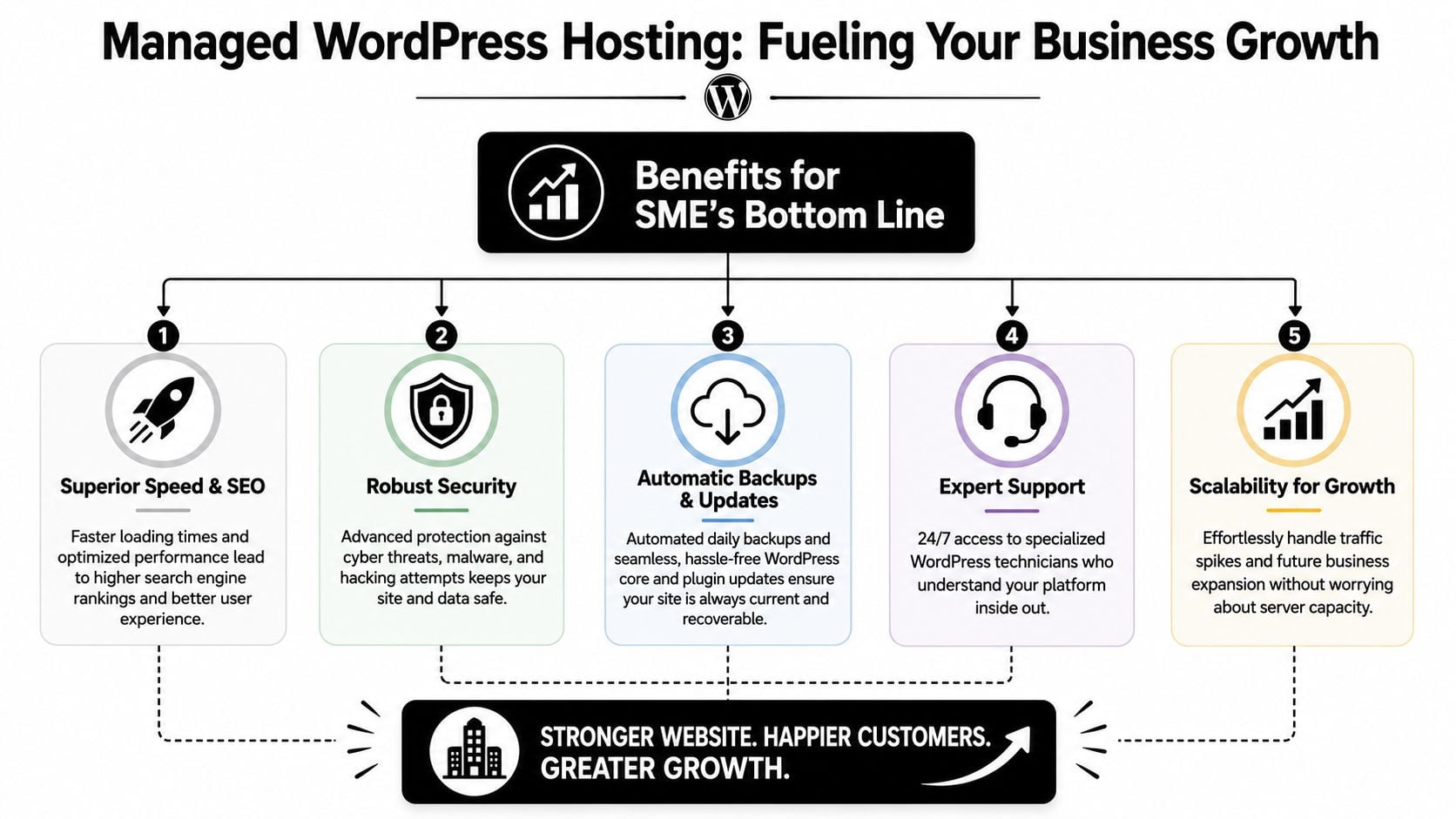
The value of managed hosting isn't in the label. It's in what your business gets back from it day to day. Better speed, fewer technical interruptions, and more reliable support all change how useful your website is.
Start with the visual summary below, then we'll break each benefit down in plain language.
Speed that helps people stay
Visitors don't think in hosting terms. They just feel whether a site is smooth or annoying. If pages drag, menus lag, or images appear in pieces, they often leave before you get a chance to make your case.
Managed WordPress hosting in the UK typically delivers a 99.99% uptime SLA and can improve performance by up to 40% compared with standard shared hosting because it includes features such as a WAF, built-in CDN, and automated updates, according to the UK managed hosting service listing on the Digital Marketplace.
For a local business, that can mean a cleaner first impression. It can also help the rest of your website work harder, especially if you've already invested in good design, better copy, and search visibility.
A quick overview can help if you'd like a broader introduction first.
Security that protects your reputation
Most business owners don't lose sleep over server settings. They lose sleep over what happens if the site gets hacked, shows spam, or disappears during a busy period.
Managed hosting usually includes layered protection. That can mean a Web Application Firewall, DDoS protection, secure certificates, and routine monitoring. You may never think about those features on a normal day, which is exactly the point. They're there to reduce the number of bad days.
A website security issue isn't only technical clean-up. It's missed enquiries, confused customers, and time pulled away from actual business.
Backups and updates without the faff
Managed hosting often quickly demonstrates its value. WordPress updates are important, but they can also feel risky. Plugin changes sometimes clash. A theme update can affect a layout. A simple edit can go wrong at the wrong time.
With managed hosting, backups and updates are handled in a more structured way. If something breaks, restoration is usually much easier than it is on a bargain plan. That safety net changes how confidently you can run the site.
- Automatic backups: You have a recent version to return to.
- Routine updates: Security and compatibility are less likely to drift.
- Less manual admin: Your team spends less time on repetitive maintenance.
A safer place to test changes
One of the underrated benefits of better hosting is that it often gives you room to work more safely. If you're adding a new plugin, changing a page builder layout, or adjusting WooCommerce settings, testing matters.
On poor hosting, changes often happen live because that's the only option. That's like repainting your shop front during opening hours and hoping the ladders don't fall over.
Good hosting gives you breathing room. It lets you make changes with less risk of breaking the public-facing site.
Support from people who know WordPress
General hosting support can be hit and miss. You raise an issue about a plugin conflict or a stubborn cache problem and get a reply that doesn't really move things forward.
WordPress-focused hosting is different because the support team deals with this platform all the time. They understand themes, plugins, updates, and common failure points. That shortens the gap between "there's a problem" and "it's fixed".
For a busy SME, that matters more than any technical badge. You're not buying hosting alone. You're buying fewer interruptions.
Managed vs Other Hosting A Clear Comparison
By this point, the central question isn't "what is hosting?" It's "which setup fits my business without causing future headaches?"
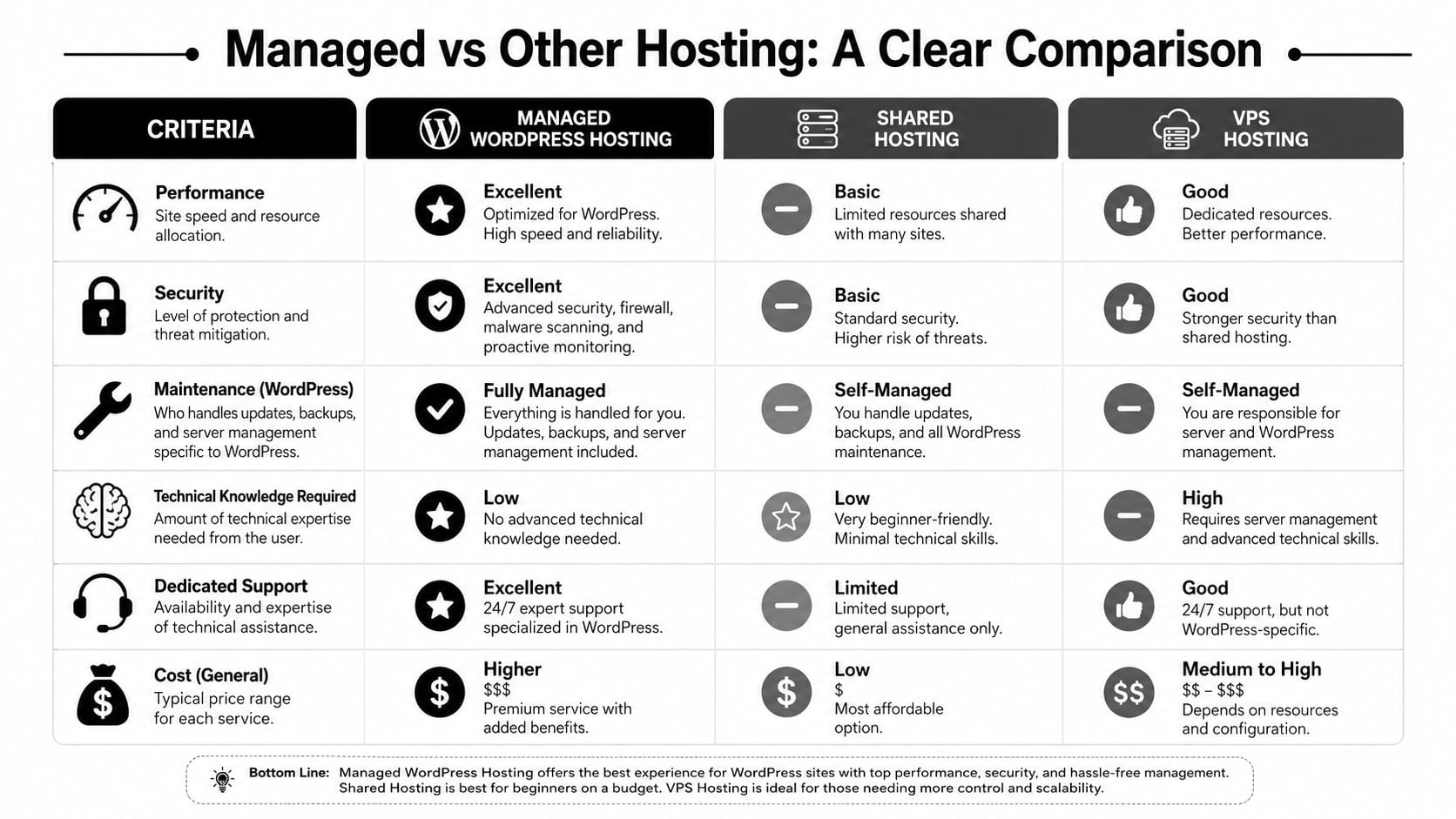
This comparison helps strip the jargon away.
A simple side by side view
| Hosting type | Performance | Security | WordPress maintenance | Technical skill needed | Support style | General cost position |
|---|---|---|---|---|---|---|
| Shared hosting | Basic | Basic | Mostly your responsibility | Low to moderate | Usually general support | Lowest |
| VPS hosting | Good | Depends on setup | Largely your responsibility | Moderate to high | Varies by provider | Middle |
| Managed WordPress hosting | Strong and WordPress-tuned | Stronger built-in protection | Provider handles much of it | Low | WordPress-specific support | Higher than shared |
Shared hosting works because it's simple to buy. That's also its weakness. You're paying less because you're getting less control, fewer dedicated resources, and less specialist help.
VPS hosting can be a smart middle ground if you or your developer want control. But control comes with responsibility. Someone still has to manage the environment properly, and that can become expensive in time even when the monthly fee looks sensible.
Managed WordPress hosting is usually the best fit when your site is part of daily business operations. If leads, orders, bookings, or member logins depend on the site, the extra support and maintenance cover start to look less like extras and more like basics.
Who each option suits
Rather than treating one option as perfect for everyone, it's better to match the tool to the job.
- Shared hosting suits: Small brochure sites, temporary projects, or websites that don't carry much business risk.
- VPS suits: Teams with technical confidence, a developer on hand, or special requirements that need more control.
- Managed WordPress hosting suits: Businesses that want WordPress-specific support, less maintenance work, and a more predictable experience.
There is one important caution. Managed hosting isn't magic. If a website has a bloated theme, poor plugin choices, or an untidy database, hosting alone won't fix all of that. It gives you a much better foundation, but the site still needs competent upkeep. That's one reason database optimisation for WordPress still matters alongside good hosting.
Choose hosting for the business you actually run, not the version of your business that has unlimited time to tinker with servers.
Understanding the Costs and Real Value
Price is where many businesses hesitate. That's fair. Managed WordPress hosting costs more than basic shared hosting, and if you're comparing line by line, the cheaper option can look tempting.
But monthly hosting cost isn't the full financial picture. The key question is what kind of problems the hosting prevents, and how much time it saves when something goes wrong.
What you actually pay for
In the UK, managed WordPress hosting can start from around £4.99 per month for entry-level plans, while premium options with dedicated resources commonly sit between $10 and $60 per month, as outlined on Unlimited Web Hosting's WordPress hosting page.
That price usually reflects more than storage space. You're paying for specialist support, security features, performance tools, backup systems, and a setup tuned for WordPress.
For many SMEs, that's easier to budget for than a string of one-off fixes.
Where cheap hosting gets expensive
The hidden cost of low-cost hosting often shows up as interruptions.
You spend time chasing support. You pay a developer to fix an update conflict. Your contact form fails and nobody spots it for days. A plugin issue appears after a routine change and your site starts behaving oddly on mobile. None of that appears on the monthly invoice, but it's still a cost.
A simple way to think about it is this:
| Option | Visible monthly cost | Hidden effort |
|---|---|---|
| Cheap hosting | Lower | Usually higher |
| Managed hosting | Higher | Usually lower |
If you'd like a broader breakdown of common pricing factors, this guide to website hosting costs is a useful companion.
The strongest argument for managed hosting isn't that it's the cheapest route. It usually isn't. The argument is that it turns messy, irregular technical costs into something more predictable. For a business owner, predictability is often worth paying for.
How to Choose the Right Hosting Provider
Once you've decided managed hosting sounds sensible, the next challenge is choosing well. Providers often use the same language on their sales pages. Everyone says they're secure, fast, and reliable.
The difference shows up when you ask precise questions.
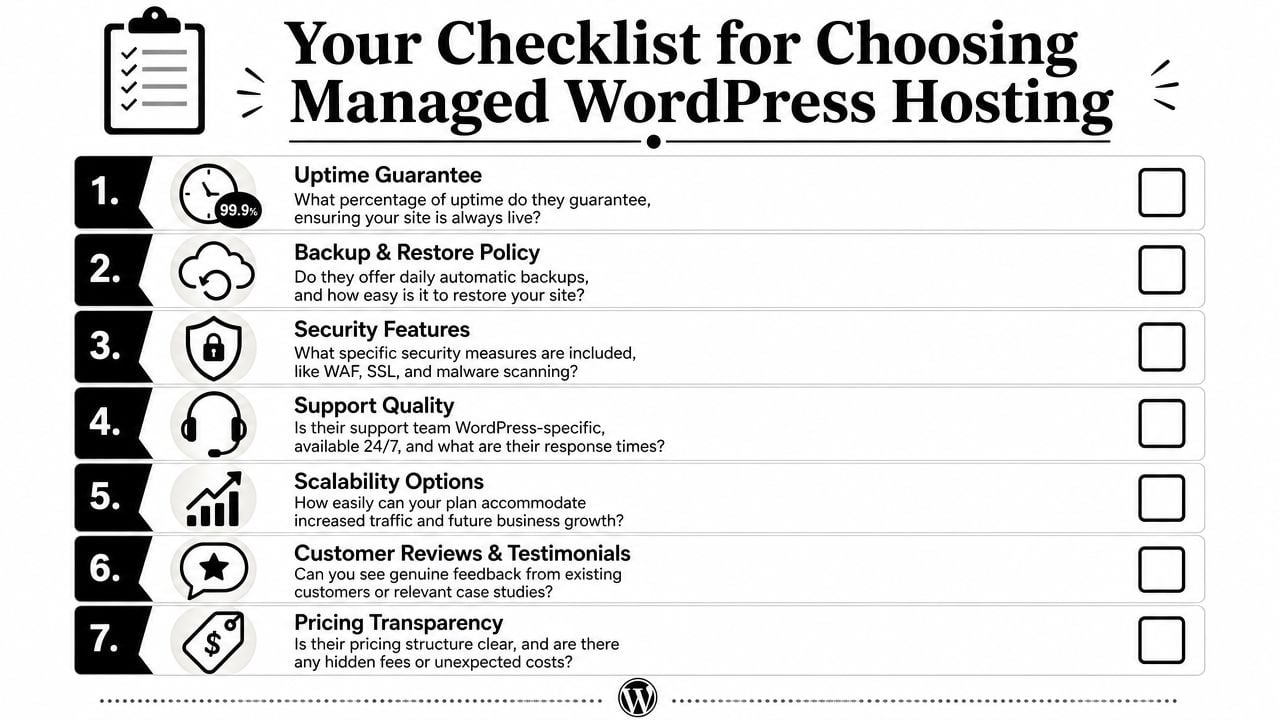
The questions worth asking before you buy
Take these into any sales conversation:
- Where is the data hosted: If you need UK-based hosting for policy, contracts, or peace of mind, ask for a direct answer.
- What does support cover: "24/7 support" sounds good, but ask whether it's WordPress-specific and whether they help with real site issues or only server availability.
- How are backups handled: Daily backups are useful only if restoring them is straightforward.
- What security is included: Look for plain answers about firewalls, malware scanning, SSL, and protective monitoring.
- Are migrations included: A cheap first month can stop looking cheap if moving the site brings extra fees.
- What happens if the site grows: Ask how the provider handles resource increases, traffic spikes, or a move to a stronger plan.
- How clear is the billing: You want prices that make sense before you sign, not surprises buried in add-ons.
Ask the provider to explain their service in plain English. If they can't, support may become frustrating later.
The GDPR point many businesses miss
This matters more in the UK than many hosting guides admit. In the last 12 months, 57% of UK WordPress users have prioritised GDPR-compliant data residency over raw speed, yet only 12% of managed hosting providers explicitly guarantee UK-based data centres, according to Yellowball's guide to managed WordPress hosting for UK enterprises.
That doesn't mean every business must only choose a UK data centre. It does mean you should know exactly where your data sits and whether the provider is transparent about it.
For Dorset SMEs, local retailers, service firms, and organisations handling customer details, that's not a small technical footnote. It's part of choosing responsibly. If you want a wider checklist to compare providers, this guide on how to choose a web hosting provider is worth keeping open as you shortlist options.
Why a Local Partner Is Your Best Asset
For many SMEs, the best hosting decision isn't just about server specs. It's about who picks up the phone when something feels off, who can explain a problem clearly, and who understands how your website fits into your wider business.
A local partner brings context as well as technical support. They know that a delayed enquiry form isn't a minor bug if you're a trades business waiting on leads. They know that a broken menu matters if you're a restaurant, a retailer, or a community organisation relying on the site daily. That practical understanding is hard to get from a faceless platform.
Local support also tends to make cost feel clearer. You know who's responsible, what the service includes, and where to go when you need help. That's especially useful when your website, branding, content, and hosting all need to work together rather than sit with different suppliers.
If you want a team that understands WordPress, design, performance, and the day-to-day needs of Dorset businesses, it helps to work with a nearby specialist rather than juggling separate providers. For businesses comparing local options, this Dorset WordPress web design agency page gives a feel for what an integrated service looks like.
If you want a website setup that feels stable, supported, and easier to manage, DesignStack can help. As a Dorset-based agency, they provide WordPress websites, reliable hosting, and fixed-cost support for businesses that want clear communication and long-term peace of mind.



Leave a Reply