

What Does a Web Designer Do Unpacking Their Role for Your Business
Think of a web designer as both the architect and the interior designer for your business's online home. They're the creative and strategic force responsible for the entire look, feel, and flow of your website. Their job is to create an online space that’s not just visually stunning but also incredibly easy to use, guiding your visitors effortlessly toward what you want them to do.
The Core Mission of a Web Designer
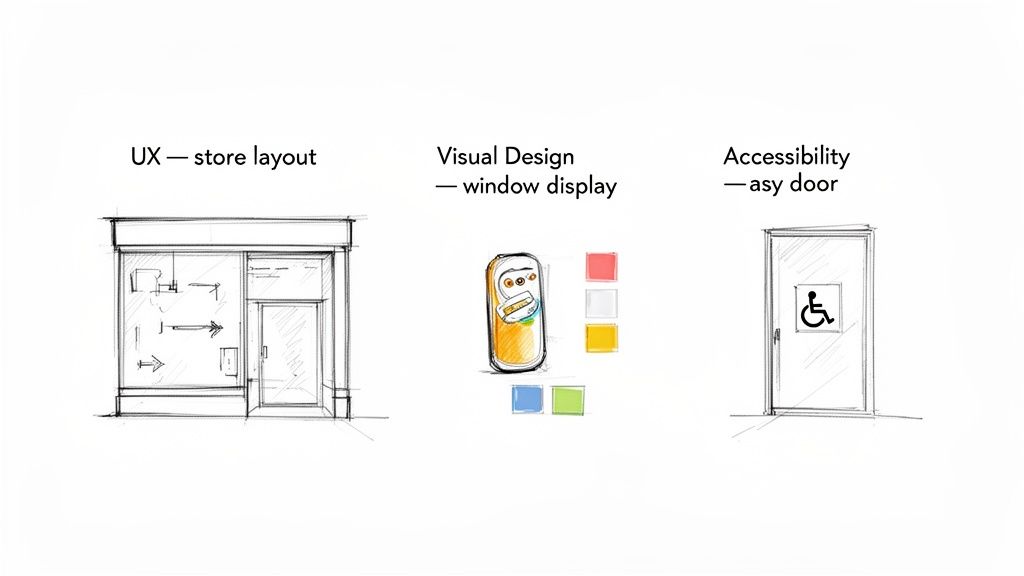
Imagine your website is your digital shop front. A web designer’s job is to make sure it’s inviting, well-organised, and guides customers straight to the checkout or the contact form. It’s all about translating your brand's unique identity into a digital experience that genuinely connects with the right people.
This is much deeper than just picking nice colours and fonts. A good designer thinks about the entire user journey, from the very first impression on the homepage to the final click. At its heart, their mission is to build a seamless bridge between what your business needs to achieve and what your customers are looking for. Creating these interactive experiences means they also need a solid grasp of what makes a dynamic web page.
Your Designer’s Actionable Blueprint
A professional web designer doesn't just start throwing things at a screen. Their process is methodical, a deliberate plan to solve problems and bring real value to your business.
Here's what a designer is really setting out to accomplish for you:
- Define and Clarify Goals: First things first, they need to understand what "success" means for you. Are you chasing more online sales, trying to generate new leads, or just looking to build brand awareness?
- Plan the User Journey: They will literally map out the different paths visitors will take through your site. The goal is to make finding key information or taking action completely intuitive and frustration-free.
- Create a Visual Identity: This is where they develop a consistent and compelling look—from the layout and typography to the imagery. It needs to reflect your brand's personality and speak directly to your ideal customer.
- Ensure Functional Excellence: A beautiful website that doesn’t work is useless. They make sure every single button, link, and form performs perfectly on all devices, whether it’s a desktop computer or a smartphone.
A Web Designer's Key Responsibilities
It’s easy to think a web designer’s job is just about making things look good, but there’s so much more to it. Their day-to-day work is a series of precise, strategic moves, all aimed at hitting your business goals—whether that’s getting more sales through the door or simply encouraging people to pick up the phone.
Think of their role as a checklist for adding value. Each task they complete transforms your website from a simple online brochure into a hard-working tool for your business. It's a craft that turns your ideas into something real and effective.
What They Actually Do, Step by Step
To get a real sense of what you're paying for, it helps to break down a designer's role into the key stages of a project. Each step logically follows the one before it, building up to a final website that works as good as it looks.
Here’s a practical look at what a professional web designer takes care of:
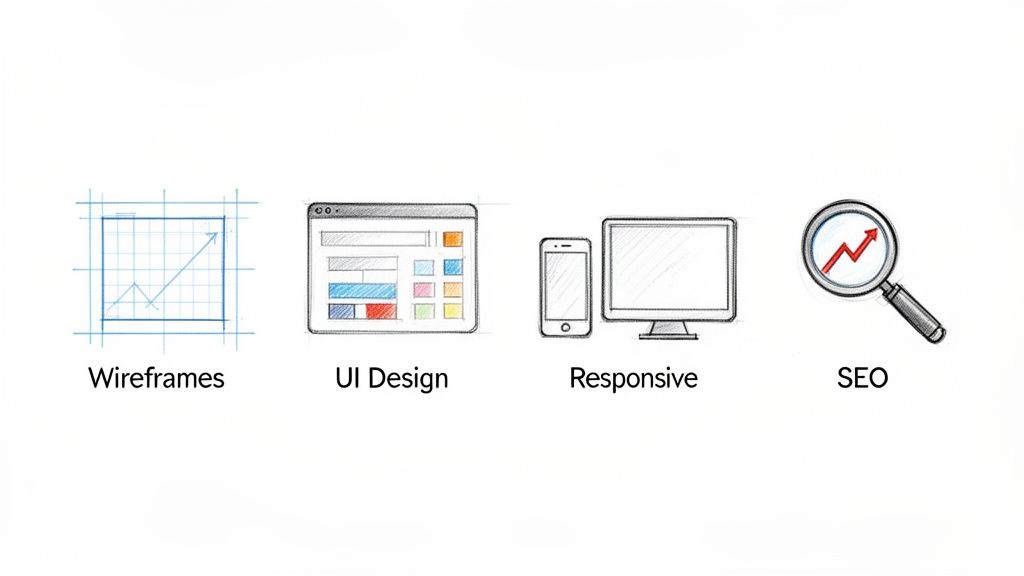
- Mapping Out the User Experience (UX): This is where it all begins. The designer figures out the best way for a visitor to navigate your site. The goal is to create a flow that feels natural and intuitive, making it dead simple for people to find what they're looking for. A good UX means less frustration for them and a better chance of a sale for you.
- Building Wireframes and Prototypes: Long before a single colour is chosen, a designer creates a wireframe. It's essentially a basic blueprint of your website's layout. This simple skeleton focuses purely on structure, making sure every button and menu is in the right place without the distraction of fancy graphics.
- Designing the User Interface (UI): With the blueprint signed off, the designer moves on to the User Interface. This is the part most people picture—applying your brand's colours, fonts, and images to bring the site to life. It's about creating a professional look that builds instant trust with your visitors.
- Mastering Responsive Design: It’s a fact that over 50% of all web traffic now comes from mobile phones. A huge part of a designer's job is making sure your website looks and functions perfectly on every single device, from a massive desktop monitor right down to the smallest smartphone. In today's market, this isn't a luxury; it's essential.
- Setting Up Foundational SEO: A stunning website is pointless if nobody can find it on Google. From day one, a good designer builds in basic SEO best practices. This means using proper heading structures, optimising images for speed, and creating a clean, logical site structure that search engines can easily crawl and understand.
Keeping Up with the Times
The online world changes in the blink of an eye, so a big part of a designer’s job is simply keeping up. They have to stay on top of emerging business technology trends to ensure the site they build for you isn't already outdated the day it launches.
A designer's work is a blend of art and science. It combines creative intuition with data-driven decisions to solve a business problem—how to connect with a customer online effectively.
This commitment to continuous learning means you’re not just getting a website for today. You’re getting a digital platform that’s ready for whatever comes next. It’s this mix of creativity, technical know-how, and strategic thinking that truly defines the role.
Web Designer vs Web Developer vs UX Designer
When you're looking to build a website, you’ll quickly run into a few key job titles: web designer, web developer, and UX designer. It’s easy to think they all do the same thing, but they’re actually distinct specialisms. Getting them mixed up can mean hiring the wrong person, which wastes both time and money.
Let’s try a simple analogy to clear things up. Imagine you're building a new house.
The UX Designer is your architect. They’re the ones drawing up the master blueprints. Their whole focus is on how people will actually live in the house. They figure out the best layout for the rooms, the flow from one space to another, and make sure the entire home is practical for the family inside.
The Web Designer is the interior designer. They take the architect's plans and bring the feel of the home to life. They’re choosing the colour palettes, the style of the fixtures, the textures, and the furniture—everything that makes the house look and feel like a beautiful, welcoming home.
The Web Developer is the construction crew. These are the builders who take the blueprints and the design plans and physically build the house. They pour the foundation, put up the walls, and handle all the plumbing and electrics. They’re the ones who turn the vision into a solid, working structure.
Breaking Down the Roles
In a small agency, you might find one person who wears a couple of these hats, but each role has its own focus, skills, and set of tools. Grasping what a web designer does compared to the others is crucial.
The real difference comes down to their main goal: a UX designer obsesses over the user's journey, a web designer crafts the visual and emotional experience, and a web developer uses code to make it all work.
This division of labour means every part of your website—from how easy it is to use, to how good it looks, and how well it performs—is handled by an expert. If you want to get into the nitty-gritty, our guide on choosing between web design or web development has even more detail.
To give you a clearer picture, here’s a quick breakdown of how these roles compare.
Designer vs Developer vs UX: A Quick Comparison
| Role | Primary Focus | Key Skills | Common Tools |
|---|---|---|---|
| Web Designer | Visual aesthetics, branding, look and feel | Graphic design, colour theory, typography, UI | Figma, Adobe XD, Sketch |
| Web Developer | Functionality, performance, code | HTML, CSS, JavaScript, PHP, Python | Visual Studio Code, GitHub, WordPress |
| UX Designer | User journey, usability, research, flow | Wireframing, prototyping, user testing, analysis | Balsamiq, Axure, user interview software |
At the end of the day, understanding who does what helps you hire the right person for the job.
Is your website fully functional but just feels clunky and confusing to get around? You probably need a UX designer. Does it work perfectly fine but looks dated and unprofessional? That’s a job for a web designer. Or do you have a beautiful design mock-up that needs to be turned into a live, interactive website? It’s time to bring in a web developer.
Inside a Professional Web Designer's Toolkit
A great web designer is part artist, part technician, but they certainly don’t work empty-handed. Just like a master carpenter has a workshop full of specialised tools, a professional web designer has a digital toolkit they rely on to bring a business’s vision to life online.
Getting a peek into this toolkit shows you that a designer’s job goes far deeper than just picking nice colours. It's a complex craft that requires a careful balance of creative flair and technical precision. Ultimately, it’s all about using the right tool for the right job, every step of the way.
Creative and Prototyping Software
Long before any code gets written, the website starts its life inside design software. Think of these platforms as the designer's digital canvas, where they create pixel-perfect mock-ups and even build interactive prototypes you can click through, giving you a real feel for the site before it's actually built.
This prototyping stage is absolutely crucial. It allows us to iron out all the kinks in the user experience without the time and cost of actual development. The go-to tools for this are:
- Figma: This is the industry favourite right now, mostly because it’s browser-based and fantastic for collaboration. It lets clients and team members jump right into the design files to leave comments in real-time.
- Adobe XD: A powerhouse from the Adobe Creative Cloud family, it's brilliant for creating everything from basic wireframes to sophisticated, animated prototypes.
- Sketch: A long-standing favourite for Mac users, known for its clean, intuitive interface and a massive library of plugins that can extend what it can do.
With these tools, a designer can play with layouts, test how people will navigate the site, and lock down the visual style. You can get a better sense of how these pieces fit together by exploring the art of crafting digital experiences.
Essential Technical Skills
While a developer usually handles the really heavy coding, a modern web designer absolutely must have a solid grasp of code. These technical skills are what ensure their beautiful designs are actually practical to build and will perform brilliantly once they're live.
A designer's command of both visual tools and foundational code is what truly separates an amateur from a professional. This dual expertise ensures the final website not only looks incredible but is also fast, accessible, and easy for you to manage.
The core technical skills are HTML (HyperText Markup Language), which provides the basic structure of a web page, and CSS (Cascading Style Sheets), which adds all the styling—the colours, fonts, and layouts.
Beyond that, a deep understanding of a Content Management System (CMS) like WordPress is essential. This is what allows them to build a site that clients can easily update themselves without needing to call for help every time. This mix of creativity and tech-savviness is a must for UK web designers, who are often tasked with both designing and maintaining seamless websites. As research from Uxcel shows, a designer's salary often reflects their proficiency with tools like Adobe XD and their grasp of accessibility standards. You can discover more about UK web designer salary insights on Uxcel.com.
The Web Design Journey from Idea to Launch
Building a new website can feel like a huge, intimidating project, but a good web designer follows a clear, predictable roadmap. It’s not just a whirlwind of creative chaos; it's a step-by-step process designed to take your business idea and turn it into a real, working website that gets results.
Think of it like building a custom home. A builder wouldn't just show up with a pile of bricks and hope for the best. They need blueprints, plans, and a solid foundation. Web design works the same way. Each stage builds on the one before it, which saves a lot of headaches and costly do-overs down the line.
The Six Key Phases of Web Design
From our first chat to the day your site goes live, the entire project follows a logical path. This keeps things on track and, just as importantly, on budget. Your input is vital at every step—after all, it's your business we're building for.
Here’s a breakdown of the typical stages you can expect:
Discovery and Strategy: This is where we lay the groundwork. Your designer will dig deep to understand your business inside and out—who your customers are, what your competitors are doing, and what you really want this website to achieve. It’s all about defining what a "win" looks like before we even think about design.
Wireframing and Prototyping: With a clear strategy, the next step is to create a wireframe. This is basically a simple, black-and-white blueprint for the website. It focuses purely on layout and how a user will move through the site. We figure out where everything needs to go before we start making it look pretty.
Visual Design and Branding: Once you’ve approved the blueprint, the real fun begins. This is where your brand’s personality comes to life. Your designer will apply your logo, colour scheme, fonts, and images to create the final look and feel of the site, making sure it connects with your ideal customer.
Development and Content Implementation: Now it's time to build. The approved designs are transformed from static images into a functional website. All your text, photos, and videos are loaded into the Content Management System (CMS), which is the engine that will power your new site.
Testing and Quality Assurance: Before flipping the switch, the site goes through a rigorous testing phase. We click every link, test every button, and fill out every form on different web browsers and devices (like phones and tablets) to catch and fix any pesky bugs. The goal is a seamless experience for every single visitor.
Launch and Post-Launch Support: The big day has arrived! Your designer will handle all the technical bits and pieces to get your site live on the internet. Many designers also offer a support period right after launch to help you get comfortable, make small tweaks, and answer any questions.
This whole process combines a few different disciplines, as this graphic shows.
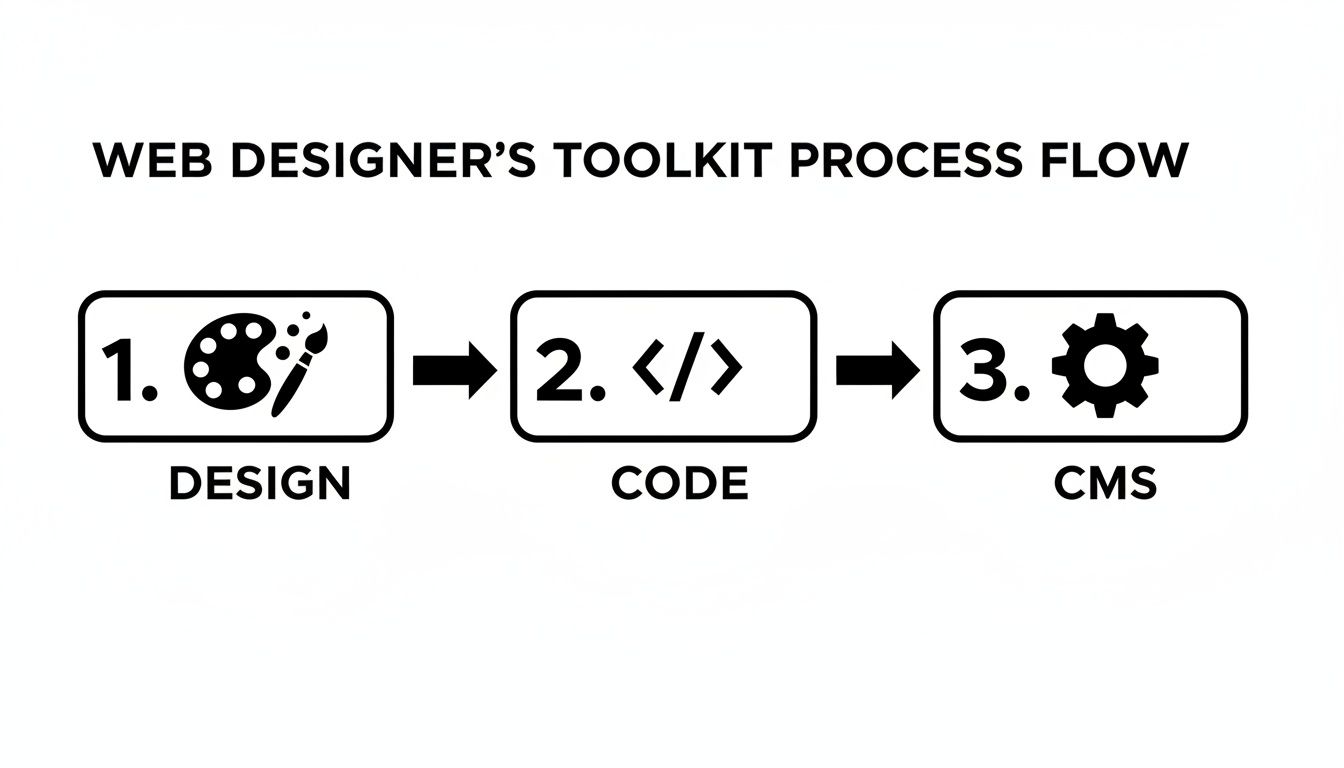
It really drives home that a modern web designer needs to be a bit of an artist, a bit of a coder, and an expert in managing the whole system.
How to Hire the Right Web Designer for Your Business
Picking the right creative partner for your website is one of the most important decisions you'll make for your business online. You need someone who doesn't just build pretty pages, but who genuinely gets what you're trying to achieve.
It all boils down to asking the right questions from the very beginning.
Before you even think about signing a contract, you have to see real-world proof of their work. Don't just get wowed by flashy designs in their portfolio; actually visit the websites they've built. Are they genuinely easy to use? Do the pages load quickly, or are you left waiting? Critically, pull them up on your mobile – how does the experience hold up? These practical, real-world tests are far more revealing than a curated gallery of screenshots.
Your Hiring Checklist: Finding the Perfect Fit
To help you make a smart decision, I've put together a simple checklist. Use these points to vet any designer you're considering and make sure they're the right match for what your business actually needs.
1. Ask for Relevant Work: The first question should always be, "Can you show me some websites you've built for businesses like mine?" A designer with experience in your industry already has a massive head start because they understand your customers' pain points and what they expect to see.
2. Understand Their Process: You need to know how they operate day-to-day. A great question is, "What's your process for communication and updates?" A seasoned pro will have a clear system for keeping you in the loop and gathering feedback, which helps avoid any nasty surprises down the line.
3. Look for Social Proof: Go hunt for client testimonials and reviews. Honest, positive feedback is one of the best signs that a designer is reliable, communicates well, and can deliver on what they promise.
4. Check Their Technical Chops: Ask them directly about mobile-first design and search engine optimisation (SEO). A stunning website that’s a nightmare to use on a phone or can't be found on Google is, frankly, a complete waste of money.
Doing this homework upfront will help you find a partner whose skills and working style truly align with your goals. For a deeper dive, take a look at our ultimate guide to finding a website designer who really understands your vision.
Frequently Asked Questions
Hiring a web designer is a big decision, and it’s perfectly normal to have some lingering questions before you jump in. Let’s tackle some of the most common ones we hear from small business owners, so you can move forward with confidence.
Think of this as setting the groundwork for a solid partnership. Clear expectations are the key to a smooth project and, ultimately, your online success.
How Much Does a Website Cost?
This is always the first question, and the most truthful answer is: it really depends. A straightforward, brochure-style website could be a few thousand pounds, but a complex e-commerce site with all the bells and whistles will naturally command a higher budget.
The final price tag is shaped by things like the total number of pages, the amount of custom design involved, and any special features you need, like an online booking system or a members-only area. Always ask for an itemised quote so you can see exactly where your investment is going.
How Long Does It Take to Build a Website?
For a typical small business website, you can generally expect the process to take anywhere from 4 to 12 weeks. That's from our first chat right through to pressing the launch button.
This timeline isn't set in stone, though. It can shift depending on the project's complexity and, crucially, how quickly you're able to provide feedback, content, and approvals. A good designer will give you a clear project plan upfront, which helps keep everything on track and avoids any frustrating delays.
A well-defined timeline is a sign of a professional. It ensures everyone is on the same page and knows what’s needed from them at each stage.
Do I Need to Provide My Own Content and Images?
For the most part, yes. You know your business best, so the written content and any specific images usually come from you. That said, don't panic if you're not a wordsmith or a photographer! Many designers can help source high-quality stock images or put you in touch with a great copywriter to help craft your message.
To get a head start and make the process smoother, here’s an actionable list of assets to prepare:
- Draft your core text: Start writing the content for key pages like Home, About Us, and Services.
- Gather your brand assets: Collect high-quality versions of your logo, brand colours, and any specific fonts you use.
- Collect high-quality photos: Gather any professional pictures of your team, products, or workplace. If you don't have any, consider investing in a photoshoot or ask your designer about sourcing stock imagery.
- Compile testimonials and reviews: Social proof is powerful. Gather your best customer feedback to be featured on the site.
Ready to build a website that not only looks the part but also works hard for your business? At DesignStack, we specialise in creating beautiful, effective websites for businesses across Dorset and the UK. Let's discuss your vision and turn it into a reality. Find out more at https://designstack.co.uk.

Leave a Reply