


Ecommerce Website Design Packages That Fit Your Business
You're staring at an ecommerce dashboard that looks busy, but the sales aren't keeping pace. Mobile sessions are sluggish, abandoned baskets are piling up, and a competitor's shop feels effortless by comparison. Your store may have started as a patched WooCommerce theme or a quick Shopify setup, but every extra plugin, workaround and developer invoice has made it harder to see what's costing you sales.
That's where ecommerce website design packages can help, provided you judge them by commercial performance rather than page count. UK online retail sales reached £127.41 billion in 2024, up from £123.3 billion in 2023, and online sales represented about 30% of total UK retail sales. Retail Gazette's UK online retail analysis makes the wider point clearly: ecommerce is now a mainstream trading channel, so your website needs to work as a serious sales system.
| Package tier | Best suited to | What it should prioritise | Main risk |
|---|---|---|---|
| Starter | New or small catalogues | Reliable platform setup, responsive template, tested checkout | Limited flexibility |
| Growth | Established UK SMEs | Bespoke design, integrations, SEO structure and support | Scope gaps around migration and content |
| Advanced | Complex or scaling retailers | Custom functionality, ERP or CRM connections and performance engineering | Higher build and maintenance demands |
A package gives you a defined buying framework. It should make ownership, responsibilities, integrations, testing, performance and support clear before development begins. The right choice will give you a better-controlled route to improving discovery, checkout and day-to-day trading.
Table of Contents
- Why Your Next Site Needs a Real Ecommerce Package
- The Three Tiers Most Agencies Offer
- What Each Tier Includes
- How Much Ecommerce Design Packages Cost in the UK
- Mobile Conversions and Speed Inside Your Package
- Matching Packages to Different UK Businesses
- Your Pre-Purchase Checklist Before Signing
Why Your Next Site Needs a Real Ecommerce Package
A Dorset retailer once described the problem to me in familiar terms. Their shop technically worked, products were live and payments went through, yet the owner was spending more time chasing fixes than improving the business. The mobile menu behaved differently from the desktop version, checkout dropped customers at the second step, and nobody had properly documented the analytics account.
The site had grown through sensible short-term decisions. A theme was patched, a plugin was added for reviews, another handled delivery rules, and a developer was called whenever two updates conflicted. None of those choices looked disastrous on their own. Together, they created a store where nobody could confidently say which parts were owned, supported or responsible for lost orders.
Practical rule: If an agency can list every deliverable but can't explain how it will protect checkout, speed and data ownership, you aren't looking at a complete ecommerce package.
A properly scoped build combines the commercial and technical work. That usually means platform configuration, product structure, responsive layouts, payment integration, analytics, search optimisation, testing and launch support under one agreed scope. The details still matter, but the buyer can see how each part fits the selling journey. For a useful explanation of the technical work involved, review what ecommerce development includes.
Scope control protects the budget
Fixed scope doesn't mean every project costs the same. It means both sides agree what the chosen budget buys, what the client supplies and what triggers a change request. That distinction prevents a common failure pattern, where “small” additions gradually turn a modest rebuild into an unplanned technical project.
Ask for written answers to practical ownership questions:
- Code and theme ownership: Can you access the source files and make a future platform change?
- Product data ownership: Can you export products, customers, orders and content without relying on the agency?
- Analytics ownership: Are tracking accounts created under your business credentials?
- Integration responsibility: Who maintains the connection when an accounting, email or fulfilment service changes?
- Support boundary: Which launch fixes are included, and which become billable work?
A package should also establish a baseline for conversion rate, checkout behaviour, search visibility and Core Web Vitals. You don't need an agency to promise a particular sales outcome. You do need it to document the starting position, test the agreed experience and show you what changed.
The strategic value is simple. A package forces the agency to commit to a complete delivery model, not just attractive mock-ups and a list of pages. Your store is a revenue tool, so buy a package that treats it like one.
The Three Tiers Most Agencies Offer
Most UK agencies organise ecommerce website design packages into Starter, Growth and Advanced tiers. These labels aren't universal, but the underlying delivery models are remarkably consistent. Starter prioritises a controlled launch, Growth adds brand and integration depth, and Advanced tackles technical complexity that a template-led build can't sensibly absorb.
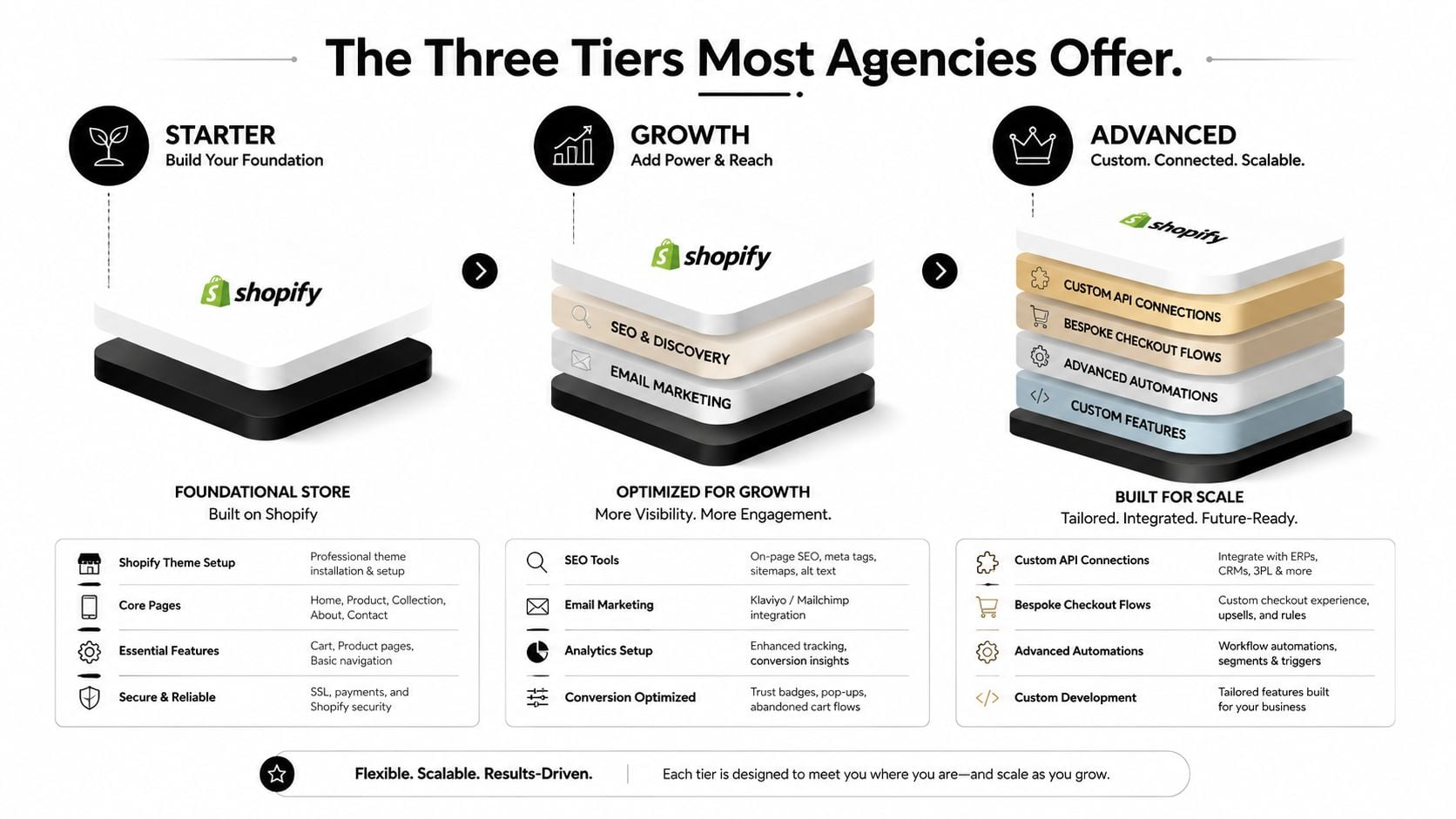
A Starter package commonly uses Shopify, a constrained SaaS setup or a lean WordPress and WooCommerce stack. You get a proven theme, essential product and payment configuration, responsive templates and a defined launch process. It suits a business that needs to start selling without funding a large discovery phase or bespoke application.
A Growth package introduces custom design decisions and a more deliberate information architecture. The agency may configure multi-currency selling, advanced product options, email marketing, reviews, improved filtering and integration-ready data structures. This tier is usually the sensible middle ground for a UK SME that already understands its products and customers but has outgrown a generic storefront.
An Advanced package is an engineering project as much as a design project. It may involve a headless or hybrid front end, custom checkout flows, trade pricing, account portals, ERP or CRM connections, warehouse logic and bespoke reporting. The agency team needs stronger development capability, clearer technical governance and a support arrangement that continues after launch.
The tier affects your future choices
Starter packages can be efficient, but a closed platform or heavily theme-dependent setup may restrict later changes. That isn't automatically a problem. It becomes a problem when your agency sells a quick launch without explaining how migration, custom functionality or data export would work later.
Growth gives you more room to evolve, but custom code still needs documentation. Advanced gives you the broadest technical control, yet it also assumes you can fund ongoing development, testing and maintenance. A detailed build won't help if nobody in the business can manage the backlog.
Before choosing an agency, compare its delivery process, technical experience and communication style with your own requirements. This guide to choosing a web design agency is useful because the right partner needs to understand commercial priorities, not just demonstrate visual polish.
Treat the tiers as different commitments, not three versions of the same product. Starter buys speed and simplicity. Growth buys flexibility with sensible control. Advanced buys a custom system, along with the responsibility that comes with it.
What Each Tier Includes
Package labels only become useful when you inspect the work behind them. Two agencies may call an offer “Growth” while providing very different levels of design, migration, testing and support. Use this table to question the proposal and expose missing scope.
| Feature area | Starter | Growth | Advanced |
|---|---|---|---|
| Design approach | Customised platform theme, restrained layouts and brand styling | Bespoke page designs, purpose-built product templates and stronger UX planning | Fully bespoke design system, complex user journeys and component governance |
| Catalogue setup | Core product import and straightforward categories | Larger catalogue structure, variants, filtering and merchandising support | Complex taxonomies, trade catalogues, multiple markets or catalogue rules |
| Payments | Standard gateway configuration, such as Stripe or PayPal | Multiple payment methods, express payments and finance options where appropriate | Bespoke payment logic, marketplace or account-based payment requirements |
| Marketing tools | Analytics, basic SEO fields and optional review tool | Email platform integration, reviews, promotions and stronger tracking | Personalisation, advanced reporting, CRM journeys and custom events |
| SEO foundations | Crawlable structure, redirects agreed in scope and basic metadata | Schema planning, migration support, technical SEO and performance work | International, complex migration and ongoing technical consultancy |
| Integrations | Limited, established apps | Accounting, email, fulfilment, reviews or booking integrations | ERP, POS, warehouse, CRM, subscription or bespoke API connections |
| Support | Launch assistance and a defined handover | Training, post-launch fixes and scheduled support time | Retained technical support, monitoring and development capacity |
The largest cost surprises sit outside the headline features. Copywriting, product photography, catalogue cleansing, advanced filters, paid theme licences, customer data migration and staff training can all increase the bill. “Content supplied by client” needs a precise definition. Ask which file format the agency expects, who checks product data and what happens when that data needs cleaning.
Support is a feature, not a courtesy
A generous build can come with very little help after launch. Within a few months, you may need assistance with a promotion, delivery rule, product import or tracking fault, while the contract treats each request as a new project. A modest build with clear support is often safer than an impressive design with no practical route to fixing problems.
Your agency proposal should identify:
- Named support contact: Confirm who receives urgent issues and who covers absences.
- Response window: “Support available” means little without a stated response expectation.
- Included hours or tasks: Check whether fixes, training and small improvements use the same allowance.
- Reporting access: Confirm that your team can view analytics and performance information directly.
- Handover materials: Request platform access, documentation and recorded training where appropriate.
Support also affects the commercial value of the package. A store can launch with a polished interface and still struggle if nobody checks mobile checkout behaviour, broken tracking or performance issues after release. Ask whether the support plan covers investigation and monitoring, rather than only visible defects reported by your staff.
A web designer's role extends beyond arranging colours and page blocks. What a web designer does explains how strategy, interface decisions, development collaboration and usability fit together. Your package should reflect that wider responsibility, especially if the agency is expected to improve conversion paths and protect the customer experience.
The common buying mistake is paying for more front-end features than the business can use while leaving too little budget for support. Choose the tier that matches your operational reality, then reserve funds for the first period of learning after launch. Use the table as a questioning tool rather than expecting every agency to mirror it exactly.
How Much Ecommerce Design Packages Cost in the UK
A £1,500 Shopify setup and a £15,000 WooCommerce rebuild solve different problems. Compare the responsibility and deliverables behind each quote, not the phrase “ecommerce website design package”.
| Tier | Typical price band | Common scope triggers for moving up |
|---|---|---|
| Starter | £1,200 to £3,500 | More products, bespoke templates, catalogue migration or additional integrations |
| Growth | £3,500 to £8,500 | Custom interface work, advanced filtering, multi-currency, SEO migration or marketing automation |
| Advanced | £8,500 upwards, sometimes reaching £25,000 | Multi-warehouse operations, headless front ends, subscription commerce, ERP or POS connections |
For a deeper breakdown of what drives these figures, see our guide to ecommerce website design cost. These UK bands also align with Digital Otter's ecommerce redesign cost guide, which places visual refreshes at £1,500 to £4,000, full redesigns at £3,000 to £8,000, and ecommerce redesign or replatforming at £4,000 to £15,000 or more. The overlap is deliberate. Catalogue size, integrations, migration risk and the level of custom work determine the final figure.
What justifies the jump
Starter works for a focused catalogue and a standard platform setup. Growth earns its higher fee when you need a distinctive product experience, richer product taxonomy, email automation through Mailchimp or Klaviyo, or reliable links to Xero and fulfilment services. Advanced is appropriate for custom pricing, trade accounts, warehouse coordination, a headless front end or subscription commerce.
Beyond the headline number, several recurring and one-off costs often shift the final figure:
- Content production: Copywriting and photography may sit outside the build.
- Platform costs: Hosting, premium themes, apps and payment charges may recur.
- Migration work: Product, customer, order, redirect and SEO migration can require separate effort.
- Training: Staff workshops and recorded handovers are not always included.
- Support: Retainers may begin when the included launch period ends.
Ask whether the quoted price is plus VAT or VAT inclusive. Then request a first-year total separating build fees from platform, hosting, licence and support charges. Check whether performance testing, analytics setup and operational configuration are included, because a low build fee can leave those tasks with your team.
The right package addresses the risks your business cannot absorb. Do not pay for bespoke engineering merely because it sounds impressive. Equally, a constrained build is false economy when your catalogue, fulfilment process or customer journey already requires more control. Judge the package by what it can improve after launch, especially checkout performance, site speed and the support available when real customer behaviour exposes problems.
Mobile Conversions and Speed Inside Your Package
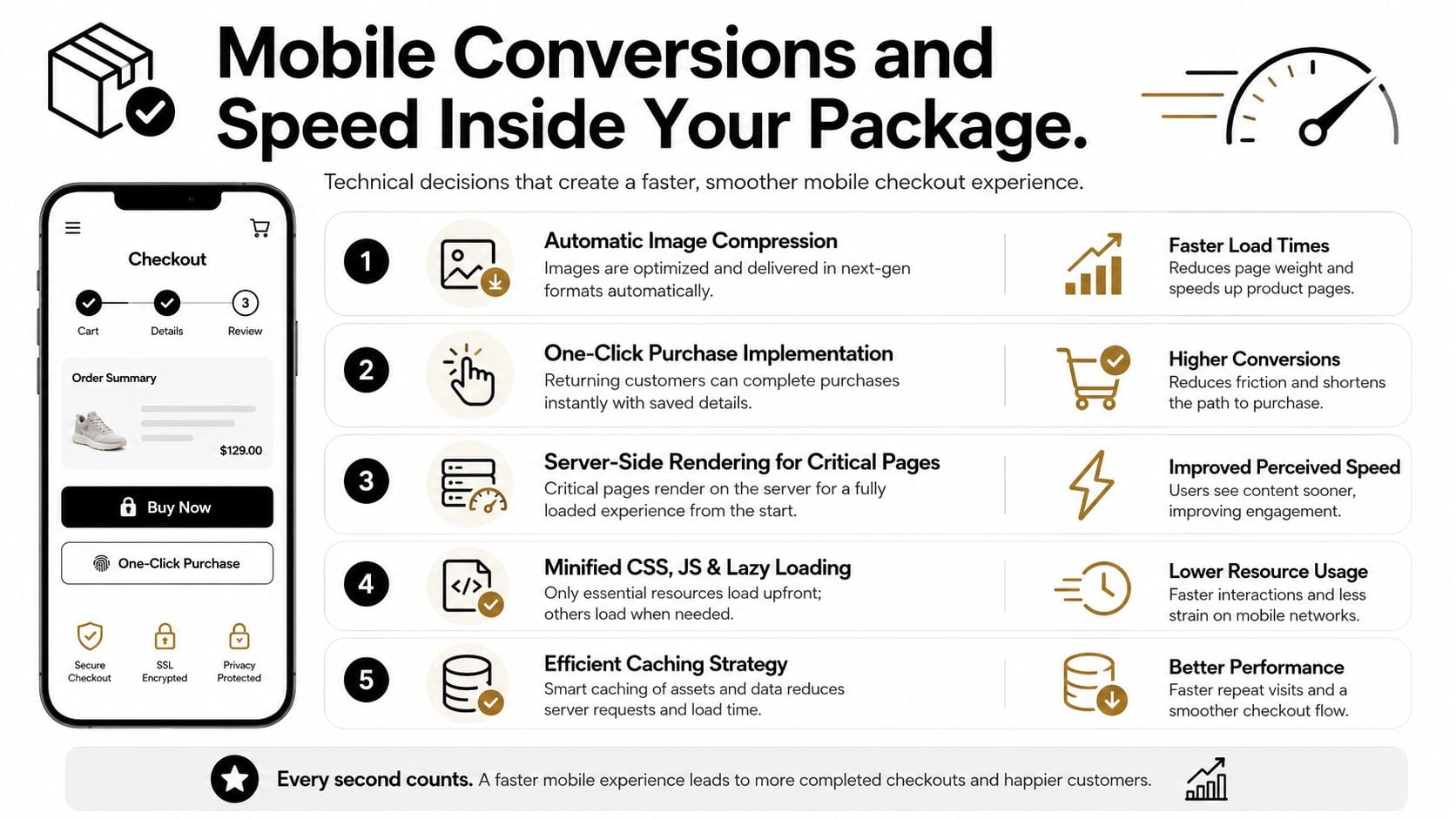
A customer can reach your store on a phone, add a product, and still leave before payment. Mobile performance therefore belongs in the package contract, not in a vague promise to “optimise later”. IRP Commerce UK benchmark data reports that mobile accounted for roughly 62.3% of ecommerce sales in July 2026, while mobile conversion was 1.8% compared with 3.9% on desktop. Treat that gap as a commercial problem. A responsive layout will not fix awkward product pages, slow basket updates or difficult payment forms.
Checkout friction often appears at the final step. UK research from IMRG and Ecommpay found an average checkout conversion rate of 58%, with single-page checkouts at 61% and multi-page checkouts at 56%, and reported that customers who abandon checkout generally do so after completing about 90% of the average time needed to finish. The IMRG and Ecommpay checkout findings give agencies a clear reason to test the payment journey rather than install a theme.
The technical checks I expect
Ask for evidence across the full mobile journey:
- Reduce asset weight. Compress product images and serve suitable formats such as WebP or AVIF. Use lazy loading where it does not delay the main content.
- Protect the critical path. Remove unnecessary scripts, bloated app code and third-party widgets that block rendering.
- Use suitable delivery infrastructure. Edge-cached content, sensible caching and hosting matched to the store's demands matter more than decorative animation.
- Shorten payment effort. Consider Apple Pay, Google Pay, Shop Pay and Clearpay where they suit your customers, margins and risk controls.
- Test on real devices. A desktop browser check will not show how a product page performs on a mid-range Android handset over a busy mobile connection.
Google's Core Web Vitals give the agency measurable targets. Specify Largest Contentful Paint under 2.5 seconds, Interaction to Next Paint under 200 milliseconds and Cumulative Layout Shift under 0.1, tested on agreed devices and connection conditions. These targets do not guarantee every page will always pass, but they create a standard the supplier must measure and explain.
Koozai's UK ecommerce speed analysis found that only 1% to 2% of 460 tested ecommerce pages achieved a good LCP result under Google's 2.5-second threshold, while the average page took 12 to 14 seconds to load its main content. The Koozai speed analysis supports a firm buying decision: include speed optimisation in the package scope.
Starter builds commonly rely on off-the-shelf themes and shared environments. That can suit a small catalogue. Growth and Advanced packages should include a performance budget, an optimisation pass and post-launch monitoring. Request real-user metrics and scheduled Core Web Vitals reviews, not one ideal Lighthouse screenshot.
For practical implementation advice, read how to improve website loading speed. Your agency should explain the work plainly and show the evidence.
Matching Packages to Different UK Businesses
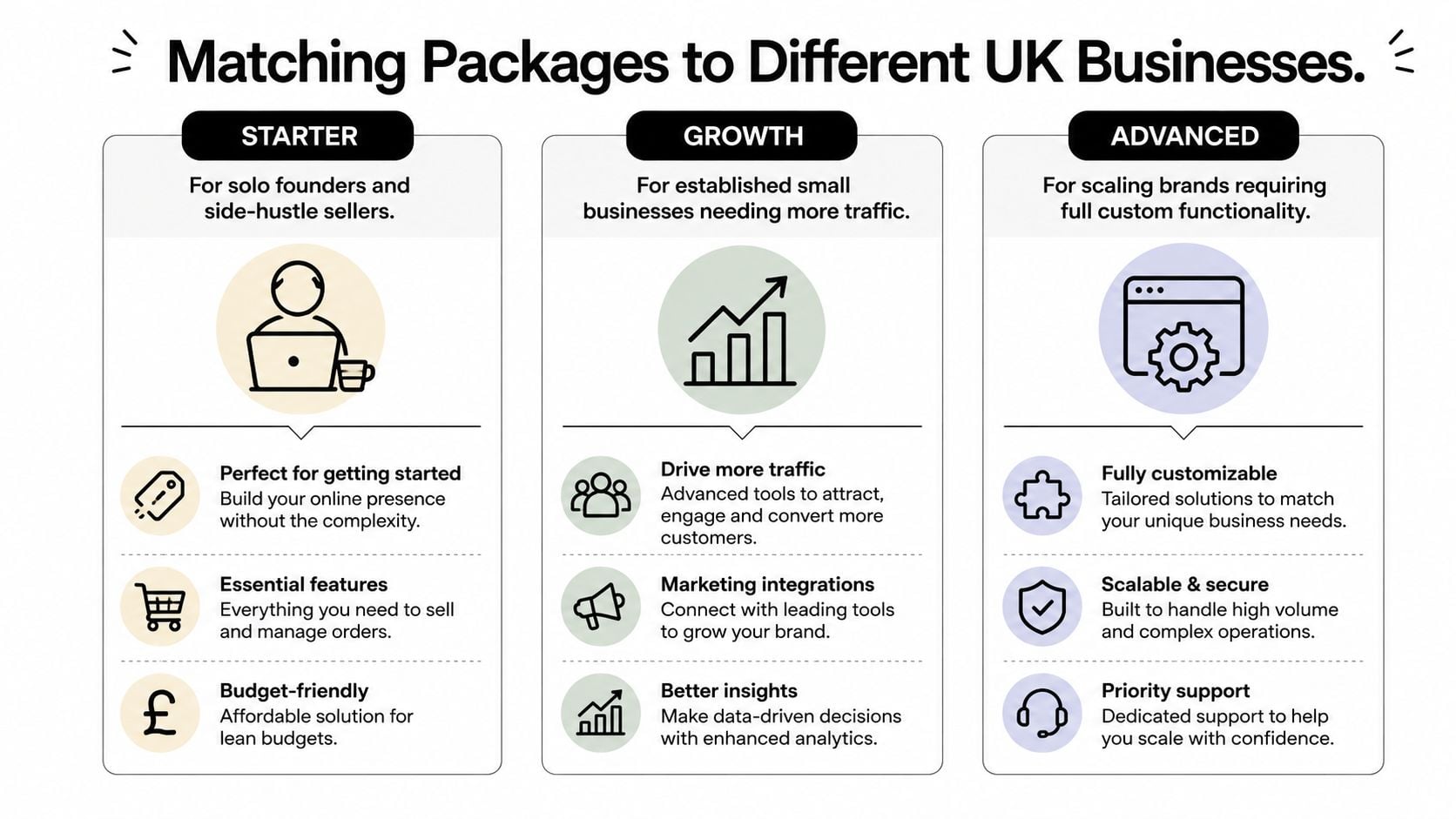
The right tier depends less on ambition and more on the shape of your operation. A solo founder with a small catalogue doesn't need the same architecture as a retailer connecting stock across locations. Buying the wrong package creates either wasted cost or an early technical ceiling.
Solo founders and side-hustle sellers
Choose Starter if you're launching your first Shopify or WooCommerce shop, selling a focused range and handling most operations yourself. You need a clean product template, dependable payments, straightforward fulfilment settings and the ability to update products without calling a developer for routine work.
Refuse to compromise on mobile checkout testing. A visually attractive theme won't compensate for confusing buttons, slow images or a payment flow that fails on the device your customers use.
Local independent retailers
Choose Growth if you run an established shop with a physical location, seasonal promotions or local competition. Your store may need branded design, local search structure, click-and-collect, delivery rules, reviews, email marketing and support when demand rises around key trading periods.
Your priority is integration reliability. Click-and-collect is only useful if stock, collection instructions and customer notifications agree with what staff can fulfil.
Established WordPress and WooCommerce stores
A content-led WordPress business should usually choose Growth, especially if its blog, landing pages and organic search visibility already contribute to sales. The rebuild must preserve valuable URLs, improve editorial workflows and give product templates enough flexibility without turning every content change into a development request.
Protect SEO migration and data ownership. A fresh design that loses rankings, redirects or product content is not a successful redesign.
Multi-location, franchise and B2B operations
Choose Advanced when your store needs custom pricing, quote builders, trade portals, account-specific catalogues, ERP connections, warehouse logic or multiple location rules. These requirements affect the underlying data model and order process, so bolting them onto a Starter foundation usually creates avoidable complexity.
The feature to defend is integration architecture. Ask for a technical map showing which system owns products, prices, stock, customers and orders. If the agency can't explain that clearly, the project isn't ready for a fixed quote.
One option for UK SMEs is a WordPress and WooCommerce build with planned technical setup, payment integration and post-launch assistance. DesignStack offers that type of ecommerce work alongside responsive WordPress websites, hosting and SEO support, so it can be included in your shortlist if those capabilities match your requirements. Compare the service model, contract terms and technical ownership with other agencies before deciding.
Your Pre-Purchase Checklist Before Signing
A proposal is only useful when it answers the questions that become urgent after launch. Send the following list to every agency and ask for written responses. If the answers are vague, the package isn't defined well enough to sign.
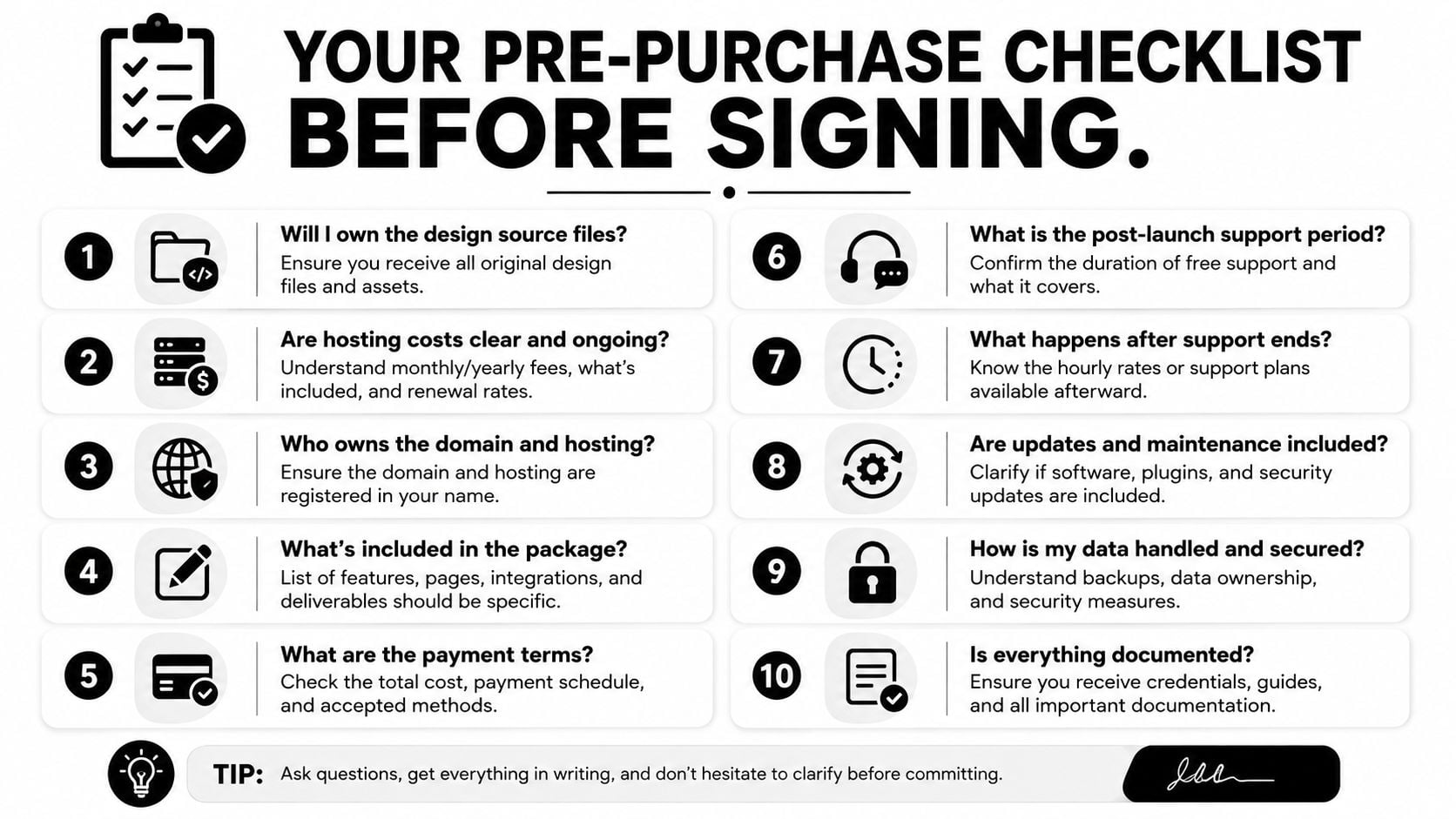
- Who owns the source files? Confirm ownership of designs, theme code, custom development and documentation.
- Who owns the product and customer data? Make sure you can export it in a usable format.
- What is the exit route? Ask how the store would move to another agency or platform.
- Who controls the accounts? Analytics, advertising, email, payment and platform accounts should be created with your business access.
- What does hosting include? Clarify capacity, security, backups, monitoring and any upgrade charges.
- Which licences transfer? Check paid themes, plugins, fonts, apps and integration subscriptions.
- What happens to SEO equity? Require a redirect plan, metadata handling, sitemap checks and indexation testing for a rebuild.
- What does support mean? Ask for included hours, response windows, named contacts and exclusions.
- How will performance be tested? Request the devices, connection conditions, tools and reporting format used for mobile and Core Web Vitals checks.
- What triggers extra billing? Identify content limits, revisions, integrations, migration work, training and change requests.
Red flags worth taking seriously
An agency asking for 100% payment upfront deserves careful questioning, especially if the contract doesn't define milestones or acceptance criteria. A portfolio made entirely from screenshots is weaker evidence than live client sites you can inspect across mobile and desktop. Vague post-launch wording is another warning sign, because “ongoing support” doesn't tell you how quickly anyone will respond or what you'll pay.
Request a written scope document, a sample reporting dashboard and the names of the people who will handle the account. Ask how the agency records change requests, protects backups and manages third-party updates. You don't need a long contract full of jargon, but you do need precise responsibilities.
A cheaper package can become the expensive option when it leaves mobile friction, migration risk and support gaps for the merchant to fix.
The cheapest quote rarely wins over a full operating cycle. Compare the total cost of the build, platform, hosting, licences, content, migration, support and future changes. Then choose the package that gives your business a stable store, measurable performance checks and a realistic route to improvement after launch.
DesignStack offers fixed-cost WordPress and WooCommerce ecommerce builds, responsive design, payment integrations, hosting options and one month of post-launch updates for businesses that want a defined route from planning to launch. Visit DesignStack to discuss your store requirements and compare a package against the performance, ownership and support questions above.


Leave a Reply